parking brake KIA CADENZA 2011 Owners Manual
[x] Cancel search | Manufacturer: KIA, Model Year: 2011, Model line: CADENZA, Model: KIA CADENZA 2011Pages: 352, PDF Size: 28.17 MB
Page 8 of 352
15
Introduction
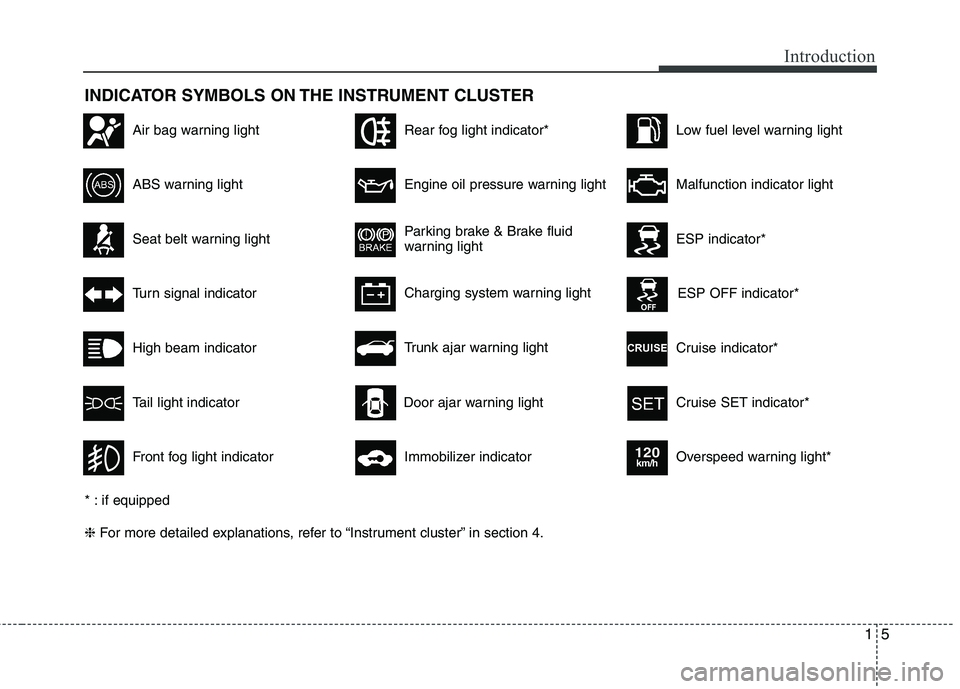
INDICATOR SYMBOLS ON THE INSTRUMENT CLUSTER
Seat belt warning light
High beam indicator
Turn signal indicator
ABS warning light
Parking brake & Brake fluid
warning light
Engine oil pressure warning light
ESP indicator*
ESP OFF indicator*
Malfunction indicator light
Air bag warning light
Cruise indicator*
Cruise SET indicator*
Immobilizer indicator
Low fuel level warning light
* : if equipped ❈ For more detailed explanations, refer to “Instrument cluster” in section 4.
Charging system warning light
Overspeed warning light*
120km/h
Tail light indicator
Trunk ajar warning light
Front fog light indicator
Rear fog light indicator*
Door ajar warning light
Page 11 of 352
23
Your vehicle at a glance
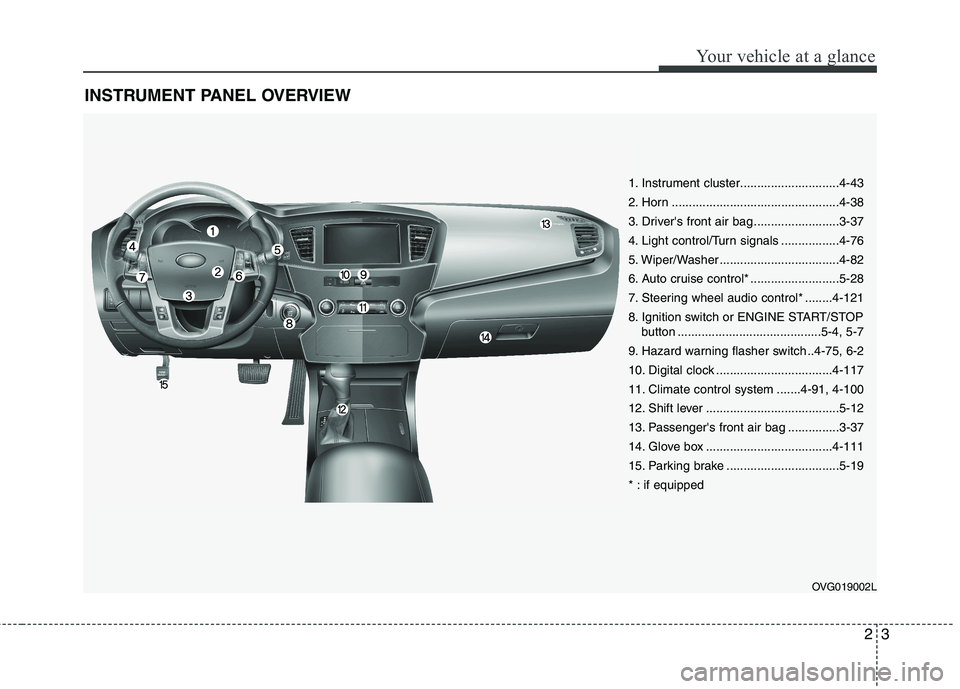
INSTRUMENT PANEL OVERVIEW
OVG019002L
1. Instrument cluster.............................4-43
2. Horn .................................................4-38
3. Driver's front air bag .........................3-37
4. Light control/Turn signals .................4-76
5. Wiper/Washer ...................................4-82
6. Auto cruise control* ..........................5-28
7. Steering wheel audio control* ........4-121
8. Ignition switch or ENGINE START/STOPbutton ..........................................5-4, 5-7
9. Hazard warning flasher switch ..4-75, 6-2
10. Digital clock ..................................4-117
11. Climate control system .......4-91, 4-100
12. Shift lever .......................................5-12
13. Passenger's front air bag ...............3-37
14. Glove box .....................................4-111
15. Parking brake .................................5-19
* : if equipped
Page 25 of 352
313
Safety features of your vehicle
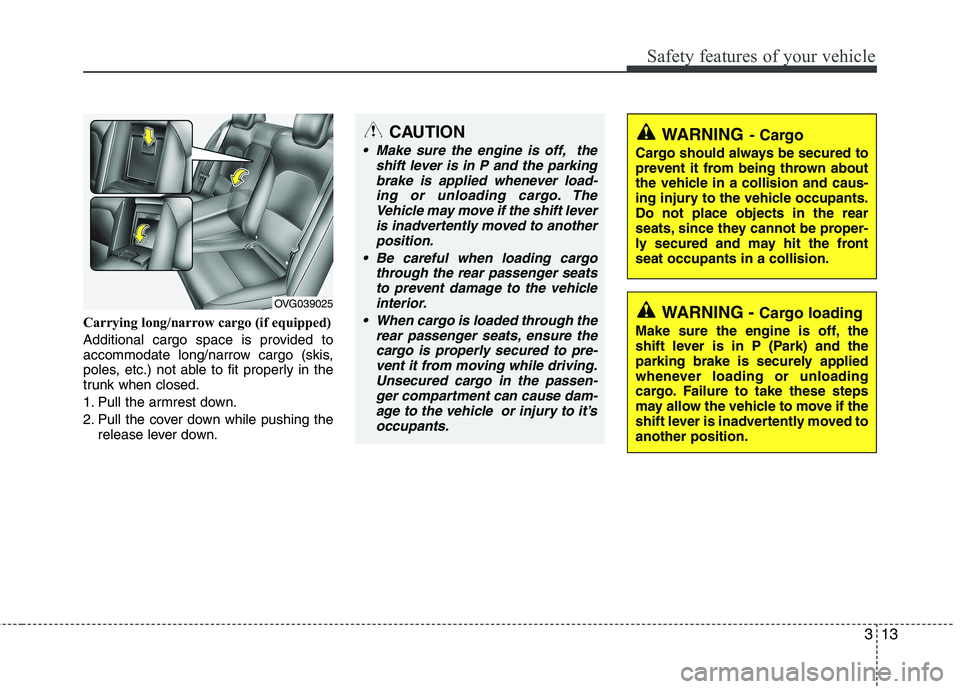
Carrying long/narrow cargo (if equipped)
Additional cargo space is provided to
accommodate long/narrow cargo (skis,
poles, etc.) not able to fit properly in the
trunk when closed.
1. Pull the armrest down.
2. Pull the cover down while pushing therelease lever down.
OVG039025
CAUTION
Make sure the engine is off, the
shift lever is in P and the parking
brake is applied whenever load-ing or unloading cargo. TheVehicle may move if the shift lever is inadvertently moved to another
position.
Be careful when loading cargo through the rear passenger seatsto prevent damage to the vehicle
interior.
When cargo is loaded through the rear passenger seats, ensure thecargo is properly secured to pre-vent it from moving while driving.
Unsecured cargo in the passen-ger compartment can cause dam-age to the vehicle or injury to it’s occupants.
WARNING - Cargo loading
Make sure the engine is off, the
shift lever is in P (Park) and the
parking brake is securely applied
whenever loading or unloading
cargo. Failure to take these steps
may allow the vehicle to move if the
shift lever is inadvertently moved toanother position.
WARNING - Cargo
Cargo should always be secured to
prevent it from being thrown about
the vehicle in a collision and caus-
ing injury to the vehicle occupants.Do not place objects in the rear
seats, since they cannot be proper-
ly secured and may hit the frontseat occupants in a collision.
Page 76 of 352
415
Features of your vehicle
Operating door locks from out-
side the vehicle
Mechanical key
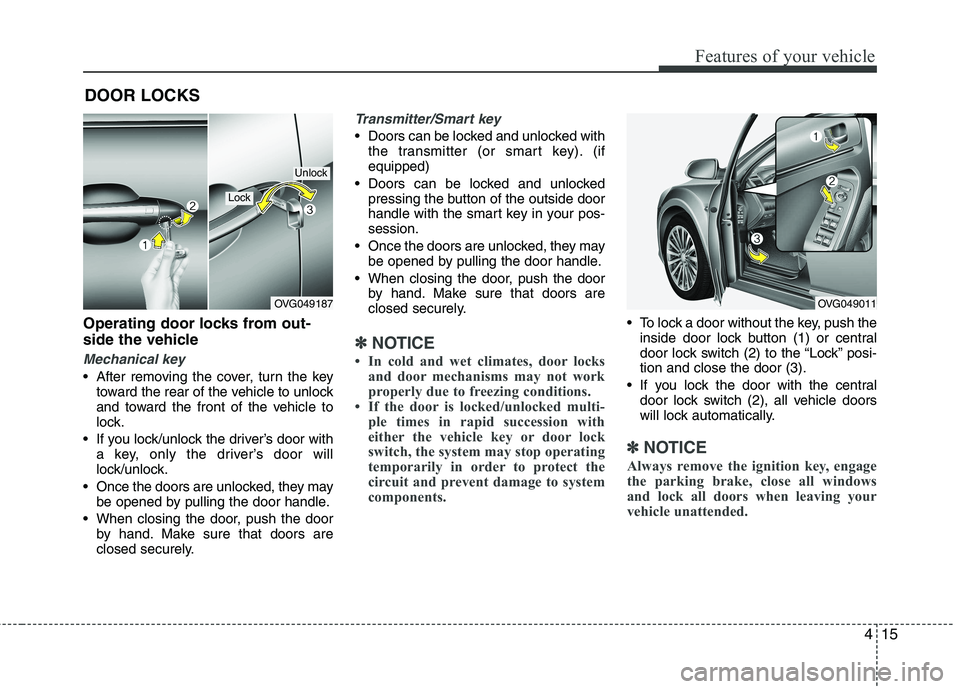
After removing the cover, turn the keytoward the rear of the vehicle to unlock
and toward the front of the vehicle to
lock.
If you lock/unlock the driver’s door with a key, only the driver’s door will
lock/unlock.
Once the doors are unlocked, they may be opened by pulling the door handle.
When closing the door, push the door by hand. Make sure that doors are
closed securely.
Transmitter/Smart key
Doors can be locked and unlocked withthe transmitter (or smart key). (if equipped)
Doors can be locked and unlocked pressing the button of the outside door
handle with the smart key in your pos-session.
Once the doors are unlocked, they may be opened by pulling the door handle.
When closing the door, push the door by hand. Make sure that doors are
closed securely.
✽✽ NOTICE
In cold and wet climates, door locks and door mechanisms may not work
properly due to freezing conditions.
If the door is locked/unlocked multi-
ple times in rapid succession with
either the vehicle key or door lock
switch, the system may stop operating
temporarily in order to protect the
circuit and prevent damage to system
components.
To lock a door without the key, push theinside door lock button (1) or central
door lock switch (2 ) to the “Lock” posi-
tion and close the door (3).
If you lock the door with the central door lock switch (2), all vehicle doors
will lock automatically.
✽✽ NOTICE
Always remove the ignition key, engage
the parking brake, close all windows
and lock all doors when leaving your
vehicle unattended.
DOOR LOCKS
OVG049187
Lock
Unlock
OVG049011
Page 78 of 352
417
Features of your vehicle
When pushing down on the front por-tion (1) of the switch, all vehicle doors
will lock.
When pushing down on the rear por- tion (2) of the switch, all vehicle doors
will unlock.
If the key is in the ignition switch or the smart key in the vehicle and any front
door is opened, the doors will not lock
even though the front portion (1) of the
central door lock switch is pressed. Impact sensing door unlock sys- tem
All doors will automatically unlock after
an impact causes the air bags to deploy.
✽✽
NOTICE
You can activate or deactivate some auto
door lock/unlock features in the vehicle
setting as follows:
Speed sensing auto door lock
Auto door unlock by unlocking the driver's door
Auto door unlock when the ignition key is removed from the ignition
switch or the smart key is removed
from the smart key holder.
Auto door lock/unlock by shifting the
transaxle shift lever out of P (Park) or
into P (Park)
If you want to activate or deactivate
some door lock/unlock feature, refer to
the “Vehicle Option” in this chapter.
WARNING - Unlocked
vehicles
Leaving your vehicle unlocked can
invite theft or possible harm to you
or others from someone hiding in
your vehicle while you are gone.
Always remove the ignition key,
engage the parking brake, close all
windows and lock all doors when
leaving your vehicle unattended.
WARNING - Unattended
children
An enclosed vehicle can become
extremely hot, causing death or
severe injury to unattended chil-dren or animals who cannot escape
the vehicle. Furthermore, children
might operate features of the vehi-
cle that could injure them, or they
could encounter other harm, possi-
bly from someone gaining entry to
the vehicle. Never leave children or
animals unattended in your vehicle.WARNING - Doors
The doors should always be fully closed and locked while the vehi-
cle is in motion to prevent acci-
dental opening of the door.
Locked doors will also discour-
age potential intruders when the
vehicle stops or slows.
Be careful when opening doors and watch for vehicles, motorcy-
cles, bicycles or pedestrians
approaching the vehicle in the
path of the door. Opening a door
when something is approaching
can cause damage or injury.
Page 115 of 352
Features of your vehicle
54
4
Seat Easy Access (only for Driver
Position Memory System equippedvehicle)
On - The driver's seat will automatically move forward or rearward for the
driver to enter or exit the vehicle
comfortably.
Off - The Seat Easy Access function will be inactivated.
Steering Easy Access (only for Driver
Position Memory System equippedvehicle)
On - The steering wheel will automatical- ly move away or toward the driver
for the driver to enter or exit the
vehicle comfortably.
Off - The Steering Easy Access function will be inactivated.
Headlamp Escort
On - The Headlamp Escort and EscortWelcome function will be activated
Off - The Headlamp Escort and Escort Welcome function will be inactivat- ed
Welcome Light (if equipped)
On - When all the doors(and trunk) arelocked and closed, if you approach
the vehicle with a smart key in pos-session the puddle lamp and door
handle lamp will come on for about
15 seconds.
Off - The Welcome Light function will be inactivated.
Welcome Sound
On - The Welcome Sound function willbe activated.
Off - The Welcome Sound function will be inactivated.
Auto Triple Turn (One-touch triple
turn signal)
On - The lane change signals will blink 3 times when the turn signal lever is
moved slightly.
Off - The Auto Triple Turn function will be inactivated. Warnings and indicators
All warning lights are checked by turning
the ignition switch ON (do not start the
engine). Any light that does not illuminate
should be checked by an authorized KIA
dealer.
After starting the engine, check to make
sure that all warning lights are off. If anyare still on, this indicates a situation that
needs attention. When releasing the
parking brake, the brake system warning
light should go off. The fuel warning light
will stay on if the fuel level is low.
Page 117 of 352
Features of your vehicle
56
4
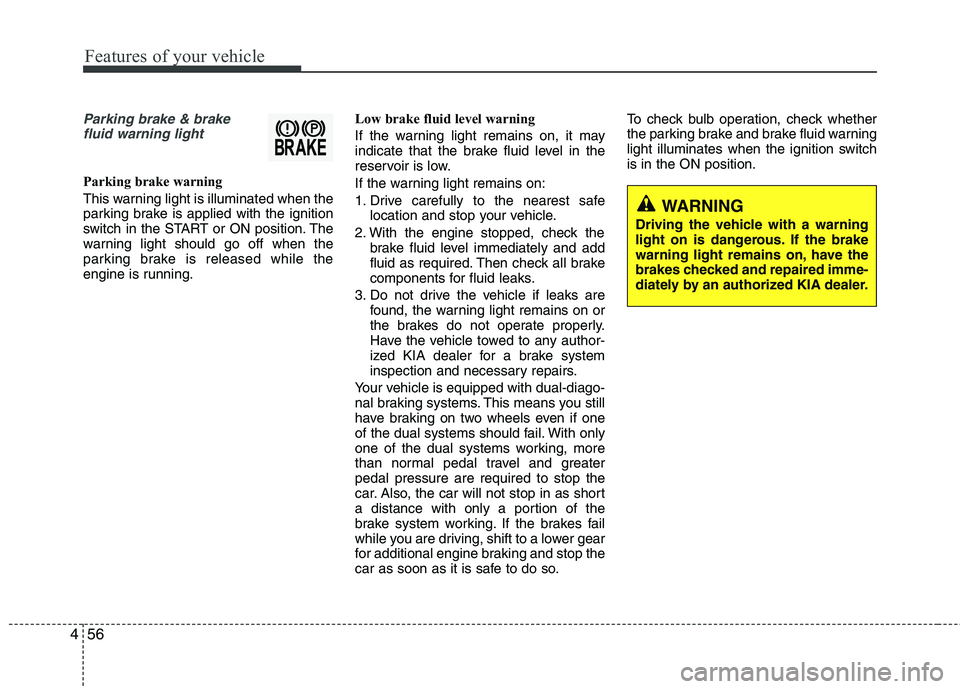
Parking brake & brake
fluid warning light
Parking brake warning
This warning light is illuminated when the
parking brake is applied with the ignition
switch in the START or ON position. The
warning light should go off when the
parking brake is released while the
engine is running. Low brake fluid level warning
If the warning light remains on, it may
indicate that the brake fluid level in the
reservoir is low.
If the warning light remains on:
1. Drive carefully to the nearest safe
location and stop your vehicle.
2. With the engine stopped, check the brake fluid level immediately and add
fluid as required. Then check all brake
components for fluid leaks.
3. Do not drive the vehicle if leaks are found, the warning light remains on or
the brakes do not operate properly.
Have the vehicle towed to any author-
ized KIA dealer for a brake system
inspection and necessary repairs.
Your vehicle is equipped with dual-diago-
nal braking systems. This means you still
have braking on two wheels even if one
of the dual systems should fail. With only
one of the dual systems working, more
than normal pedal travel and greaterpedal pressure are required to stop the
car. Also, the car will not stop in as short
a distance with only a portion of the
brake system working. If the brakes fail
while you are driving, shift to a lower gear
for additional engine braking and stop the
car as soon as it is safe to do so. To check bulb operation, check whether
the parking brake and brake fluid warning
light illuminates when the ignition switchis in the ON position.
WARNING
Driving the vehicle with a warning
light on is dangerous. If the brake
warning light remains on, have the
brakes checked and repaired imme-
diately by an authorized KIA dealer.
Page 130 of 352
469
Features of your vehicle
Types of warning sound and indicatorNon-operational conditions of rear parking assist system
The rear parking assist system may
not operate properly when:
1. Moisture is frozen to the sensor. (It willoperate normally when the moisture has been cleared.)
2. The sensor is covered with foreign matter, such as snow or water, or the
sensor cover is blocked. (It will operate
normally when the material is removed
or the sensor is no longer blocked.)
3. Driving on uneven road surfaces (unpaved roads, gravel, bumps, gradi-ent).
4. Objects generating excessive noise (vehicle horns, loud motorcycle
engines, or truck air brakes) are within
range of the sensor.
5. Heavy rain or water spray exists.
6. Wireless transmitters or mobile phones are within range of the sensor.
7. The sensor is covered with snow.
8. Trailer towing The detecting range may decrease when:
1. The sensor is stained with foreign mat-
ter such as snow or water. (The sens-
ing range will return to normal when
removed.)
2. Outside air temperature is extremely hot or cold.
The following objects may not be rec-
ognized by the sensor:
1. Sharp or slim objects such as ropes, chains or small poles.
2. Objects which tend to absorb the sen- sor frequency such as clothes, spongy
material or snow.
3. Undetectable objects smaller than 1 m (40 in.) in height and narrower than 14
cm (6 in.) in diameter.
✽✽ NOTICE
The indicator may differ from the illus-
tration according to the objects or sen-
sors status.
If the indicator blinks, have the system
checked by an authorized KIA dealer.
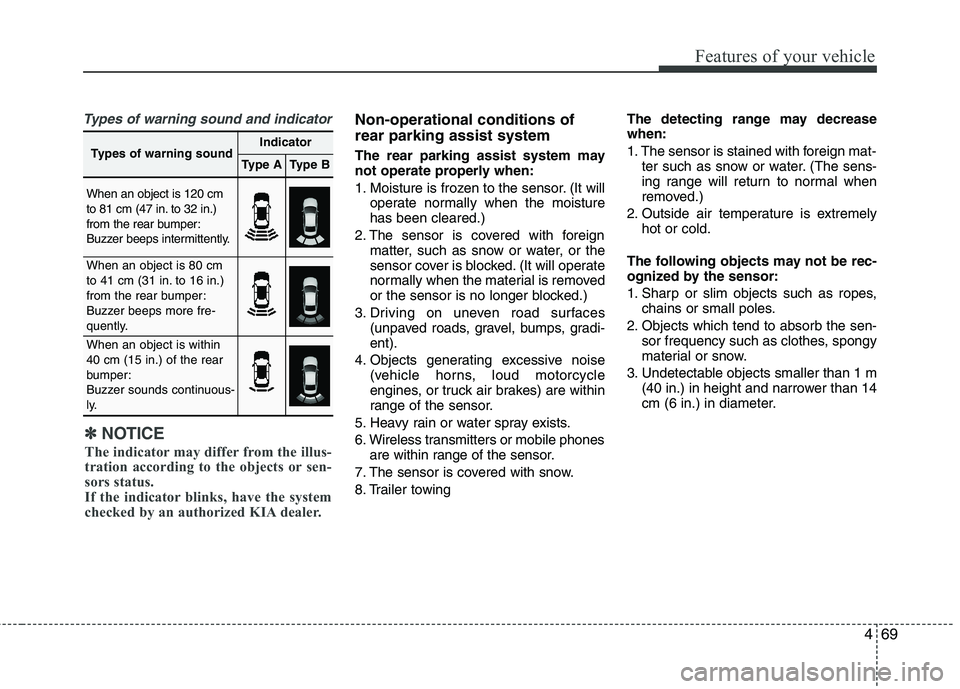
Types of warning soundIndicator
Type AType B
When an object is 120 cm
to 81 cm (47 in. to 32 in.)
from the rear bumper:
Buzzer beeps intermittently.
When an object is 80 cm
to 41 cm (31 in. to 16 in.)
from the rear bumper:
Buzzer beeps more fre-
quently.
When an object is within 40 cm (15 in.) of the rear
bumper:
Buzzer sounds continuous-
ly.
Page 134 of 352
473
Features of your vehicle
Non-operational conditions of parking assist system
Parking assist system may not oper-ate normally when:
1. Moisture is frozen to the sensor. (It will operate normally when moisture
melts.)
2. Sensor is covered with foreign matter, such as snow or water, or the sensor
cover is blocked. (It will operate nor-
mally when the material is removed or
the sensor is no longer blocked.)
3. Sensor is stained with foreign matter such as snow or water. (Sensing range
will return to normal when removed.)
4.The parking assist button is off.
There is a possibility of parking assist system malfunction when:
1. Driving on uneven road surfaces such as unpaved roads, gravel, bumps, or
gradient.
2. Objects generating excessive noise such as vehicle horns, loud motorcycle
engines, or truck air brakes can inter-
fere with the sensor.
3. Heavy rain or water spray.
4. Wireless transmitters or mobile phones present near the sensor.
5. Sensor is covered with snow.
Detecting range may decrease when:
1. Outside air temperature is extremely hot or cold.
2. Undetectable objects smaller than 1 m and narrower than 14 cm in diameter.
The following objects may not be rec-
ognized by the sensor:
1. Sharp or slim objects such as ropes, chains or small poles.
2. Objects, which tend to absorb sensor frequency such as clothes, spongy
material or snow.
✽✽ NOTICE
1. The warning may not sound sequen- tially depending on the speed and
shapes of the objects detected.
2. The parking assist system may mal-
function if the vehicle bumper height
or sensor installation has been modi-
fied. Any non-factory installed equip-
ment or accessories may also interfere
with the sensor performance.
3. Sensor may not recognize objects less
than 30 cm from the sensor, or it may
sense an incorrect distance. Use with
caution.
4. When the sensor is frozen or stained
with snow or water, the sensor may be
inoperative until the stains are
removed using a soft cloth.
5. Do not push, scratch or strike the sen-
sor with any hard objects that could
damage the surface of the sensor.
Sensor damage could occur.
Page 206 of 352
53
Driving your vehicle
Before entering vehicle
• Be sure that all windows, outside mir-ror(s), and outside lights are clean.
Check the condition of the tires.
Check under the vehicle for any sign of leaks.
Be sure there are no obstacles behind you if you intend to back up.
Necessary inspections
Fluid levels, such as engine oil, engine
coolant, brake fluid, and washer fluid
should be checked on a regular basis,
with the exact interval depending on the
fluid. Further details are provided in sec-
tion 7, “Maintenance”. Before starting
Close and lock all doors.
Position the seat so that all controls are
easily reached.
Adjust the inside and outside rearview mirrors.
Be sure that all lights work.
Check all gauges.
Check the operation of warning lights when the ignition switch is turned to the ON position.
Release the parking brake and make sure the brake warning light goes out.
For safe operation, be sure you are famil-
iar with your vehicle and its equipment.
BEFORE DRIVING
WARNING
All passengers must be properly
belted whenever the vehicle is mov-
ing. Refer to “Seat belts” in section
3 for more information on their
proper use.
WARNING
Always check the surrounding
areas near your vehicle for people,
especially children, before putting a
car into D (Drive) or R (Reverse).
WARNING
When you intend to park or stop the
vehicle with the engine on, be care-ful not to depress the accelerator
pedal for a long period of time. It
may overheat the engine or exhaust
system and cause fire.
WARNING - Driving under
the influence of alcohol or drugs
Drinking and driving is dangerous.
Drunk driving is the number one
contributor to the highway death
toll each year. Even a small amount
of alcohol will affect your reflexes,
perceptions and judgment. Drivingwhile under the influence of drugs
is as dangerous or more dangerousthan driving drunk.
You are much more likely to have a
serious accident if you drink or
take drugs and drive.
If you are drinking or taking drugs,
do not drive. Do not ride with a driv-er who has been drinking or taking
drugs. Choose a designated driveror call a cab.