height KIA CADENZA 2017 User Guide
[x] Cancel search | Manufacturer: KIA, Model Year: 2017, Model line: CADENZA, Model: KIA CADENZA 2017Pages: 500, PDF Size: 10.37 MB
Page 45 of 500
329
Safety features of your vehicle
Child restraint system (CRS)
Infants and younger children must be
restrained in an appropriate rear-fac-
ing or forward-facing CRS that has
first been properly secured to the
rear seat of the vehicle. Read and
comply with the instructions for
installation and use provided by the
manufacturer of the child restraint.
✽ ✽NOTICE
After an accident, have a Kia dealer
check the child restraint system, seat
belts, tether anchors and lower
anchors.
Selecting a Child Restraint
System (CRS)
When selecting a CRS for your child,
always:
Make sure the CRS has a label
certifying that it meets applicable
Federal Motor Vehicle Safety
Standards (FMVSS 213).
Select a child restraint based on your child’s height and weight. The
required label or the instructions
for use typically provide this infor-
mation.
Select a child restraint that fits the vehicle seating position where it
will be used.
Read and comply with the warn- ings and instructions for installation
and use provided with the child
restraint system.
WARNING
-
Child Restraint Installation
An improperly secured child
restraint can increase the risk
of serious injury or death in an
accident. Always take the fol-
lowing precautions when using
a child restraint system:
Always follow the child restraint system manufactur-
er’s instructions for installa-
tion and use.
(Continued)
(Continued)
Always properly restrain yourchild in the child restraint.
If the vehicle head restraint prevents proper installation of
a child seat (as described in
the child restraint system
manual), the head restraint of
the respective seating posi-
tion shall be readjusted or
entirely removed.
Do not use an infant carrier or a child safety seat that
"hooks" over a seatback, it
may not provide adequate
protection in an accident.
Page 46 of 500
Safety features of your vehicle
30
3
Child restraint system types
There are three main types of child
restraint systems: rear-facing seats,
forward-facing seats, and booster
seats. They are classified according
to the child’s age, height and weight.WARNING - Holding
Children
Never hold a child in your arms
or lap when riding in a vehicle.
The violent forces created dur-
ing a crash will tear the child
from your arms and throw the
child against the car’s interior.
Always use a child restraint
system which is appropriate for
your child's height and weight.WARNING - Unattended
Children
Never leave children unattended
in a vehicle. The car can heat up
very quickly, resulting in injuries
to the child in the vehicle.
WARNING - Seat Belt Use
Do not use one seat belt for two
occupants at the same time.
This will eliminate any safety
benefit provided by the seat belt
to the occupants.
Page 47 of 500
331
Safety features of your vehicle
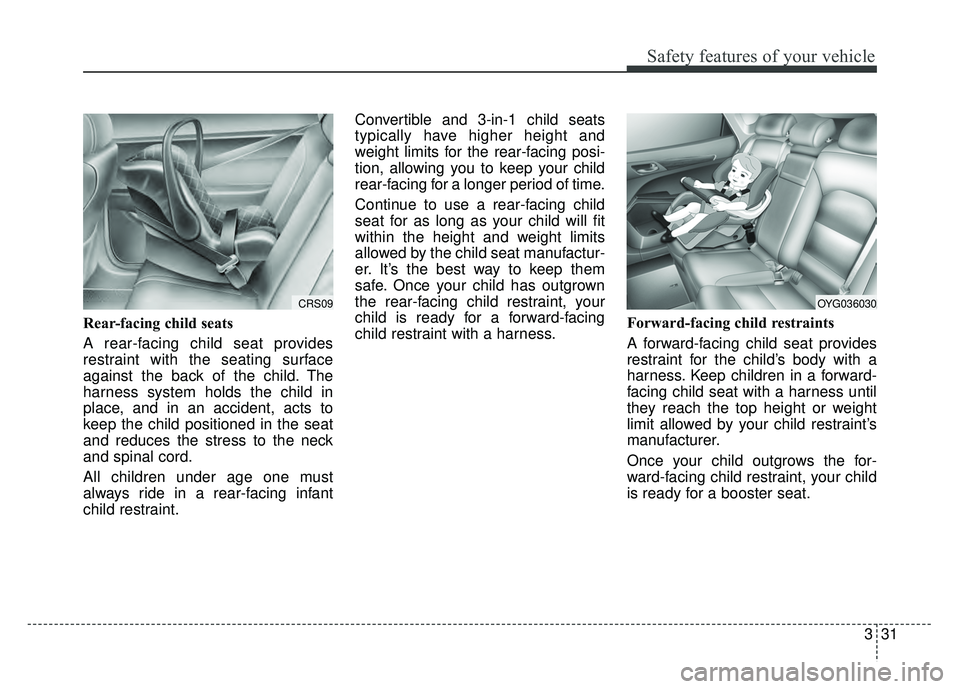
Rear-facing child seats
A rear-facing child seat provides
restraint with the seating surface
against the back of the child. The
harness system holds the child in
place, and in an accident, acts to
keep the child positioned in the seat
and reduces the stress to the neck
and spinal cord.
All children under age one must
always ride in a rear-facing infant
child restraint.Convertible and 3-in-1 child seats
typically have higher height and
weight limits for the rear-facing posi-
tion, allowing you to keep your child
rear-facing for a longer period of time.
Continue to use a rear-facing child
seat for as long as your child will fit
within the height and weight limits
allowed by the child seat manufactur-
er. It’s the best way to keep them
safe. Once your child has outgrown
the rear-facing child restraint, your
child is ready for a forward-facing
child restraint with a harness.
Forward-facing child restraints
A forward-facing child seat provides
restraint for the child’s body with a
harness. Keep children in a forward-
facing child seat with a harness until
they reach the top height or weight
limit allowed by your child restraint’s
manufacturer.
Once your child outgrows the for-
ward-facing child restraint, your child
is ready for a booster seat.
CRS09OYG036030
Page 81 of 500
365
Safety features of your vehicle
Adding equipment to or modi-
fying your air bag-equipped
vehicle
If you modify your vehicle by chang-
ing your vehicle's frame, bumper sys-
tem, front end or side sheet metal or
ride height, this may affect the opera-
tion of your vehicle's air bag system.
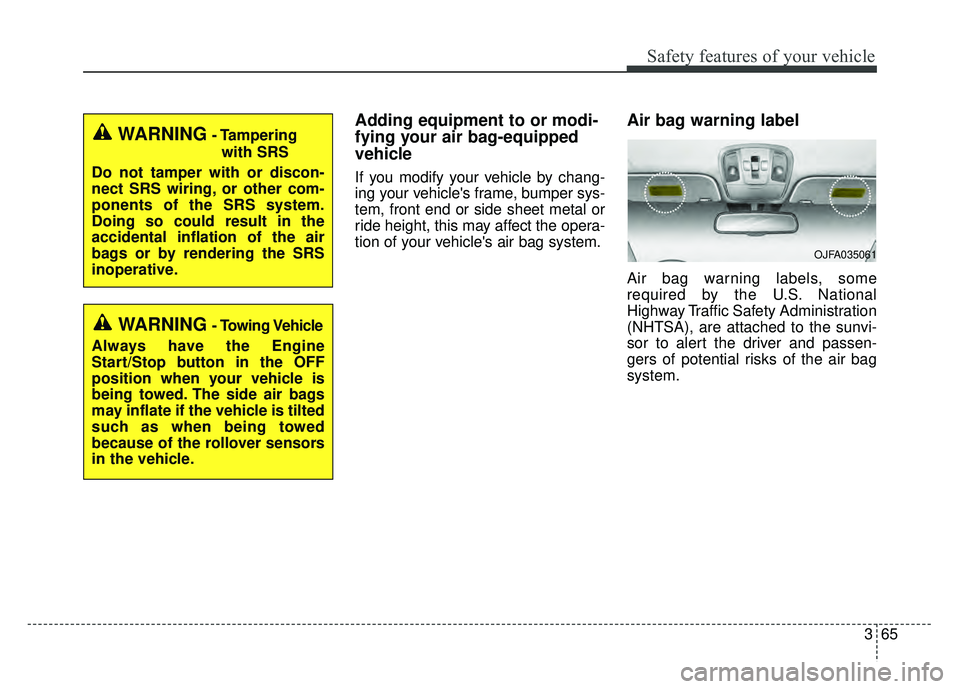
Air bag warning label
Air bag warning labels, some
required by the U.S. National
Highway Traffic Safety Administration
(NHTSA), are attached to the sunvi-
sor to alert the driver and passen-
gers of potential risks of the air bag
system.
WARNING- Tamperingwith SRS
Do not tamper with or discon-
nect SRS wiring, or other com-
ponents of the SRS system.
Doing so could result in the
accidental inflation of the air
bags or by rendering the SRS
inoperative.
WARNING- Towing Vehicle
Always have the Engine
Start/Stop button in the OFF
position when your vehicle is
being towed. The side air bags
may inflate if the vehicle is tilted
such as when being towed
because of the rollover sensors
in the vehicle.
OJFA035061
Page 129 of 500
Features of your vehicle
48
4
(Continued)
• When the charging system warning
light comes on due to the low volt-
age (When the alternator or bat-
tery) does not operate normally or
malfunctions), the steering wheel
may require increased steering
effort.Tilt and telescopic steering
Tilt and telescopic steering allows
you to adjust the steering wheel
before you drive. You can also raise it
to give your legs more room when
you exit and enter the vehicle.
The steering wheel should be posi-
tioned so that it is comfortable for
you to drive, while permitting you to
see the instrument panel warning
lights and gauges.
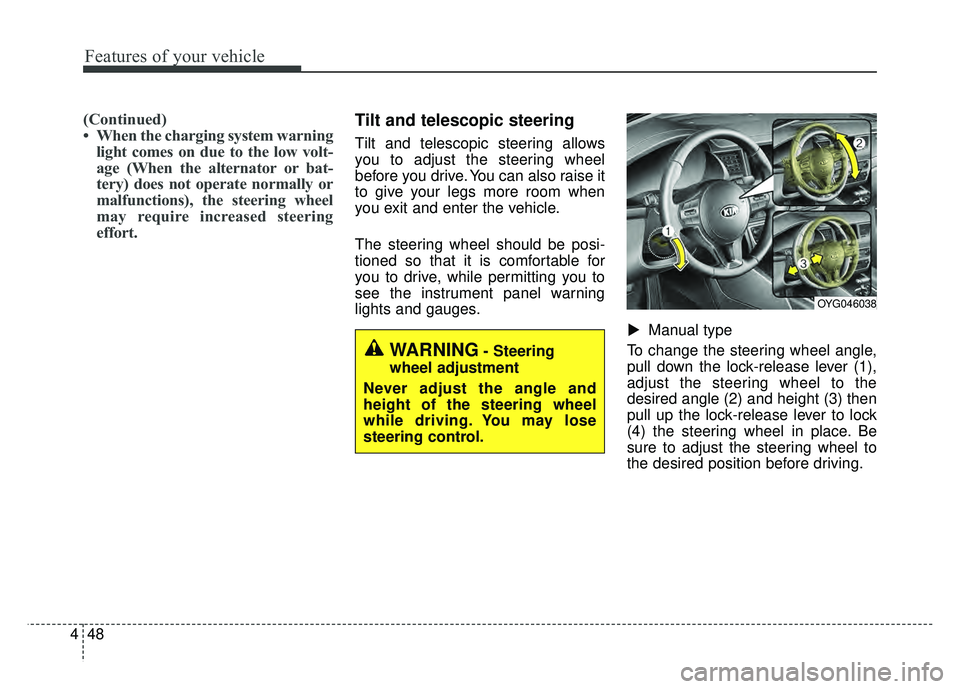
Manual type
To change the steering wheel angle,
pull down the lock-release lever (1),
adjust the steering wheel to the
desired angle (2) and height (3) then
pull up the lock-release lever to lock
(4) the steering wheel in place. Be
sure to adjust the steering wheel to
the desired position before driving.
▼
WARNING- Steering
wheel adjustment
Never adjust the angle and
height of the steering wheel
while driving. You may lose
steering control.
OYG046038
Page 158 of 500
477
Features of your vehicle
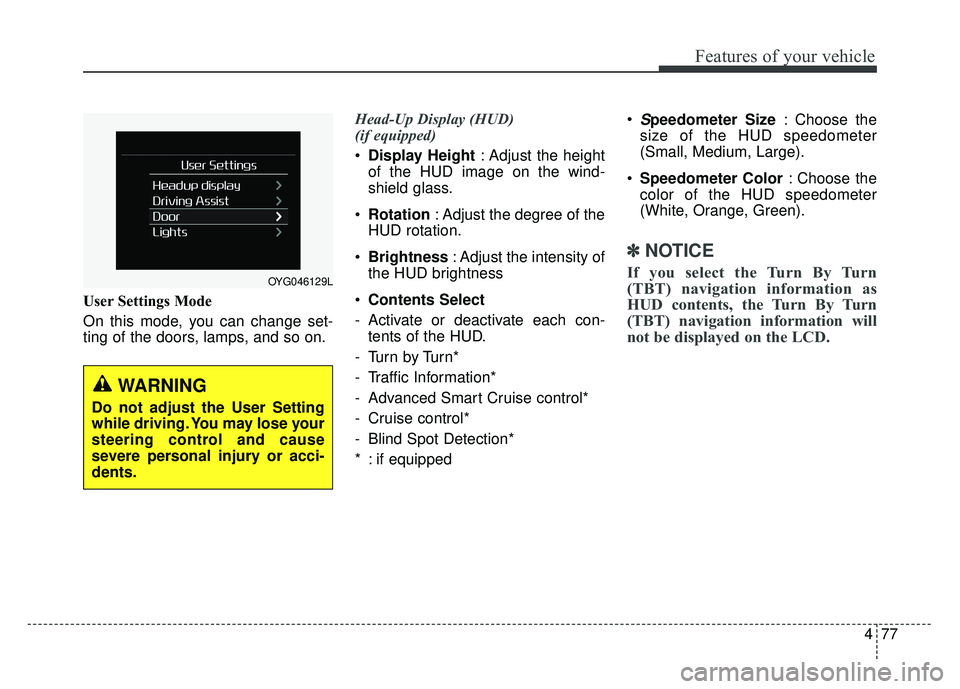
User Settings Mode
On this mode, you can change set-
ting of the doors, lamps, and so on.Head-Up Display (HUD)
(if equipped)
Display Height : Adjust the height
of the HUD image on the wind-
shield glass.
Rotation : Adjust the degree of the
HUD rotation.
Brightness : Adjust the intensity of
the HUD brightness
Contents Select
- Activate or deactivate each con- tents of the HUD.
-Turn by Turn*
- Traffic Information*
- Advanced Smart Cruise control*
- Cruise control*
- Blind Spot Detection*
* : if equipped
Speedometer Size
: Choose the
size of the HUD speedometer
(Small, Medium, Large).
Speedometer Color : Choose the
color of the HUD speedometer
(White, Orange, Green).
✽ ✽ NOTICE
If you select the Turn By Turn
(TBT) navigation information as
HUD contents, the Turn By Turn
(TBT) navigation information will
not be displayed on the LCD.OYG046129L
WARNING
Do not adjust the User Setting
while driving. You may lose your
steering control and cause
severe personal injury or acci-
dents.
Page 179 of 500

Features of your vehicle
98
4
Description
The head up display is a transparent
display which projects a shadow of
some information of the instrument
cluster and navigation on the wind-
shield glass. The head up display image on the
windshield glass may be invisible
when:
- Sitting posture is bad.
- Wearing a polarized sunglasses.
- There is an object on the cover ofthe head up display.
- Driving on a wet road.
- An inadequate lighting is turned on inside the vehicle.
- Any light comes from the outside.
- Wearing an inadequate glasses to your eyesight.
If the head up display image is not shown well, adjust the height, rota-
tion or illumination of the head up
display in the LCD window.
❈ For more details, refer to “LCD
window” in this chapter.
When the head up display needs inspection or repair, we recom-
mend that you consult an author-
ized Kia dealer.
Do not place any accessories on the clash pad or attach any objects
on the windshield glass.
✽ ✽ NOTICE
Installing window tint or any other
type of metallic coating on the wind-
shield can prevent the driver from
seeing the Head Up Display images.
✽ ✽NOTICE
When replacing the front wind-
shield glass of the vehicles equipped
with the head up display, replace it
with a windshield glass designed for
the head up display operation.
Otherwise, duplicated images may
be displayed on the windshield glass.
HEAD UP DISPLAY (HUD) (IF EQUIPPED)
OYG046430N
WARNING - Head up
display
The Head up display is a supple-
mental system. Do not solely
rely on the system, always drive
safely, and pay attention to the
driving conditions on the road.
Page 180 of 500
499
Features of your vehicle
Head Up Display ON/OFF
The HUD display will be activated or
deactivated in user setting mode
while engine is ON.
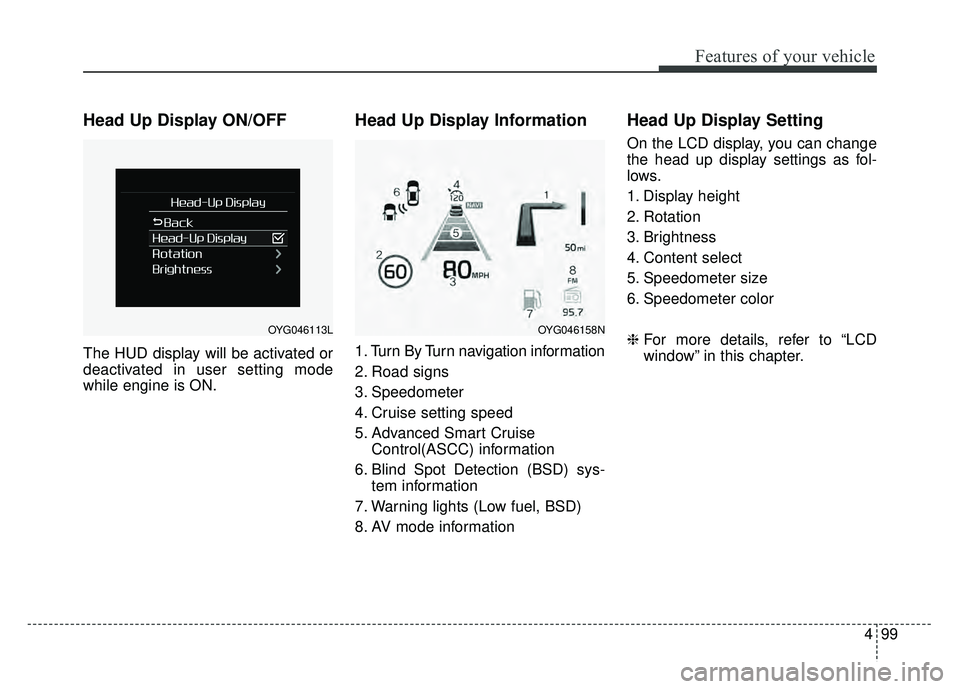
Head Up Display Information
1. Turn By Turn navigation information
2. Road signs
3. Speedometer
4. Cruise setting speed
5. Advanced Smart CruiseControl(ASCC) information
6. Blind Spot Detection (BSD) sys- tem information
7. Warning lights (Low fuel, BSD)
8. AV mode information
Head Up Display Setting
On the LCD display, you can change
the head up display settings as fol-
lows.
1. Display height
2. Rotation
3. Brightness
4. Content select
5. Speedometer size
6. Speedometer color
❈ For more details, refer to “LCD
window” in this chapter.
OYG046113LOYG046158N
Page 183 of 500
Features of your vehicle
102
4
The detecting range may decrease
when:
1. The sensor is covered with foreign
matter such as snow or water.
(The sensing range will return to
normal when removed.)
2. Outside air temperature is extremely hot or cold.
The following objects may not be
recognized by the sensor:
1. Sharp or slim objects such as ropes, chains or small poles.
2. Objects which tend to absorb the sensor frequency such as clothes,
sound absorbent material or snow.
3. Undetectable objects smaller than 40 in. (1 m) in height and narrower
than 6 in. (14 cm) in diameter.Rear parking assist system
precautions
The rear parking assist systemmay not sound consistently
depending on the speed and
shapes of the objects detected.
The rear parking assist system may malfunction if the vehicle bumper
height or sensor installation has
been modified or damaged. Any
non-factory installed equipment or
accessories may also interfere with
the sensor performance.
The sensor may not recognize objects less than 15 in. (40 cm)
from the sensor, or it may sense an
incorrect distance. Use caution.
When the sensor is frozen or cov- ered with snow, dirt, or water, the
sensor may be inoperative until the
material is removed using a soft
cloth.
To prevent damage, do not push, scratch or strike the sensor.
✽ ✽ NOTICE
This system can only sense objects
within the range and location of the
sensors. It cannot detect objects in
other areas where sensors are not
installed. Also, small or slim objects,
such as poles or objects located
between sensors may not be detected
by the sensors.
Always visually check behind the
vehicle when backing up.
Be sure to inform any drivers of the
vehicle that may be unfamiliar with
the system regarding the systems
capabilities and limitations.
Page 266 of 500
![KIA CADENZA 2017 User Guide 529
Driving your vehicle
“Press brake pedal to deactivate AUTO
HOLD”
If you do not apply the brake pedal
when you release the Auto Hold by
pressing the [AUTO HOLD] switch, a
warning will sound and](/img/2/40380/w960_40380-265.png "KIA CADENZA 2017 User Guide 529
Driving your vehicle
“Press brake pedal to deactivate AUTO
HOLD”
If you do not apply the brake pedal
when you release the Auto Hold by
pressing the [AUTO HOLD] switch, a
warning will sound and")
529
Driving your vehicle
“Press brake pedal to deactivate AUTO
HOLD”
If you do not apply the brake pedal
when you release the Auto Hold by
pressing the [AUTO HOLD] switch, a
warning will sound and a message
will appear.
“AUTO HOLD conditions not met.
Close door, hood, and fasten seatbelt”
When you press the [AUTO HOLD]
switch, if the driver’s door, engine
hood are not closed or the driver’s
seat belt is unfastened, a warning
will sound and a message will
appear on the LCD display. At this
moment, press the [AUTO HOLD]
button after closing the driver’s door,
engine hood and fastening the seat
belt.Anti-lock brake system (ABS)
ABS (or ESC) will not prevent acci-
dents due to improper or dangerous
driving maneuvers. Even though
vehicle control is improved during
emergency braking, always maintain
a safe distance between you and
objects ahead. Vehicle speeds
should always be reduced during
extreme road conditions. The vehicle
should be driven at reduced speeds
in the following circumstances:
When driving on rough, gravel orsnow-covered roads
When driving with tire chains installed
When driving on roads where the road surface is pitted or has differ-
ent surface heights.
Driving in these conditions increases
the stopping distance for your vehicle. The ABS continuously senses the
speed of the wheels. If the wheels
are going to lock, the ABS system
repeatedly modulates the hydraulic
brake pressure to the wheels.
When you apply your brakes under
conditions which may lock the
wheels, you may hear a “tik-tik’’
sound from the brakes, or feel a cor-
responding sensation in the brake
pedal. This is normal and it means
your ABS is active.
In order to obtain the maximum benefit
from your ABS in an emergency situa-
tion, do not attempt to modulate your
brake pressure and do not try to pump
your brakes. Press your brake pedal as
hard as possible or as hard as the sit-
uation allows the ABS to control the
force being delivered to the brakes.
✽ ✽
NOTICE
A click sound may be heard in the
engine compartment when the vehi-
cle begins to move after the engine is
started. These conditions are normal
and indicate that the anti-lock brake
system is functioning properly.