engine KIA CADENZA 2017 Owner's Manual
[x] Cancel search | Manufacturer: KIA, Model Year: 2017, Model line: CADENZA, Model: KIA CADENZA 2017Pages: 500, PDF Size: 10.37 MB
Page 73 of 500

357
Safety features of your vehicle
The side air bag is supplemental tothe driver's and the passenger's
seat belt systems and is not a sub-
stitute for them. Therefore your
seat belts must be worn at all times
while the vehicle is in operation.
For best protection from the side air bag system and to avoid being
injured by the deploying side air
bag, both front seat occupants
should sit in an upright position
with the seat belt properly fas-
tened. The driver's hands should
be placed on the steering wheel at
the 9:00 and 3:00 positions. The
passenger's arms and hands
should be placed on their laps. If seat or seat cover is damaged,
have the vehicle checked and
repaired by an authorized Kia deal-
er. Inform the dealer that your vehi-
cle is equipped with side air bags
and an occupant detection system.
WARNING- Flying objects
Do not place any objects (an
umbrella, bag, etc.) between the
front door and the front seat.
Such objects may become dan-
gerous projectiles if the side
airbag inflates.
WARNING- Deployment
Do not install any accessories
including seat covers, on the
side or near the side air bag as
this may affect the deployment
of the side air bags.WARNING- Unexpected deployment
Avoid impact to the side impact
airbag sensor when the Engine
Start/Stop button is ON to pre-
vent unexpected deployment of
the side air bag.WARNING - No attaching
objects
Do not place any objects over the air bag or between the air
bag and yourself. Also, do not
attach any objects around the
area the air bag inflates such
as the door, side door glass,
front and rear pillar.
Never place or insert any object into any small opening
near side airbag labels
attached to the vehicle seats.
When the air bag deploys, the
object may affect the deploy-
ment and result in unexpected
accident or bodily harm.
Page 81 of 500
365
Safety features of your vehicle
Adding equipment to or modi-
fying your air bag-equipped
vehicle
If you modify your vehicle by chang-
ing your vehicle's frame, bumper sys-
tem, front end or side sheet metal or
ride height, this may affect the opera-
tion of your vehicle's air bag system.
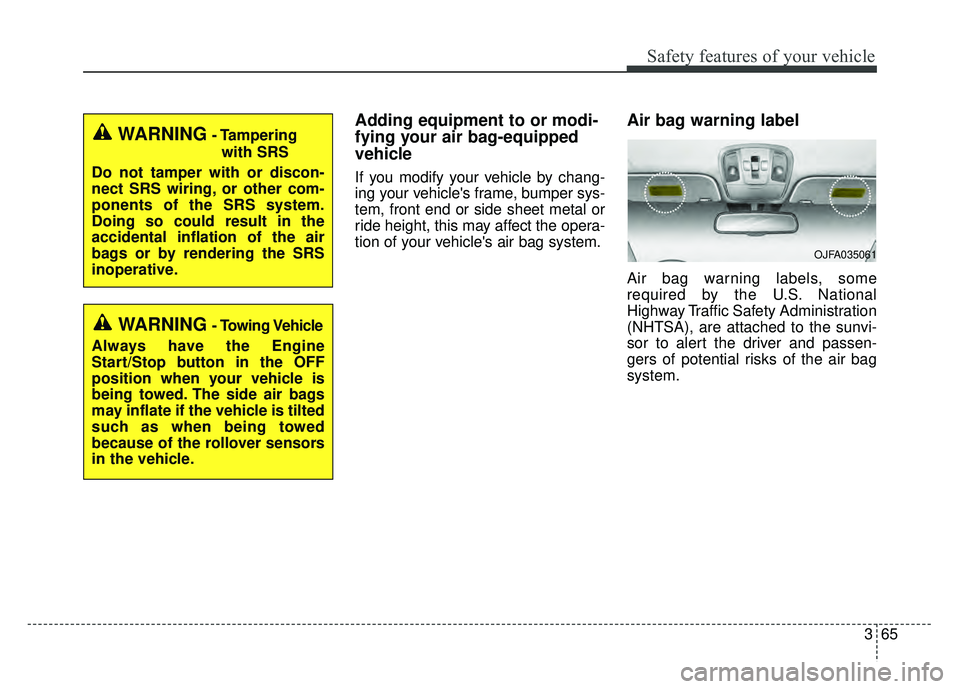
Air bag warning label
Air bag warning labels, some
required by the U.S. National
Highway Traffic Safety Administration
(NHTSA), are attached to the sunvi-
sor to alert the driver and passen-
gers of potential risks of the air bag
system.
WARNING- Tamperingwith SRS
Do not tamper with or discon-
nect SRS wiring, or other com-
ponents of the SRS system.
Doing so could result in the
accidental inflation of the air
bags or by rendering the SRS
inoperative.
WARNING- Towing Vehicle
Always have the Engine
Start/Stop button in the OFF
position when your vehicle is
being towed. The side air bags
may inflate if the vehicle is tilted
such as when being towed
because of the rollover sensors
in the vehicle.
OJFA035061
Page 86 of 500
45
Features of your vehicle
Record your key number
The key code num-
ber is stamped on
the key code tag
attached to the key
set. Should you
lose your keys, this number will
enable an authorized Kia dealer to
duplicate the keys easily.
Remove the key code tag and store it
in a safe place. Also, record the key
code number and keep it in a safe
and handy place, but not in the vehi-
cle.
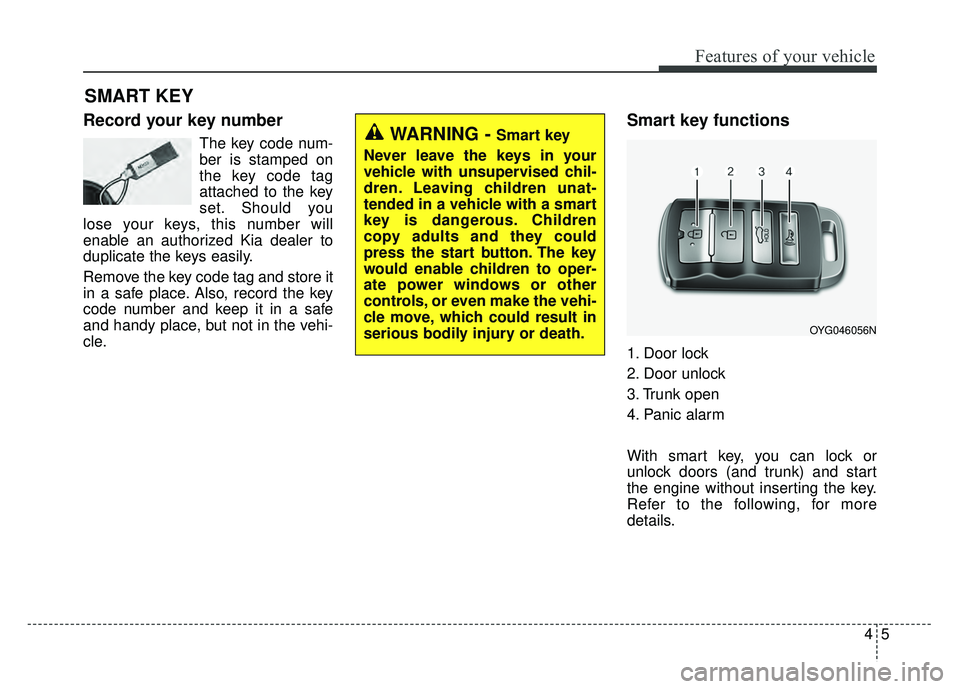
Smart key functions
1. Door lock
2. Door unlock
3. Trunk open
4. Panic alarm
With smart key, you can lock or
unlock doors (and trunk) and start
the engine without inserting the key.
Refer to the following, for more
details.
SMART KEY
WARNING - Smart key
Never leave the keys in your
vehicle with unsupervised chil-
dren. Leaving children unat-
tended in a vehicle with a smart
key is dangerous. Children
copy adults and they could
press the start button. The key
would enable children to oper-
ate power windows or other
controls, or even make the vehi-
cle move, which could result in
serious bodily injury or death.
OYG046056N
Page 87 of 500

Features of your vehicle
64
Locking
Pressing the button of the front out-
side door handles with all doors
closed and any door unlocked, locks
all the doors. The hazard warning
lights will blink and the chime will
sound once to indicate that all doors
are locked. The button will only oper-
ate when the smart key is within
28~40 in. (0.7~1 m) from the outside
door handle. If you want to make
sure that a door has locked or not,
you should check the door lock but-
ton inside the vehicle or pull the out-
side door handle.In some instances, when the outside
door button is selected, the doors will
not lock and an audible chime will
sound for 3 seconds if any of the fol-
lowing occurs:
• The smart key is in the vehicle.
The Engine Start/Stop button is in
the ACC or ON position.
Any door except the trunk is opened.
Unlocking
Pressing the button of the driver's (or
front passenger’s) outside door han-
dle with all doors closed and locked,
unlocks the driver's door.
The hazard warning lights will blink
twice to indicate that the driver's door
is unlocked. Also, the outside
rearview mirrors will automatically
unfold if the outside rearview mirror
folding switch is in the AUTO posi-
tion.
The button will only operate when
the smart key is within 28~40 in.
(0.7~1m) from the outside door han-
dle.
OYG046004
Page 88 of 500
47
Features of your vehicle
When Two press unlock function is
activated,
- If you press the driver's outsidedoor handle button, driver`s door
will unlock.
- If you press the driver's outside door handle button within four sec-
onds again, then all the doors will
unlock.
✽ ✽ NOTICE
You can activate or deactivate the
Two Press Unlock function. Refer to
“User settings” in this chapter.
Start-up
You can start the engine without
inserting the key.
❈ For detailed information refer to
“ENGINE START/STOP button” in
chapter 5.
Smart key precautions
If you lose your smart key, you will
not be able to start the engine. Tow
the vehicle, if necessary, and con-
tact an authorized Kia dealer.
A maximum of 2 smart keys can be registered to a single vehicle. If you
lose a smart key, you should imme-
diately take the vehicle and key to
your authorized Kia dealer to pro-
tect it from potential theft.
The smart key will not work if any of following occurs:
- The smart key is close to a radiotransmitter such as a radio sta-
tion or an airport which can inter-
fere with normal operation of the
smart key.
- The smart key near a mobile two- way radio system or a cellular
phone.
- Another vehicle’s smart key is being operated close to your
vehicle.
Page 93 of 500

Features of your vehicle
12
4
Restrictions in Handling Keys
When leaving keys with parking lot
and valet attendants, the following
procedures will ensure your vehicle’s
trunk and glove box compartment
can not be opened in your absence. To activate the trunk lock system so
that the trunk can only be opened with
the main key, perform the following:
1. Unlock the glove box by using the
main key (1) then open it (2).
2. Set the trunk lid control button to the LOCK position.
3. Close and lock the glove box using the main key.
When leaving your keys with a park-
ing lot or valet attendant, perform
steps 1 to 3 above, and leave the sub
key with the attendant. In this manner
the sub key can only be used to start
the engine and operate door locks.
Lock release
To release the trunk lock feature,
open the glove box with the main key
and set the trunk lid control button to
the UNLOCK position.
Immobilizer system
Your vehicle is equipped with an
electronic engine immobilizer system
to reduce the risk of unauthorized
vehicle use.
Whenever the ENGINE START/STOP
button is changed to the ON position,
the immobilizer system checks and
verifies if the key is valid or not.
If the key is valid, the engine will
start.
If the key is invalid, the engine will
not start.
✽ ✽ NOTICE
In order to prevent theft of your
vehicle, do not leave spare keys any-
where in your vehicle. Your
Immobilizer password is a customer
unique password and should be kept
confidential. Do not leave this num-
ber anywhere in your vehicle.
OYG046003
Page 94 of 500
413
Features of your vehicle
To deactivate the immobilizersystem
Change the ENGINE START/STOP
button to the ON position.
To activate the immobilizer sys-tem
Change the ENGINE START/STOP
button to the OFF position. The
immobilizer system activates auto-
matically. Without a valid smart key
for your vehicle, the engine will not
start.
In order to prevent theft of your vehi-
cle, do not leave spare keys any-
where in your vehicle.
Your immobilizer password is a cus-
tomer unique password and should
be kept confidential. Do not leave this
number anywhere in your vehicle.
✽ ✽ NOTICE
Keep each key separate in order to
avoid a starting malfunction.
Do not put metal accessories near
the smart key.
Metal accessories may interrupt the
transponder signal and may prevent
the engine from being started.
If you need additional keys or lose
your keys, consult an authorized Kia
dealer.This device complies with Part
15 of the FCC rules.
Operation is subject to the following
two conditions:
1. This device may not cause harmful
interference, and
2. This device must accept any inter- ference received, including inter-
ference that may cause undesired
operation.
✽ ✽NOTICE
Changes or modifications not
expressly approved by the party
responsible for compliance could
void the user's authority to operate
the equipment.
CAUTION - Immobilizer
damage
Do not expose your immobilizer
system to moisture, static elec-tricity and rough handling. Thismay damage your immobilizer.
CAUTION - Immobilizer
alterations
Do not change, alter or adjustthe immobilizer system becauseit could cause the immobilizersystem to malfunction.
Page 95 of 500
Features of your vehicle
14
4
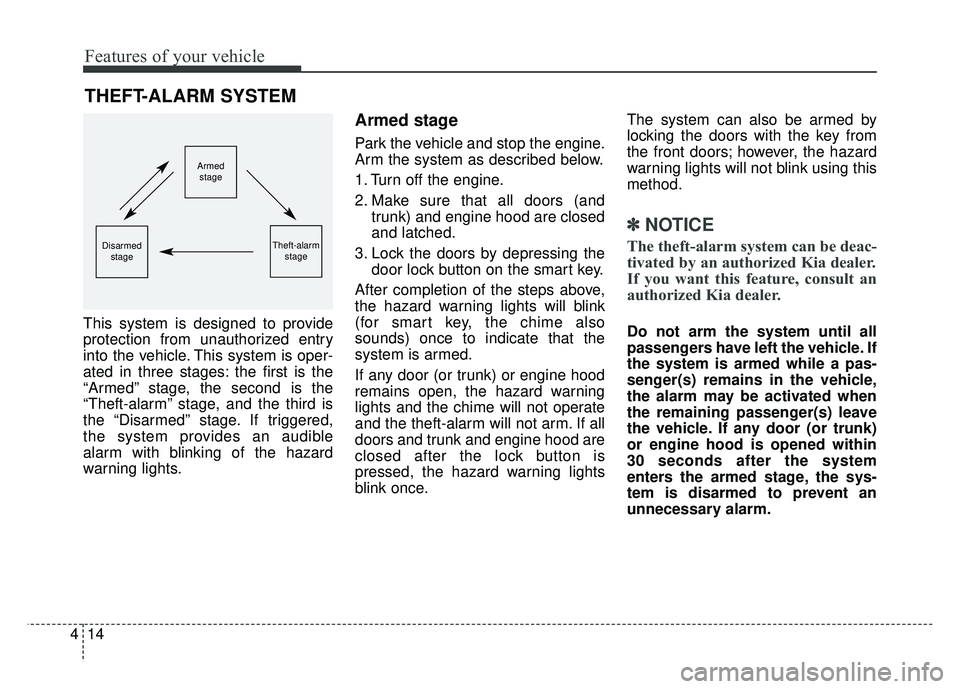
This system is designed to provide
protection from unauthorized entry
into the vehicle. This system is oper-
ated in three stages: the first is the
“Armed” stage, the second is the
“Theft-alarm” stage, and the third is
the “Disarmed” stage. If triggered,
the system provides an audible
alarm with blinking of the hazard
warning lights.
Armed stage
Park the vehicle and stop the engine.
Arm the system as described below.
1. Turn off the engine.
2. Make sure that all doors (and
trunk) and engine hood are closed
and latched.
3. Lock the doors by depressing the door lock button on the smart key.
After completion of the steps above,
the hazard warning lights will blink
(for smart key, the chime also
sounds) once to indicate that the
system is armed.
If any door (or trunk) or engine hood
remains open, the hazard warning
lights and the chime will not operate
and the theft-alarm will not arm. If all
doors and trunk and engine hood are
closed after the lock button is
pressed, the hazard warning lights
blink once. The system can also be armed by
locking the doors with the key from
the front doors; however, the hazard
warning lights will not blink using this
method.
✽ ✽
NOTICE
The theft-alarm system can be deac-
tivated by an authorized Kia dealer.
If you want this feature, consult an
authorized Kia dealer.
Do not arm the system until all
passengers have left the vehicle. If
the system is armed while a pas-
senger(s) remains in the vehicle,
the alarm may be activated when
the remaining passenger(s) leave
the vehicle. If any door (or trunk)
or engine hood is opened within
30 seconds after the system
enters the armed stage, the sys-
tem is disarmed to prevent an
unnecessary alarm.
THEFT-ALARM SYSTEM
Armed
stage
Theft-alarm stageDisarmedstage
Page 96 of 500
415
Features of your vehicle
Theft-alarm stage
The alarm will be activated if any of
the following occurs while the system
is armed.
A front or rear door is opened with-out using the smart key.
The trunk is opened without using the smart key.
The engine hood is opened.
The horn will sound and the hazard
warning lights will blink continuously
for approximately 27 seconds, and
repeat the horn 2 times unless the
system is disarmed. To turn off the
system, unlock the doors with the
smart key.
Disarmed stage
The system will be disarmed when
The doors (and trunk) are unlocked with the smart key.
After depressing the unlock button,
the hazard warning lights will blink
and the chime will sound twice (in
smart key) to indicate that the sys-
tem is disarmed.
After depressing the unlock button, if
any door (or trunk) is not opened
within 30 seconds, the system will be
rearmed.
Avoid trying to start the engine while the alarm is activated. The
vehicle starting motor is disabled
during the theft-alarm stage.
If the system is not disarmed with
the smart key, open the doors by
using the mechanical key and start
the engine by directly pressing the
engine Start/Stop button with the
smart key.
If you lose your keys, consult your authorized Kia dealer.
✽ ✽ NOTICE
Malfunctions caused by improper
alterations, adjustments or modifi-
cations to the theft-alarm system are
not covered by your vehicle manu-
facturer warranty.
CAUTION - Adjusting
alarm system
Do not change, alter or adjust the theft-alarm system becauseit could cause the theft-alarmsystem to malfunction.
Page 97 of 500
Features of your vehicle
16
4
DOOR LOCKS
Operating door locks from
outside the vehicle
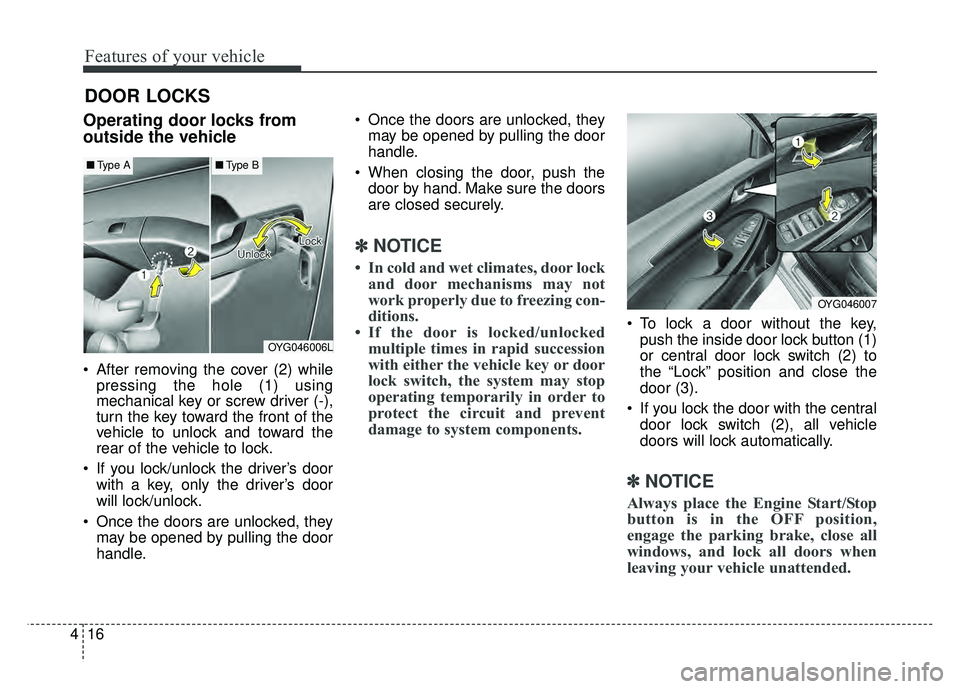
After removing the cover (2) while
pressing the hole (1) using
mechanical key or screw driver (-),
turn the key toward the front of the
vehicle to unlock and toward the
rear of the vehicle to lock.
If you lock/unlock the driver’s door with a key, only the driver’s door
will lock/unlock.
Once the doors are unlocked, they may be opened by pulling the door
handle. Once the doors are unlocked, they
may be opened by pulling the door
handle.
When closing the door, push the door by hand. Make sure the doors
are closed securely.
✽ ✽ NOTICE
• In cold and wet climates, door lock
and door mechanisms may not
work properly due to freezing con-
ditions.
• If the door is locked/unlocked multiple times in rapid succession
with either the vehicle key or door
lock switch, the system may stop
operating temporarily in order to
protect the circuit and prevent
damage to system components.
To lock a door without the key,
push the inside door lock button (1)
or central door lock switch (2) to
the “Lock” position and close the
door (3).
If you lock the door with the central door lock switch (2), all vehicle
doors will lock automatically.
✽ ✽ NOTICE
Always place the Engine Start/Stop
button is in the OFF position,
engage the parking brake, close all
windows, and lock all doors when
leaving your vehicle unattended.
OYG046006L
■ Type A■Type B
OYG046007