steering wheel KIA CADENZA 2017 Owner's Guide
[x] Cancel search | Manufacturer: KIA, Model Year: 2017, Model line: CADENZA, Model: KIA CADENZA 2017Pages: 500, PDF Size: 10.37 MB
Page 307 of 500
Driving your vehicle
70
5
SPORT MODE
button is pressed and
the SPORT MODE is
selected, the SPORT
indicator (red) will illumi-
nate on the dashboard.
is activated, and the
Engine Start/Stop button
is turned off and on again,
drive mode will reset to
COMFORT MODE.
To turn on SPORT MODE, press DRIVE
MODE button again.
- After increasing speed and turning your foot
off the accelerator
pedal, it maintains the
current gear and RPM
for some time even
though the accelerator
pedal is not depressed.
- Up-shift during accel- eration is delayed.
✽ ✽ NOTICE
In SPORT DRIVE MODE, the fuel
efficiency may decrease.
SMART MODE
SMART MODE is an intel-
ligent driving mode which
automatically selects the
most appropriate drive
mode (Economic \b
Aggressive) by measuring
usage of steering wheel,
and accelerator pedal.
ton is pressed and the
SMART MODE is select-
ed, SMART indicator will
illuminate on the dash-
board.
MODE indicator light will
depend on the driving
style. If the driving style is
economic, average, and
speedy, the indicator light
will be green, white, and
red in respective order.
is activated, and the
Engine Start/Stop button
is turned off and on again,
your car will still maintain
the SMART MODE.
Page 308 of 500
571
Driving your vehicle
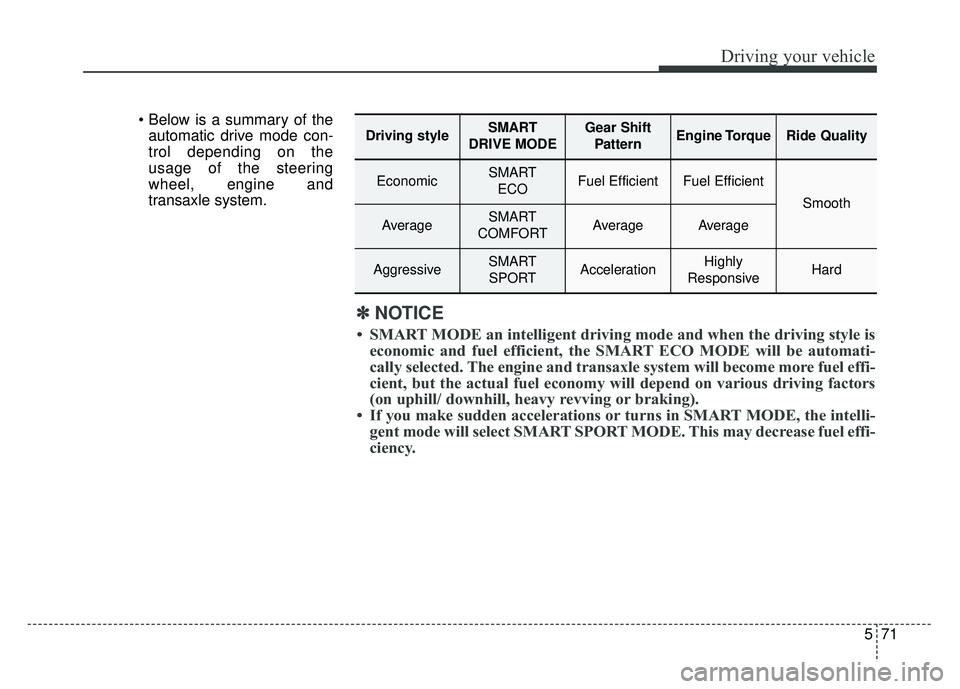
automatic drive mode con-
trol depending on the
usage of the steering
wheel, engine and
transaxle system.
Driving styleSMART
DRIVE MODEGear Shift PatternEngine TorqueRide Quality
EconomicSMART ECOFuel EfficientFuel Efficient
Smooth
AverageSMART
COMFORTAverageAverage
AggressiveSMART SPORTAccelerationHighly
ResponsiveHard
✽ ✽ NOTICE
• SMART MODE an intelligent driving mode and when the driving style is
economic and fuel efficient, the SMART ECO MODE will be automati-
cally selected. The engine and transaxle system will become more fuel effi-
cient, but the actual fuel economy will depend on various driving factor\
s
(on uphill/ downhill, heavy revving or braking).
• If you make sudden accelerations or turns in SMART MODE, the intelli- gent mode will select SMART SPORT MODE. This may decrease fuel effi-
ciency.
Page 309 of 500
Driving your vehicle
72
5
DRIVE MODE Indicator Screen
The DRIVE MODE indicator screen
can be displayed by using the trip com-
puter button on the steering wheel.
DRIVE MODE indicator screen dis-
plays status of current drive mode.
DRIVE MODE button is located on
the lower part of the transmission
lever for selecting drive mode.
If drive mode is selected manually
by the user, the drive mode indica-
tor screen will show user-selected
drive mode. (COMFORT, ECO, or
SPORT)
If SMART MODE is selected by
DRIVE MODE button, the drive
mode indicator screen will show
current drive mode automatically
selected by SMART MODE sys-
tem. (SMART COMFORT, SMART
ECO, or SMART SPORT) When the trip computer mode is
selected to show DRIVE MODE
and the SMART MODE is in oper-
ation, an automatically selected
driving mode SMART ECO,
SMART COMFORT, or SMART
SPORT, will be selected on the
cluster's center.
And right below is the horizontal
driving style gauge which reflects
the driving style in real time.
If you drive carefully and slowly in SMART MODE, the left side of the
driving style gauge will illuminate,
and be automatically shifted to the
SMART ECO MODE.
When the driver accelerates more
frequently, the right side of the driv-
ing style gauge will fill up, and shift
to SMART COMFORT MODE.
In addition, if the rate of accelera-
tion and speed is high, drive mode
will change to SMART SPORT
MODE. If the auto cruise control function is
operated or the transmission is
shifted to manual mode while
SMART MODE is on, the SMART
MODE will stop temporarily, and
the DRIVE MODE will be displayed
as OFF. The driving style gauge
light will be turned off accordingly.
If the trip computer is not set to show DRIVE MODE indicator
screen, and you want to know the
on/off status of the SMART MODE,
simply check whether the letters
'SMART' is lighten up on the
screen or not (green - ECO MODE,
white - COMFORT MODE, red -
SPORT MODE).
Page 310 of 500
573
Driving your vehicle
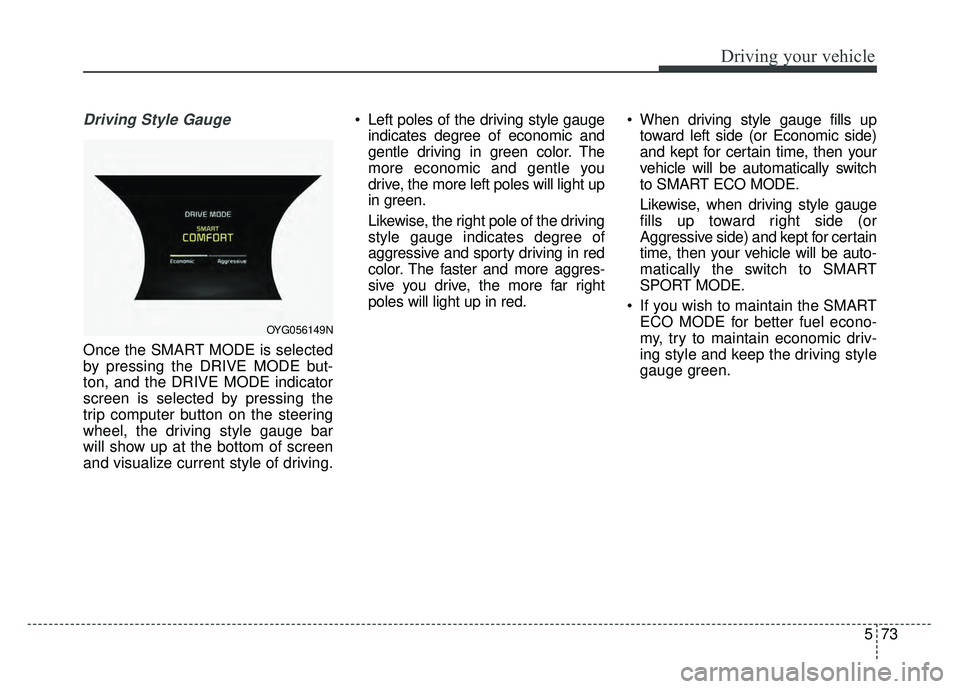
Driving Style Gauge
Once the SMART MODE is selected
by pressing the DRIVE MODE but-
ton, and the DRIVE MODE indicator
screen is selected by pressing the
trip computer button on the steering
wheel, the driving style gauge bar
will show up at the bottom of screen
and visualize current style of driving. Left poles of the driving style gauge
indicates degree of economic and
gentle driving in green color. The
more economic and gentle you
drive, the more left poles will light up
in green.
Likewise, the right pole of the driving
style gauge indicates degree of
aggressive and sporty driving in red
color. The faster and more aggres-
sive you drive, the more far right
poles will light up in red. When driving style gauge fills up
toward left side (or Economic side)
and kept for certain time, then your
vehicle will be automatically switch
to SMART ECO MODE.
Likewise, when driving style gauge
fills up toward right side (or
Aggressive side) and kept for certain
time, then your vehicle will be auto-
matically the switch to SMART
SPORT MODE.
If you wish to maintain the SMART ECO MODE for better fuel econo-
my, try to maintain economic driv-
ing style and keep the driving style
gauge green.
OYG056149N
Page 322 of 500
585
Driving your vehicle
It gently applies braking power on the
tire, which is located in the opposite
side of the possibly-colliding point.
The instrument cluster will inform the
driver of the system activation.
The Smart Blind Spot Detection
System is automatically deactivated,
when the vehicle drives a certain dis-
tance away, when the vehicle direc-
tion is changed against the possible-
colliding point, when the steering
wheel is abruptly moved, or when the
brake pedal is depressed.
When the turn signals operate, the
Smart Blind Spot Detection System
operates only once. However, when
the turn signals are turned off, the sys-
tem re-enters the activation conditions.
The driver should drive the vehicle in
the middle of the vehicle lanes to
keep the system in the ready status.
When the vehicle drives too close to
one side of the vehicle lanes, the
system may not properly operate.
In addition, the system may not prop-
erly control your vehicle in accordance
with driving situations. Thus, always
pay close attention to road situations.Warning message
When there is a malfunction with the
Smart Blind Spot Detection System,
warning message ("Smart BSD brak-
ing system malfunction") appears on
LCD display and deactivates the
Smart Blind Spot Detection System.
In this case, we recommend you to
have your vehicle inspected by an
authorized Kia dealer.
Limitations of the system
The driver must be cautious in the
below situations, because the sys-
tem may not detect other vehicles or
objects in certain circumstances.
The vehicle drives on a curvedroad or through a tollgate.
The sensor is polluted with rain, snow, mud, etc.
The rear bumper where the sensor is located is covered with a foreign
object such as a bumper sticker, a
bumper guard, a bike rack, etc.
The rear bumper is damaged, or the sensor is out of the original
default position.
The vehicle height gets lower or higher due to heavy loading in a
trunk, abnormal tire pressure, etc.
The vehicle drives in inclement weather such as heavy rain or snow.
There is a fixed object near the vehicle, such as a guardrail.
A big vehicle is near such as a bus or truck.
Page 324 of 500
587
Driving your vehicle
The road pavement (or the periph-eral ground) abnormally contains
metallic components (i.e. possibly
due to subway construction).
The brake pedal is depressed.
ESC (Electronic Stability Control) is activated.
The tire pressure is low or a tire is damaged.
The brake is reworked.
The vehicle is driven near a guardrail or near the boundary line
of a road.
The windshield or the camera lens is blocked with dirt or debris.
The vehicle drives on a small- radius curve.
The vehicle drives in the opposite direction from the designated lane
direction.
The lane sensing operation is inter- rupted by another vehicle in front.
The vehicle drives under 40 mph or over 115 mph. The vehicle abruptly changes driv-
ing direction.
The vehicle abruptly enters the next lane.
The vehicle sharply stops.
Temperature is extremely low around the vehicle.
The vehicle severely vibrates while driving over a bumpy road, uneven/
bumpy road, or concrete patch.
The vehicle drives on a slippery surface due to snow, water puddle,
or ice.
The driver is responsible for accu- rate steering.
Do not unnecessarily operate the steering wheel, when the Smart
Blind Spot Detection System is in
operation.
Always pay extreme caution while driving. The Smart Blind Spot
Detection System may not operate
or unnecessarily operate in accor-
dance with your driving situations.
WARNING
-
Smart Blind Spot Detection
System Limitations
The Smart Blind Spot Detection
System is not a substitute for
safe driving practices, but a
convenience function only. It is
the responsibility of the driver
to always drive cautiously to
prevent unexpected and sud-
den situations from occurring.
Pay attention to the road condi-
tions at all times.
Page 330 of 500
593
Driving your vehicle
Remember, your vehicle does notrequire extended warm-up. After
the engine has started, allow the
engine to run for 10 to 20 seconds
prior to placing the vehicle in gear.
In very cold weather, however, give
your engine a slightly longer warm-
up period.
Don't "lug" or "over-rev" the engine. Lugging is driving too slowly in a
very high gear resulting in engine
bucking. If this happens, shift to a
lower gear. Over-revving is racing
the engine beyond its safe limit.
This can be avoided by shifting at
the recommended speed. Use your air conditioning sparingly.
The air conditioning system is
operated by engine power so your
fuel economy is reduced when you
use it.
Open windows at high speeds can reduce fuel economy.
Fuel economy is less in crosswinds and headwinds. To help offset
some of this loss, slow down when
driving in these conditions.
Keeping a vehicle in good operating
condition is important both for econ-
omy and safety. Therefore, have an
authorized Kia dealer perform
scheduled inspections and mainte-
nance.
WARNING - Engine off
during motion
Never turn the engine off to
coast down hills or anytime the
vehicle is in motion. The power
steering and power brakes will
not function properly without the
engine running. In addition, turn-
ing off the ignition while driving
could lead to out of working
power driven steering wheel and
hard to control steering wheel.
Keep the engine on and down-
shift to an appropriate gear for
an engine braking effect.
Page 331 of 500

Driving your vehicle
94
5
Hazardous driving conditions
When hazardous driving conditions
are encountered such as water,
snow, ice, mud, sand, or similar haz-
ards, follow these suggestions:
Drive cautiously and allow extra
distance for braking.
Avoid sudden braking or steering.
When braking with non-ABS brakes pump the brake pedal with
a light up-and-down motion until
the vehicle is stopped.
Do not pump the brake pedal on a
vehicle equipped with ABS. If stalled in snow, mud, or sand,
use the second gear. Accelerate
slowly to avoid spinning the drive
wheels.
Use sand, rock salt, or other non- slip material under the drive
wheels to provide traction when
stalled in ice, snow, or mud.
Rocking the vehicle
If it is necessary to rock the vehicle
to free it from snow, sand, or mud,
first turn the steering wheel right and
left to clear the area around your
front wheels. Then, shift back and
forth between R (Reverse) and any
forward gear in vehicles equipped
with an Automatic Transaxle. Do not
race the engine, and spin the wheels
as little as possible. If you are still
stuck after a few tries, have the vehi-
cle pulled out by a tow vehicle to
avoid engine overheating and possi-
ble damage to the transaxle.
SPECIAL DRIVING CONDITIONS
WARNING- Downshifting
Do not downshift with an auto-
matic transaxle while driving on
slippery surfaces. The sudden
change in tire speed could
cause the tires to skid and
result in an accident.
WARNING- Sudden
Vehicle Movement
Do not attempt to rock the vehi-
cle if people or objects are near-
by. The vehicle may suddenly
move forward or backwards as it
becomes unstuck.
Page 338 of 500

5101
Driving your vehicle
To keep locks from freezing
To keep the locks from freezing,
squirt an approved de-icer fluid or
glycerine into the key opening. If a
lock is covered with ice, squirt it with
an approved de-icing fluid to remove
the ice. If the lock is frozen internally,
you may be able to thaw it out by
using a heated key. Handle the heat-
ed key with care to avoid injury.
Use approved window washer
anti-freeze in system
To keep the water in the window
washer system from freezing, add an
approved window washer anti-freeze
solution in accordance with instruc-
tions on the container. Window wash-
er anti-freeze is available from an
authorized Kia dealer and most auto
parts outlets. Do not use engine
coolant or other types of anti-freeze
as these may damage the paint fin-
ish.
Don’t let your parking brake
freeze
Under some conditions your parking
brake can freeze in the engaged
position. This is most likely to happen
when there is an accumulation of
snow or ice around or near the rear
brakes or if the brakes are wet. If
there is a risk the parking brake may
freeze, apply it only temporarily while
you put the gear shift lever in P
(Park, Automatic Transaxle) and
block the rear wheels so the vehicle
cannot roll. Then release the parking
brake.
Don't let ice and snow accu-
mulate underneath
Under some conditions, snow and
ice can build up under the fenders
and interfere with the steering. When
driving in severe winter conditions
where this may happen, you should
periodically check underneath the
vehicle to be sure the movement of
the front wheels and the steering
components are not obstructed.
Carry emergency equipment
Depending on the severity of the
weather, you should carry appropri-
ate emergency equipment. Some of
the items you may want to carry
include tow straps or chains, flash-
light, emergency flares, sand, shov-
el, jumper cables, window scraper,
gloves, ground cloth, coveralls, blan-
ket, etc.
TRAILER TOWING
We do not recommend using this
vehicle for trailer towing.
Page 369 of 500
What to do in an emergency
26
6
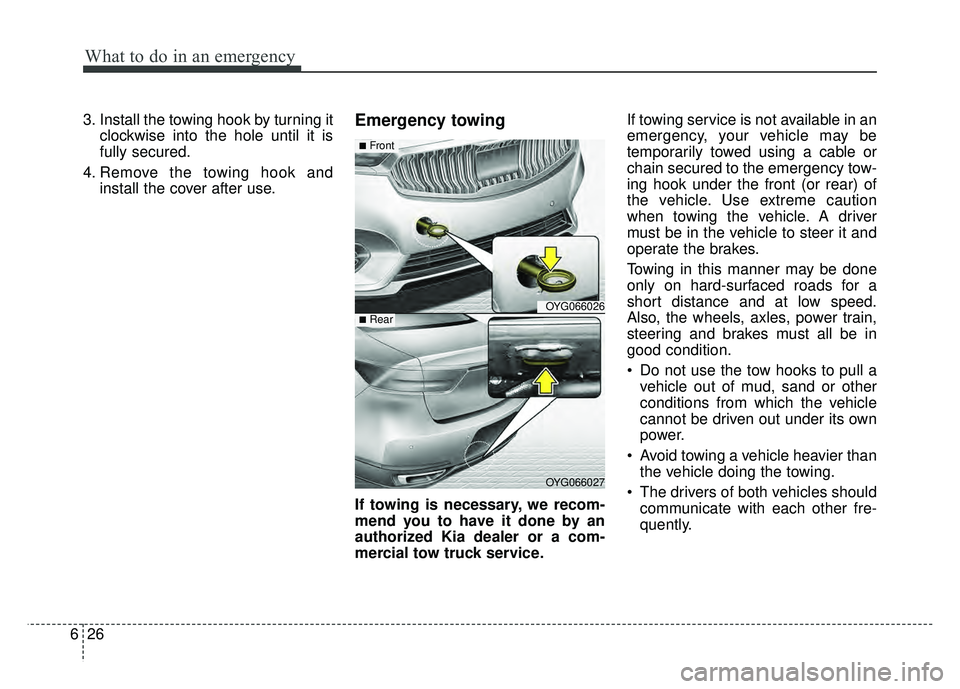
3. Install the towing hook by turning it
clockwise into the hole until it is
fully secured.
4. Remove the towing hook and install the cover after use.Emergency towing
If towing is necessary, we recom-
mend you to have it done by an
authorized Kia dealer or a com-
mercial tow truck service. If towing service is not available in an
emergency, your vehicle may be
temporarily towed using a cable or
chain secured to the emergency tow-
ing hook under the front (or rear) of
the vehicle. Use extreme caution
when towing the vehicle. A driver
must be in the vehicle to steer it and
operate the brakes.
Towing in this manner may be done
only on hard-surfaced roads for a
short distance and at low speed.
Also, the wheels, axles, power train,
steering and brakes must all be in
good condition.
Do not use the tow hooks to pull a
vehicle out of mud, sand or other
conditions from which the vehicle
cannot be driven out under its own
power.
Avoid towing a vehicle heavier than the vehicle doing the towing.
The drivers of both vehicles should communicate with each other fre-
quently.
OYG066026
OYG066027
■Front
■Rear