warning KIA CADENZA 2018 Owners Manual
[x] Cancel search | Manufacturer: KIA, Model Year: 2018, Model line: CADENZA, Model: KIA CADENZA 2018Pages: 502, PDF Size: 9.77 MB
Page 300 of 502
561
Driving your vehicle
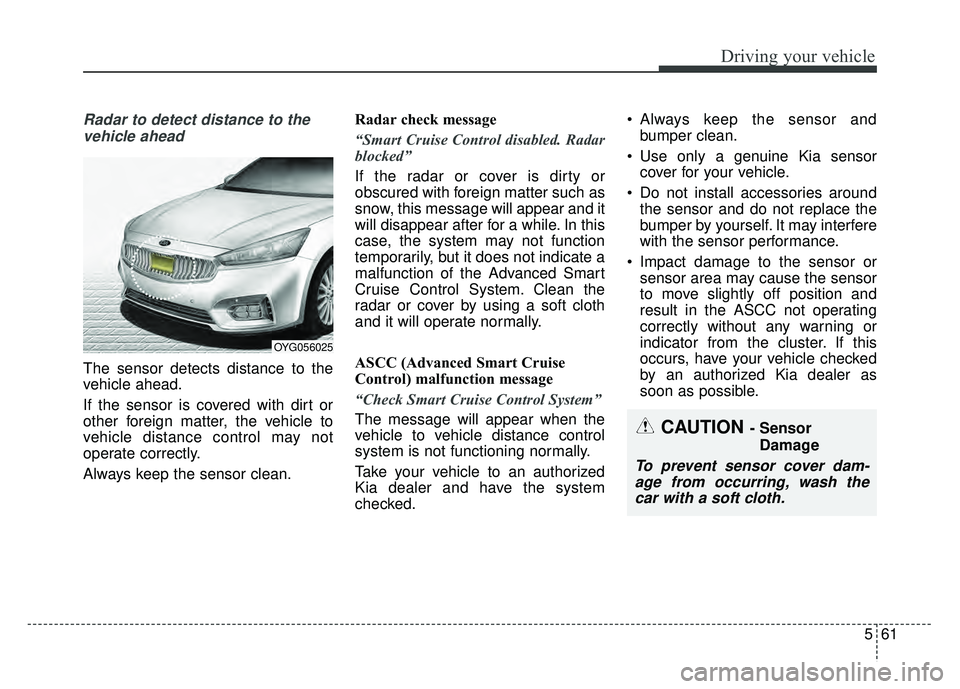
Radar to detect distance to thevehicle ahead
The sensor detects distance to the
vehicle ahead.
If the sensor is covered with dirt or
other foreign matter, the vehicle to
vehicle distance control may not
operate correctly.
Always keep the sensor clean. Radar check message
“Smart Cruise Control disabled. Radar
blocked”
If the radar or cover is dirty or
obscured with foreign matter such as
snow, this message will appear and it
will disappear after for a while. In this
case, the system may not function
temporarily, but it does not indicate a
malfunction of the Advanced Smart
Cruise Control System. Clean the
radar or cover by using a soft cloth
and it will operate normally.
ASCC (Advanced Smart Cruise
Control) malfunction message
“Check Smart Cruise Control System”
The message will appear when the
vehicle to vehicle distance control
system is not functioning normally.
Take your vehicle to an authorized
Kia dealer and have the system
checked. Always keep the sensor and
bumper clean.
Use only a genuine Kia sensor cover for your vehicle.
Do not install accessories around the sensor and do not replace the
bumper by yourself. It may interfere
with the sensor performance.
Impact damage to the sensor or sensor area may cause the sensor
to move slightly off position and
result in the ASCC not operating
correctly without any warning or
indicator from the cluster. If this
occurs, have your vehicle checked
by an authorized Kia dealer as
soon as possible.
OYG056025
CAUTION - Sensor
Damage
To prevent sensor cover dam-age from occurring, wash thecar with a soft cloth.
Page 305 of 502
Driving your vehicle
66
5
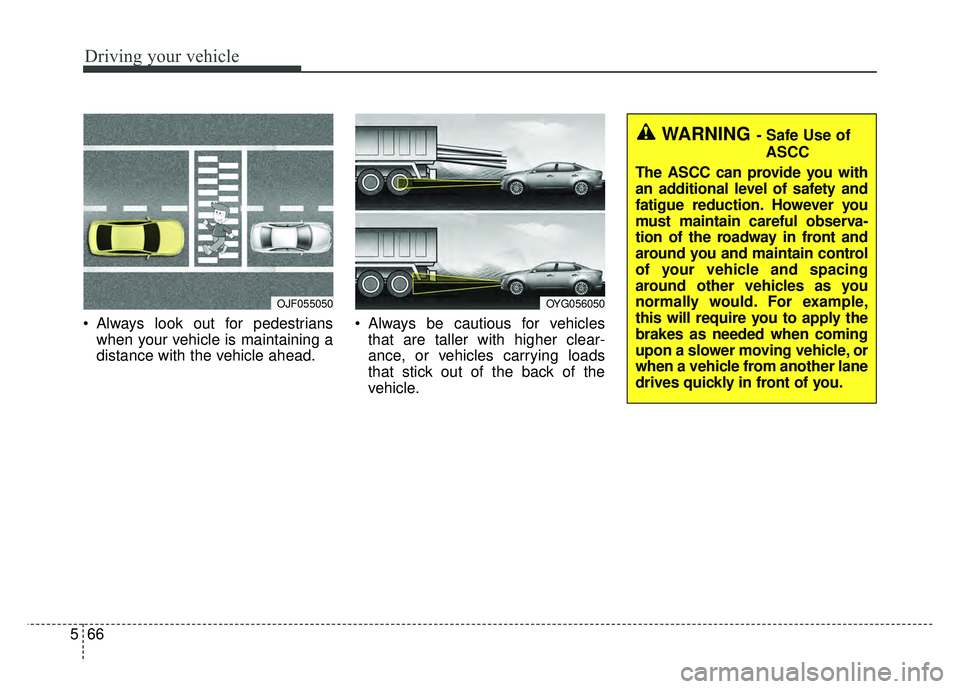
Always look out for pedestrians
when your vehicle is maintaining a
distance with the vehicle ahead. Always be cautious for vehicles
that are taller with higher clear-
ance, or vehicles carrying loads
that stick out of the back of the
vehicle.
WARNING - Safe Use of
ASCC
The ASCC can provide you with
an additional level of safety and
fatigue reduction. However you
must maintain careful observa-
tion of the roadway in front and
around you and maintain control
of your vehicle and spacing
around other vehicles as you
normally would. For example,
this will require you to apply the
brakes as needed when coming
upon a slower moving vehicle, or
when a vehicle from another lane
drives quickly in front of you.
OJF055050OYG056050
Page 306 of 502
567
Driving your vehicle
- After an engine start, please stopfor several seconds. If system ini-
tialization is not completed, the
ASCC does not normally operate.
- After an engine start, if any objects are not detected or the sensor
cover is obscured with foreign sub-
stances, there is a possibility that
the ASCC system may not work.
- The following conditions may cause a malfunction: over-loading
the trunk, suspension modification,
tire replacement with unauthorized
tires or tires with different tread
wear and pressure levels. This device complies with Part 15
of the FCC rules.
Operation is subject to the following
three conditions:
1. This device may not cause harm-
ful interference, and
2. This device must accept any inter- ference received, including inter-
ference that may cause undesired
operation.
3. Changes or modifications not expressly approved by the party
responsible for compliance could
void the user’s authority to operate
the device. Radio frequency radiation expo-
sure information:
This equipment complies with FCC
radiation exposure limits set forth for
an uncontrolled environment.
This equipment should be installed
and operated with minimum distance
of 20 cm between the radiator
(antenna) and your body.
This transmitter must not be co-
located or operating in conjunction
with any other antenna or transmit-
ter.
WARNING - Inclines &
Towing
Do not use ASCC on steep
inclines or when towing another
vehicle or trailer since such
extreme loading can interfere
with your vehicle's ability to
maintain the selected speed.
Page 315 of 502
Driving your vehicle
76
5
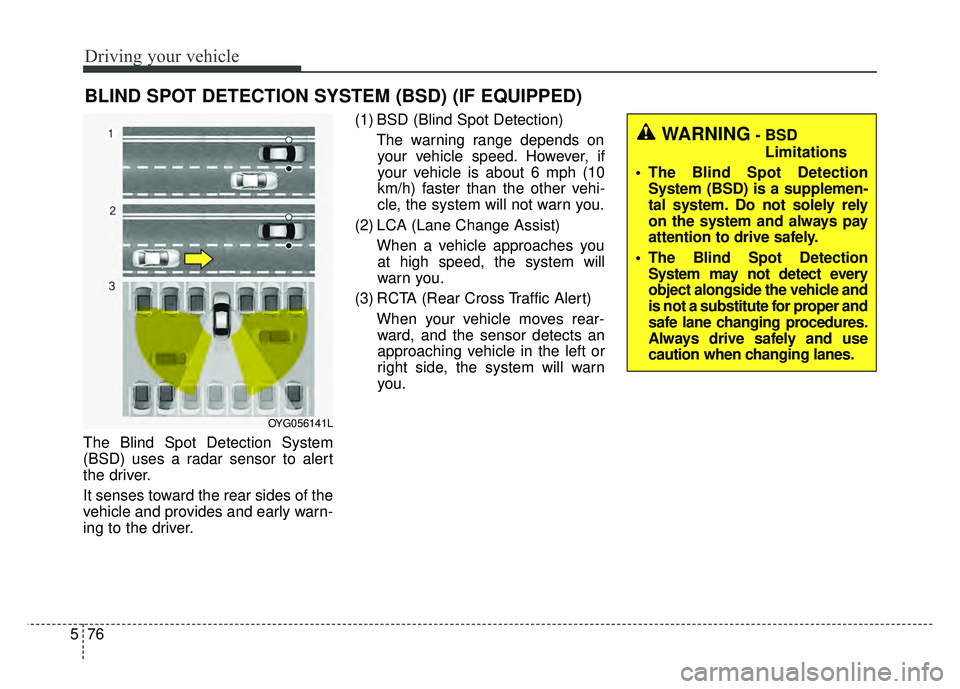
The Blind Spot Detection System
(BSD) uses a radar sensor to alert
the driver.
It senses toward the rear sides of the
vehicle and provides and early warn-
ing to the driver. (1) BSD (Blind Spot Detection)
The warning range depends onyour vehicle speed. However, if
your vehicle is about 6 mph (10
km/h) faster than the other vehi-
cle, the system will not warn you.
(2) LCA (Lane Change Assist) When a vehicle approaches youat high speed, the system will
warn you.
(3) RCTA (Rear Cross Traffic Alert) When your vehicle moves rear-ward, and the sensor detects an
approaching vehicle in the left or
right side, the system will warn
you.
BLIND SPOT DETECTION SYSTEM (BSD) (IF EQUIPPED)
WARNING- BSD
Limitations
The Blind Spot Detection System (BSD) is a supplemen-
tal system. Do not solely rely
on the system and always pay
attention to drive safely.
The Blind Spot Detection System may not detect every
object alongside the vehicle and
is not a substitute for proper and
safe lane changing procedures.
Always drive safely and use
caution when changing lanes.
OYG056141L
Page 316 of 502
577
Driving your vehicle
BSD (Blind Spot Detection) /
LCA (Lane Change Assist)
Operating conditions
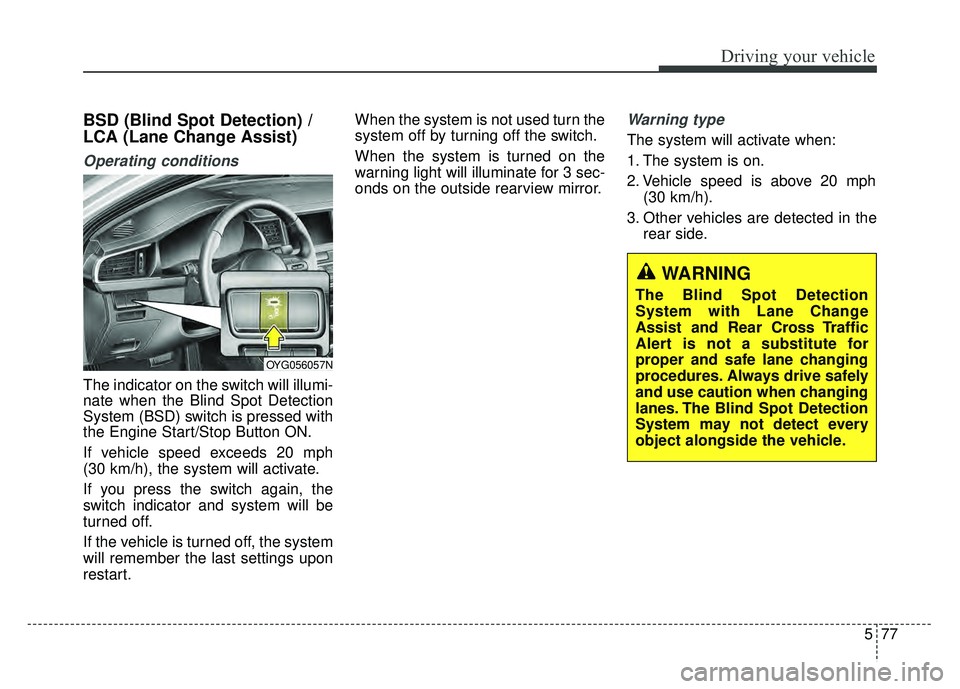
The indicator on the switch will illumi-
nate when the Blind Spot Detection
System (BSD) switch is pressed with
the Engine Start/Stop Button ON.
If vehicle speed exceeds 20 mph
(30 km/h), the system will activate.
If you press the switch again, the
switch indicator and system will be
turned off.
If the vehicle is turned off, the system
will remember the last settings upon
restart.When the system is not used turn the
system off by turning off the switch.
When the system is turned on the
warning light will illuminate for 3 sec-
onds on the outside rearview mirror.
Warning type
The system will activate when:
1. The system is on.
2. Vehicle speed is above 20 mph
(30 km/h).
3. Other vehicles are detected in the rear side.
WARNING
The Blind Spot Detection
System with Lane Change
Assist and Rear Cross Traffic
Alert is not a substitute for
proper and safe lane changing
procedures. Always drive safely
and use caution when changing
lanes. The Blind Spot Detection
System may not detect every
object alongside the vehicle.
OYG056057N
Page 317 of 502
Driving your vehicle
78
5
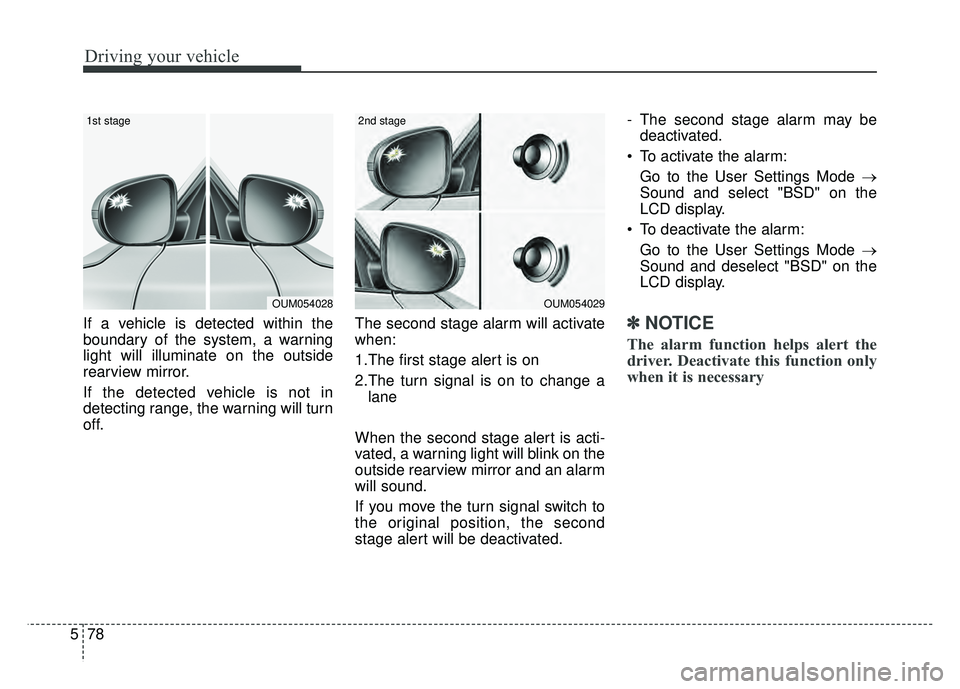
If a vehicle is detected within the
boundary of the system, a warning
light will illuminate on the outside
rearview mirror.
If the detected vehicle is not in
detecting range, the warning will turn
off. The second stage alarm will activate
when:
1.The first stage alert is on
2.The turn signal is on to change a
lane
When the second stage alert is acti-
vated, a warning light will blink on the
outside rearview mirror and an alarm
will sound.
If you move the turn signal switch to
the original position, the second
stage alert will be deactivated. - The second stage alarm may be
deactivated.
To activate the alarm: Go to the User Settings Mode →
Sound and select "BSD" on the
LCD display.
To deactivate the alarm: Go to the User Settings Mode →
Sound and deselect "BSD" on the
LCD display.✽ ✽
NOTICE
The alarm function helps alert the
driver. Deactivate this function only
when it is necessary
OUM054029
2nd stage
OUM054028
1st stage
Page 318 of 502
579
Driving your vehicle
Detecting sensor
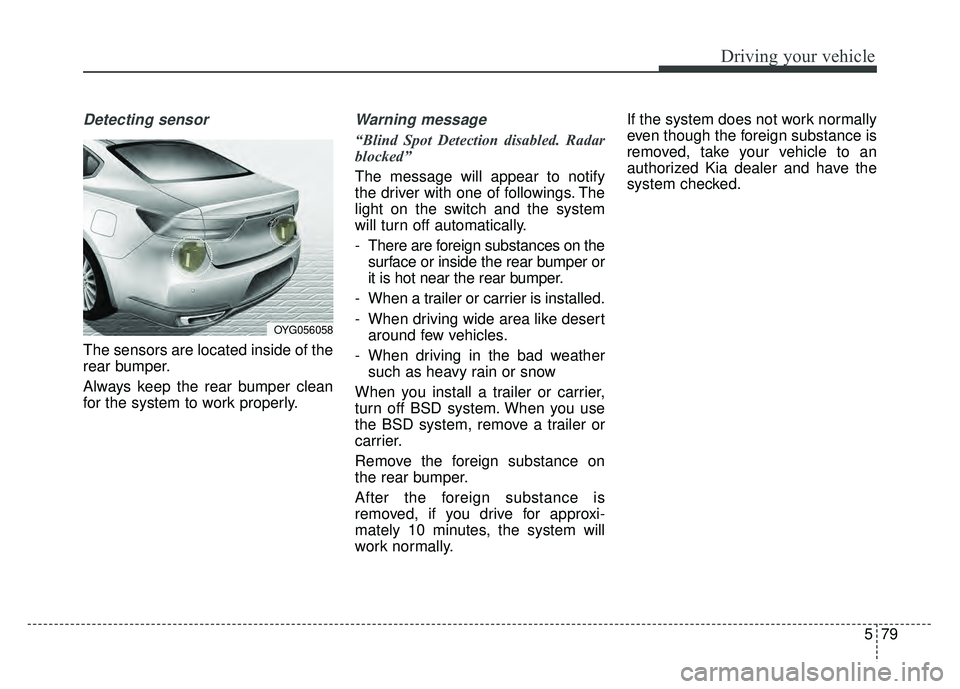
The sensors are located inside of the
rear bumper.
Always keep the rear bumper clean
for the system to work properly.
Warning message
“Blind Spot Detection disabled. Radar
blocked”
The message will appear to notify
the driver with one of followings. The
light on the switch and the system
will turn off automatically.
- There are foreign substances on thesurface or inside the rear bumper or
it is hot near the rear bumper.
- When a trailer or carrier is installed.
- When driving wide area like desert around few vehicles.
- When driving in the bad weather such as heavy rain or snow
When you install a trailer or carrier,
turn off BSD system. When you use
the BSD system, remove a trailer or
carrier.
Remove the foreign substance on
the rear bumper.
After the foreign substance is
removed, if you drive for approxi-
mately 10 minutes, the system will
work normally. If the system does not work normally
even though the foreign substance is
removed, take your vehicle to an
authorized Kia dealer and have the
system checked.
OYG056058
Page 319 of 502
Driving your vehicle
80
5
“Check BSD System”
If the system does not work properly,
a warning message will appear and
the light on the switch will turn off. The
system will turn off automatically.
Have your vehicle inspected by an
authorized Kia dealer.RCTA (Rear Cross Traffic Alert)
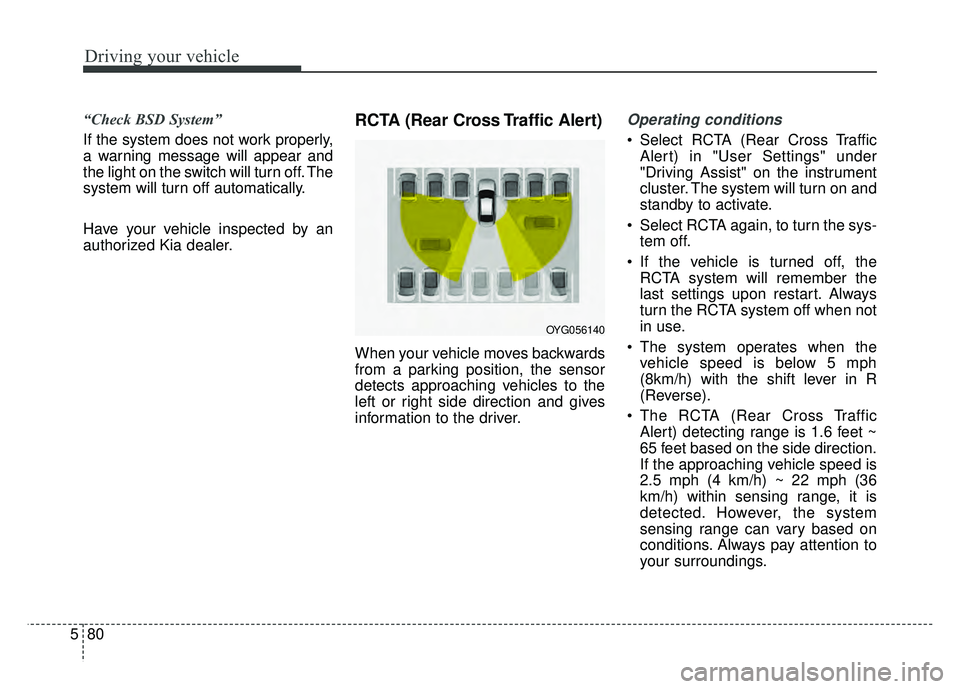
When your vehicle moves backwards
from a parking position, the sensor
detects approaching vehicles to the
left or right side direction and gives
information to the driver.
Operating conditions
Select RCTA (Rear Cross Traffic
Alert) in "User Settings" under
"Driving Assist" on the instrument
cluster. The system will turn on and
standby to activate.
Select RCTA again, to turn the sys- tem off.
If the vehicle is turned off, the RCTA system will remember the
last settings upon restart. Always
turn the RCTA system off when not
in use.
The system operates when the vehicle speed is below 5 mph
(8km/h) with the shift lever in R
(Reverse).
The RCTA (Rear Cross Traffic Alert) detecting range is 1.6 feet ~
65 feet based on the side direction.
If the approaching vehicle speed is
2.5 mph (4 km/h) ~ 22 mph (36
km/h) within sensing range, it is
detected. However, the system
sensing range can vary based on
conditions. Always pay attention to
your surroundings.
OYG056140
Page 320 of 502
581
Driving your vehicle
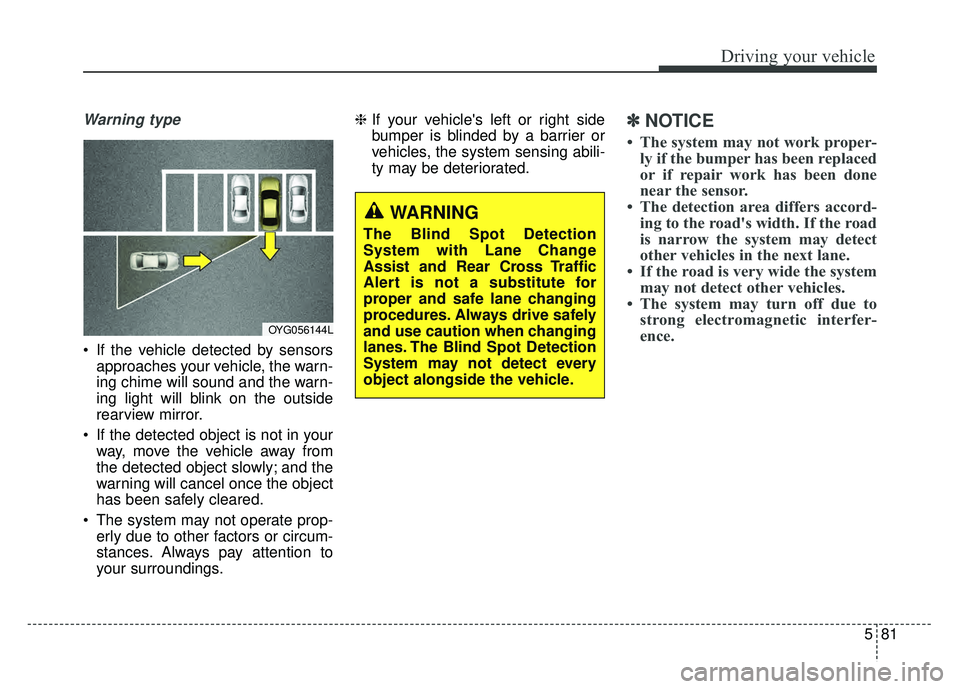
Warning type
If the vehicle detected by sensorsapproaches your vehicle, the warn-
ing chime will sound and the warn-
ing light will blink on the outside
rearview mirror.
If the detected object is not in your way, move the vehicle away from
the detected object slowly; and the
warning will cancel once the object
has been safely cleared.
The system may not operate prop- erly due to other factors or circum-
stances. Always pay attention to
your surroundings. ❈
If your vehicle's left or right side
bumper is blinded by a barrier or
vehicles, the system sensing abili-
ty may be deteriorated.
✽ ✽
NOTICE
• The system may not work proper-
ly if the bumper has been replaced
or if repair work has been done
near the sensor.
• The detection area differs accord- ing to the road's width. If the road
is narrow the system may detect
other vehicles in the next lane.
• If the road is very wide the system may not detect other vehicles.
• The system may turn off due to strong electromagnetic interfer-
ence.
OYG056144L
WARNING
The Blind Spot Detection
System with Lane Change
Assist and Rear Cross Traffic
Alert is not a substitute for
proper and safe lane changing
procedures. Always drive safely
and use caution when changing
lanes. The Blind Spot Detection
System may not detect every
object alongside the vehicle.
Page 324 of 502
585
Driving your vehicle
It gently applies braking power on the
tire, which is located in the opposite
side of the possibly-colliding point.
The instrument cluster will inform the
driver of the system activation.
The Smart Blind Spot Detection
System is automatically deactivated,
when the vehicle drives a certain dis-
tance away, when the vehicle direc-
tion is changed against the possible-
colliding point, when the steering
wheel is abruptly moved, or when the
brake pedal is depressed.
When the turn signals operate, the
Smart Blind Spot Detection System
operates only once. However, when
the turn signals are turned off, the sys-
tem re-enters the activation conditions.
The driver should drive the vehicle in
the middle of the vehicle lanes to
keep the system in the ready status.
When the vehicle drives too close to
one side of the vehicle lanes, the
system may not properly operate.
In addition, the system may not prop-
erly control your vehicle in accordance
with driving situations. Thus, always
pay close attention to road situations.Warning message
When there is a malfunction with the
Smart Blind Spot Detection System,
warning message ("Smart BSD brak-
ing system malfunction") appears on
LCD display and deactivates the
Smart Blind Spot Detection System.
In this case, we recommend you to
have your vehicle inspected by an
authorized Kia dealer.
Limitations of the system
The driver must be cautious in the
below situations, because the sys-
tem may not detect other vehicles or
objects in certain circumstances.
The vehicle drives on a curvedroad or through a tollgate.
The sensor is polluted with rain, snow, mud, etc.
The rear bumper where the sensor is located is covered with a foreign
object such as a bumper sticker, a
bumper guard, a bike rack, etc.
The rear bumper is damaged, or the sensor is out of the original
default position.
The vehicle height gets lower or higher due to heavy loading in a
trunk, abnormal tire pressure, etc.
The vehicle drives in inclement weather such as heavy rain or snow.
There is a fixed object near the vehicle, such as a guardrail.
A big vehicle is near such as a bus or truck.