buttons KIA CADENZA 2019 User Guide
[x] Cancel search | Manufacturer: KIA, Model Year: 2019, Model line: CADENZA, Model: KIA CADENZA 2019Pages: 518, PDF Size: 11.08 MB
Page 149 of 518
467
Features of your vehicle
Reprogramming a single
HomeLink®button
To program a new device to a previ-
ously trained HomeLink®button, fol-
low these steps:
1. Press and hold the desired HomeLink
®button. Do NOT
release until step 4 has been com-
pleted.
2. When the indicator light begins to flash slowly (after 20 seconds),
position the handheld transmitter 1
to 3 inches away from the
HomeLink
®surface.
3. Press and hold the handheld transmitter button. The HomeLink
®
indicator light will flash, first slowly
and then rapidly.
4. When the indicator light begins to flash rapidly, release both buttons.
5. Press and hold the just-trained HomeLink
®button and observe
the red Status Indicator LED. If the
indicator light stays on constantly,
programming is complete and
your new device should activate.
Erasing HomeLink®buttons
Individual buttons cannot be erased.
However, to erase all three pro-
grammed buttons:
1. Press and hold the two outer HomeLink
®buttons until the indi-
cator light begins to flash-after 20
seconds.
2. Release both buttons. Do not hold for longer than 30 seconds.
The Integrated HomeLink
®Wireless
Control System is now in the training
(learn) mode and can be pro-
grammed at any time following the
appropriate steps in the
Programming sections above. FCC ID: NZLZTVHL3
IC: 4112A-ZTVHL3
Pursuant to Code of Federal
Regulations, Title 47, Part 15
(“FCC Rules”)
Operation is subject to the following
two conditions:
1. This device may not cause harmful
interference, and
2. This device must accept any inter- ference received, including inter-
ference that may cause undesired
operation.
Page 154 of 518
Features of your vehicle
72
4
Instrument Cluster Control
Adjusting Instrument Cluster
Illumination
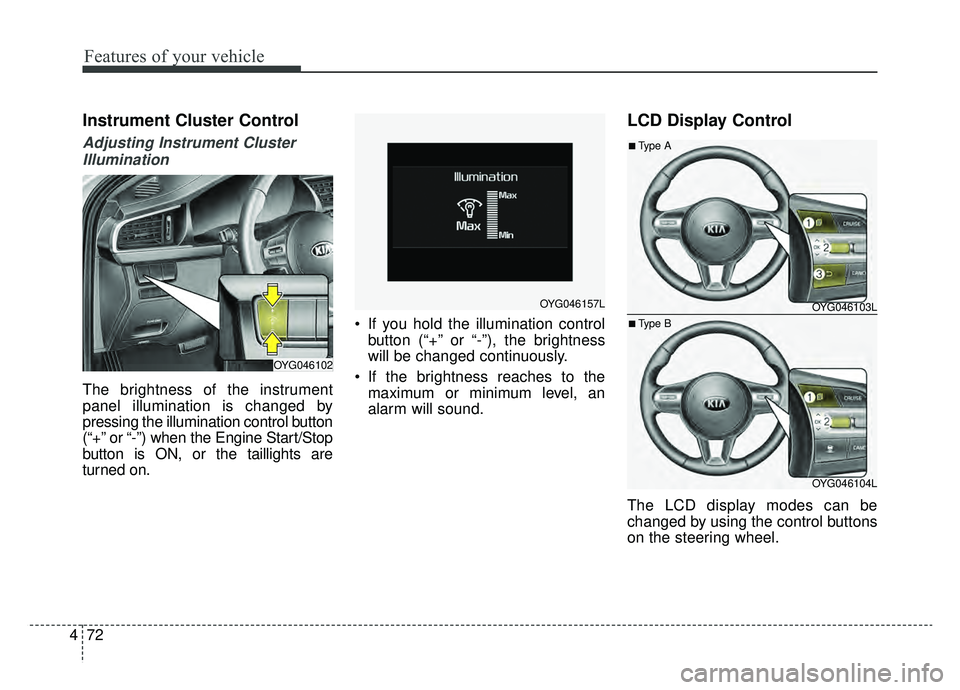
The brightness of the instrument
panel illumination is changed by
pressing the illumination control button
(“+” or “-”) when the Engine Start/Stop
button is ON, or the taillights are
turned on. If you hold the illumination control
button (“+” or “-”), the brightness
will be changed continuously.
If the brightness reaches to the maximum or minimum level, an
alarm will sound.
LCD Display Control
The LCD display modes can be
changed by using the control buttons
on the steering wheel.
OYG046102
OYG046157LOYG046103L
OYG046104L
■Type A
■Type B
Page 213 of 518
4131
Features of your vehicle
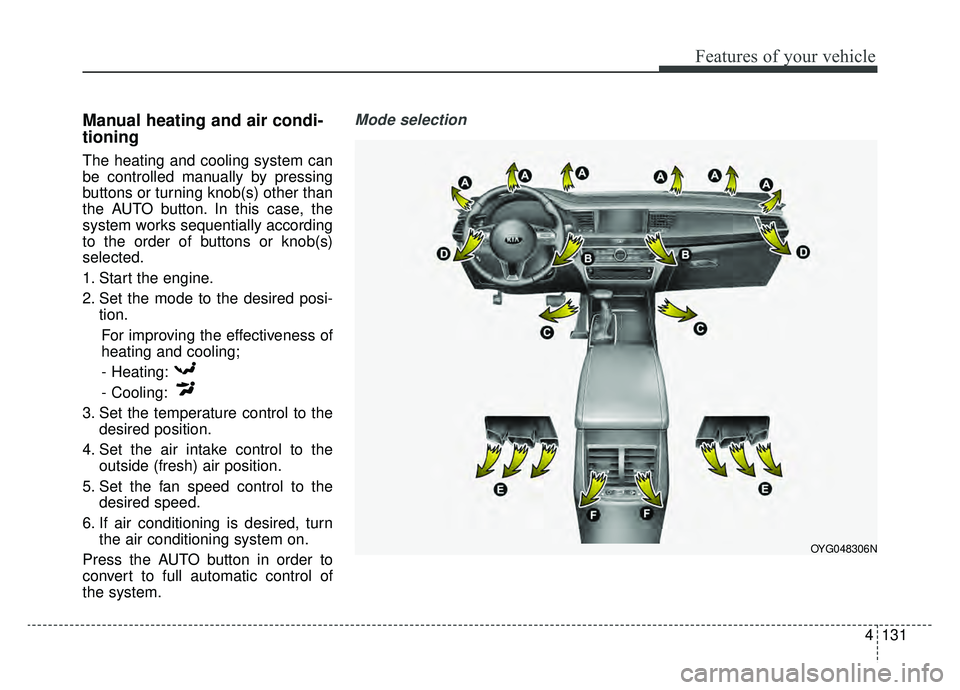
Manual heating and air condi-
tioning
The heating and cooling system can
be controlled manually by pressing
buttons or turning knob(s) other than
the AUTO button. In this case, the
system works sequentially according
to the order of buttons or knob(s)
selected.
1. Start the engine.
2. Set the mode to the desired posi-tion.
For improving the effectiveness of
heating and cooling;- Heating:
- Cooling:
3. Set the temperature control to the desired position.
4. Set the air intake control to the outside (fresh) air position.
5. Set the fan speed control to the desired speed.
6. If air conditioning is desired, turn the air conditioning system on.
Press the AUTO button in order to
convert to full automatic control of
the system.
Mode selection
OYG048306N
Page 218 of 518
Features of your vehicle
136
4
Air conditioning
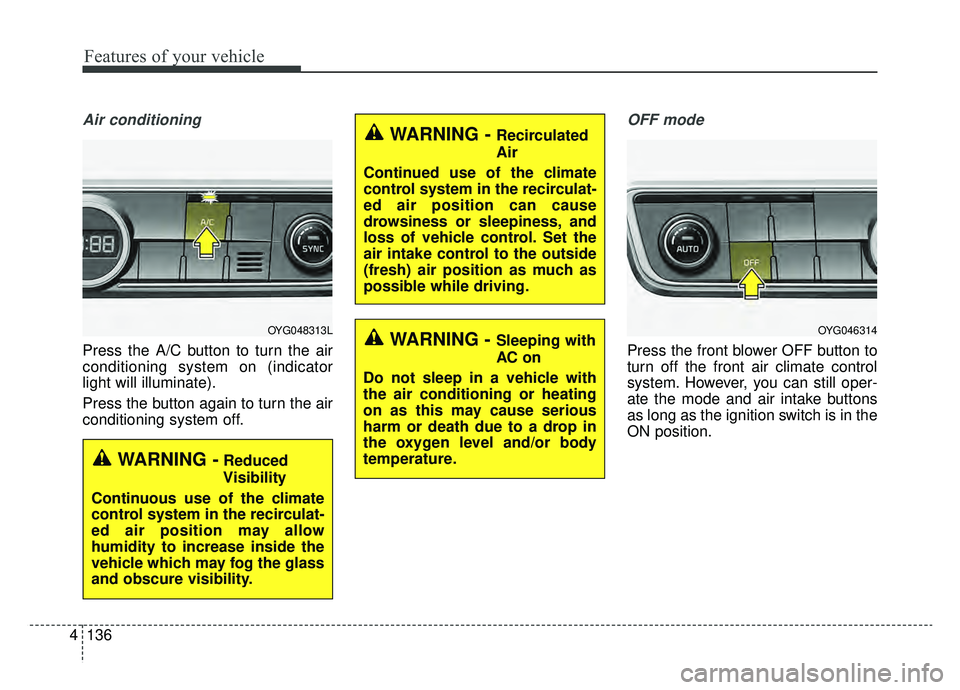
Press the A/C button to turn the air
conditioning system on (indicator
light will illuminate).
Press the button again to turn the air
conditioning system off.
OFF mode
Press the front blower OFF button to
turn off the front air climate control
system. However, you can still oper-
ate the mode and air intake buttons
as long as the ignition switch is in the
ON position.
OYG048313L
WARNING -Reduced
Visibility
Continuous use of the climate
control system in the recirculat-
ed air position may allow
humidity to increase inside the
vehicle which may fog the glass
and obscure visibility.
WARNING - Recirculated
Air
Continued use of the climate
control system in the recirculat-
ed air position can cause
drowsiness or sleepiness, and
loss of vehicle control. Set the
air intake control to the outside
(fresh) air position as much as
possible while driving.
WARNING - Sleeping with
AC on
Do not sleep in a vehicle with
the air conditioning or heating
on as this may cause serious
harm or death due to a drop in
the oxygen level and/or body
temperature.OYG046314
Page 243 of 518

4161
Features of your vehicle
Steering wheel audio controls
(if equipped)
The steering wheel may incorporate
audio control buttons.
VOLUME ( / ) (1)
Press the lever upward ( ) toincrease the volume.
Press the lever downward ( ) to decrease the volume.
SEEK/PRESET ( / ) (2)
The SEEK/PRESET lever has differ-
ent functions based on the system
mode. For the following functions the
lever should be pressed for 0.8 sec-
onds or more.
RADIO mode
It will function as the AUTO SEEK
select button.
CD/USB/ iPod
®mode
It will function as the FF/REW button.
If the SEEK/PRESET button is
pressed for less than 0.8 seconds, it
will work as follows in each mode. RADIO mode
It will function as the PRESET STA-
TION buttons.
USB/iPod
®mode
It will function as TRACK UP/DOWN
button.
MODE ( ) (3)
Press the button to change audio
source.
FM
➟AM ➟ SXM ➟USB/iPod®➟
AUX ➟Bluetooth®wireless technolo-
gy audio
MUTE ( ) (4)
Press the button to mute the sound.
Press the button to turn off the microphone during a telephone
call.
Detailed information for audio control
buttons are described in the following
pages in this section.CAUTION
Do not operate audio remote control buttons simultaneously.
OYG048422N
Page 514 of 518

I7
Index
Lighting. . . . . . . . . . . . . . . . . . . . . . . . . . . . . . . . . . . . \
4-113Battery saver function . . . . . . . . . . . . . . . . . . . . . . 4-113
Check headlight . . . . . . . . . . . . . . . . . . . . . . . . . . . 4-119
Front fog light . . . . . . . . . . . . . . . . . . . . . . . . . . . . 4-118
Headlight leveling device . . . . . . . . . . . . . . . . . . . . 4-119
High beam assist . . . . . . . . . . . . . . . . . . . . . . . . . . 4-116
High beam operation . . . . . . . . . . . . . . . . . . . . . . . 4-115
Lighting control . . . . . . . . . . . . . . . . . . . . . . . . . . . 4-113
Turn signals and lane change signals . . . . . . . . . . . 4-118
Luggage volume . . . . . . . . . . . . . . . . . . . . . . . . . . . . . . . 8-5
Maintenance services . . . . . . . . . . . . . . . . . . . . . . . . . . . 7-4 Owner maintenance precautions . . . . . . . . . . . . . . . . 7-5
Owner’s responsibility . . . . . . . . . . . . . . . . . . . . . . . . 7-4
Mirrors . . . . . . . . . . . . . . . . . . . . . . . . . . . . . . . . . . . . \
. 4-54 Automatic-dimming function . . . . . . . . . . . . . . . . . . 4-61
Compass function . . . . . . . . . . . . . . . . . . . . . . . . . . . 4-62
Erasing HomeLink
®buttons . . . . . . . . . . . . . . . . . . 4-67
Erasing programmed HomeLink buttons . . . . . . . . . 4-58
Gate operator & Canadian programming. . . . . . . . . 4-66
Inside rearview mirror . . . . . . . . . . . . . . . . . . . . . . . 4-54
Operating HomeLink
®. . . . . . . . . . . . . . . . . . . . . . . 4-66
Outside rearview mirror . . . . . . . . . . . . . . . . . . . . . . 4-68
Programming HomeLink
®. . . . . . . . . . . . . . . . . . . . 4-64
Reprogramming a single HomeLink®button . . . . . 4-67
Rolling code programming . . . . . . . . . . . . . . . . . . . 4-65 Mirrors
Standard programming . . . . . . . . . . . . . . . . . . . . . . . 4-64
Online factory authorized manuals (U.S. only) . . . . . . 8-14 Electrical troubleshooting manual . . . . . . . . . . . . . . 8-14
Owner's manual . . . . . . . . . . . . . . . . . . . . . . . . . . . . 8-14
Service manual . . . . . . . . . . . . . . . . . . . . . . . . . . . . . 8-14
Owner maintenance . . . . . . . . . . . . . . . . . . . . . . . . . . . . 7-6 Owner maintenance schedule. . . . . . . . . . . . . . . . . . . 7-6
Panoramic sunroof . . . . . . . . . . . . . . . . . . . . . . . . . . . . 4-43 Closing the sunroof . . . . . . . . . . . . . . . . . . . . . . . . . 4-47
Resetting the sunroof . . . . . . . . . . . . . . . . . . . . . . . . 4-48
Sliding the sunroof . . . . . . . . . . . . . . . . . . . . . . . . . . 4-45
Sunroof open warning . . . . . . . . . . . . . . . . . . . . . . . 4-44
Sunshade. . . . . . . . . . . . . . . . . . . . . . . . . . . . . . . . . . 4-45\
Tilting the sunroof . . . . . . . . . . . . . . . . . . . . . . . . . . 4-47
Parking brake . . . . . . . . . . . . . . . . . . . . . . . . . . . . . . . . 7-25 Checking the parking brake . . . . . . . . . . . . . . . . . . . 7-25
Parking Distance Warning-Reverse (PDW-R) . . . . . . 4-107 Non-operational conditions of parking distance warning-reverse . . . . . . . . . . . . . . . . . . . . . . . . . . 4-108
Operation of the parking distance warning-reverse . . . . . . . . . . . . . . . . . . . . . . . . . . 4-107
M
O
P