cruise control KIA CADENZA 2019 Owner's Manual
[x] Cancel search | Manufacturer: KIA, Model Year: 2019, Model line: CADENZA, Model: KIA CADENZA 2019Pages: 518, PDF Size: 11.08 MB
Page 310 of 518
Driving your vehicle
64
5
Vehicle to vehicle distance
setting (Smart cruise control
system)
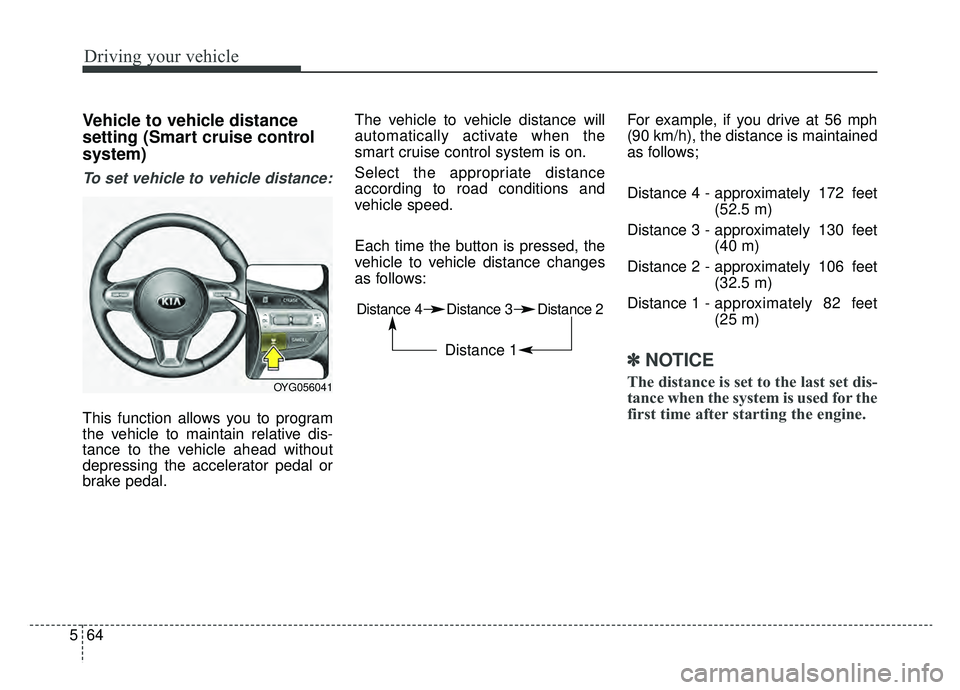
To set vehicle to vehicle distance:
This function allows you to program
the vehicle to maintain relative dis-
tance to the vehicle ahead without
depressing the accelerator pedal or
brake pedal. The vehicle to vehicle distance will
automatically activate when the
smart cruise control system is on.
Select the appropriate distance
according to road conditions and
vehicle speed.
Each time the button is pressed, the
vehicle to vehicle distance changes
as follows:
For example, if you drive at 56 mph
(90 km/h), the distance is maintained
as follows;
Distance 4 - approximately 172 feet
(52.5 m)
Distance 3 - approximately 130 feet (40 m)
Distance 2 - approximately 106 feet (32.5 m)
Distance 1 - approximately 82 feet
(25 m)
✽ ✽
NOTICE
The distance is set to the last set dis-
tance when the system is used for the
first time after starting the engine.OYG056041
Distance 4 Distance 3 Distance 2
Distance 1
Page 313 of 518
567
Driving your vehicle
If you push the smart cruise controltoggle switch (RES+ or SET-) while
Auto Hold and smart cruise control
is operating the Auto Hold will be
released regardless of accelerator
pedal operation and the vehicle will
start to move. The AUTO HOLD
indicator changes from green to
white. (if equipped with EPB
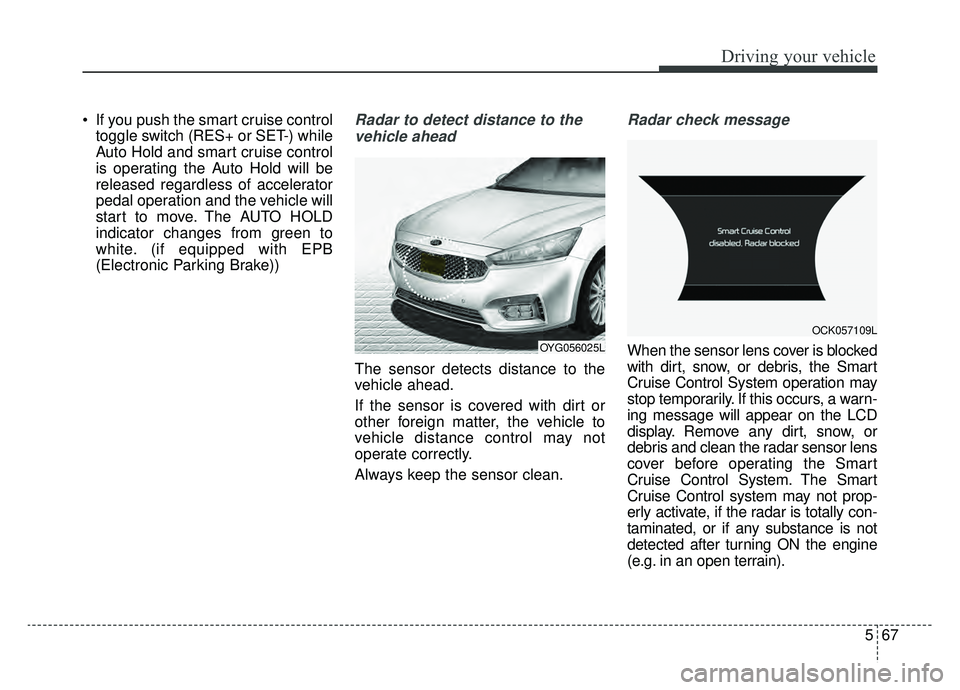
(Electronic Parking Brake))Radar to detect distance to the
vehicle ahead
The sensor detects distance to the
vehicle ahead.
If the sensor is covered with dirt or
other foreign matter, the vehicle to
vehicle distance control may not
operate correctly.
Always keep the sensor clean.
Radar check message
When the sensor lens cover is blocked
with dirt, snow, or debris, the Smart
Cruise Control System operation may
stop temporarily. If this occurs, a warn-
ing message will appear on the LCD
display. Remove any dirt, snow, or
debris and clean the radar sensor lens
cover before operating the Smart
Cruise Control System. The Smart
Cruise Control system may not prop-
erly activate, if the radar is totally con-
taminated, or if any substance is not
detected after turning ON the engine
(e.g. in an open terrain).OYG056025L
OCK057109L
Page 314 of 518
Driving your vehicle
68
5
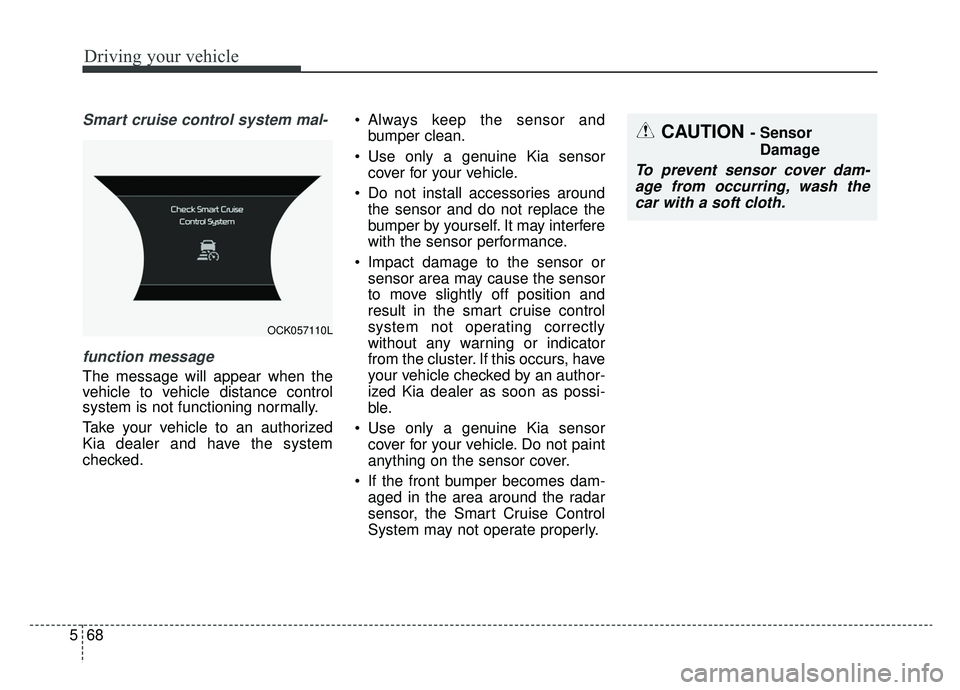
Smart cruise control system mal-
function message
The message will appear when the
vehicle to vehicle distance control
system is not functioning normally.
Take your vehicle to an authorized
Kia dealer and have the system
checked. Always keep the sensor and
bumper clean.
Use only a genuine Kia sensor cover for your vehicle.
Do not install accessories around the sensor and do not replace the
bumper by yourself. It may interfere
with the sensor performance.
Impact damage to the sensor or sensor area may cause the sensor
to move slightly off position and
result in the smart cruise control
system not operating correctly
without any warning or indicator
from the cluster. If this occurs, have
your vehicle checked by an author-
ized Kia dealer as soon as possi-
ble.
Use only a genuine Kia sensor cover for your vehicle. Do not paint
anything on the sensor cover.
If the front bumper becomes dam- aged in the area around the radar
sensor, the Smart Cruise Control
System may not operate properly.
OCK057110L
CAUTION - Sensor
Damage
To prevent sensor cover dam-age from occurring, wash thecar with a soft cloth.
Page 315 of 518
569
Driving your vehicle
To adjust the sensitivity of
smart cruise control system
The sensitivity of vehicle speed when
following the front vehicle to maintain
the set distance can be adjusted. Go
to the User Settings Mode (Driving
Assist) and select SCC (Smart
Cruise Control). You may select one
of the three stages you prefer.
Slow:Vehicle speed to the vehicle ahead
to maintain the set distance is
slower than normal speed.
Normal: Vehicle speed to the vehicle ahead
to maintain the set distance is nor-
mal
Fast: Vehicle speed to the vehicle ahead
to maintain the set distance is
faster than normal speed.
✽ ✽ NOTICE
The system remembers the last
selected mode.
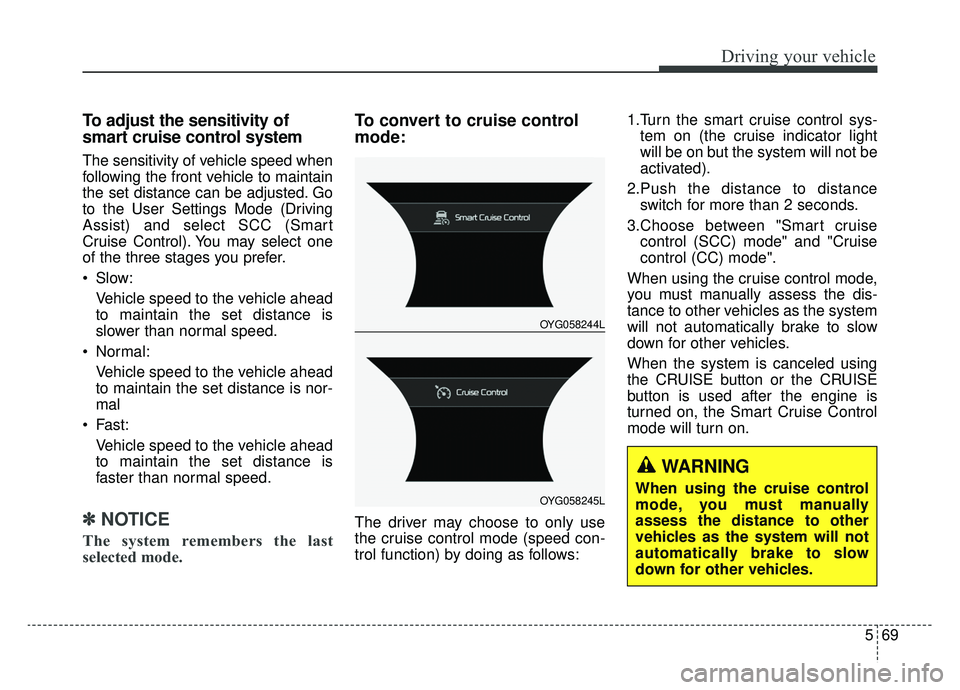
To convert to cruise control
mode:
The driver may choose to only use
the cruise control mode (speed con-
trol function) by doing as follows: 1.Turn the smart cruise control sys-
tem on (the cruise indicator light
will be on but the system will not be
activated).
2.Push the distance to distance switch for more than 2 seconds.
3.Choose between "Smart cruise control (SCC) mode" and "Cruise
control (CC) mode".
When using the cruise control mode,
you must manually assess the dis-
tance to other vehicles as the system
will not automatically brake to slow
down for other vehicles.
When the system is canceled using
the CRUISE button or the CRUISE
button is used after the engine is
turned on, the Smart Cruise Control
mode will turn on.
OYG058244L
OYG058245L
WARNING
When using the cruise control
mode, you must manually
assess the distance to other
vehicles as the system will not
automatically brake to slow
down for other vehicles.
Page 316 of 518
Driving your vehicle
70
5
Limitations of the system
The smart cruise control system may
have limits to its ability to detect dis-
tance to the vehicle ahead due to
road and traffic conditions.
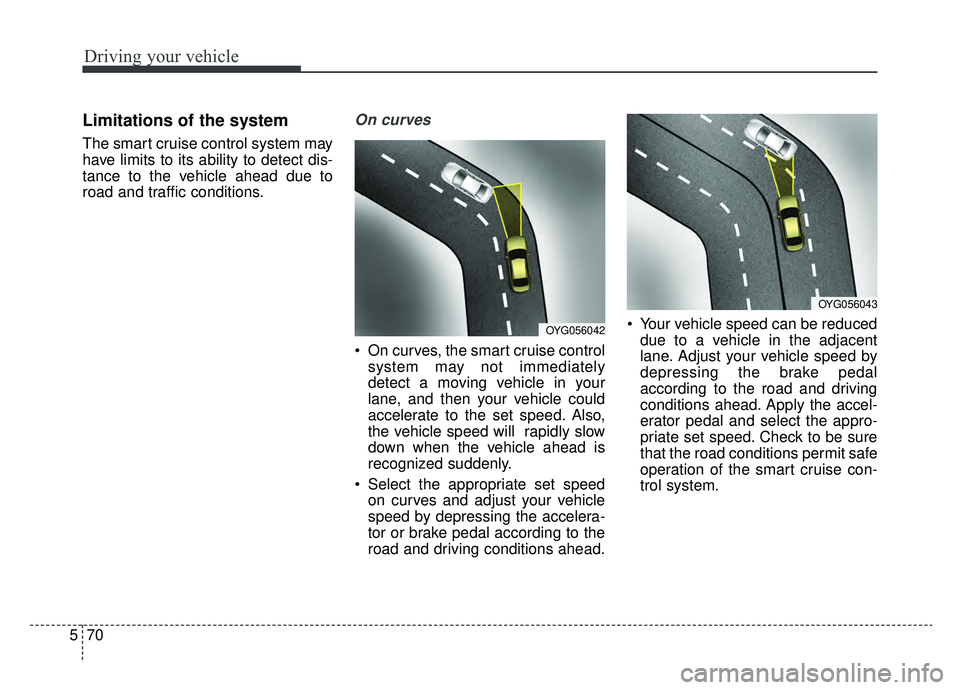
On curves
On curves, the smart cruise control
system may not immediately
detect a moving vehicle in your
lane, and then your vehicle could
accelerate to the set speed. Also,
the vehicle speed will rapidly slow
down when the vehicle ahead is
recognized suddenly.
Select the appropriate set speed on curves and adjust your vehicle
speed by depressing the accelera-
tor or brake pedal according to the
road and driving conditions ahead. Your vehicle speed can be reduced
due to a vehicle in the adjacent
lane. Adjust your vehicle speed by
depressing the brake pedal
according to the road and driving
conditions ahead. Apply the accel-
erator pedal and select the appro-
priate set speed. Check to be sure
that the road conditions permit safe
operation of the smart cruise con-
trol system.
OYG056043
OYG056042
Page 317 of 518
571
Driving your vehicle
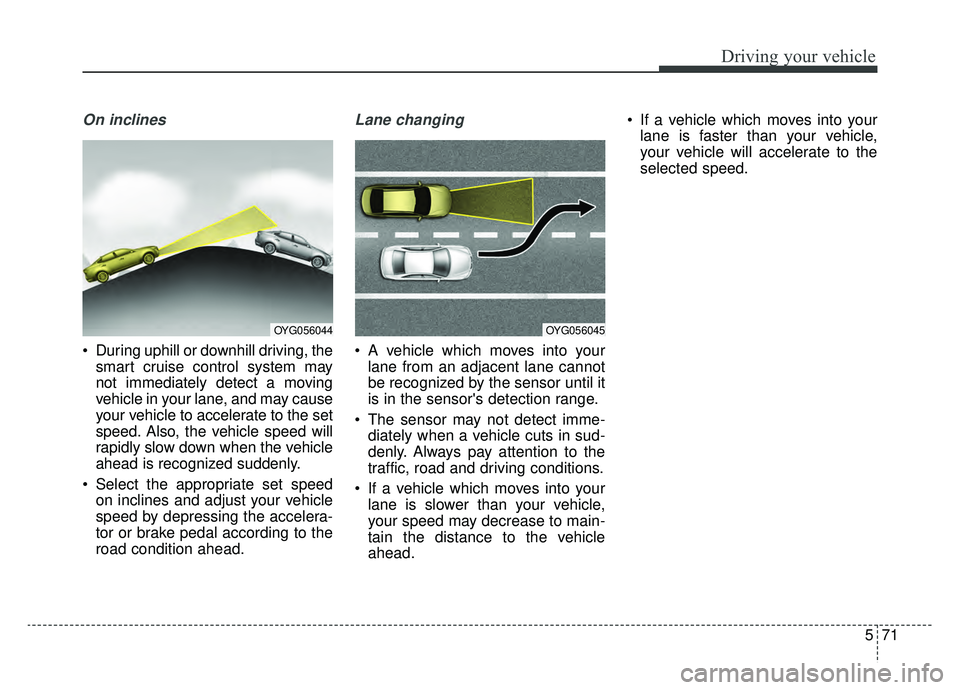
On inclines
During uphill or downhill driving, thesmart cruise control system may
not immediately detect a moving
vehicle in your lane, and may cause
your vehicle to accelerate to the set
speed. Also, the vehicle speed will
rapidly slow down when the vehicle
ahead is recognized suddenly.
Select the appropriate set speed on inclines and adjust your vehicle
speed by depressing the accelera-
tor or brake pedal according to the
road condition ahead.
Lane changing
A vehicle which moves into yourlane from an adjacent lane cannot
be recognized by the sensor until it
is in the sensor's detection range.
The sensor may not detect imme- diately when a vehicle cuts in sud-
denly. Always pay attention to the
traffic, road and driving conditions.
If a vehicle which moves into your lane is slower than your vehicle,
your speed may decrease to main-
tain the distance to the vehicle
ahead. If a vehicle which moves into your
lane is faster than your vehicle,
your vehicle will accelerate to the
selected speed.
OYG056045OYG056044
Page 320 of 518
Driving your vehicle
74
5
- After an engine start, please stop
for several seconds. If system ini-
tialization is not completed, the
smart cruise control system will not
operate.
- After an engine start, if the sensor cover is obscured with foreign sub-
stances, there is a possibility that
the smart cruise control system
may not work.
- The following conditions may cause a malfunction: over-loading
the liftgate, suspension modifica-
tion, tire replacement with unau-
thorized tires or tires with different
tread wear and pressure levels.
- Keep a safe distance according to road conditions and vehicle speed.
If the vehicle to vehicle distance is
too close during a high-speed driv-
ing, a serious collision may result.
- The smart cruise control system cannot recognize a stopped vehi-
cle, pedestrians or an oncoming
vehicle. Always look ahead cau-
tiously to prevent unexpected and
sudden situations from occurring.
WARNING - Inclines &
Towing
Do not use smart cruise control
system on steep inclines or
when towing another vehicle or
trailer since such extreme load-
ing can interfere with your vehi-
cle's ability to maintain the
selected speed.WARNING
- Safe Use of smart cruise control system
The smart cruise control system
can provide you with an addition-
al level of safety and fatigue
reduction. However you must
maintain careful observation of
the roadway in front and around
you and maintain control of your
vehicle and spacing around
other vehicles as you normally
would. For example, this will
require you to apply the brakes
as needed when coming upon a
slower moving vehicle, or when a
vehicle from another lane drives
quickly in front of you.
WARNING - Emergency Stops
The smart cruise control sys-
tem cannot guarantee the stop
for every emergency situation.
If an emergency stop is neces-
sary, you must apply the brakes.
Page 321 of 518
575
Driving your vehicle
- When other vehicles are changinglanes in front of you frequently,
there may be a delay in the sys-
tem's reaction. Always look ahead
cautiously to prevent unexpected
and sudden situations from occur-
ring.
- The smart cruise control system is a supplementary system only and
is not a substitute for safe driving-
practices. It is the responsibility of
the driver to always check the
speed and the distance to the vehi-
cle ahead.
- Always be aware of the selected speed and vehicle to vehicle dis-
tance.
- Always maintain sufficient braking distance and decelerate your vehi-
cle by applying the brakes if neces-
sary. This device complies with Part 15
of the FCC rules.
Operation is subject to the following
three conditions:
1. This device may not cause harm-
ful interference, and
2. This device must accept any inter- ference received, including inter-
ference that may cause undesired
operation.
3. Changes or modifications not expressly approved by the party
responsible for compliance could
void the user’s authority to operate
the device. Radio frequency radiation expo-
sure information:
This equipment complies with FCC
radiation exposure limits set forth for
an uncontrolled environment.
This equipment should be installed
and operated with minimum distance
of 20 cm between the radiator
(antenna) and your body.
This transmitter must not be co-locat-
ed or operating in conjunction with
any other antenna or transmitter.
Page 326 of 518

Driving your vehicle
80
5
DRIVE MODE Indicator Screen
The DRIVE MODE indicator screen
can be displayed by using the trip com-
puter button on the steering wheel.
DRIVE MODE indicator screen dis-
plays status of current drive mode.
DRIVE MODE button is located on
the lower part of the transmission
lever for selecting drive mode.
If drive mode is selected manually
by the user, the drive mode indica-
tor screen will show user-selected
drive mode. (COMFORT, ECO, or
SPORT)
If SMART MODE is selected by
DRIVE MODE button, the drive
mode indicator screen will show
current drive mode automatically
selected by SMART MODE sys-
tem. (SMART COMFORT, SMART
ECO, or SMART SPORT) When the trip computer mode is
selected to show DRIVE MODE
and the SMART MODE is in oper-
ation, an automatically selected
driving mode SMART ECO,
SMART COMFORT, or SMART
SPORT, will be selected on the
cluster's center.
And right below is the horizontal
driving style gauge which reflects
the driving style in real time.
If you drive carefully and slowly in SMART MODE, the left side of the
driving style gauge will illuminate,
and be automatically shifted to the
SMART ECO MODE.
When the driver accelerates more
frequently, the right side of the driv-
ing style gauge will fill up, and shift
to SMART COMFORT MODE.
In addition, if the rate of accelera-
tion and speed is increased, drive
mode will change to SMART
SPORT MODE. If the auto cruise control function is
operated or the transmission is
shifted to manual mode while
SMART MODE is on, the SMART
MODE will stop temporarily, and
the DRIVE MODE will be displayed
as OFF. The driving style gauge
light will be turned off accordingly.
If the trip computer is not set to show DRIVE MODE indicator
screen, and you want to know the
on/off status of the SMART MODE,
simply check whether the letters
'SMART' appear on the screen or
not (green - ECO MODE, white -
COMFORT MODE, red - SPORT
MODE).
Page 328 of 518
Driving your vehicle
82
5
Attributes of SMART MODE.
If the accelerator pedal is pressed
gently, your vehicle will recognize it
as a economic driving style. After
some time, the system will automat-
ically shift to SMART ECO MODE.
If you press the accelerator pedal frequently in SMART ECO MODE,
the system will automatically shift
to SMART COMFORT MODE.
Even when driving style has not changed from SMART ECO
MODE, if your vehicle is driven
uphill considerably, the system will
detect the gradient. Then, the
SMART system will automatically
change the setting to the SMART
COMFORT MODE temporarily.
Once your vehicle is out of the hilly
ground, your vehicle will automati-
cally return to the SMART ECO
MODE. The SMART system will recognize
repetitive acceleration or steering
and automatically turn to the SMART
SPORT MODE. Your vehicle will run
at a lower gear in SMART SPORT
MODE compared to those in
SMART COMFORT MODE.
The vehicle's start and stop
response rate will become faster.
When the SMART SPORT MODE is activated, and you take your feet
off the accelerator pedal, the vehi-
cle will remain in low gear and you
may sense engine brake. This is
due to necessary preparatory time
for the next acceleration and is for
convenience.
The SMART SPORT MODE is acti- vated only when repetitive acceler-
ation.
The artificial intelligence algorithm will instantly calculate each driver's
style of driving. So if the driver is
changed to a different person, the
algorithm will measure accordingly.
Conditions which Limit SMART
MODE
In following conditions your vehicle will
temporarily stop the SMART Mode
and the indicator light will turn off.
When using the manual transmis- sion operation mode: If the
transaxle system is changed from
automatic to manual, your vehicle
will automatically stop the SMART
MODE.
If transmission operation is
changed from automatic to manu-
al, the vehicle will reflect it and
automatically stop the SMART
MODE.
When the Cruise Control system is turned on:
When the driver sets a target
cruise control speed, your vehicle
will automatically stop the SMART
MODE. (The SMART MODE will
stop not immediately after you
press the cruise control button, but
when the cruise control system
takes control of the vehicle speed.)