cruise control KIA CADENZA 2020 Owner's Guide
[x] Cancel search | Manufacturer: KIA, Model Year: 2020, Model line: CADENZA, Model: KIA CADENZA 2020Pages: 560, PDF Size: 11.37 MB
Page 383 of 560

Driving your vehicle
130 5
Temporary deactivation
The ( ) indicator light changes from
green to white when the steering
wheel control is temporarily deacti-
vated. Even if the steering wheel is
not controlled, the distance between
the vehicle ahead will be maintained.
Speed setting
Automatic speed setting mode
The system enters the automatic
speed setting mode when:
1. The operating conditions are satis-
fied
- ‘AUTO’ indicator will illuminate
green
2. Smart Cruise Control set speed
and the highway speed limit
matches
If the system changes to the auto-
matic speed mode, the ‘AUTO’
symbol will turn green and a chime
will sound. When the highway
speed limit changes, the set speed
automatically changes to the
changed speed limit.Manual speed setting mode
If the speed is set manually using the
RES+ or SET- switch on the steering
wheel, the set speed on the cluster
will turn white and the 'AUTO' symbol
will disappear.
OYG059288
Page 386 of 560

5133
Driving your vehicle
System malfunction
This message shows that there is a
problem with HDA, so have your
vehicle inspected by an authorized
Kia dealer.
✽ ✽
NOTICE
• High Driving Assist is limited in
other countries.
• High Driving Assist only operates
based on the speed limits of the
highway but it does not work with
the speed cameras.
• The time gap could occur between
the navigation speed warning and
system operation.
• The system is not designed to work
on highways other than mentioned
as a controlled access road. The
system automatically cancels
when you leave the highway.
• If there is a problem with
Highway Driving Assist, the sys-
tem cannot be activated in the
Infotainment System screen.
• If your vehicle is 1640 ft. (500 m)
ahead and behind of an open toll-
gate, the system is automatically
canceled. Also, it is converted to
Smart Cruise Control automati-
cally with a pop-up message on the
navigation.
(Continued)(Continued)
• In the automatic speed setting
mode, the vehicle automatically
accelerates or decelerates when
the highway speed limit changes.
• If your vehicle speed exceeds 95
mph (153 km/h), Highway Driving
Assist is automatically canceled.
Also, it is converted to Smart
Cruise Control automatically with
a pop-up message on the naviga-
tion.
• If you enter a rest area on the
highway or a IC/JC (intersec-
tion/junction) without a destina-
tion set, the system is canceled
later than when the vehicle actual-
ly leaves the highway.
ODEP059331N
Page 387 of 560
Driving your vehicle
134
5
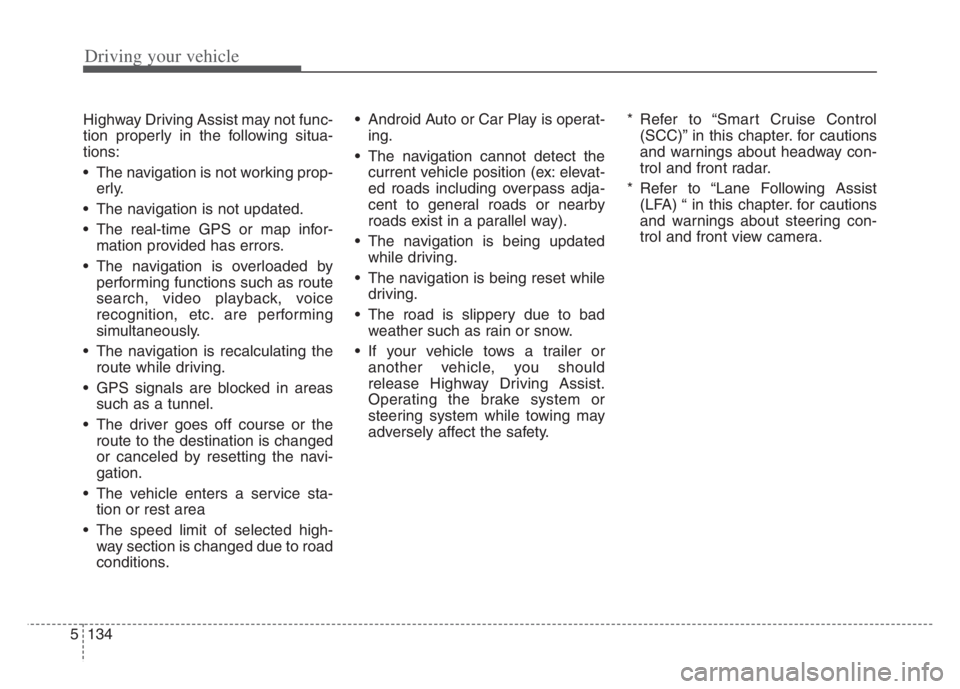
Highway Driving Assist may not func-
tion properly in the following situa-
tions:
The navigation is not working prop-
erly.
The navigation is not updated.
The real-time GPS or map infor- mation provided has errors.
The navigation is overloaded by performing functions such as route
search, video playback, voice
recognition, etc. are performing
simultaneously.
The navigation is recalculating the route while driving.
GPS signals are blocked in areas such as a tunnel.
The driver goes off course or the route to the destination is changed
or canceled by resetting the navi-
gation.
The vehicle enters a service sta- tion or rest area
The speed limit of selected high- way section is changed due to road
conditions. Android Auto or Car Play is operat-
ing.
The navigation cannot detect the current vehicle position (ex: elevat-
ed roads including overpass adja-
cent to general roads or nearby
roads exist in a parallel way).
The navigation is being updated while driving.
The navigation is being reset while driving.
The road is slippery due to bad weather such as rain or snow.
If your vehicle tows a trailer or another vehicle, you should
release Highway Driving Assist.
Operating the brake system or
steering system while towing may
adversely affect the safety. * Refer to “Smart Cruise Control
(SCC)” in this chapter. for cautions
and warnings about headway con-
trol and front radar.
* Refer to “Lane Following Assist (LFA) “ in this chapter. for cautions
and warnings about steering con-
trol and front view camera.
Page 502 of 560
757
Maintenance
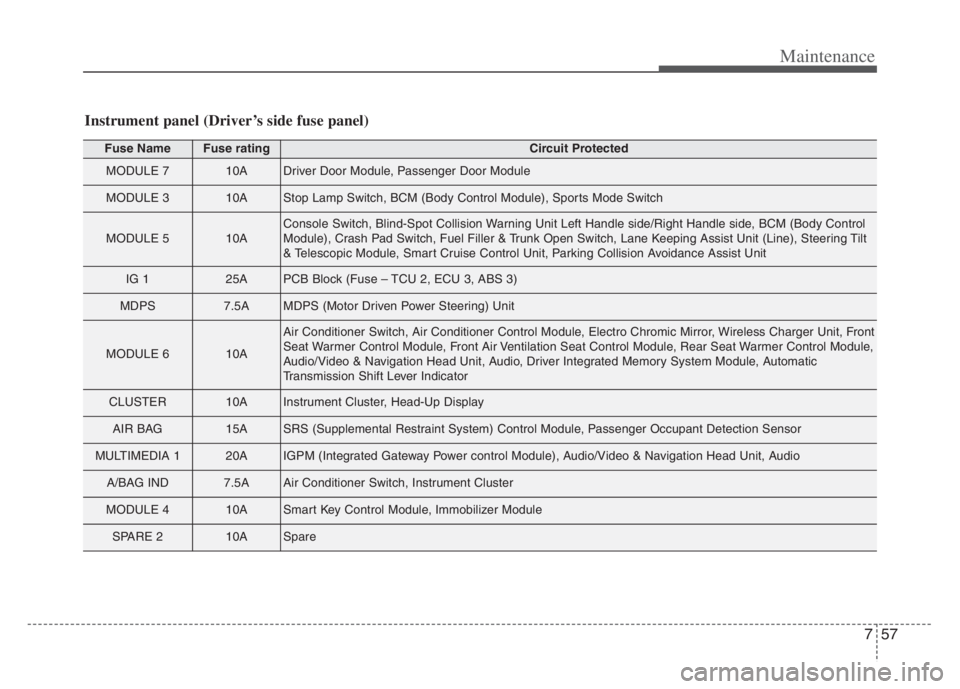
Fuse NameFuse ratingCircuit Protected
MODULE 710ADriver Door Module, Passenger Door Module
MODULE 310AStop Lamp Switch, BCM (Body Control Module), Sports Mode Switch
MODULE 510AConsole Switch, Blind-Spot Collision Warning Unit Left Handle side/Right Handle side, BCM (Body Control
Module), Crash Pad Switch, Fuel Filler & Trunk Open Switch, Lane Keeping Assist Unit (Line), Steering Tilt
& Telescopic Module, Smart Cruise Control Unit, Parking Collision Avoidance Assist Unit
IG 125APCB Block (Fuse – TCU 2, ECU 3, ABS 3)
MDPS7.5AMDPS (Motor Driven Power Steering) Unit
MODULE 610A
Air Conditioner Switch, Air Conditioner Control Module, Electro Chromic Mirror, Wireless Charger Unit, Front
Seat Warmer Control Module, Front Air Ventilation Seat Control Module, Rear Seat Warmer Control Module,
Audio/Video & Navigation Head Unit, Audio, Driver Integrated Memory System Module, Automatic
Transmission Shift Lever Indicator
CLUSTER10AInstrument Cluster, Head-Up Display
AIR BAG15ASRS (Supplemental Restraint System) Control Module, Passenger Occupant Detection Sensor
MULTIMEDIA 120AIGPM (Integrated Gateway Power control Module), Audio/Video & Navigation Head Unit, Audio
A/BAG IND7.5AAir Conditioner Switch, Instrument Cluster
MODULE 410ASmart Key Control Module, Immobilizer Module
SPARE 210ASpare
Instrument panel (Driver’s side fuse panel)
Page 507 of 560
Maintenance
62 7
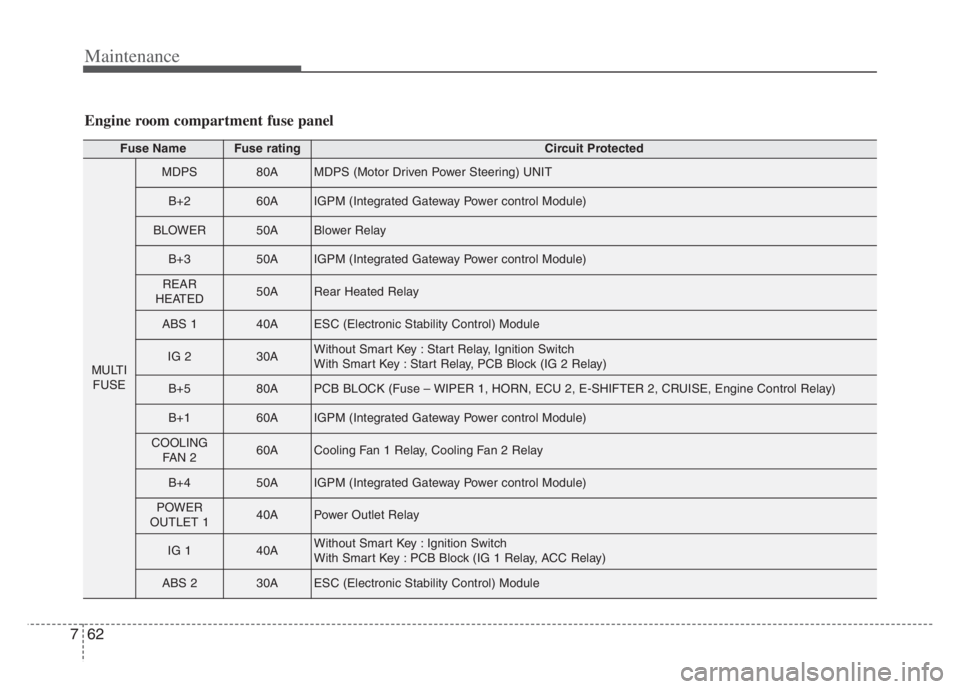
Fuse NameFuse ratingCircuit Protected
MULTI
FUSE
MDPS80AMDPS (Motor Driven Power Steering) UNIT
B+260AIGPM (Integrated Gateway Power control Module)
BLOWER50ABlower Relay
B+350AIGPM (Integrated Gateway Power control Module)
REAR
HEATED50ARear Heated Relay
ABS 140AESC (Electronic Stability Control) Module
IG 230AWithout Smart Key : Start Relay, Ignition Switch
With Smart Key : Start Relay, PCB Block (IG 2 Relay)
B+580APCB BLOCK (Fuse – WIPER 1, HORN, ECU 2, E-SHIFTER 2, CRUISE, Engine Control Relay)
B+160AIGPM (Integrated Gateway Power control Module)
COOLING
FAN 260ACooling Fan 1 Relay, Cooling Fan 2 Relay
B+450AIGPM (Integrated Gateway Power control Module)
POWER
OUTLET 140APower Outlet Relay
IG 140AWithout Smart Key : Ignition Switch
With Smart Key : PCB Block (IG 1 Relay, ACC Relay)
ABS 230AESC (Electronic Stability Control) Module
Engine room compartment fuse panel
Page 509 of 560
Maintenance
64 7
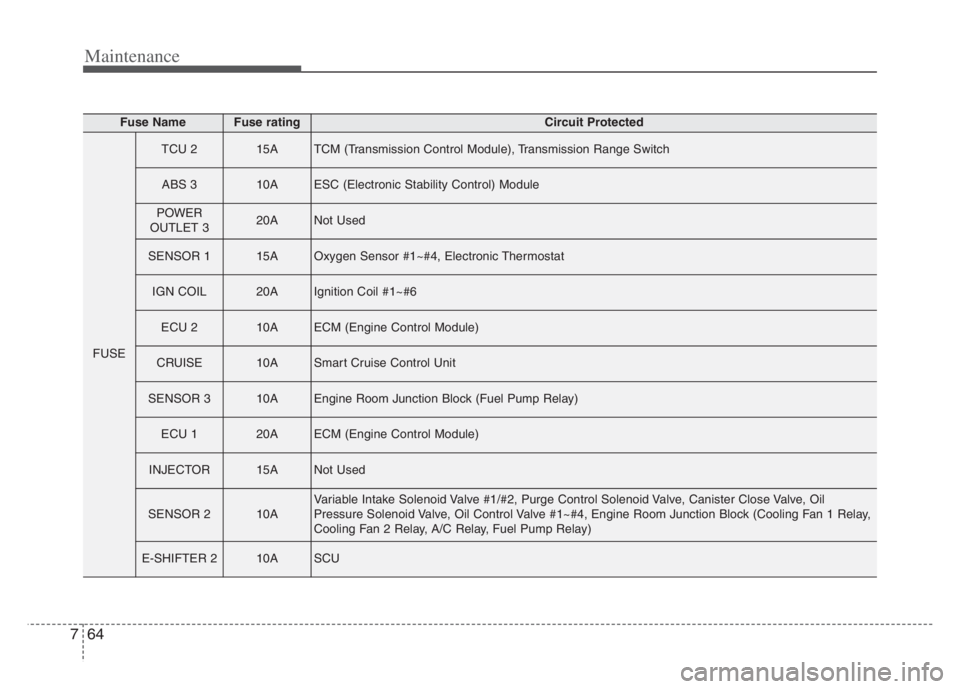
Fuse NameFuse ratingCircuit Protected
FUSE
TCU 215ATCM (Transmission Control Module), Transmission Range Switch
ABS 310AESC (Electronic Stability Control) Module
POWER
OUTLET 320ANot Used
SENSOR 115AOxygen Sensor #1~#4, Electronic Thermostat
IGN COIL20AIgnition Coil #1~#6
ECU 210AECM (Engine Control Module)
CRUISE10ASmart Cruise Control Unit
SENSOR 310AEngine Room Junction Block (Fuel Pump Relay)
ECU 120AECM (Engine Control Module)
INJECTOR15ANot Used
SENSOR 210AVariable Intake Solenoid Valve #1/#2, Purge Control Solenoid Valve, Canister Close Valve, Oil
Pressure Solenoid Valve, Oil Control Valve #1~#4, Engine Room Junction Block (Cooling Fan 1 Relay,
Cooling Fan 2 Relay, A/C Relay, Fuel Pump Relay)
E-SHIFTER 210ASCU
Page 556 of 560
I7
Index
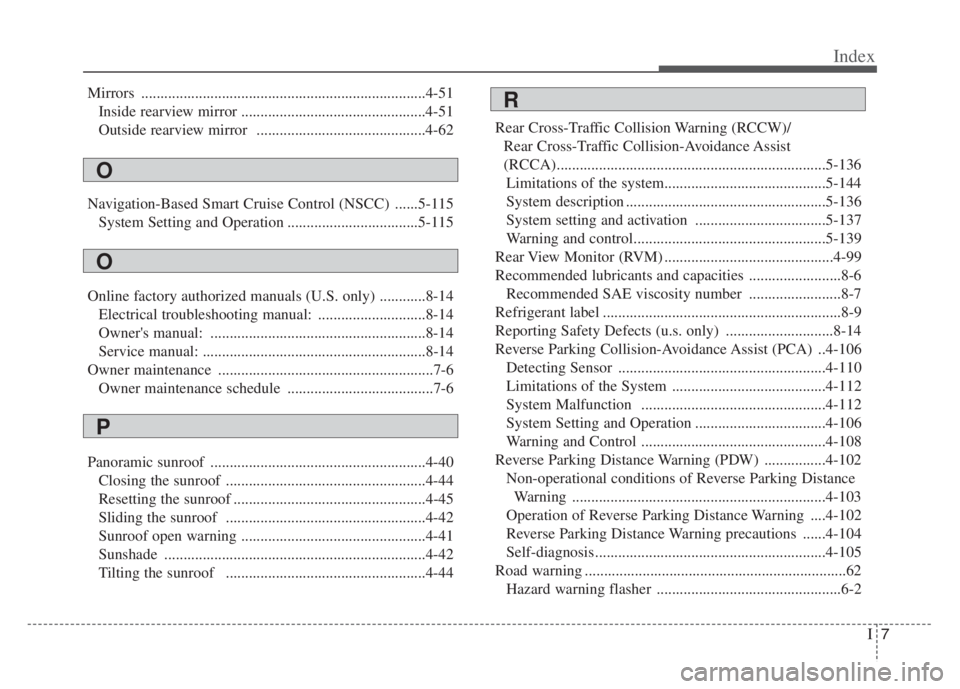
Mirrors ..........................................................................4-51
Inside rearview mirror ................................................4-51
Outside rearview mirror ............................................4-62
Navigation-Based Smart Cruise Control (NSCC) ......5-115
System Setting and Operation ..................................5-115
Online factory authorized manuals (U.S. only) ............8-14
Electrical troubleshooting manual: ............................8-14
Owner's manual: ........................................................8-14
Service manual: ..........................................................8-14
Owner maintenance ........................................................7-6
Owner maintenance schedule ......................................7-6
Panoramic sunroof ........................................................4-40
Closing the sunroof ....................................................4-44
Resetting the sunroof ..................................................4-45
Sliding the sunroof ....................................................4-42
Sunroof open warning ................................................4-41
Sunshade ....................................................................4-42
Tilting the sunroof ....................................................4-44Rear Cross-Traffic Collision Warning (RCCW)/
Rear Cross-Traffic Collision-Avoidance Assist
(RCCA)......................................................................5-136
Limitations of the system..........................................5-144
System description ....................................................5-136
System setting and activation ..................................5-137
Warning and control..................................................5-139
Rear View Monitor (RVM) ............................................4-99
Recommended lubricants and capacities ........................8-6
Recommended SAE viscosity number ........................8-7
Refrigerant label ..............................................................8-9
Reporting Safety Defects (u.s. only) ............................8-14
Reverse Parking Collision-Avoidance Assist (PCA) ..4-106
Detecting Sensor ......................................................4-110
Limitations of the System ........................................4-112
System Malfunction ................................................4-112
System Setting and Operation ..................................4-106
Warning and Control ................................................4-108
Reverse Parking Distance Warning (PDW) ................4-102
Non-operational conditions of Reverse Parking Distance
Warning ..................................................................4-103
Operation of Reverse Parking Distance Warning ....4-102
Reverse Parking Distance Warning precautions ......4-104
Self-diagnosis............................................................4-105
Road warning ....................................................................62
Hazard warning flasher ................................................6-2
O
P
R
O
Page 557 of 560
Index
8I
Scheduled maintenance service ......................................7-8
Seat ..................................................................................3-4
Driver position memory system (for power seat) ......3-10
Front seat adjustment - power ......................................3-7
Headrest (for front seat) ..............................................3-12
Rear seat adjustment ..................................................3-14
Seatback pocket ..........................................................3-14
Seat belts ........................................................................3-18
Care of seat belts ........................................................3-27
Pre-tensioner seat belt ................................................3-23
Seat belt precautions ..................................................3-25
Seat belt restraint system ............................................3-18
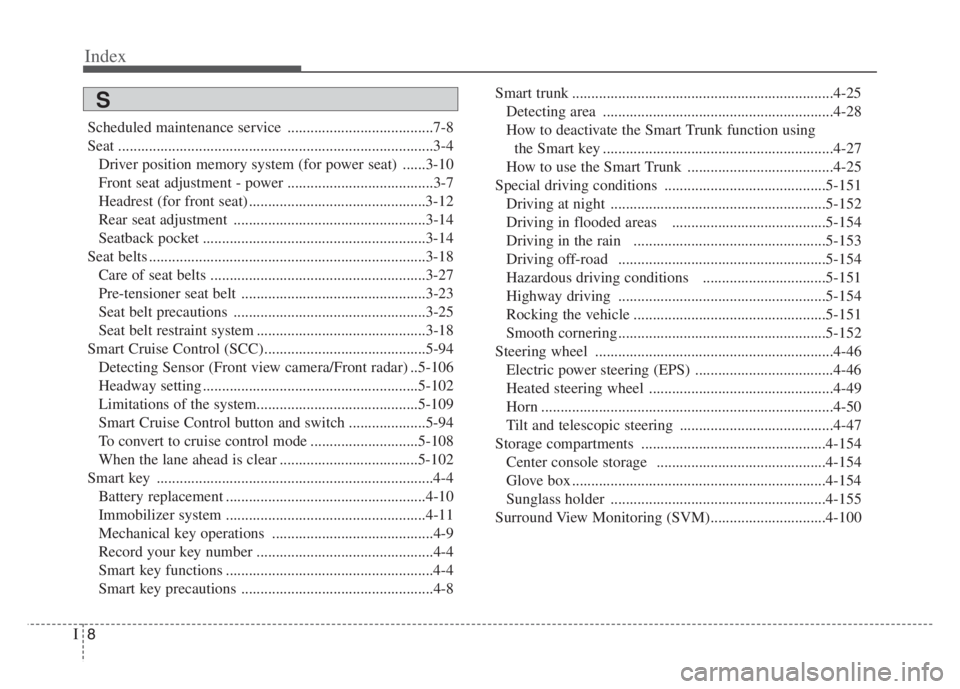
Smart Cruise Control (SCC)..........................................5-94
Detecting Sensor (Front view camera/Front radar) ..5-106
Headway setting ........................................................5-102
Limitations of the system..........................................5-109
Smart Cruise Control button and switch ....................5-94
To convert to cruise control mode ............................5-108
When the lane ahead is clear ....................................5-102
Smart key ........................................................................4-4
Battery replacement ....................................................4-10
Immobilizer system ....................................................4-11
Mechanical key operations ..........................................4-9
Record your key number ..............................................4-4
Smart key functions ......................................................4-4
Smart key precautions ..................................................4-8Smart trunk ....................................................................4-25
Detecting area ............................................................4-28
How to deactivate the Smart Trunk function using
the Smart key ............................................................4-27
How to use the Smart Trunk ......................................4-25
Special driving conditions ..........................................5-151
Driving at night ........................................................5-152
Driving in flooded areas ........................................5-154
Driving in the rain ..................................................5-153
Driving off-road ......................................................5-154
Hazardous driving conditions ................................5-151
Highway driving ......................................................5-154
Rocking the vehicle ..................................................5-151
Smooth cornering ......................................................5-152
Steering wheel ..............................................................4-46
Electric power steering (EPS) ....................................4-46
Heated steering wheel ................................................4-49
Horn ............................................................................4-50
Tilt and telescopic steering ........................................4-47
Storage compartments ................................................4-154
Center console storage ............................................4-154
Glove box ..................................................................4-154
Sunglass holder ........................................................4-155
Surround View Monitoring (SVM)..............................4-100
S