cruise control KIA CADENZA 2020 Owner's Manual
[x] Cancel search | Manufacturer: KIA, Model Year: 2020, Model line: CADENZA, Model: KIA CADENZA 2020Pages: 560, PDF Size: 11.37 MB
Page 362 of 560

5109
Driving your vehicle
1. Turn Smart Cruise Control on (the
cruise indicator light will be on but
the system will not be activated).
2. Push the distance to distance
switch for more than 2 seconds.
3. Choose between "Smart Cruise
Control" and "Cruise Control".
When the system is canceled using
the CRUISE button or the CRUISE
button is used after the engine is
turned on, the Smart Cruise Control
mode will turn on.Limitations of the system
Smart Cruise Control may have lim-
its to its ability to detect distance to
the vehicle ahead due to road and
traffic conditions.
On curves
On curves, Smart Cruise Control
may not detect a moving vehicle in
your lane, and then your vehicle
could accelerate to the set speed.
Also, the vehicle speed will rapidly
down when the vehicle ahead is
recognized suddenly.
Select the appropriate set speed
on curves and adjust your vehicle
speed by depressing the accelera-
tor or brake pedal according to the
road condition ahead and driving
condition.WARNING
When using the cruise control
mode, you must manually
adjust the distance to other
vehicles as the system will not
automatically brake to slow
down for other vehicles.
OHM059349L
Page 363 of 560

Driving your vehicle
110 5
Your vehicle speed can be reduced
due to a vehicle in the adjacent
lane. Adjust your vehicle speed by
depressing the brake pedal
according to the road condition
ahead and driving condition. Apply
the accelerator pedal and select
the appropriate set speed. Check
to be sure that the road conditions
permit safe operation of the smart
cruise control.
On inclines
During uphill or downhill driving,
Smart Cruise Control may not
detect a moving vehicle in your
lane, and cause your vehicle to
accelerate to the set speed. Also,
the vehicle speed will rapidly down
when the vehicle ahead is recog-
nized suddenly.
Select the appropriate set speed
on inclines and adjust your vehicle
speed by depressing the accelera-
tor or brake pedal according to the
road condition ahead and driving
condition.
Lane changing
A vehicle which moves into your
lane from an adjacent lane cannot
be recognized by the sensor until it
is in the sensor's detection range.
The sensor may not detect imme-
diately when a vehicle cuts in sud-
denly. Always pay attention to the
traffic, road and driving conditions.
If a vehicle which moves into your
lane is slower than your vehicle,
your speed may decrease to main-
tain the distance to the vehicle
ahead.
OHM059355LOJF055028
OHM059352L
Page 366 of 560

5113
Driving your vehicle
Always be cautious for vehicles
with higher height or vehicles car-
rying loads that sticks out to the
back of the vehicle.
WARNING
When using Smart Cruise
Control take the following pre-
cautions:
If an emergency stop is nec-
essary, you must apply the
brakes. The vehicle cannot be
stopped at every emergency
situation by using Smart
Cruise Control.
Keep a safe distance accord-
ing to road conditions and
vehicle speed. If the headway
is too close during a high-
speed driving, a serious colli-
sion may result.
Always maintain sufficient
braking distance and deceler-
ate your vehicle by applying
the brakes if necessary.
Smart Cruise Control cannot
recognize a stopped vehicle,
pedestrians or an oncoming
vehicle. Always look ahead
cautiously to prevent unex-
pected and sudden situations
from occurring.
(Continued)
OYG059275
(Continued)
Vehicles moving in front of
you with a frequent lane
change may cause a delay in
the system's reaction or may
cause the system to react to a
vehicle actually in an adjacent
lane.
Always drive cautiously to
prevent unexpected and sud-
den situations from occur-
ring.
Always be aware of the select-
ed speed and headway. The
driver should not solely rely
on the system but always pay
attention to driving conditions
and control your vehicle
speed.
Smart Cruise Control may not
recognize complex driving sit-
uations so always pay atten-
tion to driving conditions and
control your vehicle speed.
(Continued)
Page 367 of 560
Driving your vehicle
114 5
✽
✽
NOTICE
Smart Cruise Control may not oper-
ate temporarily due to:
• Electrical interference
• Modifying the suspension
• Differences of tire abrasion or tire
pressure
• Installing different type of tires
The brake control using Smart
Cruise Control may make a
sound.
This device complies with Part 15
of the FCC rules.
Operation is subject to the following
three conditions:
1. This device may not cause harm-
ful interference, and
2. This device must accept any inter-
ference received, including inter-
ference that may cause undesired
operation.
3. Changes or modifications not
expressly approved by the party
responsible for compliance could
void the user's authority to operate
the device.(Continued)
Smart Cruise Control may rec-
ognize a pedestrian, bicycle,
motorcycle, etc. as a vehicle.
Always, look ahead cautiously
to prevent unexpected and
sudden situations from occur-
ring.
Turn off Smart Cruise Control
when the vehicle is being
towed.
Page 368 of 560

5115
Driving your vehicle
Navigation-based Smart Cruise
Control will help automatically adjust
your speed when a curved road is
ahead by receiving road information
from the navigation while the Smart
Cruise Control is operating.✽ ✽
NOTICE
• Navigation-based Smart Cruise
Control is available only on con-
trolled access road of certain high-
ways.
❈ ❈
Controlled access road indicates
roads with limited entrances
and exits that allow uninter-
rupted high speed traffic flow.
Only passenger cars and motor-
cycles are allowed on controlled
access roads.
• Additional highways may be
expanded by navigation updates.
System Setting and Operation
System setting
With the Engine Start/Stop button
in the ON or START position,
Navigation-based Smart Cruise
Control can be activated by select-
ing 'Driver Assistance →Driving
Assist →Highway Auto Curve
Slowdown' from the Vehicle mode
on the infotainment system. For
detailed information, please refer
to the infotainment system manual
separately supplied.
If the engine is turned off then on
again, the system maintains the
last setting.
NAVIGATION-BASED SMART CRUISE CONTROL (NSCC)
WARNING
Navigation-based Smart
Cruise Control is not a substi-
tute for safe driving practices,
but a convenience function. It
is the responsibility of the driv-
er to always be aware of the
surroundings and drive safely.
Navigation-based Smart
Cruise Control relies entirely
on the road information pro-
vided by the navigation sys-
tem and may accelerate above
speed limit. It is the responsi-
bility of the driver to follow
traffic laws and avoid acci-
dents.
For your safety, please read
the owner's manual before
using the system.
Available highway
(Controlled access road)
USA
Select Interstate Highway
and U.S. (Federal) and State
Highways
Page 369 of 560

Driving your vehicle
116 5
Operating conditions
Select 'Highway Auto Curve
Slowdown‘ from the Settings menu in
the infotainment system screen and
satisfy the following conditions for
the system to operate.
Driving on the highway main line
Smart Cruise Control is operating
If all the mentioned conditions are
satisfied, the system is ENABLED
and the 'AUTO' symbol on the clus-
ter will illuminate white.
System operation
System standby
If the system is ENABLED, the
'AUTO' symbol on the cluster will illu-
minate white.System in operation
If the vehicle decelerates in a curve,
the 'AUTO' symbol on the cluster will
illuminate green.
This system works only for curved
sections located on highway main
lines.
Depending on the curve ahead on
the road, the vehicle will deceler-
ate, and after passing curve, the
vehicle will accelerate to Smart
Cruise Control set speed.
OQL058364
OQL058366
Page 370 of 560

5117
Driving your vehicle
The higher the driving speed, the
faster the vehicle is decelerated.
The system responds to curves
located on the destination set in
the navigation. If the destination is
not set, the system will respond to
road information of the expected
route.✽ ✽
NOTICE
• Navigation-based Smart Cruise
Control is limited in other coun-
tries.
• The system may not operate due to
the existence of leading vehicles
and the driving situations of the
vehicle.
• The system operates regardless of
whether the sharp curve warning
appears on the navigation, but the
time gap could occur between the
warning and system operation.
• The navigation only provides
curve information within permit-
ted speed ranges so that the system
may not decrease its speed during
extreme over speed driving.
• The system is not designed to work
on highways other than mentioned
as a controlled access road.
• The system automatically cancels
when you leave the highway
(Continued)(Continued)
• Highway Driving Assist and
Navigation-based Smart Cruise
Control uses the same “AUTO”
symbol that indicates the status of
the system. Therefore, even if
Navigation-based Cruise Control
is off, the “AUTO” symbol may be
displayed.
• If there is a problem with
Navigation based Smart Cruise
Control, the system cannot be acti-
vated in the AVN system screen,
and the “AUTO” symbol will turn
off. However, if Highway Driving
Assist is activated, the “AUTO”
symbol will be displayed.
• After you pass through a tollgate
on a highway, the system operates
based on the first lane. If you enter
one of the other lanes, the system
might not properly decelerate.
• If you over speed, the system may
not decelerate the vehicle in a
curve.
(Continued)
Page 371 of 560
Driving your vehicle
118 5
(Continued)
• Deceleration by the system may
not be sufficient if the driver accel-
erates while the system is operat-
ing,
• Deceleration by the system may
not be sufficient due to road con-
ditions such as uneven road sur-
faces, narrow lanes, etc.
• If the road is controlled, due to
construction or holiday events, the
system might not work properly. ✽ ✽
NOTICE
Navigation-based Cruise Control
may not function properly in the fol-
lowing situations :
• The navigation is not working
properly.
• The navigation is not updated.
• The real-time GPS or map infor-
mation provided has errors.
• The navigation is overloaded by
performing functions such as
route search, video playback,
voice recognition, etc. are per-
forming simultaneously.
• GPS signals are blocked in areas
such as a tunnel.
• The driver goes off course or the
route to the destination is changed
or canceled by resetting the navi-
gation.
• The vehicle enters a service station
or rest area.
• A section of the highway’s shape
has changed.
• Android Auto or Car Play is oper-
ating.
(Continued)(Continued)
• The navigation cannot detect the
current vehicle position (ex: ele-
vated roads including overpass
adjacent to general roads or near-
by roads exist in a parallel way).
• The navigation is being updated
while driving.
• The navigation is being reset while
driving.
• The road is slippery due to bad
weather such as rain or snow.
Page 373 of 560
Driving your vehicle
120 5
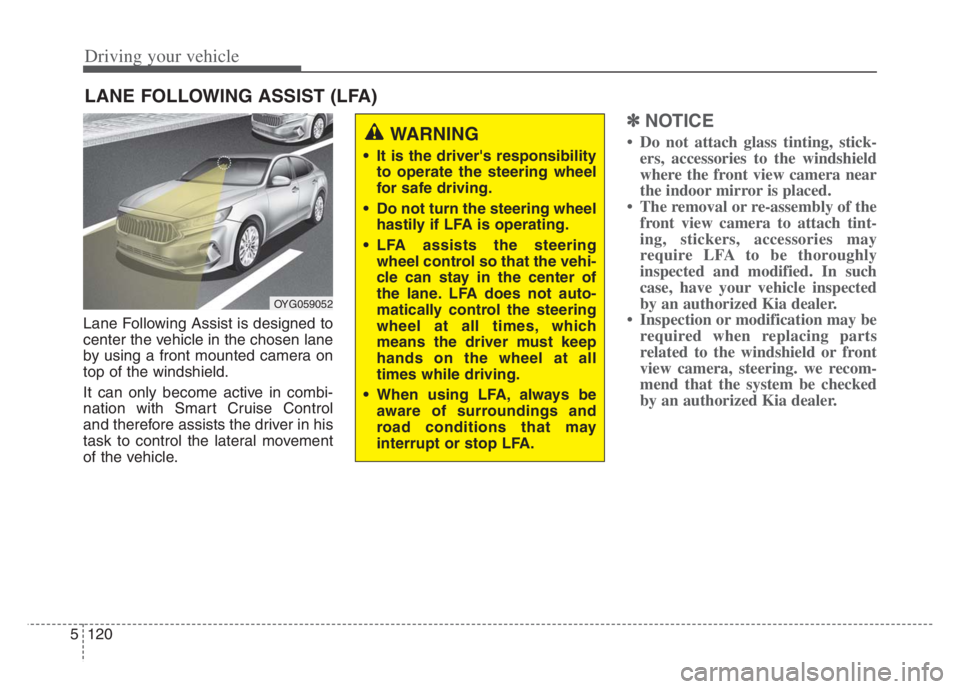
Lane Following Assist is designed to
center the vehicle in the chosen lane
by using a front mounted camera on
top of the windshield.
It can only become active in combi-
nation with Smart Cruise Control
and therefore assists the driver in his
task to control the lateral movement
of the vehicle.
✽ ✽
NOTICE
• Do not attach glass tinting, stick-
ers, accessories to the windshield
where the front view camera near
the indoor mirror is placed.
• The removal or re-assembly of the
front view camera to attach tint-
ing, stickers, accessories may
require LFA to be thoroughly
inspected and modified. In such
case, have your vehicle inspected
by an authorized Kia dealer.
• Inspection or modification may be
required when replacing parts
related to the windshield or front
view camera, steering. we recom-
mend that the system be checked
by an authorized Kia dealer.
LANE FOLLOWING ASSIST (LFA)
OYG059052
WARNING
It is the driver's responsibility
to operate the steering wheel
for safe driving.
Do not turn the steering wheel
hastily if LFA is operating.
LFA assists the steering
wheel control so that the vehi-
cle can stay in the center of
the lane. LFA does not auto-
matically control the steering
wheel at all times, which
means the driver must keep
hands on the wheel at all
times while driving.
When using LFA, always be
aware of surroundings and
road conditions that may
interrupt or stop LFA.
Page 382 of 560
![KIA CADENZA 2020 Owners Manual 5129
Driving your vehicle
System setting and operation
With the ENGINE START/STOP but-
ton in the [ON], select or release the
setting from “Settings Vehicle
Driver Assistance Driving As](/img/2/40377/w960_40377-381.png "KIA CADENZA 2020 Owners Manual 5129
Driving your vehicle
System setting and operation
With the ENGINE START/STOP but-
ton in the [ON], select or release the
setting from “Settings Vehicle
Driver Assistance Driving As")
5129
Driving your vehicle
System setting and operation
With the ENGINE START/STOP but-
ton in the [ON], select or release the
setting from “Settings Vehicle
Driver Assistance Driving Assist
Highway Driving Assist” from the
Settings mode on the infotainment
system. For detailed information,
please refer to the infotainment sys-
tem manual separately supplied.
Select HDA in and the system will
operate if the following conditions are
met :
If the engine is turned off then on
again, the system maintains the last
setting.
Operating conditions
Select 'Highway Driving Assist' from
the Settings menu in the infotain-
ment system screen and satisfy the
following conditions for the system to
operate.
When driving on the highway main
line.
When Smart Cruise Control is in
operation (Vehicle deceleration
and acceleration control)
- Refer to “Smart Cruise Control
(SCC)” in this chapter.
- If SCC is in standby mode (SCC
is on but speed is not set), HDA
will be in the same mode. The
white indicator ( ) light will
be turned on.
When the vehicle speed is below
95 mph (150 km/h)
If all the mentioned conditions are
satisfied, the system is ENABLED
and the indicator ( ) on the cluster
will illuminate green.
Steering wheel control
Steering control
If the vehicle detects both lane mark-
ers (lane color white), the ( ) indi-
cator light will change from white to
green. This indicates that the steer-
ing wheel is being controlled.
OQL058313