steering KIA CADENZA 2020 Workshop Manual
[x] Cancel search | Manufacturer: KIA, Model Year: 2020, Model line: CADENZA, Model: KIA CADENZA 2020Pages: 560, PDF Size: 11.37 MB
Page 376 of 560
5123
Driving your vehicle
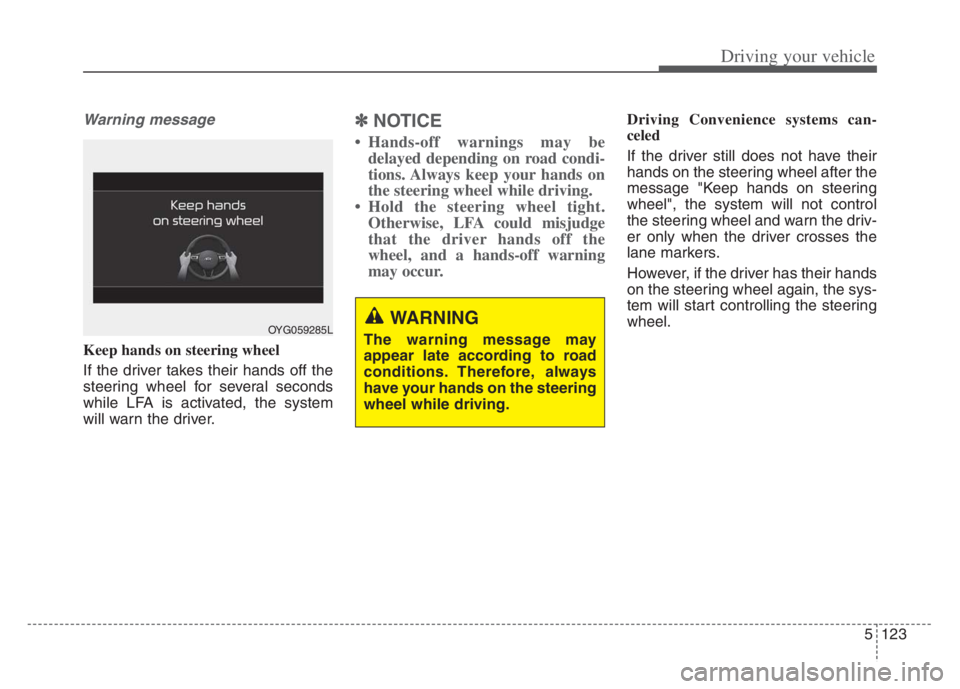
Warning message
Keep hands on steering wheel
If the driver takes their hands off the
steering wheel for several seconds
while LFA is activated, the system
will warn the driver.
✽ ✽NOTICE
• Hands-off warnings may be
delayed depending on road condi-
tions. Always keep your hands on
the steering wheel while driving.
• Hold the steering wheel tight. Otherwise, LFA could misjudge
that the driver hands off the
wheel, and a hands-off warning
may occur.
Driving Convenience systems can-
celed
If the driver still does not have their
hands on the steering wheel after the
message "Keep hands on steering
wheel", the system will not control
the steering wheel and warn the driv-
er only when the driver crosses the
lane markers.
However, if the driver has their hands
on the steering wheel again, the sys-
tem will start controlling the steering
wheel.
OYG059285LWARNING
The warning message may
appear late according to road
conditions. Therefore, always
have your hands on the steering
wheel while driving.
Page 377 of 560
Driving your vehicle
124 5
✽
✽
NOTICE
• Even though the steering is assist-
ed by the system, the driver may
control the steering wheel.
• The steering wheel may feel heav-
ier when the steering wheel is
assisted by the system than when it
is not.
Check Lane Following Assist
If there is a problem with the system
a message will appear for a few sec-
onds. In this case, have the system
checked by an authorized Kia dealer.LFA will not be in the ENABLED
state and/or the steering wheel will not
be assisted when:
If the driver operate turn signal
lamp or Hazzard warning flasher to
change the lane,
- To change the driving lane, turn
on the turn signal lamp switch
and change the lanes.
- If change the driving lane to
another without operating turn
signal lamp switch, the repulsive
force may occur on the steering
wheel.
- After system operating or chang-
ing the lanes, you must move to
the center of the lane to switch the
system to LFA. If you continue to
drive close to the lane line instead
of in the middle of the lane, it does
not assist the steering.
WARNING
LFA is a supplemental system
only. It is the responsibility of
the driver to safely steer the
vehicle and to maintain it in its
lane.
Turn off LFA and drive without
using the system in the fol-
lowing situations:
- In bad weather
- In bad road conditions
- When the steering wheel
needs to be controlled by the
driver frequently.
- When towing a vehicle or
trailer
Page 378 of 560

5125
Driving your vehicle
ESC (Electronic Stability Control)
or VSM (Vehicle Stability
Management) is activated.
The vehicle is driven on a sharp
curve.
Vehicle speed is over 95 mph (153
km/h).
The vehicle makes sharp lane
changes.
The vehicle brakes suddenly.
Only one lane marker is detected.
The lane is very wide or narrow.
Radius of a curve is too small.
The vehicle is driven on a steep
incline.
The steering wheel is turned sud-
denly.
The system may not operate for 15
seconds after the engine is started
or the front view camera is initial-
ized.Limitations of the System
LFA may operate prematurely even if
the vehicle does not depart from the
intended lane, OR, LFA may not
assist your steering or warn you if the
vehicle leaves the intended lane
under the following circumstances:When the lane and road condi-
tions are poor
It is difficult to distinguish the lane
marking from the road surface or
the lane marking is faded or not
clearly marked.
It is difficult to distinguish the color
of the lane marker from the road.
There are markings on the road
surface that look like a lane marker
that is inadvertently being detected
by the front view camera.
The lane marker is indistinct or
damaged.
The lane marker is merged or
divided. (e.g. tollgate)
The lane number increases or
decreases or the lane marker are
crossing complicatedly.
There are more than two lane
markers on the road in front of you.
The lane marker is very thick or
thin.
Page 382 of 560
![KIA CADENZA 2020 Workshop Manual 5129
Driving your vehicle
System setting and operation
With the ENGINE START/STOP but-
ton in the [ON], select or release the
setting from “Settings Vehicle
Driver Assistance Driving As](/img/2/40377/w960_40377-381.png "KIA CADENZA 2020 Workshop Manual 5129
Driving your vehicle
System setting and operation
With the ENGINE START/STOP but-
ton in the [ON], select or release the
setting from “Settings Vehicle
Driver Assistance Driving As")
5129
Driving your vehicle
System setting and operation
With the ENGINE START/STOP but-
ton in the [ON], select or release the
setting from “Settings Vehicle
Driver Assistance Driving Assist
Highway Driving Assist” from the
Settings mode on the infotainment
system. For detailed information,
please refer to the infotainment sys-
tem manual separately supplied.
Select HDA in and the system will
operate if the following conditions are
met :
If the engine is turned off then on
again, the system maintains the last
setting.
Operating conditions
Select 'Highway Driving Assist' from
the Settings menu in the infotain-
ment system screen and satisfy the
following conditions for the system to
operate.
When driving on the highway main
line.
When Smart Cruise Control is in
operation (Vehicle deceleration
and acceleration control)
- Refer to “Smart Cruise Control
(SCC)” in this chapter.
- If SCC is in standby mode (SCC
is on but speed is not set), HDA
will be in the same mode. The
white indicator ( ) light will
be turned on.
When the vehicle speed is below
95 mph (150 km/h)
If all the mentioned conditions are
satisfied, the system is ENABLED
and the indicator ( ) on the cluster
will illuminate green.
Steering wheel control
Steering control
If the vehicle detects both lane mark-
ers (lane color white), the ( ) indi-
cator light will change from white to
green. This indicates that the steer-
ing wheel is being controlled.
OQL058313
Page 383 of 560

Driving your vehicle
130 5
Temporary deactivation
The ( ) indicator light changes from
green to white when the steering
wheel control is temporarily deacti-
vated. Even if the steering wheel is
not controlled, the distance between
the vehicle ahead will be maintained.
Speed setting
Automatic speed setting mode
The system enters the automatic
speed setting mode when:
1. The operating conditions are satis-
fied
- ‘AUTO’ indicator will illuminate
green
2. Smart Cruise Control set speed
and the highway speed limit
matches
If the system changes to the auto-
matic speed mode, the ‘AUTO’
symbol will turn green and a chime
will sound. When the highway
speed limit changes, the set speed
automatically changes to the
changed speed limit.Manual speed setting mode
If the speed is set manually using the
RES+ or SET- switch on the steering
wheel, the set speed on the cluster
will turn white and the 'AUTO' symbol
will disappear.
OYG059288
Page 384 of 560

5131
Driving your vehicle
Warning Message
Hands-off warning
Keep hands on steering wheel
If the driver takes their hands off the
steering wheel for several seconds
while HDA is activated, the system
will warn the driver.
✽ ✽
NOTICE
If the steering wheel is held with a
light grip, the message may appear
because HDA may not recognize
that the driver has their hands on
the steering wheel.
OJF058416L
WARNING
The warning message may
appear late according to road
conditions. Therefore, always
have your hands on the steering
wheel while driving.
Page 385 of 560

Driving your vehicle
132 5
Highway Driving Assist (HDA) system
canceled
If the driver still does not have their
hands on the steering wheel after the
message "Keep hands on steering
wheel", HDA will be canceled.
However, if Lane Following Assist is
reactivated manually by the driver,
Highway Driving Assist will reacti-
vate.
To activate Lane Following Assist,
refer to “Lane Following Assist (LFA)”
in this chapter.HDA will not be in the ENABLED
state and/or the steering wheel
will not be assisted when:
The turn signal is turned on before
changing a lane. If you change
lanes without the turn signal on,
the steering wheel might be con-
trolled.
The vehicle is not driven in the mid-
dle of the lane when the system is
turned on or right after changing a
lane.
ESC (Electronic Stability Control)
or VSM (Vehicle Stability
Management) is activated.
The vehicle is driven on a sharp
curve.
Vehicle speed is over 95 mph (153
km/h).
The vehicle makes sharp lane
changes.
The vehicle brakes suddenly.
Only one lane marker is detected.
The lane is very wide or narrow. There are more than two lane
markers on the road (e.g. construc-
tion area).
Radius of a curve is too small.
The vehicle is driven on a steep
incline.
The steering wheel is turned sud-
denly.
Page 387 of 560
Driving your vehicle
134
5
Highway Driving Assist may not func-
tion properly in the following situa-
tions:
The navigation is not working prop-
erly.
The navigation is not updated.
The real-time GPS or map infor- mation provided has errors.
The navigation is overloaded by performing functions such as route
search, video playback, voice
recognition, etc. are performing
simultaneously.
The navigation is recalculating the route while driving.
GPS signals are blocked in areas such as a tunnel.
The driver goes off course or the route to the destination is changed
or canceled by resetting the navi-
gation.
The vehicle enters a service sta- tion or rest area
The speed limit of selected high- way section is changed due to road
conditions. Android Auto or Car Play is operat-
ing.
The navigation cannot detect the current vehicle position (ex: elevat-
ed roads including overpass adja-
cent to general roads or nearby
roads exist in a parallel way).
The navigation is being updated while driving.
The navigation is being reset while driving.
The road is slippery due to bad weather such as rain or snow.
If your vehicle tows a trailer or another vehicle, you should
release Highway Driving Assist.
Operating the brake system or
steering system while towing may
adversely affect the safety. * Refer to “Smart Cruise Control
(SCC)” in this chapter. for cautions
and warnings about headway con-
trol and front radar.
* Refer to “Lane Following Assist (LFA) “ in this chapter. for cautions
and warnings about steering con-
trol and front view camera.
Page 403 of 560

Driving your vehicle
150 5
Remember, your vehicle does not
require extended warm-up. After
the engine has started, allow the
engine to run for 10 to 20 seconds
prior to placing the vehicle in gear.
In very cold weather, however, give
your engine a slightly longer warm-
up period.
Don't "lug" or "over-rev" the engine.
Lugging is driving too slowly in a
very high gear resulting in engine
bucking. If this happens, shift to a
lower gear. Over-revving is racing
the engine beyond its safe limit.
This can be avoided by shifting at
the recommended speed. Use your air conditioning sparingly.
The air conditioning system is
operated by engine power so your
fuel economy is reduced when you
use it.
Open windows at high speeds can
reduce fuel economy.
Fuel economy is less in crosswinds
and headwinds. To help offset
some of this loss, slow down when
driving in these conditions.
Keeping a vehicle in good operating
condition is important both for econ-
omy and safety. Therefore, have an
authorized Kia dealer perform
scheduled inspections and mainte-
nance.
WARNING - Engine off
during motion
Never turn the engine off to
coast down hills or anytime the
vehicle is in motion. The power
steering and power brakes will
not function properly without the
engine running. In addition, turn-
ing off the ignition while driving
could lead to out of working
power driven steering wheel and
hard to control steering wheel.
Keep the engine on and down-
shift to an appropriate gear for
an engine braking effect.
Page 404 of 560
5151
Driving your vehicle
Hazardous driving conditions
When hazardous driving conditions
are encountered such as water,
snow, ice, mud, sand, or similar haz-
ards, follow these suggestions:
Drive cautiously and allow extra
distance for braking.
Avoid sudden braking or steering.
When braking with non-ABS
brakes pump the brake pedal with
a light up-and-down motion until
the vehicle is stopped.
Do not pump the brake pedal on a
vehicle equipped with ABS. If stalled in snow, mud, or sand,
use the second gear. Accelerate
slowly to avoid spinning the drive
wheels.
Use sand, rock salt, or other non-
slip material under the drive
wheels to provide traction when
stalled in ice, snow, or mud.
Rocking the vehicle
If it is necessary to rock the vehicle
to free it from snow, sand, or mud,
first turn the steering wheel right and
left to clear the area around your
front wheels. Then, shift back and
forth between R (Reverse) and any
forward gear in vehicles equipped
with an Automatic Transmission. Do
not race the engine, and spin the
wheels as little as possible. If you are
still stuck after a few tries, have the
vehicle pulled out by a tow vehicle to
avoid engine overheating and possi-
ble damage to the transmission.
SPECIAL DRIVING CONDITIONS
WARNING- Downshifting
Do not downshift with an auto-
matic transmission while driv-
ing on slippery surfaces. The
sudden change in tire speed
could cause the tires to skid
and result in an accident.
WARNING- Sudden
Vehicle Movement
Do not attempt to rock the vehi-
cle if people or objects are near-
by. The vehicle may suddenly
move forward or backwards as it
becomes unstuck.