instrument KIA Carens 2011 2.G Owner's Guide
[x] Cancel search | Manufacturer: KIA, Model Year: 2011, Model line: Carens, Model: KIA Carens 2011 2.GPages: 338, PDF Size: 6.51 MB
Page 130 of 338
451
Features of your vehicle
D190100AUN
Battery saver function
The purpose of this feature is to pre-vent the battery from being dis-
charged. The system automatically
turns off the parking lights when the
driver removes the ignition key and
opens the driver-side door (in that
order).
With this feature, the parking lights will be turned off automatically if the driver
parks on the side of road at night.
If necessary, to keep the lights on
when the ignition key is removed, per-
form the following:
1) Open the driver-side door.
2) Turn the parking lights OFF and ON again using the light switch on the
steering column.
D190400AUN-EC
Lighting control
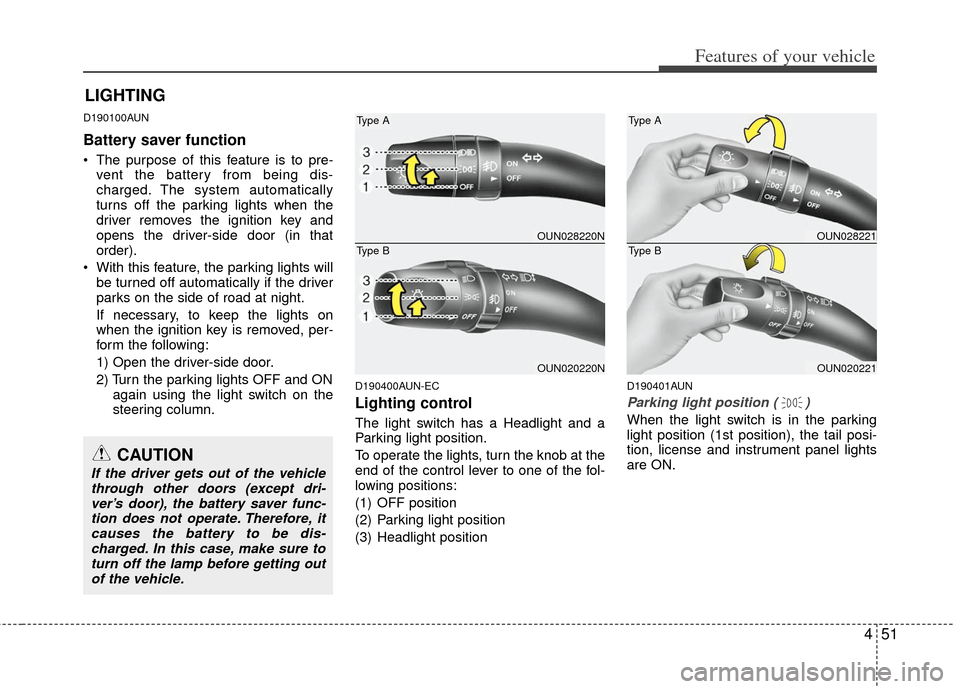
The light switch has a Headlight and a
Parking light position.
To operate the lights, turn the knob at the
end of the control lever to one of the fol-
lowing positions:
(1) OFF position
(2) Parking light position
(3) Headlight position
D190401AUN
Parking light position ( )
When the light switch is in the parking
light position (1st position), the tail posi-
tion, license and instrument panel lights
are ON.
LIGHTING
OUN028220N
OUN020220N
Type A
Type BOUN028221
OUN020221
Type A
Type B
CAUTION
If the driver gets out of the vehiclethrough other doors (except dri-ver’s door), the battery saver func-tion does not operate. Therefore, itcauses the battery to be dis- charged. In this case, make sure toturn off the lamp before getting outof the vehicle.
Page 131 of 338
Features of your vehicle
52
4
D190402AUN
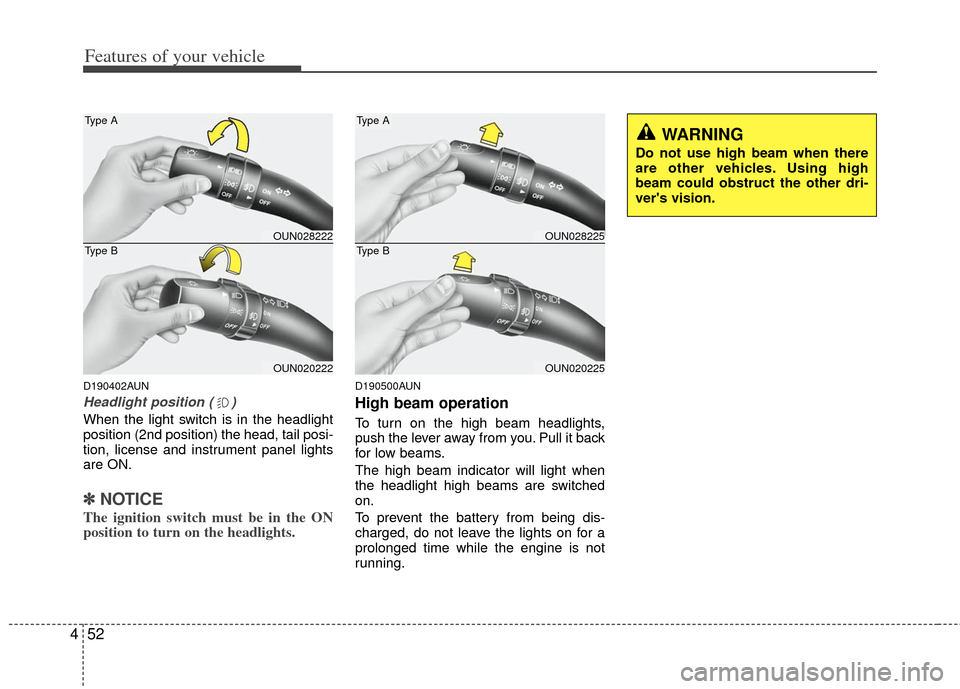
Headlight position ( )
When the light switch is in the headlight
position (2nd position) the head, tail posi-
tion, license and instrument panel lights
are ON.
✽ ✽
NOTICE
The ignition switch must be in the ON
position to turn on the headlights.
D190500AUN
High beam operation
To turn on the high beam headlights,
push the lever away from you. Pull it back
for low beams.
The high beam indicator will light when
the headlight high beams are switched
on.
To prevent the battery from being dis-
charged, do not leave the lights on for a
prolonged time while the engine is not
running.
OUN028222
OUN020222
Type A
Type BOUN028225
OUN020225
Type A
Type B
WARNING
Do not use high beam when there
are other vehicles. Using high
beam could obstruct the other dri-
ver's vision.
Page 139 of 338
Features of your vehicle
60
4
In the ON position, the light stays on at all
times.
In the OFF position, the light stays off at
all times, even when a door is open.
D210600AUN
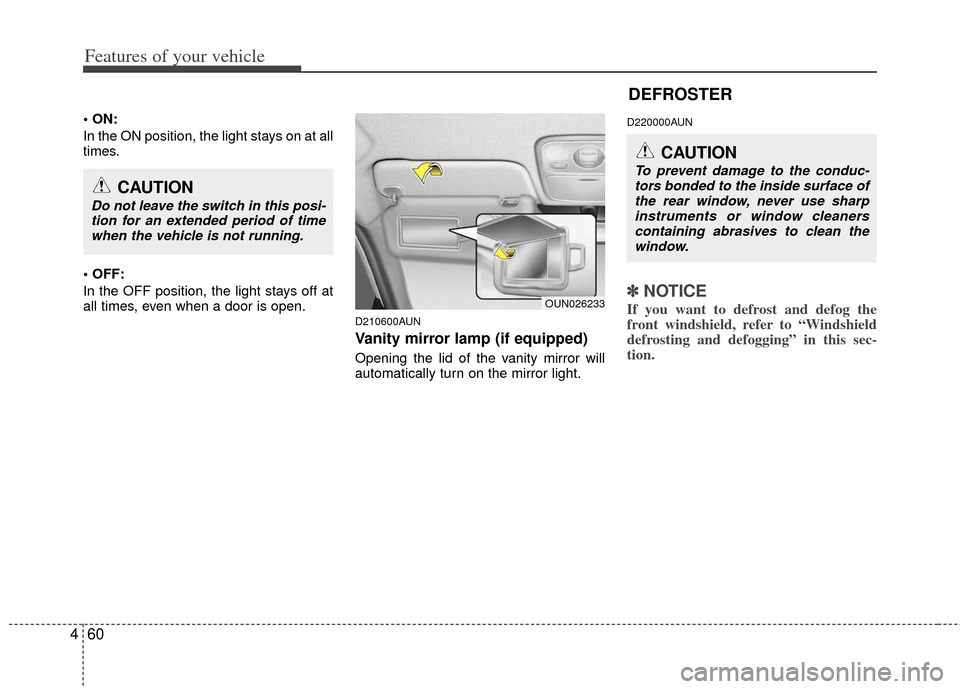
Vanity mirror lamp (if equipped)
Opening the lid of the vanity mirror will
automatically turn on the mirror light.
D220000AUN
✽ ✽
NOTICE
If you want to defrost and defog the
front windshield, refer to “Windshield
defrosting and defogging” in this sec-
tion. OUN026233
CAUTION
Do not leave the switch in this posi-
tion for an extended period of timewhen the vehicle is not running.
DEFROSTER
CAUTION
To prevent damage to the conduc-tors bonded to the inside surface ofthe rear window, never use sharp instruments or window cleanerscontaining abrasives to clean the window.
Page 144 of 338
465
Features of your vehicle
Floor/Defrost-Level (A, C, E, D)
Most of the air flow is directed to the floor
and the windshield with a small amount
directed to the side window defrosters.
Defrost-Level (A, D)
Most of the air flow is directed to the
windshield with a small amount of air
directed to the side window defrosters.Instrument panel vents
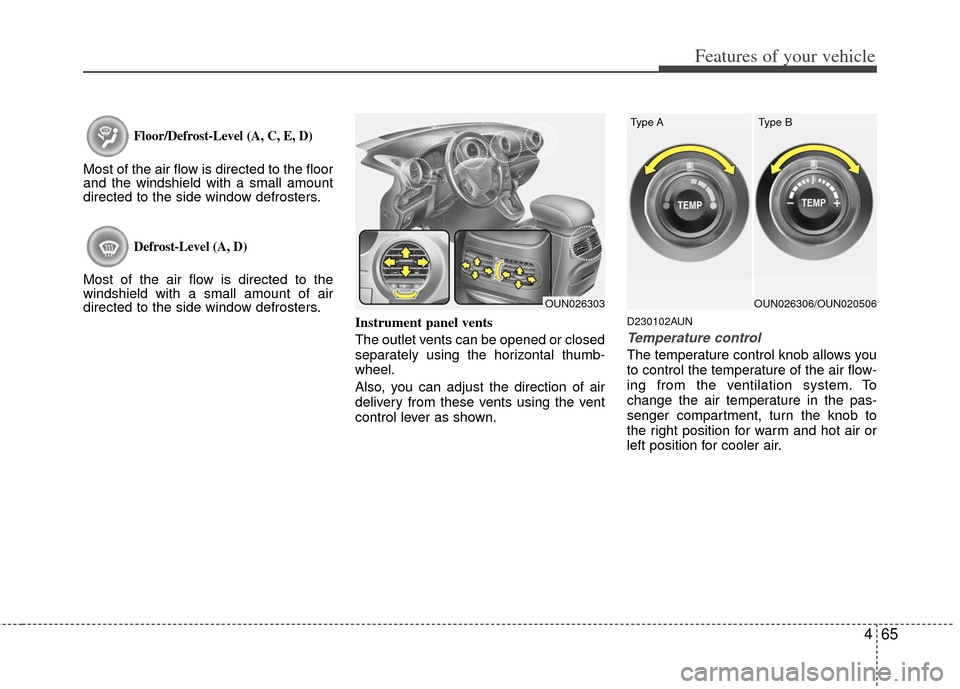
The outlet vents can be opened or closed
separately using the horizontal thumb-
wheel.
Also, you can adjust the direction of air
delivery from these vents using the vent
control lever as shown.
D230102AUN
Temperature control
The temperature control knob allows you
to control the temperature of the air flow-
ing from the ventilation system. To
change the air temperature in the pas-
senger compartment, turn the knob to
the right position for warm and hot air or
left position for cooler air.
OUN026303OUN026306/OUN020506
Type AType B
Page 151 of 338
Features of your vehicle
72
4
D240100BUN
Automatic heating and air condi-
tioning
The automatic climate control system is
controlled by simply setting the desired
temperature.
The Full Automatic Temperature Control
(FATC) system automatically controls the
heating and cooling system as follows;
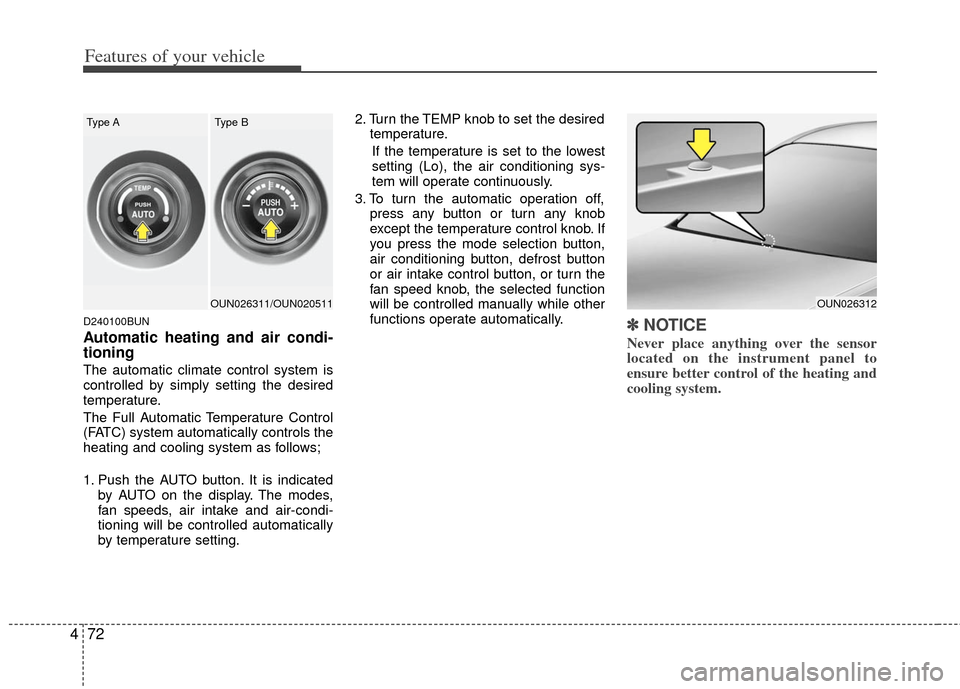
1. Push the AUTO button. It is indicated
by AUTO on the display. The modes,
fan speeds, air intake and air-condi-
tioning will be controlled automatically
by temperature setting. 2. Turn the TEMP knob to set the desired
temperature.
If the temperature is set to the lowest
setting (Lo), the air conditioning sys-
tem will operate continuously.
3. To turn the automatic operation off, press any button or turn any knob
except the temperature control knob. If
you press the mode selection button,
air conditioning button, defrost button
or air intake control button, or turn the
fan speed knob, the selected function
will be controlled manually while other
functions operate automatically.
✽ ✽NOTICE
Never place anything over the sensor
located on the instrument panel to
ensure better control of the heating and
cooling system.
OUN026312OUN026311/OUN020511
Type AType B
Page 153 of 338
Features of your vehicle
74
4
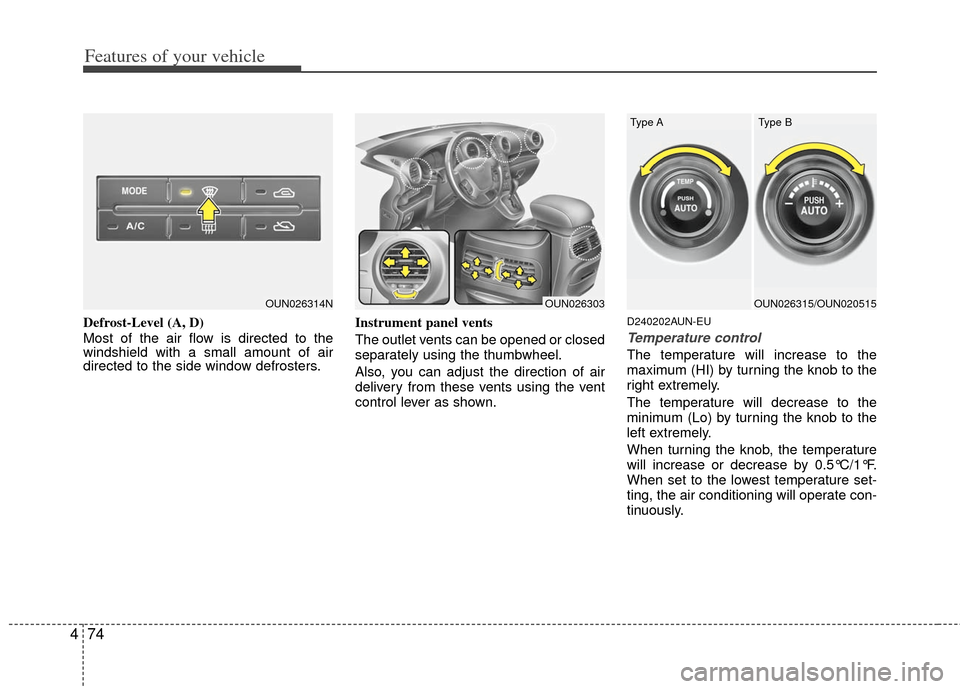
Defrost-Level (A, D)
Most of the air flow is directed to the
windshield with a small amount of air
directed to the side window defrosters. Instrument panel vents
The outlet vents can be opened or closed
separately using the thumbwheel.
Also, you can adjust the direction of air
delivery from these vents using the vent
control lever as shown.D240202AUN-EU
Temperature control
The temperature will increase to the
maximum (HI) by turning the knob to the
right extremely.
The temperature will decrease to the
minimum (Lo) by turning the knob to the
left extremely.
When turning the knob, the temperature
will increase or decrease by 0.5°C/1°F.
When set to the lowest temperature set-
ting, the air conditioning will operate con-
tinuously.
OUN026314NOUN026303OUN026315/OUN020515
Type AType B
Page 205 of 338
Driving your vehicle
85
For smooth operation, depress the brakepedal when shifting from N (Neutral) to aforward or reverse gear.E060101AUN-EU
Transaxle ranges
The indicator in the instrument cluster
displays the shift lever position when the
ignition switch is in the ON position.
P (Park)
Always come to a complete stop before
shifting into P (Park). This position locks
the transaxle and prevents the front
wheels from rotating.
WARNING- Automatic transaxle
Always check the surrounding
areas near your vehicle for peo-
ple, especially children, before
shifting a car into D (Drive) or R
(Reverse).
Before leaving the driver’s seat, always make sure the shift lever
is in the P (Park) position; then
set the parking brake fully and
shut the engine off. Unexpected
and sudden vehicle movement
can occur if these precautions
are not followed in the order iden-
tified.
CAUTION
To avoid damage to your transaxle, do not accelerate theengine in R (Reverse) or any for-ward gear position with thebrakes on.
When stopped on an incline, do not hold the vehicle stationarywith engine power. Use the serv-ice brake or the parking brake.
Do not shift from N (Neutral) or P (Park) into D (Drive), or R(Reverse) when the engine isabove idle speed.
WARNING
Shifting into P (Park) while the vehicle is in motion will cause the
drive wheels to lock which will
cause you to lose control of the
vehicle.
Do not use the P (Park) position in place of the parking brake.
Always make sure the shift lever
is latched in the P (Park) position
and set the parking brake fully.
(Continued)
Page 221 of 338
Driving your vehicle
24
5
E090000AUN-EU
The cruise control system allows you to
program the vehicle to maintain a con-
stant speed without pressing the acceler-
ator pedal.
This system is designed to function
above approximately 40 km/h (25 mph).✽ ✽
NOTICE
During normal cruise control operation,
when the SET switch is activated or
reactivated after applying the brakes,
the cruise control will energize after
approximately 3 seconds. This delay is
normal.
CRUISE CONTROL SYSTEM (IF EQUIPPED)
WARNING
If the cruise control is left on,
(CRUISE indicator light in the
instrument cluster illuminated)
the cruise control can be
switched on accidentally. Keep
the cruise control system off
(CRUISE indicator light OFF)
when the cruise control is not in
use, to avoid inadvertently set-
ting a speed.
Use the cruise control system only when traveling on open
highways in good weather.
(Continued)
(Continued)
Do not use the cruise controlwhen it may not be safe to keep
the car at a constant speed, for
instance, driving in heavy or
varying traffic, or on slippery
(rainy, icy or snow-covered) or
winding roads or over 6% up-hill
or down-hill roads.
Pay particular attention to the driving conditions whenever
using the cruise control system.
Page 222 of 338
525
Driving your vehicle
E090100AUN
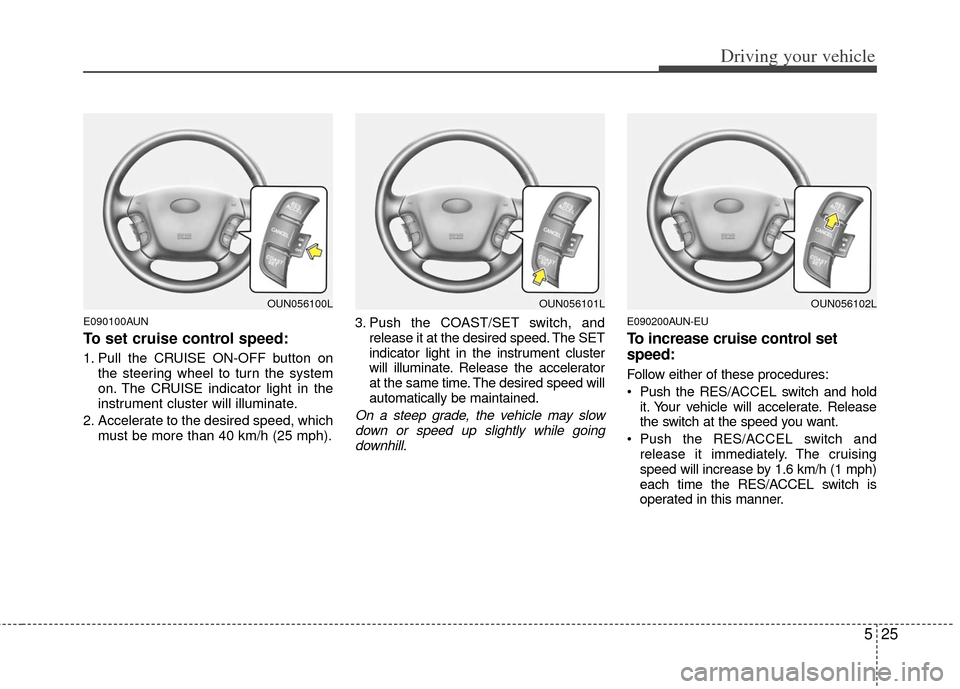
To set cruise control speed:
1. Pull the CRUISE ON-OFF button onthe steering wheel to turn the system
on. The CRUISE indicator light in the
instrument cluster will illuminate.
2. Accelerate to the desired speed, which must be more than 40 km/h (25 mph). 3. Push the COAST/SET switch, and
release it at the desired speed. The SET
indicator light in the instrument cluster
will illuminate. Release the accelerator
at the same time. The desired speed will
automatically be maintained.
On a steep grade, the vehicle may slowdown or speed up slightly while goingdownhill.
E090200AUN-EU
To increase cruise control set
speed:
Follow either of these procedures:
Push the RES/A CCEL switch and hold
it. Your vehicle will accelerate. Release
the switch at the speed you want.
Push the RES/A CCEL switch and
release it immediately. The cruising
speed will increase by 1.6 km/h (1 mph)
each time the RES/ACCEL switch is
operated in this manner.
OUN056101LOUN056102LOUN056100L
Page 224 of 338
527
Driving your vehicle
Each of these actions will cancel cruisecontrol operation (the SET indicator lightin the instrument cluster will go off), but itwill not turn the system off. If you wish toresume cruise control operation, pushthe RES/ACCEL switch located on yoursteering wheel. You will return to your previously preset speed.
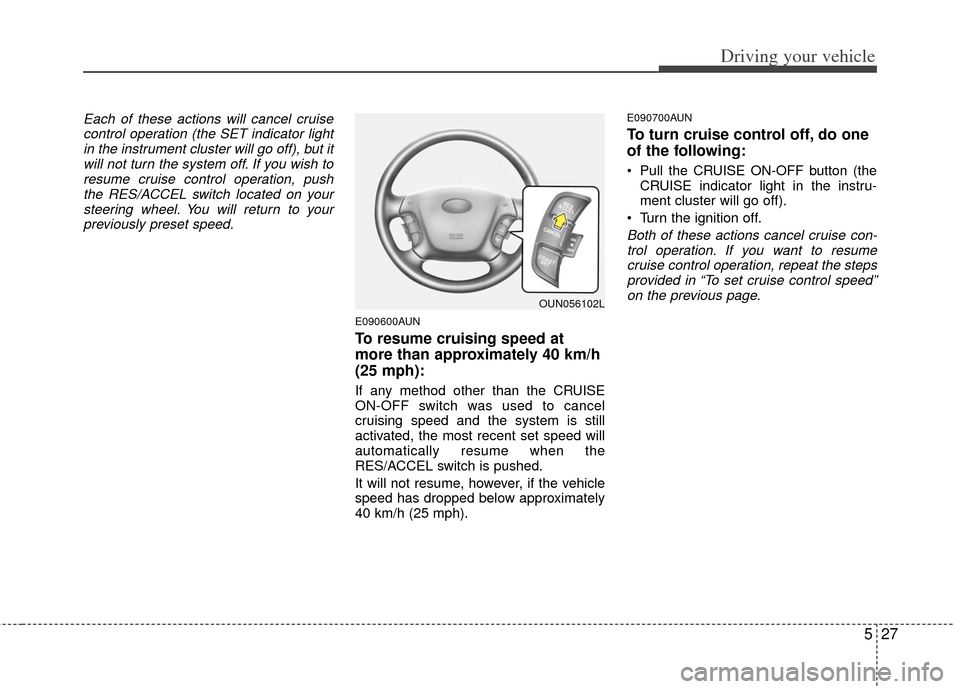
E090600AUN
To resume cruising speed at
more than approximately 40 km/h
(25 mph):
If any method other than the CRUISE
ON-OFF switch was used to cancel
cruising speed and the system is still
activated, the most recent set speed will
automatically resume when the
RES/ACCEL switch is pushed.
It will not resume, however, if the vehicle
speed has dropped below approximately
40 km/h (25 mph).
E090700AUN
To turn cruise control off, do one
of the following:
Pull the CRUISE ON-OFF button (the CRUISE indicator light in the instru-
ment cluster will go off).
Turn the ignition off.
Both of these actions cancel cruise con- trol operation. If you want to resumecruise control operation, repeat the steps provided in “To set cruise control speed”on the previous page.
OUN056102L