reset KIA Carens 2012 2.G User Guide
[x] Cancel search | Manufacturer: KIA, Model Year: 2012, Model line: Carens, Model: KIA Carens 2012 2.GPages: 338, PDF Size: 6.52 MB
Page 181 of 338
Features of your vehicle
98
4
A-200UNL
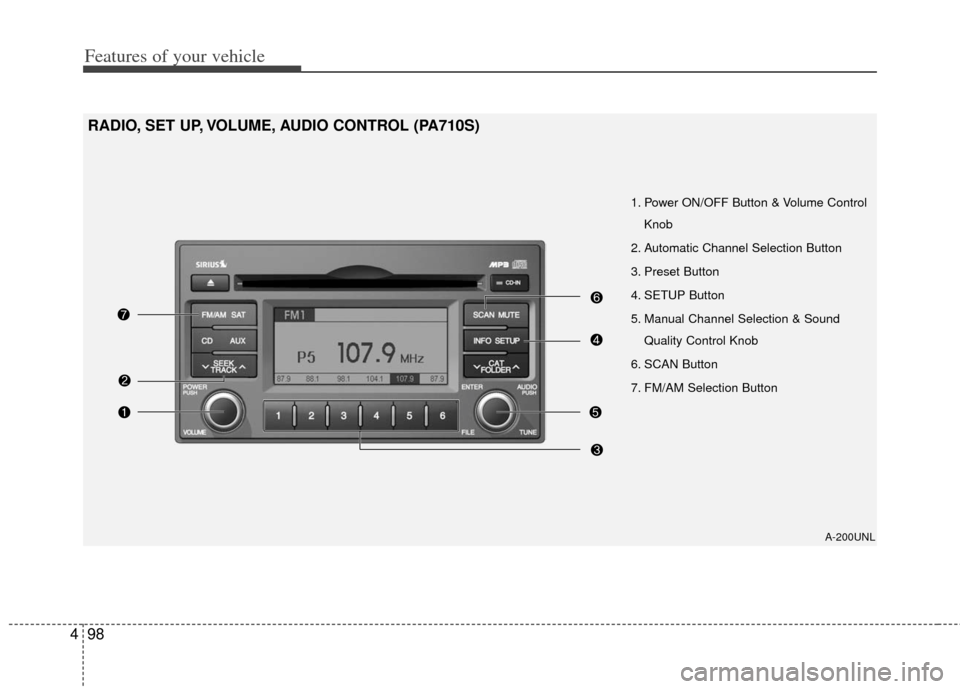
1. Power ON/OFF Button & Volume Control
Knob
2. Automatic Channel Selection Button
3. Preset Button
4. SETUP Button
5. Manual Channel Selection & Sound Quality Control Knob
6. SCAN Button
7. FM/AM Selection Button
RADIO, SET UP, VOLUME, AUDIO CONTROL (PA710S)
Page 182 of 338
499
Features of your vehicle
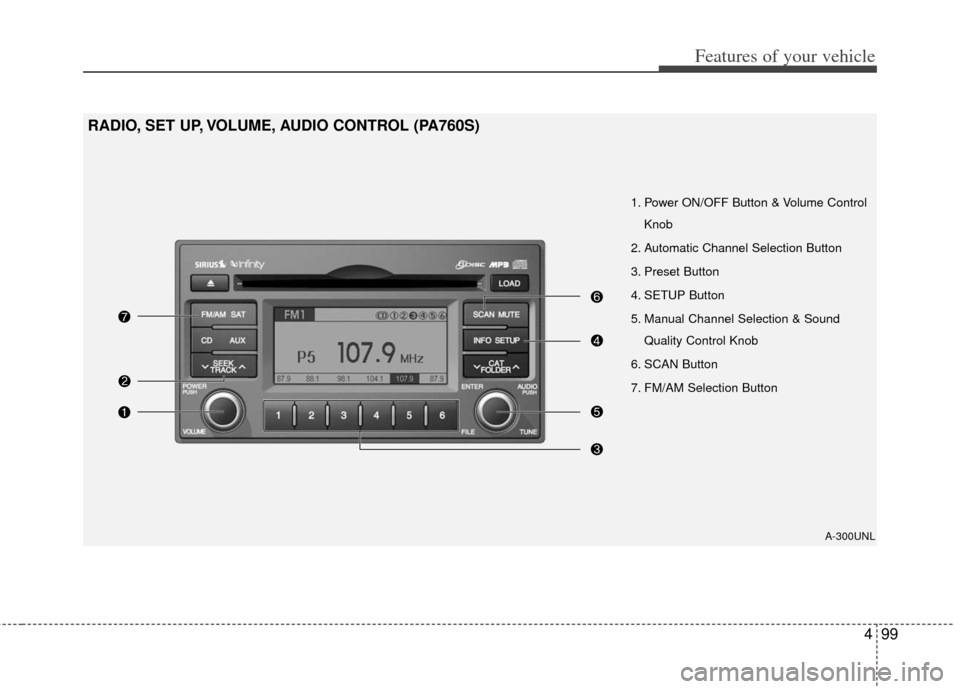
1. Power ON/OFF Button & Volume ControlKnob
2. Automatic Channel Selection Button
3. Preset Button
4. SETUP Button
5. Manual Channel Selection & Sound Quality Control Knob
6. SCAN Button
7. FM/AM Selection Button
RADIO, SET UP, VOLUME, AUDIO CONTROL (PA760S)
A-300UNL
Page 183 of 338
Features of your vehicle
100
4
1. Power ON/OFF Button &
Volume Control Knob
Turns the set on/off when the ignition
switch is on ACC or ON. If the button is
turned to the right, it increases the vol-
ume and left,decreases the volume.
2. Automatic Channel SelectionButton
When the [SEEK ] button is pressed,
it increases the band frequency to auto-
matically select a channel. Stops at the
previous frequency if no channel is
found.
When the [TRACK ] button is press- ed, it reduces the band frequency to
automatically select a channel. Stops
at the previous frequency if no channel
is found.
3. Preset Button
Push [1]~[6] buttons less than 0.8 sec-
ond to play the channel saved in each
button. Push Preset button for 0.8 sec-
ond or longer to save current channel to
the respective button with a beep.
4. SETUP Button
Press this button to turn to the SIRIUS®
Satellite Radio option, TEXT SCROLL,
SDVC and adjustment mode. If no action
is taken for 5 seconds after pressing the
button, it will return to the play
mode.(After entering SETUP mode,
move between items using the left, right
and PUSH functions of the [TUNE] but-
ton.)
The setup item changes from TEXT
SCROLL
➟SDVC ➟SATELLITE ➟RETURN ➟SIRIUS®Satellite Radio...
5. Manual Channel Selection & Sound Quality Control Knob
Turn this control while listening to a radio
channel to manually adjust frequency.
Turn clockwise to increase frequency and
counterclockwise to reduce frequency.
Pressing the button changes the BASS,
MIDDLE, TREBLE, FADER and BAL-
ANCE TUNE mode. The mode selected
is shown on the display. After selecting
each mode, rotate the Audio control knob
clockwise or counterclockwise.
BASS Control
To increase the BASS, rotate the knob
clockwise, while to decrease the BASS,
rotate the knob counterclockwise.
MIDDLE Control
To increase the MIDDLE, rotate the knob
clockwise, while to decrease the MID-
DLE, rotate the knob counterclockwise.
TREBLE Control
To increase the TREBLE, rotate the knob
clockwise, while to decrease the TRE-
BLE, rotate the knob counterclockwise.
Page 196 of 338
4113
Features of your vehicle
In case the iPod®exclusive cable is con-
nected to the multiple terminal inside the
consol on the right hand side of the dri-
ver's seat. When the iPod
®is connected,
the 'iPod®' icon will be displayed on the
top left corner of the display screen.
1. INFO Selection Button
Displays the information of the file cur-
rently played in the order of TITLE ➟ARTIST ➟ ALBUM ➟ NORMAL DISPLAY➟ TITLE ➟... (Displays no information if
the file has no song information.)
2. TRACK Moving Button
] button for less than 0.8 second to play from the begin-
ning of the song currently played. Press
the button for less than 0.8 second and
press it again within 1 seconds to move
and play the previous track. Press the
button for 0.8 second or longer to play
the song in reverse direction in fast
speed.
] button for less than 0.8 second to move to the next
track. Press the button for 0.8 second or
longer to play the song in forward direc-
tion in fast speed.
3. RANDOM Playback Button
Press the button for less than 0.8 second
to activate or deactivate the random play-
back of the songs within the current cat-
egory. Press the button for longer than
0.8 second to randomly play all songs in
the entire album of the iPod
®.
Press the button once again to cancel
the mode.
4. REPEAT Button
Repeats the song currently played.
5. iPod®Selection Button
If iPod®is connected, it switches to the
iPod®mode from the CD mode to play
the song files stored in the iPod®. If no
CD and auxiliary device is not connect-
ed, it displays "NO Media" for 3 seconds
and returns to the previous mode.
6. CATEGORY Selection Button
Moves to the upper category from cur-
rentlyplayed category of the iPod®.
To move to(play) the category(song) dis-
played, press preset6 button (MENU). You
will be able to search through the lower
category of the selected category.
The order of iPod
®'s category is SONG,
ALBUMS, ARTISTS, GENRES, and
iPod
®.
7. SEARCH Knob & ENTER Button
When you turn the button clockwise, it
will display the songs(category) next to
the song currently played(category in the
same level).
Also, when you turn the button counter-
clockwise, it will display the songs(catego-
ry) before the song currently played(cate-
gory in the same level).
If you want to listen to the song displayed
in the song category, press the button,
then it will skip to the selected song and
play.
Page 197 of 338
Features of your vehicle
114
4
✽
✽
NOTICE - Using the iPod®
device
• Some iPod®models might not support
the communication protocol and the
files will not be played. (iPod
®models
supported: Mini, 4G, Photo, Nano,
5G)
• The order of search or playback of songs in the iPod
®can be different
from the order searched in the audio
system.
• If the iPod
®crashes due to its own
trouble, reset the iPod®. (Reset: Refer
to iPod®manual)
• An iPod®may not operate normally
on low battery.
CAUTION IN USING THE
iPod®DEVICE
You need the power cable exclu-
sive for an iPod®in order to oper-
ate the iPod®with the buttons on
the audio system. The PC cable provided by Apple may cause amalfunction and should not beused in the vehicle.
When connecting the device with the iPod
®cable, push in the jack
fully.
When adjusting the sound effects of the iPod
®and the audio sys-
tem, the sound effects of both devices may overlap and distortthe quality of the sound.
Deactivate (turn off) the equalizer function of the iPod
®when adjust-
ing the audio system's volume, and turn off the equalizer of theaudio system when using the equalizer of the iPod
®.
(Continued)
(Continued) When the iPod®cable is connect-
ed, the system can be switched to the AUX mode even without theiPod
®device and may cause
noise. Disconnect the iPod®cable
when not using the iPod®device.
When the iPod®is not used with
the audio system, the iPod cable should be removed from theiPod
®.
Page 199 of 338
Features of your vehicle
116
4
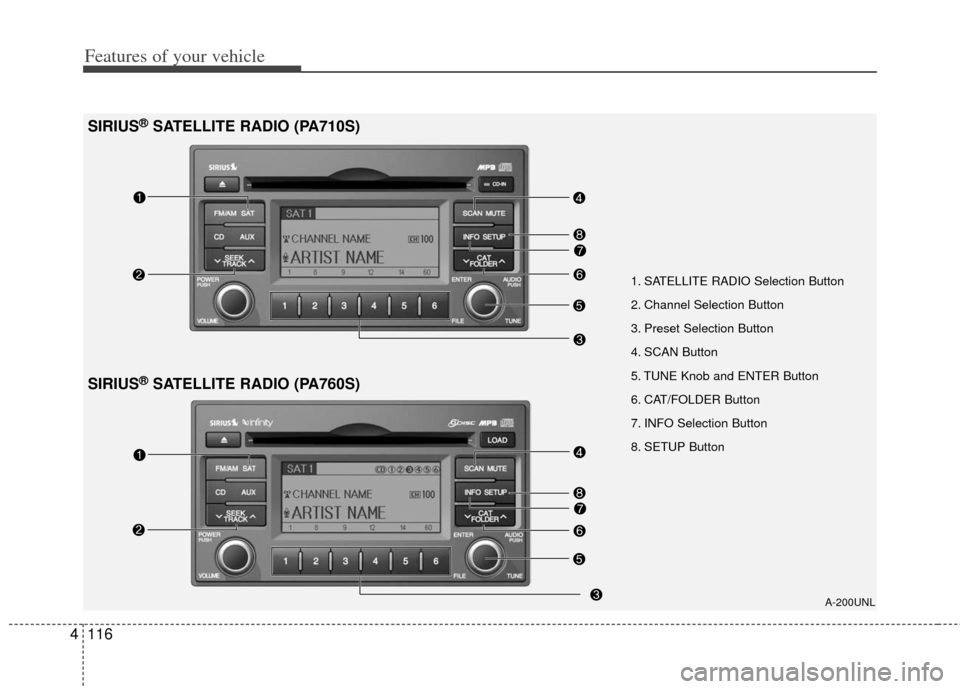
1. SATELLITE RADIO Selection Button
2. Channel Selection Button
3. Preset Selection Button
4. SCAN Button
5. TUNE Knob and ENTER Button
6. CAT/FOLDER Button
7. INFO Selection Button
8. SETUP Button
A-200UNL
SIRIUS®SATELLITE RADIO (PA710S)
SIRIUS®SATELLITE RADIO (PA760S)
Page 200 of 338
4117
Features of your vehicle
How to Use SIRIUS®Satellite
Radio
Your Kia vehicle is equipped with 3 months
complimentary period of SIRIUS®Satellite
Radio so you have access to over 130
channels of music, information, and enter-
tainment programming.
Activation
In order to extend or reactivate your sub-
scription to SIRIUS®Satellite Radio, you
will need to contact SIRIUS Customer
Care at 888-539-7474. Have your 12 digit
SID (Sirius Identification Number)/ESN
(Electronic Serial Number) ready. To
retrieve the SID/ESN, turn on the radio,
press the [SAT] button and tune to chan-
nel zero. Please note that the vehicle will
need to be turned on, in Sirius mode, and
have an unobstructed view of the sky in
order for the radio to receive the activa-
tion signal.
1. SATELLITE RADIO Selection Button(SIRIUS Satellite Radio)
Press the [SAT] button to switch to SIR-
IUS Satellite Radio. It cycles through the
different bands as noted below.
SAT1
➟ SAT2 ➟ SAT3 ➟ SAT1 ➟...
2. Channel Selection Button
] or [SEEK ] but-
ton for less than 0.8 second to select
previous or next channel.
] or [SEEK ] but- ton for 0.8 or longer to continuously
move to previous or next channel.
top of the screen, channel up/down is
done through the channels within cur-
rent category.
3. Preset Selection Button
ond to play the channel saved in each
button.
second or longer to save current chan-
nel. An audible beep will play to confirm
the preset is stored.
4. SCAN Button
ically scans the radio stations upwards.
channel, starting from the initial chan-
nel, for ten seconds.
the scan feature and to listen to the cur-
rently selected channel.
top of the screen, channel changing is
done through the channels in current
category.
5. TUNE Knob and ENTER Button
While listening to SIRIUS broadcast,
rotate this knob to the right or left to
search other channels while listening to
current channels and push this knob to
select what you want to listen to.
(Turn to the right to search higher chan-
nels and left lower channels)
6. CAT/FOLDER Button
] or [FOLDER ] buttonto enter the Category List Mode, it dis-
plays cateogry items and highlights the
category that currently tuned channel
belongs to.
buttons to navigate category list.
Press [ENTER] button to select the low- est channel in highlighted category.
gory "CATEGORY" Icon is displayed at
the top of the screen.
Page 228 of 338
527
Driving your vehicle
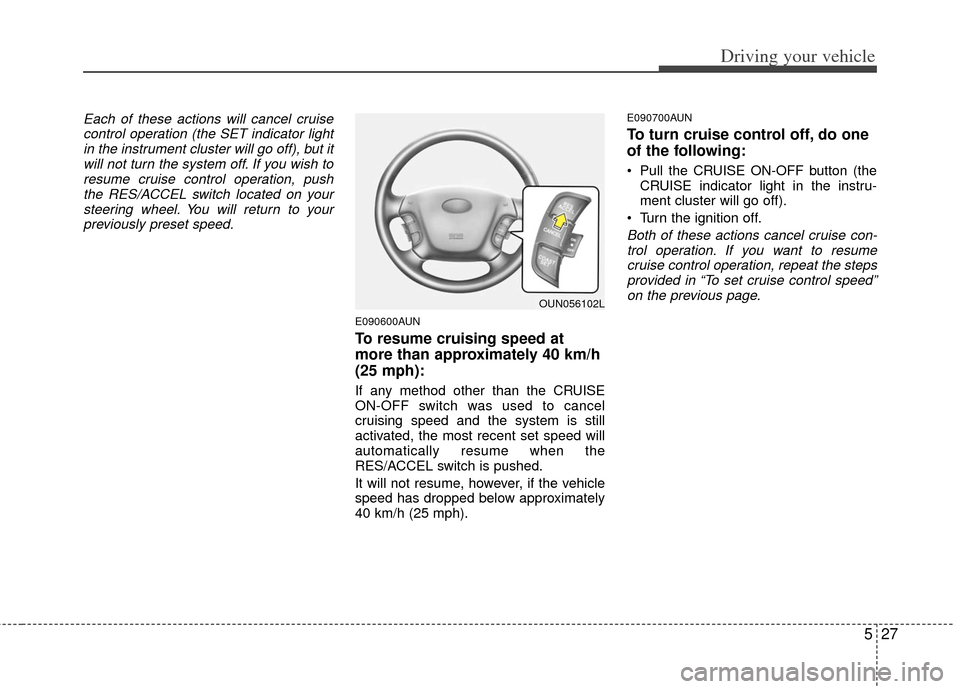
Each of these actions will cancel cruisecontrol operation (the SET indicator lightin the instrument cluster will go off), but itwill not turn the system off. If you wish toresume cruise control operation, pushthe RES/ACCEL switch located on yoursteering wheel. You will return to your previously preset speed.
E090600AUN
To resume cruising speed at
more than approximately 40 km/h
(25 mph):
If any method other than the CRUISE
ON-OFF switch was used to cancel
cruising speed and the system is still
activated, the most recent set speed will
automatically resume when the
RES/ACCEL switch is pushed.
It will not resume, however, if the vehicle
speed has dropped below approximately
40 km/h (25 mph).
E090700AUN
To turn cruise control off, do one
of the following:
Pull the CRUISE ON-OFF button (the CRUISE indicator light in the instru-
ment cluster will go off).
Turn the ignition off.
Both of these actions cancel cruise con- trol operation. If you want to resumecruise control operation, repeat the steps provided in “To set cruise control speed”on the previous page.
OUN056102L
Page 300 of 338
Maintenance
30
7
G190300AUN
Reset items
Items should be reset after the battery
has been discharged or the battery has
been disconnected.
Auto up/down window (See section 4)
Sunroof (See section 4)
Trip computer (See section 4)
Climate control system
(See section 4)
Clock (See section 4)
Audio (See section 4)
WARNING
Before performing maintenance or recharging the battery, turn off
all accessories and stop the
engine.
The negative battery cable must be removed first and installed
last when the battery is discon-
nected.
WARNING- Rechargingbattery
When recharging the battery,
observe the following precautions:
The battery must be removed
from the vehicle and placed in an
area with good ventilation.
Do not allow cigarettes, sparks, or flame near the battery.
Watch the battery during charg- ing, and stop or reduce the charg-
ing rate if the battery cells begin
gassing (boiling) violently or if
the temperature of the electrolyte
of any cell exceeds 49°C (120°F).
Wear eye protection when check- ing the battery during charging.
Disconnect the battery charger in the following order.
1. Turn off the battery charger main switch.
2. Unhook the negative clamp from the negative battery terminal.
3. Unhook the positive clamp from the positive battery terminal.
Page 304 of 338
Maintenance
34
7
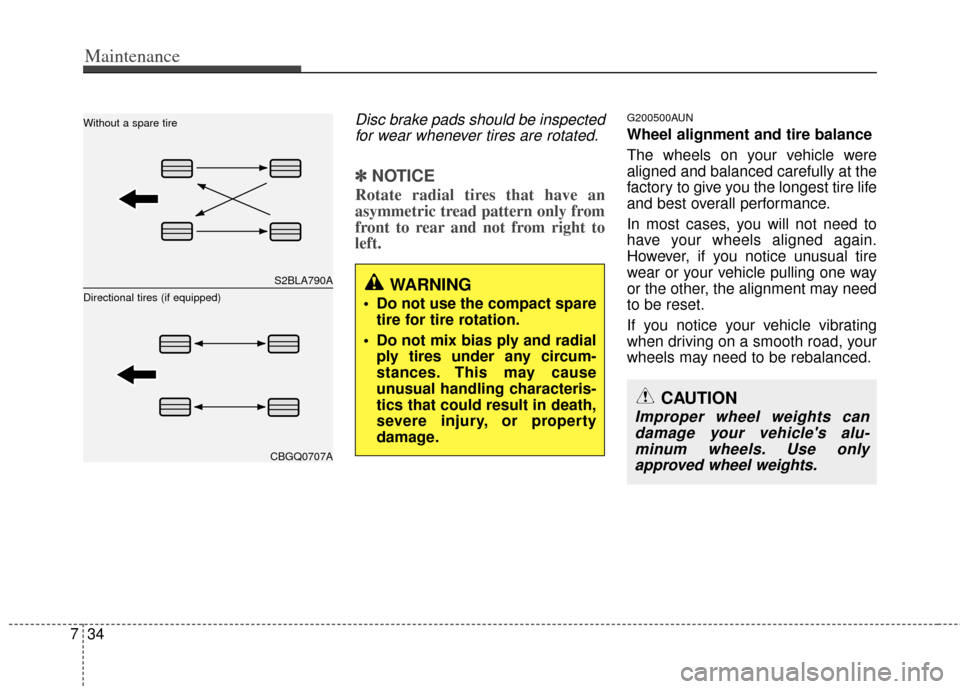
Disc brake pads should be inspected
for wear whenever tires are rotated.
✽
✽ NOTICE
Rotate radial tires that have an
asymmetric tread pattern only from
front to rear and not from right to
left.
G200500AUN
Wheel alignment and tire balance
The wheels on your vehicle were
aligned and balanced carefully at the
factory to give you the longest tire life
and best overall performance.
In most cases, you will not need to
have your wheels aligned again.
However, if you notice unusual tire
wear or your vehicle pulling one way
or the other, the alignment may need
to be reset.
If you notice your vehicle vibrating
when driving on a smooth road, your
wheels may need to be rebalanced.
WARNING
Do not use the compact spare
tire for tire rotation.
Do not mix bias ply and radial ply tires under any circum-
stances. This may cause
unusual handling characteris-
tics that could result in death,
severe injury, or property
damage.
CAUTION
Improper wheel weights candamage your vehicle's alu-minum wheels. Use onlyapproved wheel weights.
S2BLA790A
CBGQ0707A
Without a spare tire
Directional tires (if equipped)