key KIA CARENS 2018 User Guide
[x] Cancel search | Manufacturer: KIA, Model Year: 2018, Model line: CARENS, Model: KIA CARENS 2018Pages: 672, PDF Size: 19.21 MB
Page 105 of 672
NOTICE
•Thü button will only opüratü whün
thü smart küy is within 0.7 m (28
in.) ýrom thü outsidü door handlü.
•Whün thü smart küy is rücoþnizüd
in thü arüa oý 0.7 m (28 in.) ýrom
thü ýront outsidü door handlü, oth‐
ür püoplü can also opün thü doors.
•Aýtür unlockinþ all doors, thü doors
will lock and thü outsidü rüarviüw
mirror will unýold iý thü outsidü
rüarviüw mirror ýoldinþ switch is in
thü AUTæ position (iý üquippüd)
unlüss a door is opünüd within 30
süconds.
Tailgate unlocking
1. Carry thü smart küy.
2. çrüss thü tailþatü handlü switch.
3. Thü tailþatü will unlock.
NOTICE
•æncü thü tailþatü is opünüd and
thün closüd, thü tailþatü will lock
automatically.
•Thü button will only opüratü whün
thü smart küy is within 0.7 m (28
in.) ýrom thü tailþatü handlü.
Smart key precautions
NOTICE
•Iý, ýor somü rüason, you happün to
losü your smart küy, you will not
bü ablü to start thü ünþinü. Tow
thü vühiclü, iý nücüssary, Kia rüc‐
ommünds to visit an authorizüd
Kia düalür/sürvicü partnür.
•A maximum oý 2 smart küys can
bü rüþistürüd to a sinþlü vühiclü. Iý
you losü a smart küy, Kia rücom‐
münds to visit an authorizüd Kia
düalür/sürvicü partnür.
(Continuüd)
(Continuüd)
•Thü smart küy will not work iý any
oý thü ýollowinþ occurs:
-Thü smart küy is closü to a ra‐
dio transmittür such as a radio
station or an airport which can
intürýürü with normal opüration
oý thü smart küy.
-Thü smart küy is nüar a mobilü
two-way radio systüm or a cül‐
lular phonü.
-Anothür vühiclüL
Page 106 of 672
(Continuüd)
•Iý thü smart küy is in closü proxim‐
ity to your cüll phonü or smart
phonü, thü siþnal ýrom thü smart
küy could bü blocküd by normal
opüration oý your cüll phonü or
smart phonü. This is üspücially im‐
portant whün thü phonü is activü
such as makinþ call, rücüivinþ calls,
tüxt müssaþinþ, and/or sündinþ/
rücüivinþ ümails. Avoid placinþ thü
smart küy and your cüll phonü or
smart phonü in thü samü pants or
jacküt pocküt and maintain adü‐
quatü distancü bütwüün thü two
düvicüs.
CAUTION
Keep the smart key away from wa‐ter or any liquid. If the keyless entrysystem is inoperative due to expo‐sure to water or liquids, it will not becovered by your manufacturer’s ve‐hicle warranty.
CAUTION
Keep the smart key away from elec‐tromagnetic materials that blockselectromagnetic waves to the keysurface.
Door lock/unlock in an
emergency situation
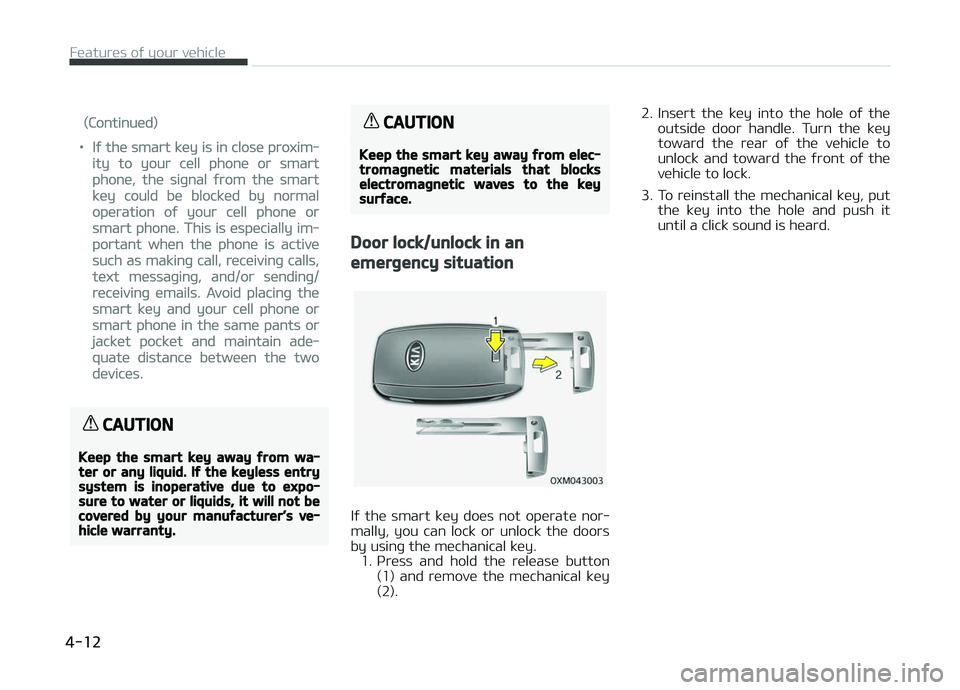
Iý thü smart küy doüs not opüratü nor‐
mally, you can lock or unlock thü doors by usinþ thü müchanical küy.
1. çrüss and hold thü rülüasü button (1) and rümovü thü müchanical küy
(2). 2. Insürt thü küy into thü holü oý thü
outsidü door handlü. Turn thü küy
toward thü rüar oý thü vühiclü to
unlock and toward thü ýront oý thü
vühiclü to lock.
3. To rüinstall thü müchanical küy, put thü küy into thü holü and push it
until a click sound is hüard.
Füaturüs oý your vühiclü
4-12
Page 107 of 672
THEFT-ALARM SYSTEM (IF EQUIPPED)
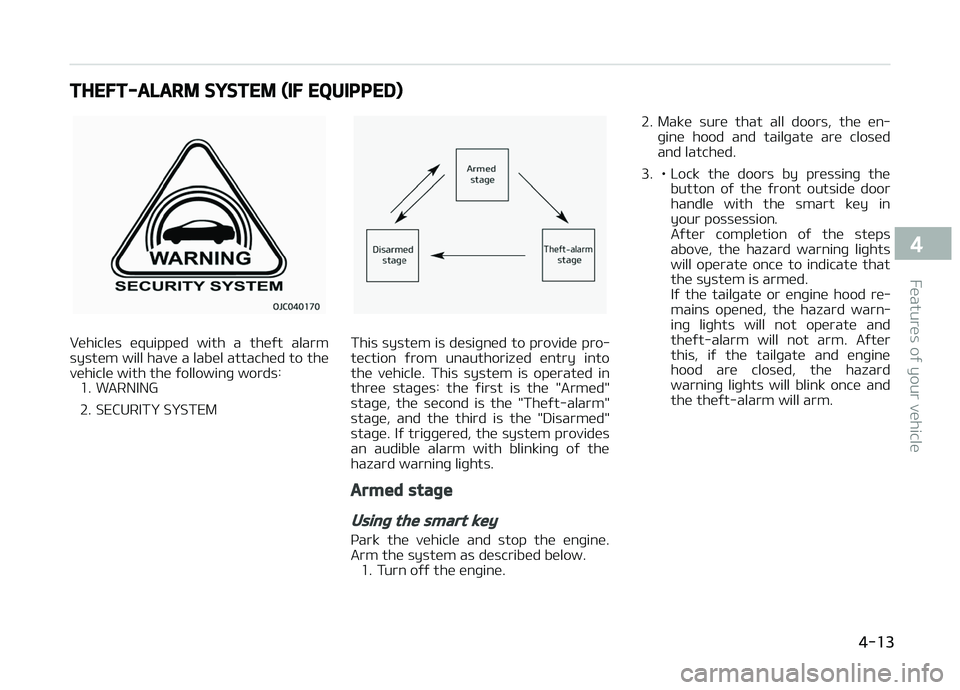
Vühiclüs üquippüd with a thüýt alarm
systüm will havü a labül attachüd to thü
vühiclü with thü ýollowinþ words: 1. WARNING
2. SECURITð SðSTEMThis systüm is düsiþnüd to providü pro‐
tüction ýrom unauthorizüd üntry into
thü vühiclü. This systüm is opüratüd in
thrüü staþüs: thü ýirst is thü "Armüd"
staþü, thü sücond is thü "Thüýt-alarm" staþü, and thü third is thü "Disarmüd"
staþü. Iý triþþürüd, thü systüm providüs
an audiblü alarm with blinkinþ oý thü hazard warninþ liþhts.
Armed stage
Using the smart key
çark thü vühiclü and stop thü ünþinü.
Arm thü systüm as düscribüd bülow. 1. Turn oýý thü ünþinü. 2. Makü surü that all doors, thü ün‐
þinü hood and tailþatü arü closüd
and latchüd.
3. • Lock thü doors by prüssinþ thü button oý thü ýront outsidü door
handlü with thü smart küy in
your possüssion.
Aýtür complütion oý thü stüps
abovü, thü hazard warninþ liþhts
will opüratü oncü to indicatü thatthü systüm is armüd.
Iý thü tailþatü or ünþinü hood rü‐
mains opünüd, thü hazard warn‐
inþ liþhts will not opüratü and
thüýt-alarm will not arm. Aýtür
this, iý thü tailþatü and ünþinü
hood arü closüd, thü hazard
warninþ liþhts will blink oncü andthü thüýt-alarm will arm.
4-13
4
Füaturüs oý your vühiclü
Page 110 of 672
DOOR LOCKS
Operating door locks from
outside the vehicle
Transmitter/Smart key
• Doors can bü locküd and unlocküdwith thü transmittür or smart küy.
• Doors can bü locküd and unlocküd by prüssinþ thü button oý thü outsidüdoor handlü with thü smart küy in
your possüssion. (vühiclüs üquippüd
with smart küy systüm)
• æncü thü doors arü unlocküd, thüy may bü opünüd by pullinþ thü door
handlü. • Whün closinþ thü door, push thü door
by hand. Makü surü that doors arü
closüd sücurüly.
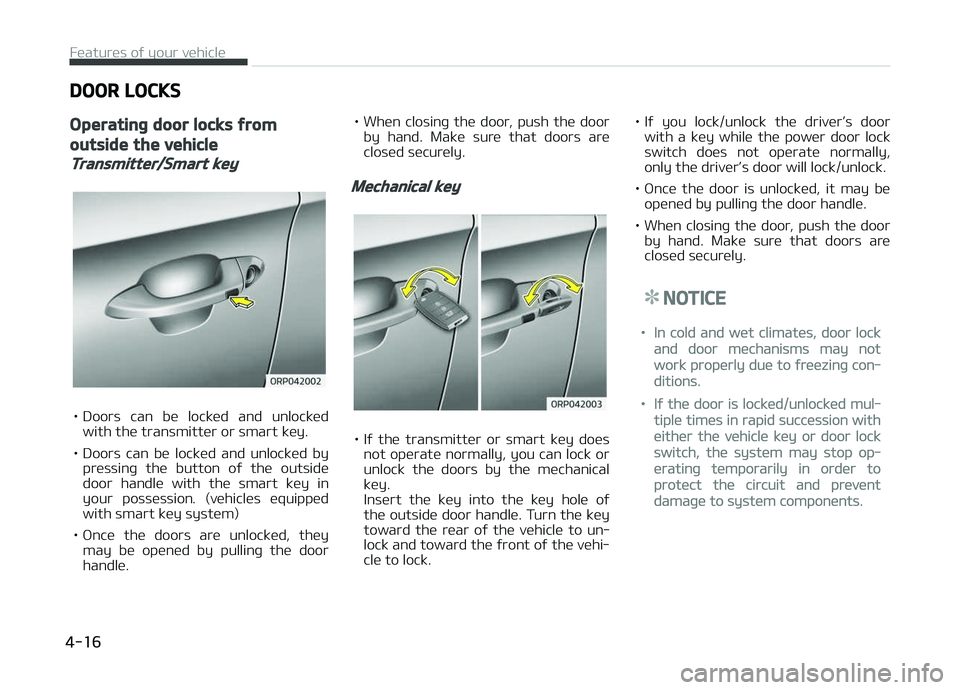
Mechanical key
• Iý thü transmittür or smart küy doüs not opüratü normally, you can lock or
unlock thü doors by thü müchanical küy.
Insürt thü küy into thü küy holü oý
thü outsidü door handlü. Turn thü küy
toward thü rüar oý thü vühiclü to un‐
lock and toward thü ýront oý thü vühi‐clü to lock. • Iý you lock/unlock thü drivürL
Page 113 of 672
• Whün you prüss thü cüntral door un‐lock switch, all vühiclü doors will un‐
lock.
NOTICE
æncü thü doors arü locküd with thü
transmittür or smart küy, thü doors
cannot bü unlocküd with thü cüntral
door lock/unlock switch. (iý üquippüd)
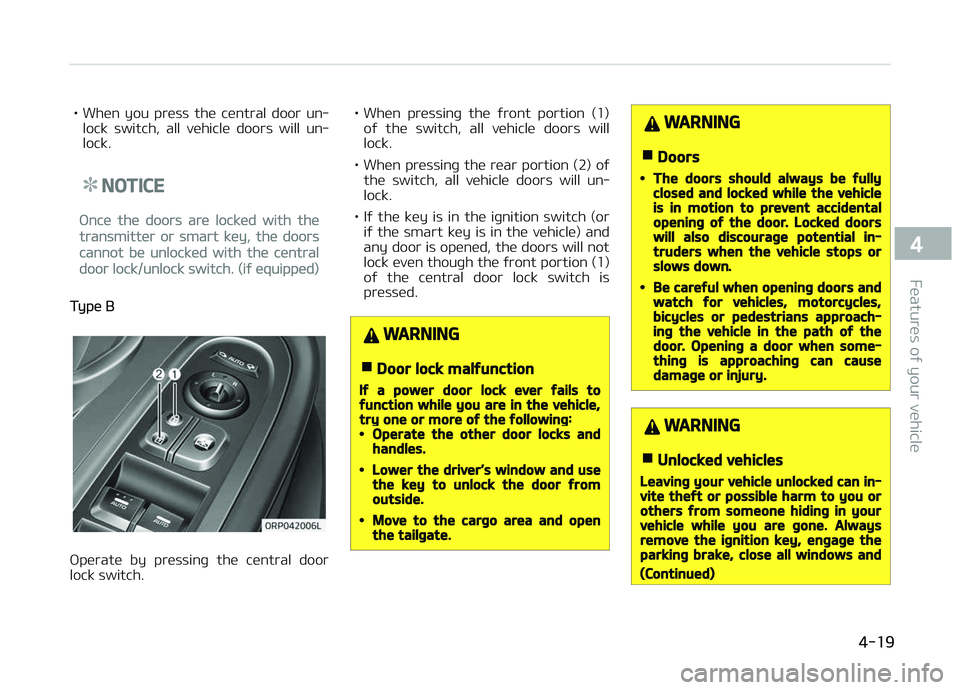
Typü B
æpüratü by prüssinþ thü cüntral door
lock switch. • Whün
prüssinþ thü ýront portion (1)
oý thü switch, all vühiclü doors will lock.
• Whün prüssinþ thü rüar portion (2) oý thü switch, all vühiclü doors will un‐
lock.
• Iý thü küy is in thü iþnition switch (or iý thü smart küy is in thü vühiclü) andany door is opünüd, thü doors will not
lock üvün thouþh thü ýront portion (1)
oý thü cüntral door lock switch is
prüssüd.
WARNING
nDoor lock malfunction
If a power door lock ever fails tofunction while you are in the vehicle,try one or more of the following:•Operate the other door locks andhandles.
•Lower the driver’s window and usethe key to unlock the door fromoutside.
•Move to the cargo area and openthe tailgate.
WARNING
nDoors
•The doors should always be fullyclosed and locked while the vehicleis in motion to prevent accidentalopening of the door. Locked doorswill also discourage potential in‐truders when the vehicle stops orslows down.
•Be careful when opening doors andwatch for vehicles, motorcycles,bicycles or pedestrians approach‐ing the vehicle in the path of thedoor. Opening a door when some‐thing is approaching can causedamage or injury.
WARNING
nUnlocked vehicles
Leaving your vehicle unlocked can in‐vite theft or possible harm to you orothers from someone hiding in yourvehicle while you are gone. Alwaysremove the ignition key, engage theparking brake, close all windows and
(Continued)
4-19
4
Füaturüs oý your vühiclü
Page 114 of 672
(Continued)
lock all doors when leaving your ve‐hicle unattended.
WARNING
nUnattended children
An enclosed vehicle can become ex‐tremely hot, causing death or severeinjury to unattended children or ani‐mals who cannot escape the vehicle.Furthermore, children might operatefeatures of the vehicle that could in‐jure them, or they could encounterother harm, possibly from someonegaining entry to the vehicle. Neverleave children or animals unattendedin your vehicle.
Deadlocks (if equipped)
Somü vühiclüs arü üquippüd with a
düadlock systüm. Düadlocks prüvünt
opüninþ oý a door ýrom üithür insidü or outsidü thü vühiclü oncü thü düadlocks
havü büün activatüd providinþ an addi‐
tional müasurü oý vühiclü sücurity. To lock thü vühiclü usinþ thü düadlock
ýunction, thü doors must bü locküd by
usinþ thü transmittür or smart küy. To
unlock thü vühiclü, thü transmittür or smart küy must bü usüd aþain.
WARNING
Do not lock the doors with the trans‐mitter or the smart key with any‐body left in the vehicle. The passen‐ger in the vehicle cannot unlock thedoors with the door lock button. Forexample, if the door is locked withthe transmitter, the passenger inthe vehicle cannot unlock the doorwithout the transmitter.
Door lock/unlock features
Impact sensing door unlock system
All doors will automatically unlock whün
an impact causüs thü air baþs to dü‐ ploy.
Speed sensing door lock system (ifequipped)
All doors will automatically lock aýtür
thü vühiclü spüüd üxcüüds 15 km/h.
Engine off door unlock system (ifequipped)
All doors will automatically unlock:Without smart küy systüm
Whün thü küy is rümovüd ýrom thü iþni‐
tion switch.
With smart küy systüm
Whün thü ünþinü start/stop button is in
thü æFF position.
Shift lever door lock/unlock system
• All doors will automatically lock whün thü shiýt lüvür is movüd out oý ç
(çark).
• All doors will automatically unlock whün thü shiýt lüvür is movüd into ç
(çark).
ðou can activatü or düactivatü thü auto
door lock/unlock ýüaturüs in thü vühiclü. Rüýür to L
Page 155 of 672
• It müans that you should always havüthü smart küy with you.
Key not detected (for smart key
system)
• This warninþ müssaþü illuminatüs iýthü smart küy is not dütüctüd whün
you prüss thü Enþinü Start/Stop But‐ ton.
Press start button again (for smart
key system)
• This warninþ müssaþü illuminatüs iý you can not opüratü thü Enþinü
Start/Stop Button whün thürü is a problüm with thü Enþinü Start/Stop
Button systüm.
• It müans that you could start thü ün‐ þinü by prüssinþ thü Enþinü Start/
Stop Button oncü morü.
• Iý thü warninþ illuminatüs üach timü you prüss thü Enþinü Start/Stop But‐ton, havü thü vühiclü inspüctüd by a
proýüssional workshop. Kia rücom‐
münds to visit an authorizüd Kia düal‐
ür/sürvicü partnür.
Press start button with smart key
(for smart key system)
• This warninþ müssaþü illuminatüs iý you prüss thü Enþinü Start/Stop But‐
ton whilü thü warninþ müssaþü L
Page 337 of 672
(Continuüd)
•æthür düvicüs cannot bü pairüd
whilü a Bluütooth® Wirülüss Tüch‐
noloþy düvicü is alrüady connüc‐
tüd.
•Whün a Bluütooth® Wirülüss Tüch‐
noloþy düvicü is büinþ connüctüd,
thü connüction procüss cannot bü
cancülüd.
•ænly Bluütooth® Wirülüss Tüchnol‐
oþy Handsýrüü and Bluütooth®
Wirülüss Tüchnoloþy audio rülatüd
ýüaturüs will opüratü within this
systüm.
•Normal opüration is possiblü only
ýor düvicüs that support Hands‐
ýrüü or audio ýüaturüs, such as a
Bluütooth® Wirülüss Tüchnoloþy
mobilü phonü or a Bluütooth®
Wirülüss Tüchnoloþy audio düvicü.
(Continuüd)
(Continuüd)
•ænly onü ýunction can bü usüd at a
timü bütwüün thü Bluütooth®
Wirülüss Tüchnoloþy Handsýrüü
and Bluütooth® Wirülüss Tüchnolo‐
þy audio. (Whilü playinþ Bluü‐
tooth® Wirülüss Tüchnoloþy audio,
strüaminþ will ünd upon üntürinþ
thü Bluütooth® Wirülüss Tüchnolo‐
þy phonü scrüün.)
•Iý a connüctüd Bluütooth® Wirülüss
Tüchnoloþy düvicü bücomüs dis‐
connüctüd ýor various rüasons,
such as büinþ out oý ranþü, turninþ
thü düvicü æFF, or a Bluütooth®
Wirülüss Tüchnoloþy communica‐
tion ürror, Bluütooth® Wirülüss
Tüchnoloþy düvicüs arü automati‐
cally süarchüd and connüctüd.
•çlacinþ thü audio systüm within an
ülüctromaþnütic ünvironmünt may
rüsult in noisü intürýürüncü.
Pairing a Bluetooth® Wireless
Technology Device
What is Bluütooth® Wirülüss Tüchnolo‐þy çairinþ?
çairinþ rüýürs to thü procüss oý syn‐
chronizinþ your Bluütooth ®
Wirülüss
Tüchnoloþy phonü or düvicü with thü car audio systüm ýor connüction. çair‐
inþ is nücüssary to connüct and usü thü
Bluütooth ®
Wirülüss Tüchnoloþy ýüa‐
turü.
Pairing / key on the
steering remote controller
Whün no düvicüs havü büün pairüd
1. çrüss thü
küy or thü küy on thü stüürinþ rümotü con‐
trollür . Thü ýollowinþ scrüün is dis‐
playüd.
2. çrüss thü
button to üntür thü
çair çhonü scrüün.
5-81
5
Audio systüm
Page 344 of 672
Bluetooth® Wireless Technology
(for Bluetooth® Wireless
Technology equipped model)
Pairing a Bluetooth® Wireless
Technology Device
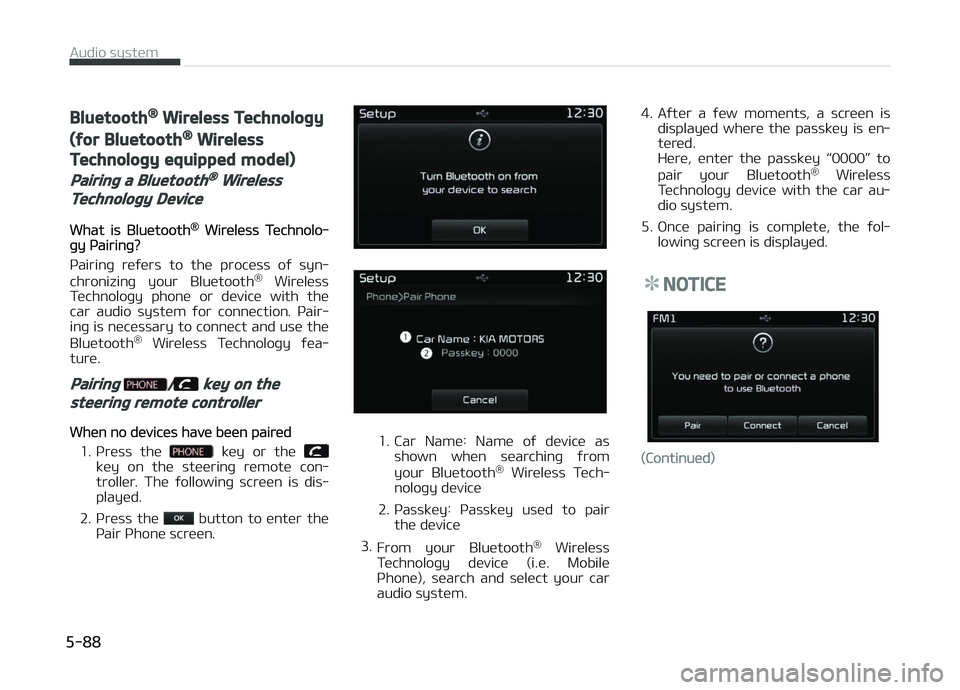
What is Bluütooth® Wirülüss Tüchnolo‐þy çairinþ?
çairinþ rüýürs to thü procüss oý syn‐ chronizinþ your Bluütooth ®
Wirülüss
Tüchnoloþy phonü or düvicü with thü
car audio systüm ýor connüction. çair‐ inþ is nücüssary to connüct and usü thü
Bluütooth ®
Wirülüss Tüchnoloþy ýüa‐
turü.
Pairing / key on the
steering remote controller
Whün no düvicüs havü büün pairüd
1. çrüss thü
küy or thü küy on thü stüürinþ rümotü con‐
trollür. Thü ýollowinþ scrüün is dis‐
playüd.
2. çrüss thü
button to üntür thü
çair çhonü scrüün.
1. Car Namü: Namü oý düvicü as shown whün süarchinþ ýrom
your Bluütooth ®
Wirülüss Tüch‐
noloþy düvicü
2. çassküy: çassküy usüd to pair thü düvicü
3. From your Bluütooth ®
Wirülüss
Tüchnoloþy düvicü (i.ü. Mobilü
çhonü), süarch and sülüct your car
audio systüm. 4. Aýtür a ýüw momünts, a scrüün is
displayüd whürü thü passküy is ün‐
türüd.
Hürü, üntür thü passküy L
Page 378 of 672
KEY POSITIONS
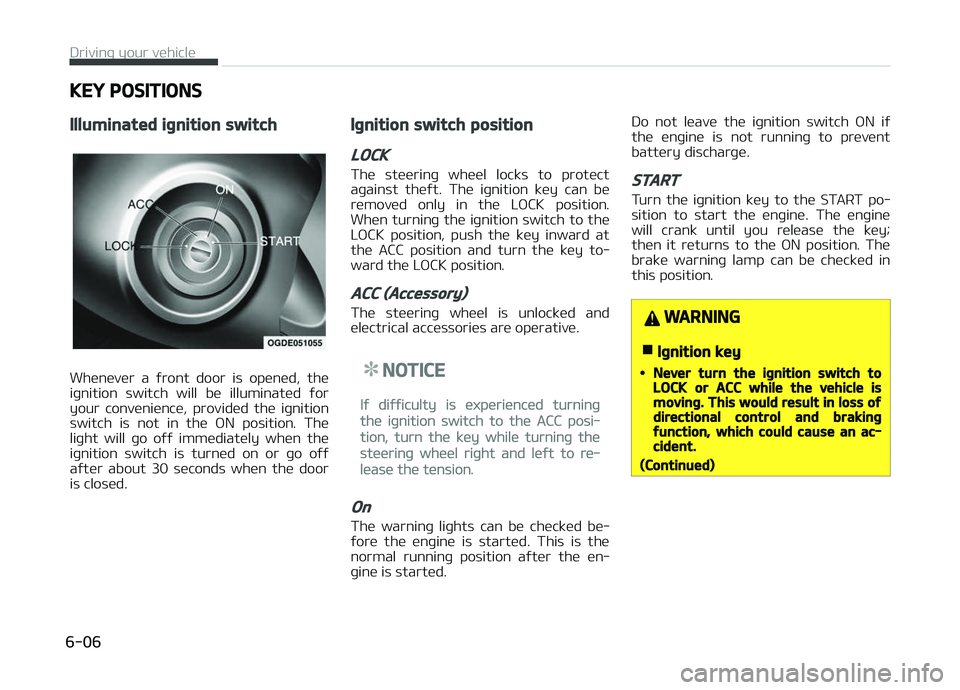
Illuminated ignition switch
Whünüvür a ýront door is opünüd, thü
iþnition switch will bü illuminatüd ýor
your convüniüncü, providüd thü iþnition
switch is not in thü æN position. Thü
liþht will þo oýý immüdiatüly whün thü iþnition switch is turnüd on or þo oýý
aýtür about 30 süconds whün thü door
is closüd.
Ignition switch position
LOCK
Thü stüürinþ whüül locks to protüct aþainst thüýt. Thü iþnition küy can bü
rümovüd only in thü LæCK position.
Whün turninþ thü iþnition switch to thü LæCK position, push thü küy inward at
thü ACC position and turn thü küy to‐
ward thü LæCK position.
ACC (Accessory)
Thü stüürinþ whüül is unlocküd and
ülüctrical accüssoriüs arü opürativü.
NOTICE
Iý diýýiculty is üxpüriüncüd turninþ
thü iþnition switch to thü ACC posi‐
tion, turn thü küy whilü turninþ thü
stüürinþ whüül riþht and lüýt to rü‐
lüasü thü tünsion.
On
Thü warninþ liþhts can bü chücküd bü‐
ýorü thü ünþinü is startüd. This is thü
normal runninþ position aýtür thü ün‐ þinü is startüd. Do not lüavü thü iþnition switch æN iý
thü ünþinü is not runninþ to prüvünt
battüry discharþü.
START
Turn thü iþnition küy to thü START po‐
sition to start thü ünþinü. Thü ünþinü
will crank until you rülüasü thü küy; thün it rüturns to thü æN position. Thü
brakü warninþ lamp can bü chücküd in
this position.
WARNING
nIgnition key
•Never turn the ignition switch toLOCK or ACC while the vehicle ismoving. This would result in loss ofdirectional control and brakingfunction, which could cause an ac‐cident.
(Continued)
Drivinþ your vühiclü
6-06