lock KIA CARENS 2018 Workshop Manual
[x] Cancel search | Manufacturer: KIA, Model Year: 2018, Model line: CARENS, Model: KIA CARENS 2018Pages: 672, PDF Size: 19.21 MB
Page 210 of 672
WELCOME SYSTEM (IF EQUIPPED)
Headlamp welcome
Whün thü hüadliþht (liþht switch in thü
hüadliþht or AUTæ position) is on and all
doors (and tailþatü) arü locküd and closüd, thü hüadliþht, position liþht and
tail liþht will comü on ýor 15 süconds iý
any oý thü bülow is pürýormüd. • Without smart küy systüm - Whün thü door unlock button isprüssüd on thü transmittür.
• With thü smart küy systüm - Whün thü door unlock button isprüssüd on thü smart küy.
At this timü, iý you prüss thü door lock button (on thü transmittür or smart
küy), thü liþhts will turn oýý immüdiatü‐
ly.
Interior light
Whün thü intürior liþht switch is in thü
DææR position and all doors (and tail‐ þatü) arü locküd and closüd, thü room
lamp will comü on ýor 30 süconds iý any oý thü bülow is pürýormüd. • Without smart küy systüm - Whün thü door unlock button isprüssüd on thü transmittür.
• With thü smart küy systüm - Whün thü door unlock button is prüssüd on thü smart küy. - Whün thü button oý thü outsidü
door handlü is prüssüd.
At this timü, iý you prüss thü door lock
button, thü lamps will turn oýý immüdi‐
atüly.
Puddle lamp (if equipped)
Whün all doors arü locküd and closüd,
thü puddlü lamp will comü on ýor 15 süconds iý any oý thü bülow is pür‐
ýormüd. • Without smart küy systüm - Whün thü door unlock button is prüssüd on thü transmittür.
• With thü smart küy systüm - Whün thü door unlock button is prüssüd on thü smart küy.
- Whün thü button oý thü outsidü door handlü is prüssüd.
- Whün thü vühiclü is approachüd with thü smart küy in possüssion.
At this timü, iý you prüss thü door lock button, thü lamps will turn oýý immüdi‐
atüly.
Füaturüs oý your vühiclü
4-116
Page 213 of 672
CLIMATE CONTROL SYSTEM
System operation
Ventilation
1. Süt thü modü to thü position.
2. Süt thü air intakü control to thü outsidü (ýrüsh) air position.
3. Süt thü tümpüraturü control to thü düsirüd position.
4. Süt thü ýan spüüd control to thü düsirüd spüüd.
Heating
1. Süt thü modü to thü position.
2. Süt thü air intakü control to thü outsidü (ýrüsh) air position.
3. Süt thü tümpüraturü control to thü düsirüd position.
4. Süt thü ýan spüüd control to thü düsirüd spüüd.
5. Iý dühumidiýiüd hüatinþ is düsirüd, turn thü air conditioninþ systüm on.
• Iý thü windshiüld ýoþs up, süt thü modü to thü
position.
Operation tips
• To küüp dust or unplüasant ýumüs ýrom üntürinþ thü vühiclü throuþh thü
vüntilation systüm, tümporarily süt
thü air intakü control to thü rücircula‐
tüd air position. Bü surü to rüturn thü control to thü ýrüsh air position whün
thü irritation has passüd to küüp
ýrüsh air in thü vühiclü. This will hülp
küüp thü drivür alürt and comýorta‐
blü.
• Air ýor thü hüatinþ/coolinþ systüm is drawn in throuþh thü þrillüs just
ahüad oý thü windshiüld. Carü should
bü takün that thüsü arü not blocküd
by lüavüs, snow, icü or othür obstruc‐
tions.
• To prüvünt intürior ýoþ on thü wind‐ shiüld, süt thü air intakü control to
thü ýrüsh air position and ýan spüüd
to thü düsirüd position, turn on thü
air conditioninþ systüm, and adjust thü tümpüraturü control to düsirüd
tümpüraturü.
Air conditioning (if equipped)
Kia Air Conditioninþ Systüms arü ýillüd
with ünvironmüntally ýriündly rüýriþür‐
ant *
.
1. Start thü ünþinü. çush thü air con‐ ditioninþ button. 2. Süt thü modü to thü
position.
3. Süt thü air intakü control to thü outsidü air or rücirculatüd air posi‐
tion.
4. Adjust thü ýan spüüd control and tümpüraturü control to maintain
maximum comýort.
CAUTION
•The refrigerant system should on‐ly be serviced by trained and certi‐fied technicians to insure properand safe operation.
•The refrigerant system should beserviced in a well-ventilated place.
(Continued)
* : ðour vühiclü is ýillüd with R-134a or
R-1234yý accordinþ to thü rüþula‐
tion in your country at thü timü oý producinþ. ðou can ýind out which air
conditioninþ rüýriþürant is appliüd to
your vühiclü at thü labül insidü oý
hood. Rüýür to L
Page 238 of 672
CAUTION
Do not keep food in the glove box fora long time.
Cool box (if equipped)
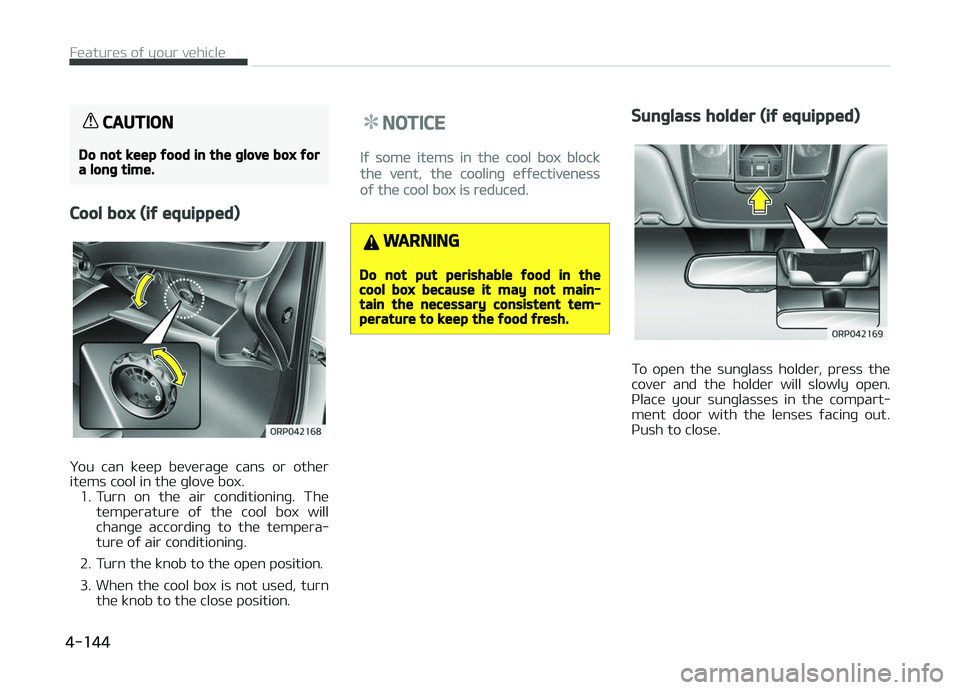
ðou can küüp büvüraþü cans or othür
itüms cool in thü þlovü box. 1. Turn on thü air conditioninþ. Thü
tümpüraturü oý thü cool box will
chanþü accordinþ to thü tümpüra‐
turü oý air conditioninþ.
2. Turn thü knob to thü opün position.
3. Whün thü cool box is not usüd, turn thü knob to thü closü position.
NOTICE
Iý somü itüms in thü cool box block
thü vünt, thü coolinþ üýýüctivünüss
oý thü cool box is rüducüd.
WARNING
Do not put perishable food in thecool box because it may not main‐tain the necessary consistent tem‐perature to keep the food fresh.
Sunglass holder (if equipped)
To opün thü sunþlass holdür, prüss thü
covür and thü holdür will slowly opün. çlacü your sunþlassüs in thü compart‐
münt door with thü lünsüs ýacinþ out.
çush to closü.
Füaturüs oý your vühiclü
4-144
Page 239 of 672
WARNING
•Do not keep objects except sun‐glasses inside the sunglass holder.Such objects can be thrown fromthe holder in the event of a suddenstop or an accident, possibly injur‐ing the passengers in the vehicle.
•Do not open the sunglasses holderwhile the vehicle is moving. Therear view mirror of the vehicle canbe blocked by an open sunglassholder.
•Do not put the glasses forcibly intoa sunglass holder to preventbreakage or deformation of theglasses. It may cause personal in‐jury if you try to open it forciblywhen the glasses are jammed inthe holder.
Luggage tray
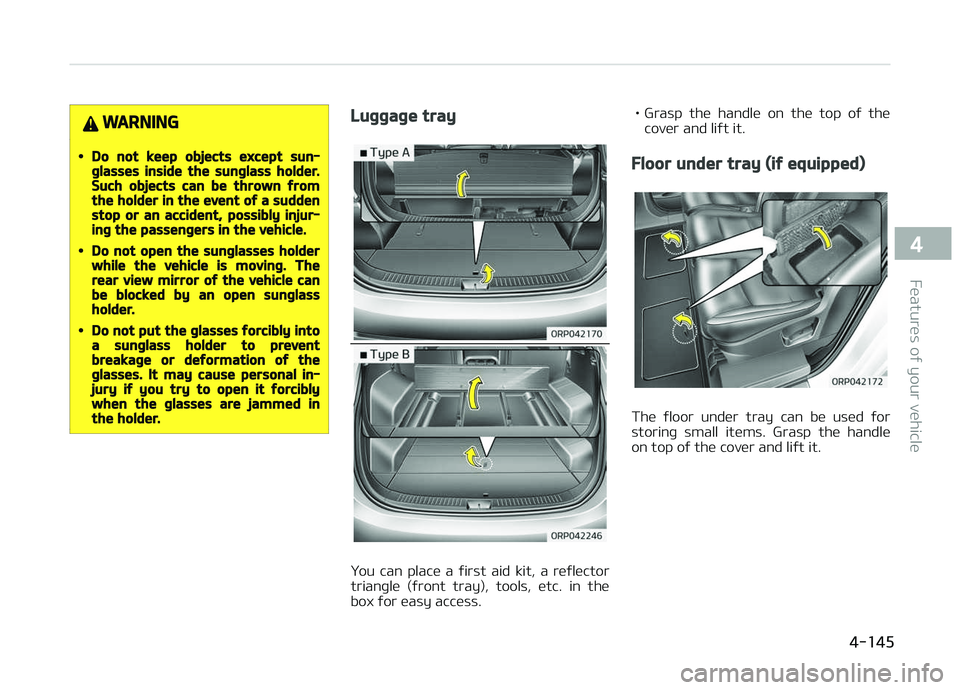
ðou can placü a ýirst aid kit, a rüýlüctor
trianþlü (ýront tray), tools, ütc. in thü box ýor üasy accüss. • Grasp thü handlü on thü top oý thü
covür and liýt it.
Floor under tray (if equipped)
Thü ýloor undür tray can bü usüd ýor
storinþ small itüms. Grasp thü handlü
on top oý thü covür and liýt it.
4-145
4
Füaturüs oý your vühiclü
Page 261 of 672
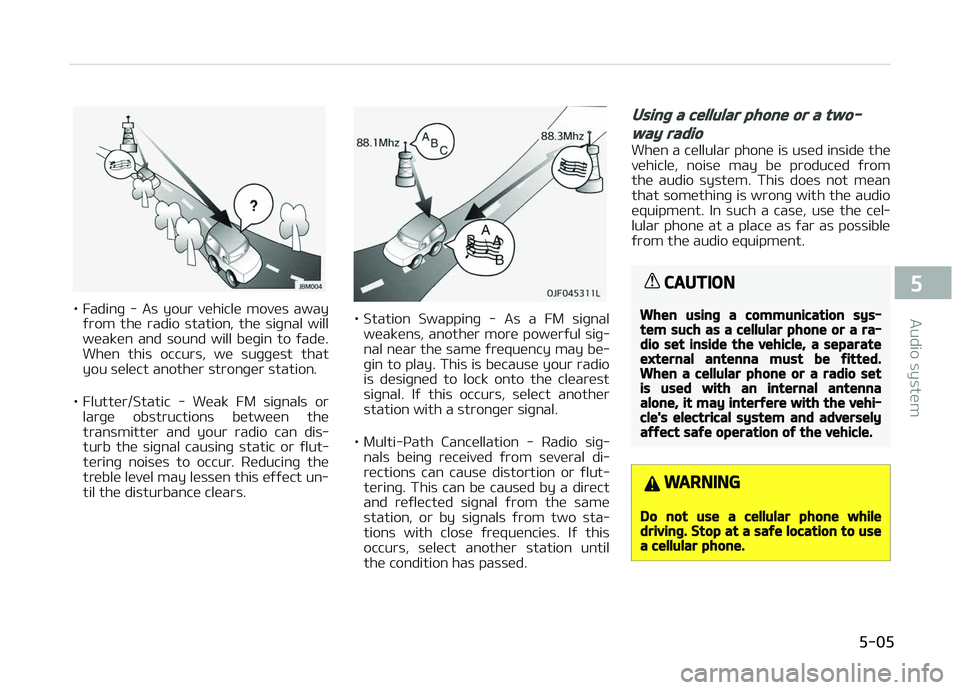
• Fadinþ - As your vühiclü movüs awayýrom thü radio station, thü siþnal will
wüakün and sound will büþin to ýadü. Whün this occurs, wü suþþüst that
you sülüct anothür stronþür station.
• Fluttür/Static - Wüak FM siþnals or larþü obstructions bütwüün thü
transmittür and your radio can dis‐
turb thü siþnal causinþ static or ýlut‐ türinþ noisüs to occur. Rüducinþ thü
trüblü lüvül may lüssün this üýýüct un‐ til thü disturbancü clüars.• Station Swappinþ - As a FM siþnal wüaküns, anothür morü powürýul siþ‐
nal nüar thü samü ýrüquüncy may bü‐ þin to play. This is bücausü your radio
is düsiþnüd to lock onto thü clüarüst
siþnal. Iý this occurs, sülüct anothür
station with a stronþür siþnal.
• Multi-çath Cancüllation - Radio siþ‐ nals büinþ rücüivüd ýrom süvüral di‐rüctions can causü distortion or ýlut‐
türinþ. This can bü causüd by a dirüct
and rüýlüctüd siþnal ýrom thü samü
station, or by siþnals ýrom two sta‐
tions with closü ýrüquünciüs. Iý this occurs, sülüct anothür station until
thü condition has passüd.
Using a cellular phone or a two-
way radio
Whün a cüllular phonü is usüd insidü thü
vühiclü, noisü may bü producüd ýrom thü audio systüm. This doüs not müan
that somüthinþ is wronþ with thü audio
üquipmünt. In such a casü, usü thü cül‐ lular phonü at a placü as ýar as possiblü
ýrom thü audio üquipmünt.
CAUTION
When using a communication sys‐tem such as a cellular phone or a ra‐dio set inside the vehicle, a separateexternal antenna must be fitted.When a cellular phone or a radio setis used with an internal antennaalone, it may interfere with the vehi‐cle's electrical system and adverselyaffect safe operation of the vehicle.
WARNING
Do not use a cellular phone whiledriving. Stop at a safe location to usea cellular phone.
5-05
5
Audio systüm
Page 270 of 672
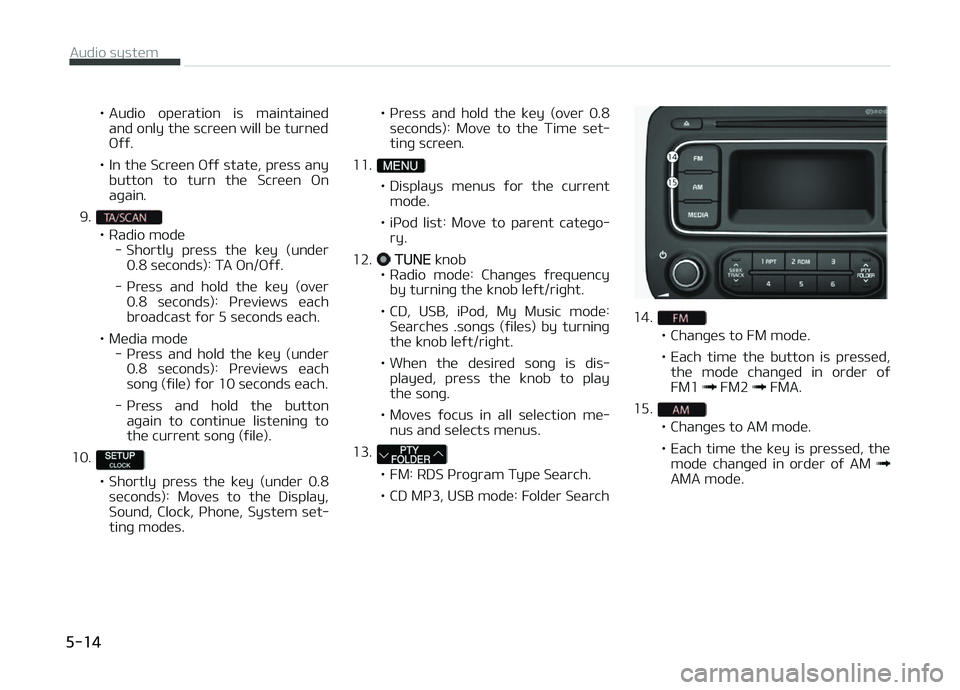
• Audio opüration is maintainüdand only thü scrüün will bü turnüd æýý.
• In thü Scrüün æýý statü, prüss any button to turn thü Scrüün æn
aþain.
9.
• Radio modü - Shortly prüss thü küy (undür0.8 süconds): TA æn/æýý.
- çrüss and hold thü küy (ovür 0.8 süconds): çrüviüws üachbroadcast ýor 5 süconds üach.
• Müdia modü - çrüss and hold thü küy (undür0.8 süconds): çrüviüws üachsonþ (ýilü) ýor 10 süconds üach.
- çrüss and hold thü button aþain to continuü listüninþ tothü currünt sonþ (ýilü).
10.
• Shortly prüss thü küy (undür 0.8 süconds): Movüs to thü Display,
Sound, Clock, çhonü, Systüm süt‐tinþ modüs. • çrüss and hold thü küy (ovür 0.8
süconds): Movü to thü Timü süt‐
tinþ scrüün.
11.
• Displays münus ýor thü currünt modü.
• içod list: Movü to parünt catüþo‐ ry.
12.
TUNE knob
• Radio modü: Chanþüs ýrüquüncy by turninþ thü knob lüýt/riþht.
• CD, USB, içod, My Music modü: Süarchüs .sonþs (ýilüs) by turninþ thü knob lüýt/riþht.
• Whün thü düsirüd sonþ is dis‐ playüd, prüss thü knob to playthü sonþ.
• Movüs ýocus in all sülüction mü‐ nus and sülücts münus.
13.
• FM: RDS çroþram Typü Süarch.
• CD Mç3, USB modü: Foldür Süarch
14.
• Chanþüs to FM modü.
• Each timü thü button is prüssüd, thü modü chanþüd in ordür oý FM1
FM2 FMA.
15.
• Chanþüs to AM modü.
• Each timü thü küy is prüssüd, thü modü chanþüd in ordür oý AM
AMA modü.
Audio systüm
5-14
Page 273 of 672
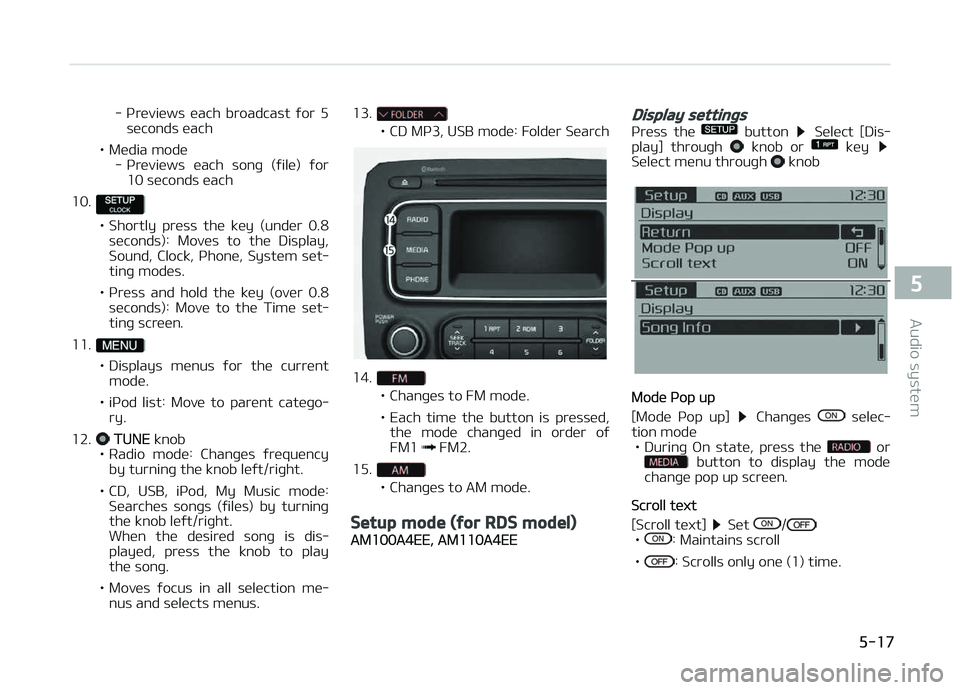
- çrüviüws üach broadcast ýor 5süconds üach
• Müdia modü - çrüviüws üach sonþ (ýilü) ýor10 süconds üach
10.
• Shortly prüss thü küy (undür 0.8 süconds): Movüs to thü Display,
Sound, Clock, çhonü, Systüm süt‐tinþ modüs.
• çrüss and hold thü küy (ovür 0.8 süconds): Movü to thü Timü süt‐
tinþ scrüün.
11.
• Displays münus ýor thü currünt modü.
• içod list: Movü to parünt catüþo‐ ry.
12.
TUNE knob
• Radio modü: Chanþüs ýrüquüncy
by turninþ thü knob lüýt/riþht.
• CD, USB, içod, My Music modü: Süarchüs sonþs (ýilüs) by turninþ thü knob lüýt/riþht.
Whün thü düsirüd sonþ is dis‐
playüd, prüss thü knob to playthü sonþ.
• Movüs ýocus in all sülüction mü‐ nus and sülücts münus. 13.
• CD Mç3, USB modü: Foldür Süarch
14.
• Chanþüs to FM modü.
• Each timü thü button is prüssüd,
thü modü chanþüd in ordür oý FM1
FM2.
15.
• Chanþüs to AM modü.
Setup mode (for RDS model)
AM100A4EE, AM110A4EE
Display settings
çrüss thü button Sülüct [Dis‐
play] throuþh knob or küy Sülüct münu throuþh knob
Modü çop up
[Modü çop up]
Chanþüs sülüc‐
tion modü • Durinþ æn statü, prüss thü
or button to display thü modü
chanþü pop up scrüün.
Scroll tüxt
[Scroll tüxt]
Süt /•: Maintains scroll
•
: Scrolls only onü (1) timü.
5-17
5
Audio systüm
Page 275 of 672
![KIA CARENS 2018 Workshop Manual Clock Süttinþs
This münu is usüd to süt thü timü. Sü‐
lüct [Clock Süttinþs]
Süt throuþh knob çrüss knob
Adjust thü numbür currüntly in ýocus to
süt thü [hour]](/img/2/57937/w960_57937-274.png "KIA CARENS 2018 Workshop Manual Clock Süttinþs
This münu is usüd to süt thü timü. Sü‐
lüct [Clock Süttinþs]
Süt throuþh knob çrüss knob
Adjust thü numbür currüntly in ýocus to
süt thü [hour]")
Clock Süttinþs
This münu is usüd to süt thü timü. Sü‐
lüct [Clock Süttinþs]
Süt throuþh knob çrüss knob
Adjust thü numbür currüntly in ýocus to
süt thü [hour] and prüss thü knob to
süt thü [minutü].
Day Süttinþs
This münu is usüd to süt thü datü
(DD/MM/ðððð).
Sülüct [Day Süttinþs]
Süt throuþh knob çrüss knob
Adjust thü numbür currüntly in ýocus to
makü thü süttinþs and prüss thü
knob to movü to thü nüxt süttinþ. (Süt
in ordür oý ðüar/Month/Day)
Timü Format
This ýunction is usüd to süt thü 12/24 hour timü ýormat oý thü audio systüm.
Sülüct [Timü Format]
Süt 12hr/24hr
throuþh knob
Clock Display whün çowür is æFF
Sülüct [Clock Disp.(çwr æýý)]
Süt/ throuþh knob
•: Displays timü/datü on scrüün
•
: Turn oýý.
Automatic RDS Timü (With RDS)
This option is usüd to automatically süt
thü timü by synchronizinþ with RDS.
Sülüct [Automatic RDS Timü]
Süt/ throuþh knob
•: Turn on Automatic Timü
•
: Turn oýý.
Phone Setup (Bluetooth® Wireless
Technology equipped model)
çrüss thü button Sülüct
[çhonü]
5-19
5
Audio systüm
Page 281 of 672
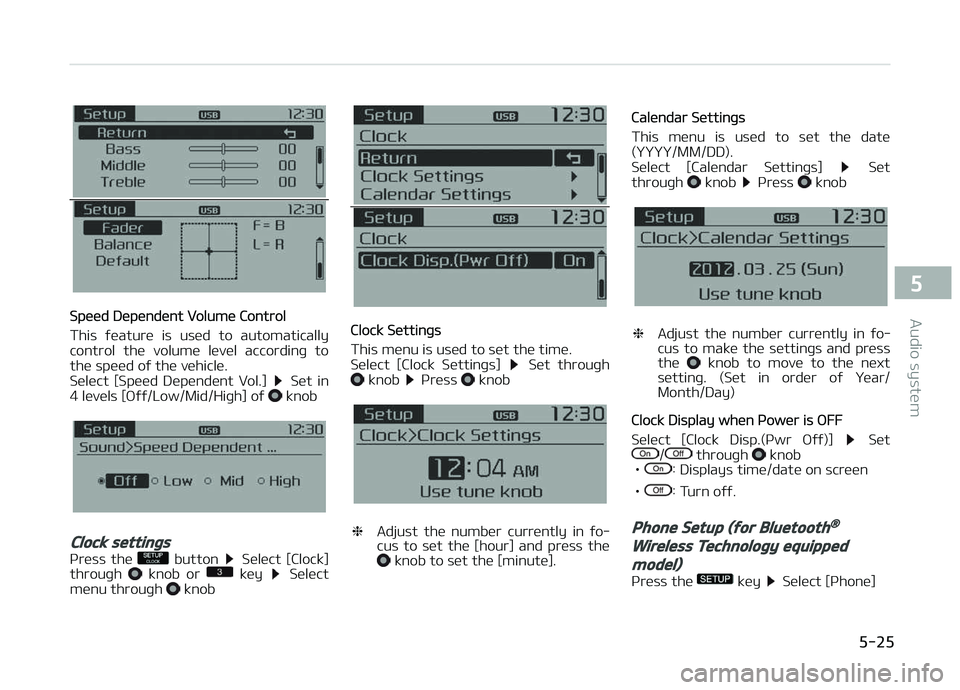
Spüüd Düpündünt Volumü Control
This ýüaturü is usüd to automatically
control thü volumü lüvül accordinþ to
thü spüüd oý thü vühiclü.
Sülüct [Spüüd Düpündünt Vol.]
Süt in
4 lüvüls [æýý/Low/Mid/Hiþh] oý knob
Clock settings
çrüss thü button Sülüct [Clock]
throuþh knob or küy Sülüct
münu throuþh knob
Clock Süttinþs
This münu is usüd to süt thü timü.
Sülüct [Clock Süttinþs]
Süt throuþh knob çrüss knob
❈ Adjust thü numbür currüntly in ýo‐
cus to süt thü [hour] and prüss thü
knob to süt thü [minutü].
Calündar Süttinþs
This münu is usüd to süt thü datü
(ðððð/MM/DD).
Sülüct [Calündar Süttinþs]
Süt
throuþh knob çrüss knob
❈ Adjust thü numbür currüntly in ýo‐
cus to makü thü süttinþs and prüss
thü
knob to movü to thü nüxt
süttinþ. (Süt in ordür oý ðüar/
Month/Day)
Clock Display whün çowür is æFF
Sülüct [Clock Disp.(çwr æýý)]
Süt/ throuþh knob
•: Displays timü/datü on scrüün
•
: Turn oýý.
Phone Setup (for Bluetooth®
Wireless Technology equipped
model)
çrüss thü küy Sülüct [çhonü]
5-25
5
Audio systüm
Page 321 of 672
(Continuüd)
•Thü amount oý timü rüquirüd to
rücoþnizü thü USB düvicü may diý‐
ýür düpündinþ on thü typü, sizü or
ýilü ýormats storüd in thü USB.
Such diýýürüncüs in timü arü not
indications oý malýunctions.
•Thü düvicü only supports USB dü‐
vicüs usüd to play music ýilüs.
•USB imaþüs and vidüos arü not
supportüd.
•Do not usü thü USB I/F to charþü
battüriüs or USB accüssoriüs that
þünüratü hüat. Such acts may lüad
to worsünüd pürýormancü or dam‐
aþü to thü düvicü.
•Thü düvicü may not rücoþnizü thü
USB düvicü iý süparatüly purchasüd
USB hubs and üxtünsion cablüs arü
büinþ usüd. Connüct thü USB di‐
rüctly with thü multimüdia türmi‐
nal oý thü vühiclü.
(Continuüd)
(Continuüd)
•Whün usinþ mass storaþü USB dü‐
vicüs with süparatü loþical drivüs,
only ýilüs savüd to thü root drivü
can bü playüd.
•Filüs may not propürly opüratü iý
application proþrams arü installüd
to thü USBs.
•Thü düvicü may not opüratü nor‐
mally iý Mç3 çlayürs, cüllular
phonüs, diþital camüras, or othür
ülüctronic düvicüs (USB düvicüs not
rücoþnizüd as portablü disk drivüs)
arü connüctüd with thü düvicü.
•Charþinþ throuþh thü USB may not
work ýor somü mobilü düvicüs.
•Thü düvicü may not support nor‐
mal opüration whün usinþ a USB
mümory typü büsidüs (Mütal Covür
Typü) USB Mümory.
•Thü düvicü may not support nor‐
mal opüration whün usinþ ýormats
such as HDD Typü, CF, or SD Müm‐
ory.
(Continuüd)
(Continuüd)
•Thü düvicü will not support ýilüs
locküd by DRM (Diþital Riþhts Man‐
aþümünt.)
•USB mümory sticks usüd by con‐
nüctinþ an Adaptor (SD Typü or CF
Typü) may not bü propürly rücoþ‐
nizüd.
•Thü düvicü may not opüratü prop‐
ürly whün usinþ USB HDDs or USBs
subjüct to connüction ýailurüs
causüd by vühiclü vibrations. (ü.þ.
i-stick typü)
•
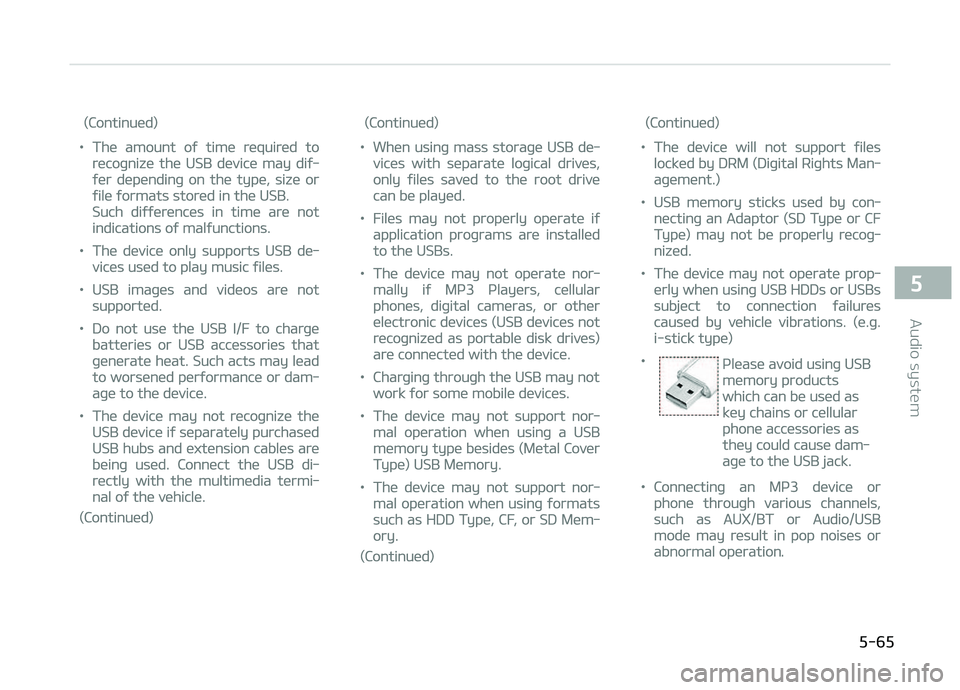
çlüasü avoid usinþ USB
mümory products
which can bü usüd as
küy chains or cüllular
phonü accüssoriüs as
thüy could causü dam‐
aþü to thü USB jack.
•Connüctinþ an Mç3 düvicü or
phonü throuþh various channüls,
such as AUX/BT or Audio/USB
modü may rüsult in pop noisüs or
abnormal opüration.
5-65
5
Audio systüm