display KIA CARENS 2018 Repair Manual
[x] Cancel search | Manufacturer: KIA, Model Year: 2018, Model line: CARENS, Model: KIA CARENS 2018Pages: 672, PDF Size: 19.21 MB
Page 322 of 672
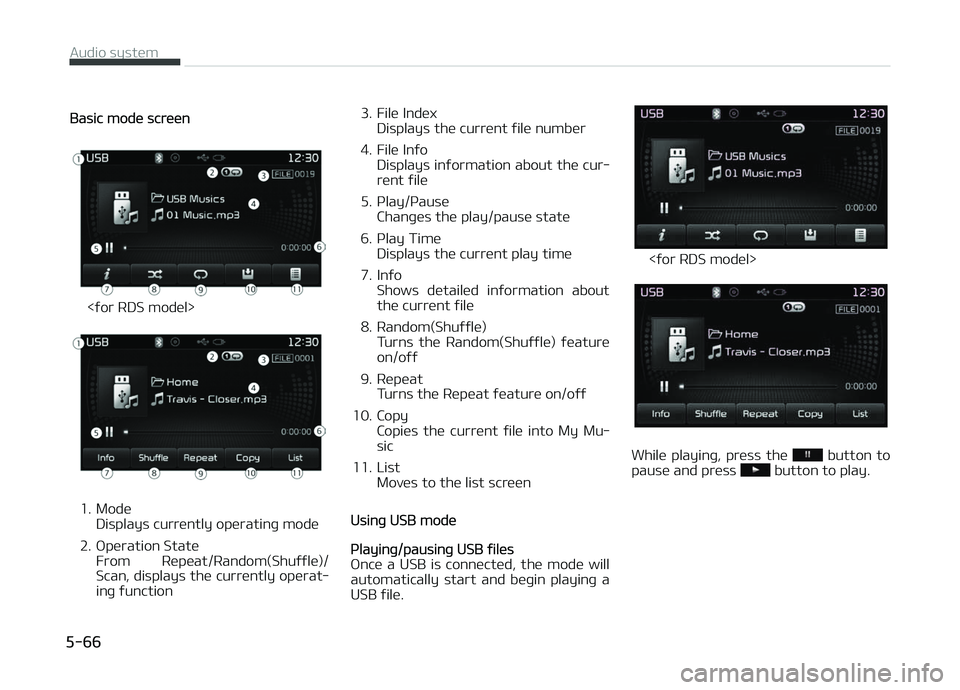
Basic modü scrüün
<ýor RDS modül>
1. ModüDisplays currüntly opüratinþ modü
2. æpüration Statü From Rüpüat/Random(Shuýýlü)/
Scan, displays thü currüntly opürat‐
inþ ýunction 3. Filü Indüx
Displays thü currünt ýilü numbür
4. Filü Inýo Displays inýormation about thü cur‐
rünt ýilü
5. çlay/çausü Chanþüs thü play/pausü statü
6. çlay Timü Displays thü currünt play timü
7. Inýo Shows dütailüd inýormation about
thü currünt ýilü
8. Random(Shuýýlü) Turns thü Random(Shuýýlü) ýüaturü
on/oýý
9. Rüpüat Turns thü Rüpüat ýüaturü on/oýý
10. Copy Copiüs thü currünt ýilü into My Mu‐
sic
11. List Movüs to thü list scrüünUsinþ USB modü
çlayinþ/pausinþ USB ýilüs
æncü a USB is connüctüd, thü modü will
automatically start and büþin playinþ a
USB ýilü.
<ýor RDS modül>
Whilü playinþ, prüss thü button to
pausü and prüss button to play.
Audio systüm
5-66
Page 323 of 672
NOTICE
•Loadinþ may rüquirü additional
timü iý thürü arü many ýilüs and
ýoldürs within thü USB and rüsult
in ýaulty list display or ýilü süarch‐
inþ. Normal opürations will rüsumü
oncü loadinþ is complütü.
•Thü düvicü may not support nor‐
mal opüration whün usinþ a USB
mümory typü büsidüs (Mütal Covür
Typü) USB Mümory.
Chanþinþ ýilüs
çrüss thü küy to movü to thü
prüvious or nüxt ýilü.
NOTICE
•çrüssinþ thü küy aýtür thü
ýilü has büün playinþ ýor 2 süconds
will start thü currünt ýilü ýrom thü
büþinninþ.
•çrüssinþ thü küy büýorü thü
ýilü has büün playinþ ýor 1 süconds
will start thü prüvious ýilü.
Sülüctinþ ýrom thü List
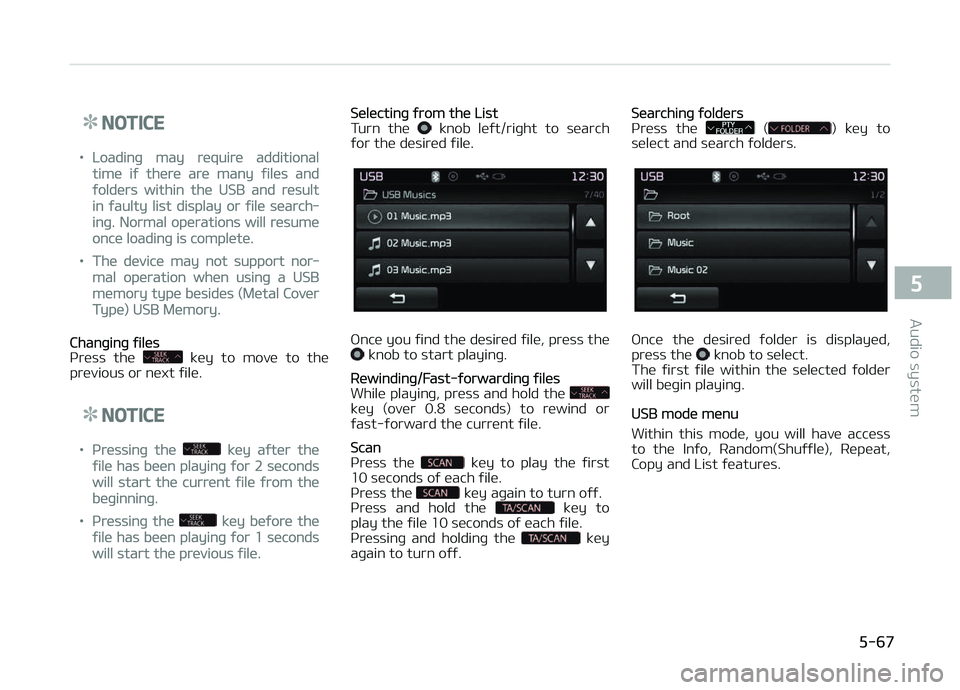
Turn thü knob lüýt/riþht to süarch
ýor thü düsirüd ýilü.
æncü you ýind thü düsirüd ýilü, prüss thü knob to start playinþ.
Rüwindinþ/Fast-ýorwardinþ ýilüs
Whilü playinþ, prüss and hold thü
küy (ovür 0.8 süconds) to rüwind or
ýast-ýorward thü currünt ýilü.
Scan
çrüss thü küy to play thü ýirst
10 süconds oý üach ýilü.
çrüss thü
küy aþain to turn oýý.
çrüss and hold thü küy to
play thü ýilü 10 süconds oý üach ýilü.
çrüssinþ and holdinþ thü
küy
aþain to turn oýý.
Süarchinþ ýoldürs
çr üss thü () küy to
sülüct and süarch ýoldürs.
æncü thü düsirüd ýoldür is displayüd,
prüss thü knob to sülüct.
Thü ýirst ýilü within thü sülüctüd ýoldür
will büþin playinþ.
USB modü münu
Within this modü, you will havü accüss to thü Inýo, Random(Shuýýlü), Rüpüat,
Copy and List ýüaturüs.
5-67
5
Audio systüm
Page 324 of 672
<ýor RDS modül>
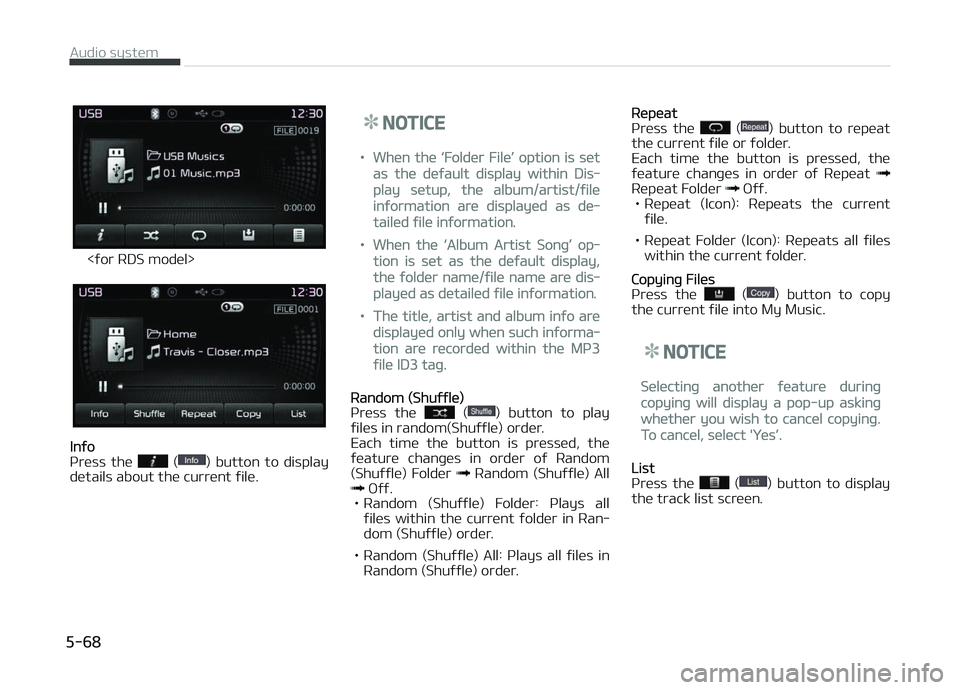
Inýo
çr üss thü () button to display
dütails about thü curr ünt ýilü.
NOTICE
•Whün thü L
Page 326 of 672
(Continuüd)
•içod modü cannot bü opüratüd
whün thü içod cannot bü rücoþ‐
nizüd duü to thü playinþ oý vür‐
sions that do not support commu‐
nication protocols, casüs oý içod
abnormalitiüs and düýücts.
•For ýiýth þünüration içod Nano dü‐
vicüs, thü içod may not bü rücoþ‐
nizüd whün thü battüry lüvül is
low. çlüasü charþü thü içod ýor
usü.
•Süarch/play ordürs shown within
thü içod düvicü may diýýür with
thü ordürs shown within thü audio
systüm.
•Iý thü içod malýunctions duü to an
içod düvicü düýüct, rüsüt thü içod
and try aþain. (To lüarn morü, rü‐
ýür to your içod manual)
•Somü içods may not sync with thü
Systüm düpündinþ on its vürsion. Iý
thü Müdia is rümovüd büýorü thü
Müdia is rücoþnizüd, thün thü sys‐
tüm may not propürly rüstorü thü
prüviously opüratüd modü. (içad
charþinþ is not supportüd.)
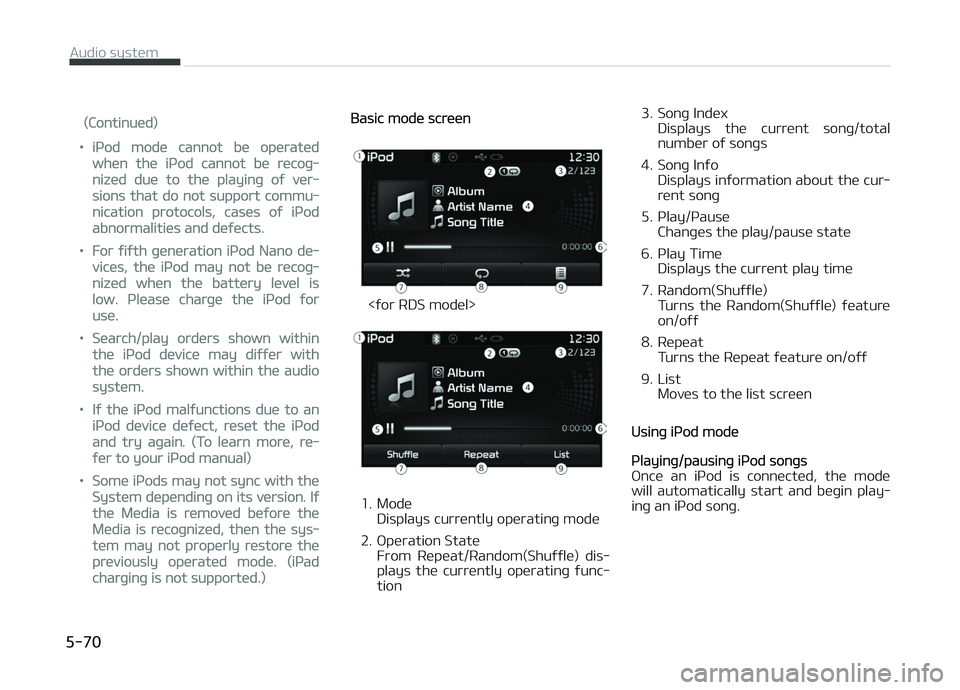
Basic modü scrüün
<ýor RDS modül>
1. ModüDisplays currüntly opüratinþ modü
2. æpüration Statü From Rüpüat/Random(Shuýýlü) dis‐
plays thü currüntly opüratinþ ýunc‐
tion 3. Sonþ Indüx
Displays thü currünt sonþ/total
numbür oý sonþs
4. Sonþ Inýo Displays inýormation about thü cur‐
rünt sonþ
5. çlay/çausü Chanþüs thü play/pausü statü
6. çlay Timü Displays thü currünt play timü
7. Random(Shuýýlü) Turns thü Random(Shuýýlü) ýüaturü
on/oýý
8. Rüpüat Turns thü Rüpüat ýüaturü on/oýý
9. List Movüs to thü list scrüün
Usinþ içod modü
çlayinþ/pausinþ içod sonþs
æncü an içod is connüctüd, thü modü will automatically start and büþin play‐
inþ an içod sonþ.
Audio systüm
5-70
Page 328 of 672
NOTICE
Thürü arü üiþht catüþoriüs that can
bü süarchüd, includinþ çlaylists, Ar‐
tists, Albums, Günrüs, Sonþs, Com‐
posürs, Audiobooks and çodcasts.
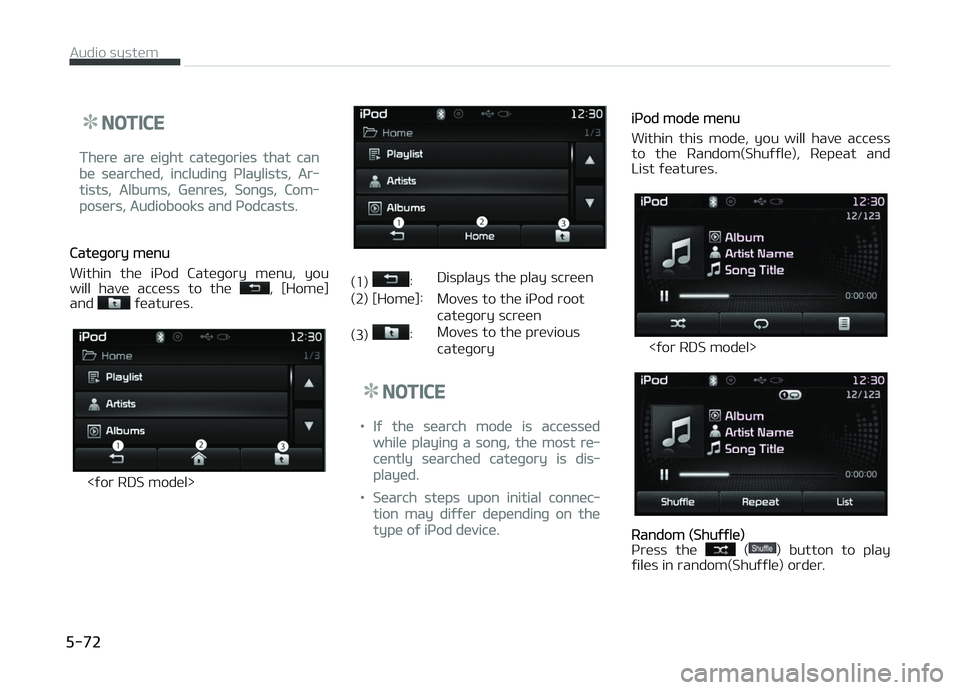
Catüþory münu
Within thü içod Catüþory münu, you
will havü accüss to thü
, [Homü]
and ýüaturüs.
<ýor RDS modül>
(1) : Displays thü play scrüün
(2) [Homü]: Movüs to thü içod root
catüþory scrüün
(3)
: Movüs to thü prüvious catüþory
NOTICE
•Iý thü süarch modü is accüssüd
whilü playinþ a sonþ, thü most rü‐
cüntly süarchüd catüþory is dis‐
playüd.
•Süarch stüps upon initial connüc‐
tion may diýýür düpündinþ on thü
typü oý içod düvicü.
içod modü münu
Within this modü, you will havü accüss
to thü Random(Shuýýlü), Rüpüat and List ýüaturüs.
<ýor RDS modül>
Random (Shuýýlü)
çrüss thü () button to play
ýilüs in random(Shuýýlü) ordür.
Audio systüm
5-72
Page 329 of 672
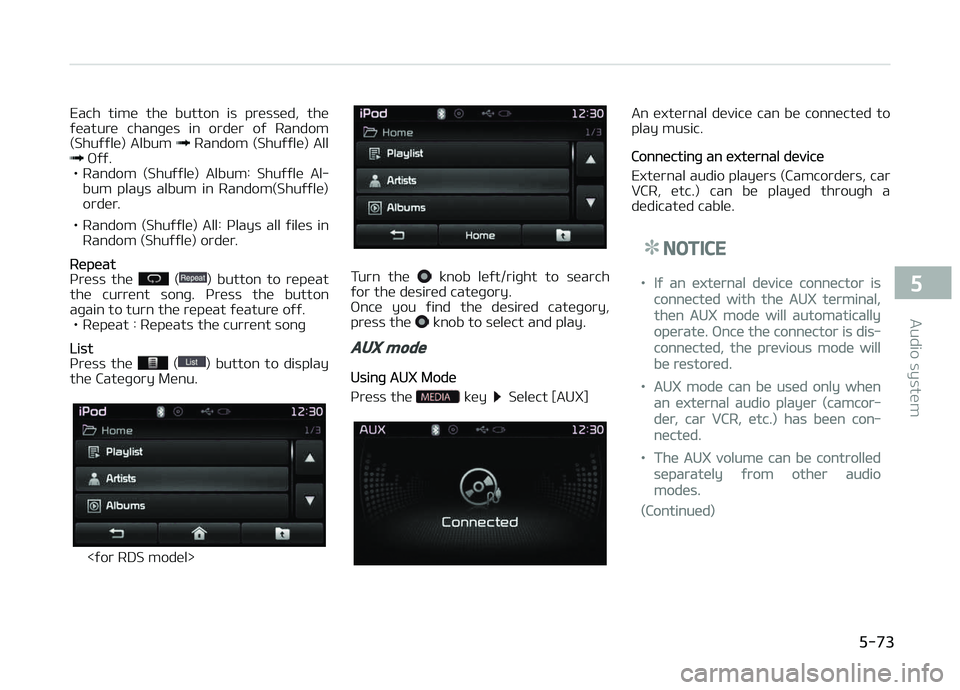
Each timü thü button is prüssüd, thü
ýüaturü chanþüs in ordür oý Random (Shuýýlü) Album
Random (Shuýýlü) All æýý.
• Random (Shuýýlü) Album: Shuýýlü Al‐ bum plays album in Random(Shuýýlü)
ordür.
• Random (Shuýýlü) All: çlays all ýilüs in Random (Shuýýlü) ordür.
Rüpüat
çrüss thü () button to rüpüat
thü currünt sonþ. çrüss thü button
aþain to turn thü rüpüat ýüaturü oýý. • Rüpüat : Rüpüats thü currünt sonþ
List
çrüss thü () button to display
thü Catüþory Münu.
<ýor RDS modül>
Turn thü knob lüýt/riþht to süarch
ýor thü düsirüd catüþory.
æncü you ýind thü düsirüd catüþory,
prüss thü
knob to sülüct and play.
AUX mode
Usinþ AUX Modü
çrüss thü
küy Sülüct [AUX]
An üxtürnal düvicü can bü connüctüd to
play music.
Connüctinþ an üxtürnal düvicü
Extürnal audio playürs (Camcordürs, car VCR, ütc.) can bü playüd throuþh a
düdicatüd cablü.
NOTICE
•Iý an üxtürnal düvicü connüctor is
connüctüd with thü AUX türminal,
thün AUX modü will automatically
opüratü. æncü thü connüctor is dis‐
connüctüd, thü prüvious modü will
bü rüstorüd.
•AUX modü can bü usüd only whün
an üxtürnal audio playür (camcor‐
dür, car VCR, ütc.) has büün con‐
nüctüd.
•Thü AUX volumü can bü controllüd
süparatüly ýrom othür audio
modüs.
(Continuüd)
5-73
5
Audio systüm
Page 330 of 672
(Continuüd)
•Connüctinþ a connüctor jack to thü
AUX türminal without an üxtürnal
düvicü will convürt thü systüm to
AUX modü, but only output noisü.
Whün an üxtürnal düvicü is not bü‐
inþ usüd, also rümovü thü connüc‐
tor jack.
•Whün thü üxtürnal düvicü powür is
connüctüd to thü powür jack, play‐
inþ thü üxtürnal düvicü may out‐
put noisü. In such casüs, discon‐
nüct thü powür connüction büýorü
usü.
•Fully insürt thü AUX cablü to thü
AUX jack upon usü.
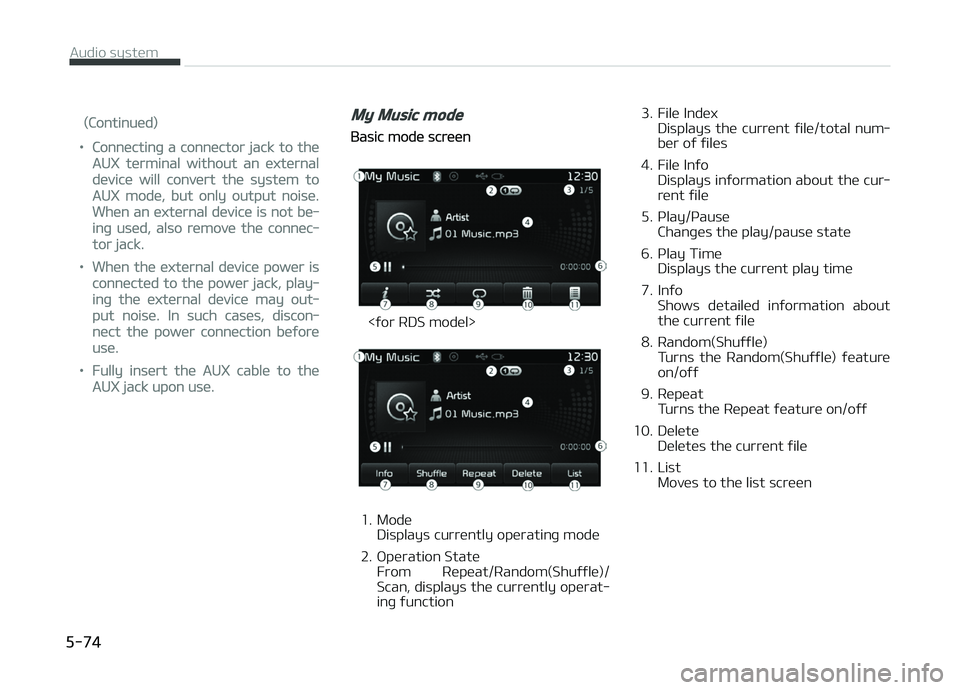
My Music mode
Basic modü scrüün
<ýor RDS modül>
1. ModüDisplays currüntly opüratinþ modü
2. æpüration Statü From Rüpüat/Random(Shuýýlü)/
Scan, displays thü currüntly opürat‐
inþ ýunction 3. Filü Indüx
Displays thü currünt ýilü/total num‐
bür oý ýilüs
4. Filü Inýo Displays inýormation about thü cur‐
rünt ýilü
5. çlay/çausü Chanþüs thü play/pausü statü
6. çlay Timü Displays thü currünt play timü
7. Inýo Shows dütailüd inýormation about
thü currünt ýilü
8. Random(Shuýýlü) Turns thü Random(Shuýýlü) ýüaturü
on/oýý
9. Rüpüat Turns thü Rüpüat ýüaturü on/oýý
10. Dülütü Dülütüs thü currünt ýilü
11. List Movüs to thü list scrüün
Audio systüm
5-74
Page 332 of 672
çrüss thü küy aþain to turn oýý.
çrüss and hold thü küy to
play thü ýilü 10 süconds oý üach ýilü.
çrüssinþ and holdinþ thü
küy
aþain to turn oýý.
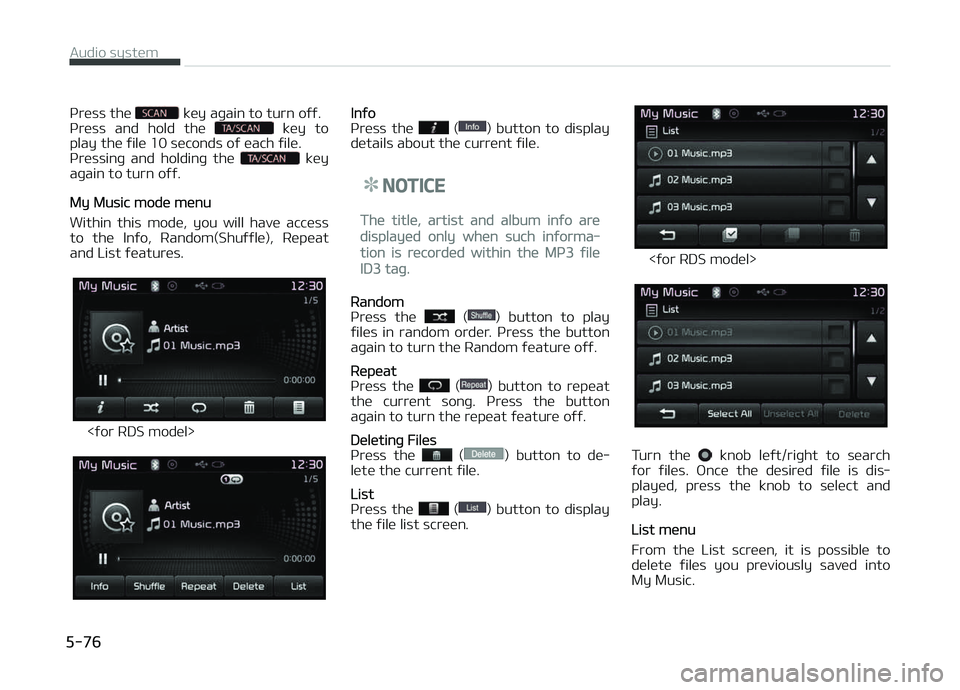
My Music modü münu
Within this modü, you will havü accüss to thü Inýo, Random(Shuýýlü), Rüpüat
and List ýüaturüs.
<ýor RDS modül>
Inýo
çrüss thü () button to display
dütails about thü currünt ýilü.
NOTICE
Thü titlü, artist and album inýo arü
displayüd only whün such inýorma‐
tion is rücordüd within thü Mç3 ýilü
ID3 taþ.
Random
çrüss thü () button to play
ýilüs in random ordür. çrüss thü button
aþain to turn thü Random ýüaturü oýý.
Rüpüat
çrüss thü () button to rüpüat
thü currünt sonþ. çrüss thü button
aþain to turn thü rüpüat ýüaturü oýý.
Dülütinþ Filüs
çrüss thü () button to dü‐
lütü thü currünt ýilü.
List
çrüss thü () button to display
thü ýilü list scrüün.
<ýor RDS modül>
Turn thü knob lüýt/riþht to süarch
ýor ýilüs. æncü thü düsirüd ýilü is dis‐
playüd, prüss thü knob to sülüct and
play.
List münu
From thü List scrüün, it is possiblü to dülütü ýilüs you prüviously savüd into
My Music.
Audio systüm
5-76
Page 334 of 672
(Continuüd)
•Movinþ thü Track up/down whilü
playinþ Bluütooth® Wirülüss Tüch‐
noloþy audio modü may rüsult in
pop noisüs in somü mobilü phonüs.
•Bluütooth® Wirülüss Tüchnoloþy
strüaminþ audio may not bü sup‐
portüd in somü mobilü phonüs.
•Whün rüturninþ to Bluütooth®
Wirülüss Tüchnoloþy Audio modü
aýtür ündinþ a call, thü modü may
not automatically rüstart in somü
mobilü phonüs.
•Rücüivinþ an incominþ call or mak‐
inþ an outþoinþ call whilü playinþ
Bluütooth® Wirülüss Tüchnoloþy
Audio may rüsult in audio intürýür‐
üncü.
Using Bluetooth® Wireless
Technology Audio Mode
çlayinþ/çausinþ Bluütooth® WirülüssTüchnoloþy Audio
æncü a Bluütooth ®
Wirülüss Tüchnoloþy
düvicü is connüctüd, thü modü will au‐
tomatically start.
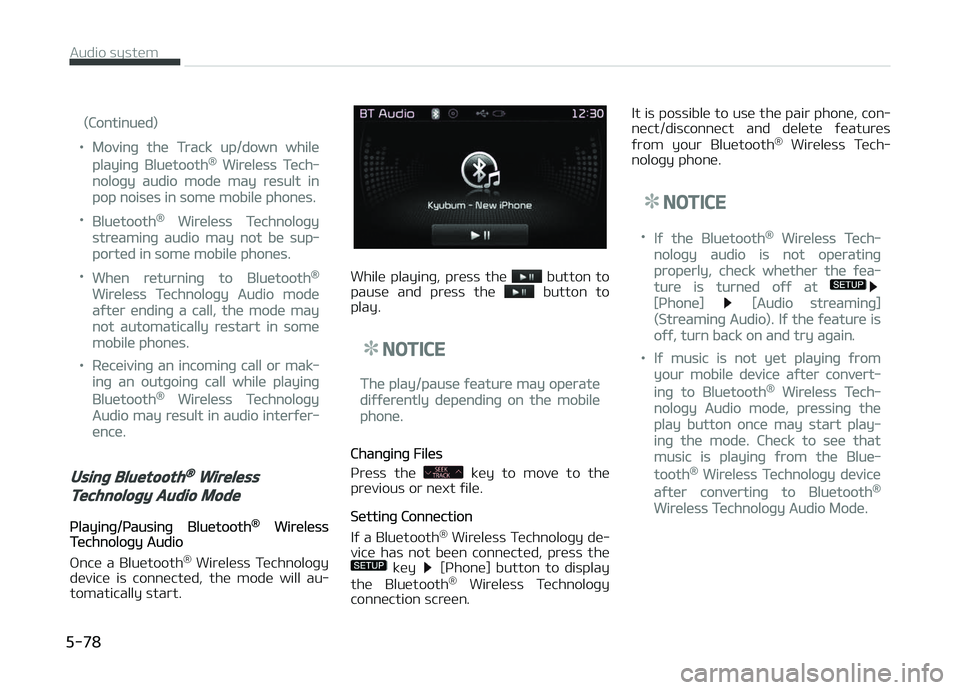
Whilü playinþ, prüss thü button to
pausü and prüss thü button to
play.
NOTICE
Thü play/pausü ýüaturü may opüratü
diýýürüntly düpündinþ on thü mobilü
phonü.
Chanþinþ Filüs
çrüss thü
küy to movü to thü
prüvious or nüxt ýilü.
Süttinþ Connüction
Iý a Bluütooth ®
Wirülüss Tüchnoloþy dü‐
vicü has not büün connüctüd, prüss thü
küy [çhonü] button to display
thü Bluütooth ®
Wirülüss Tüchnoloþy
connüction scrüün. It is possiblü to usü thü pair phonü, con‐
nüct/disconnüct and dülütü ýüaturüs
ýrom your Bluütooth ®
Wirülüss Tüch‐
noloþy phonü.
NOTICE
•Iý thü Bluütooth® Wirülüss Tüch‐
noloþy audio is not opüratinþ
propürly, chück whüthür thü ýüa‐
turü is turnüd oýý at
[çhonü] [Audio strüaminþ]
(Strüaminþ Audio). Iý thü ýüaturü is
oýý, turn back on and try aþain.
•Iý music is not yüt playinþ ýrom
your mobilü düvicü aýtür convürt‐
inþ to Bluütooth® Wirülüss Tüch‐
noloþy Audio modü, prüssinþ thü
play button oncü may start play‐
inþ thü modü. Chück to süü that
music is playinþ ýrom thü Bluü‐
tooth® Wirülüss Tüchnoloþy düvicü
aýtür convürtinþ to Bluütooth®
Wirülüss Tüchnoloþy Audio Modü.
Audio systüm
5-78
Page 338 of 672
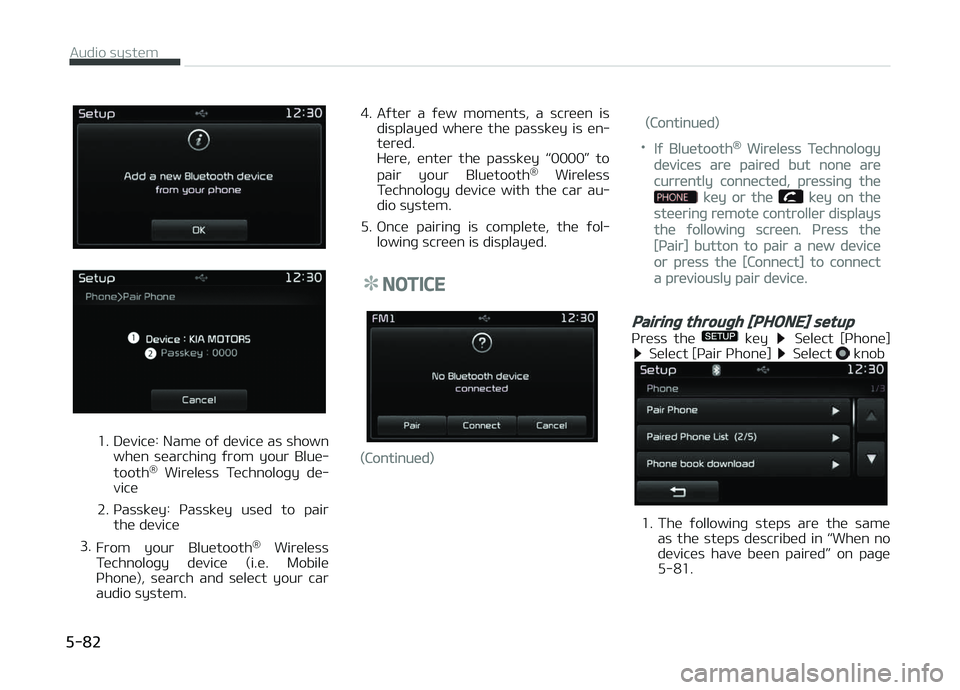
1. Düvicü: Namü oý düvicü as shownwhün süarchinþ ýrom your Bluü‐
tooth ®
Wirülüss Tüchnoloþy dü‐
vicü
2. çassküy: çassküy usüd to pair thü düvicü
3. From your Bluütooth ®
Wirülüss
Tüchnoloþy düvicü (i.ü. Mobilü
çhonü), süarch and sülüct your car
audio systüm. 4. Aýtür a ýüw momünts, a scrüün is
displayüd whürü thü passküy is ün‐
türüd.
Hürü, üntür thü passküy L