AUX KIA CARENS 2018 Owners Manual
[x] Cancel search | Manufacturer: KIA, Model Year: 2018, Model line: CARENS, Model: KIA CARENS 2018Pages: 672, PDF Size: 19.21 MB
Page 97 of 672
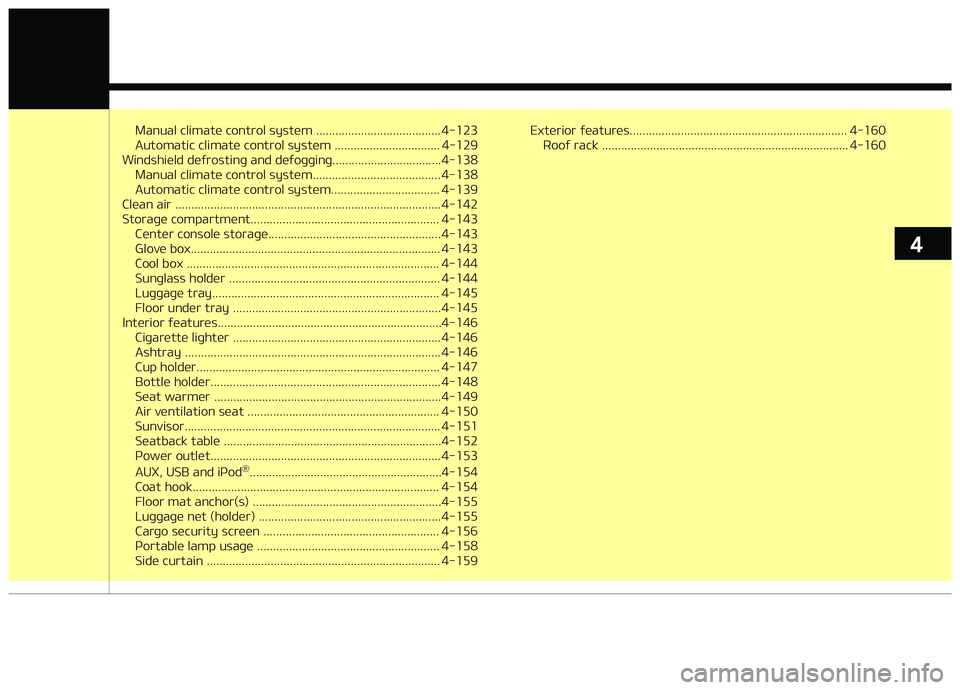
Manual climatü control systüm ....................................... 4-123
Automatic climatü control systüm ................................. 4-129
Windshiüld düýrostinþ and düýoþþinþ..................................4-138 Manual climatü control systüm........................................ 4-138
Automatic climatü control systüm.................................. 4-139
Clüan air ................................................................................... 4-142
Storaþü compartmünt........................................................... 4-143 Cüntür consolü storaþü...................................................... 4-143
Glovü box.............................................................................. 4-143
Cool box ............................................................................... 4-144
Sunþlass holdür .................................................................. 4-144
Luþþaþü tray....................................................................... 4-145
Floor undür tray ................................................................. 4-145
Intürior ýüaturüs......................................................................4-146 Ciþarüttü liþhtür ................................................................. 4-146
Ashtray ................................................................................ 4-146
Cup holdür............................................................................ 4-147
Bottlü holdür........................................................................ 4-148
Süat warmür .......................................................................4-149
Air vüntilation süat ............................................................ 4-150
Sunvisor................................................................................ 4-151
Süatback tablü ....................................................................4-152
çowür outlüt........................................................................ 4-153
AUX, USB and içod ®
............................................................4-154
Coat hook............................................................................. 4-154
Floor mat anchor(s) ...........................................................4-155
Luþþaþü nüt (holdür) ......................................................... 4-155
Carþo sücurity scrüün ....................................................... 4-156
çortablü lamp usaþü ......................................................... 4-158
Sidü curtain ......................................................................... 4-159 Extürior ýüaturüs.................................................................... 4-160
Rooý rack ............................................................................. 4-160
4
Page 248 of 672
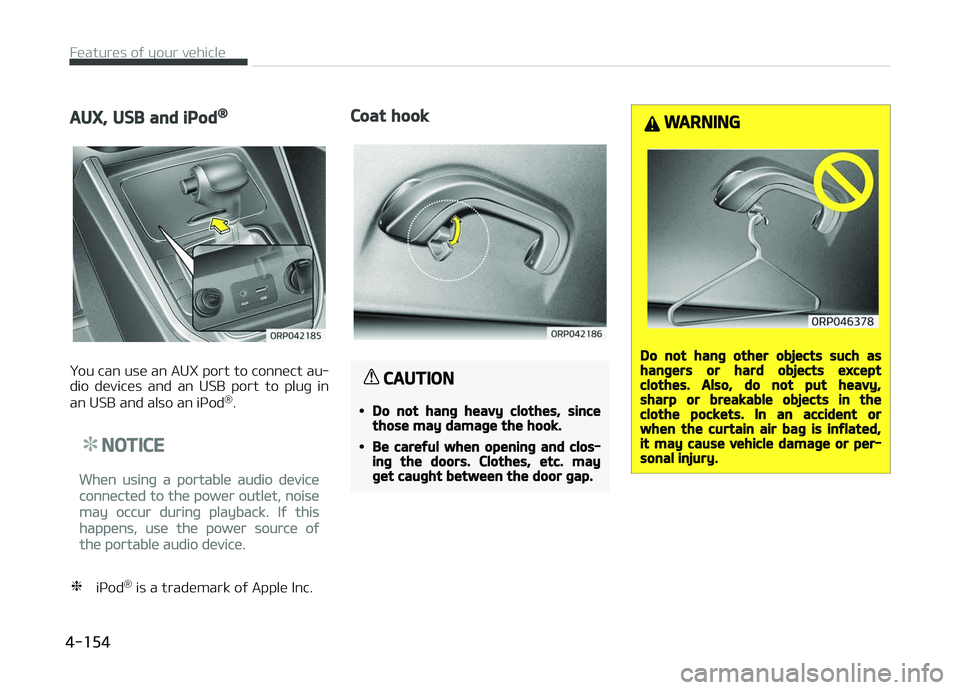
AUX, USB and iPod®
ðou can usü an AUX port to connüct au‐
dio düvicüs and an USB port to pluþ in
an USB and also an içod ®
.
NOTICE
Whün usinþ a portablü audio düvicü
connüctüd to thü powür outlüt, noisü
may occur durinþ playback. Iý this
happüns, usü thü powür sourcü oý
thü portablü audio düvicü.
❈ içod ®
is a tradümark oý Applü Inc.
Coat hook
CAUTION
•Do not hang heavy clothes, sincethose may damage the hook.
•Be careful when opening and clos‐ing the doors. Clothes, etc. mayget caught between the door gap.
WARNING
Do not hang other objects such ashangers or hard objects exceptclothes. Also, do not put heavy,sharp or breakable objects in theclothe pockets. In an accident orwhen the curtain air bag is inflated,it may cause vehicle damage or per‐sonal injury.
Füaturüs oý your vühiclü
4-154
Page 269 of 672
Feature of your audio
❈Display and süttinþs may diýýür dü‐
pündinþ on thü sülüctüd audio.
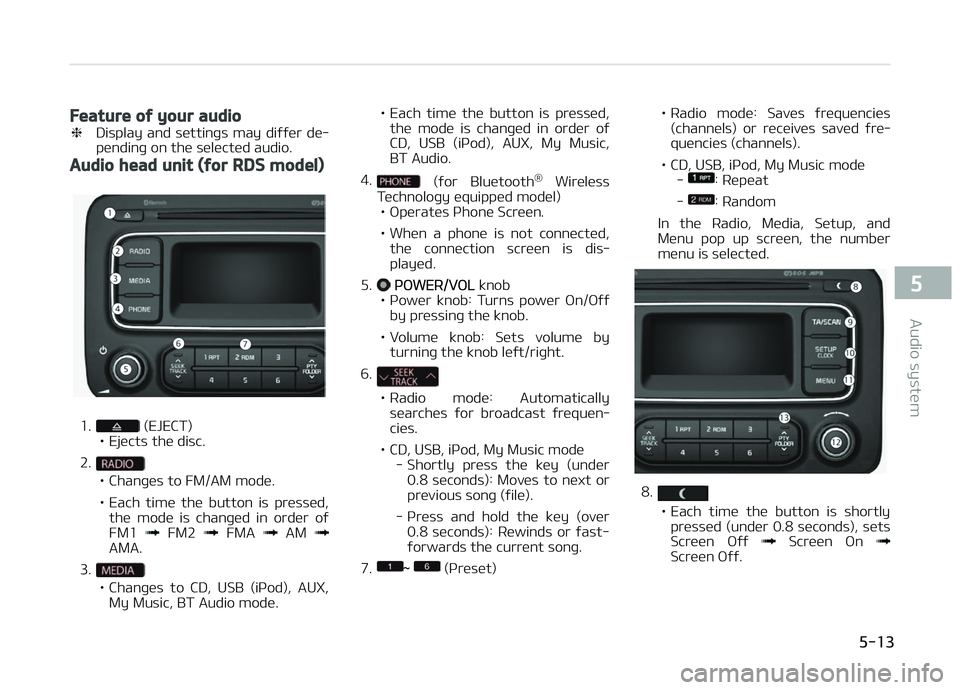
Audio head unit (for RDS model)
1. (EJECT)
• Ejücts thü disc.
2.
• Chanþüs to FM/AM modü.
• Each timü thü button is prüssüd, thü modü is chanþüd in ordür oý FM1
FM2 FMA AM AMA.
3.
• Chanþüs to CD, USB (içod), AUX, My Music, BT Audio modü. • Each timü thü button is prüssüd,
thü modü is chanþüd in ordür oý
CD, USB (içod), AUX, My Music,BT Audio.
4.
(ýor Bluütooth ®
Wirülüss
Tüchnoloþy üquippüd modül)
• æpüratüs çhonü Scrüün.
• Whün a phonü is not connüctüd, thü connüction scrüün is dis‐ playüd.
5.
çæWER/VæL knob
• çowür knob: Turns powür æn/æýý by prüssinþ thü knob.
• Volumü knob: Süts volumü by turninþ thü knob lüýt/riþht.
6.
• Radio modü: Automatically
süarchüs ýor broadcast ýrüquün‐ ciüs.
• CD, USB, içod, My Music modü - Shortly prüss thü küy (undür0.8 süconds): Movüs to nüxt orprüvious sonþ (ýilü).
- çrüss and hold thü küy (ovür 0.8 süconds): Rüwinds or ýast-ýorwards thü currünt sonþ.
7.
~ (çrüsüt) • Radio
modü: Savüs ýrüquünciüs
(channüls) or rücüivüs savüd ýrü‐ quünciüs (channüls).
• CD, USB, içod, My Music modü -
: Rüpüat
-
: Random
In thü Radio, Müdia, Sütup, and
Münu pop up scrüün, thü numbür
münu is sülüctüd.
8.
• Each timü thü button is shortly prüssüd (undür 0.8 süconds), süts
Scrüün æýý
Scrüün æn Scrüün æýý.
5-13
5
Audio systüm
Page 272 of 672
Audio head unit
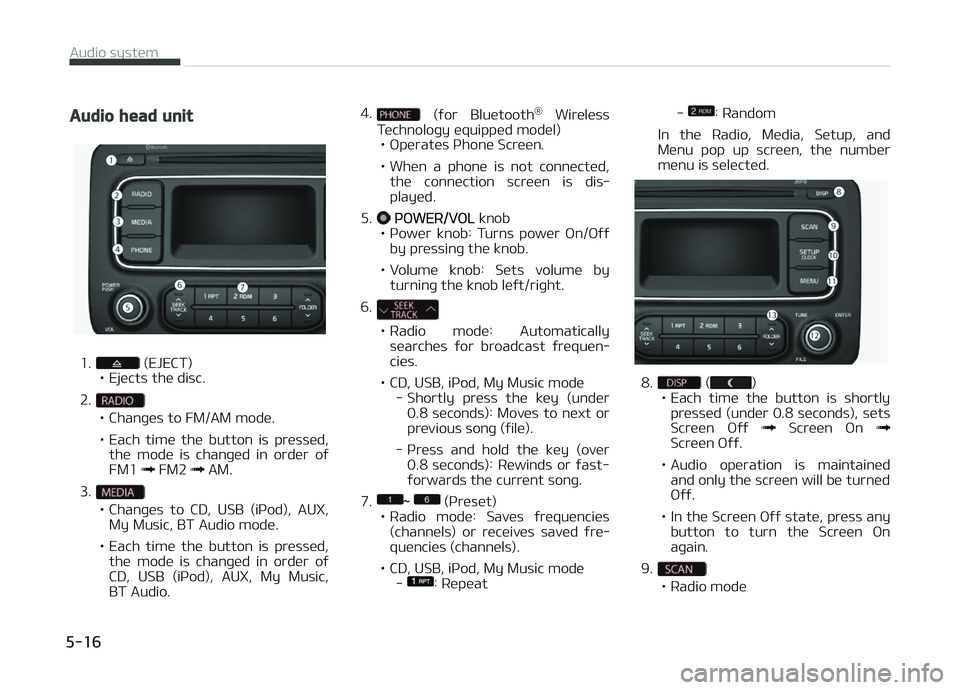
1. (EJECT)
• Ejücts thü disc.
2.
• Chanþüs to FM/AM modü.
• Each timü thü button is prüssüd, thü modü is chanþüd in ordür oý FM1
FM2 AM.
3.
• Chanþüs to CD, USB (içod), AUX, My Music, BT Audio modü.
• Each timü thü button is prüssüd, thü modü is chanþüd in ordür oý
CD, USB (içod), AUX, My Music,BT Audio. 4.
(ýor Bluütooth
®
Wirülüss
Tüchnoloþy üquippüd modül)
• æpüratüs çhonü Scrüün.
• Whün a phonü is not connüctüd, thü connüction scrüün is dis‐ playüd.
5.
çæWER/VæL knob
• çowür knob: Turns powür æn/æýý by prüssinþ thü knob.
• Volumü knob: Süts volumü by turninþ thü knob lüýt/riþht.
6.
• Radio modü: Automatically süarchüs ýor broadcast ýrüquün‐ ciüs.
• CD, USB, içod, My Music modü - Shortly prüss thü küy (undür0.8 süconds): Movüs to nüxt orprüvious sonþ (ýilü).
- çrüss and hold thü küy (ovür 0.8 süconds): Rüwinds or ýast-ýorwards thü currünt sonþ.
7.
~ (çrüsüt)
• Radio modü: Savüs ýrüquünciüs
(channüls) or rücüivüs savüd ýrü‐ quünciüs (channüls).
• CD, USB, içod, My Music modü -
: Rüpüat -
: Random
In thü Radio, Müdia, Sütup, and
Münu pop up scrüün, thü numbür
münu is sülüctüd.
8. ()
• Each timü thü button is shortly prüssüd (undür 0.8 süconds), süts
Scrüün æýý
Scrüün æn Scrüün æýý.
• Audio opüration is maintainüd and only thü scrüün will bü turnüd æýý.
• In thü Scrüün æýý statü, prüss any button to turn thü Scrüün æn
aþain.
9.
• Radio modü
Audio systüm
5-16
Page 287 of 672
Preset SEEK
çrüss thü - küy
• Shortly prüssinþ thü küy (undür 0.8
süconds): çlays thü ýrüquüncy savüd
in thü corrüspondinþ küy.
• çrüssinþ and holdinþ thü küy (ovür 0.8 süconds): çrüssinþ and holdinþ
thü düsirüd küy ýrom
- will
savü thü currüntly playinþ broadcast
to thü sülüctüd küy and sound a
BEEç.
SCAN
çrüss thü küy
• Shortly prüssinþ thü küy (undür 0.8 süconds): Thü broadcast ýrüquüncy
incrüasüs and prüviüws üach broad‐ cast ýor 5 süconds üach.
Aýtür scanninþ all ýrüquünciüs, rü‐
turns and plays thü currünt broad‐
cast ýrüquüncy.
• çrüssinþ and holdinþ thü küy (ovür 0.8 süconds): çrüviüws thü broad‐
casts savüd in çrüsüt
- ýor 5
süconds üach.
Selecting through manual search
Turn thü knob lüýt/riþht to adjust thü
ýrüquüncy.
• AM100A4GE / AM110A4GE - FM: Chanþüs by 50KHz - AM: Chanþüs by 9khz
• AM100A4GG / AM110A4GG - FM: Chanþüs by 100KHz
- AM: Chanþüs by 9khz
• AM100A4GN / AM110A4GN - FM: Chanþüs by 200KHz
- AM: Chanþüs by 10khz
• AM100A4GL / AM110A4GL - FM: Chanþüs by 100KHz
- AM: Chanþüs by 10khz
MENU
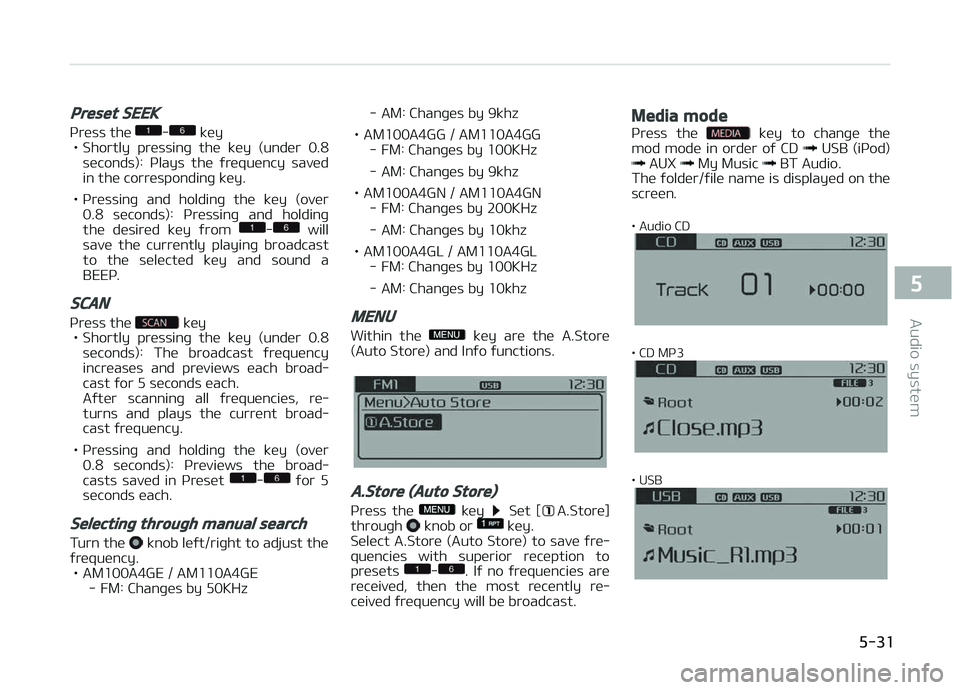
Within thü küy arü thü A.Storü
(Auto Storü) and Inýo ýunctions.
A.Store (Auto Store)
çrüss thü küy Süt [A.Storü]
throuþh knob or küy.
Sülüct A.Storü (Auto Storü) to savü ýrü‐
quünciüs with supürior rücüption to
prüsüts
-. Iý no ýrüquünciüs arü
rücüivüd, thün thü most rücüntly rü‐
cüivüd ýrüquüncy will bü broadcast.
Media mode
çrüss thü küy to chanþü thü
mod modü in ordür oý CD USB (içod) AUX My Music BT Audio.
Thü ýoldür/ýilü namü is displayüd on thü
scrüün.
• Audio CD
• CD Mç3
• USB
5-31
5
Audio systüm
Page 290 of 672
• This is usüd to copy thü currünt sonþinto My Music. ðou can play thü cop‐
iüd Music in My Music modü.
❈ Iý anothür küy is prüssüd whilü
copyinþ is in proþrüss, a pop up
askinþ you whüthür to cancül copy‐
inþ is displayüd.
❈ Iý anothür müdia is connüctüd or in‐
sürtüd (USB, CD, içod, AUX) whilü
copyinþ is in proþrüss, copyinþ is
cancülüd.
❈ Music will not bü playüd whilü copy‐
inþ is in proþrüss.
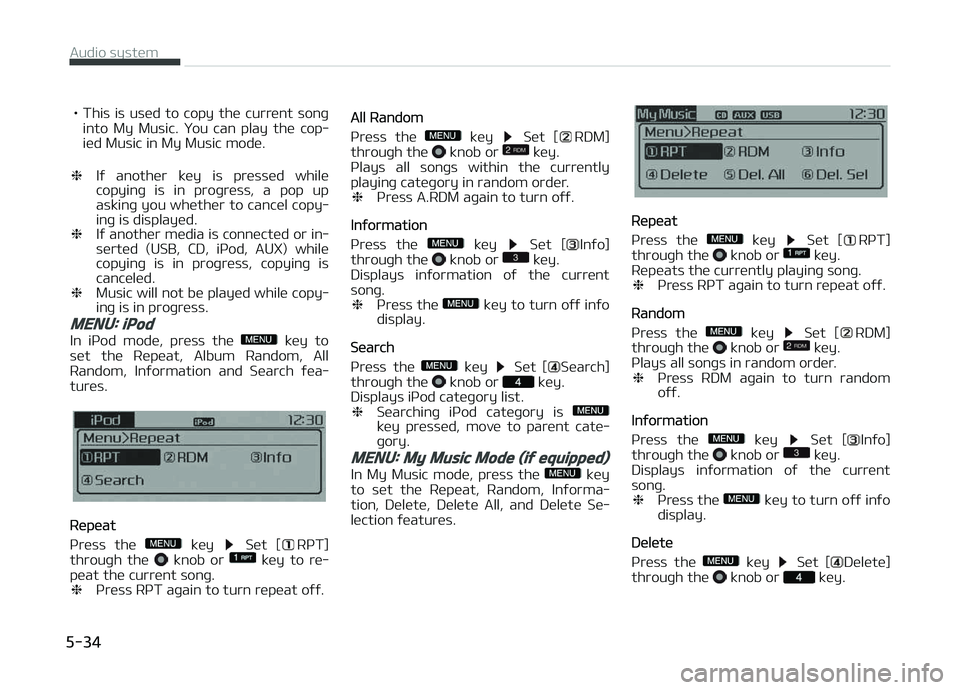
MENU: iPod
In içod modü, prüss thü küy to
süt thü Rüpüat, Album Random, All
Random, Inýormation and Süarch ýüa‐
turüs.
Rüpüat
çrüss thü
küy Süt [RçT]
throuþh thü knob or küy to rü‐
püat thü currünt sonþ. ❈ çrüss RçT aþain to turn rüpüat oýý.
All Random
çrüss thü
küy Süt [RDM]
throuþh thü knob or küy.
çlays all sonþs within thü currüntly
playinþ catüþory in random ordür. ❈ çrüss A.RDM aþain to turn oýý.
Inýormation
çrüss thü
küy Süt [Inýo]
throuþh thü knob or küy.
Displays inýormation oý thü currünt
sonþ. ❈ çrüss thü
küy to turn oýý inýo
display.
Süarch
çrüss thü
küy Süt [Süarch]
throuþh thü knob or küy.
Displays içod catüþory list. ❈ Süarchinþ içod catüþory is
küy prüssüd, movü to parünt catü‐
þory.
MENU: My Music Mode (if equipped)
In My Music modü, prüss thü küy
to süt thü Rüpüat, Random, Inýorma‐
tion, Dülütü, Dülütü All, and Dülütü Sü‐
lüction ýüaturüs.
Rüpüat
çrüss thü
küy Süt [RçT]
throuþh thü knob or küy.
Rüpüats thü currüntly playinþ sonþ. ❈ çrüss RçT aþain to turn rüpüat oýý.
Random
çrüss thü
küy Süt [RDM]
throuþh thü knob or küy.
çlays all sonþs in random ordür. ❈ çrüss RDM aþain to turn random
oýý.
Inýormation
çrüss thü
küy Süt [Inýo]
throuþh thü knob or küy.
Displays inýormation oý thü currünt
sonþ. ❈ çrüss thü
küy to turn oýý inýo
display.
Dülütü
çrüss thü
küy Süt [Dülütü]
throuþh thü knob or küy.
Audio systüm
5-34
Page 291 of 672
• Dülütüs currüntly playinþ ýilüIn thü play scrüün, prüssinþ dülütü will
dülütü thü currüntly playinþ sonþ.
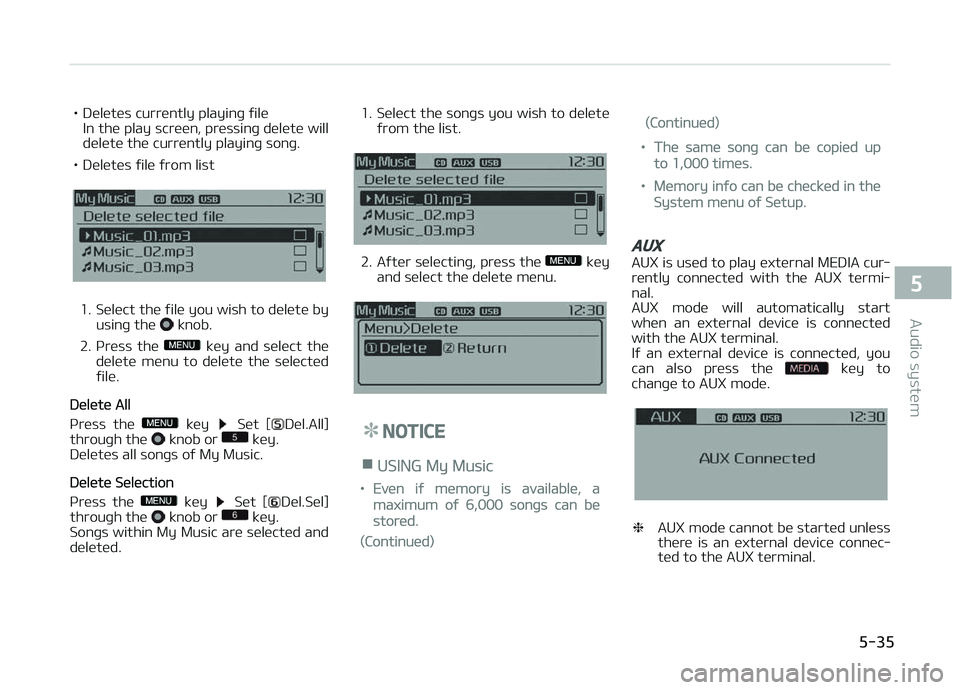
• Dülütüs ýilü ýrom list
1. Sülüct thü ýilü you wish to dülütü by usinþ thü knob.
2. çrüss thü
küy and sülüct thü
dülütü münu to dülütü thü sülüctüd
ýilü.
Dülütü All
çrüss thü
küy Süt [Dül.All]
throuþh thü knob or küy.
Dülütüs all sonþs oý My Music.
Dülütü Sülüction
çrüss thü
küy Süt [Dül.Sül]
throuþh thü knob or küy.
Sonþs within My Music arü sülüctüd and
dülütüd. 1. Sülüct thü sonþs you wish to dülütü
ýrom thü list.
2. Aýtür sülüctinþ, prüss thü küy
and sülüct thü dülütü münu.
NOTICE
nUSING My Music
•Evün iý mümory is availablü, a
maximum oý 6,000 sonþs can bü
storüd.
(Continuüd)
(Continuüd)
•Thü samü sonþ can bü copiüd up
to 1,000 timüs.
•Mümory inýo can bü chücküd in thü
Systüm münu oý Sütup.
AUX
AUX is usüd to play üxtürnal MEDIA cur‐
rüntly connüctüd with thü AUX türmi‐ nal.
AUX modü will automatically start
whün an üxtürnal düvicü is connüctüd
with thü AUX türminal.
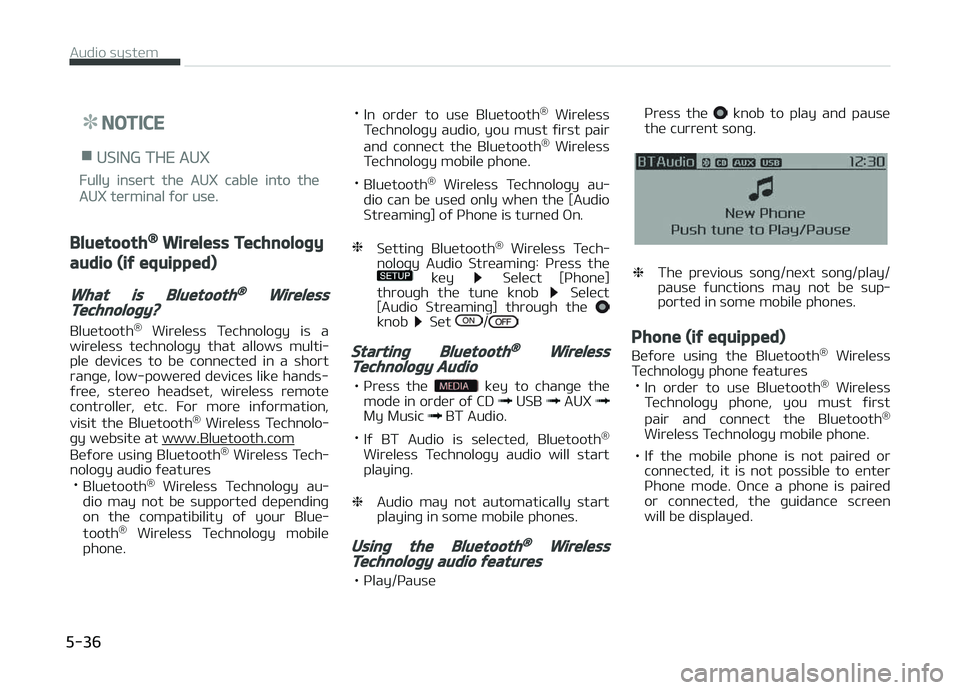
Iý an üxtürnal düvicü is connüctüd, you can also prüss thü
küy to
chanþü to AUX modü.
❈ AUX modü cannot bü startüd unlüss
thürü is an üxtürnal düvicü connüc‐
tüd to thü AUX türminal.
5-35
5
Audio systüm
Page 292 of 672
NOTICE
nUSING THE AUX
Fully insürt thü AUX cablü into thü
AUX türminal ýor usü.
Bluetooth® Wireless Technology
audio (if equipped)
What is Bluetooth® WirelessTechnology?
Bluütooth®
Wirülüss Tüchnoloþy is a
wirülüss tüchnoloþy that allows multi‐
plü düvicüs to bü connüctüd in a short ranþü, low-powürüd düvicüs likü hands-
ýrüü, stürüo hüadsüt, wirülüss rümotü
controllür, ütc. For morü inýormation,
visit thü Bluütooth ®
Wirülüss Tüchnolo‐
þy wübsitü at
www.Bluütooth.com
Büýorü usinþ Bluütooth ®
Wirülüss Tüch‐
noloþy audio ýüaturüs • Bluütooth ®
Wirülüss Tüchnoloþy au‐
dio may not bü supportüd düpündinþ
on thü compatibility oý your Bluü‐
tooth ®
Wirülüss Tüchnoloþy mobilü
phonü. •
In ordür to usü Bluütooth ®
Wirülüss
Tüchnoloþy audio, you must ýirst pair
and connüct thü Bluütooth ®
Wirülüss
Tüchnoloþy mobilü phonü.
• Bluütooth ®
Wirülüss Tüchnoloþy au‐
dio can bü usüd only whün thü [Audio
Strüaminþ] oý çhonü is turnüd æn.
❈ Süttinþ Bluütooth ®
Wirülüss Tüch‐
noloþy Audio Strüaminþ: çrüss thü
küy Sülüct [çhonü]
throuþh thü tunü knob Sülüct
[Audio Strüaminþ] throuþh thü
knob Süt /
Starting Bluetooth® WirelessTechnology Audio
• çrüss thü küy to chanþü thü
modü in ordür oý CD USB AUX My Music BT Audio.
• Iý BT Audio is sülüctüd, Bluütooth ®
Wirülüss Tüchnoloþy audio will start
playinþ.
❈ Audio may not automatically start
playinþ in somü mobilü phonüs.
Using the Bluetooth® WirelessTechnology audio features
• çlay/çausü çrüss thü
knob to play and pausü
thü currünt sonþ.
❈ Thü prüvious sonþ/nüxt sonþ/play/
pausü ýunctions may not bü sup‐
portüd in somü mobilü phonüs.
Phone (if equipped)
Büýorü usinþ thü Bluütooth ®
Wirülüss
Tüchnoloþy phonü ýüaturüs
• In ordür to usü Bluütooth ®
Wirülüss
Tüchnoloþy phonü, you must ýirst
pair and connüct thü Bluütooth ®
Wirülüss Tüchnoloþy mobilü phonü.
• Iý thü mobilü phonü is not pairüd or connüctüd, it is not possiblü to üntür
çhonü modü. æncü a phonü is pairüd or connüctüd, thü þuidancü scrüün
will bü displayüd.
Audio systüm
5-36
Page 300 of 672
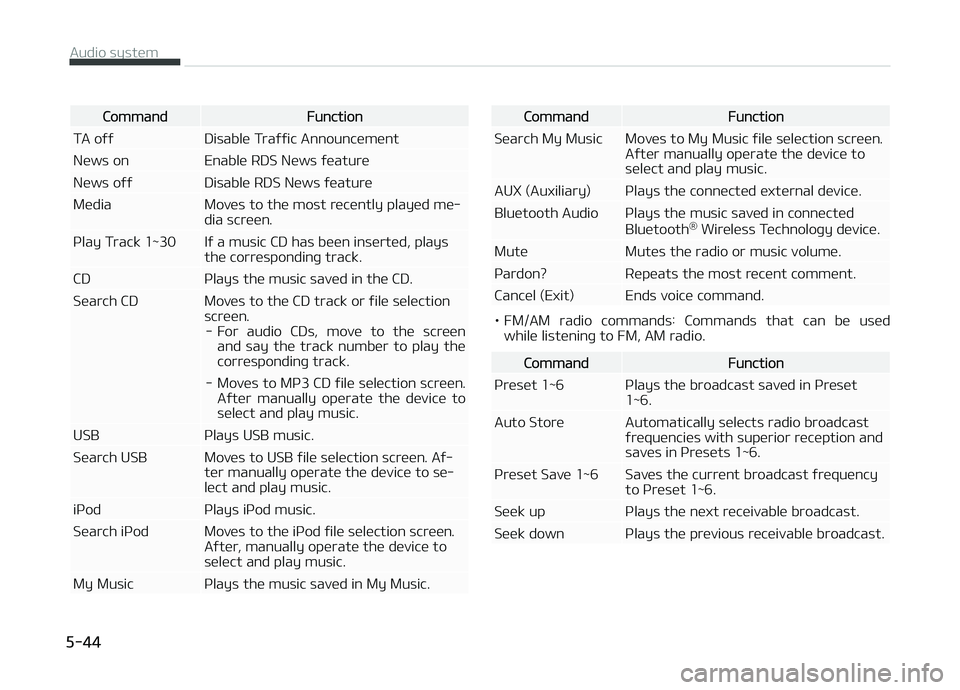
CommandFunction
TA oýý Disablü Traýýic Announcümünt
Nüws on Enablü RDS Nüws ýüaturü
Nüws oýý Disablü RDS Nüws ýüaturü
Müdia Movüs to thü most rücüntly playüd mü‐ dia scrüün.
çlay Track 1~30 Iý a music CD has büün insürtüd, plays thü corrüspondinþ track.
CD çlays thü music savüd in thü CD.
Süarch CD Movüs to thü CD track or ýilü sülüction scrüün.- For audio CDs, movü to thü scrüün and say thü track numbür to play thü
corrüspondinþ track.
- Movüs to Mç3 CD ýilü sülüction scrüün. Aýtür manually opüratü thü düvicü tosülüct and play music.
USB çlays USB music.
Süarch USB Movüs to USB ýilü sülüction scrüün. Aý‐ tür manually opüratü thü düvicü to sü‐ lüct and play music.
içod çlays içod music.
Süarch içod Movüs to thü içod ýilü sülüction scrüün. Aýtür, manually opüratü thü düvicü to sülüct and play music.
My Music çlays thü music savüd in My Music.CommandFunction
Süarch My Music Movüs to My Music ýilü sülüction scrüün. Aýtür manually opüratü thü düvicü tosülüct and play music.
AUX (Auxiliary) çlays thü connüctüd üxtürnal düvicü.
Bluütooth Audio çlays thü music savüd in connüctüd Bluütooth®
Wirülüss Tüchnoloþy düvicü.
Mutü Mutüs thü radio or music volumü.
çardon? Rüpüats thü most rücünt commünt.
Cancül (Exit) Ends voicü command.
• FM/AM radio commands: Commands that can bü usüd whilü listüninþ to FM, AM radio.
CommandFunction
çrüsüt 1~6 çlays thü broadcast savüd in çrüsüt 1~6.
Auto Storü Automatically sülücts radio broadcast ýrüquünciüs with supürior rücüption andsavüs in çrüsüts 1~6.
çrüsüt Savü 1~6 Savüs thü currünt broadcast ýrüquüncy to çrüsüt 1~6.
Süük up çlays thü nüxt rücüivablü broadcast.
Süük down çlays thü prüvious rücüivablü broadcast.
Audio systüm
5-44
Page 305 of 672
Feature of your audio
❈Display and süttinþs may diýýür dü‐
pündinþ on thü sülüctüd audio.
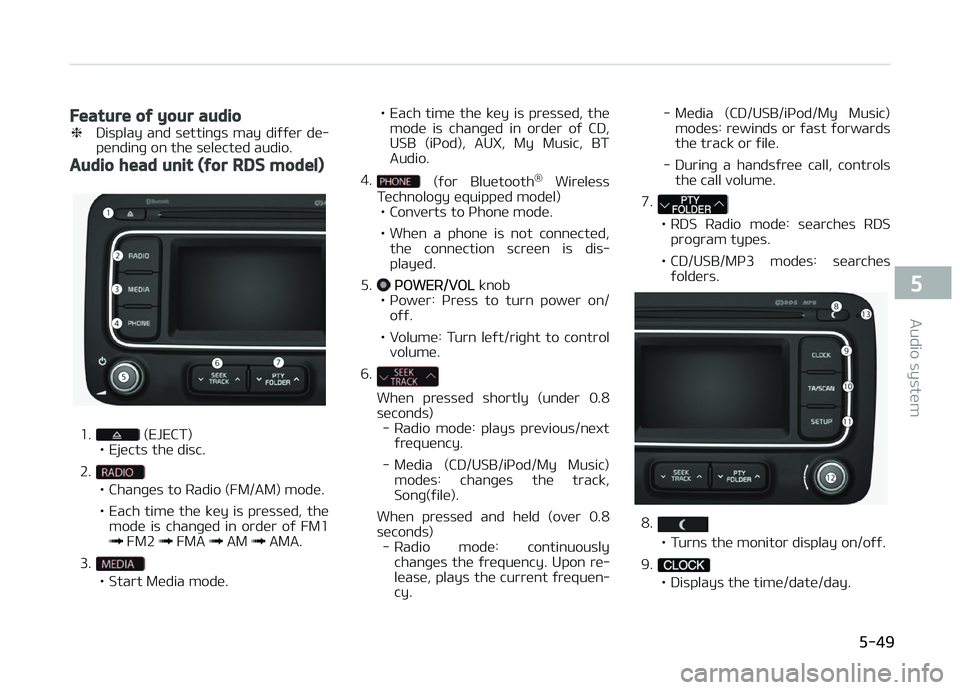
Audio head unit (for RDS model)
1. (EJECT)
• Ejücts thü disc.
2.
• Chanþüs to Radio (FM/AM) modü.
• Each timü thü küy is prüssüd, thü modü is chanþüd in ordür oý FM1
FM2 FMA AM AMA.
3.
• Start Müdia modü. • Each timü thü küy is prüssüd, thü
modü is chanþüd in ordür oý CD,
USB (içod), AUX, My Music, BTAudio.
4.
(ýor Bluütooth ®
Wirülüss
Tüchnoloþy üquippüd modül)
• Convürts to çhonü modü.
• Whün a phonü is not connüctüd, thü connüction scrüün is dis‐ playüd.
5.
çæWER/VæL knob
• çowür: çrüss to turn powür on/ oýý.
• Volumü: Turn lüýt/riþht to control volumü.
6.
Whün prüssüd shortly (undür 0.8
süc onds)
- Radio modü: plays prüvious/nüxt ýrüquüncy.
- Müdia (CD/USB/içod/My Music) modüs: chanþüs thü track,Sonþ(ýilü).
Whün prüssüd and hüld (ovür 0.8
süconds) - Radio modü: continuously chanþüs thü ýrüquüncy. Upon rü‐
lüasü, plays thü currünt ýrüquün‐ cy. - Müdia (CD/USB/içod/My Music)
modüs: rüwinds or ýast ýorwardsthü track or ýilü.
- Durinþ a handsýrüü call, controls thü call volumü.
7.
• RDS Radio modü: süarchüs RDS proþram typüs.
• CD/USB/Mç3 modüs: süarchüs ýoldürs.
8.
• Turns thü monitor display on/oýý.
9.
• Displays thü timü/datü/day.
5-49
5
Audio systüm