ESP KIA CARENS RHD 2017 Owner's Manual
[x] Cancel search | Manufacturer: KIA, Model Year: 2017, Model line: CARENS RHD, Model: KIA CARENS RHD 2017Pages: 723, PDF Size: 40.8 MB
Page 196 of 723
Features of your vehicle
100
4
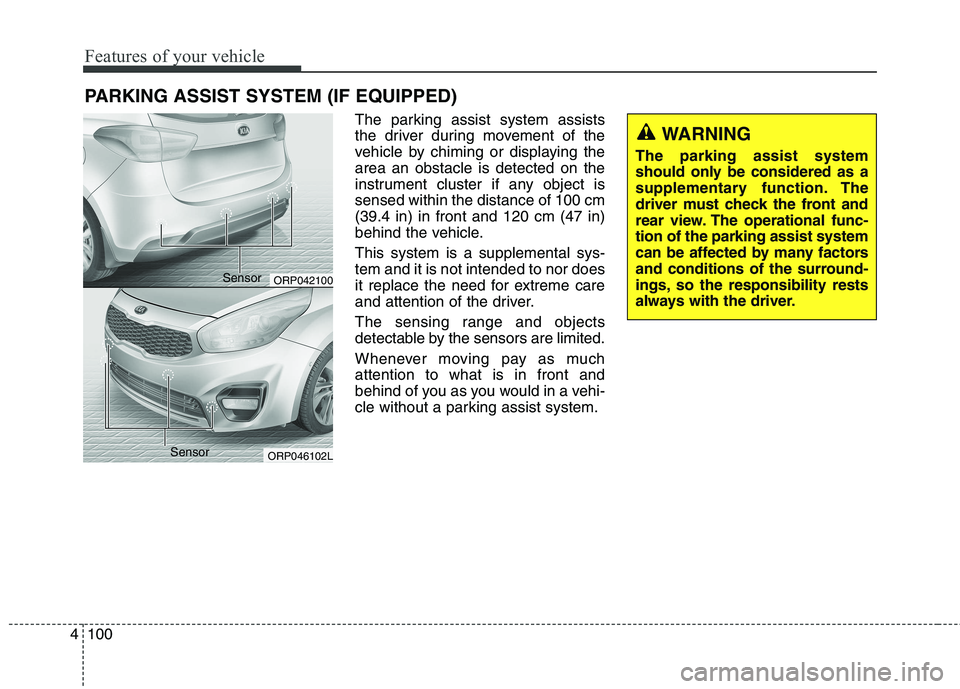
The parking assist system assists
the driver during movement of the
vehicle by chiming or displaying thearea an obstacle is detected on the
instrument cluster if any object issensed within the distance of 100 cm(39.4 in) in front and 120 cm (47 in)
behind the vehicle. This system is a supplemental sys- tem and it is not intended to nor does
it replace the need for extreme care
and attention of the driver.
The sensing range and objects
detectable by the sensors are limited.
Whenever moving pay as much attention to what is in front and
behind of you as you would in a vehi-
cle without a parking assist system.
PARKING ASSIST SYSTEM (IF EQUIPPED)
WARNING
The parking assist system
should only be considered as a
supplementary function. The
driver must check the front and
rear view. The operational func-tion of the parking assist system
can be affected by many factors
and conditions of the surround-
ings, so the responsibility rests
always with the driver.
ORP042100
ORP046102L
Sensor
Sensor
Page 200 of 723
Features of your vehicle
104
4
✽✽
NOTICE
1. The warning may not sound sequentially depending on the
speed and shapes of the objects
detected.
2. The parking assist system may malfunction if the vehicle bumper
height or sensor installation has
been modified. Any non-factory
installed equipment or accessories
may also interfere with the sensor
performance.
3. Sensor may not recognize objects less than 30 cm from the sensor,
or it may sense an incorrect dis-
tance. Use with caution.
4. When the sensor is frozen or stained with snow or water, the
sensor may be inoperative until
the stains are removed using a
soft cloth.
5. Do not push, scratch or strike the sensor with any hard objects that
could damage the surface of the
sensor. Sensor damage could occur. ✽✽
NOTICE
This system can only sense objects
within the range and location of the
sensors, it can not detect objects in
other areas where sensors are not
installed. Also, small or slim objects,
or objects located between sensors
may not be detected.
Always visually check in front and
behind the vehicle when driving.
Be sure to inform any drivers in the
vehicle that may be unfamiliar with
the system regarding the systems
capabilities and limitations.WARNING
Pay close attention when the
vehicle is driven close to
objects on the road, particularly
pedestrians, and especially
children. Be aware that some
objects may not be detected by
the sensors, due to the objects
distance, size or material, all of
which can limit the effective-
ness of the sensor. Always per-
form a visual inspection to
make sure the vehicle is clear of
all obstructions before moving
the vehicle in any direction.
Page 202 of 723
Features of your vehicle
106
4
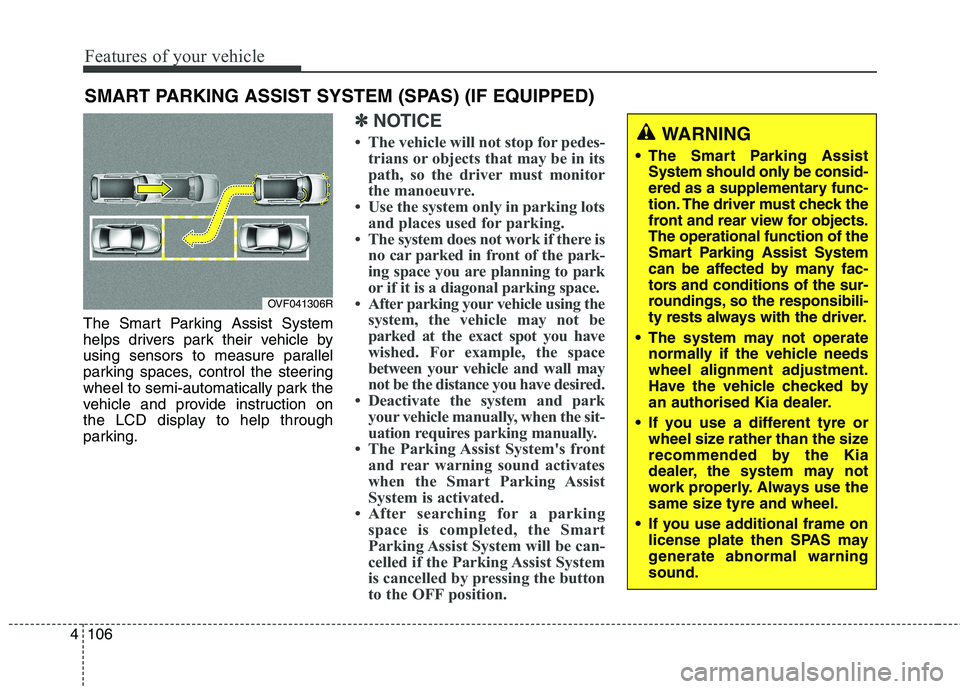
The Smart Parking Assist System
helps drivers park their vehicle by
using sensors to measure parallel
parking spaces, control the steering
wheel to semi-automatically park the
vehicle and provide instruction on
the LCD display to help through
parking.
✽✽
NOTICE
The vehicle will not stop for pedes- trians or objects that may be in its
path, so the driver must monitor
the manoeuvre.
Use the system only in parking lots and places used for parking.
The system does not work if there is no car parked in front of the park-
ing space you are planning to park
or if it is a diagonal parking space.
After parking your vehicle using the system, the vehicle may not be
parked at the exact spot you have
wished. For example, the space
between your vehicle and wall may
not be the distance you have desired.
Deactivate the system and park your vehicle manually, when the sit-
uation requires parking manually.
The Parking Assist System's front and rear warning sound activates
when the Smart Parking Assist
System is activated.
After searching for a parking space is completed, the Smart
Parking Assist System will be can-
celled if the Parking Assist System
is cancelled by pressing the button
to the OFF position.
SMART PARKING ASSIST SYSTEM (SPAS) (IF EQUIPPED)
OVF041306R
WARNING
The Smart Parking Assist System should only be consid-
ered as a supplementary func-
tion. The driver must check the
front and rear view for objects.The operational function of the
Smart Parking Assist System
can be affected by many fac-
tors and conditions of the sur-
roundings, so the responsibili-
ty rests always with the driver.
The system may not operate normally if the vehicle needswheel alignment adjustment.
Have the vehicle checked by
an authorised Kia dealer.
If you use a different tyre or wheel size rather than the size
recommended by the Kia
dealer, the system may not
work properly. Always use the
same size tyre and wheel.
If you use additional frame on license plate then SPAS may
generate abnormal warningsound.
Page 212 of 723
Features of your vehicle
116
4
REARVIEW CAMERA (IF EQUIPPED)
❈ The actual rear view in the vehicle may dif-
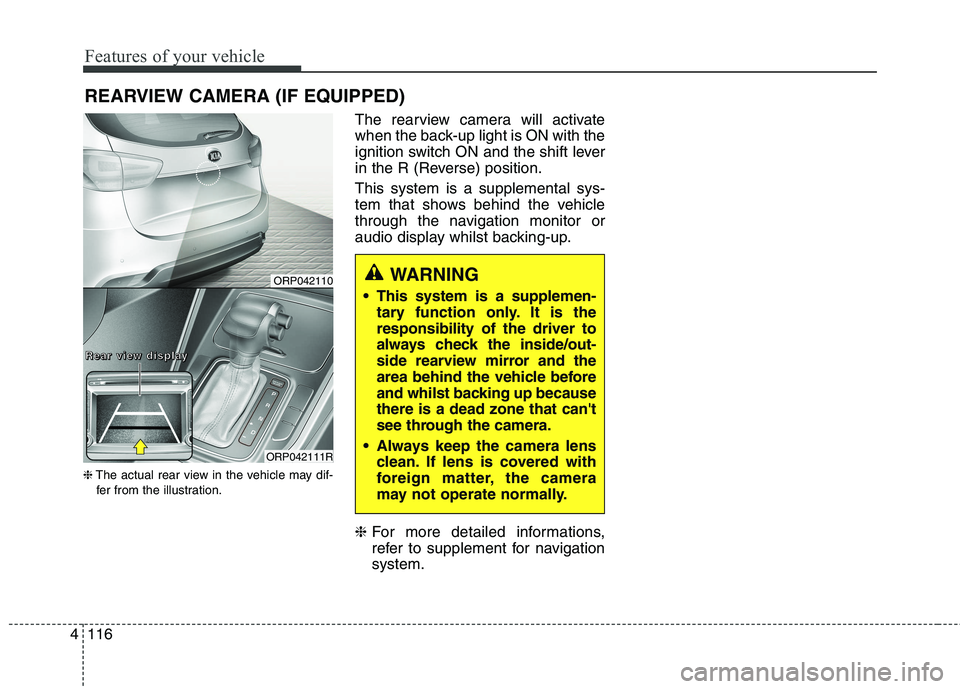
fer from the illustration. The rearview camera will activate
when the back-up light is ON with the
ignition switch ON and the shift lever
in the R (Reverse) position. This system is a supplemental sys-
tem that shows behind the vehicle
through the navigation monitor or
audio display whilst backing-up. ❈
For more detailed informations,
refer to supplement for navigationsystem.
WARNING
This system is a supplemen- tary function only. It is the responsibility of the driver to
always check the inside/out-
side rearview mirror and the
area behind the vehicle before
and whilst backing up becausethere is a dead zone that can't
see through the camera.
Always keep the camera lens clean. If lens is covered with
foreign matter, the camera
may not operate normally.ORP042110
ORP042111R
RRRReeeeaaaarrrr vvvviiiieeeewwww ddddiiiissssppppllllaaaayyyy
Page 214 of 723
Features of your vehicle
118
4
Headlight (Headlamp) welcome function (if equipped)
When the headlight switch is in the
ON or AUTO position and all doors
(and tailgate) are closed and locked,
if you press the door unlock button
on the transmitter or smart key, the
headlights will come on for about 15
seconds.
If the headlight switch is in the AUTO position, the function can only oper-ate at night.
At this time, if you press the door
unlock button again or door lock but-
ton on the transmitter or smart key,
the headlights will turn off immedi-
ately.
You can activate or deactivate the
headlamp welcome fuction. Refer to
“User setting” in this chapter. Static bending light (if equipped)
Whilst driving the corner, for your
sight and safety, the static bending
light turns on automatically. The sys-
tem will operate automatically as fol-
lows:
When vehicle speed is under
10km/h and steering wheel angle
approximately 80 degrees.
When vehicle speed is over 10km/h and steering wheel angle
approximately 35 degrees.
When the vehicle is at a standstill.
When moving rearwards with one of the above conditions satisfied the lights will light up the oppositedirection. Daytime running light (if equipped)
Daytime Running Lights (DRL) can
make it easier for others to see the
front of your vehicle during the day.
DRL can be helpful in many different
driving conditions, and it is especially
helpful after dawn and before sunset.
The DRL system will turn off when:
1. The front fog light or headlight (low
beam) switch is ON.
2. The engine is OFF.
Page 243 of 723
4147
Features of your vehicle
✽✽NOTICE
When using the air conditioning system, monitor the temperature
gauge closely whilst driving up
hills or in heavy traffic when out-
side temperatures are high. Air
conditioning system operation
may cause engine overheating.
Continue to use the blower fan but
turn the air conditioning system
off if the temperature gauge indi-
cates engine overheating.
When opening the windows in humid weather air conditioning
may create water droplets inside
the vehicle. Since excessive water
droplets may cause damage to
electrical equipment, air condi-
tioning should only be used with
the windows closed.Air conditioning system operation tips
If the vehicle has been parked indirect sunlight during hot weather,
open the windows for a short time
to let the hot air inside the vehicle
escape.
Use air conditioning to reduce humidity and moisture inside the
vehicle on rainy or humid days.
During air conditioning system operation, you may occasionallynotice a slight change in enginespeed as the air conditioning com-
pressor cycles. This is a normal
system operation characteristic.
Use the air conditioning system every month only for a few minutes
to ensure maximum system per-
formance.CAUTION
The refrigerant system should
only be serviced by trainedand certified technicians toinsure proper and safe opera-tion.
The refrigerant system should be serviced in a well-ventilat-ed place.
The air conditioning evapora- tor (cooling coil) shall neverbe repaired or replaced withone removed from a used or salvaged vehicle and newreplacement MAC evaporatorsshall be certified (and labeled) as meeting SAE StandardJ2842.
Page 249 of 723
4153
Features of your vehicle
Manual heating and air condi- tioning The heating and cooling system can
be controlled manually by pressing
buttons or turning knob(s) other than
the AUTO button. In this case, the
system works sequentially according
to the order of buttons or knob(s)selected.
1. Start the engine.
2. Set the mode to the desired posi-tion.
To improve the effectiveness ofheating and cooling:
- Heating:- Cooling:
3. Set the temperature control to the desired position.
4. Set the air intake control to the outside (fresh) air position.
5. Set the fan speed control to the desired speed.
6. If air conditioning is desired, turn the air conditioning system on.
Press the AUTO button in order to
convert to full automatic control ofthe system.Mode selection
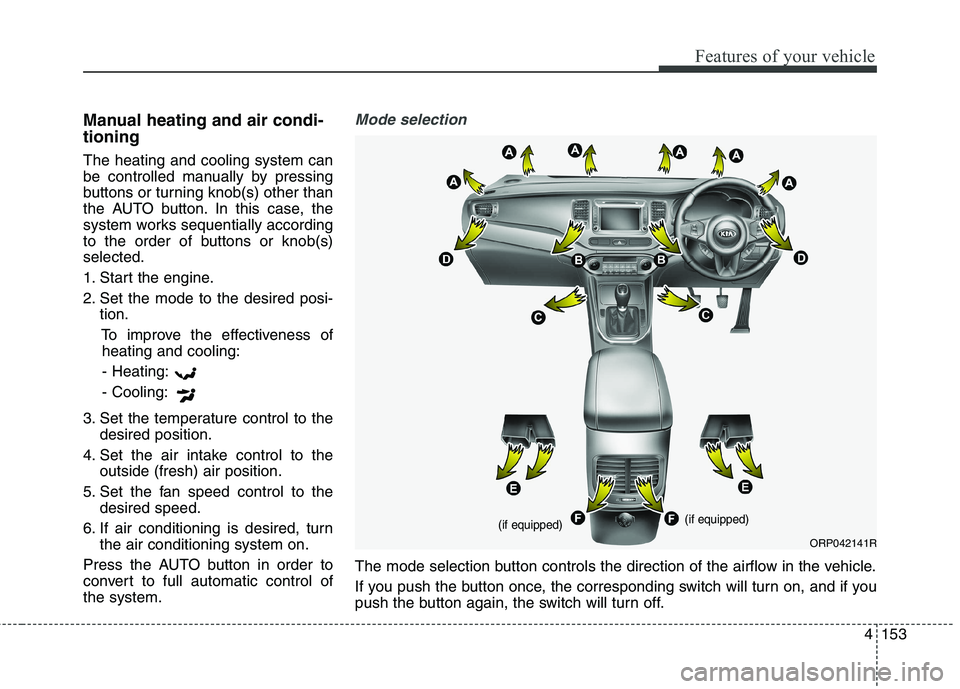
The mode selection button controls the direction of the airflow in the vehicle.
If you push the button once, the corresponding switch will turn on, and if you
push the button again, the switch will turn off.
ORP042141R
(if equipped) (if equipped)
Page 257 of 723
4161
Features of your vehicle
Air conditioning system operation tips
If the vehicle has been parked indirect sunlight during hot weather,
open the windows for a short time
to let the hot air inside the vehicle
escape.
Use air conditioning to reduce humidity and moisture inside the
vehicle on rainy or humid days.
During air conditioning system operation, you may occasionallynotice a slight change in enginespeed as the air conditioning com-
pressor cycles. This is a normal
system operation characteristic.
Use the air conditioning system every month only for a few minutes
to ensure maximum system per-
formance. When using the air conditioning
system, you may notice clear water
dripping (or even puddling) on the
ground under the passenger side
of the vehicle. This is a normal sys-
tem operation characteristic.
Operating the air conditioning sys- tem in the recirculated air position
provides maximum cooling, how-
ever, continual operation in this
mode may cause the air inside the
vehicle to become stale.
During cooling operation, you may occasionally notice a misty air flow
because of rapid cooling and
humid air intake. This is a normal
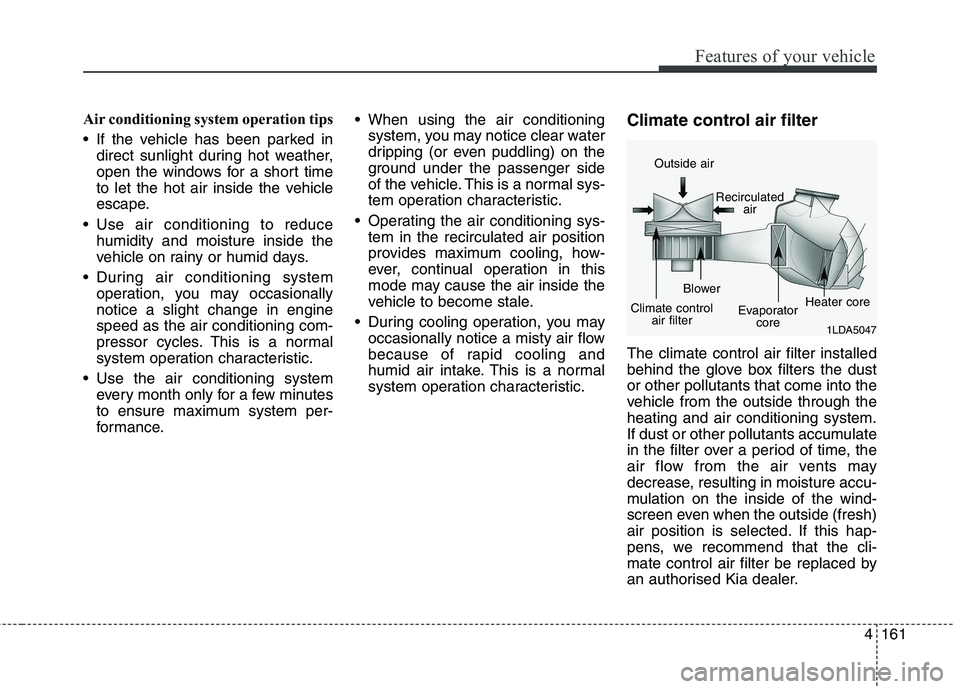
system operation characteristic. Climate control air filter The climate control air filter installed
behind the glove box filters the dustor other pollutants that come into the
vehicle from the outside through theheating and air conditioning system.
If dust or other pollutants accumulate
in the filter over a period of time, the
air flow from the air vents may
decrease, resulting in moisture accu-
mulation on the inside of the wind-
screen even when the outside (fresh)
air position is selected. If this hap-
pens, we recommend that the cli-
mate control air filter be replaced by
an authorised Kia dealer.
1LDA5047
Outside air
Recirculatedair
Climate control air filter Blower
Evaporatorcore Heater core
Page 259 of 723
4163
Features of your vehicle
For maximum defrosting, set thetemperature control to the hottest
position and the fan speed controlto the highest speed.
If warm air to the floor is desired whilst defrosting or defogging, setthe mode to the floor-defrost posi-tion. Before driving, clear all snow and
ice from the windscreen, rear win-
dow, outside rear view mirrors, and
all side windows.
Clear all snow and ice from the bonnet and air inlet in the cowl grill
to improve heater and defrosterefficiency and to reduce the proba-
bility of fogging up the inside of thewindscreen. Manual climate control system
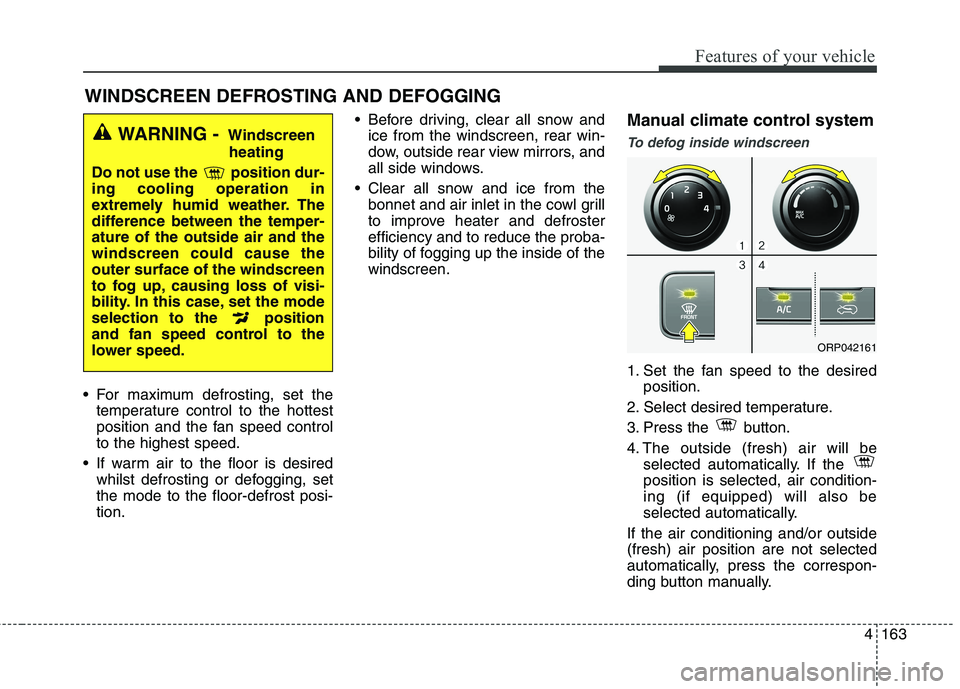
To defog inside windscreen
1. Set the fan speed to the desired
position.
2. Select desired temperature.
3. Press the button.
4. The outside (fresh) air will be selected automatically. If the position is selected, air condition-ing (if equipped) will also be
selected automatically.
If the air conditioning and/or outside(fresh) air position are not selected
automatically, press the correspon-
ding button manually.
WINDSCREEN DEFROSTING AND DEFOGGING
WARNING - Windscreen
heating
Do not use the position dur- ing cooling operation in
extremely humid weather. The
difference between the temper-ature of the outside air and thewindscreen could cause theouter surface of the windscreen
to fog up, causing loss of visi-
bility. In this case, set the mode
selection to the position
and fan speed control to the
lower speed.
ORP042161
Page 260 of 723
Features of your vehicle
164
4
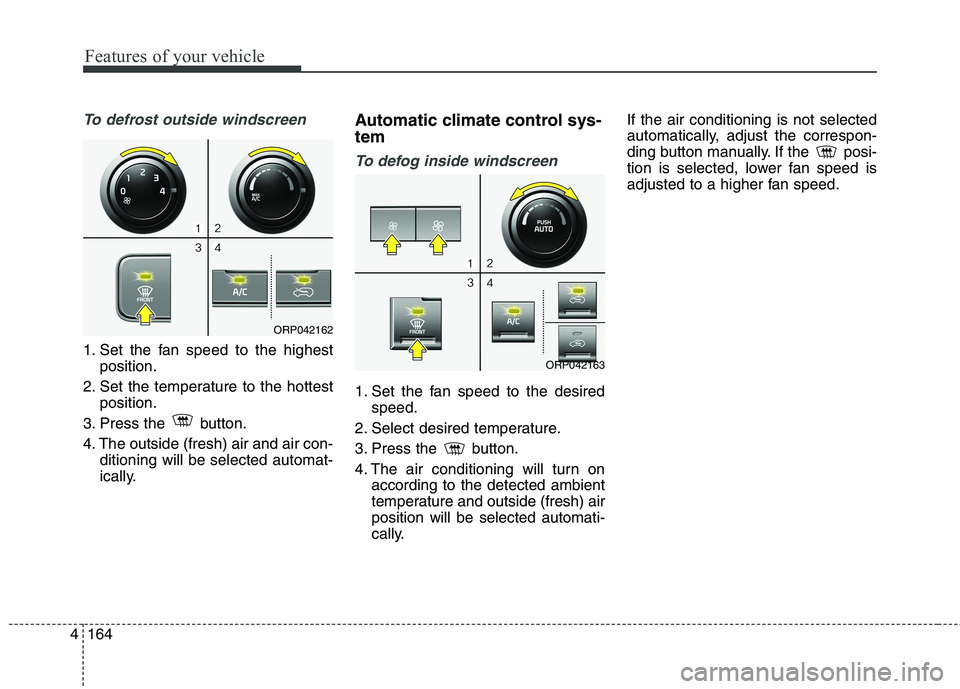
To defrost outside windscreen
1. Set the fan speed to the highest
position.
2. Set the temperature to the hottest position.
3. Press the button.
4. The outside (fresh) air and air con- ditioning will be selected automat-
ically. Automatic climate control sys- tem
To defog inside windscreen
1. Set the fan speed to the desired
speed.
2. Select desired temperature.
3. Press the button.
4. The air conditioning will turn on according to the detected ambient
temperature and outside (fresh) airposition will be selected automati-
cally. If the air conditioning is not selected
automatically, adjust the correspon-
ding button manually. If the posi-
tion is selected, lower fan speed is
adjusted to a higher fan speed.
ORP042163
ORP042162