clock KIA CARENS RHD 2017 Owners Manual
[x] Cancel search | Manufacturer: KIA, Model Year: 2017, Model line: CARENS RHD, Model: KIA CARENS RHD 2017Pages: 723, PDF Size: 40.8 MB
Page 137 of 723
441
Features of your vehicle
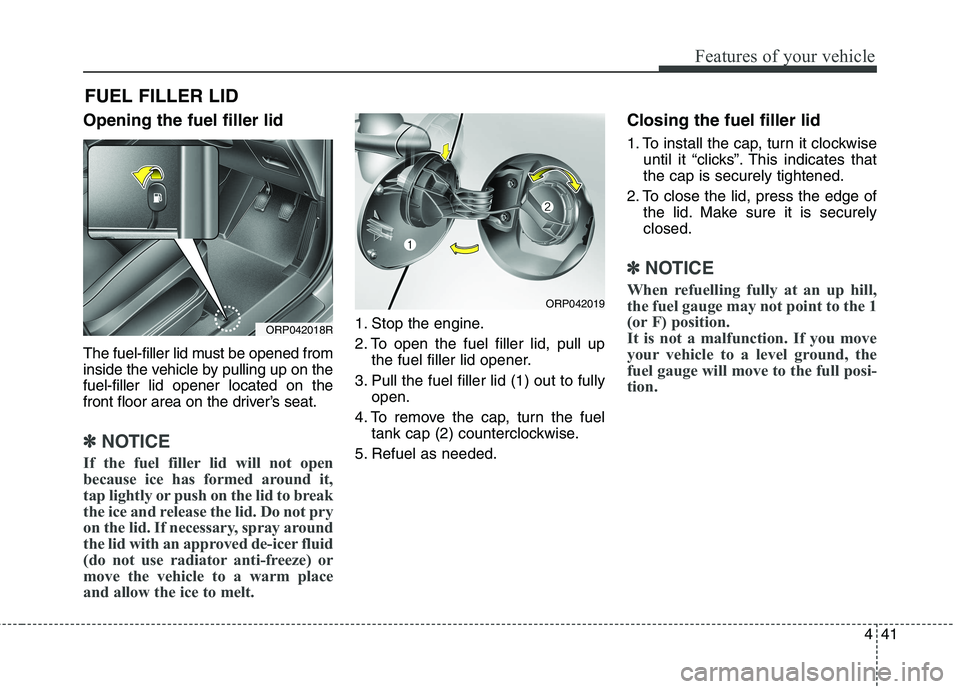
Opening the fuel filler lid
The fuel-filler lid must be opened from
inside the vehicle by pulling up on thefuel-filler lid opener located on the
front floor area on the driver’s seat.
✽✽NOTICE
If the fuel filler lid will not open
because ice has formed around it,
tap lightly or push on the lid to break
the ice and release the lid. Do not pry
on the lid. If necessary, spray around
the lid with an approved de-icer fluid
(do not use radiator anti-freeze) or
move the vehicle to a warm place
and allow the ice to melt.
1. Stop the engine.
2. To open the fuel filler lid, pull up the fuel filler lid opener.
3. Pull the fuel filler lid (1) out to fully open.
4. To remove the cap, turn the fuel tank cap (2) counterclockwise.
5. Refuel as needed. Closing the fuel filler lid
1. To install the cap, turn it clockwise
until it “clicks”. This indicates that the cap is securely tightened.
2. To close the lid, press the edge of the lid. Make sure it is securelyclosed.
✽✽ NOTICE
When refuelling fully at an up hill,
the fuel gauge may not point to the 1
(or F) position.
It is not a malfunction. If you move
your vehicle to a level ground, the
fuel gauge will move to the full posi-
tion.
FUEL FILLER LID
ORP042018R
ORP042019
Page 285 of 723
Audio system
2
5
✽✽
NOTICE
If you install an aftermarket HID
head lamp, your vehicle’s audio and
electronic device may malfunction.Antenna
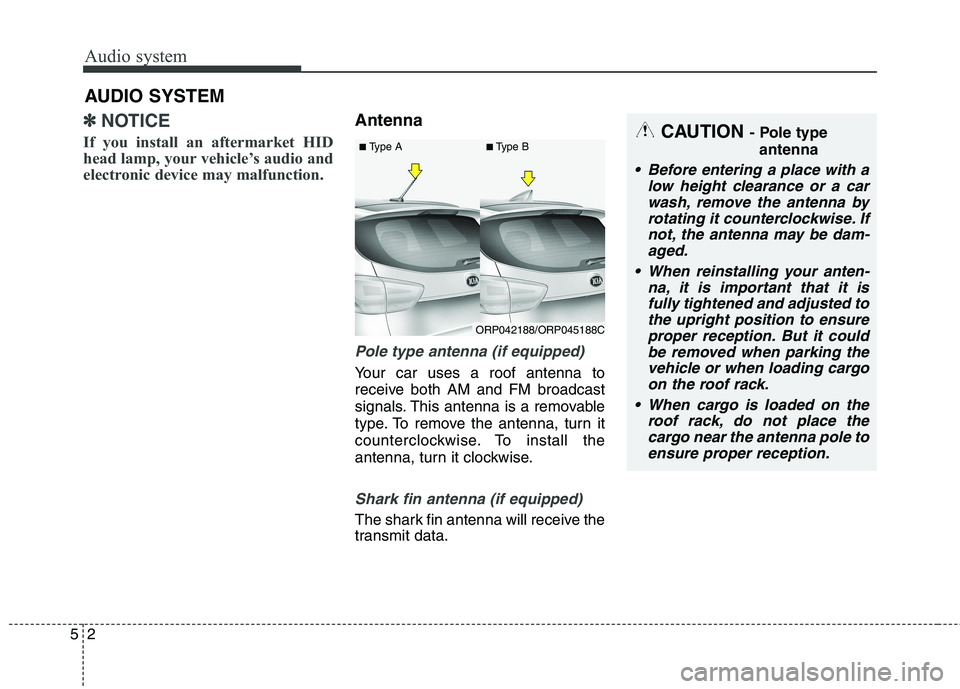
Pole type antenna (if equipped)
Your car uses a roof antenna to
receive both AM and FM broadcast
signals. This antenna is a removable
type. To remove the antenna, turn it
counterclockwise. To install the
antenna, turn it clockwise.
Shark fin antenna (if equipped)
The shark fin antenna will receive the
transmit data.
AUDIO SYSTEM
CAUTION
- Pole type
antenna
• Before entering a place with a low height clearance or a carwash, remove the antenna by rotating it counterclockwise. Ifnot, the antenna may be dam-aged.
When reinstalling your anten- na, it is important that it isfully tightened and adjusted tothe upright position to ensureproper reception. But it could be removed when parking thevehicle or when loading cargoon the roof rack.
When cargo is loaded on the roof rack, do not place thecargo near the antenna pole toensure proper reception.
ORP042188/ORP045188C
■
Type A ■Type B
Page 299 of 723
Audio system
16
5
Features of your vehicle
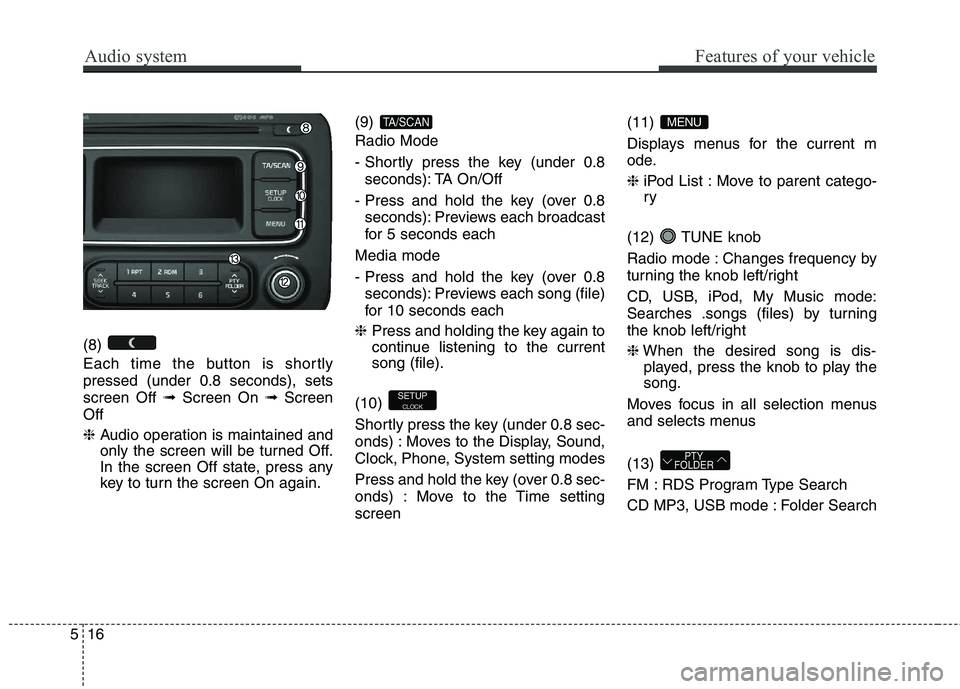
(8)
Each time the button is shortly pressed (under 0.8 seconds), setsscreen Off ➟Screen On ➟Screen
Off ❈ Audio operation is maintained and
only the screen will be turned Off.
In the screen Off state, press any
key to turn the screen On again. (9) Radio Mode
- Shortly press the key (under 0.8
seconds): TA On/Off
- Press and hold the key (over 0.8 seconds): Previews each broadcast
for 5 seconds each
Media mode
- Press and hold the key (over 0.8 seconds): Previews each song (file)
for 10 seconds each
❈ Press and holding the key again to
continue listening to the currentsong (file).
(10)
Shortly press the key (under 0.8 sec-
onds) : Moves to the Display, Sound,
Clock, Phone, System setting modes
Press and hold the key (over 0.8 sec-
onds) : Move to the Time settingscreen (11)
Displays menus for the current m
ode. ❈
iPod List : Move to parent catego- ry
(12) TUNE knob
Radio mode : Changes frequency by
turning the knob left/right
CD, USB, iPod, My Music mode:
Searches .songs (files) by turning
the knob left/right ❈ When the desired song is dis-
played, press the knob to play the song.
Moves focus in all selection menus
and selects menus (13)
FM : RDS Program Type Search
CD MP3, USB mode : Folder Search
PTY
FOLDER
MENU
SETUP
CLOCK
TA/SCAN
Page 302 of 723
519
Audio system
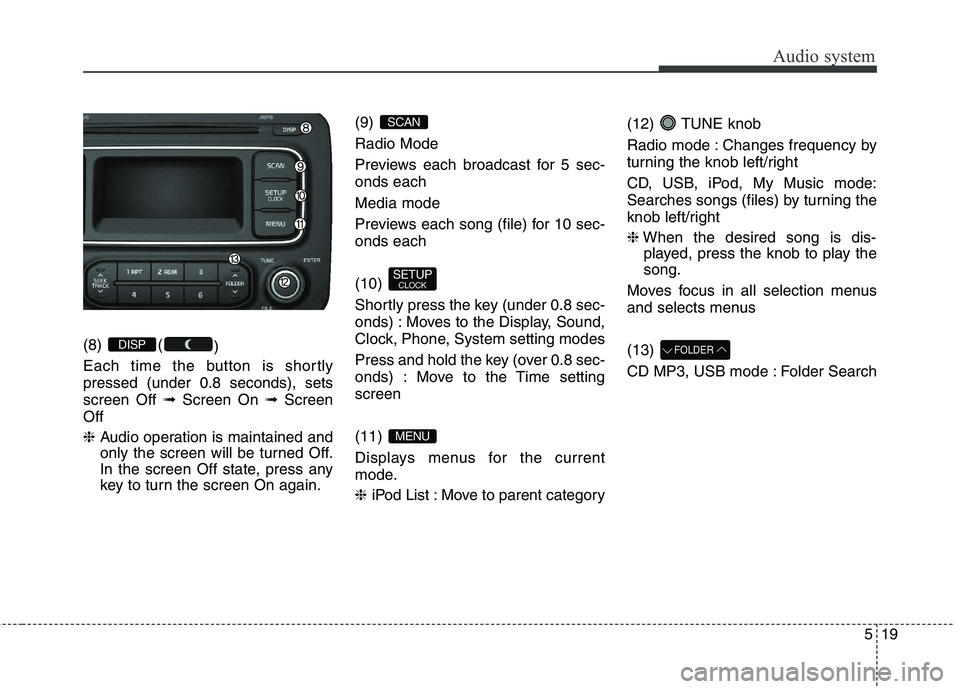
(8) ()
Each time the button is shortly pressed (under 0.8 seconds), setsscreen Off ➟Screen On ➟Screen
Off ❈ Audio operation is maintained and
only the screen will be turned Off.
In the screen Off state, press any
key to turn the screen On again. (9) Radio Mode
Previews each broadcast for 5 sec- onds each Media mode
Previews each song (file) for 10 sec- onds each (10)
Shortly press the key (under 0.8 sec-
onds) : Moves to the Display, Sound,
Clock, Phone, System setting modes
Press and hold the key (over 0.8 sec-
onds) : Move to the Time settingscreen (11)
Displays menus for the current
mode. ❈
iPod List : Move to parent category (12) TUNE knob
Radio mode : Changes frequency by
turning the knob left/right
CD, USB, iPod, My Music mode:
Searches songs (files) by turning the
knob left/right ❈
When the desired song is dis-
played, press the knob to play the song.
Moves focus in all selection menus
and selects menus (13)
CD MP3, USB mode : Folder SearchFOLDER
MENU
SETUP CLOCK
SCAN
DISP
Page 306 of 723
![KIA CARENS RHD 2017 Owners Manual 523
Audio system
CLOCK SETTINGS
Press the key Select [Clock]
through TUNE knob or key
Select menu through TUNE knob
Clock Settings
This menu is used to set the time.
Select [Clock Settings] Set](/img/2/57939/w960_57939-305.png "KIA CARENS RHD 2017 Owners Manual 523
Audio system
CLOCK SETTINGS
Press the key Select [Clock]
through TUNE knob or key
Select menu through TUNE knob
Clock Settings
This menu is used to set the time.
Select [Clock Settings] Set")
523
Audio system
CLOCK SETTINGS
Press the key Select [Clock]
through TUNE knob or key
Select menu through TUNE knob
Clock Settings
This menu is used to set the time.
Select [Clock Settings] Set throughTUNE knob Press TUNE knob
❈ Adjust the number currently in
focus to set the [hour] and press
the tune knob to set the [minute].
Day Settings
This menu is used to set the date (DD/MM/YYYY).
Select [Day Settings] Set through
TUNE knob Press TUNE knob
❈ Adjust the number currently in
focus to make the settings and
press the tune knob to move to the
next setting. (Set in order of
Year/Month/Day)
Time Format This function is used to set the 12/24
hour time format of the audio system.
Select [Time Format] Set 12Hr /
24Hr through TUNE knob
Clock Display when Power is OFF
Select [Clock Disp.(Pwr Off)
Set
/ through TUNE knob
: Displays time/date on screen
Turn off.
Automatic RDS Time This option is used to automatically set
the time by synchronizing with RDS.
Select [Automatic RDS Time]
Set
/ through TUNE knob
: Turn on Automatic Time
Turn off.
Off
On
OffOn
Off
On
OffOn
3
SETUP
CLOCK
Page 315 of 723
![KIA CARENS RHD 2017 Owners Manual Audio system
32
5
CLOCK SETTINGS
Press the key Select [Clock]
through TUNE knob or key
Select menu through TUNE knob
Clock Settings
This menu is used to set the time.
Select [Clock Settings] Se](/img/2/57939/w960_57939-314.png "KIA CARENS RHD 2017 Owners Manual Audio system
32
5
CLOCK SETTINGS
Press the key Select [Clock]
through TUNE knob or key
Select menu through TUNE knob
Clock Settings
This menu is used to set the time.
Select [Clock Settings] Se")
Audio system
32
5
CLOCK SETTINGS
Press the key Select [Clock]
through TUNE knob or key
Select menu through TUNE knob
Clock Settings
This menu is used to set the time.
Select [Clock Settings] Set through
TUNEknob Press TUNEknob
❈ Adjust the number currently in
focus to set the [hour] and press
the tune knob to set the [minute]. Calendar Settings
This menu is used to set the date (YYYY/MM/DD).
Select [Calendar Settings] Set through
TUNE knob Press
TUNE knob
❈ Adjust the number currently in
focus to make the settings and
press the tune knob to move to the
next setting. (Set in order of
Year/Month/Day)
Clock Display when Power isOFF
Select [Clock Disp.(Pwr Off)
Set
/ through TUNE knob
: Displays time/date on screen
Turn off.
Off
On
OffOn
3
SETUP
CLOCK
Page 349 of 723
Audio system
66
5
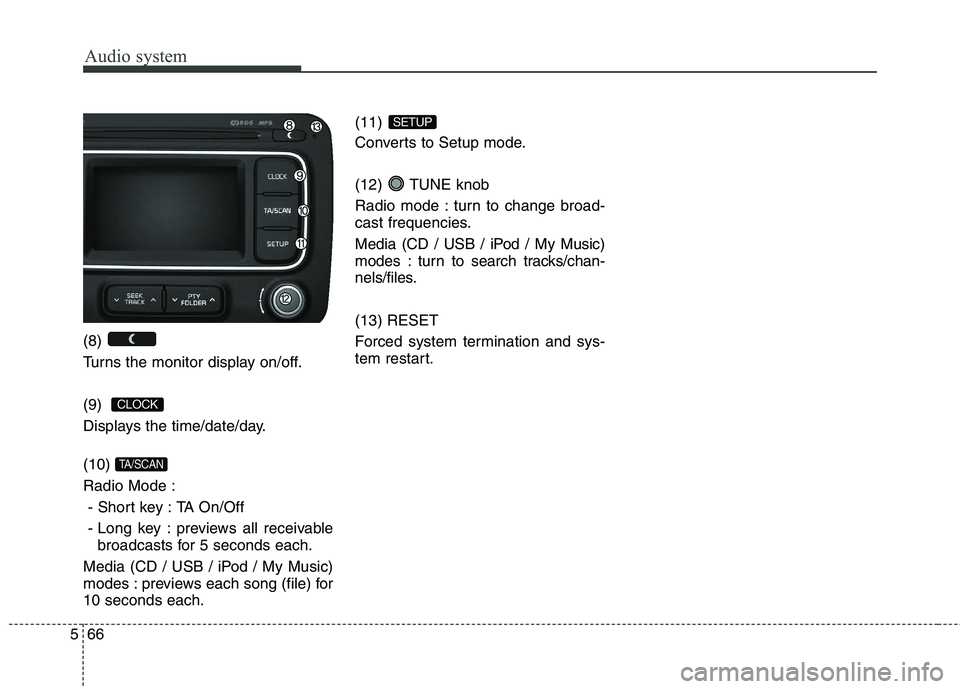
(8)
Turns the monitor display on/off. (9)
Displays the time/date/day. (10) Radio Mode :
- Short key : TA On/Off
- Long key : previews all receivable broadcasts for 5 seconds each.
Media (CD / USB / iPod / My Music)
modes : previews each song (file) for10 seconds each. (11)
Converts to Setup mode.
(12) TUNE knob
Radio mode : turn to change broad-
cast frequencies.
Media (CD / USB / iPod / My Music)
modes : turn to search tracks/chan-
nels/files. (13) RESET
Forced system termination and sys-
tem restart.
SETUP
TA/SCAN
CLOCK
Page 352 of 723
569
Audio system
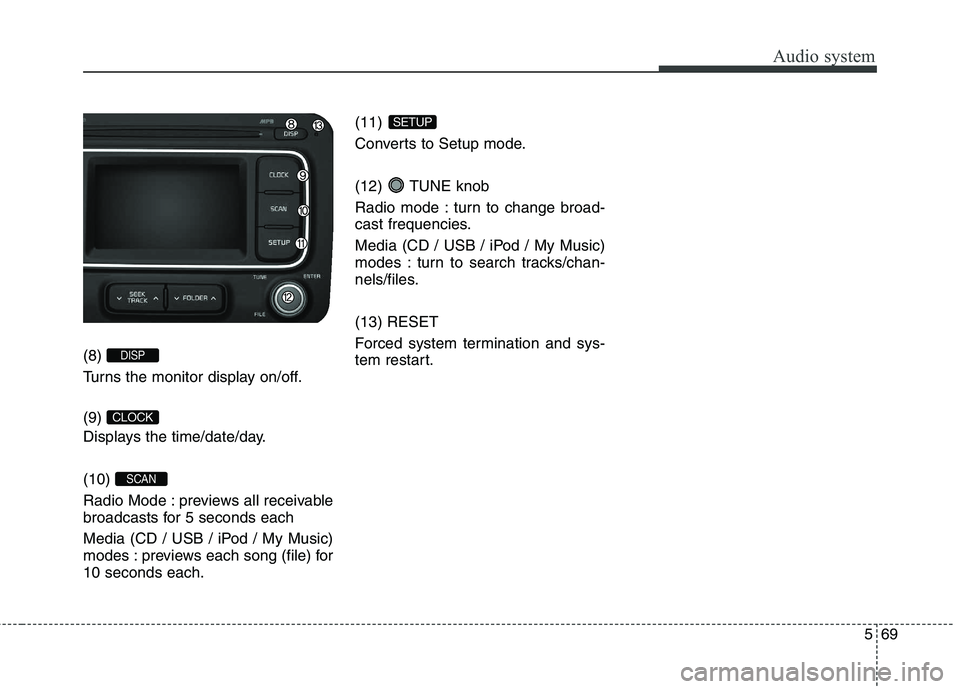
(8)
Turns the monitor display on/off. (9)
Displays the time/date/day. (10)
Radio Mode : previews all receivable
broadcasts for 5 seconds each
Media (CD / USB / iPod / My Music)
modes : previews each song (file) for10 seconds each.(11)
Converts to Setup mode.
(12) TUNE knob
Radio mode : turn to change broad-
cast frequencies.
Media (CD / USB / iPod / My Music)
modes : turn to search tracks/chan-
nels/files. (13) RESET
Forced system termination and sys-
tem restart.
SETUP
SCAN
CLOCK
DISP
Page 417 of 723
![KIA CARENS RHD 2017 Owners Manual Audio system
134
5
SETUP
(for RDS model) AM111 A4EE
Starting Mode
Press the key to display the Setup screen.
You can select and control options
related to [Display], [Sound],
[Clock/Day], [Phone](/img/2/57939/w960_57939-416.png "KIA CARENS RHD 2017 Owners Manual Audio system
134
5
SETUP
(for RDS model) AM111 A4EE
Starting Mode
Press the key to display the Setup screen.
You can select and control options
related to [Display], [Sound],
[Clock/Day], [Phone")
Audio system
134
5
SETUP
(for RDS model) AM111 A4EE
Starting Mode
Press the key to display the Setup screen.
You can select and control options
related to [Display], [Sound],
[Clock/Day], [Phone] and [System]. Display Settings
Adjusting the Brightness
Press the key Select
[Display] Select [Brightness]
Use the , buttons to adjust the
screen brightness or set the
Brightness on Automatic, Day, or
Night mode.
Press the button to reset.
(1) Automatic : Adjusts the bright-
ness automatically
(2) Daylight : Always maintains the brightness on high
(3) Night : Always maintains the
brightness on low
Pop-up Mode
Press the key Select
[Display] Select [Pop-up Mode]
This feature is used to display the
Pop-up Mode screen when entering
radio and media modes.
When this feature is turned on, pressing the or key
will display the Pop-up Mode screen.
✽✽ NOTICE
The media Pop-up Mode screen can
be displayed only when two or more
media modes have been connected.
MEDIA RADIO
SETUP
Default
SETUP
SETUP
Page 420 of 723
![KIA CARENS RHD 2017 Owners Manual 5137
Audio system
Touch Screen Beep
Press the key Select
[Sound] Select [Touch ScreenBeep]
This feature is used to turn the touch
screen beep on/off.Clock/Day Setting
Clock Setting
Press the key](/img/2/57939/w960_57939-419.png "KIA CARENS RHD 2017 Owners Manual 5137
Audio system
Touch Screen Beep
Press the key Select
[Sound] Select [Touch ScreenBeep]
This feature is used to turn the touch
screen beep on/off.Clock/Day Setting
Clock Setting
Press the key")
5137
Audio system
Touch Screen Beep
Press the key Select
[Sound] Select [Touch ScreenBeep]
This feature is used to turn the touch
screen beep on/off.Clock/Day Setting
Clock Setting
Press the key Select
[Clock/Day] Select [Clock Settings]
Use the , buttons to set the
Hour, Minutes and AM/PM setting.
✽✽
NOTICE
Press and hold the key (over
0.8 seconds) to display the
Clock/Day screen.
Calendar Setting
Press the key Select
[Clock/Day] Select [Day Settings]
Use the , buttons to set the
Day, Month and Year setting.SETUP
CLOCK
SETUP
SETUP