tow KIA CARENS RHD 2018 User Guide
[x] Cancel search | Manufacturer: KIA, Model Year: 2018, Model line: CARENS RHD, Model: KIA CARENS RHD 2018Pages: 723, PDF Size: 40.94 MB
Page 147 of 723
451
Features of your vehicle
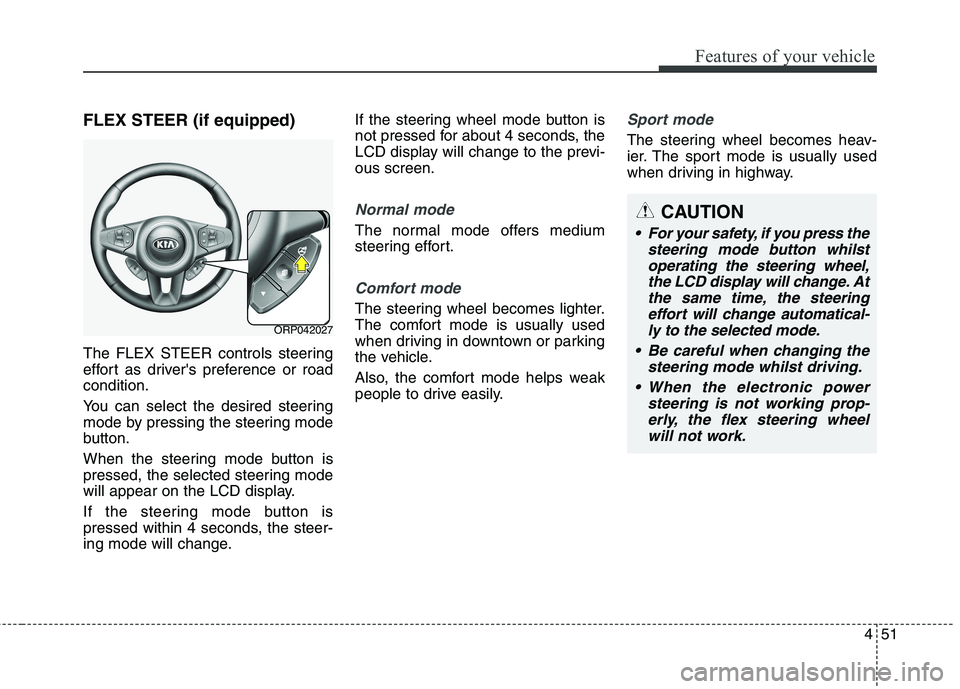
FLEX STEER (if equipped)
The FLEX STEER controls steering
effort as driver's preference or roadcondition.
You can select the desired steering
mode by pressing the steering mode
button.
When the steering mode button is
pressed, the selected steering mode
will appear on the LCD display.
If the steering mode button is
pressed within 4 seconds, the steer-
ing mode will change.If the steering wheel mode button is
not pressed for about 4 seconds, the
LCD display will change to the previ-ous screen.
Normal mode
The normal mode offers medium
steering effort.
Comfort mode
The steering wheel becomes lighter.
The comfort mode is usually used
when driving in downtown or parking
the vehicle.
Also, the comfort mode helps weak
people to drive easily.
Sport mode
The steering wheel becomes heav-
ier. The sport mode is usually used
when driving in highway.
ORP042027
CAUTION
For your safety, if you press the
steering mode button whilstoperating the steering wheel, the LCD display will change. Atthe same time, the steeringeffort will change automatical- ly to the selected mode.
Be careful when changing the steering mode whilst driving.
When the electronic power steering is not working prop-erly, the flex steering wheelwill not work.
Page 148 of 723
Features of your vehicle
52
4
Inside rearview mirror
Adjust the rearview mirror so that the
centre view through the rear window
is seen. Make this adjustment before
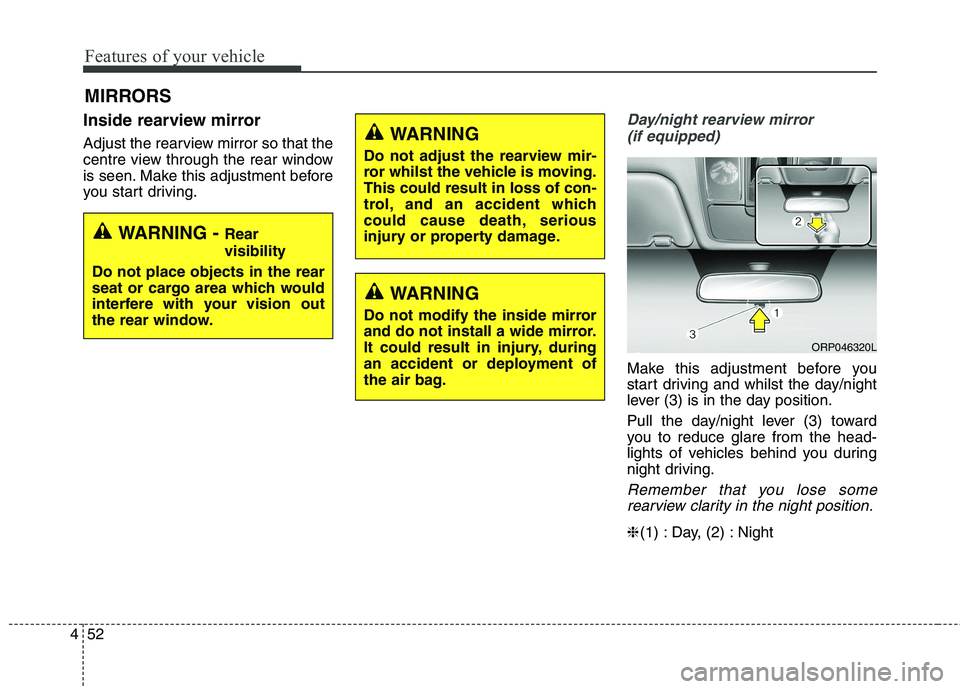
you start driving.Day/night rearview mirror
(if equipped)
Make this adjustment before you
start driving and whilst the day/night
lever (3) is in the day position.
Pull the day/night lever (3) toward
you to reduce glare from the head-
lights of vehicles behind you during
night driving.
Remember that you lose somerearview clarity in the night position.
❈ (1) : Day, (2) : Night
MIRRORS
WARNING -
Rear visibility
Do not place objects in the rear
seat or cargo area which would
interfere with your vision out
the rear window.
WARNING
Do not adjust the rearview mir-
ror whilst the vehicle is moving.This could result in loss of con-
trol, and an accident which
could cause death, serious
injury or property damage.
WARNING
Do not modify the inside mirror
and do not install a wide mirror.
It could result in injury, during
an accident or deployment of
the air bag.
ORP046320L
Page 149 of 723
453
Features of your vehicle
Electric chromic mirror (ECM)(if equipped)
The electric rearview mirror automat- ically controls the glare from the
headlights of the vehicle behind you
in nighttime or low light driving condi-
tions. The sensor mounted in the mir-
ror senses the light level around the
vehicle, and automatically controls
the headlight glare from vehicles
behind you.
When the engine is running, the glare
is automatically controlled by the sen-
sor mounted in the rearview mirror.
Whenever the shift lever is shifted
into R (Reverse), the mirror will auto-
matically go to the brightest setting in
order to improve the drivers view
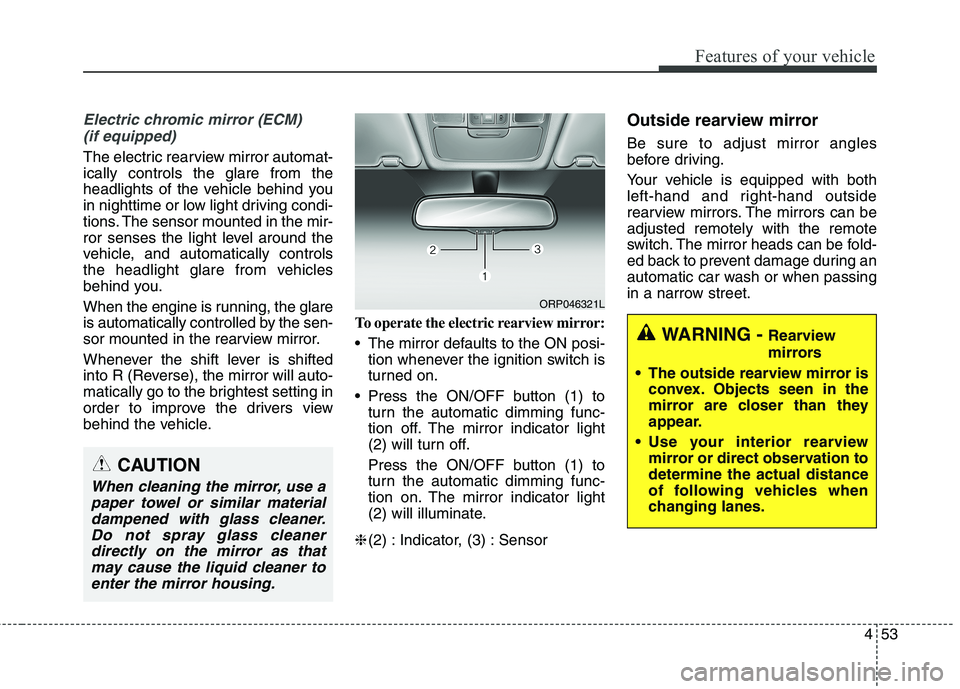
behind the vehicle. To operate the electric rearview mirror:
The mirror defaults to the ON posi-
tion whenever the ignition switch is
turned on.
Press the ON/OFF button (1) to turn the automatic dimming func-
tion off. The mirror indicator light
(2) will turn off.
Press the ON/OFF button (1) to
turn the automatic dimming func-
tion on. The mirror indicator light
(2) will illuminate.
❈ (2) : Indicator, (3) : Sensor Outside rearview mirror Be sure to adjust mirror angles
before driving.
Your vehicle is equipped with both
left-hand and right-hand outside
rearview mirrors. The mirrors can beadjusted remotely with the remote
switch. The mirror heads can be fold-
ed back to prevent damage during an
automatic car wash or when passing
in a narrow street.
CAUTION
When cleaning the mirror, use a
paper towel or similar materialdampened with glass cleaner. Do not spray glass cleanerdirectly on the mirror as thatmay cause the liquid cleaner to enter the mirror housing.
WARNING - Rearview
mirrors
The outside rearview mirror is convex. Objects seen in the
mirror are closer than they
appear.
Use your interior rearview mirror or direct observation todetermine the actual distance
of following vehicles when
changing lanes.
ORP046321L
Page 151 of 723
455
Features of your vehicle
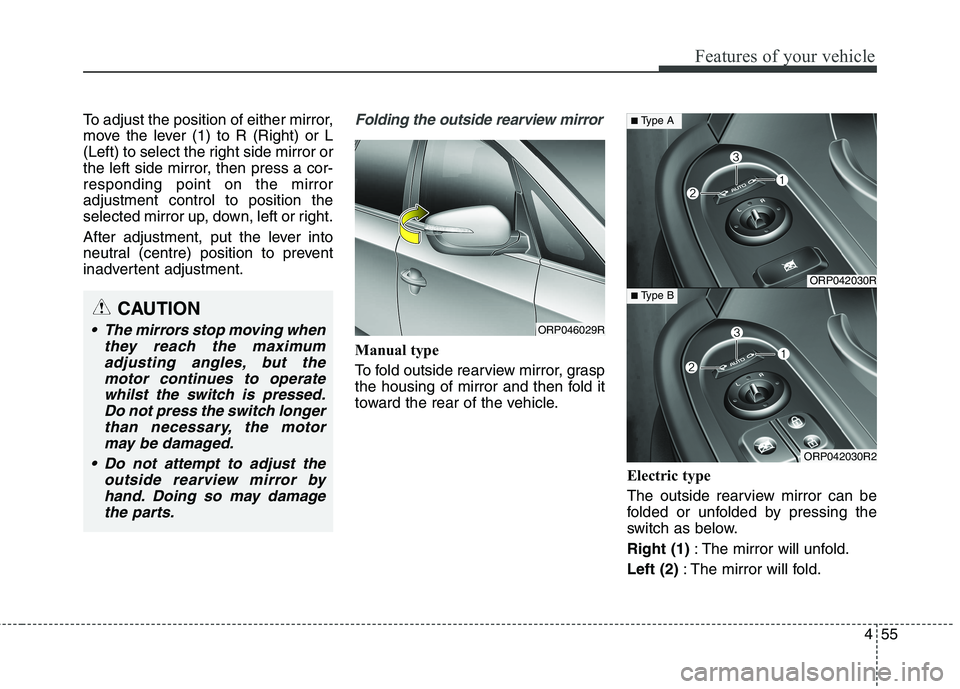
To adjust the position of either mirror,
move the lever (1) to R (Right) or L
(Left) to select the right side mirror or
the left side mirror, then press a cor-responding point on the mirroradjustment control to position the
selected mirror up, down, left or right.
After adjustment, put the lever into
neutral (centre) position to prevent
inadvertent adjustment.Folding the outside rearview mirror
Manual type
To fold outside rearview mirror, grasp
the housing of mirror and then fold it
toward the rear of the vehicle.Electric type
The outside rearview mirror can be
folded or unfolded by pressing the
switch as below. Right (1): The mirror will unfold.
Left (2) : The mirror will fold.
CAUTION
The mirrors stop moving when
they reach the maximumadjusting angles, but themotor continues to operatewhilst the switch is pressed. Do not press the switch longerthan necessary, the motormay be damaged.
Do not attempt to adjust the outside rearview mirror byhand. Doing so may damagethe parts.ORP046029R
ORP042030R
ORP042030R2
■ Type A
■ Type B
Page 157 of 723
461
Features of your vehicle
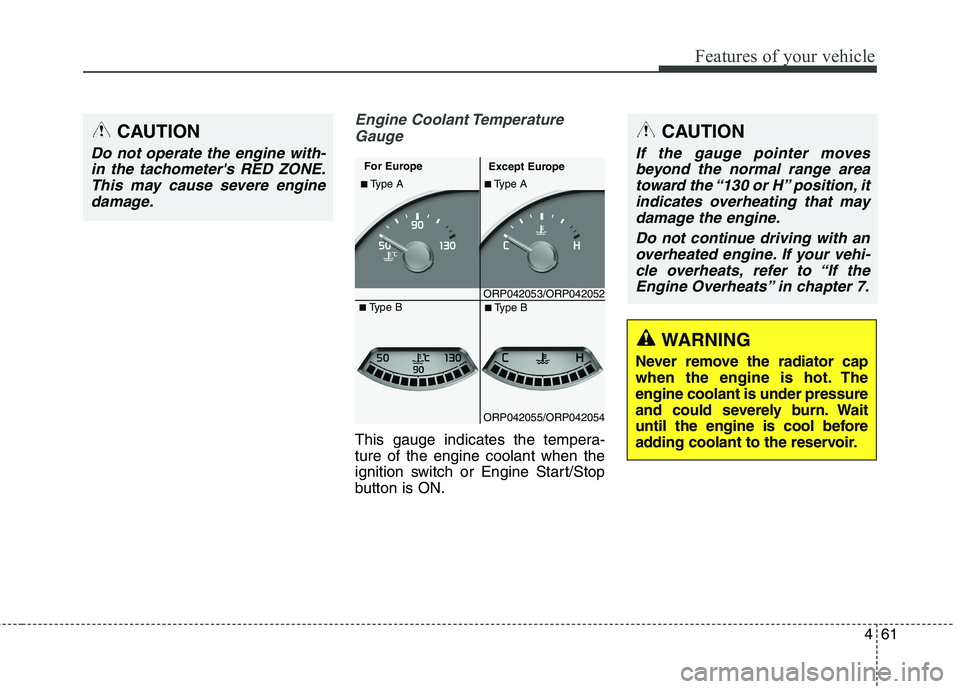
Engine Coolant TemperatureGauge
This gauge indicates the tempera- ture of the engine coolant when the
ignition switch or Engine Start/Stop
button is ON.
CAUTION
Do not operate the engine with-in the tachometer's RED ZONE.This may cause severe engine damage.
ORP042053/ORP042052
■
Type A
For Europe
Except Europe
■ Type A
ORP042055/ORP042054■
Type B
■ Type B
WARNING
Never remove the radiator cap
when the engine is hot. Theengine coolant is under pressure
and could severely burn. Wait
until the engine is cool before
adding coolant to the reservoir.
CAUTION
If the gauge pointer moves beyond the normal range areatoward the “130 or H” position, itindicates overheating that may damage the engine.
Do not continue driving with anoverheated engine. If your vehi-cle overheats, refer to “If theEngine Overheats” in chapter 7.
Page 178 of 723
Features of your vehicle
82
4
WARNING - Parking Brake
& Brake Fluid
Warning Light
Driving the vehicle with a warn-
ing light ON is dangerous. If the
Parking Brake & Brake Fluid
Warning Light illuminates with
the parking brake released, itindicates that the brake fluid
level is low.
In this case, have the vehicle
inspected by a professional
workshop. Kia recommends tovisit an authorised Kia
dealer/service partner.
Parking Brake & Brake Fluid Warning Light
This warning light illuminates:
Once you set the ignition switch or Engine Start/Stop Button to the ON position.
- It illuminates for approximately 3seconds
- It remains on if the parking brake is applied.
When the parking brake is applied.
When the brake fluid level in the reservoir is low.
- If the warning light illuminateswith the parking brake released, it
indicates the brake fluid level in
reservoir is low. If the brake fluid level in the reservoir
is low:
1. Drive carefully to the nearest safe
location and stop your vehicle.
2. With the engine stopped, check the brake fluid level immediately
and add fluid as required (For
more details, refer to “Brake Fluid”
in chapter 8). Then check all brake
components for fluid leaks. If any
leak on the brake system is still
found, the warning light remains
on, or the brakes do not operate
properly, do not drive the vehicle.
In this case, have the vehicle
towed to a professional workshopand inspected. Kia recommends to visit an autho-
rised Kia dealer/service partner.
Dual-diagonal braking system
Your vehicle is equipped with dual-
diagonal braking systems. This
means you still have braking on two
wheels even if one of the dual sys-
tems should fail. With only one of the dual systems
working, more than normal pedal
travel and greater pedal pressure are
required to stop the vehicle.
Also, the vehicle will not stop in as
short a distance with only a portion
of the brake system working.
If the brakes fail whilst you are driv-
ing, shift to a lower gear for addition-
al engine braking and stop the vehi-
cle as soon as it is safe to do so.
Page 193 of 723
497
Features of your vehicle
This system will activate whenbacking up with the ignition switch ON.
If the vehicle is moving at a speed
over 5 km/h (3 mph), the system
may not be activated correctly.
The sensing distance whilst the rear parking assist system is in
operation is approximately 120 cm(47 in.).
When more than two objects are sensed at the same time, the clos-
est one will be recognized first.
Types of warning sound
When an object is 120 cm to 61 cm(47 in. to 23.6 in.) from the rear
bumper: Buzzer beeps intermittently
When an object is 60 cm to 31 cm (23.6 in. to 12.2 in.) from the rear
bumper: Buzzer beeps more fre-quently
When an object is within 30 cm (11.8 in.) of the rear bumper:
Buzzer sounds continuously.
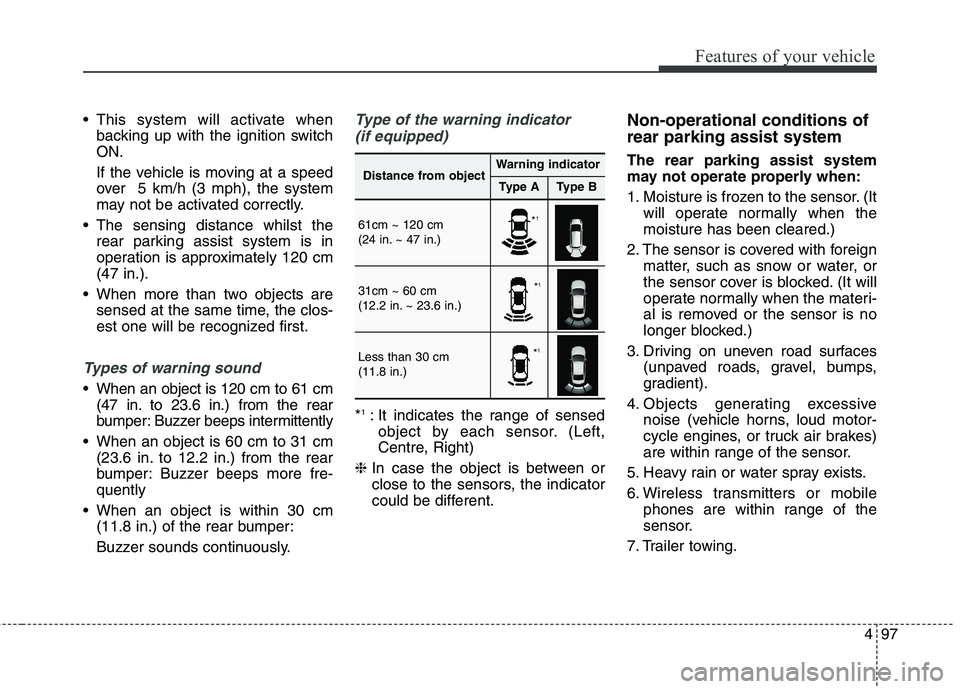
Type of the warning indicator
(if equipped)
* 1
: It indicates the range of sensed
object by each sensor. (Left,
Centre, Right)
❈ In case the object is between or
close to the sensors, the indicator
could be different. Non-operational conditions of rear parking assist system The rear parking assist system
may not operate properly when:
1. Moisture is frozen to the sensor. (It
will operate normally when the moisture has been cleared.)
2. The sensor is covered with foreign matter, such as snow or water, or
the sensor cover is blocked. (It will
operate normally when the materi-
al is removed or the sensor is no
longer blocked.)
3. Driving on uneven road surfaces (unpaved roads, gravel, bumps,
gradient).
4. Objects generating excessive noise (vehicle horns, loud motor-
cycle engines, or truck air brakes)
are within range of the sensor.
5. Heavy rain or water spray exists.
6. Wireless transmitters or mobile phones are within range of the
sensor.
7. Trailer towing.
Distance from objectWarning indicator
Type AType B
61cm ~ 120 cm
(24 in. ~ 47 in.)
31cm ~ 60 cm
(12.2 in. ~ 23.6 in.)
Less than 30 cm (11.8 in.)
* 1
* 1
* 1
Page 218 of 723
Features of your vehicle
122
4
The high-beam indicator will light
when the headlight high beams are
switched on.
To prevent the battery from being discharged, do not leave the lights
on for a prolonged time whilst the
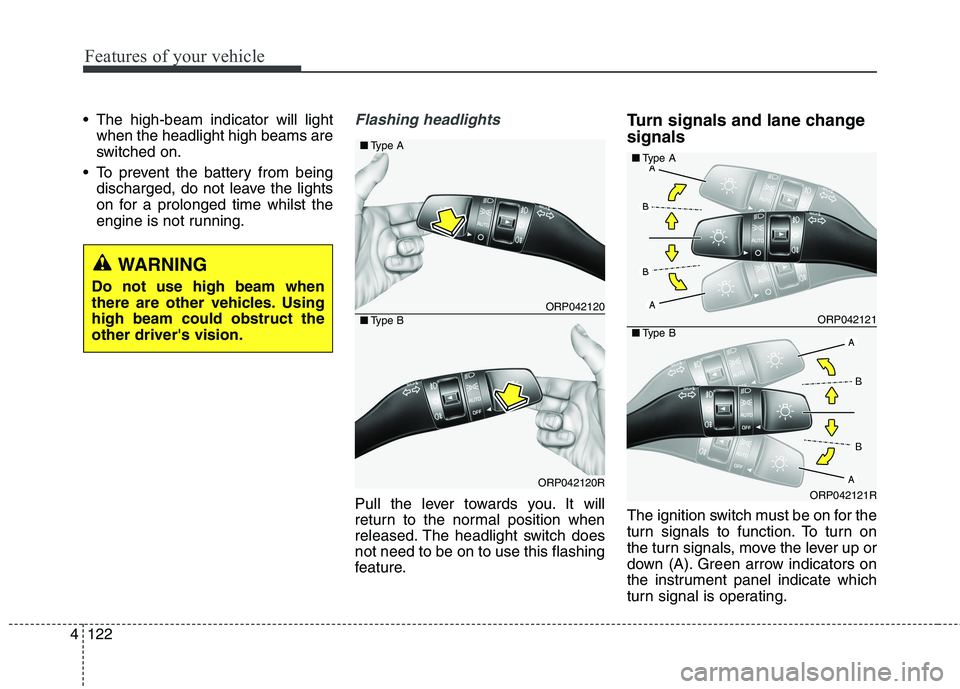
engine is not running.Flashing headlights
Pull the lever towards you. It will
return to the normal position when
released. The headlight switch doesnot need to be on to use this flashing
feature. Turn signals and lane change signals
The ignition switch must be on for the
turn signals to function. To turn on
the turn signals, move the lever up or
down (A). Green arrow indicators on
the instrument panel indicate which
turn signal is operating.
ORP042120
ORP042120R
■
Type A
■Type BORP042121
ORP042121R
■Type A
■Type B
WARNING
Do not use high beam when
there are other vehicles. Usinghigh beam could obstruct theother driver's vision.
Page 227 of 723
4131
Features of your vehicle
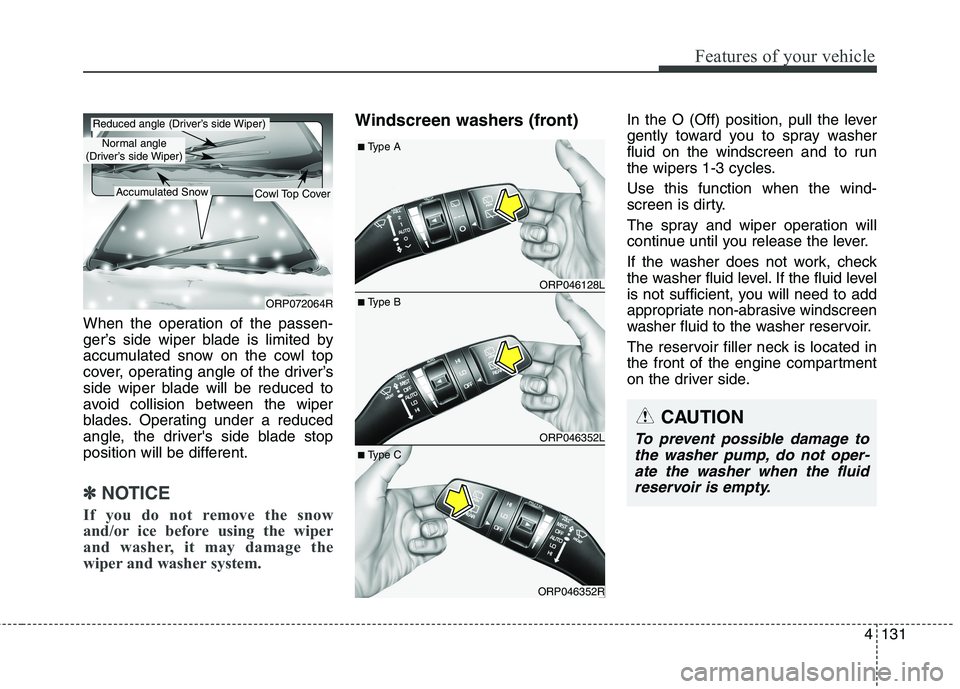
When the operation of the passen-
ger’s side wiper blade is limited by
accumulated snow on the cowl top
cover, operating angle of the driver’s
side wiper blade will be reduced to
avoid collision between the wiper
blades. Operating under a reduced
angle, the driver's side blade stop
position will be different.
✽✽NOTICE
If you do not remove the snow
and/or ice before using the wiper
and washer, it may damage the
wiper and washer system.
Windscreen washers (front) In the O (Off) position, pull the lever
gently toward you to spray washer
fluid on the windscreen and to run
the wipers 1-3 cycles. Use this function when the wind-
screen is dirty.
The spray and wiper operation will
continue until you release the lever.
If the washer does not work, check
the washer fluid level. If the fluid level
is not sufficient, you will need to add
appropriate non-abrasive windscreen
washer fluid to the washer reservoir.
The reservoir filler neck is located in
the front of the engine compartment
on the driver side.
CAUTION
To prevent possible damage to
the washer pump, do not oper-ate the washer when the fluid reservoir is empty.
ORP072064R
Reduced angle (Driver’s side Wiper)
Normal angle
(Driver’s side Wiper)
Accumulated SnowCowl Top Cover
ORP046128L
ORP046352L
ORP046352R
■ Type B
■
Type A
■ Type C
Page 238 of 723
Features of your vehicle
142
4
Mode selection
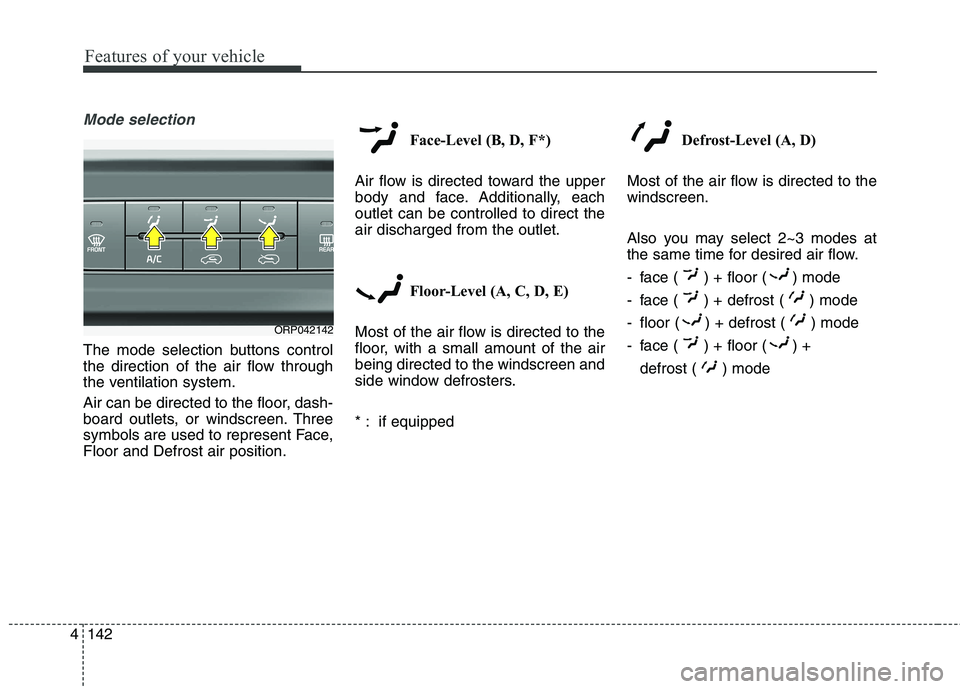
The mode selection buttons control
the direction of the air flow through
the ventilation system.
Air can be directed to the floor, dash-
board outlets, or windscreen. Three
symbols are used to represent Face,Floor and Defrost air position. Face-Level (B, D, F*)
Air flow is directed toward the upper
body and face. Additionally, eachoutlet can be controlled to direct theair discharged from the outlet.
Floor-Level (A, C, D, E)
Most of the air flow is directed to the
floor, with a small amount of the airbeing directed to the windscreen and
side window defrosters.
* : if equipped Defrost-Level (A, D)
Most of the air flow is directed to the windscreen.
Also you may select 2~3 modes at
the same time for desired air flow.
- face ( ) + floor ( ) mode
- face ( ) + defrost ( ) mode
- floor ( ) + defrost ( ) mode
- face ( ) + floor ( ) + defrost ( ) mode
ORP042142