tow KIA CARENS RHD 2018 Owner's Manual
[x] Cancel search | Manufacturer: KIA, Model Year: 2018, Model line: CARENS RHD, Model: KIA CARENS RHD 2018Pages: 723, PDF Size: 40.94 MB
Page 250 of 723
Features of your vehicle
154
4
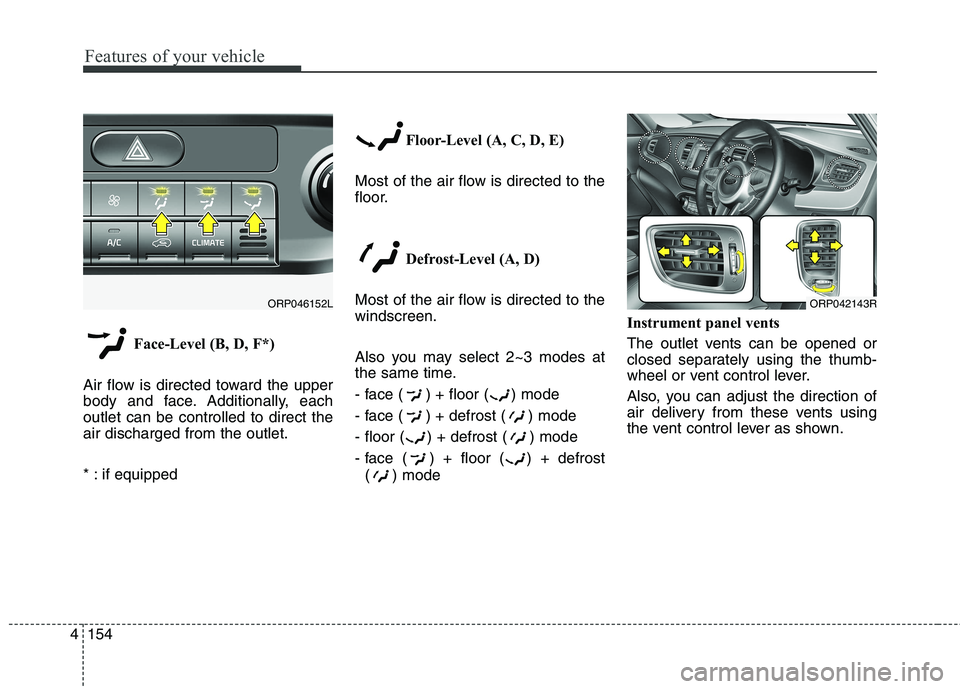
Face-Level (B, D, F*)
Air flow is directed toward the upper
body and face. Additionally, eachoutlet can be controlled to direct theair discharged from the outlet.
* : if equipped Floor-Level (A, C, D, E)
Most of the air flow is directed to the
floor.
Defrost-Level (A, D)
Most of the air flow is directed to thewindscreen.
Also you may select 2~3 modes at
the same time.
- face ( ) + floor ( ) mode
- face ( ) + defrost ( ) mode
- floor ( ) + defrost ( ) mode
- face ( ) + floor ( ) + defrost ( ) mode Instrument panel vents
The outlet vents can be opened or
closed separately using the thumb-
wheel or vent control lever.
Also, you can adjust the direction of
air delivery from these vents using
the vent control lever as shown.
ORP042143RORP046152L
Page 262 of 723
Features of your vehicle
166
4
This indicator illuminates
when the auto defoggingsystem senses the mois-ture of inside the wind-
screen and operates.
If more moisture is in the vehicle,
higher steps operate as follow.
Step 1 : Operating the air condition- ing
Step 2 : Blowing air flow toward the windscreen
Step 3 : Outside air position
Step 4 : Increasing air flow toward the windscreen If your vehicle is equipped with the
auto defogging system, it is automat-
ically activated when the conditions
are met. To cancel or reset the Auto
Defogging system, press the front
windscreen defroster button for 3
seconds when the ignition switch is in
the ON position. When the Auto
Defogging System is Cancelled, ADS
OFF symbol will blink 3 times and the
ADS OFF will be displayed on the cli-
mate control information screen.
When the Auto Defogging System is
reset, ADS OFF symbol will blink 6times without a signal. In case of automatic climate control
system with a climate button, it blinks
defroster button indicator. Blinking
time is same as above.
To use the auto defogging system
again, follow the procedures men-
tioned above.
If the battery has been disconnected or discharged, it resets to the auto
defogging status.✽✽
NOTICE
If the A/C off is manually selected
whilst the auto defogging system is
on, the auto defogging indicator will
blink 3 times to give notice that the
A/C off can not be selected.
CAUTION
Do not remove the sensor cover located on the upper end of thedriver side windscreen glass. Damage to the system partscould occur and may not be cov-ered by your vehicle warranty.
Page 272 of 723
Features of your vehicle
176
4
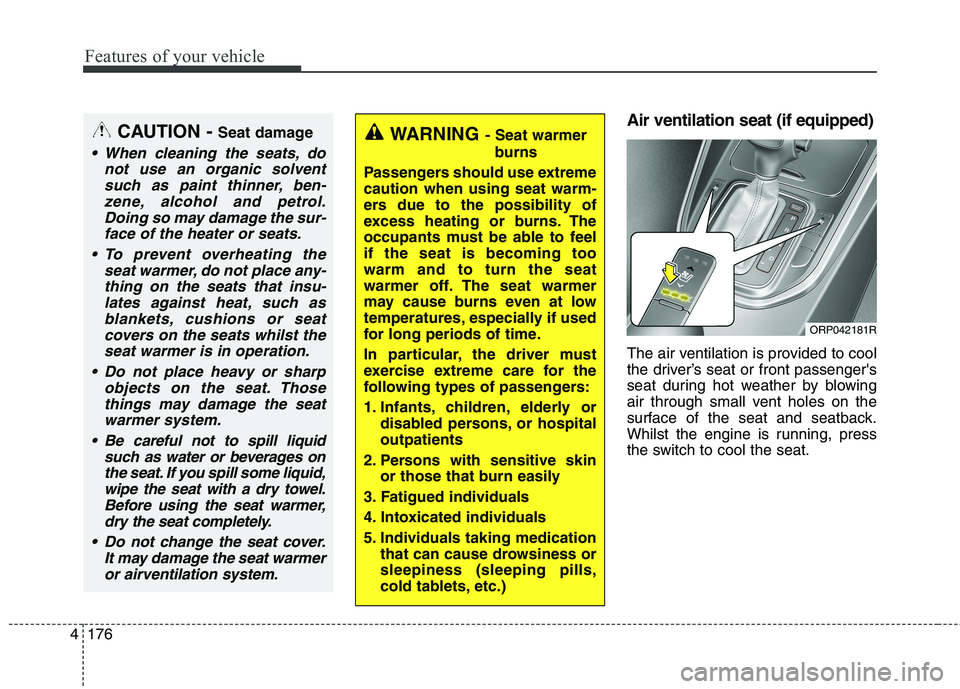
Air ventilation seat (if equipped)
The air ventilation is provided to cool
the driver’s seat or front passenger's
seat during hot weather by blowing
air through small vent holes on the
surface of the seat and seatback.
Whilst the engine is running, press
the switch to cool the seat.WARNING - Seat warmer
burns
Passengers should use extreme caution when using seat warm-
ers due to the possibility of
excess heating or burns. The
occupants must be able to feelif the seat is becoming toowarm and to turn the seat
warmer off. The seat warmer
may cause burns even at low
temperatures, especially if used
for long periods of time.
In particular, the driver must
exercise extreme care for the
following types of passengers:
1. Infants, children, elderly or disabled persons, or hospital outpatients
2. Persons with sensitive skin or those that burn easily
3. Fatigued individuals
4. Intoxicated individuals
5. Individuals taking medication that can cause drowsiness or sleepiness (sleeping pills,
cold tablets, etc.)CAUTION - Seat damage
When cleaning the seats, do
not use an organic solventsuch as paint thinner, ben-zene, alcohol and petrol.Doing so may damage the sur-face of the heater or seats.
To prevent overheating the seat warmer, do not place any-thing on the seats that insu-lates against heat, such asblankets, cushions or seat covers on the seats whilst theseat warmer is in operation.
Do not place heavy or sharp objects on the seat. Thosethings may damage the seat warmer system.
Be careful not to spill liquid such as water or beverages onthe seat. If you spill some liquid,wipe the seat with a dry towel. Before using the seat warmer,dry the seat completely.
Do not change the seat cover. It may damage the seat warmeror airventilation system.
ORP042181R
Page 273 of 723
4177
Features of your vehicle
When the operation of the air ventila-
tion is not needed, keep the switchesin the OFF position.
Each time you press the switch,the airflow will change as follows:
When pressing the switch for more than 1.5 seconds with the seat
cooler operating, the seat cooler
will turn OFF.
When the air ventilation seat is turned on, the seat may get cooler
after about 5 minutes.
Because the air ventilation uses the air in the vehicle, cooling effi-
ciency depends on the tempera-
ture of the air. In order to improve
cooling efficiency, use the air con-
ditioning system together.
The air ventilation seat defaults to the OFF position whenever the
ignition switch is turned to the ONposition. Sunvisor
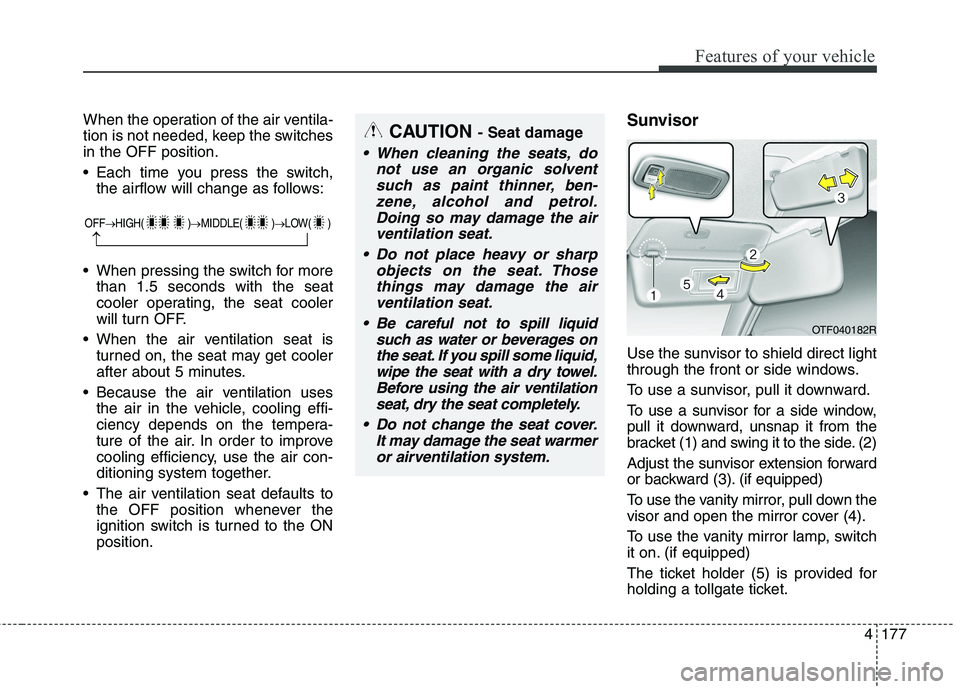
Use the sunvisor to shield direct light
through the front or side windows.
To use a sunvisor, pull it downward.
To use a sunvisor for a side window,
pull it downward, unsnap it from the
bracket (1) and swing it to the side. (2)
Adjust the sunvisor extension forward
or backward (3). (if equipped)
To use the vanity mirror, pull down the
visor and open the mirror cover (4).
To use the vanity mirror lamp, switch
it on. (if equipped)
The ticket holder (5) is provided for
holding a tollgate ticket.CAUTION
- Seat damage
When cleaning the seats, do
not use an organic solventsuch as paint thinner, ben-zene, alcohol and petrol.Doing so may damage the air ventilation seat.
Do not place heavy or sharp objects on the seat. Thosethings may damage the airventilation seat.
Be careful not to spill liquid such as water or beverages onthe seat. If you spill some liquid,wipe the seat with a dry towel.Before using the air ventilation seat, dry the seat completely.
Do not change the seat cover. It may damage the seat warmeror airventilation system.
OTF040182R
OFF HIGH( ) MIDDLE( ) LOW( )
Page 278 of 723
Features of your vehicle
182
4
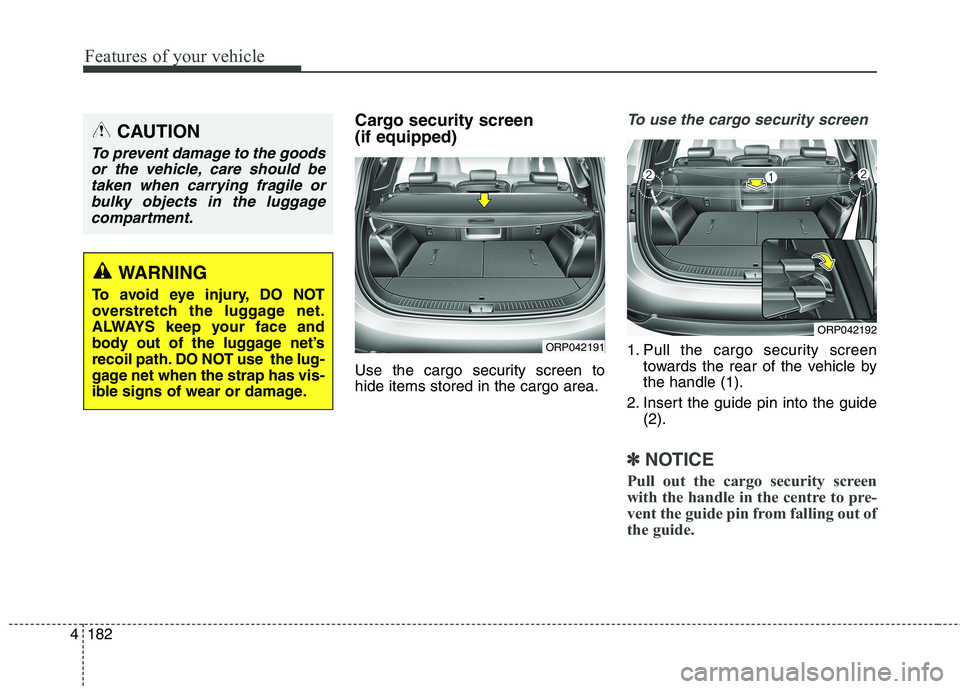
Cargo security screen (if equipped)
Use the cargo security screen to hide items stored in the cargo area.To use the cargo security screen
1. Pull the cargo security screen
towards the rear of the vehicle by the handle (1).
2. Insert the guide pin into the guide (2).
✽✽ NOTICE
Pull out the cargo security screen
with the handle in the centre to pre-
vent the guide pin from falling out of
the guide.
ORP042192
ORP042191
CAUTION
To prevent damage to the goods or the vehicle, care should betaken when carrying fragile or bulky objects in the luggagecompartment.
WARNING
To avoid eye injury, DO NOT
overstretch the luggage net.
ALWAYS keep your face and
body out of the luggage net’s
recoil path. DO NOT use the lug-
gage net when the strap has vis-
ible signs of wear or damage.
Page 287 of 723
Audio system
4
5
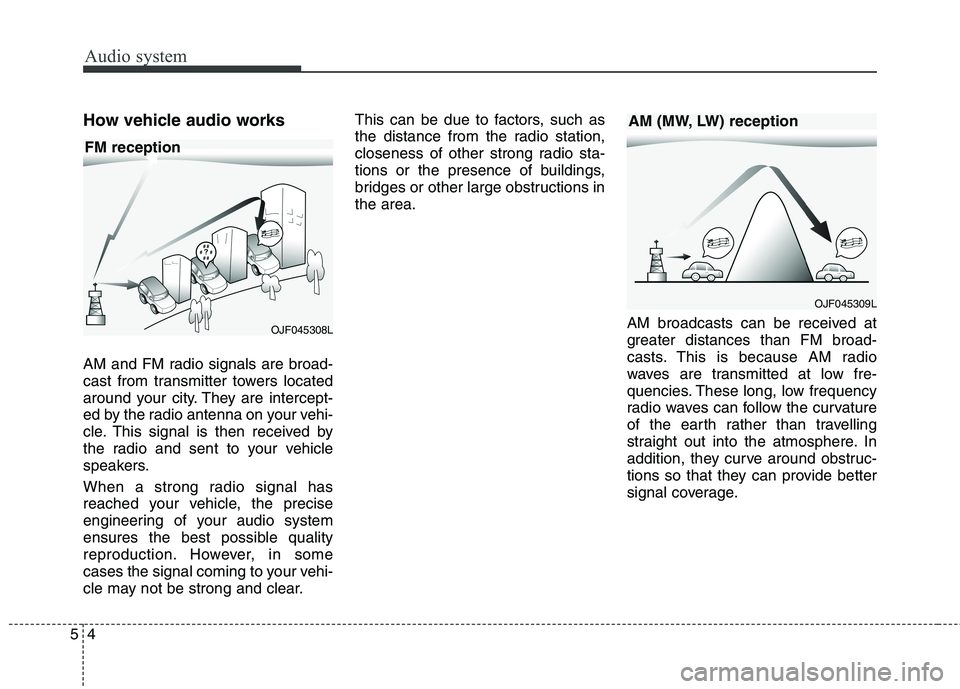
How vehicle audio works
AM and FM radio signals are broad-
cast from transmitter towers located
around your city. They are intercept-
ed by the radio antenna on your vehi-
cle. This signal is then received by
the radio and sent to your vehicle
speakers.
When a strong radio signal has
reached your vehicle, the precise
engineering of your audio system
ensures the best possible quality
reproduction. However, in some
cases the signal coming to your vehi-
cle may not be strong and clear. This can be due to factors, such as
the distance from the radio station,
closeness of other strong radio sta-
tions or the presence of buildings,
bridges or other large obstructions inthe area.
AM broadcasts can be received at
greater distances than FM broad-
casts. This is because AM radio
waves are transmitted at low fre-
quencies. These long, low frequency
radio waves can follow the curvature
of the earth rather than travelling
straight out into the atmosphere. In
addition, they curve around obstruc-
tions so that they can provide better
signal coverage.
OJF045308L
OJF045309L
FM reception
AM (MW, LW) reception
Page 437 of 723
approximately 30 km/h (20 mph) . . . . . . . . . . . . . . 6-68
. . . . . . . . . . . . . . . . . . . . . . . 6-68
Speed limit control system. . . . . . . . . . . . . . . . . . . 6-69 . . . . . . . . . . . . . . . . . . . . . 6-69
. . . . . . . . . . . . . . . . . . . . . . . . . . . . . 6-69
. . . . . . . . . . . . . . . 6-71
Speed Limit Information Function (SLIF) . . . . . 6-72 . . . . . . . . . . . . . . . . . . 6-73
. . . . . . . . . . . . . . . . . . . . . . . . . . . . . . . . . . . 6-73
. . . . . . . . . . . . . . . . . . . . . . . . . . . . . . . . . . . . . 6-74
. . . . . . . . . . . . . . . . . . . . . . 6-77
Lane departure warning system (LDWS) . . . . . . 6-78 . . . . . . . . . . . . . . . . . . . . . . . . . . . 6-80
. . . . . . . . . . . . . . 6-81
vehicle leaves the lane, or may warn you even if the
vehicle does not leave the lane when . . . . . . . . . . . . 6-81
Blind spot detection system (BSD) . . . . . . . . . . . . 6-82 LCA (Lane Change Assist) . . . . . . . . . . . . . . . . . . . . 6-83
. . . . . . . . . . . . . . . . . 6-86
. . . . . . . . . . . . . . . . . . . . . . . . . . . . 6-88
Economical operation . . . . . . . . . . . . . . . . . . . . . . 6-90 Special driving conditions . . . . . . . . . . . . . . . . . . 6-92
. . . . . . . . . . . . . . . . . 6-92
. . . . . . . . . . . . . . . . . . . . . . . . . . 6-92
. . . . . . . . . . . . . . . . . . . . . . . . . . . . 6-93
. . . . . . . . . . . . . . . . . . . . . . . . . . . . . 6-93
. . . . . . . . . . . . . . . . . . . . . . 6-94
. . . . . . . . . . . . . . . . . . . . . . . . . . . . . . 6-94
. . . . . . . . . . . . . . . . . . . . . . . . . . . . . 6-95
Winter driving . . . . . . . . . . . . . . . . . . . . . . . . . . . . 6-96 . . . . . . . . . . . . . . . . . . . . . . . 6-96
. . . . . . . . . . 6-98
. . . . . . . . . . . . . . . . . . . . . . 6-98
. . . . . . . 6-98
. . . . . . . . . . . . . . . . . . . . 6-99
in system . . . . . . . . . . . . . . . . . . . . . . . . . . . . . . . . . . . 6-99
. . . . . . . . . . . . . 6-99
. . . . 6-99
. . . . . . . . . . . . . . . . . . . 6-99
Trailer Towing . . . . . . . . . . . . . . . . . . . . . . . . . . . 6-100
Vehicle weight . . . . . . . . . . . . . . . . . . . . . . . . . . . . 6-113
6
Page 441 of 723
Driving your vehicle
6
6
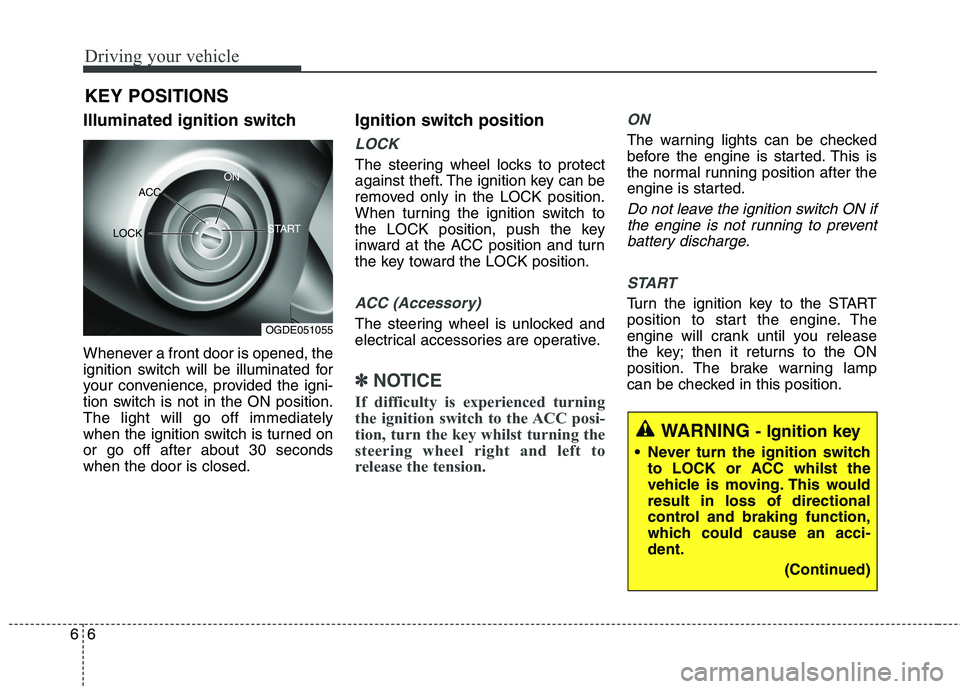
Illuminated ignition switch
Whenever a front door is opened, the
ignition switch will be illuminated for
your convenience, provided the igni-
tion switch is not in the ON position.The light will go off immediately
when the ignition switch is turned onor go off after about 30 secondswhen the door is closed. Ignition switch position
LOCK
The steering wheel locks to protect
against theft. The ignition key can be
removed only in the LOCK position.
When turning the ignition switch to
the LOCK position, push the key
inward at the ACC position and turn
the key toward the LOCK position.
ACC (Accessory)
The steering wheel is unlocked and
electrical accessories are operative.
✽✽
NOTICE
If difficulty is experienced turning
the ignition switch to the ACC posi-
tion, turn the key whilst turning the
steering wheel right and left to
release the tension.
ON
The warning lights can be checked
before the engine is started. This is
the normal running position after the
engine is started.
Do not leave the ignition switch ON if the engine is not running to preventbattery discharge.
START
Turn the ignition key to the START
position to start the engine. The
engine will crank until you release
the key; then it returns to the ON
position. The brake warning lamp
can be checked in this position.
KEY POSITIONS
WARNING
- Ignition key
Never turn the ignition switch to LOCK or ACC whilst the
vehicle is moving. This wouldresult in loss of directional
control and braking function,
which could cause an acci-dent.
(Continued)
OGDE051055
ACC
ON
START
LOCK
Page 484 of 723
649
Driving your vehicle
To release EPB (Electronic parking
brake) automatically:
Manual transaxle vehicle1. Start the engine.
2. Fasten the driver's seat belt.
3. Close the driver's door, engine bonnet and tailgate.
4. Depress the clutch pedal with the gear engaged.
5. Depress the accelerator pedal whilst releasing the clutch pedal.
Automatic transaxle vehicle
1. Start the engine.
2. Fasten the driver's seat belt.
3. Close the driver's door, engine bonnet and tailgate.
4. Depress the accelerator pedal whilst the shift lever is in R
(Rear), D (Drive).
Shift lever in P (Park) With the engine running depress
the brake pedal and shift out of P
(Park) to R (Rear) or D (Drive). Shift lever in N (Neutral)
With the engine running depress
the brake pedal and shift out of N
(Neutral) to R (Rear) or D (Drive).
Make sure the brake warning light
goes off.
✽✽ NOTICE
For your safety, you can engage the EPB even though the ignition
switch or engine stop/start button
is in the OFF position, but you
cannot release it.
For your safety, depress the brake pedal and release the parking
brake manually with the EPB
switch when you drive downhill or
when backing up the vehicle. ✽
✽
NOTICE - Manual transaxle
A vehicle towing a trailer on a hill or
on an incline may slightly roll back-
wards when starting the vehicle. To
prevent the situation follow the
below instructions.
1. Depress the clutch pedal and select a gear.
2. Keep pulling up the EPB switch.
3. Depress the accelerator pedal and slowly release the clutch pedal.
4.If the vehicle starts off with enough driving power release the
EPB switch.
Do not follow the above procedure
when driving on a flat level ground.
The vehicle may suddenly move for-
ward.
Page 488 of 723
653
Driving your vehicle
When the EPB (Electronic park-ing brake) does not release
If the EPB does not release normal-
ly, load the vehicle on a flatbed tow
truck and have the system checked
by a professional workshop. Kia rec-
ommends to visit an authorised Kia
dealer/service partner. Anti-lock brake system (ABS)
(Continued)
On roads where the road sur-
face is pitted or has different surface height.
The safety features of an ABS
(or ESC) equipped vehicle
should not be tested by high
speed driving or cornering. This
could endanger the safety of
yourself or others.
WARNING
ABS (or ESC) will not prevent
accidents due to improper or
dangerous driving manoeuvres.
Even though vehicle control is
improved during emergency
braking, always maintain a safe
distance between you and
objects ahead. Vehicle speeds
should always be reduced dur-
ing extreme road conditions.
The braking distance for vehicle
equipped with an anti-lock brak-
ing system (or Electronic
Stability Control) may be longer
than for those without it in the
following road conditions. During these conditions the
vehicle should be driven atreduced speeds:
Rough, gravel or snow-cov- ered roads.
With tyre chains installed. (Continued)