service KIA CARENS RHD 2018 Owner's Manual
[x] Cancel search | Manufacturer: KIA, Model Year: 2018, Model line: CARENS RHD, Model: KIA CARENS RHD 2018Pages: 723, PDF Size: 40.94 MB
Page 107 of 723
411
Features of your vehicle
Battery replacement
A battery should last for several
years, but if the transmitter or smart
key is not working properly, try
replacing the battery with a new one.
If you are unsure how to use or
replace the battery, Kia recommends
to contact an authorised Kia
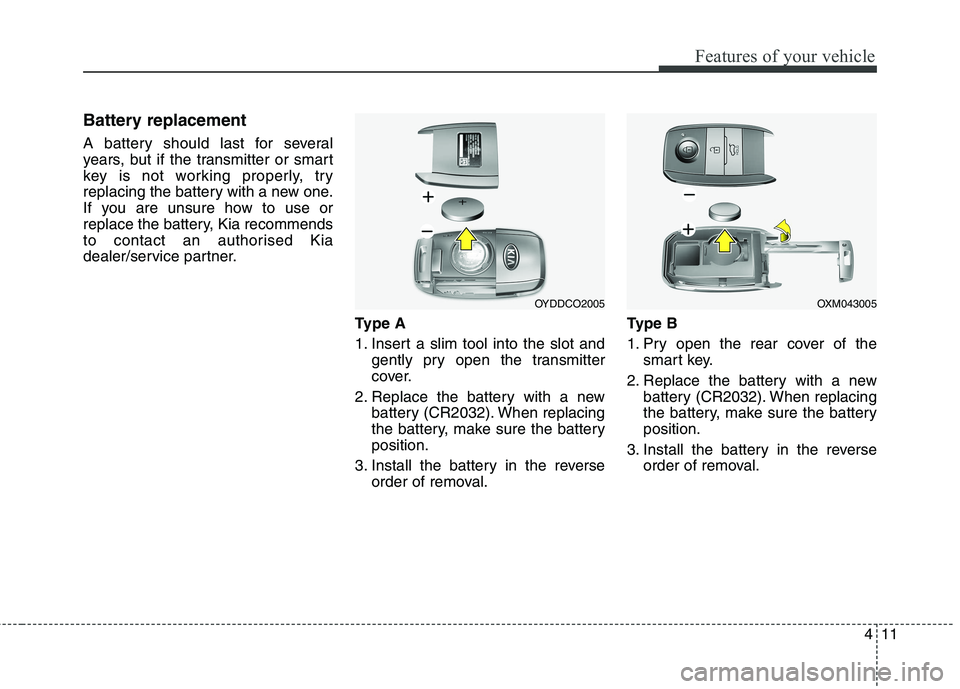
dealer/service partner.Type A
1. Insert a slim tool into the slot andgently pry open the transmitter
cover.
2. Replace the battery with a new battery (CR2032). When replacing
the battery, make sure the batteryposition.
3. Install the battery in the reverse order of removal. Ty p e B
1. Pry open the rear cover of the
smart key.
2. Replace the battery with a new battery (CR2032). When replacing
the battery, make sure the batteryposition.
3. Install the battery in the reverse order of removal.
OYDDCO2005OXM043005
Page 108 of 723
Features of your vehicle
12
4
✽✽
NOTICE
Using the wrong battery can cause the transmitter or smart key to
malfunction. Be sure to use the
correct battery.
Circuits inside the transmitter or smart key may develop problems
when dropped, exposed to mois-
ture or static electricity.
If you suspect that your transmit- ter or smart key might have sus-
tained some damage, or you feel
your transmitter or smart key is
not working correctly, Kia recom-
mends to visit an authorised Kia
dealer/service partner.
The transmitter or smart key is designed to give you years of trou-
ble-free use, however it can mal-
function if exposed to moisture or
static electricity. If you are unsure
how to use or replace the battery,
Kia recommends to visit an autho-
rised Kia dealer/service partner.CAUTION
An inappropriately disposed
battery can be harmful to theenvironment and human health.
Dispose the battery according toyour local law(s) or regulation.
Page 110 of 723
Features of your vehicle
14
4
Unlocking
1. Carry the smart key.
2. Press the button of the front out-
side door handle.
3. All doors will unlock and the hazard warning lights will blink twice. Also,
the outside rearview mirror will
automatically unfold if the outside
rearview mirror folding switch is in
the AUTO position (if equipped).
✽✽ NOTICE
The button will only operate when the smart key is within 0.7 m (28
in.) from the outside door handle.
When the smart key is recognized in the area of 0.7 m (28 in.) from
the front outside door handle, other
people can also open the doors.
After unlocking all doors, the doors will lock and the outside
rearview mirror will unfold if the
outside rearview mirror folding
switch is in the AUTO position (if
equipped) unless a door is opened
within 30 seconds.
Tailgate unlocking
1. Carry the smart key.
2. Press the tailgate handle switch.
3. The tailgate will unlock.
✽✽ NOTICE
Once the tailgate is opened and then closed, the tailgate will lock
automatically.
The button will only operate when the smart key is within 0.7 m (28
in.) from the tailgate handle.
Smart key precautions
✽✽ NOTICE
If, for some reason, you happen to lose your smart key, you will not
be able to start the engine. Tow the
vehicle, if necessary, Kia recom-
mends to visit an authorised Kia
dealer/service partner.
A maximum of 2 smart keys can be registered to a single vehicle. If
you lose a smart key, Kia recom-
mends to visit an authorised Kia
dealer/service partner.
The smart key will not work if any of the following occurs:
- The smart key is close to a radiotransmitter such as a radio sta-
tion or an airport which can
interfere with normal operation
of the smart key.
- The smart key is near a mobile two-way radio system or a
mobile phone.
- Another vehicle’s smart key is being operated close to your
vehicle. (Continued)
Page 111 of 723
415
Features of your vehicle
(Continued)When the smart key does not work
properly, open and close the door
with the mechanical key. If you
have a problem with the smart
key, Kia recommends to visit an
authorised Kia dealer/service
partner.
If the smart key is in close proximity to your cell phone or smart phone,
the signal from the smart key could
be blocked by normal operation of
your cell phone or smart phone. This
is especially important when the
phone is active such as making call,
receiving calls, text messaging,
and/or sending/receiving emails.
Avoid placing the smart key and
your cell phone or smart phone in
the same pants or jacket pocket and
maintain adequate distance between
the two devices.Door lock/unlock in an emer-
gency situation
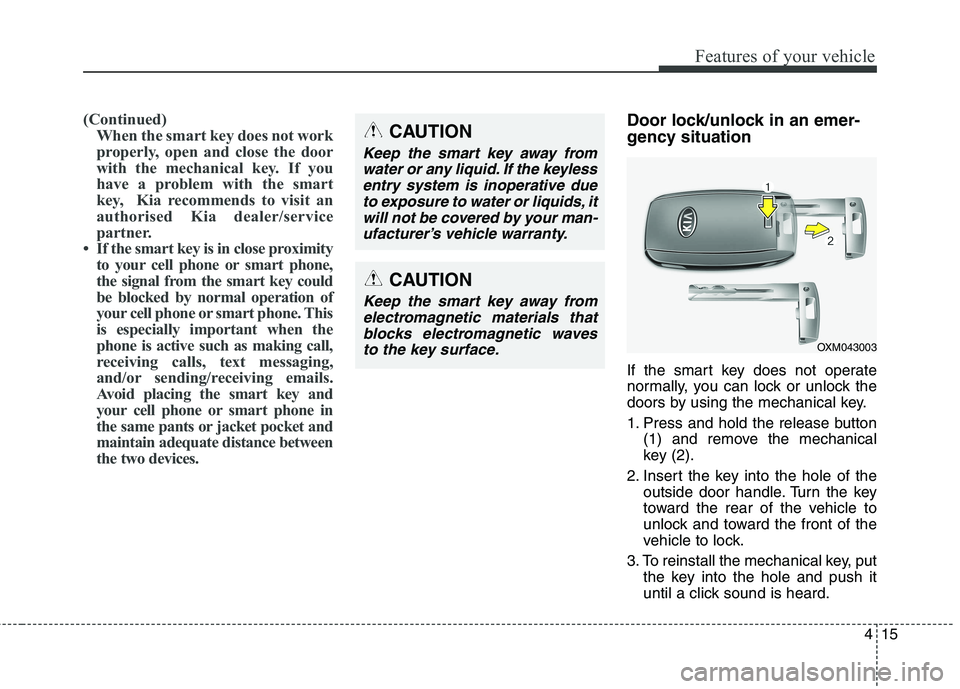
If the smart key does not operate
normally, you can lock or unlock the
doors by using the mechanical key.
1. Press and hold the release button (1) and remove the mechanical
key (2).
2. Insert the key into the hole of the outside door handle. Turn the key
toward the rear of the vehicle to
unlock and toward the front of the
vehicle to lock.
3. To reinstall the mechanical key, put the key into the hole and push it
until a click sound is heard.CAUTION
Keep the smart key away from
water or any liquid. If the keylessentry system is inoperative due to exposure to water or liquids, itwill not be covered by your man-ufacturer’s vehicle warranty.
OXM043003
CAUTION
Keep the smart key away fromelectromagnetic materials thatblocks electromagnetic waves to the key surface.
Page 114 of 723
Features of your vehicle
18
4
Theft-alarm stage
The alarm will be activated if any of
the following occurs whilst the sys-
tem is armed.
A front or rear door is opened with-
out using transmitter or smart key.
The tailgate is opened without using transmitter or smart key.
The engine bonnet is opened.The siren will sound and the hazard
warning lights will blink continuously
for 27 seconds, unless the system is
disarmed. To turn off the system,
unlock the doors with the transmitter
or smart key. Disarmed stage
The system will be disarmed when:
Transmitter
- The door unlock button is pressed.
- The engine is started.
- The ignition switch is in the “ON”
position for 30 seconds or more.
Smart key
- The door unlock button is pressed.
- The button of the front outside dooris pressed whilst carrying the
smart key.
- The engine is started.
After the doors are unlocked, the haz-
ard warning lights will blink twice to indi-
cate that the system is disarmed. After
pressing the unlock button, if any door(or tailgate) is not opened within 30
seconds, the system will be rearmed.
✽✽ NOTICE
Without smart key system If the system is not disarmed withthe transmitter, insert the key into
the ignition switch and start the
engine. Then the system will be
disarmed.
With smart key system If the system is not disarmed with
the smart key, open the door with
the mechanical key and start the
engine. Then the system will be
disarmed.
If you lose your keys, Kia recom- mends to visit an authorised Kia
dealer/service partner.
CAUTION
Do not change, alter or adjust the
theft-alarm system because itcould cause the theft-alarm sys-tem to malfunction have the sys-tem serviced by a professionalworkshop. Kia recommends tovisit an authorised Kiadealer/service partner.Malfunctions caused by improp-er alterations, adjustments ormodifications to the theft-alarmsystem are not covered by yourvehicle manufacturer warranty.
Page 118 of 723
Features of your vehicle
22
4
Disarmed stage
The system will be disarmed when:
Transmitter
- The door unlock button is pressed.
- The 3 seconds are passed after
the engine has been started.
Smart key
- The door unlock button is pressed.
- The button of the front outside dooris pressed whilst carrying the
smart key.
- The engine is started.
After the doors are unlocked, the haz-
ard warning lights will blink twice to
indicate that the system is disarmed.
After pressing the unlock button, if
any door (or tailgate) is not opened
within 30 seconds, the system will be
rearmed.
✽✽ NOTICE
Avoid trying to start the engine whilst the alarm is activated. The
vehicle starting motor is disabled
during the theft-alarm stage.
If you lose your keys, Kia recom- mends to visit an authorised Kia
dealer/service partner.Self-diagnosis (if equipped)
If the siren sounds 3 times when you
lock the doors by using the transmit-
ter, it means the intrusion/tilt sensor
is not working normally. Kia recom-
mends to visit an authorised Kia
dealer/service partner.
CAUTION
Do not change, alter or adjust the
system because it could causethe system to malfunction and we recommend that the systembe serviced by an authorised Kiadealer.
Malfunctions caused by improp-er alterations, adjustments or modifications to the system arenot covered by your vehiclemanufacturer warranty.
Page 139 of 723
443
Features of your vehicle
(Continued)
When using an approvedportable fuel container, be sure to place the container on
the ground prior to refuelling.
Static electricity discharge
from the container can ignite
fuel vapours causing a fire.Once refuelling has begun,
contact with the vehicleshould be maintained until the
filling is complete.
Use only portable plastic fuel
containers designed to carry
and store petrol.
Do not use mobile phones whilst refuelling. Electric cur-
rent and/or electronic interfer-
ence from mobile phones can
potentially ignite fuel vapours
causing a fire.
(Continued)(Continued)
When refuelling, always shutthe engine off. Sparks produced
by electrical components relat-ed to the engine can ignite fuel
vapours causing a fire. Once
refuelling is complete, check tomake sure the filler cap and
filler door are securely closed,
before starting the engine.
DO NOT use matches or a lighter and DO NOT SMOKE or
leave a lit cigarette in your
vehicle whilst at a gas station
especially during refuelling.
Automotive fuel is highly
flammable and can, when
ignited, result in fire.
If a fire breaks out during refu- elling, leave the vicinity of the
vehicle, and immediately con-
tact the manager of the gasstation and then contact the
local fire department. Follow
any safety instructions they
provide.CAUTION
Make sure to refuel your vehi-
cle according to the "Fuelrequirements" suggested in chapter 1.
If the fuel filler cap requires replacement, please make surethat you use parts designed forreplacement in your vehicle. An incorrect fuel filler cap canresult in a serious malfunctionof the fuel system or emission control system. For moredetailed information, Kia rec-ommends to contact an autho- rised Kia dealer/service partner.
Do not spill fuel on the exterior surfaces of the vehicle. Anytype of fuel spilled on paintedsurfaces may damage the paint.
After refuelling, make sure the fuel cap is installed securelyto prevent fuel spillage in theevent of an accident.
Page 143 of 723
447
Features of your vehicle
Resetting the sunroof
Whenever the vehicle battery is dis- connected or discharged, or related
fuse is blown, you must reset your
sunroof system as follows:
1.Start the engine.
2.Close the sunroof completely ifopened.
3.Release the sunroof control lever.
4.Push the sunroof control lever for- ward in the direction of close (about 10 seconds) until the sun-
shade open and sunroof glass tilts.
Then, release the lever.
5.With in 3 seconds, push the sun- roof control lever forward in the
direction of close, until the sunroof
operates as follows again: The sunroof glass slide open
The sunroof glass slide close
The sunshade close
Then, release the lever.
When this is complete, the sunroof system is reset. For more detailed information, Kiarecommends to contact an autho-
rised Kia dealer/service partner.CAUTION
Periodically remove any dirt
that may accumulate on theguide rail.
If you try to open the sunroof when the temperature isbelow freezing or when thesunroof is covered with snow or ice, the glass or the motorcould be damaged.
If you drive with the sunroof opened right after a vehiclewash or rain, water may get inside the vehicle.
CAUTION
If the sunroof is not reset whenthe vehicle battery is discon-nected or discharged, or related fuse is blown, the sunroof mayoperate improperly.
Page 144 of 723
Features of your vehicle
48
4
STEERING WHEEL
Electronic power steering (EPS)
Power steering uses the motor to
assist you in steering the vehicle. If
the engine is off or if the power steer-
ing system becomes inoperative, the
vehicle may still be steered, but it will
require increased steering effort.
The motor driven power steering is
controlled by the power steering con-
trol unit which senses the steering
wheel torque and vehicle speed to
command the motor.
The steering wheel becomes heavier
as the vehicle’s speed increases and
becomes lighter as the vehicle’s
speed decreases for better control of
the steering wheel.
Should you notice any change in the
effort required to steer during normal
vehicle operation, have the system
checked by a professional workshop.Kia recommends to visit an autho-
rised Kia dealer/service partner.
✽✽ NOTICE
The following symptoms may occur
during normal vehicle operation:
The EPS warning light does not illuminate.
The steering effort is high immedi- ately after turning the ignition
switch on. This happens as the sys-
tem performs the EPS system diag-
nostics. When the diagnostics is
completed, the steering wheel will
return to its normal condition.
A click noise may be heard from the EPS relay after the ignition switch
is turned to the ON or LOCK/OFF
position.
Motor noise may be heard when the vehicle is at a stop or at a low driv-
ing speed.
The steering effort increases if the steering wheel is rotated continu-
ously when the vehicle is not in
motion. However, after a few min-
utes, it will return to its normal con-
ditions. (Continued)(Continued)
If an error is detected in the electric
power steering system, EPS will
stop assisting driver in steering the
vehicle to prevent accidents and the
warning light on the cluster will
illuminate or blink. In this case,
have the system inspected by a pro-
fessional workshop. Kia recom-
mends to visit an authorised Kia
dealer/service partner.
When you operate the steering wheel in low temperature, abnor-
mal noise could occur. If tempera-
ture rises, the noise will disappear.
This is a normal condition.
When the vehicle is stationary, if you turn the steering wheel all the
way to the left or right continuously,
the steering wheel becomes heavier
from the end. This is not a system
malfunction but for your safety. As
time passes, the steering wheel
returns to its normal condition.
When the charging system warn- ing light comes on or the voltage is
low (When the alternator (or bat-
tery) does not operate normally or
it malfunctions), the steering wheel
may get heavy and become diffi-
cult to control operate abnormally.
Page 163 of 723
467
Features of your vehicle
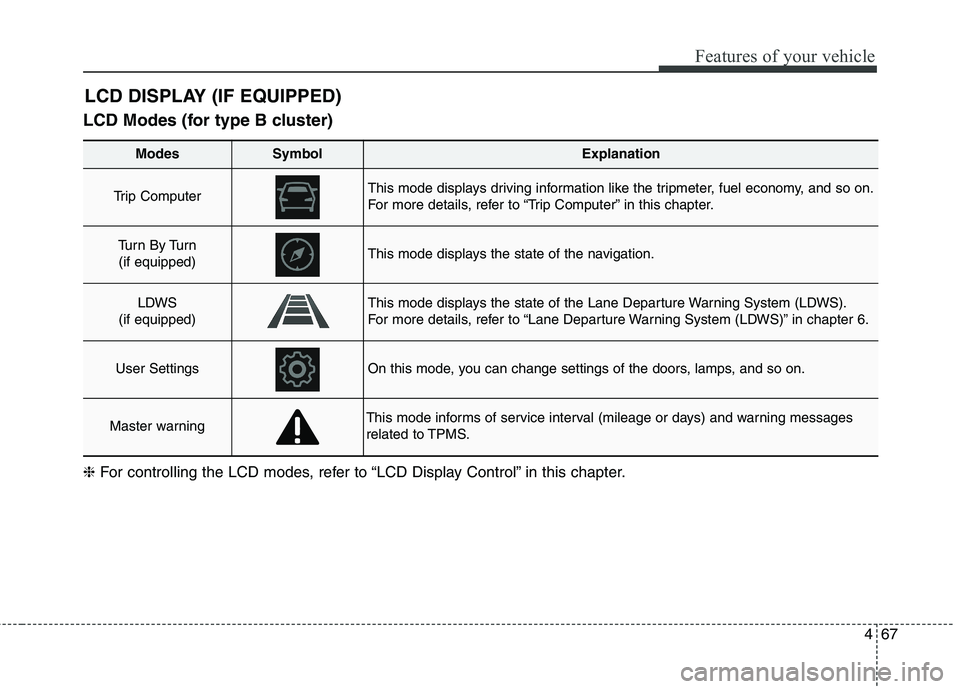
LCD Modes (for type B cluster)LCD DISPLAY (IF EQUIPPED)
Modes SymbolExplanation
Trip Computer This mode displays driving information like the tripmeter, fuel economy, and so on.
For more details, refer to “Trip Computer” in this chapter.
Tu r n B y Tu r n
(if equipped)This mode displays the state of the navigation.
LDWS
(if equipped)This mode displays the state of the Lane Departure Warning System (LDWS).
For more details, refer to “Lane Departure Warning System (LDWS)” in chapter 6.
User SettingsOn this mode, you can change settings of the doors, lamps, and so on.
Master warningThis mode informs of service interval (mileage or days) and warning messages
related to TPMS.
❈ For controlling the LCD modes, refer to “LCD Display Control” in this chapter.