Side light KIA CEED 2013 User Guide
[x] Cancel search | Manufacturer: KIA, Model Year: 2013, Model line: CEED, Model: KIA CEED 2013Pages: 1168, PDF Size: 48.01 MB
Page 93 of 1168
Features of your vehicle
14
4
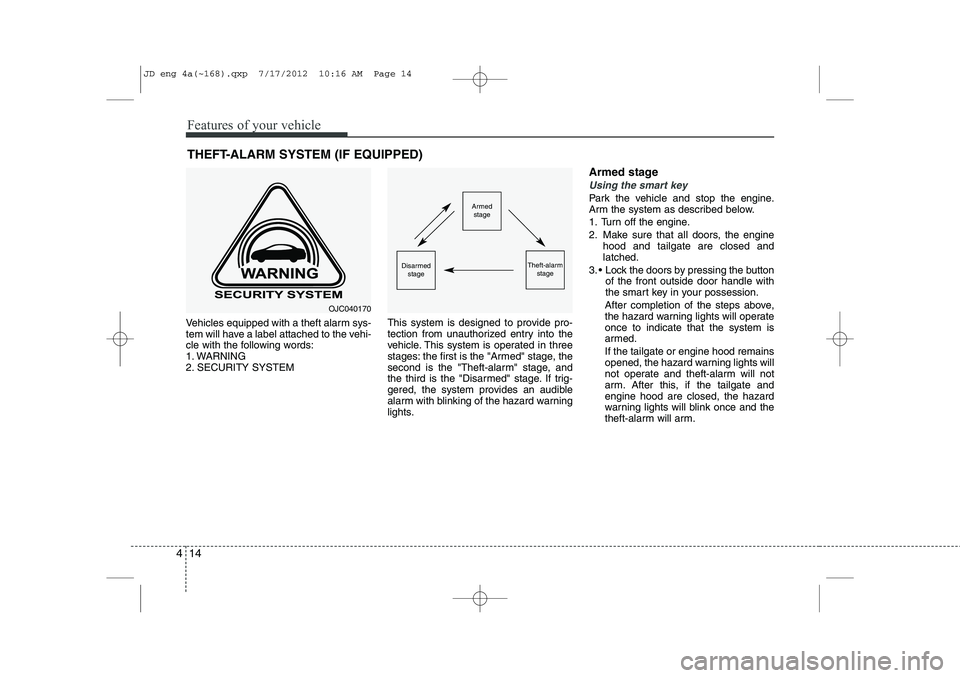
Vehicles equipped with a theft alarm sys-
tem will have a label attached to the vehi-
cle with the following words:
1. WARNING
2. SECURITY SYSTEM This system is designed to provide pro-
tection from unauthorized entry into the
vehicle. This system is operated in three
stages: the first is the "Armed" stage, the
second is the "Theft-alarm" stage, and
the third is the "Disarmed" stage. If trig-
gered, the system provides an audible
alarm with blinking of the hazard warning
lights.Armed stage
Using the smart key
Park the vehicle and stop the engine.
Arm the system as described below.
1. Turn off the engine.
2. Make sure that all doors, the engine
hood and tailgate are closed and latched.
3. Lock the doors by pressing the button of the front outside door handle with
the smart key in your possession.
After completion of the steps above,
the hazard warning lights will operateonce to indicate that the system is
armed. If the tailgate or engine hood remains
opened, the hazard warning lights will
not operate and theft-alarm will not
arm. After this, if the tailgate andengine hood are closed, the hazard
warning lights will blink once and the
theft-alarm will arm.
THEFT-ALARM SYSTEM (IF EQUIPPED)Armed
stage
Theft-alarm stageDisarmedstage
OJC040170
JD eng 4a(~168).qxp 7/17/2012 10:16 AM Page 14
Page 95 of 1168
Features of your vehicle
16
4
Disarmed stage
The system will be disarmed when:
Transmitter
- The door unlock button is pressed.
- The engine is started.
- The ignition switch is in the “ON” posi-
tion for 30 seconds or more.
Smart key
- The door unlock button is pressed.
- The button of the front outside door ispressed while carrying the smart key.
- The engine is started.
After the doors are unlocked, the hazard
warning lights will blink twice to indicate
that the system is disarmed.
After pressing the unlock button, if anydoor (or tailgate) is not opened within 30
seconds, the system will be rearmed.
✽✽ NOTICE
Page 97 of 1168
Features of your vehicle
18
4
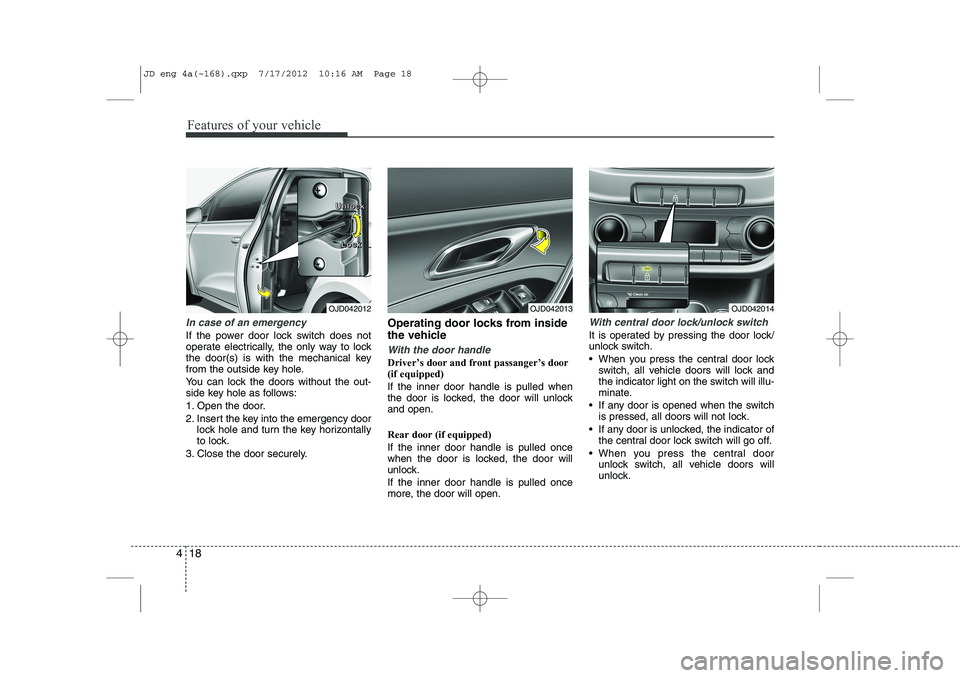
In case of an emergency
If the power door lock switch does not
operate electrically, the only way to lock
the door(s) is with the mechanical key
from the outside key hole.
You can lock the doors without the out-
side key hole as follows:
1. Open the door.
2. Insert the key into the emergency door
lock hole and turn the key horizontally
to lock.
3. Close the door securely. Operating door locks from inside
the vehicle
With the door handle
Driver’s door and front passanger’s door (if equipped) If the inner door handle is pulled when
the door is locked, the door will unlockand open. Rear door (if equipped) If the inner door handle is pulled once
when the door is locked, the door will
unlock. If the inner door handle is pulled once
more, the door will open.
With central door lock/unlock switch
It is operated by pressing the door lock/
unlock switch.
When you press the central door lock
switch, all vehicle doors will lock and
the indicator light on the switch will illu-
minate.
If any door is opened when the switch is pressed, all doors will not lock.
If any door is unlocked, the indicator of the central door lock switch will go off.
When you press the central door unlock switch, all vehicle doors will
unlock.
OJD042012 L
LLLoooocccckkkk
OJD042013OJD042014
U
UUUnnnnlllloooocccckkkk
JD eng 4a(~168).qxp 7/17/2012 10:16 AM Page 18
Page 107 of 1168
Features of your vehicle
28
4
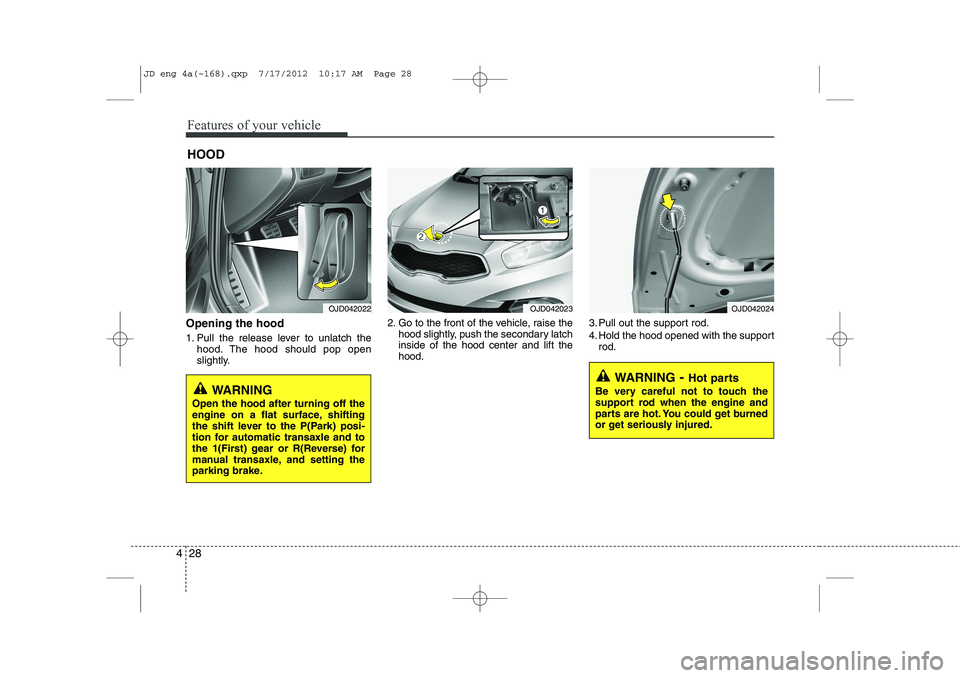
Opening the hood
1. Pull the release lever to unlatch the
hood. The hood should pop open
slightly. 2. Go to the front of the vehicle, raise the
hood slightly, push the secondary latchinside of the hood center and lift thehood. 3. Pull out the support rod.
4. Hold the hood opened with the support
rod.
HOOD
OJD042022
WARNING
Open the hood after turning off the
engine on a flat surface, shifting
the shift lever to the P(Park) posi-
tion for automatic transaxle and to
the 1(First) gear or R(Reverse) for
manual transaxle, and setting the
parking brake.
WARNING - Hot parts
Be very careful not to touch the
support rod when the engine and
parts are hot. You could get burned
or get seriously injured.
OJD042023OJD042024
JD eng 4a(~168).qxp 7/17/2012 10:17 AM Page 28
Page 121 of 1168
Features of your vehicle
42
4
Inside rearview mirror
Adjust the rearview mirror so that the
center view through the rear window is
seen. Make this adjustment before you
start driving.
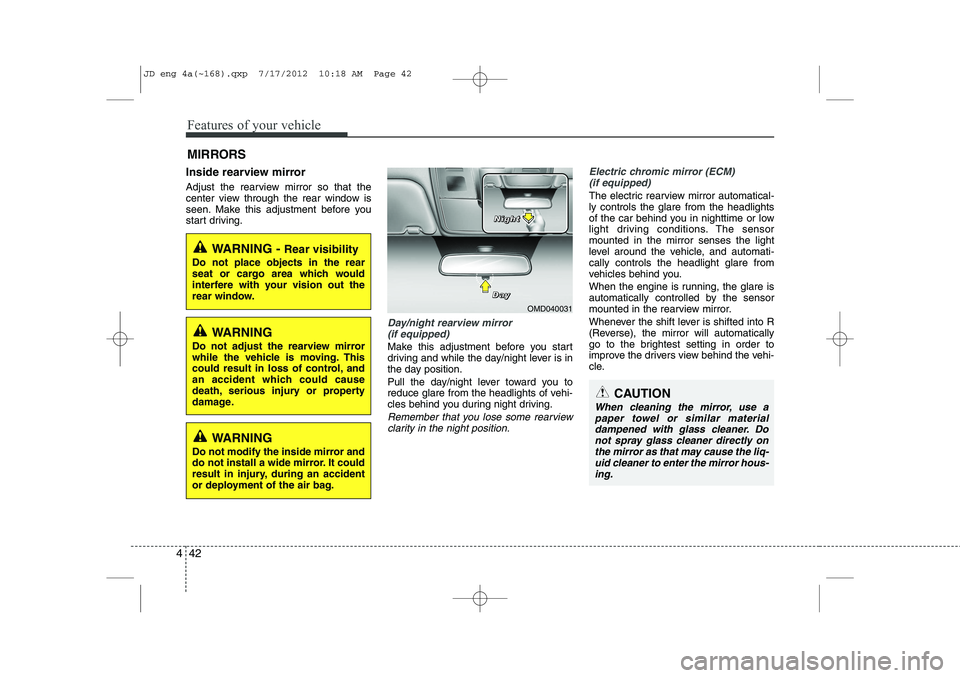
Day/night rearview mirror
(if equipped)
Make this adjustment before you start
driving and while the day/night lever is in
the day position.
Pull the day/night lever toward you to
reduce glare from the headlights of vehi-
cles behind you during night driving.
Remember that you lose some rearviewclarity in the night position.
Electric chromic mirror (ECM)
(if equipped)
The electric rearview mirror automatical- ly controls the glare from the headlights
of the car behind you in nighttime or low
light driving conditions. The sensormounted in the mirror senses the light
level around the vehicle, and automati-cally controls the headlight glare from
vehicles behind you.
When the engine is running, the glare is
automatically controlled by the sensor
mounted in the rearview mirror.
Whenever the shift lever is shifted into R
(Reverse), the mirror will automatically
go to the brightest setting in order to
improve the drivers view behind the vehi-
cle.
MIRRORS
WARNING -
Rear visibility
Do not place objects in the rear
seat or cargo area which would
interfere with your vision out the
rear window.
CAUTION
When cleaning the mirror, use a paper towel or similar materialdampened with glass cleaner. Do not spray glass cleaner directly on
the mirror as that may cause the liq- uid cleaner to enter the mirror hous-ing.
WARNING
Do not adjust the rearview mirror
while the vehicle is moving. This
could result in loss of control, and
an accident which could cause
death, serious injury or property
damage.
WARNING
Do not modify the inside mirror and
do not install a wide mirror. It could
result in injury, during an accident
or deployment of the air bag.
OMD040031
D
DDDaaaayyyy
NNNNiiiigggghhhhtttt
JD eng 4a(~168).qxp 7/17/2012 10:18 AM Page 42
Page 122 of 1168
443
Features of your vehicle
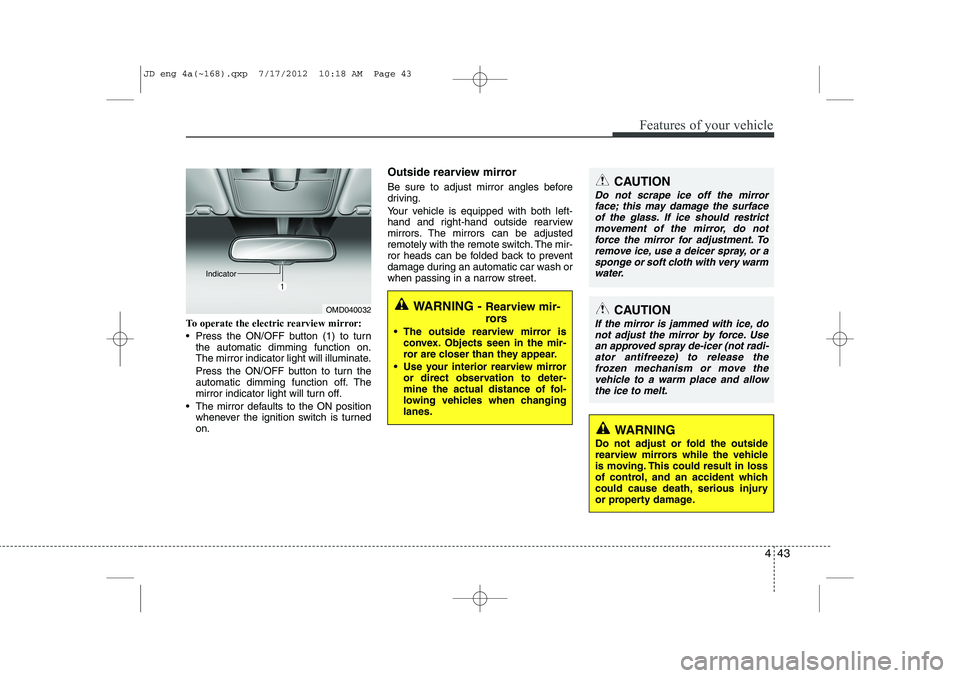
To operate the electric rearview mirror:
Press the ON/OFF button (1) to turnthe automatic dimming function on.
The mirror indicator light will illuminate.
Press the ON/OFF button to turn the
automatic dimming function off. The
mirror indicator light will turn off.
The mirror defaults to the ON position whenever the ignition switch is turnedon. Outside rearview mirror
Be sure to adjust mirror angles before
driving.
Your vehicle is equipped with both left-
hand and right-hand outside rearview
mirrors. The mirrors can be adjusted
remotely with the remote switch. The mir-
ror heads can be folded back to prevent
damage during an automatic car wash or
when passing in a narrow street.
OMD040032
IndicatorWARNING -
Rearview mir-
rors
The outside rearview mirror is convex. Objects seen in the mir-
ror are closer than they appear.
Use your interior rearview mirror or direct observation to deter-
mine the actual distance of fol-
lowing vehicles when changinglanes.
CAUTION
Do not scrape ice off the mirror
face; this may damage the surface
of the glass. If ice should restrict movement of the mirror, do notforce the mirror for adjustment. To remove ice, use a deicer spray, or a
sponge or soft cloth with very warmwater.
CAUTION
If the mirror is jammed with ice, do not adjust the mirror by force. Usean approved spray de-icer (not radi-
ator antifreeze) to release thefrozen mechanism or move the vehicle to a warm place and allow
the ice to melt.
WARNING
Do not adjust or fold the outside
rearview mirrors while the vehicle
is moving. This could result in loss
of control, and an accident which
could cause death, serious injury
or property damage.
JD eng 4a(~168).qxp 7/17/2012 10:18 AM Page 43
Page 163 of 1168
Features of your vehicle
84
4
TPMS (Tire Pressure Monitoring
System) indicator (if equipped)
Low tire pressure telltale/ TPMS malfunction indicator
The low tire pressure telltale comes on
for 3 seconds after the ignition switch is
turned to the ON position.
The low tire pressure and position tell- tales illuminates when one or more of
your tires is significantly underinflated.
The TPMS malfunction indicator will illu-
minate after it blinks for approximately
one minute when there is a problem with
the Tire Pressure Monitoring System.
If this occurs, we recommend that the
system be checked by an authorized Kia
dealer.
For more details, refer to the TPMS in section 6.
The low tire pressure position telltale illu-
minates on the LCD display.
Engine oil pressure warn-ing
This warning light indicates the engine oil
pressure is low.
If the warning light illuminates while driv- ing:
1. Drive safely to the side of the road and stop.
2. With the engine off, check the engine oil level. If the level is low, add oil as required.
If the warning light remains on after
adding oil or if oil is not available, we rec-
ommend that you call an authorized Kia
dealer.
WARNING - Safe stopping
The TPMS cannot alert you to severe and sudden tire damage caused by external factors.
If you notice any vehicle instabili- ty, immediately take your foot offthe accelerator pedal, apply thebrakes gradually and with lightforce, and slowly move to a safeposition off the road.
CAUTION
If the engine does not stop immedi-
ately after the engine oil pressure
warning light is illuminated, severe damage could result.
JD eng 4a(~168).qxp 7/17/2012 10:20 AM Page 84
Page 166 of 1168
487
Features of your vehicle
Engine coolant tempera-ture warning light(if equipped)
The warning light illuminates if the tem-
perature of the engine coolant is above120±3°C (248±5.4°F).
Do not continue driving with an overheat-
ed engine. If your vehicle overheats, refer
to “Overheating” in section 6.
✽✽ NOTICE
If the engine coolant temperature warn- ing light illuminates, it indicates over-heating that may damage the engine.
Glow indicator (Diesel engine)
The indicator light illuminates when the
ignition switch is placed at the ON posi-
tion. The engine can be started after the
preheat indicator light goes off. The illu-
minating time varies with the water tem-
perature, air temperature and batterycondition.
✽✽ NOTICE
If the engine does not start within 10
seconds after the preheating is complet-
ed, turn the ignition key once more to
the LOCK/OFF position for 10 seconds,
and then to the ON position, in order to
preheat again.
Fuel filter warning light (Diesel engine)
This warning light illuminates for 3 sec-
onds after the ignition switch is set to the
ON position and then it will go out. If it
lights up while the engine is running, it
indicates that water has accumulated
inside the fuel filter. If this happens,
remove the water from the fuel filter.
For more details, refer to “Fuel filter” in section 7.
CAUTION
If the preheat indicator light contin-ues to illuminate or flash on and off after the engine has warmed up orwhile driving, we recommend that
the system be checked by an authorized Kia dealer.
CAUTION
When the fuel filter warning lightilluminates, engine power (vehiclespeed & idle speed) may decrease. If you keep driving with the warning
light on, you can damage your vehi-cle's engine parts and injection sys- tem of the Common Rail. If thisoccurs, we recommend that the
system be checked by an author-ized Kia dealer.
JD eng 4a(~168).qxp 7/17/2012 10:20 AM Page 87
Page 178 of 1168
499
Features of your vehicle
Operating condition
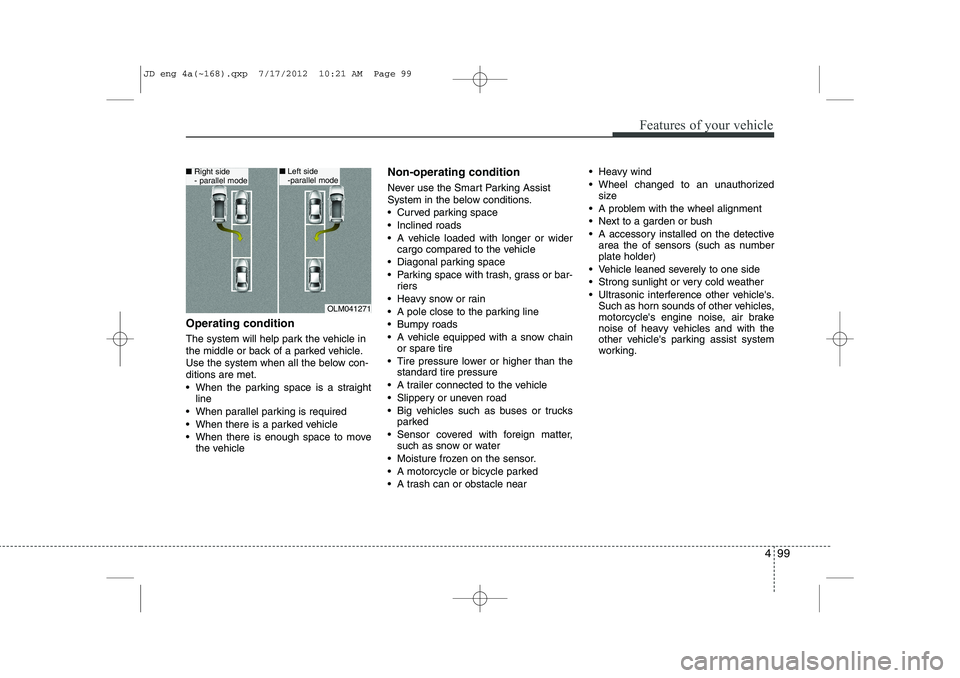
The system will help park the vehicle in
the middle or back of a parked vehicle.
Use the system when all the below con-ditions are met.
When the parking space is a straightline
When parallel parking is required
When there is a parked vehicle
When there is enough space to move the vehicle Non-operating condition
Never use the Smart Parking Assist
System in the below conditions.
Curved parking space
Inclined roads
A vehicle loaded with longer or wider
cargo compared to the vehicle
Diagonal parking space
Parking space with trash, grass or bar- riers
Heavy snow or rain
A pole close to the parking line
Bumpy roads
A vehicle equipped with a snow chain or spare tire
Tire pressure lower or higher than the standard tire pressure
A trailer connected to the vehicle
Slippery or uneven road
Big vehicles such as buses or trucks parked
Sensor covered with foreign matter, such as snow or water
Moisture frozen on the sensor.
A motorcycle or bicycle parked
A trash can or obstacle near Heavy wind
Wheel changed to an unauthorized
size
A problem with the wheel alignment
Next to a garden or bush
A accessory installed on the detective area the of sensors (such as number plate holder)
Vehicle leaned severely to one side
Strong sunlight or very cold weather
Ultrasonic interference other vehicle's. Such as horn sounds of other vehicles,
motorcycle's engine noise, air brake
noise of heavy vehicles and with the
other vehicle's parking assist system
working.
OLM041271
■Right side
- parallel mode■Left side
-parallel mode
JD eng 4a(~168).qxp 7/17/2012 10:21 AM Page 99
Page 188 of 1168
4 109
Features of your vehicle
REARVIEW CAMERA (IF EQUIPPED)
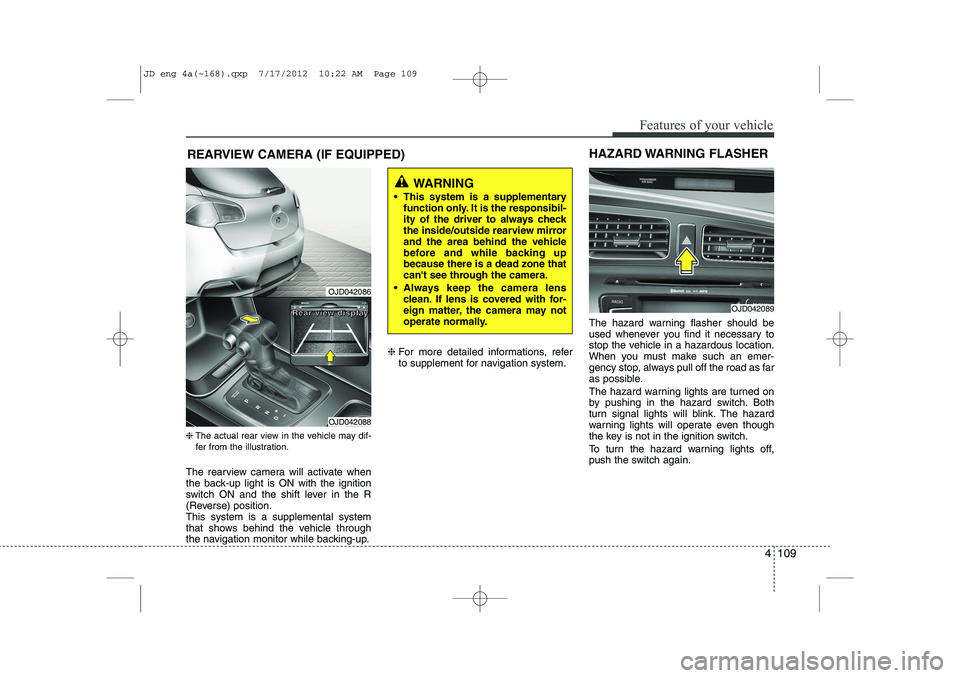
❈ The actual rear view in the vehicle may dif-
fer from the illustration.
The rearview camera will activate when
the back-up light is ON with the ignition
switch ON and the shift lever in the R
(Reverse) position.This system is a supplemental system
that shows behind the vehicle through
the navigation monitor while backing-up. ❈
For more detailed informations, refer
to supplement for navigation system. The hazard warning flasher should be
used whenever you find it necessary to
stop the vehicle in a hazardous location.
When you must make such an emer-
gency stop, always pull off the road as far
as possible.
The hazard warning lights are turned on
by pushing in the hazard switch. Both
turn signal lights will blink. The hazard
warning lights will operate even though
the key is not in the ignition switch.
To turn the hazard warning lights off,
push the switch again.
OJD042089
HAZARD WARNING FLASHER
WARNING
This system is a supplementary function only. It is the responsibil-
ity of the driver to always check
the inside/outside rearview mirror
and the area behind the vehicle
before and while backing upbecause there is a dead zone that
can't see through the camera.
Always keep the camera lens clean. If lens is covered with for-
eign matter, the camera may not
operate normally.
OJD042086
OJD042088
RRRReeeeaaaarrrr vvvviiiieeeewwww ddddiiiissssppppllllaaaayyyy
JD eng 4a(~168).qxp 7/17/2012 10:22 AM Page 109