ECO mode KIA CEED 2013 Workshop Manual
[x] Cancel search | Manufacturer: KIA, Model Year: 2013, Model line: CEED, Model: KIA CEED 2013Pages: 1168, PDF Size: 48.01 MB
Page 403 of 1168
Driving your vehicle
62
5
ECONOMICAL OPERATION
Your vehicle's fuel economy depends
mainly on your style of driving, where you
drive and when you drive.
Each of these factors affects how many
kilometers (miles) you can get from a
liter (gallon) of fuel. To operate your vehi-
cle as economically as possible, use the
following driving suggestions to help
save money in both fuel and repairs:
Drive smoothly. Accelerate at a moder- ate rate. Do not make "jack-rabbit"
starts or full-throttle shifts and maintain
a steady cruising speed. Do not race
between stoplights. Try to adjust your
speed to the traffic so you do not have
to change speeds unnecessarily. Avoid
heavy traffic whenever possible.
Always maintain a safe distance from
other vehicles so you can avoid unnec-
essary braking. This also reduces
brake wear.
Drive at a moderate speed. The faster you drive, the more fuel your vehicle
uses. Driving at a moderate speed,
especially on the highway, is one of the
most effective ways to reduce fuel con-sumption. Do not "ride" the brake or clutch pedal.
This can increase fuel consumption
and also increase wear on these com-
ponents. In addition, driving with your
foot resting on the brake pedal may
cause the brakes to overheat, which
reduces their effectiveness and may
lead to more serious consequences.
Take care of your tires. Keep them inflated to the recommended pressure.
Incorrect inflation, either too much or
too little, results in unnecessary tire
wear. Check the tire pressures at leastonce a month.
Be sure that the wheels are aligned correctly. Improper alignment can
result from hitting curbs or driving too
fast over irregular surfaces. Poor align-
ment causes faster tire wear and may
also result in other problems as well as
greater fuel consumption. Keep your vehicle in good condition.
For better fuel economy and reduced
maintenance costs, maintain your vehi-cle in accordance with the mainte-
nance schedule. If you drive your vehi-
cle in severe conditions, more frequentmaintenance is required.
Keep your vehicle clean. For maximum service, your vehicle should be kept
clean and free of corrosive materials. It
is especially important that mud, dirt,
ice, etc. not be allowed to accumulate
on the underside of the vehicle. This
extra weight can result in increased
fuel consumption and also contributeto corrosion.
Travel lightly. Do not carry unnecessary weight in your vehicle. Weight reduces
fuel economy.
Do not let the engine idle longer than necessary. If you are waiting (and not
in traffic), turn off your engine and
restart only when you're ready to go.
JD eng 5.qxp 7/17/2012 10:44 AM Page 62
Page 418 of 1168
577
Driving your vehicle
If you do decide to pull a trailer
Here are some important points if you decide to pull a trailer:
Consider using a sway control. You can ask a hitch dealer about sway control.
Do not do any towing with your car during its first 2,000 km (1,200 miles) in order to allow the engine to properly break in. Failure
to heed this caution may result in serious engine or transaxle damage.
When towing a trailer, we recommend that you consult an authorized Kia dealer on additional requirements such as a towing kit, etc.
Always drive your vehicle at a moderate speed (less than 100 km/h (60 mph)).
On a long uphill grade, do not exceed 70 km/h (45 mph) or the posted towing speed limit, whichever is lower.
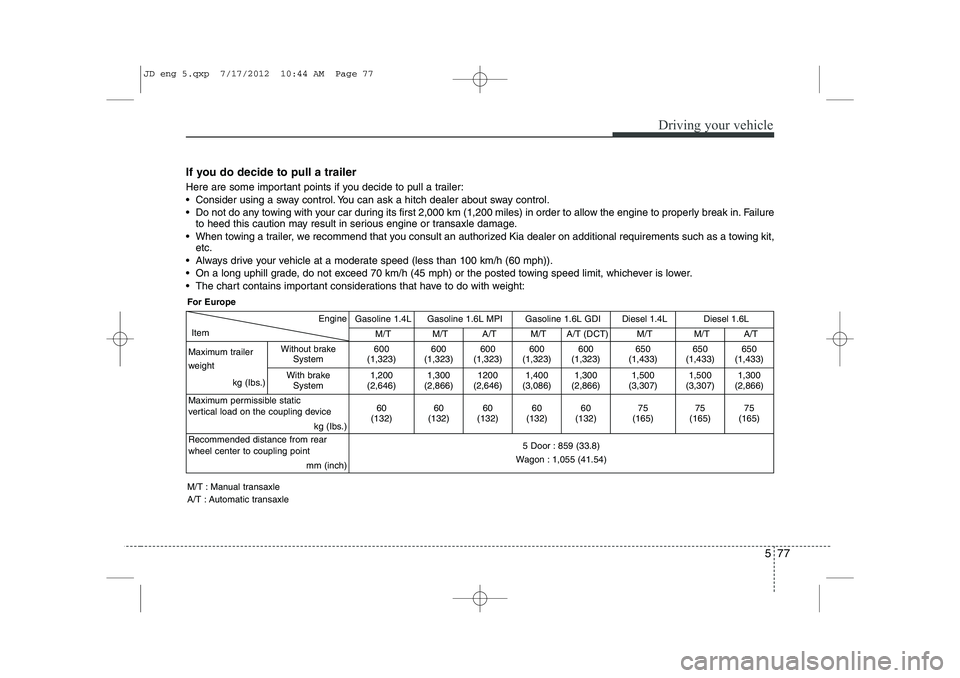
The chart contains important considerations that have to do with weight:
Engine
Item
Gasoline 1.4LGasoline 1.6L MPI Gasoline 1.6L GDIDiesel 1.4L Diesel 1.6L
M/TM/TA/T M/T A/T (DCT)M/T M/T A/T
Maximum trailer
weight kg (Ibs.)
Without brakeSystem600
(1,323)600
(1,323)600
(1,323) 600
(1,323) 600
(1,323)650
(1,433) 650
(1,433) 650
(1,433)
With brake System
1,200
(2,646)1,300
(2,866)1200
(2,646) 1,400
(3,086) 1,300
(2,866)1,500
(3,307) 1,500
(3,307) 1,300
(2,866)
Maximum permissible static
vertical load on the coupling device kg (Ibs.)
60
(132)60
(132)60
(132) 60
(132) 60
(132)75
(165) 75
(165) 75
(165)
Recommended distance from rear wheel center to coupling point mm (inch)
5 Door : 859 (33.8)
Wagon : 1,055 (41.54)
For Europe
M/T : Manual transaxle
A/T : Automatic transaxle
JD eng 5.qxp 7/17/2012 10:44 AM Page 77
Page 504 of 1168
751
Maintenance
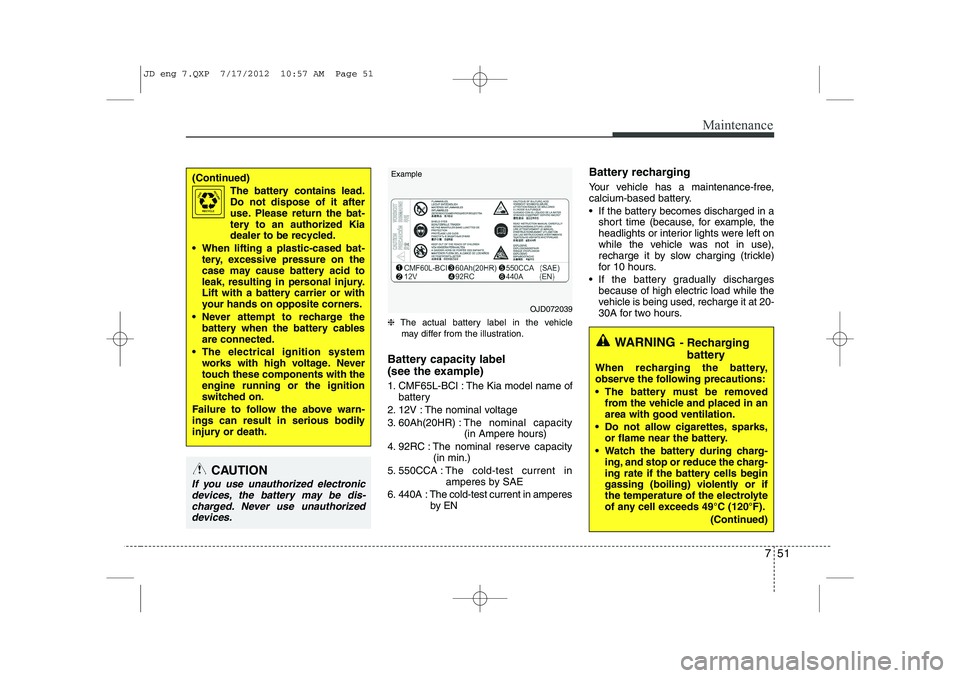
❈The actual battery label in the vehicle
may differ from the illustration.
Battery capacity label
(see the example)
1. CMF65L-BCI : The Kia model name of battery
2. 12V : The nominal voltage
3. 60Ah(20HR) : The nominal capacity
(in Ampere hours)
4. 92RC : The nominal reserve capacity (in min.)
5. 550CCA : The cold-test current in
amperes by SAE
6. 440A : The cold-test current in amperes by EN Battery recharging
Your vehicle has a maintenance-free,
calcium-based battery.
If the battery becomes discharged in a
short time (because, for example, the
headlights or interior lights were left on
while the vehicle was not in use),
recharge it by slow charging (trickle)
for 10 hours.
If the battery gradually discharges because of high electric load while the
vehicle is being used, recharge it at 20-
30A for two hours.
(Continued)
The battery contains lead.
Do not dispose of it after
use. Please return the bat-
tery to an authorized Kia
dealer to be recycled.
When lifting a plastic-cased bat- tery, excessive pressure on the
case may cause battery acid to
leak, resulting in personal injury.
Lift with a battery carrier or with
your hands on opposite corners.
Never attempt to recharge the battery when the battery cablesare connected.
The electrical ignition system works with high voltage. Never
touch these components with theengine running or the ignition
switched on.
Failure to follow the above warn-
ings can result in serious bodily
injury or death.
CAUTION
If you use unauthorized electronic devices, the battery may be dis-charged. Never use unauthorizeddevices.
OJD072039
WARNING - Recharging
battery
When recharging the battery,
observe the following precautions:
The battery must be removed from the vehicle and placed in an area with good ventilation.
Do not allow cigarettes, sparks, or flame near the battery.
Watch the battery during charg- ing, and stop or reduce the charg-
ing rate if the battery cells begin
gassing (boiling) violently or if
the temperature of the electrolyte
of any cell exceeds 49°C (120°F).
(Continued)
Example
JD eng 7.QXP 7/17/2012 10:57 AM Page 51
Page 573 of 1168
Index
2
I
Active ECO system . . . . . . . . . . . . . . . . . . . . . . . . . . . 5-32
AFLS (Adaptive Front Lighting System) . . . . . . . . 4-117
Air bag warning label . . . . . . . . . . . . . . . . . . . . . . . . . 3-63
Air bag warning light . . . . . . . . . . . . . . . . . . . . . . . . . 3-43
Air bags . . . . . . . . . . . . . . . . . . . . . . . . . . . . . . . . . . . . 3-40
Air bag warning label . . . . . . . . . . . . . . . . . . . . . . . 3-54
Air bag warning light . . . . . . . . . . . . . . . . . . . . . . . . 3-43
Curtain air bag . . . . . . . . . . . . . . . . . . . . . . . . . . . . . 3-54
Driver's and passenger's front air bag . . . . . . . . . . 3-48
Passenger’s front air bag ON indicator . . . . . . . . . 3-44
Passenger’s front air bag ON/OFF switch . . . . . . . 3-50
Side impact air bag. . . . . . . . . . . . . . . . . . . . . . . . . . 3-53
SRS components and functions . . . . . . . . . . . . . . . . 3-45
Air cleaner . . . . . . . . . . . . . . . . . . . . . . . . . . . . . . . . . . 7-43
Air conditioner compressor label . . . . . . . . . . . . . . . 8-11
Air conditioning system . . . . . . . . . . . . . . . . . . . . . . . . 8-3
Alarm system. . . . . . . . . . . . . . . . . . . . . . . . . . . . . . . . 4-14
Aming . . . . . . . . . . . . . . . . . . . . . . . . . . . . . . . . . . . . . . 7-87
Anti-lock brake system (ABS) . . . . . . . . . . . . . . . . . . 5-41
Appearance care Interior care . . . . . . . . . . . . . . . . . . . . . . . . . . . . . . 7-103
Armrest (Rear seat) . . . . . . . . . . . . . . . . . . . . . . . . . . 3-14
Ashtray. . . . . . . . . . . . . . . . . . . . . . . . . . . . . . . . . . . . 4-154
Audio remote control . . . . . . . . . . . . . . . . . . . . . . . . 4-164 Audio system . . . . . . . . . . . . . . . . . . . . . . . . . . . . . . . 4-169
Audio remote control . . . . . . . . . . . . . . . . . . . . . . . 4-170
Roof antenna . . . . . . . . . . . . . . . . . . . . . . . . . . . . . . 4-169
Auto defogging system . . . . . . . . . . . . . . . . . . . . . . . 4-149
Auto light/AFLS position . . . . . . . . . . . . . . . . . . . . . 4-112
Automatic climate control system . . . . . . . . . . . . . . 4-136 Air conditioning . . . . . . . . . . . . . . . . . . . . . . . . . . . 4-145
Automatic heating and air conditioning . . . . . . . 4-137
Climate control air filter . . . . . . . . . . . . . . . . . . . . 4-146
Manual heating and air conditioning . . . . . . . . . . 4-139
Automatic transaxle / DCT . . . . . . . . . . . . . . . . . . . . 5-23 DS mode. . . . . . . . . . . . . . . . . . . . . . . . . . . . . . . . . . . 5-27
Paddle shifter . . . . . . . . . . . . . . . . . . . . . . . . . . . . . . 5-28
Shift lock system . . . . . . . . . . . . . . . . . . . . . . . . . . . . 5-29
Sports mode. . . . . . . . . . . . . . . . . . . . . . . . . . . . . . . . 5-27
Automatic transaxle shift position indicator (Normal vision) . . . . . . . . . . . . . . . . . . . . . . . . . . . . . 4-49
Automatic transaxle shift position indicator (Super vision) . . . . . . . . . . . . . . . . . . . . . . . . . . . . . . 4-62
Aux, USB and iPod . . . . . . . . . . . . . . . . . . . . . . . . . . 4-158
Barrier net . . . . . . . . . . . . . . . . . . . . . . . . . . . . . . . . . 4-161
Battery . . . . . . . . . . . . . . . . . . . . . . . . . . . . . . . . . . . . . 7-50
Battery replacement (Remote keyless entry) . . . . . . . 4-9
Battery saver function . . . . . . . . . . . . . . . . . . . . . . . 4-110
A
B
JD eng Index.qxp 7/21/2012 11:45 AM Page 2
Page 575 of 1168
Index
4
I
Cup holder . . . . . . . . . . . . . . . . . . . . . . . . . . . . . . . . . 4-155
Curtain air bag . . . . . . . . . . . . . . . . . . . . . . . . . . . . . . 3-54 Dashboard illumination, see instrument panel
illumination (Normal vision) . . . . . . . . . . . . . . . . . . 4-47
Dashboard illumination, see instrument panel illumination (Super vision) . . . . . . . . . . . . . . . . . . . 4-60
Dashboard, see instrument cluster (Normal vision) . . 4-46
Dashboard, see instrument cluster (Super vision) . . . 4-59
Daytime running light (DRL) . . . . . . . . . . . . . . . . . 4-115
Deadlocks . . . . . . . . . . . . . . . . . . . . . . . . . . . . . . . . . . . 4-20
Defogging (Windshield) . . . . . . . . . . . . . . . . . . . . . . 4-148
Defroster (Rear window) . . . . . . . . . . . . . . . . . . . . . 4-126
Defrosting (Windshield) . . . . . . . . . . . . . . . . . . . . . . 4-148
Dimensions. . . . . . . . . . . . . . . . . . . . . . . . . . . . . . . . . . . 8-2Display illumination, see instrument panel illumination (Normal vision) . . . . . . . . . . . . . . . . . . . . . . . . . . . . . 4-47
Display illumination, see instrument panel illumination (Super vision) . . . . . . . . . . . . . . . . . . . . . . . . . . . . . . 4-60
Displays, see instrument cluster (Normal vision) . . 4-46
Displays, see instrument cluster (Super vision) . . . . 4-59
Door locks . . . . . . . . . . . . . . . . . . . . . . . . . . . . . . . . . . 4-17 Central door lock switch . . . . . . . . . . . . . . . . . . . . . 4-18
Child-protector rear door lock . . . . . . . . . . . . . . . . 4-21
Deadlocks. . . . . . . . . . . . . . . . . . . . . . . . . . . . . . . . . . 4-20
Double clutch transmission shift indicator (Normal vision) . . . . . . . . . . . . . . . . . . . . . . . . . . . . . 4-49 Double clutch transmission shift indicator
(Super vision) . . . . . . . . . . . . . . . . . . . . . . . . . . . . . . 4-62
Drinks holders, see cup holders. . . . . . . . . . . . . . . . 4-155
Driver position memory system. . . . . . . . . . . . . . . . . . 3-8
Driver's and passenger's front air bag . . . . . . . . . . . 3-48
Driving at night . . . . . . . . . . . . . . . . . . . . . . . . . . . . . . 5-65
Driving in flooded areas . . . . . . . . . . . . . . . . . . . . . . . 5-66
Driving in the rain . . . . . . . . . . . . . . . . . . . . . . . . . . . 5-65
Driving information mode . . . . . . . . . . . . . . . . . . . . . 4-65
Driving off-road . . . . . . . . . . . . . . . . . . . . . . . . . . . . . 5-66
DS mode . . . . . . . . . . . . . . . . . . . . . . . . . . . . . . . . . . . . 5-27
Economical operation . . . . . . . . . . . . . . . . . . . . . . . . . 5-62
Electric chromic mirror (ECM) . . . . . . . . . . . . . . . . 4-42
Electric parking brake . . . . . . . . . . . . . . . . . . . . . . . . 5-37
Electric power steering . . . . . . . . . . . . . . . . . . . . . . . . 4-37
Electronic stability control (ESC) . . . . . . . . . . . . . . . 5-44
Emergency commodity . . . . . . . . . . . . . . . . . . . . . . . . 6-32
Emergency starting. . . . . . . . . . . . . . . . . . . . . . . . . . . . 6-5 Jump starting . . . . . . . . . . . . . . . . . . . . . . . . . . . . . . . 6-5
Push starting . . . . . . . . . . . . . . . . . . . . . . . . . . . . . . . . 6-7
Emergency Stop Signal (ESS) . . . . . . . . . . . . . . . . . . 5-48
Emergency while driving . . . . . . . . . . . . . . . . . . . . . . . 6-3
Emission control system . . . . . . . . . . . . . . . . . . . . . . 7-104 Crankcase emission control system . . . . . . . . . . . 7-104
Evaporative emission control System . . . . . . . . . . 7-104
E
D
JD eng Index.qxp 7/21/2012 11:45 AM Page 4
Page 583 of 1168
Index
12
I
Tachometer (Normal vision) . . . . . . . . . . . . . . . . . . . 4-47
Tachometer (Super vision) . . . . . . . . . . . . . . . . . . . . . 4-60
Tailgate . . . . . . . . . . . . . . . . . . . . . . . . . . . . . . . . . . . . . 4-22
Tether anchor system . . . . . . . . . . . . . . . . . . . . . . . . . 3-34
Theft-alarm system . . . . . . . . . . . . . . . . . . . . . . . . . . . 4-14
Tilt & telescopic steering . . . . . . . . . . . . . . . . . . . . . . 4-38
Tire chains . . . . . . . . . . . . . . . . . . . . . . . . . . . . . . . . . . 5-68
Tire pressure monitoring system (TPMS) . . . . . . . . 6-23
Tire rotation . . . . . . . . . . . . . . . . . . . . . . . . . . . . . . . . 7-56
Tire specification and pressure label . . . . . . . . . . . . 8-10
Tires and wheels . . . . . . . . . . . . . . . . . . . . . . . . . 7-53, 8-5
Checking tire inflation pressure . . . . . . . . . . . . . . . 7-55
Compact spare tire replacement . . . . . . . . . . . . . . . 7-58
Recommended cold tire inflation pressures . . . . . . 7-53
Tire care. . . . . . . . . . . . . . . . . . . . . . . . . . . . . . . . . . . 7-53
Tire maintenance . . . . . . . . . . . . . . . . . . . . . . . . . . . 7-59
Tire replacement . . . . . . . . . . . . . . . . . . . . . . . . . . . . 7-57
Tire rotation . . . . . . . . . . . . . . . . . . . . . . . . . . . . . . . 7-56
Tire sidewall labeling . . . . . . . . . . . . . . . . . . . . . . . . 7-59
Tire traction . . . . . . . . . . . . . . . . . . . . . . . . . . . . . . . 7-59
Wheel alignment and tire balance . . . . . . . . . . . . . 7-57
Wheel replacement . . . . . . . . . . . . . . . . . . . . . . . . . . 7-58
Towing . . . . . . . . . . . . . . . . . . . . . . . . . . . . . . . . . . . . . 6-28
Trailer towing . . . . . . . . . . . . . . . . . . . . . . . . . . . . . . . 5-71 Transaxle
Automatic transaxle/DCT . . . . . . . . . . . . . . . . . . . . 5-23
Double clutch transmission . . . . . . . . . . . . . . . . . . . 5-23
Manual transaxle . . . . . . . . . . . . . . . . . . . . . . . . . . . 5-20
Trip computer (Normal vision) . . . . . . . . . . . . . . . . . 4-51
Service mode . . . . . . . . . . . . . . . . . . . . . . . . . . . . . . . 4-55
User Settings . . . . . . . . . . . . . . . . . . . . . . . . . . . . . . . 4-56
Trip computer (Super vision) . . . . . . . . . . . . . . . . . . 4-64
Driving information mode . . . . . . . . . . . . . . . . . . . . 4-65
Lane Departure Warning System Mode . . . . . . . . 4-67
Service mode . . . . . . . . . . . . . . . . . . . . . . . . . . . . . . . 4-68
User Settings . . . . . . . . . . . . . . . . . . . . . . . . . . . . . . . 4-69
Turn signals . . . . . . . . . . . . . . . . . . . . . . . . . . . . . . . . 4-114
User Settings (Normal vision) . . . . . . . . . . . . . . . . . . 4-56
User Settings (Super vision) . . . . . . . . . . . . . . . . . . . . 4-69
Vanity mirror lamp . . . . . . . . . . . . . . . . . . . . . . . . . . 4-123
Vehicle break-in process . . . . . . . . . . . . . . . . . . . . . . . . 1-5
Vehicle certification label . . . . . . . . . . . . . . . . . . . . . . . 8-9
Vehicle identification number (VIN). . . . . . . . . . . . . . 8-9
Vehicle stability management . . . . . . . . . . . . . . . . . . 5-47
Vehicle weight . . . . . . . . . . . . . . . . . . . . . . . . . . . . . . . 5-80
U
V
T
JD eng Index.qxp 7/21/2012 11:45 AM Page 12
Page 585 of 1168
kia, tthe ccompany
Thank you for becoming the owner of a new Kia vehicle. As a global car manufacturing company focused on building high- quality vehicles at value prices, Kia Motors is dedicated to providing you
with Service above your expectation and delight customer experience. In our Kia dealerships you will experience our “ Family-like Care”
promise, that creates feelings of warmth, hospitality and trust – feelings of being looked after by people who care.
All information contained in this Owner’s Manual is accurate at the
time of publication. However, Kia reserves the right to make changesat any time so that our policy of continual product improvement can becarried out. This manual applies to all Kia models and includes descriptions and
explanations of optional as well as standard equipment. As a result, youmay encounter material in this manual that is not applicable to yourspecific Kia vehicle.
Enjoy your vehicle & experience Kia “Family-like Care” !
JD RHD FOREWORD.QXP 3/21/2012 4:53 PM Page 1
Page 586 of 1168
iThank you for choosing a Kia vehicle. This manual will familiarize you with operational, maintenance and safety information about your new vehicle. It is
supplemented by a Warranty and Maintenance book that provides important information on all warranties regarding
your vehicle. Kia urges you to read these publications carefully and follow the recommendations to help assureenjoyable and safe operation of your new vehicle.
Kia offers a great variety of options, components and features for its various models. Therefore, some of the equip- ment described in this manual, along with the various illustrations, may not be applicable to your particular vehicle. The information and specifications provided in this manual were accurate at the time of printing. Kia reserves the right to discontinue or change specifications or design at any time without notice and without incurring any obliga-
tion. If you have questions, we recommend to contact your authorised Kia dealer. Kia assures you of our continuing interest in your motoring pleasure and satisfaction in your Kia vehicle.
© 2012 Kia Motors Slovakia s.r.o. All rights reserved. Reproduction by any means, electronic or mechanical, including photocopying, recording, or by any information storage and retrieval system or translation in whole or part is not permitted without written author-
ization from Kia Motors Slovakia s.r.o..
FF
oo rreeww oorrdd
JD RHD FOREWORD.QXP 3/21/2012 4:53 PM Page 2
Page 703 of 1168
Features of your vehicle
40
4
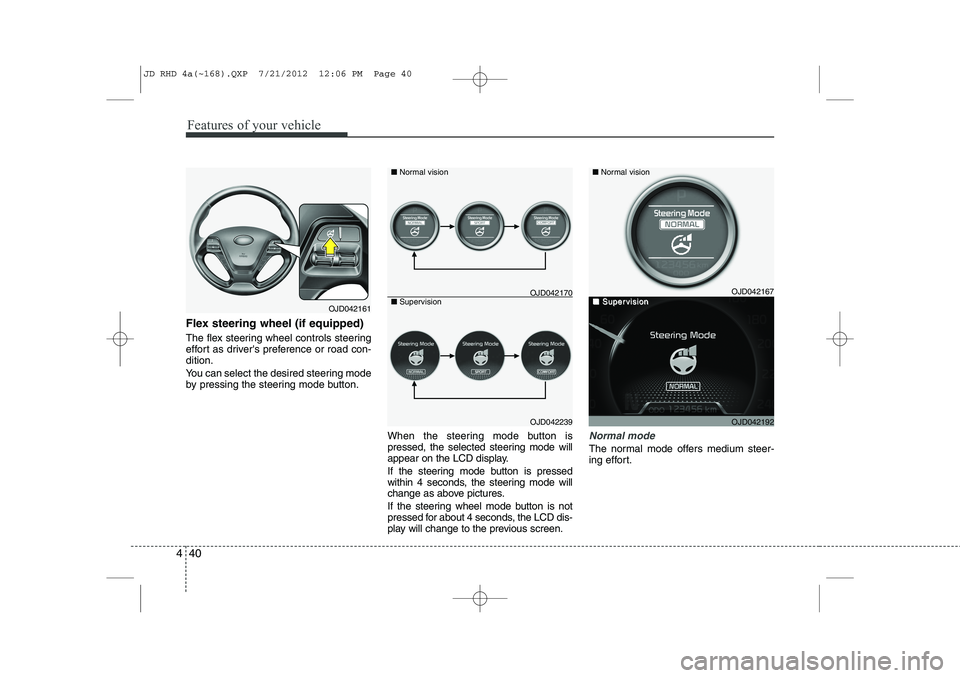
Flex steering wheel (if equipped)
The flex steering wheel controls steering
effort as driver's preference or road con-dition.
You can select the desired steering mode
by pressing the steering mode button.
When the steering mode button is
pressed, the selected steering mode will
appear on the LCD display.
If the steering mode button is pressed
within 4 seconds, the steering mode will
change as above pictures.
If the steering wheel mode button is not
pressed for about 4 seconds, the LCD dis-
play will change to the previous screen.
Normal mode
The normal mode offers medium steer-
ing effort.
OJD042161
OJD042239
■
Normal vision
■ Supervision
OJD042167
OJD042192
■ Normal vision
■■SuperSupervisionvisionOJD042170
JD RHD 4a(~168).QXP 7/21/2012 12:06 PM Page 40
Page 704 of 1168
441
Features of your vehicle
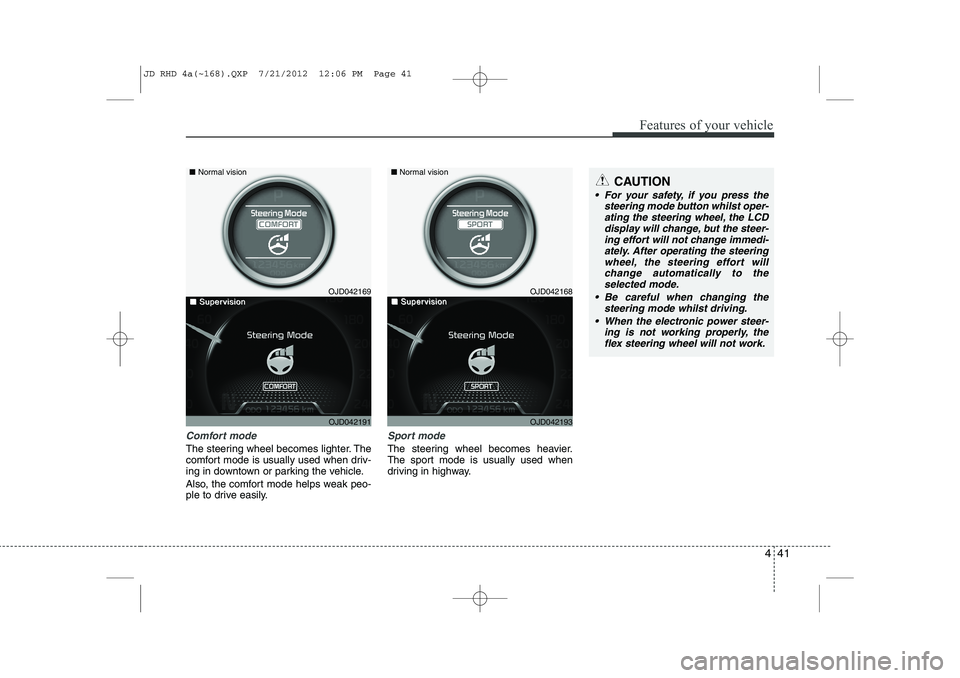
Comfort mode
The steering wheel becomes lighter. The
comfort mode is usually used when driv-
ing in downtown or parking the vehicle.
Also, the comfort mode helps weak peo-
ple to drive easily.
Sport mode
The steering wheel becomes heavier.
The sport mode is usually used when
driving in highway.
CAUTION
For your safety, if you press thesteering mode button whilst oper-
ating the steering wheel, the LCDdisplay will change, but the steer-ing effort will not change immedi- ately. After operating the steering
wheel, the steering effort will change automatically to theselected mode.
Be careful when changing the steering mode whilst driving.
When the electronic power steer- ing is not working properly, theflex steering wheel will not work.
OJD042169
OJD042191
■
Normal vision
■■SuperSupervisionvisionOJD042168
OJD042193
■Normal vision
■■SuperSupervisionvision
JD RHD 4a(~168).QXP 7/21/2012 12:06 PM Page 41