Door KIA CEED 2014 Owners Manual
[x] Cancel search | Manufacturer: KIA, Model Year: 2014, Model line: CEED, Model: KIA CEED 2014Pages: 1206, PDF Size: 50.15 MB
Page 740 of 1206

Features of your vehicle
56
4
User Settings
In this mode there are 3 kinds of the sub-
menu. 1. Stop the vehicle with the ignition
switch in the ON position or engine
running.
2. Press the ▲ or ▼ button until the User
setting mode is displayed.
3. With the User setting mode displayed, press the button until the screenis changed.
4. You can change the item by pressing the ▲ or ▼ button and select an item
by pressing the button. Door Menu
Page 755 of 1206

471
Features of your vehicle
User Settings
1. Stop the vehicle with the ignitionswitch in the ON position or engine
running.
2. Press the button until the User set- ting mode is displayed.
3. You can change the item by pressing the ▼button and select an item by
pressing the button. Door Menu
Page 757 of 1206

473
Features of your vehicle
LCD display information
Sunroof open
If driver removes the ignition key (Smart
key : turns off the engine) and opens the
driver-side door when the sunroof is not
fully closed, warning message will appear
on the LCD display. Also, the warning
chime sounds for approximately 7 sec-
onds.
Illumination intensity
The illumination intensity of the instru-
ment panel is shown when adjusting it
with the illumination control switch.
For more details, refer to “Instrument
panel illumination” in section 4.
Turn on "FUSE SWITCH" (mode switch)
The notice appears to inform the driver to
turn on the fuse switch in the instrument
panel under the steering wheel.
For more details, refer to “Fuses” in sec- tion 7.
OJD042078/OJD042215
■
Normal vision
■SupervisionOJD042079/OJD042214
■
Normal vision
■SupervisionOJD042240/OJD042188
■
Normal vision
■Supervision
JD RHD 4a(~171).QXP 4/29/2013 11:59 AM Page 73
Page 758 of 1206

Features of your vehicle
74
4
Parking assist warning (if equipped)
Displays the area an obstacle is detected
whilst moving forward or rearward.
For more details, refer to “Parking assist
system” in section 4.
Align steering wheel (if equipped)
If you start the engine when the steering
wheel is turned 90 degrees to the left (or
right) after a couple of seconds, “Align
steering wheel” illuminates on the LCD
display for 5 seconds.
Turn the steering wheel to the right (or left)
and make it turned to the left (or right) less
than 30 degrees.
For vehicle’s equipped with smart
key system
Key not in vehicle
If the smart key is not in the vehicle and
if any door is opened or closed with the
engine start/stop button in the ACC, ON,
or START position, the warning illumi-
nates on the LCD display. Also, the chime
sounds for 5 seconds when the smart
key is not in the vehicle and the door isclosed.
Always have the smart key with you.
OJD042163/OJD042196
■
Normal vision
■SupervisionOJD042164/OJD042211
■
Normal vision
■SupervisionOJD042073/OJD042205
■
Normal vision
■Supervision
JD RHD 4a(~171).QXP 4/29/2013 11:59 AM Page 74
Page 774 of 1206
Features of your vehicle
90
4
LCD DISPLAY WARNINGS AND INDICATORS (INSTRUMENT PANEL DISPLAY)
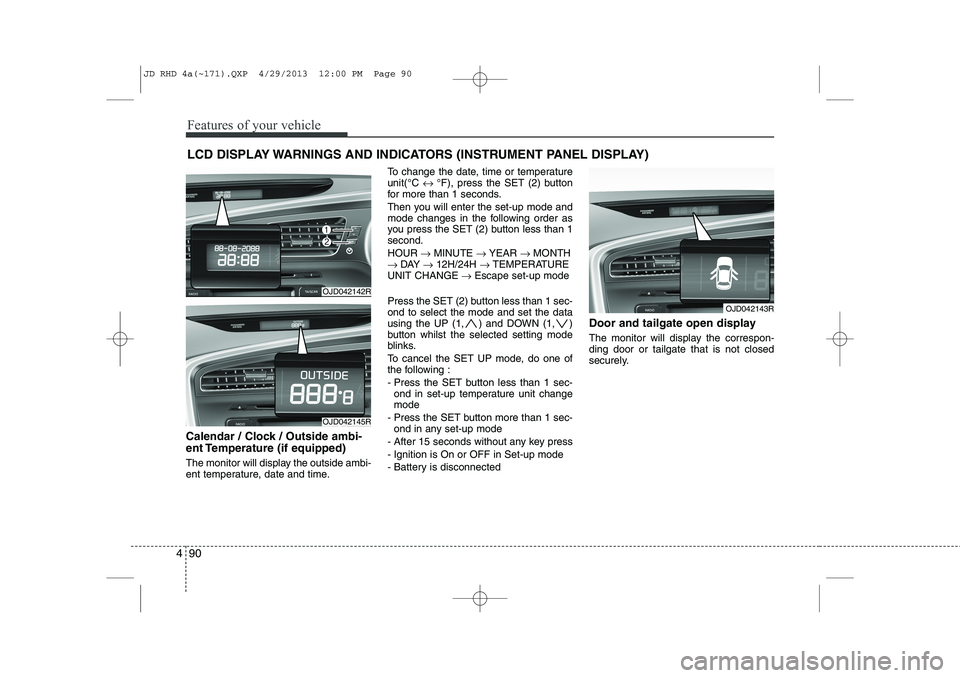
Calendar / Clock / Outside ambi-
ent Temperature (if equipped)
The monitor will display the outside ambi-
ent temperature, date and time. To change the date, time or temperatureunit(°C
↔ °F), press the SET (2) button
for more than 1 seconds.
Then you will enter the set-up mode and
mode changes in the following order as
you press the SET (2) button less than 1second. HOUR → MINUTE → YEAR → MONTH
→ DAY → 12H/24H → TEMPERATURE
UNIT CHANGE → Escape set-up mode
Press the SET (2) button less than 1 sec- ond to select the mode and set the data
using the UP (1, ) and DOWN (1, )
button whilst the selected setting mode
blinks.
To cancel the SET UP mode, do one of
the following :
- Press the SET button less than 1 sec- ond in set-up temperature unit change mode
- Press the SET button more than 1 sec- ond in any set-up mode
- After 15 seconds without any key press
- Ignition is On or OFF in Set-up mode
- Battery is disconnected Door and tailgate open display
The monitor will display the correspon- ding door or tailgate that is not closed
securely.
OJD042142R
OJD042145R
OJD042143R
JD RHD 4a(~171).QXP 4/29/2013 12:00 PM Page 90
Page 776 of 1206
Features of your vehicle
92
4
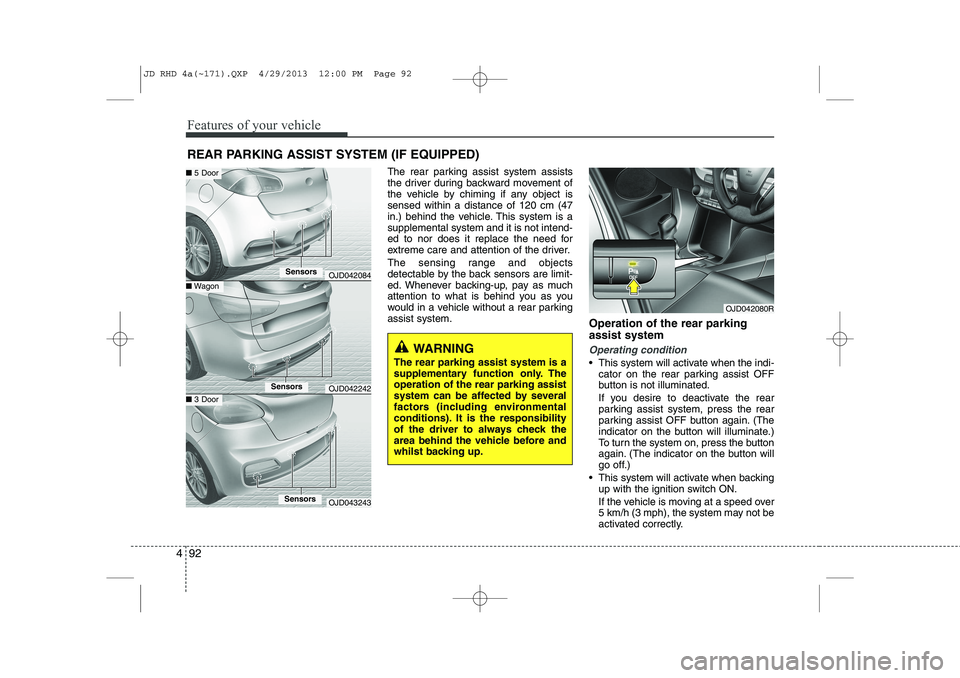
The rear parking assist system assists
the driver during backward movement of
the vehicle by chiming if any object issensed within a distance of 120 cm (47
in.) behind the vehicle. This system is asupplemental system and it is not intend-
ed to nor does it replace the need for
extreme care and attention of the driver.
The sensing range and objects
detectable by the back sensors are limit-
ed. Whenever backing-up, pay as much
attention to what is behind you as you
would in a vehicle without a rear parkingassist system.
Operation of the rear parking assist system
Operating condition
This system will activate when the indi-
cator on the rear parking assist OFF
button is not illuminated.
If you desire to deactivate the rear
parking assist system, press the rear
parking assist OFF button again. (The
indicator on the button will illuminate.)
To turn the system on, press the button
again. (The indicator on the button will
go off.)
This system will activate when backing up with the ignition switch ON.
If the vehicle is moving at a speed over
5 km/h (3 mph), the system may not be
activated correctly.
REAR PARKING ASSIST SYSTEM (IF EQUIPPED)
WARNING
The rear parking assist system is a
supplementary function only. Theoperation of the rear parking assist
system can be affected by several
factors (including environmental
conditions). It is the responsibility
of the driver to always check the
area behind the vehicle before and
whilst backing up.
OJD042080R
OJD042084
OJD042242
OJD043243
■ Wagon
■ 5 Door
■3 Door
Sensors
Sensors
Sensors
JD RHD 4a(~171).QXP 4/29/2013 12:00 PM Page 92
Page 780 of 1206

Features of your vehicle
96
4
The parking assist system assists the
driver during movement of the vehicle by
chiming or displaying the area an obsta-
cle is detected on the instrument cluster
if any object is sensed within the distanceof 100 cm (39.4 in.) in front and 120 cm
(47 in.) behind the vehicle. This system is a supplemental system and it is not intended to nor does it
replace the need for extreme care and
attention of the driver.
The sensing range and objects
detectable by the sensors are limited.
Whenever moving pay as much attention
to what is in front and behind of you as
you would in a vehicle without a parkingassist system. Operation of the parking assist system
Operating condition
This system activates when the park-
ing assist system button is pressed
with the ignition switch ON.
Type A
The indicator of the parking assist sys-
tem button turns on automatically and
activates the parking assist system
when you shift the gear to the
R(Reverse) position or press the SPAS
button. It will turn off automatically
when you drive above 40 km/h(24.8
mph) except in the case when the
parking assist system button is
pressed with the ignition switch ON.
PARKING ASSIST SYSTEM (IF EQUIPPED)
WARNING
The parking assist system should
only be considered as a supple-
mentary function. The driver must
check the front and rear view. Theoperational function of the parking
assist system can be affected by
many factors and conditions of the
surroundings, so the responsibility
rests always with the driver.
OJD042081R
OJD042085
OJD042084
OJD042242
■ Front
■Rear (Wagon)
SSSSeeeennnnssssoooorrrrssss
SSSSeeeennnnssssoooorrrrssss
SSSSeeeennnnssssoooorrrrssss
OJD043243
■Rear (3 Door)
SSSSeeeennnnssssoooorrrrssss
■Rear (5 Door)
JD RHD 4a(~171).QXP 4/29/2013 12:00 PM Page 96
Page 795 of 1206

4 111
Features of your vehicle
Battery saver function
The purpose of this feature is to pre-vent the battery from being dis-
charged. The system automatically
turns off the parking lights when the
driver removes the ignition key (Smart
key : turns off the engine) and opens
the driver- side door.
With this feature, the parking lights will be turned off automatically if the driver
parks on the side of road at night.
If necessary, to keep the lights on
when the ignition key is removed, per-
form the following :
1) Open the driver-side door.
2) Turn the parking lights OFF and ON again using the light switch on the
steering column. Headlamp delay function (if equipped) The headlamps (and/or taillights) remain
on for same minutes (Type A: 20 minutes,
Type B: 5 minutes) after the ignition key
is removed or turned to the ACC or
LOCK position. However, if the driver’sdoor is opened and closed, the head-
lights are turned off after 15 seconds.
The headlights can be turned off by
pressing the lock button on the transmit-
ter or smart key twice or turning off the
light switch from the headlight or Autolight position.
You can activate or deactivate the head-
lamp delay fuction. Refer to “User setting”in this section.
Headlight (Headlamp) welcome function (if equipped)
When the headlight switch is in the ON or
AUTO position and all doors (and tail-
gate) are closed and locked, if you press
the door unlock button on the transmitter
or smart key, the headlights will come on
for about 15 seconds.
If the headlight switch is in the AUTO
position, the function can only operate atnight.
At this time, if you press the door unlock
button again or door lock button on the
transmitter or smart key, the headlights
will turn off immediately.
You can activate or deactivate the head-
lamp welcome fuction. Refer to “User set-
ting” in this section.
✽✽
NOTICE
There can be turned on front fog light and the fail light when you turn on the
headlight switch ON. In this case we rec-ommend that you the system checked by
an authorised Kia dealer.
LIGHTING
CAUTION
If the driver gets out of the vehicle through other doors (except driver’s door), the battery saver functiondoes not operate and the headlamp
delay function does not turn offautomatically. Therefore, it causes the battery to be discharged. In this case, make sure to turn off the lampbefore getting out of the vehicle.
JD RHD 4a(~171).QXP 4/29/2013 12:01 PM Page 111
Page 807 of 1206
4 123
Features of your vehicle
Interior lamp AUTO cut
When all entrances are closed, if youlock the vehicle by using the transmit-
ter or the smart key, all interior lamp
will be off after a few seconds.
If you do not operate anything in the vehicle after turning off the engine, the
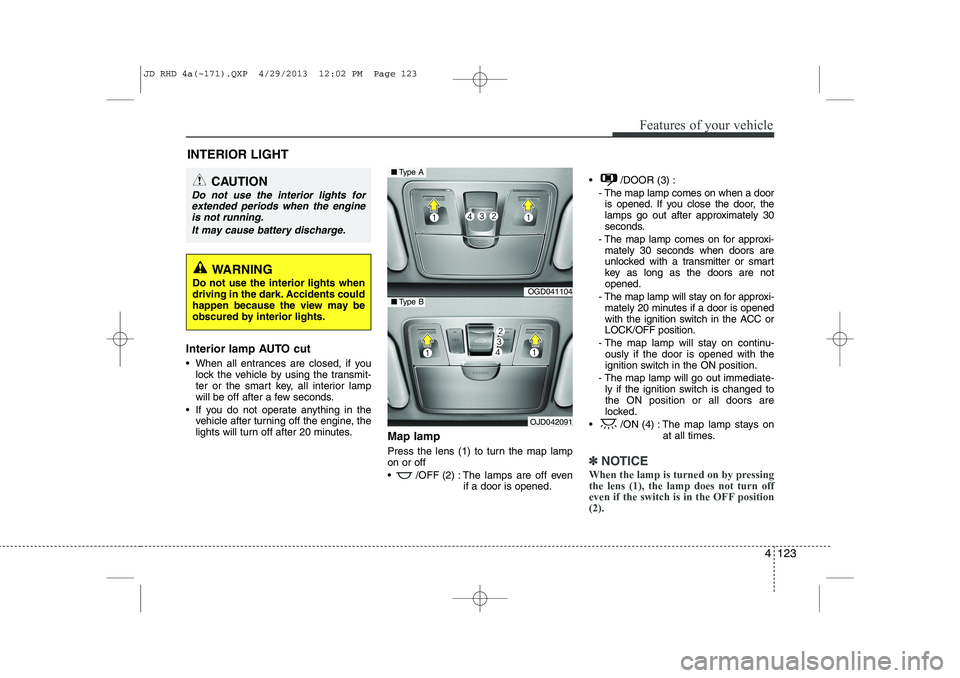
lights will turn off after 20 minutes. Map lamp
Press the lens (1) to turn the map lamp on or off
/OFF (2) : The lamps are off even
if a door is opened. /DOOR (3) :
- The map lamp comes on when a dooris opened. If you close the door, the
lamps go out after approximately 30
seconds.
- The map lamp comes on for approxi- mately 30 seconds when doors are
unlocked with a transmitter or smart
key as long as the doors are notopened.
- The map lamp will stay on for approxi- mately 20 minutes if a door is opened
with the ignition switch in the ACC orLOCK/OFF position.
- The map lamp will stay on continu- ously if the door is opened with the
ignition switch in the ON position.
- The map lamp will go out immediate- ly if the ignition switch is changed tothe ON position or all doors are
locked.
/ON (4) : The map lamp stays on at all times.
✽✽NOTICE
When the lamp is turned on by pressing the lens (1), the lamp does not turn off
even if the switch is in the OFF position(2).
INTERIOR LIGHT
CAUTION
Do not use the interior lights for extended periods when the engine
is not running.
It may cause battery discharge.
WARNING
Do not use the interior lights when
driving in the dark. Accidents could
happen because the view may be
obscured by interior lights.
OGD041104
OJD042091
■ Type A
■Type B
JD RHD 4a(~171).QXP 4/29/2013 12:02 PM Page 123
Page 810 of 1206
Features of your vehicle
126
4
Headlamp welcome
When the headlight(light switch in the
headlight or AUTO position) is on and all
doors (and tailgate) are locked andclosed, the headlight, position light and
tail light will come on for 15 seconds if
any of the below is performed.
Without smart key system
- When the door unlock button is pressed on the transmitter.
With the smart key system - When the door unlock button is pressed on the smart key.
At this time, if you press the door lock but-
ton (on the transmitter or smart key), the
lights will turn off immediately. Interior light
When the interior light switch is in the DOOR position and all doors (and tail-
gate) are locked and closed, the room
lamp will come on for 30 seconds if any
of the below is performed.
Without smart key system
- When the door unlock button is pressed on the transmitter.
With the smart key system - When the door unlock button is pressed on the smart key.
- When the button of the outside door handle is pressed.
At this time, if you press the door lock but-
ton, the lamps will turn off immediately. Puddle lamp (if equipped)
When all doors are locked and closed,
the puddle lamp will come on for 15 sec-
onds if any of the below is performed.
Without smart key system
- When the door unlock button is pressed on the transmitter.
With the smart key system - When the door unlock button is pressed on the smart key.
- When the button of the outside door handle is pressed.
- When the vehicle is approached with the smart key in possession.
At this time, if you press the door lock but-
ton, the lamps will turn off immediately.
WELCOME SYSTEM (IF EQUIPPED)
JD RHD 4a(~171).QXP 4/29/2013 12:03 PM Page 126