change wheel KIA CEED 2015 Owner's Manual
[x] Cancel search | Manufacturer: KIA, Model Year: 2015, Model line: CEED, Model: KIA CEED 2015Pages: 1210, PDF Size: 35.92 MB
Page 417 of 1210

571
Driving your vehicle
If you are considering towing with your
vehicle, you should first check with your
country's Department of Motor Vehicles
to determine their legal requirements.
Since laws vary the requirements for tow-
ing trailers, cars, or other types of vehi-
cles or apparatus may differ. We recom-
mend that you ask an authorized Kia
dealer.✽✽NOTICE - For Europe
The technically permissible maximum load on the rear axle(s) may be
exceeded by not more than 15 % and
the technically permissible maximum
laden mass of the vehicle may be
exceeded by not more than 10 % or
100 kg (220.4 lbs), whichever value is
lower. In this case, do not exceed 100
km/h (62.1 mph) for vehicle of catego-
ry M1 or 80 km/h (49.7 mph) for vehi-
cle of category N1.
When towing a trailer, the additional load imposed at the trailer coupling
device may cause the rear tire maxi-
mum load ratings to be exceeded, but
not by more than 15%. In such a case,
do not exceed 100km/h, and the rear
tire pressure should be at least 20
kPa(0.2 bar) above the tire pressure(s)
as recommended for normal use (i.e.
without a trailer attached).Your vehicle can tow a trailer. To identify
what the vehicle trailering capacity is for
your vehicle, you should read the infor-
mation in “Weight of the trailer” that
appears later in this chapter.
Remember that trailering is different than
just driving your vehicle by itself.
Trailering means changes in handling,
durability, and fuel economy. Successful,
safe trailering requires correct equip-
ment, and it has to be used properly.
This chapter contains many time-tested,
important trailering tips and safety rules.
Many of these are important for your
safety and that of your passengers.
Please read this chapter carefully before
you pull a trailer. Load-pulling components such as the
engine, transaxle, wheel assemblies, and
tires are forced to work harder against
the load of the added weight. The engine
is required to operate at relatively higher
speeds and under greater loads. This
additional burden generates extra heat.
The trailer also considerably adds wind
resistance, increasing the pulling require-
ments.
TRAILER TOWING
CAUTION
Pulling a trailer improperly can
damage your vehicle and result in
costly repairs not covered by yourwarranty. To pull a trailer correctly, follow the advice in this chapter.
WARNING - Towing a trailer
If you don't use the correct equip-
ment and/or drive improperly, you
can lose control when you pull a
trailer. For example, if the trailer is
too heavy, the brakes may not work
well - or even at all. You and your
passengers could be seriously or
fatally injured. Pull a trailer only if
you have followed all the steps in
this chapter.
WARNING - Weight limits
Before towing, make sure the total
trailer weight, GCW (gross combi-
nation weight), GVW (gross vehicle
weight), GAW (gross axle weight )and trailer tongue load are all with-in the limits.
JD eng 5.QXP 3/4/2015 2:52 PM Page 71
Page 435 of 1210
69
What to do in an emergency
IF YOU HAVE A FLAT TIRE (WITH SPARE TIRE, IF EQUIPPED)
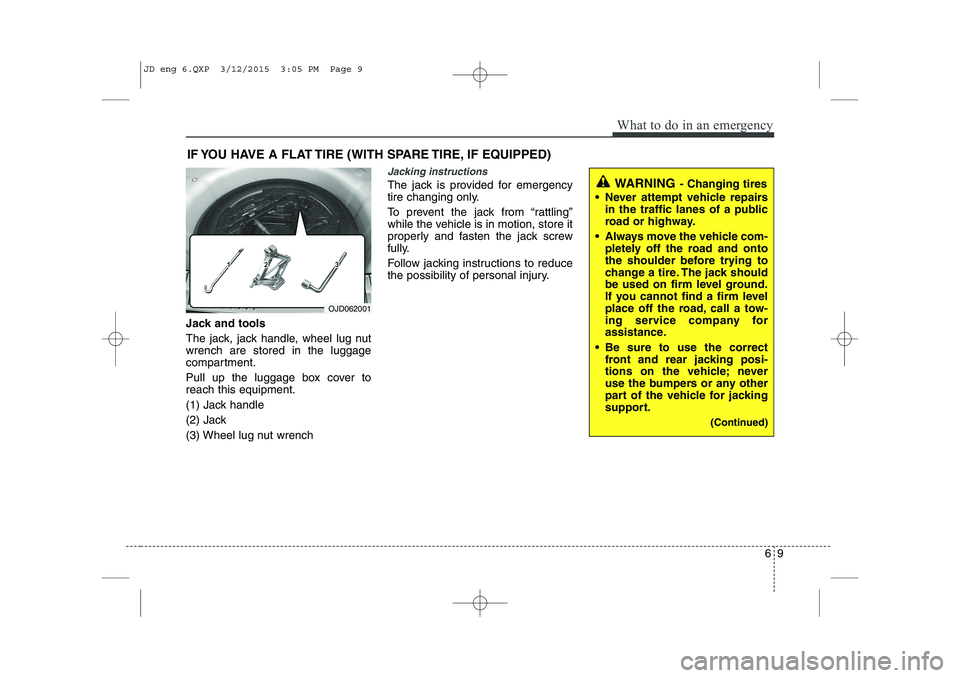
Jack and tools
The jack, jack handle, wheel lug nut wrench are stored in the luggage
compartment.
Pull up the luggage box cover to reach this equipment.
(1) Jack handle
(2) Jack
(3) Wheel lug nut wrench
Jacking instructions
The jack is provided for emergency
tire changing only.
To prevent the jack from “rattling”
while the vehicle is in motion, store it
properly and fasten the jack screw
fully.
Follow jacking instructions to reduce
the possibility of personal injury.
OJD062001
WARNING - Changing tires
Never attempt vehicle repairs in the traffic lanes of a public
road or highway.
Always move the vehicle com- pletely off the road and onto
the shoulder before trying to
change a tire. The jack should
be used on firm level ground.
If you cannot find a firm level
place off the road, call a tow-
ing service company for
assistance.
Be sure to use the correct front and rear jacking posi-
tions on the vehicle; never
use the bumpers or any other
part of the vehicle for jacking
support.
(Continued)
JD eng 6.QXP 3/12/2015 3:05 PM Page 9
Page 437 of 1210
611
What to do in an emergency
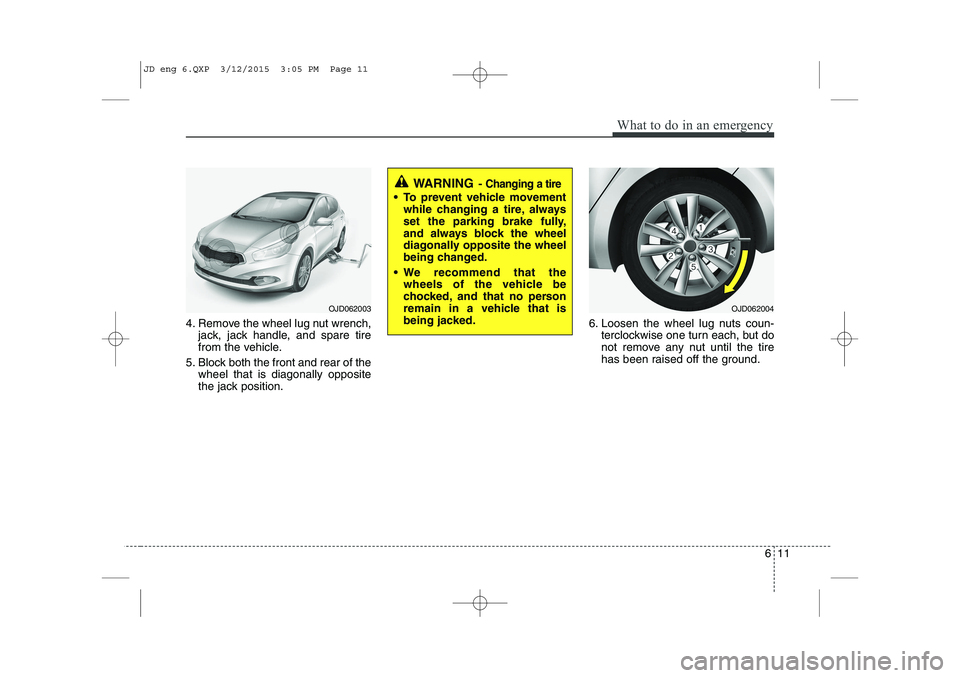
4. Remove the wheel lug nut wrench,jack, jack handle, and spare tire
from the vehicle.
5. Block both the front and rear of the wheel that is diagonally opposite
the jack position. 6. Loosen the wheel lug nuts coun-
terclockwise one turn each, but do
not remove any nut until the tire
has been raised off the ground.
WARNING - Changing a tire
To prevent vehicle movement
while changing a tire, always
set the parking brake fully,
and always block the wheel
diagonally opposite the wheel
being changed.
We recommend that the wheels of the vehicle be
chocked, and that no person
remain in a vehicle that is
being jacked.
OJD062003OJD062004
JD eng 6.QXP 3/12/2015 3:05 PM Page 11
Page 440 of 1210
What to do in an emergency
14
6
Wheel nut tightening torque:
Steel wheel & aluminium alloy wheel:
9~11 kg.m (65~79 lb.ft)
If you have a tire gauge, remove the
valve cap and check the air pressure.
If the pressure is lower than recom-
mended, drive slowly to the nearest
service station and inflate to the cor-
rect pressure. If it is too high, adjust it
until it is correct. Always reinstall the
valve cap after checking or adjusting
tire pressure. If the cap is not
replaced, air may leak from the tire. If
you lose a valve cap, buy another and
install it as soon as possible.
After you have changed wheels,
always secure the flat tire in its place
and return the jack and tools to their
proper storage locations. To prevent the jack, jack handle,
wheel lug nut wrench and spare tire
from rattling while the vehicle is in
motion, store them properly.CAUTION
Your vehicle has metric threads
on the wheel studs and nuts.Make certain during wheel removal that the same nuts thatwere removed are reinstalled -or, if replaced, that nuts with metric threads and the samechamfer configuration are used.Installation of a non-metric thread nut on a metric stud orvice-versa will not secure thewheel to the hub properly andwill damage the stud so that it must be replaced.
Note that most lug nuts do nothave metric threads. Be sure touse extreme care in checking for thread style before installingaftermarket lug nuts or wheels.If in doubt, we recommend thatyou consult an authorized Kia dealer.
WARNING - Wheel studs
If the studs are damaged, they
may lose their ability to retain
the wheel. This could lead to theloss of the wheel and a collisionresulting in serious injuries.
WARNING - Inadequate
spare tire pressure
Check the inflation pressures as
soon as possible after installing
the spare tire. Adjust it to the
specified pressure, if necessary.
Refer to “Tires and wheels” in
chapter 8.
JD eng 6.QXP 3/12/2015 3:05 PM Page 14
Page 467 of 1210

Maintenance
8
7
OWNER MAINTENANCE
We recommend that the following lists
are vehicle checks and inspections that
should be performed by the owner or an
authorized Kia dealer at the frequencies
indicated to help ensure safe, depend-
able operation of your vehicle.
If you have any question, we recommend
that you consult an authorized Kia deal-
er.
These Owner Maintenance Checks are
generally not covered by warranties and
you may be charged for labor, parts and
lubricants used. Owner maintenance schedule
When you stop for fuel:
Check the engine oil level.
Check coolant level in coolant reser-
voir.
Check the windshield washer fluid level.
Look for low or under-inflated tires.
Check the radiator and condenser. Check if the front of the radiator and
condenser are clean and not blocked
with leaves, dirt or insects etc.
If any of the above parts are extremely
dirty or you are not sure of their condi-
tion, we recommend that you contact
an authorized Kia dealer.
While operating your vehicle:
Note any changes in the sound of theexhaust or any smell of exhaust fumes
in the vehicle.
Check for vibrations in the steering wheel. Notice any increased steering
effort or looseness in the steering
wheel, or change in its straight-aheadposition.
Notice if your vehicle constantly turns slightly or “pulls” to one side when trav-
eling on smooth, level road.
When stopping, listen and check for unusual sounds, pulling to one side,
increased brake pedal travel or “hard-
to-push” brake pedal.
If any slipping or changes in the oper- ation of your transaxle occurs, check
the transaxle fluid level.
Check manual transaxle operation, including clutch operation.
Check automatic transaxle/double clutch transmission P (Park) function.
Check parking brake.
Check for fluid leaks under your vehicle (water dripping from the air conditioning
system during or after use is normal).
WARNING
Be careful when checking your
engine coolant level when the
engine is hot. Scalding hot coolant
and steam may blow out under
pressure. This could cause burns
or other serious injury.
JD eng 7.QXP 3/4/2015 3:29 PM Page 8
Page 722 of 1210
437
Features of your vehicle
Electronic power steering
Power steering uses the motor to assist
you in steering the vehicle. If the engine
is off or if the power steering system
becomes inoperative, the vehicle may
still be steered, but it will require
increased steering effort.
The electronic power steering is con-
trolled by the power steering control unit
which senses the steering wheel torque
and vehicle speed to command the
motor.
The steering effort becomes heavier as
the vehicle’s speed increases and
becomes lighter as the vehicle’s speed
decreases for better control of the steer- ing wheel.
Should you notice any change in the
effort required to steer during normal
vehicle operation, we recommend that
the system be checked by an authorised
Kia dealer.✽NOTICE
The following symptoms may occur dur-
ing normal vehicle operation:
• The EPS warning light does not illu- minate.
• The steering effort is high immediately
after turning the ignition switch on.
This happens as the system performs
the EPS system diagnostics. When the
diagnostics is completed, the steering
wheel will return to its normal condi-
tion.
• A click noise may be heard from the EPS relay after the ignition switch is
turned to the ON or LOCK/OFF posi-
tion.
• Motor noise may be heard when the
vehicle is at a stop or at a low driving
speed.
• The steering effort increases if the
steering wheel is rotated continuously
when the vehicle is not in motion.
However, after a few minutes, it will
return to its normal conditions. (Continued)(Continued)
• If an error is detected in the electric
power steering system, EPS will stop
assisting driver in steering the vehicle to
prevent accidents and the warning light
on the cluster will illuminate or blink.
We recommend that the system be
checked by an authorised Kia dealer as
soon as possible.
• When you operate the steering wheel in low temperature, abnormal noise could
occur. If temperature rises, the noise
will disappear. This is a normal condi-
tion.
• When the vehicle is stationary, if you turn the steering wheel all the way to
the left or right continuously, the
steering wheel becomes heavier from
the end. This is not a system malfunc-
tion but for your safety. As time pass-
es, the steering wheel returns to its
normal condition.
• When the charging system warning light comes on or the voltage is low
(When the alternator (or battery) does
not operate normally or it malfunc-
tions), the steering wheel may get
heavy and become difficult to control
operate abnormally.
STEERING WHEEL
JD RHD 4a(~171).QXP 4/14/2015 6:57 PM Page 37
Page 723 of 1210
Features of your vehicle
38
4
Tilt & telescopic steering
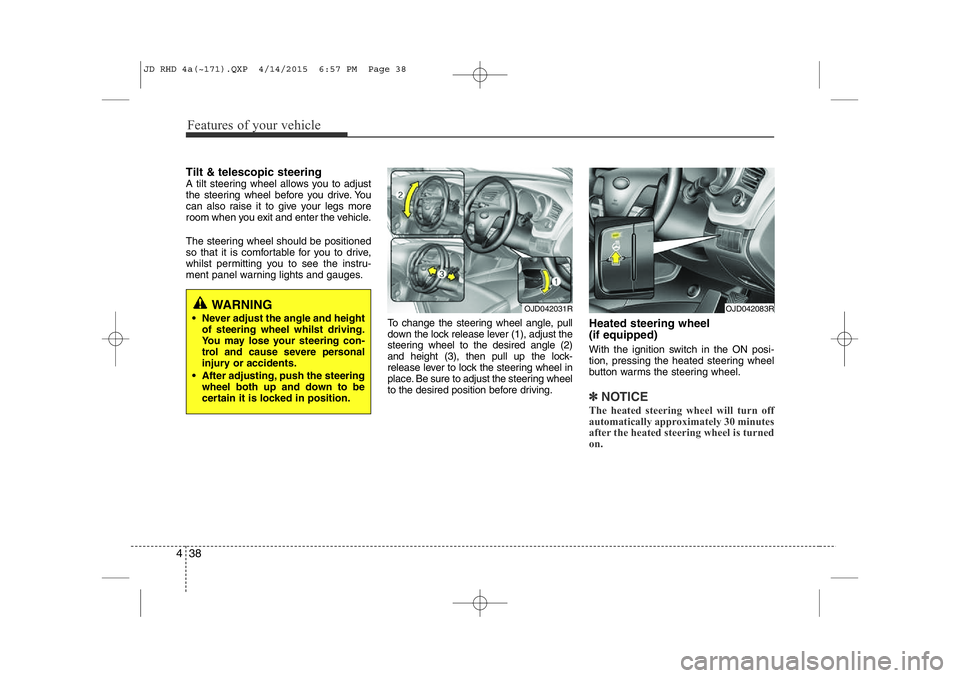
A tilt steering wheel allows you to adjust
the steering wheel before you drive. You
can also raise it to give your legs more
room when you exit and enter the vehicle.
The steering wheel should be positioned
so that it is comfortable for you to drive,
whilst permitting you to see the instru-
ment panel warning lights and gauges.
To change the steering wheel angle, pull
down the lock release lever (1), adjust the
steering wheel to the desired angle (2)
and height (3), then pull up the lock-
release lever to lock the steering wheel in
place. Be sure to adjust the steering wheel
to the desired position before driving.Heated steering wheel (if equipped)
With the ignition switch in the ON posi-
tion, pressing the heated steering wheel
button warms the steering wheel.
✽NOTICE
The heated steering wheel will turn off
automatically approximately 30 minutes
after the heated steering wheel is turned
on.
WARNING
• Never adjust the angle and height of steering wheel whilst driving.
You may lose your steering con-
trol and cause severe personal
injury or accidents.
• After adjusting, push the steering wheel both up and down to be
certain it is locked in position.OJD042031ROJD042083R
JD RHD 4a(~171).QXP 4/14/2015 6:57 PM Page 38
Page 725 of 1210
Features of your vehicle
40
4
Flex steering wheel (if equipped)
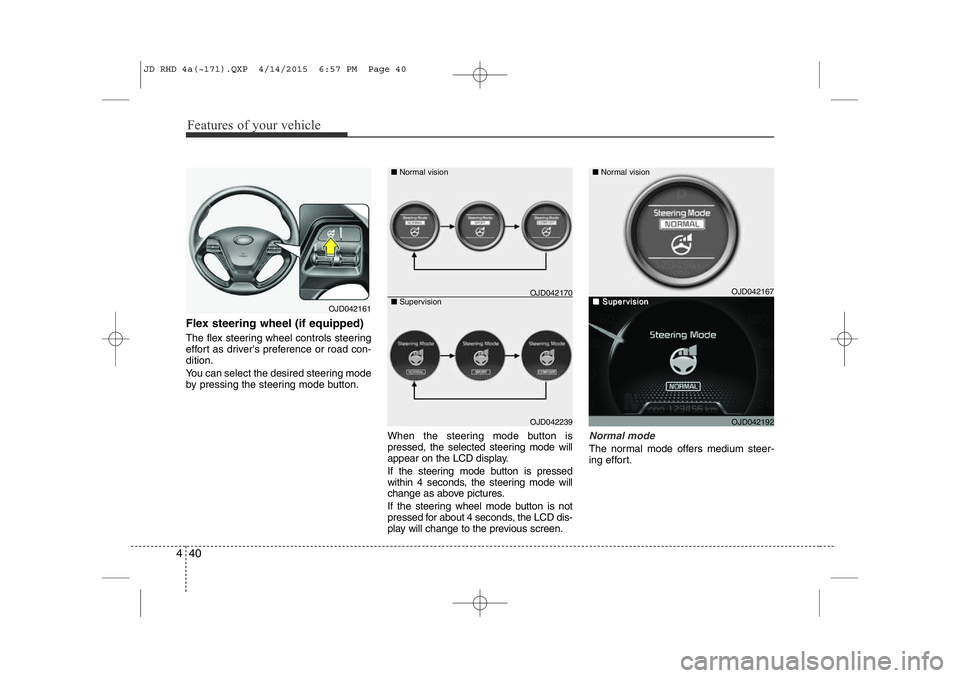
The flex steering wheel controls steering
effort as driver's preference or road con-dition.
You can select the desired steering mode
by pressing the steering mode button.
When the steering mode button is
pressed, the selected steering mode will
appear on the LCD display.
If the steering mode button is pressed
within 4 seconds, the steering mode will
change as above pictures.
If the steering wheel mode button is not
pressed for about 4 seconds, the LCD dis-
play will change to the previous screen.
Normal mode
The normal mode offers medium steer-
ing effort.
OJD042161
OJD042239
■
Normal vision
■ Supervision
OJD042167
OJD042192
■ Normal vision
■■SuperSupervisionvisionOJD042170
JD RHD 4a(~171).QXP 4/14/2015 6:57 PM Page 40
Page 726 of 1210
441
Features of your vehicle
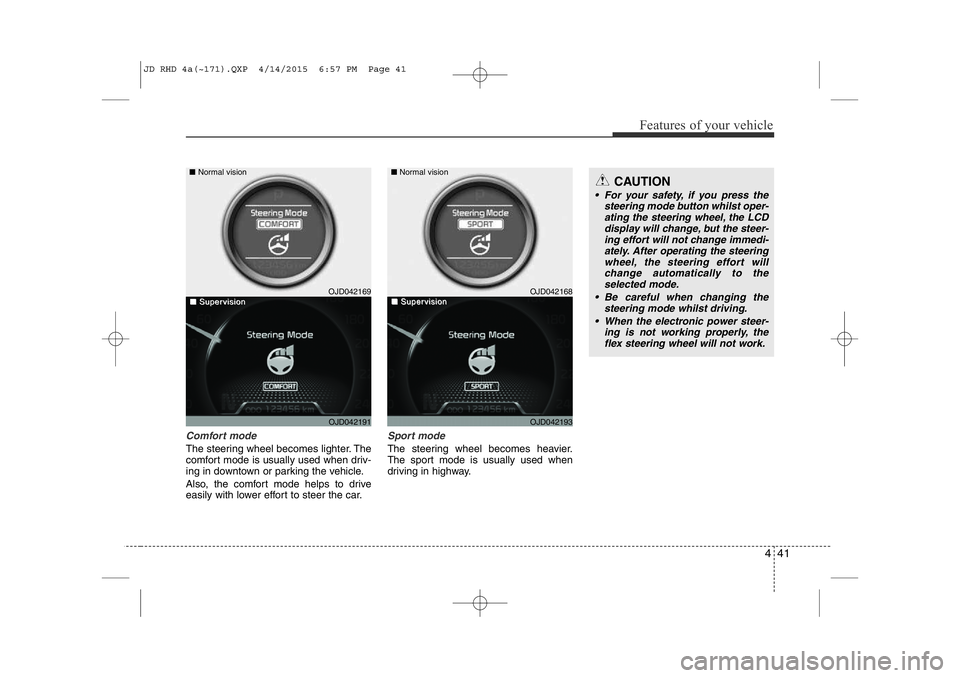
Comfort mode
The steering wheel becomes lighter. The
comfort mode is usually used when driv-
ing in downtown or parking the vehicle.
Also, the comfort mode helps to drive
easily with lower effort to steer the car.
Sport mode
The steering wheel becomes heavier.
The sport mode is usually used when
driving in highway.
CAUTION
• For your safety, if you press thesteering mode button whilst oper-ating the steering wheel, the LCD display will change, but the steer-ing effort will not change immedi-
ately. After operating the steeringwheel, the steering effort will change automatically to the
selected mode.
• Be careful when changing the steering mode whilst driving.
• When the electronic power steer- ing is not working properly, theflex steering wheel will not work.
OJD042169
OJD042191
■
Normal vision
■■SuperSupervisionvisionOJD042168
OJD042193
■ Normal vision
■■SuperSupervisionvision
JD RHD 4a(~171).QXP 4/14/2015 6:57 PM Page 41
Page 742 of 1210
457
Features of your vehicle
Door Menu
• Auto Door Lock
Off - The auto door lock operation will becanceled.
Speed - All doors will be automatically locked when the vehicle speed
exceeds 15km/h (9.3mph).
Shift Lever - All doors will be automati- cally locked if the shift lever
is shifted from the P(Park)
position to the R(Reverse),
N(Neutral) or D(Drive) posi-
tion. (for automatic transaxle
shift lever)
• Auto Door Unlock
Off - The auto door unlock operation will be canceled.
Key Out - All doors will be automatically unlocked when the ignition key
is removed from ignition switch
(or smart key is in the OFFposition).
Shift Lever - All doors will be automati- cally unlocked if the shift
lever is shifted to the
P(Park) position. (for auto-
matic transaxle shift lever) Lamp Menu
• Headlamp delay (if equipped)
If the headlamp delay function is checked :
The Headlamp delay and Headlamp
Welcome function will be activated.
• Welcome Light (if equipped)
If the welcome light function is checked :
The welcome light function of puddle
lamp will activate.
• Auto Triple Turn
(One-touch triple turn signal)
If the auto triple turn function is checked :
The lane change signals will blink 3 times
when the turn signal lever is moved
slightly. Settings Menu
• Seat Easy Access (for Driver Position
Memory System equipped vehicle)
(if equipped)
If the seat easy access function is
checked :
The driver's seat will automatically move
forward or rearward for the driver to enter
or exit the vehicle comfortably.
• Steering position (if equipped)
If the steering position function is
checked:
The warning illuminates on the LCD dis-
play when the steering wheel is not
aligned with the ENGINE STRAT/STOP
button in the ON position.
• Shift indicator (for manual transaxle)
If the shift indicator function is checked :
The shift indicator function will be activated.
For more details, refer to “Manual
transaxle shift indicator” in this section.
JD RHD 4a(~171).QXP 4/14/2015 6:58 PM Page 57