light KIA CEED 2015 Owner's Manual
[x] Cancel search | Manufacturer: KIA, Model Year: 2015, Model line: CEED, Model: KIA CEED 2015Pages: 1210, PDF Size: 35.92 MB
Page 84 of 1210

• Glove box lamp . . . . . . . . . . . . . . . . . . . . . . . . . . . . . 4-125
Welcome system . . . . . . . . . . . . . . . . . . . . . . . . . . . 4-126 • Headlamp welcome . . . . . . . . . . . . . . . . . . . . . . . . . . 4-126
• Interior light . . . . . . . . . . . . . . . . . . . . . . . . . . . . . . . . 4-126
• Puddle lamp . . . . . . . . . . . . . . . . . . . . . . . . . . . . . . . . 4-126
Defroster . . . . . . . . . . . . . . . . . . . . . . . . . . . . . . . . . 4-127 • Rear window defroster . . . . . . . . . . . . . . . . . . . . . . . 4-127
Manual climate control system . . . . . . . . . . . . . . 4-128 • Heating and air conditioning . . . . . . . . . . . . . . . . . . 4-129
• System operation . . . . . . . . . . . . . . . . . . . . . . . . . . . . 4-133
• Climate control air filter . . . . . . . . . . . . . . . . . . . . . . 4-135
• Checking the amount of air conditioner refrigerant and compressor lubricant . . . . . . . . . . 4-136
Automatic climate control system . . . . . . . . . . . . 4-137 • Automatic heating and air conditioning . . . . . . . . . 4-138
• Manual heating and air conditioning . . . . . . . . . . . 4-140
• System operation . . . . . . . . . . . . . . . . . . . . . . . . . . . . 4-145
• Climate control air filter . . . . . . . . . . . . . . . . . . . . . . 4-147
• Checking the amount of air conditioner refrigerant and compressor lubricant . . . . . . . . . . 4-148
Windshield defrosting and defogging . . . . . . . . . 4-149 • Manual climate control system. . . . . . . . . . . . . . . . . 4-149
• Automatic climate control system . . . . . . . . . . . . . . 4-150
Clean air . . . . . . . . . . . . . . . . . . . . . . . . . . . . . . . . . 4-151
Storage compartment . . . . . . . . . . . . . . . . . . . . . . 4-152 • Center console storage. . . . . . . . . . . . . . . . . . . . . . . . 4-152
• Sliding armrest . . . . . . . . . . . . . . . . . . . . . . . . . . . . . . 4-152
• Glove box . . . . . . . . . . . . . . . . . . . . . . . . . . . . . . . . . . 4-153
• Cool box . . . . . . . . . . . . . . . . . . . . . . . . . . . . . . . . . . . 4-153 • Sunglass holder . . . . . . . . . . . . . . . . . . . . . . . . . . . . . 4-154
• Luggage tray. . . . . . . . . . . . . . . . . . . . . . . . . . . . . . . . 4-154
• Luggage side tray . . . . . . . . . . . . . . . . . . . . . . . . . . . . 4-155
Interior features . . . . . . . . . . . . . . . . . . . . . . . . . . . 4-155 • Cigarette lighter . . . . . . . . . . . . . . . . . . . . . . . . . . . . . 4-155
• Ashtray . . . . . . . . . . . . . . . . . . . . . . . . . . . . . . . . . . . . 4-156
• Cup holder . . . . . . . . . . . . . . . . . . . . . . . . . . . . . . . . . 4-157
• Bottle holder . . . . . . . . . . . . . . . . . . . . . . . . . . . . . . . . 4-158
• Sunvisor . . . . . . . . . . . . . . . . . . . . . . . . . . . . . . . . . . . 4-158
• Power outlet . . . . . . . . . . . . . . . . . . . . . . . . . . . . . . . . 4-159
• Aux, USB and iPod . . . . . . . . . . . . . . . . . . . . . . . . . . 4-160
• Clothes hanger . . . . . . . . . . . . . . . . . . . . . . . . . . . . . . 4-161
• Floor mat anchor(s) . . . . . . . . . . . . . . . . . . . . . . . . . . 4-161
• Luggage net (holder) . . . . . . . . . . . . . . . . . . . . . . . . . 4-162
• Cargo area cover . . . . . . . . . . . . . . . . . . . . . . . . . . . . 4-162
• Barrier net . . . . . . . . . . . . . . . . . . . . . . . . . . . . . . . . . 4-163
• Cargo security screen . . . . . . . . . . . . . . . . . . . . . . . . 4-166
• Luggage rail system . . . . . . . . . . . . . . . . . . . . . . . . . . 4-167
• Shopping bag holder . . . . . . . . . . . . . . . . . . . . . . . . . 4-168
Exterior features . . . . . . . . . . . . . . . . . . . . . . . . . . 4-169 • Mounting bracket for roof carrier . . . . . . . . . . . . . . 4-169
• Roof rack . . . . . . . . . . . . . . . . . . . . . . . . . . . . . . . . . . 4-170
Audio system . . . . . . . . . . . . . . . . . . . . . . . . . . . . . 4-172 • Antenna . . . . . . . . . . . . . . . . . . . . . . . . . . . . . . . . . . . . 4-172
• Audio remote control . . . . . . . . . . . . . . . . . . . . . . . . . 4-173
• How car audio works. . . . . . . . . . . . . . . . . . . . . . . . . 4-174
4
JD eng 4a.QXP 3/4/2015 4:21 PM Page 3
Page 88 of 1210
47
Features of your vehicle
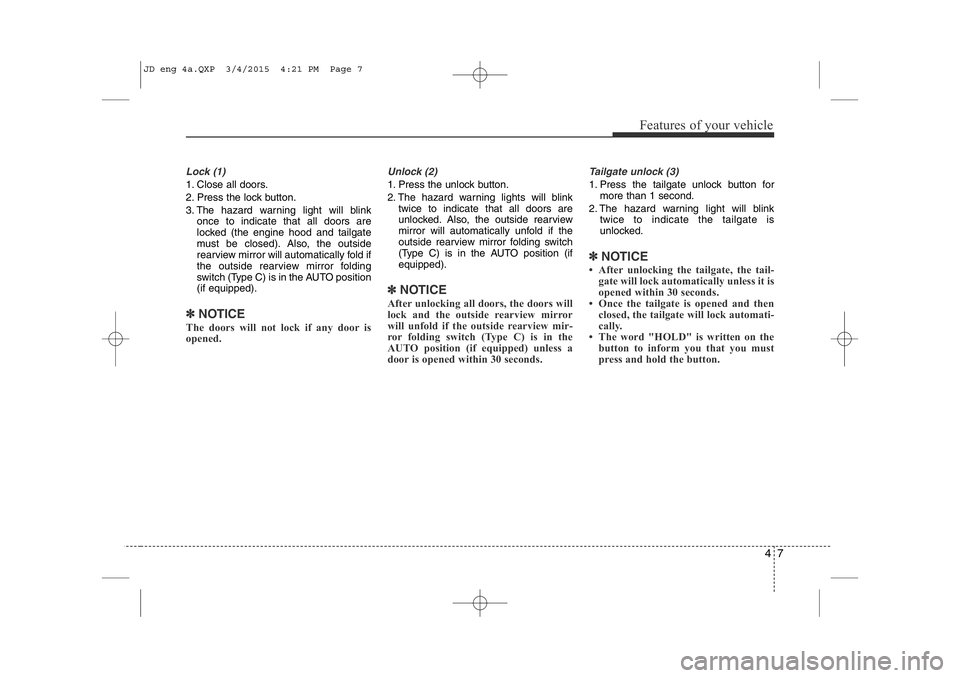
Lock (1)
1. Close all doors.
2. Press the lock button.
3. The hazard warning light will blinkonce to indicate that all doors are
locked (the engine hood and tailgate
must be closed). Also, the outside
rearview mirror will automatically fold if
the outside rearview mirror folding
switch (Type C) is in the AUTO position(if equipped).
✽NOTICE
The doors will not lock if any door is
opened.
Unlock (2)
1. Press the unlock button.
2. The hazard warning lights will blink twice to indicate that all doors are
unlocked. Also, the outside rearview
mirror will automatically unfold if the
outside rearview mirror folding switch
(Type C) is in the AUTO position (ifequipped).
✽NOTICE
After unlocking all doors, the doors will
lock and the outside rearview mirror
will unfold if the outside rearview mir-
ror folding switch (Type C) is in the
AUTO position (if equipped) unless a
door is opened within 30 seconds.
Tailgate unlock (3)
1. Press the tailgate unlock button for more than 1 second.
2. The hazard warning light will blink twice to indicate the tailgate is
unlocked.
✽NOTICE
• After unlocking the tailgate, the tail- gate will lock automatically unless it is
opened within 30 seconds.
• Once the tailgate is opened and then closed, the tailgate will lock automati-
cally.
• The word "HOLD" is written on the button to inform you that you must
press and hold the button.
JD eng 4a.QXP 3/4/2015 4:21 PM Page 7
Page 91 of 1210

Features of your vehicle
10
4
2. Pull the smart key module out.
3. Turn the smart key module over. 4. Push the battery out from the battery
holder.
5. Replace the battery with a new battery (CR2032). When replacing the battery,
make sure the battery position.
6. Install the battery in the reverse order of removal.
For transmitter or smart key replace-
ment, we recommend that you contact
an authorized Kia dealer.
CAUTION
• The transmitter or smart key is designed to give you years oftrouble-free use, however it can malfunction if exposed to mois-ture or static electricity. If you are
unsure how to use or replace thebattery, we recommend that you contact an authorized Kia dealer.
• Using the wrong battery can cause the transmitter or smartkey to malfunction. Be sure to usethe correct battery.
• To avoid damaging the transmit- ter or smart key, don't drop it, get
it wet, or expose it to heat or sun- light.
CAUTION
An inappropriately disposed bat-
tery can be harmful to the environ- ment and human health.
Dispose the battery according toyour local law(s) or regulation.
OJD042004
OJD042005
OJD042006
JD eng 4a.QXP 3/4/2015 4:21 PM Page 10
Page 92 of 1210
411
Features of your vehicle
SMART KEY (IF EQUIPPED)
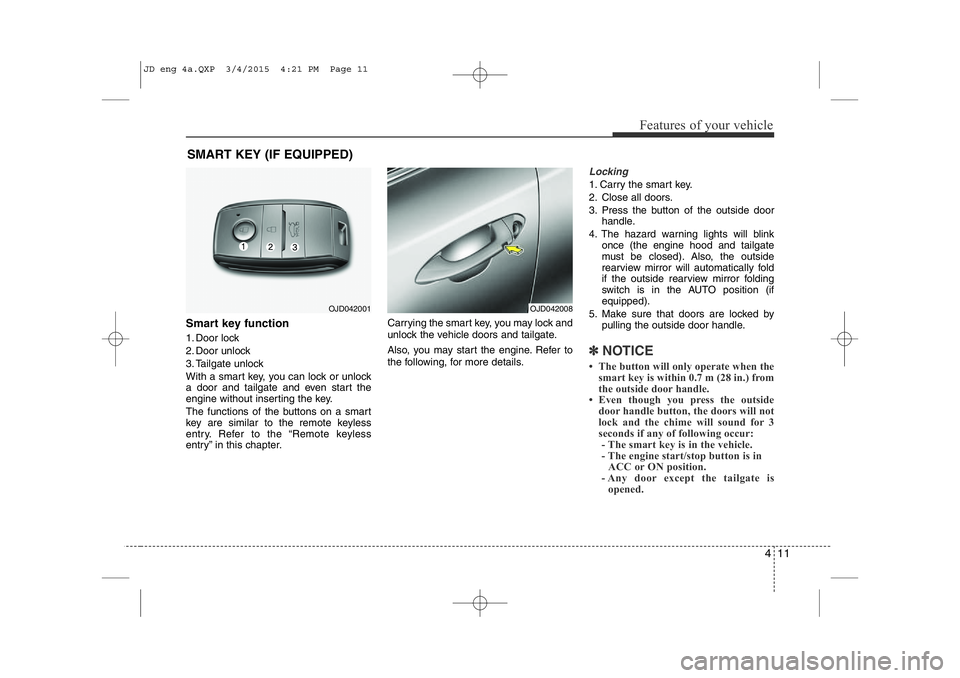
Smart key function
1. Door lock
2. Door unlock
3. Tailgate unlock
With a smart key, you can lock or unlock
a door and tailgate and even start the
engine without inserting the key.
The functions of the buttons on a smart
key are similar to the remote keyless
entry. Refer to the “Remote keyless
entry” in this chapter. Carrying the smart key, you may lock and
unlock the vehicle doors and tailgate.
Also, you may start the engine. Refer to
the following, for more details.
Locking
1. Carry the smart key.
2. Close all doors.
3. Press the button of the outside door
handle.
4. The hazard warning lights will blink once (the engine hood and tailgate
must be closed). Also, the outside
rearview mirror will automatically fold
if the outside rearview mirror folding
switch is in the AUTO position (if equipped).
5. Make sure that doors are locked by pulling the outside door handle.
✽NOTICE
• The button will only operate when the smart key is within 0.7 m (28 in.) from
the outside door handle.
• Even though you press the outside
door handle button, the doors will not
lock and the chime will sound for 3
seconds if any of following occur:- The smart key is in the vehicle.
- The engine start/stop button is in ACC or ON position.
- Any door except the tailgate is opened.
OJD042001OJD042008
JD eng 4a.QXP 3/4/2015 4:21 PM Page 11
Page 93 of 1210
Features of your vehicle
12
4
Unlocking
1. Carry the smart key.
2. Press the button of the front outside
door handle.
3. All doors will unlock and the hazard warning lights will blink twice. Also, the
outside rearview mirror will automati-
cally unfold if the outside rearview mir-
ror folding switch is in the AUTO posi-tion (if equipped).
✽NOTICE
• The button will only operate when the smart key is within 0.7 m (28 in.) from
the outside door handle.
• When the smart key is recognized in
the area of 0.7 m (28 in.) from the
front outside door handle, other peo-
ple can also open the doors.
• After unlocking all doors, the doors
will lock and the outside rearview
mirror will unfold if the outside
rearview mirror folding switch (Type
B) is in the AUTO position (if
equipped) unless a door is opened
within 30 seconds.
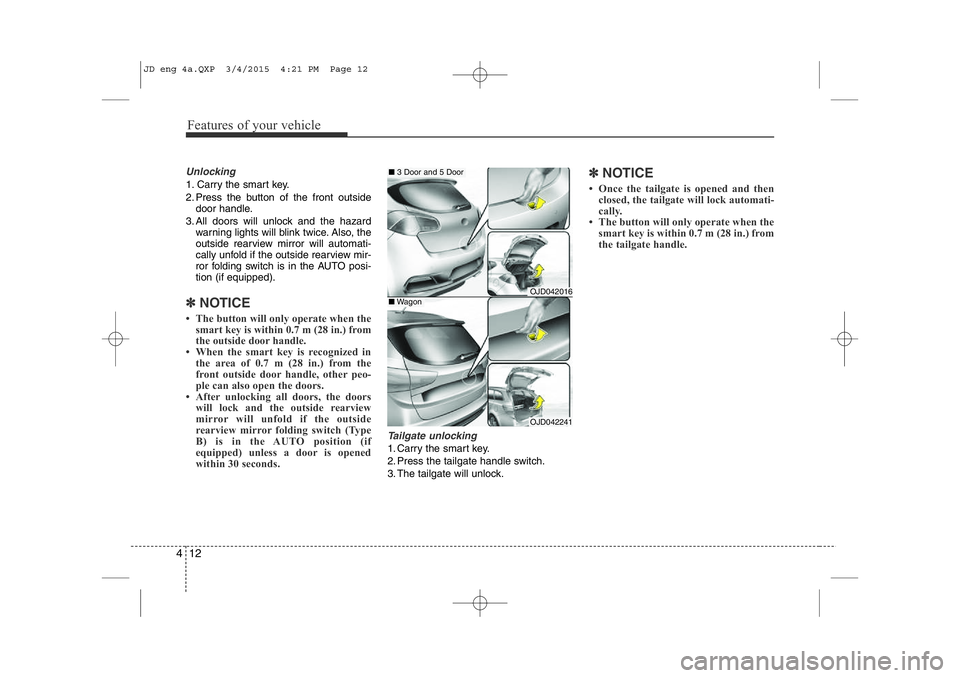
Tailgate unlocking
1. Carry the smart key.
2. Press the tailgate handle switch.
3. The tailgate will unlock.
✽NOTICE
• Once the tailgate is opened and then closed, the tailgate will lock automati-
cally.
• The button will only operate when the
smart key is within 0.7 m (28 in.) from
the tailgate handle.
OJD042016
OJD042241
■3 Door and 5 Door
■Wagon
JD eng 4a.QXP 3/4/2015 4:21 PM Page 12
Page 95 of 1210

Features of your vehicle
14
4
Vehicles equipped with a theft alarm sys-
tem will have a label attached to the vehi-
cle with the following words:
1. WARNING
2. SECURITY SYSTEM This system is designed to provide pro-
tection from unauthorized entry into the
vehicle. This system is operated in three
stages: the first is the "Armed" stage, the
second is the "Theft-alarm" stage, and
the third is the "Disarmed" stage. If trig-
gered, the system provides an audible
alarm with blinking of the hazard warning
lights.Armed stage
Using the smart key
Park the vehicle and stop the engine.
Arm the system as described below.
1. Turn off the engine.
2. Make sure that all doors, the engine
hood and tailgate are closed and latched.
3. • Lock the doors by pressing the button of the front outside door handle with
the smart key in your possession.
After completion of the steps above,
the hazard warning lights will operateonce to indicate that the system is
armed. If the tailgate or engine hood remains
opened, the hazard warning lights will
not operate and theft-alarm will not
arm. After this, if the tailgate andengine hood are closed, the hazard
warning lights will blink once and the
theft-alarm will arm.
THEFT-ALARM SYSTEM (IF EQUIPPED)Armed
stage
Theft-alarm stageDisarmed
stage
OJC040170
JD eng 4a.QXP 3/4/2015 4:22 PM Page 14
Page 96 of 1210

415
Features of your vehicle
• Lock the doors by pressing the lockbutton on the smart key.
After completion of the steps above,
the hazard warning lights will operate once to indicate that the system is
armed. If the tailgate or engine hood remains
opened, the hazard warning lights will
not operate and theft-alarm will not
arm. After this, if the tailgate andengine hood are closed, the hazard
warning lights will blink once and the
theft-alarm will arm.Using the transmitter
Park the vehicle and stop the engine.
Arm the system as described below.
1. Turn off the engine and remove the ignition key from the ignition switch.
2. Make sure that all doors, the engine hood and tailgate are closed andlatched.
3. Lock the doors by pressing the lock button on the transmitter.
After completion of the steps above,
the hazard warning lights will blink once to indicate that the system is
armed.
If the tailgate or engine hood remains opened, the hazard warning lights will
not operate and theft-alarm will not
arm. After this, if the tailgate andengine hood are closed, the hazard
warning lights will blink once and the
theft-alarm will arm.
• Do not arm the system until all pas- sengers have left the vehicle. If thesystem is armed while a passen-
ger(s) remains in the vehicle, the
alarm may be activated when the
remaining passenger(s) leave the
vehicle. If any door, tailgate orengine hood is opened within 30seconds after entering the armed
stage, the system is disarmed to
prevent unnecessary alarm. Theft-alarm stage
The alarm will be activated if any of the
following occurs while the system is
armed.
• A front or rear door is opened without
using transmitter or smart key.
• The tailgate is opened without using transmitter or smart key.
• The engine hood is opened.The siren will sound and the hazard
warning lights will blink continuously for
27 seconds, unless the system is dis-
armed. To turn off the system, unlock the
doors with the transmitter or smart key.
JD eng 4a.QXP 3/4/2015 4:22 PM Page 15
Page 97 of 1210

Features of your vehicle
16
4
Disarmed stage
The system will be disarmed when:
Transmitter
- The door unlock button is pressed.
- The engine is started.
- The ignition switch is in the “ON” posi-
tion for 30 seconds or more.
Smart key
- The door unlock button is pressed.
- The button of the front outside door is
pressed while carrying the smart key.
- The engine is started.
After the doors are unlocked, the hazard
warning lights will blink twice to indicate
that the system is disarmed.
After pressing the unlock button, if any door (or tailgate) is not opened within 30
seconds, the system will be rearmed.
✽NOTICE
• Without smart key system If the system is not disarmed with the
transmitter, insert the key into the
ignition switch and start the engine.
Then the system will be disarmed.
• With smart key system
If the system is not disarmed with the
smart key, open the door with the
mechanical key and start the engine.
Then the system will be disarmed.
• If you lose your keys, we recommend
that you consult an authorized Kia
dealer.CAUTION
Do not change, alter or adjust the
theft-alarm system because it could cause the theft-alarm system tomalfunction and we recommendthat the system be serviced by an
authorized Kia dealer.
Malfunctions caused by improperalterations, adjustments or modifi-cations to the theft-alarm system
are not covered by your vehiclemanufacturer warranty.
JD eng 4a.QXP 3/4/2015 4:22 PM Page 16
Page 100 of 1210
419
Features of your vehicle
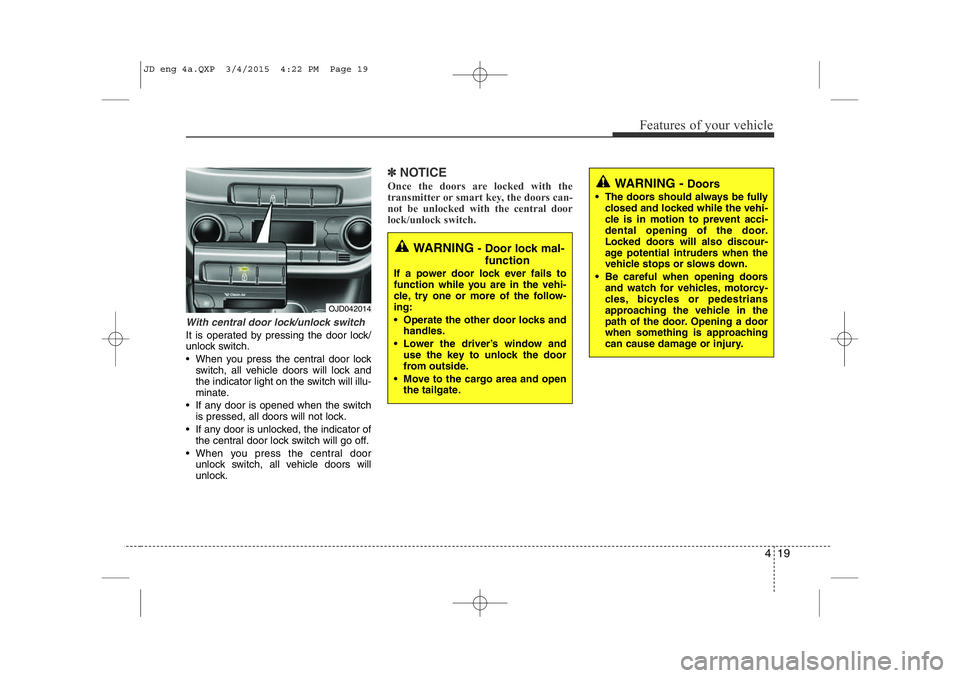
With central door lock/unlock switch
It is operated by pressing the door lock/
unlock switch.
• When you press the central door lockswitch, all vehicle doors will lock and
the indicator light on the switch will illu-
minate.
• If any door is opened when the switch is pressed, all doors will not lock.
• If any door is unlocked, the indicator of the central door lock switch will go off.
• When you press the central door unlock switch, all vehicle doors will
unlock.
✽NOTICE
Once the doors are locked with the
transmitter or smart key, the doors can-
not be unlocked with the central door
lock/unlock switch. WARNING - Doors
• The doors should always be fully closed and locked while the vehi-
cle is in motion to prevent acci-
dental opening of the door.
Locked doors will also discour-
age potential intruders when the
vehicle stops or slows down.
• Be careful when opening doors and watch for vehicles, motorcy-
cles, bicycles or pedestrians
approaching the vehicle in the
path of the door. Opening a door
when something is approaching
can cause damage or injury.
WARNING - Door lock mal-
function
If a power door lock ever fails to
function while you are in the vehi-
cle, try one or more of the follow-ing:
• Operate the other door locks and handles.
• Lower the driver’s window and use the key to unlock the door
from outside.
• Move to the cargo area and open the tailgate.
OJD042014
JD eng 4a.QXP 3/4/2015 4:22 PM Page 19
Page 106 of 1210
425
Features of your vehicle
Power windows
The ignition switch must be in the ON
position for power windows to operate.
Each door has a power window switch
that controls the door’s window. The dri-
ver’s door has a master power window
switch that controls all the windows in the
vehicle. Also, the driver has a power win-
dow lock switch which can block the
operation of rear passenger windows.
The power windows can be operated for
approximately 30 seconds after the igni-
tion key is removed or turned to the ACC
or LOCK position. However, if the front
doors are opened, the power windows
cannot be operated even within the 30
seconds period.
✽NOTICE
While driving with the rear windows
down or with the sunroof (if equipped)
in an open (or partially open position),
your vehicle may demonstrate a wind
buffeting or pulsation noise. This
noise is a normal occurrence and can be
reduced or eliminated by taking the fol-
lowing actions. If the noise occurs with
one or both of the rear windows down,
partially lower both front windows
approximately one inch. If you experi-
ence the noise with the sunroof open,
slightly reduce the size of the sunroof
opening.
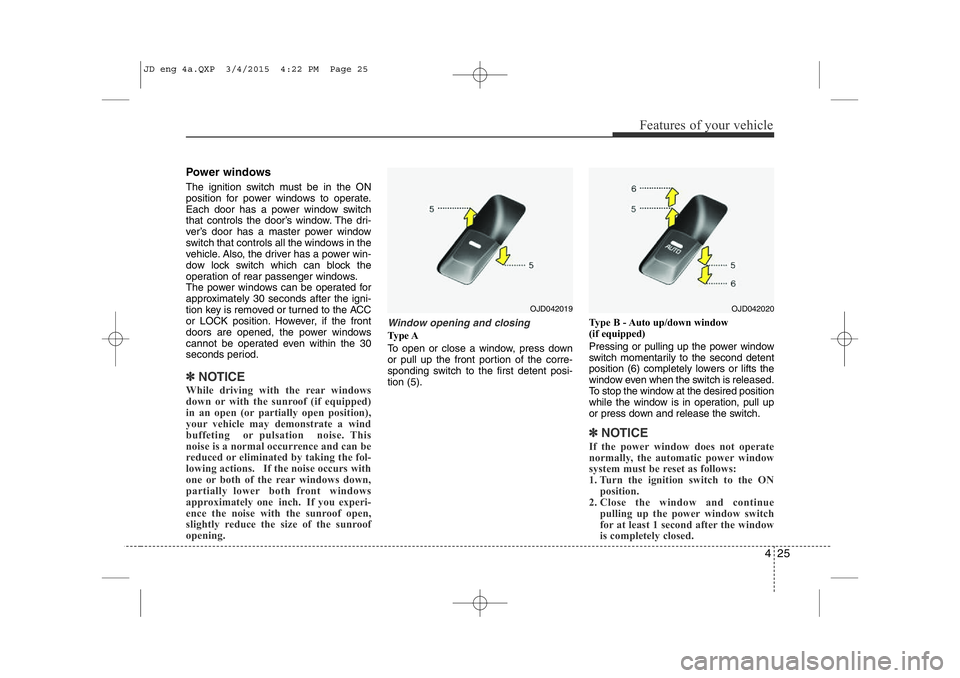
Window opening and closing
Ty p e A
To open or close a window, press down
or pull up the front portion of the corre-
sponding switch to the first detent posi-tion (5). Type B - Auto up/down window
(if equipped)
Pressing or pulling up the power window
switch momentarily to the second detent
position (6) completely lowers or lifts the
window even when the switch is released.
To stop the window at the desired position
while the window is in operation, pull up
or press down and release the switch.
✽NOTICE
If the power window does not operate
normally, the automatic power window
system must be reset as follows:
1. Turn the ignition switch to the ON position.
2. Close the window and continue
pulling up the power window switch
for at least 1 second after the window
is completely closed.
OJD042020OJD042019
JD eng 4a.QXP 3/4/2015 4:22 PM Page 25