reset KIA CEED 2015 Owner's Manual
[x] Cancel search | Manufacturer: KIA, Model Year: 2015, Model line: CEED, Model: KIA CEED 2015Pages: 1210, PDF Size: 35.92 MB
Page 274 of 1210
4 193
Features of your vehicle
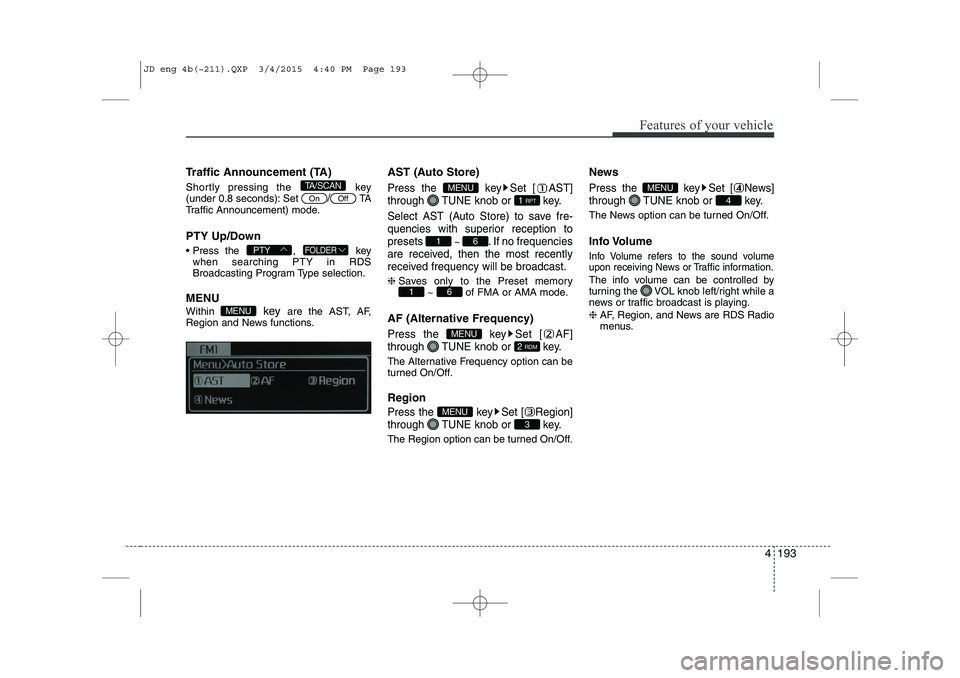
Traffic Announcement (TA)
Shortly pressing the key
(under 0.8 seconds): Set
/TA
Traffic Announcement) mode.
PTY Up/Down
Press the , key when searching PTY in RDS
Broadcasting Program Type selection.
MENU Within key are the AST, AF,
Region and News functions. AST (Auto Store)Press the key Set [ AST]
through TUNE knob or key.
Select AST (Auto Store) to save fre-
quencies with superior reception topresets
~ . If no frequencies
are received, then the most recently
received frequency will be broadcast.
❈ Saves only to the Preset memory
~ of FMA or AMA mode.
AF (Alternative Frequency)
Press the key Set [ AF]
through TUNE knob or key.
The Alternative Frequency option can be
turned On/Off. Region
Press the key Set [ Region]
through TUNE knob or key.
The Region option can be turned On/Off. News
Press the key Set [ News]
through TUNE knob or key.
The News option can be turned On/Off.
Info Volume
Info Volume refers to the sound volume
upon receiving News or Traffic information.
The info volume can be controlled by
turning the VOL knob left/right while a
news or traffic broadcast is playing. ❈
AF, Region, and News are RDS Radio
menus.
4
MENU
3
MENU
2 RDM
MENU
61
61
1 RPT
MENU
MENU
FOLDERPTY
OffOn
TA/SCAN
JD eng 4b(~211).QXP 3/4/2015 4:40 PM Page 193
Page 279 of 1210
![KIA CEED 2015 Owners Manual Features of your vehicle
198
4
All Random
Press the key Set [ A.RDM] through the TUNEknob or
key.
Plays all songs within the currently play-
ing category in random order.
Information
Press the](/img/2/57940/w960_57940-278.png "KIA CEED 2015 Owners Manual Features of your vehicle
198
4
All Random
Press the key Set [ A.RDM] through the TUNEknob or
key.
Plays all songs within the currently play-
ing category in random order.
Information
Press the")
Features of your vehicle
198
4
All Random
Press the key Set [ A.RDM] through the TUNEknob or
key.
Plays all songs within the currently play-
ing category in random order.
Information
Press the key Set [ Info] through the
TUNEknob or
key.
Displays information of the current song.
Search
Press the key Set [ Search] through the TUNEknob or
key.
Some iPod models may not support communication protocol and files may
not properly play.
Supported iPod models:
- iPod Mini ®
- iPod 4th(Photo) ~ 6th(Classic) genera- tion
- iPod Nano ®
1st~4th generation
- iPod Touch ®
1st~2nd generation The order of search or playback of
songs in the iPod can be different from the order searched in the audio system.
If the iPod is disabled due to its own malfunction, reset the iPod. (Reset:
Refer to iPod manual)
An iPod may not operate normally on low battery.
Some iPod devices, such as the iPhone, can be connected through the
-interface. The device must have audio
Bluetooth®Wireless Technology capa-
bility (such as for stereo headphone
Bluetooth®Wireless Technology ). The
device can play, but it will not be con-
trolled by the audio system.
To use iPod features within the audio, use the cable provided upon purchasing an
iPod device.
Skipping or improper operation may occur depending on the characteristics of your
iPod/Phone device.
If your iPhone is connected to both the
Bluetooth®Wireless Technology and
USB, the sound may not be properly
played. In your iPhone, select the Dockconnector or
Bluetooth®Wireless
Technology to change the sound output
(source). When connecting iPod with the iPod
Power Cable, insert the connector to the
multimedia socket completely. If not
inserted completely, communications
between iPod and audio may be inter-
rupted.
When adjusting the sound effects of the iPod and the audio system, the sound
effects of both devices will overlap and
might reduce or distort the quality of thesound.
Deactivate (turn off) the equalizer func- tion of an iPod when adjusting the audio
system’s volume, and turn off the
equalizer of the audio system whenusing the equaliz
er of an iPod.
When not using iPod with car audio, detach the iPod cable from iPod. Otherwise, iPod
may remain in accessory mode, and may
not work properly.
5
MENU
4
MENU
3
MENU
JD eng 4b(~211).QXP 3/4/2015 4:40 PM Page 198
Page 295 of 1210

Features of your vehicle
214
4
(8)
Turns the monitor display on/off. (9)
Set TA(Traffic Announcement) featureOn/Off (10) Radio Mode
- Shortly press the key (under 0.8 sec-
onds): Previews each broadcast for 5 seconds each
-
Press and hold the key (over 0.8 seconds):
Previews the broadcasts saved in Preset ~ for 5 seconds each.
Media (CD/USB/iPod/My Music) modes :
previews each song (file) for 10 secondseach. (11)
Switches to Setup mode.
(12) TUNE knob
Radio mode : turn to change broadcast
frequencies.
Media (CD/USB/iPod/My Music) modes :
turn to search tracks/channels/files. (13) RESET
Forced system termination and system
restart.
SETUP
61
SCAN
TA
JD eng 4c(~265).QXP 3/4/2015 4:48 PM Page 214
Page 296 of 1210

4 215
Features of your vehicle
Steering remote controller
(1) VOLUME
Used to control volume. (2) MUTE
Mutes audio volume. (3) SEEK
When pressed shortly (under 0.8 seconds)
- Radio mode : searches broadcast fre-quencies saved to presets.
- Media (CD / USB / iPod / My Music / BT Audio) modes : changes the track, file. When pressed and held (over 0.8 seconds)
- Radio mode, automatically searches broadcast frequencies and channels
- Media(CD/USB/iPod/My Music) modes, rewinds or fast forwards the track or song(file)
(4) MODE
Each time this key is pressed, the mode is changed in order of FM1
➟FM2
➟FMA➟AM➟AMA➟USB or iPod➟AUX
➟My Music➟BT Audio
If the media is not connected or a disc is
not inserted, corresponding modes will
be disabled. (5)
When pressed shortly (under 0.8 seconds)
- Starts voice recognition
- When selecting during a voice prompt, stops the prompt and converts to voice
command waiting state
When pressed and held (over 0.8 seconds)
- Ends voice recognition (6)
When pressed shortly (under 0.8 seconds)
- When pressed in the phone screen,
displays call history screen
- When pressed in the dial screen, makes a call
- When pressed in the incoming call screen, answers the call
- When pressed during call waiting, switches to waiting call (Call Waiting)
When pressed and held (over 0.8 seconds)
- When pressed in the Bluetooth®
Wireless Technology Handsfree wait
mode, redials the last call
- When pressed during a
Bluetooth®
Wireless Technology Handsfree call,
switches call back to mobile phone
(Private)
- When pressed while calling on the mobile phone, switches call back to
Bluetooth®Wireless Technology
Handsfree (Operates only when
Bluetooth®Wireless Technology
Handsfree is connected)
(7) Ends phone call
JD eng 4c(~265).QXP 3/4/2015 4:48 PM Page 215
Page 297 of 1210
Features of your vehicle
216
4
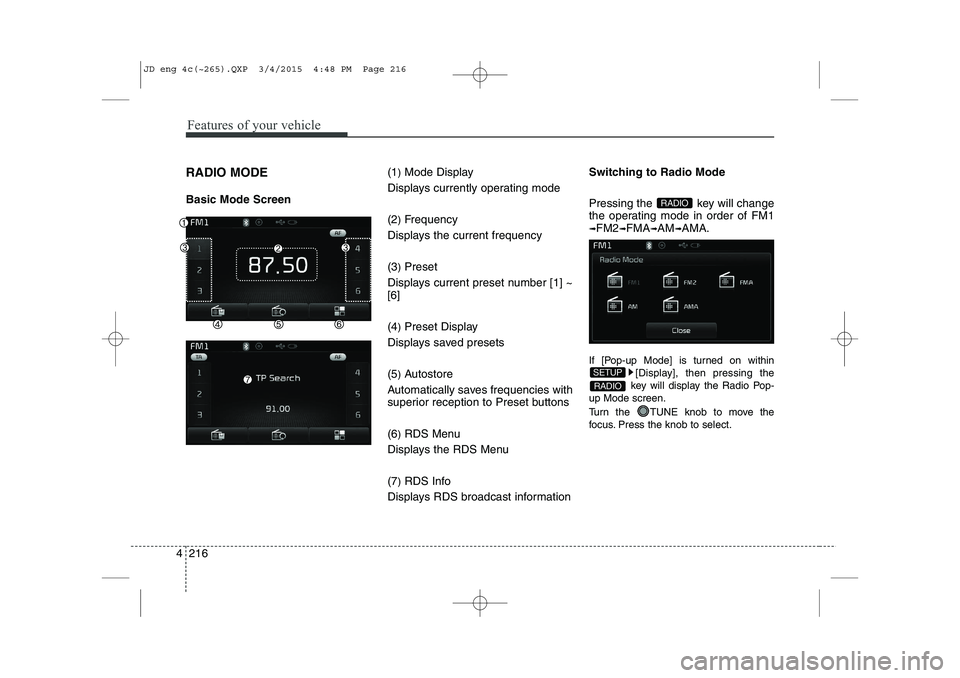
RADIO MODE Basic Mode Screen (1
)Mode Display
Displays currently operating mode (2 )Frequency
Displays the current frequency(3 )Preset
Displays current preset number [1] ~ [6] (4 )Preset Display
Displays saved presets(5 )Autostore
Automatically saves frequencies with
superior reception to Preset buttons (6 )RDS Menu
Displays the RDS Menu(7 )RDS Info
Displays RDS broadcast information Switching to Radio Mode
Pressing the key will change
the operating mode in order of FM1
➟FM2➟FMA➟AM➟AMA.
If [Pop-up Mode] is turned on within [Display], then pressing the
key will display the Radio Pop-
up Mode screen.
Turn the TUNE knob to move the
focus. Press the knob to select.
RADIO
SETUP
RADIO
JD eng 4c(~265).QXP 3/4/2015 4:48 PM Page 216
Page 298 of 1210
4 217
Features of your vehicle
Searching Radio Frequencies
Using Seek
Press the key to play the
previous/next frequency.
Using TUNE
Turn the TUNE knob to select the
desired frequency.
FM : Increases/decreased by 50kHz
AM : Increases/decreased by 9kHzUsing Radio Mode
Selecting /Saving Presets
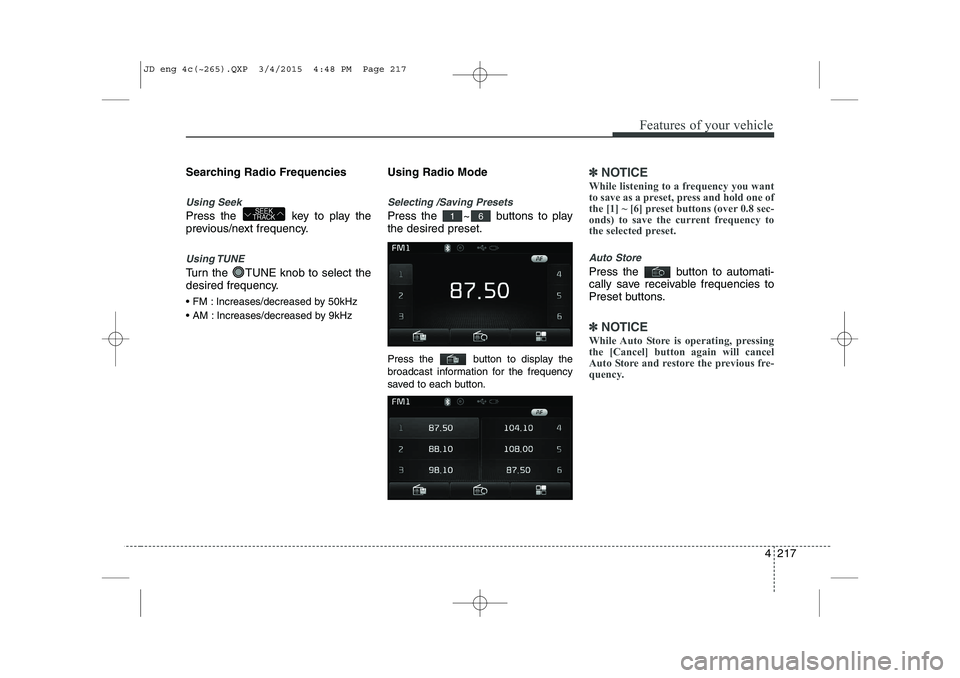
Press the ~ buttons to play the desired preset.
Press the button to display the
broadcast information for the frequency
saved to each button.
✽✽
NOTICE
While listening to a frequency you want
to save as a preset, press and hold one of
the [1] ~ [6] preset buttons (over 0.8 sec-
onds) to save the current frequency to
the selected preset.
Auto Store
Press the button to automati-
cally save receivable frequencies to
Preset buttons.
✽✽ NOTICE
While Auto Store is operating, pressing
the [Cancel] button again will cancel
Auto Store and restore the previous fre-
quency.
61SEEK
TRACK
JD eng 4c(~265).QXP 3/4/2015 4:48 PM Page 217
Page 334 of 1210
![KIA CEED 2015 Owners Manual 4 253
Features of your vehicle
SETUP
Starting Mode
Press the key to display the Setup screen.
You can select and control options relat-
ed to [Display], [Sound], [Phone] and[System].Display Setti](/img/2/57940/w960_57940-333.png "KIA CEED 2015 Owners Manual 4 253
Features of your vehicle
SETUP
Starting Mode
Press the key to display the Setup screen.
You can select and control options relat-
ed to [Display], [Sound], [Phone] and[System].Display Setti")
4 253
Features of your vehicle
SETUP
Starting Mode
Press the key to display the Setup screen.
You can select and control options relat-
ed to [Display], [Sound], [Phone] and[System].Display Settings
Adjusting the Brightness
Press the key Select
[Display] Select [Brightness]
Use the , buttons to adjust the
screen brightness or set the Brightness
on Automatic, Day, or Night mode.
Press the button to reset. (
1) Automatic : Adjusts the brightness
automatically
( 2) Day : Always maintains the bright-
ness on high
( 3) Night : Always maintains the bright-
ness on low
Pop-up Mode
Press the key Select
[Display] Select [Pop-up Mode]
This feature is used to display the Pop-up
Mode screen when entering radio and
media modes.
When this feature is turned on, pressing
the or key will display
the Pop-up Mode screen.
✽✽NOTICE
The media Pop-up Mode screen can be
displayed only when two or more media
modes have been connected.
MEDIA RADIO
SETUP
Default
SETUP SETUP
JD eng 4c(~265).QXP 3/4/2015 4:49 PM Page 253
Page 335 of 1210
![KIA CEED 2015 Owners Manual Features of your vehicle
254
4
Scroll Text
Press the key Select
[Display] Select [Scroll text]
This feature is used to scroll text dis-
played on the screen when it is too long
to be displayed at](/img/2/57940/w960_57940-334.png "KIA CEED 2015 Owners Manual Features of your vehicle
254
4
Scroll Text
Press the key Select
[Display] Select [Scroll text]
This feature is used to scroll text dis-
played on the screen when it is too long
to be displayed at")
Features of your vehicle
254
4
Scroll Text
Press the key Select
[Display] Select [Scroll text]
This feature is used to scroll text dis-
played on the screen when it is too long
to be displayed at once.
When turned on, the text is repeatedly
scrolled. When turned off, the text is
scrolled just once.
MP3 Information Display
Press the key Select
[Display] Select [Song Info]
This feature is used to change the infor-
mation displayed within USB and MP3
CD modes.
(1) Folder File : Displays file name and
folder name
(2) Album Artist Song : Displays album name/artist name/song Sound Settings
Sound Settings
Press the key Select
[Sound] Select [Audio Setting]
Use the , , , buttons to
adjust the Fader/Balance settings.
Use the , buttons to adjust the
Bass/Middle/Treble settings.
Press the button to reset.
Default
SETUP
SETUP
SETUP
JD eng 4c(~265).QXP 3/4/2015 4:49 PM Page 254
Page 342 of 1210
4 261
Features of your vehicle
Command Function
More Help Provides guidance on commands that can be
used anywhere in the system.
Help Provides guidance on commands that can be
used within the current mode.
Call
phone bookEx) Call “John”
Phone Provides guidance on Phone related com- mands. After saying this command, say “Call
History”, “
Phone book”, “Dial Number” to exe-cute corresponding functions.
Call History Displays the Call History screen.
Phone bookDisplays the phone bookscreen. After saying
this command, say the name of a phone booksaved in the phone bookto automatically con-nect the call.
Dial Number Display the Dial number screen. After saying this command, you can say the number what
you want to call.
Redial Connects the most recently called number. Radio
When listening to the radio, displays the next
radio screen. (FM1 ➟FM2 ➟FMA ➟ AM ➟
AMA)
When listening to a different mode, displaysthe most recently played radio screen.
Command Function FM
When currently listening to the FM radio,
maintains the current state.
When listening to a different mode, displaysthe most recently played FM screen.
FM1(FM One) Displays the FM1 screen.
FM2(FM Two) Displays the FM2 screen.
FMA Displays the FMA screen.
AM Displays the AM screen.
AMA Displays the AMA screen.
FM Preset 1~6 Plays the most recently played broadcast
saved in FM Preset 1~6.
AM Preset 1~6 Plays the broadcast saved in AM Preset 1~6.
FM 87.5~107.9 Plays the FM broadcast of the corresponding
frequency.
AM 530~1710 Plays the AM broadcast of the corresponding
frequency.
TA on Enable Traffic Announcement
TA off Disable Traffic Announcement
News on Enable RDS News feature
News off Disable RDS News feature
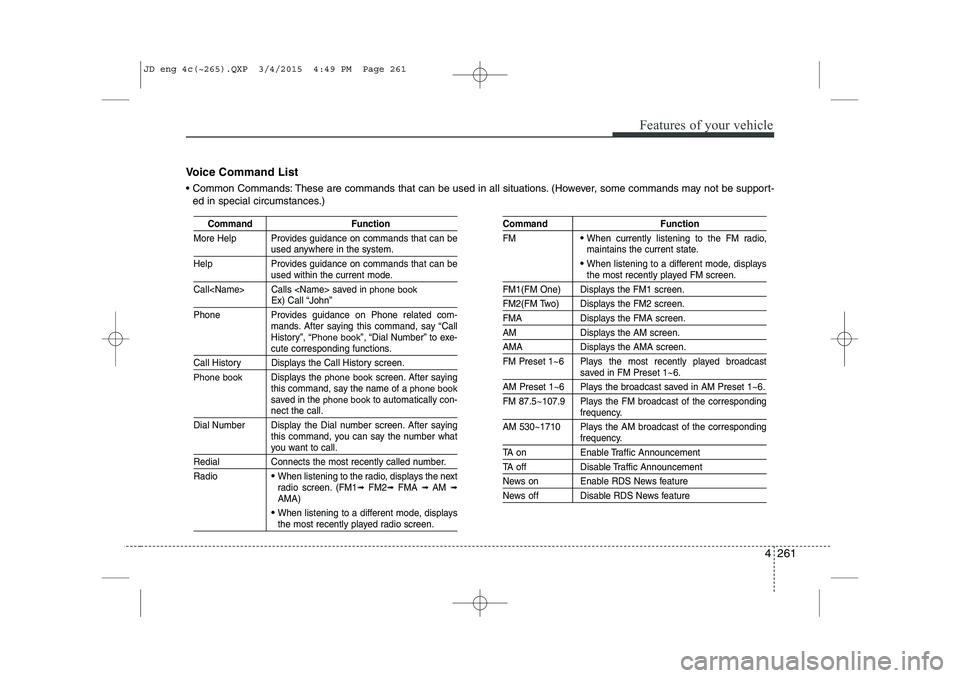
Voice Command List
Common Commands: These are commands that can be used in all situations. (However, some commands may not be support- ed in special circumstances.)
JD eng 4c(~265).QXP 3/4/2015 4:49 PM Page 261
Page 344 of 1210
4 263
Features of your vehicle
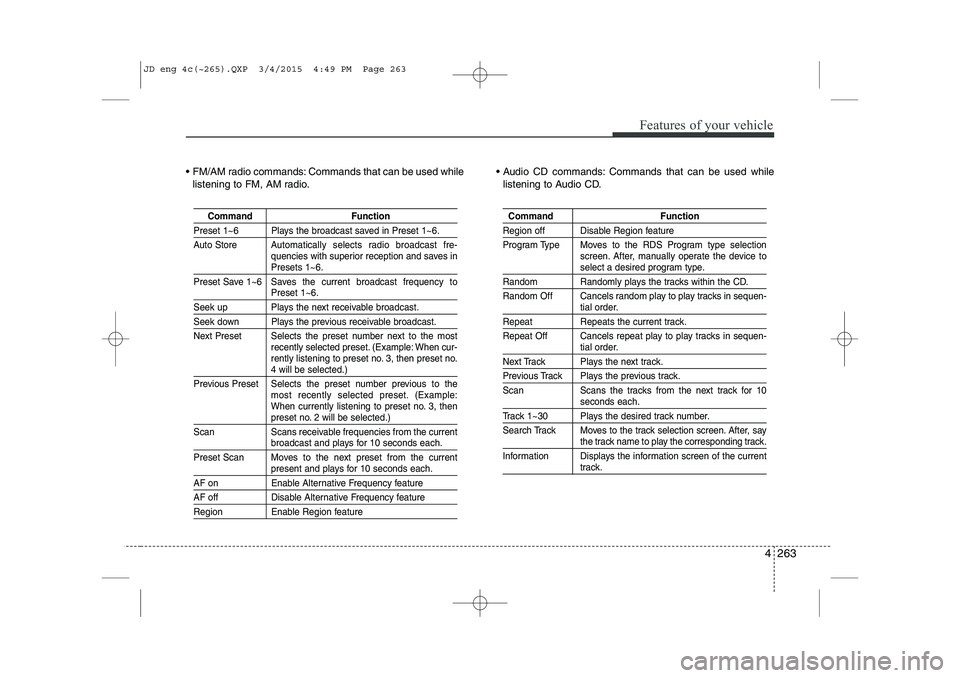
FM/AM radio commands: Commands that can be used whilelistening to FM, AM radio. Audio CD commands: Commands that can be used while
listening to Audio CD.
Command Function
Preset 1~6 Plays the broadcast saved in Preset 1~6.
Auto Store A utomatically selects radio broadcast fre-
quencies with superior reception and saves in
Presets 1~6.
Preset Save 1~6 Saves the current broadcast frequency to
Preset 1~6.
Seek up Plays the next receivable broadcast.
Seek down Plays the previous receivable broadcast.
Next Preset Selects the preset number next to the most recently selected preset. (Example: When cur-
rently listening to preset no. 3, then preset no.
4 will be selected.)
Previous Preset Selects the preset number previous to the most recently selected preset. (Example:
When currently listening to preset no. 3, then
preset no. 2 will be selected.)
Scan Scans receivable frequencies from the current
broadcast and plays for 10 seconds each.
Preset Scan Moves to the next preset from the current
present and plays for 10 seconds each.
AF on Enable Alternative Frequency feature
AF off Disable Alternative Frequency feature
Region Enable Region feature
Command Function
Region off Disable Region feature
Program Type Moves to the RDS Program type selection screen. After, manually operate the device to
select a desired program type.
Random Randomly plays the tracks within the CD.
Random Off Cancels random play to play tracks in sequen-
tial order.
Repeat Repeats the current track.
Repeat Off Cancels repeat play to play tracks in sequen-
tial order.
Next Track Plays the next track.
Previous Track Plays the previous track.
Scan Scans the tracks from the next track for 10
seconds each.
Track 1~30 Plays the desired track number.
Search Track Moves to the track selection screen. After, say
the track name to play the corresponding track.
Information Displays the information screen of the current
track.
JD eng 4c(~265).QXP 3/4/2015 4:49 PM Page 263