ECO mode KIA CEED 2015 Workshop Manual
[x] Cancel search | Manufacturer: KIA, Model Year: 2015, Model line: CEED, Model: KIA CEED 2015Pages: 1210, PDF Size: 35.92 MB
Page 340 of 1210
![KIA CEED 2015 Workshop Manual 4 259
Features of your vehicle
System Setting
Memory Information
Press the key Select
[System] Select [Memory Information]
This feature displays information related
to system memory.
(1) Using : Di](/img/2/57940/w960_57940-339.png "KIA CEED 2015 Workshop Manual 4 259
Features of your vehicle
System Setting
Memory Information
Press the key Select
[System] Select [Memory Information]
This feature displays information related
to system memory.
(1) Using : Di")
4 259
Features of your vehicle
System Setting
Memory Information
Press the key Select
[System] Select [Memory Information]
This feature displays information related
to system memory.
(1) Using : Displays capacity currently inuse
(2) Capacity : Displays total capacity
Voice Recognition Mode Setting
Press the key Select
[System] Select [Voice RecognitionSystem]
This feature is used to select the desired
prompt feedback option from Normal and
Expert. ( 1) Normal : When using voice recogni-
tion, provides detailed guidance prompts
( 2) Expert : When using voice recogni-
tion, omits some guidance prompts
✽✽NOTICE
Voice Recognition is depend on the Audio System.
Language
Press the key Select
[System] Select [Language]
This feature is used to change the sys-
tem and voice recognition language. If the language is changed, the system
will restart and apply the selected lan-
guage.SETUP SETUP
SETUP
JD eng 4c(~265).QXP 3/4/2015 4:49 PM Page 259
Page 353 of 1210

57
Driving your vehicle
Starting the engine
✽✽
NOTICE - Kick down mecha- nism
If your vehicle is equipped with a kick
down mechanism in the accelerator
pedal, it prevents you from driving at
full throttle unintentionally by making
the driver require increased effort to
depress the accelerator pedal. However,
if you depress the pedal more than
approximately 80%, the vehicle can be
at full throttle and the accelerator pedal
will be easier to depress. This is not a
malfunction but a normal condition.
Starting the gasoline engine
1. Make sure the parking brake is applied.
2. Manual Transaxle - Depress the
clutch pedal fully and shift the
transaxle into Neutral. Keep the clutch
pedal and brake pedal depressed
while turning the ignition switch to the
start position.
Automatic Transaxle/DCT* - Place
the transaxle shift lever in P (Park).
Depress the brake pedal fully.
You can also start the engine when
the shift lever is in the N (Neutral)position.
* DCT: Double clutch transmission
3. Turn the ignition switch to START and hold it there until the engine starts (a
maximum of 10 seconds), then
release the key.
It should be started without depressing
the accelerator pedal.
4. Do not wait for the engine to warm up while the vehicle remains stationary.
Start driving at moderate engine
speeds. (Steep accelerating and
decelerating should be avoided.)
CAUTION
If the engine stalls while you are in
motion, do not attempt to move the
shift lever to the P (Park) position. Iftraffic and road conditions permit,you may put the shift lever in the N (Neutral) position while the vehicle
is still moving and turn the ignitionswitch to the START position in an attempt to restart the engine.
CAUTION
Do not engage the starter for morethan 10 seconds. If the engine stallsor fails to start, wait 5 to 10 seconds
before re-engaging the starter.Improper use of the starter may dam-age it.
WARNING
Always wear appropriate shoes
when operating your vehicle.
Unsuitable shoes (high heels, ski
boots,etc.) may interfere with yourability to use the brake and acceler-
ator pedal, and clutch (if equipped).
JD eng 5.QXP 3/4/2015 2:50 PM Page 7
Page 361 of 1210

515
Driving your vehicle
Your vehicle may be equipped with the ISG system, which reduces fuel con-
sumption by automatically shutting down
the engine, when the vehicle is at a
standstill. (For example : red light, stop
sign and traffic jam)
The engine starts automatically as soon
as the starting conditions are met.
The ISG system is ON whenever the
engine is running.
✽✽NOTICE
When the engine automatically starts by
the ISG system, some warning lights
(ABS, ESC, ESC OFF, EPS or Parking
brake warning light) may turn on for a
few seconds.
This happens because of low battery
voltage. It does not mean the system has
malfunctioned.
Auto stop
To stop the engine in idle stop mode
1. Decrease the vehicle speed to less than 5 km/h (3 mph).
2. Shift into N (Neutral) position.
3. Release the clutch pedal. The engine will stop and the green AUTO
STOP( ) indicator on the instrument
cluster will illuminate.
ISG (IDLE STOP AND GO) SYSTEM (IF EQUIPPED)
OJD052026
JD eng 5.QXP 3/4/2015 2:50 PM Page 15
Page 363 of 1210

517
Driving your vehicle
Auto Start
To restart the engine from idle stopmode
Press the clutch pedal when the shift lever is in the N (Neutral) position.
A message "Press Clutch Pedal for Auto Start" will appear on the LCD display.
The engine will start and the green AUTO STOP ( ) indicator on the
instrument cluster will go out.
The engine will also restart automati-
cally without the driver’s any actions if the following occurs:
- The fan speed of manual climate con- trol system is set above the 3rd position when the air conditioning is on.
- The fan speed of automatic climate control system is set above the 6thposition when the air conditioning is on.
- When a certain amount of time has passed with the climate control systemon.
- When the defroster is on.
- The brake vaccum pressure is low.
- The battery charging status is low.
- The vehicle speed exceeds 5 km/h (3 mph). The green AUTO STOP ( ) indicator
on the instrument cluster will blink for 5
seconds and a message “Auto Start” will
appear on the LCD display.
OJD052041/OJD052054
■
Normal vision
■Supervision
OJD052037/OJD052050
■
Normal vision
■ Supervision
JD eng 5.QXP 3/4/2015 2:50 PM Page 17
Page 365 of 1210

519
Driving your vehicle
ISG system malfunction
The system may not operate when:
The ISG related sensors or system error
occurs.
The following will happen:
The yellow AUTO STOP ( ) indica-tor on the instrument cluster will stay
on after blinking for 5 seconds.
The light on the ISG OFF button will illuminate.
✽✽ NOTICE
If the ISG OFF button light is not turned off by pressing the ISG OFF but-
ton again or if the ISG system continu-
ously does not work correctly, we rec-
ommend that you contact an authorized
Kia dealer as soon as possible.
When the ISG OFF button light comes
on, it may stop illuminating after driv-
ing your vehicle at approximately 80
km/h for a maximum of two hours and
setting the fan speed control knob
below the 2nd position. If the ISG OFF
button light continues to be illuminat-
ed in spite of the procedure, we recom-
mend that you contact an authorized
Kia dealer as soon as possible.WARNING
When the engine is in Idle Stop
mode, it's possible to restart theengine without the driver taking
any action.
Before leaving the car or doing any-
thing in the engine room area, stop
the engine by turning the ignition
switch to the LOCK/OFF position or
removing the ignition key.
OJD052003
JD eng 5.QXP 3/4/2015 2:50 PM Page 19
Page 373 of 1210

527
Driving your vehicle
Sports mode
Whether the vehicle is stationary or in
motion, sports mode is selected by push-
ing the shift lever from the D (Drive) posi-
tion into the manual gate. To return to D
(Drive) range operation, push the shift
lever back into the main gate.
In sports mode, moving the shift lever
backwards and forwards will allow you to
make gearshifts rapidly.
Up (+) : Push the lever forward once toshift up one gear.
Down (-) : Pull the lever backwards once to shift down one gear. DS mode (Drive Sporty) - DCT
DS mode supports the performance
mode for driver. To shift the DS mode,
shift the transaxle to DS mode which is
center of sports mode. If you shift [+] or
[–] gear, the mode is change to sports
mode. The transmission shift is automat-ically changed at higher engine speeds
by engine load, your driving style, vehiclecondition.
In DS mode, while coasting downhill, the
engine does not support the vehicle to
slow down.
In DS mode, if you control the paddle
shifter, the gear will be changed to sports
mode. If the gear is changed to D (Drive),
the gear will be changed to D (Drive)
mode.
✽✽
NOTICE - DCT
While stopping the vehicle by applying
parking brake in D gear, even if you
release the parking brake, the vehicle
may not move. In this case, you can
drive the vehicle by applying the foot
brake and release, applying the acceler-
ator or shifting the lever (D
N
D).
OJD052006
Sports mode
or
DS mode
++++ ((((UUUUPPPP))))
---- ((((DDDDOOOOWWWWNNNN))))
JD eng 5.QXP 3/4/2015 2:51 PM Page 27
Page 374 of 1210
Driving your vehicle
28
5
✽✽
NOTICE
In sports mode, the driver must exe- cute upshifts in accordance with road
conditions, taking care to keep the
engine speed below the red zone.
In sports mode, only the 6 forward
gears can be selected. To reverse or
park the vehicle, move the shift lever
to the R (Reverse) or P (Park) position
as required.
In sports mode, downshifts are made automatically when the vehicle slows
down. When the vehicle stops, 1st gear
is automatically selected.
In sports mode, when the engine rpm approaches the red zone shift points
are varied to upshift automatically.
To maintain the required levels of
vehicle performance and safety, the
system may not execute certain
gearshifts when the shift lever is oper-
ated.
When driving on a slippery road, push the shift lever forward into the +(up)
position. This causes the transaxle to
shift into the 2nd gear which is better
for smooth driving on a slippery road.
Push the shift lever to the -(down) side
to shift back to the 1st gear.
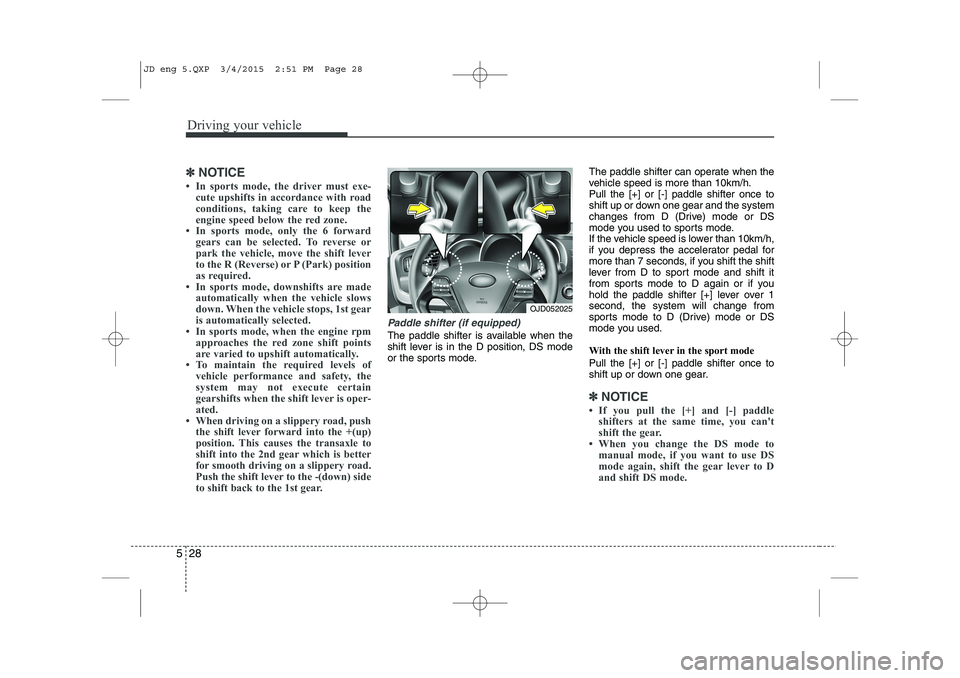
Paddle shifter (if equipped)
The paddle shifter is available when the
shift lever is in the D position, DS mode
or the sports mode. The paddle shifter can operate when the
vehicle speed is more than 10km/h.Pull the [+] or [-] paddle shifter once to
shift up or down one gear and the system
changes from D (Drive) mode or DS
mode you used to sports mode.
If the vehicle speed is lower than 10km/h,
if you depress the accelerator pedal for
more than 7 seconds, if you shift the shift
lever from D to sport mode and shift it
from sports mode to D again or if you
hold the paddle shifter [+] lever over 1second, the system will change from
sports mode to D (Drive) mode or DS
mode you used.
With the shift lever in the sport mode Pull the [+] or [-] paddle shifter once to
shift up or down one gear.
✽✽
NOTICE
If you pull the [+] and [-] paddle shifters at the same time, you can't
shift the gear.
When you change the DS mode to
manual mode, if you want to use DS
mode again, shift the gear lever to D
and shift DS mode.
OJD052025
JD eng 5.QXP 3/4/2015 2:51 PM Page 28
Page 378 of 1210
Driving your vehicle
32
5
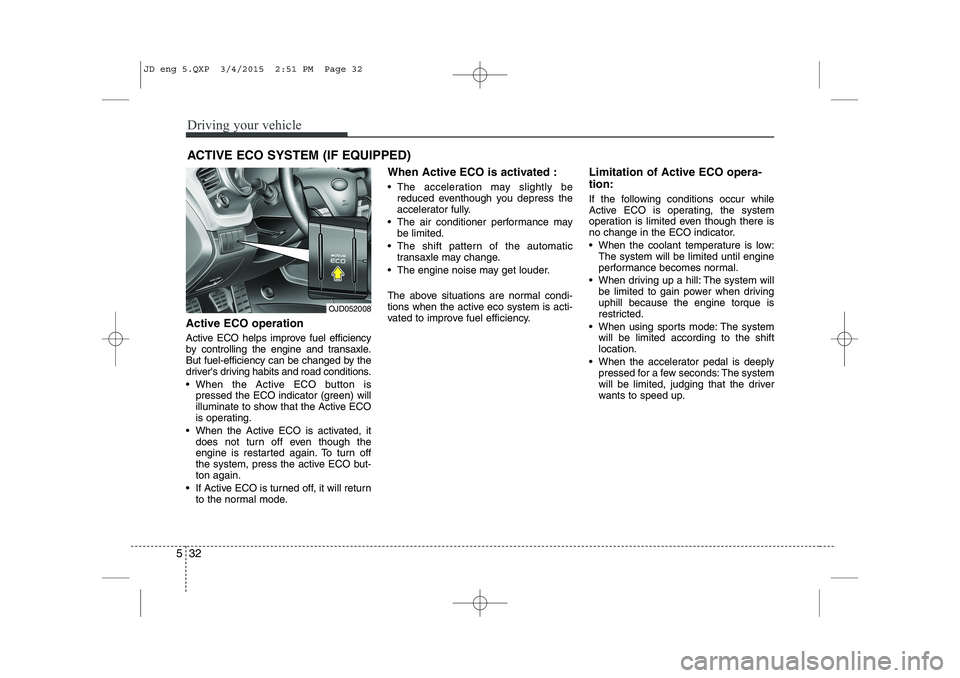
Active ECO operation
Active ECO helps improve fuel efficiency
by controlling the engine and transaxle.
But fuel-efficiency can be changed by the
driver's driving habits and road conditions.
When the Active ECO button is
pressed the ECO indicator (green) will
illuminate to show that the Active ECO
is operating.
When the Active ECO is activated, it does not turn off even though the
engine is restarted again. To turn off
the system, press the active ECO but-ton again.
If Active ECO is turned off, it will return to the normal mode. When Active ECO is activated :
The acceleration may slightly be
reduced eventhough you depress the
accelerator fully.
The air conditioner performance may be limited.
The shift pattern of the automatic transaxle may change.
The engine noise may get louder.
The above situations are normal condi-
tions when the active eco system is acti-
vated to improve fuel efficiency. Limitation of Active ECO opera- tion:
If the following conditions occur while
Active ECO is operating, the system
operation is limited even though there is
no change in the ECO indicator.
When the coolant temperature is low:
The system will be limited until engine
performance becomes normal.
When driving up a hill: The system will be limited to gain power when drivinguphill because the engine torque is
restricted.
When using sports mode: The system will be limited according to the shiftlocation.
When the accelerator pedal is deeply pressed for a few seconds: The system
will be limited, judging that the driver
wants to speed up.
ACTIVE ECO SYSTEM (IF EQUIPPED)
OJD052008
JD eng 5.QXP 3/4/2015 2:51 PM Page 32
Page 406 of 1210

Driving your vehicle
60
5
If your vehicle leaves the lane when the
LDWS is operating and vehicle speed
exceeds 60km/h, the warning operates
as follows: 1. Visual warning
If you leave the lane, the lane you leave
on the LCD display blinks yellow with 0.8
second of interval.
2. Auditory warning
If you leave the lane, the warning sound
operates with 0.8 second of interval.
If you change the display mode of trip
computer while the LDWS is ON, the
symbol of the LDWS will display like a
picture. The color of symbol will change depend
on the condition of LDWS system.
- White color : It means the sensor does
not detect the lane line.
- Green color : It means the sensor detects the lane line.
OJD042180
OJD042179
OJD042181/OJD042182
When the sensor detects the lane line
When the sensor doesn’t detect the lane lineOJD052057
JD eng 5.QXP 3/4/2015 2:52 PM Page 60
Page 408 of 1210
Driving your vehicle
62
5
ECONOMICAL OPERATION
Your vehicle's fuel economy depends
mainly on your style of driving, where you
drive and when you drive.
Each of these factors affects how many
kilometers (miles) you can get from a
liter (gallon) of fuel. To operate your vehi-
cle as economically as possible, use the
following driving suggestions to help
save money in both fuel and repairs:
Drive smoothly. Accelerate at a moder- ate rate. Do not make "jack-rabbit"
starts or full-throttle shifts and maintain
a steady cruising speed. Do not race
between stoplights. Try to adjust your
speed to the traffic so you do not have
to change speeds unnecessarily. Avoid
heavy traffic whenever possible.
Always maintain a safe distance from
other vehicles so you can avoid unnec-
essary braking. This also reduces
brake wear.
Drive at a moderate speed. The faster you drive, the more fuel your vehicle
uses. Driving at a moderate speed,
especially on the highway, is one of the
most effective ways to reduce fuel con-sumption. Do not "ride" the brake or clutch pedal.
This can increase fuel consumption
and also increase wear on these com-
ponents. In addition, driving with your
foot resting on the brake pedal may
cause the brakes to overheat, which
reduces their effectiveness and may
lead to more serious consequences.
Take care of your tires. Keep them inflated to the recommended pressure.
Incorrect inflation, either too much or
too little, results in unnecessary tire
wear. Check the tire pressures at leastonce a month.
Be sure that the wheels are aligned correctly. Improper alignment can
result from hitting curbs or driving too
fast over irregular surfaces. Poor align-
ment causes faster tire wear and may
also result in other problems as well as
greater fuel consumption. Keep your vehicle in good condition.
For better fuel economy and reduced
maintenance costs, maintain your vehi-cle in accordance with the mainte-
nance schedule. If you drive your vehi-
cle in severe conditions, more frequentmaintenance is required.
Keep your vehicle clean. For maximum service, your vehicle should be kept
clean and free of corrosive materials. It
is especially important that mud, dirt,
ice, etc. not be allowed to accumulate
on the underside of the vehicle. This
extra weight can result in increased
fuel consumption and also contributeto corrosion.
Travel lightly. Do not carry unnecessary weight in your vehicle. Weight reduces
fuel economy.
Do not let the engine idle longer than necessary. If you are waiting (and not
in traffic), turn off your engine and
restart only when you're ready to go.
JD eng 5.QXP 3/4/2015 2:52 PM Page 62