phone KIA CEED 2015 Manual PDF
[x] Cancel search | Manufacturer: KIA, Model Year: 2015, Model line: CEED, Model: KIA CEED 2015Pages: 1210, PDF Size: 35.92 MB
Page 891 of 1210
Features of your vehicle
206
4
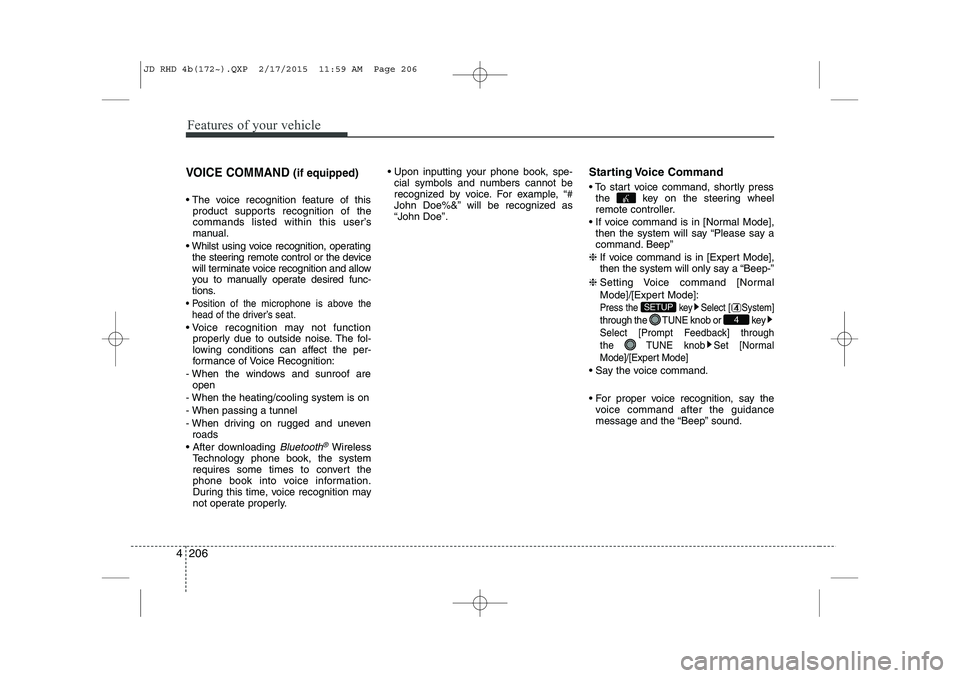
VOICE COMMAND (if equipped)
The voice recognition feature of this
product supports recognition of the
commands listed within this user’s
manual.
Whilst using voice recognition, operating the steering remote control or the device
will terminate voice recognition and allow
you to manually operate desired func-
tions.
Position of the microphone is above the head of the driver’s seat.
Voice recognition may not function properly due to outside noise. The fol-
lowing conditions can affect the per-
formance of Voice Recognition:
- When the windows and sunroof are open
- When the heating/cooling system is on
- When passing a tunnel
- When driving on rugged and uneven roads
After downloading
Bluetooth®Wireless
Technology phone book, the system
requires some times to convert the
phone book into voice information.
During this time, voice recognition may
not operate properly. Upon inputting your phone book, spe-
cial symbols and numbers cannot be
recognized by voice. For example, “#
John Doe%&” will be recognized as“John Doe”. Starting Voice Command
To start voice command, shortly press
the key on the steering wheel
remote controller.
If voice command is in [Normal Mode], then the system will say “Please say a
command. Beep”
❈ If voice command is in [Expert Mode],
then the system will only say a “Beep-”
❈ Setting Voice command [Normal
Mode]/[Expert Mode]:
Press the key Select [ System]
through the TUNE knob or key
Select [Prompt Feedback] through
the TUNE knob Set [Normal
Mode]/[Expert Mode]
Say the voice command.
For proper voice recognition, say the
voice command after the guidance
message and the “Beep” sound.
4
SETUP
JD RHD 4b(172~).QXP 2/17/2015 11:59 AM Page 206
Page 894 of 1210
4 209
Features of your vehicle
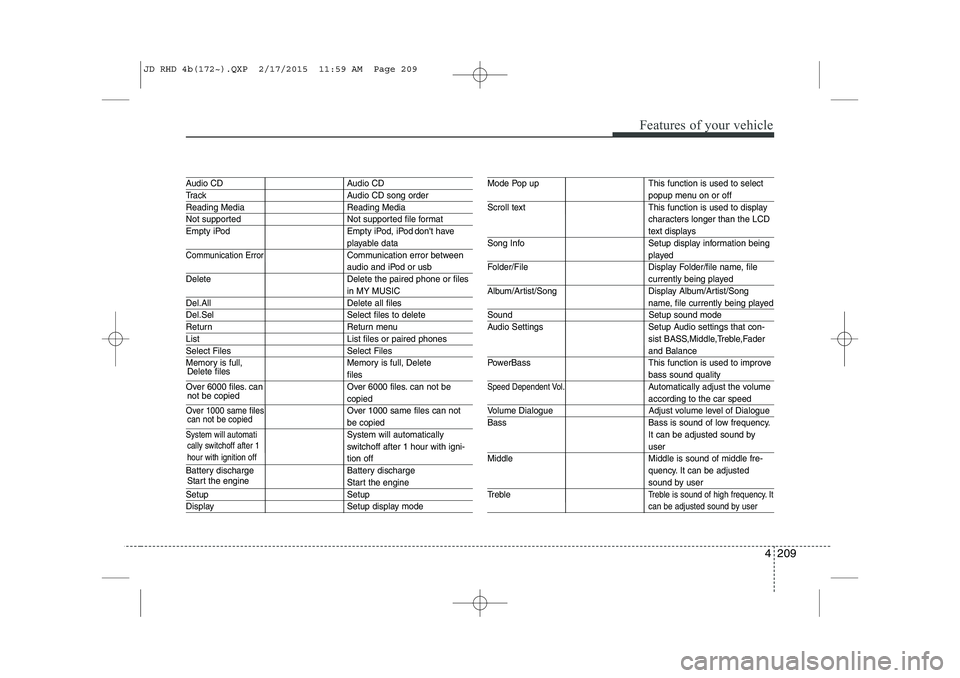
Audio CD Audio CD
Track Audio CD song order
Reading Media Reading Media
Not supported Not supported file format
Empty iPod Empty iPod, iPod don't have
playable data
Communication ErrorCommunication error between
audio and iPod or usb
Delete Delete the paired phone or files
in MY MUSIC
Del.All Delete all files
Del.Sel Select files to delete
Return Return menu
List List files or paired phones
Select Files Select Files
Memory is full, Memory is full, Delete
files
Over 6000 files. can Over 6000 files. can not be
copied
Over 1000 same files Over 1000 same files can not
be copied
System will automatiSystem will automatically
switchoff after 1 hour with igni-
tion off
Battery discharge Battery discharge
Start the engine
Setup Setup
Display Setup display mode
Mode Pop up This function is used to select
popup menu on or off
Scroll text This function is used to display characters longer than the LCD
text displays
Song Info Setup display information being
played
Folder/File Display Folder/file name, file
currently being played
Album/Artist/Song Display Album/Artist/Song
name, file currently being played
Sound Setup sound mode
Audio Settings Setup Audio settings that con- sist BASS,Middle,Treble,Fader
and Balance
PowerBass This function is used to improve
bass sound quality
Speed Dependent Vol.Automatically adjust the volume
according to the car speed
Volume Dialogue Adjust volume level of Dialogue Bass Bass is sound of low frequency.
It can be adjusted sound by
user
Middle Middle is sound of middle fre- quency. It can be adjusted
sound by user
Treble
Treble is sound of high frequency. It
can be adjusted sound by user
cally switchoff after 1 hour with ignition off
Delete files not be copied
can not be copied
Start the engine
JD RHD 4b(172~).QXP 2/17/2015 11:59 AM Page 209
Page 895 of 1210
Features of your vehicle
210
4
System?
activated
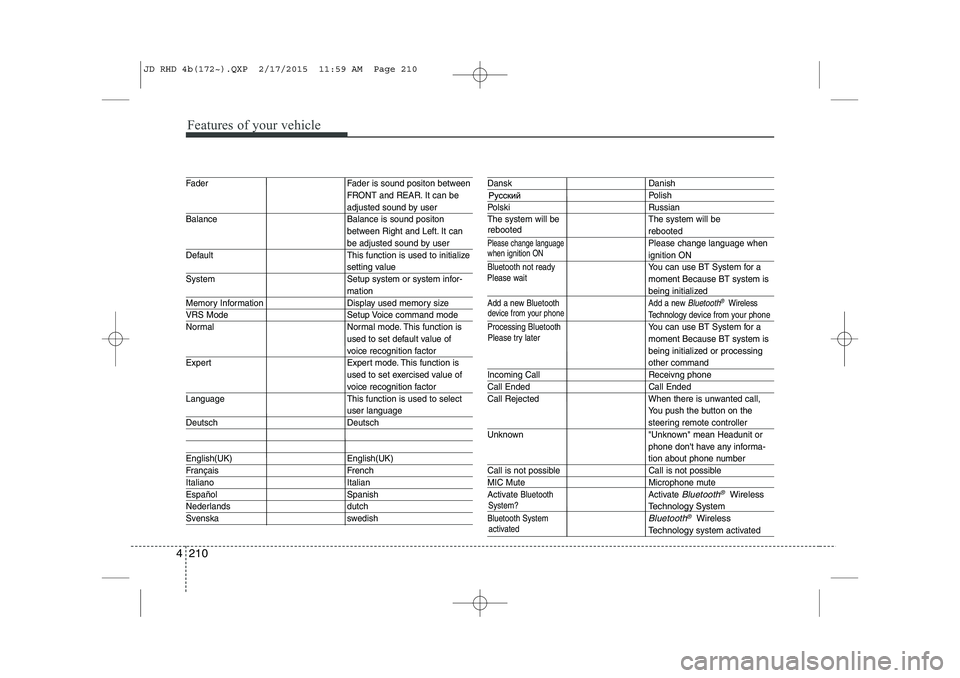
Fader Fader is sound positon between FRONT and REAR. It can be
adjusted sound by user
Balance Balance is sound positon between Right and Left. It can
be adjusted sound by user
Default This function is used to initialize
setting value
System Setup system or system infor-
mation
Memory Information Display used memory size
VRS Mode Setup Voice command mode
Normal Normal mode. This function is used to set default value of
voice recognition factor
Expert Expert mode. This function is used to set exercised value of
voice recognition factor
Language This function is used to select
user language
Deutsch Deutsch
English(UK) English(UK)
Français French
Italiano Italian
Español Spanish
Nederlands dutch
Svenska swedish
Dansk Danish
Polish
Polski Russian
The system will be The system will be
rebooted
Please change languagePlease change language when
ignition ON
Bluetooth not readyYou can use BT System for a moment Because BT system is
being initialized
Add a new Bluetooth Add a new Bluetooth®Wireless
Technology de vice from your phone
Processing Bluetooth
You can use BT System for a moment Because BT system is
being initialized or processing
other command
Incoming Call Receivng phone
Call Ended Call Ended
Call Rejected When there is unwanted call, You push the button on the
steering remote controller
Unknown "Unknown" mean Headunit or phone don't have any informa-
tion about phone number
Call is not possible Call is not possible
MIC Mute Microphone mute
Activate
BluetoothActivate Bluetooth®Wireless
TechnologySystem
Bluetooth SystemBluetooth®Wireless
Technologysystem activated
when ignition ON
device from your phone
Please try later
Please wait
rebooted
JD RHD 4b(172~).QXP 2/17/2015 11:59 AM Page 210
Page 896 of 1210
4 211
Features of your vehicle
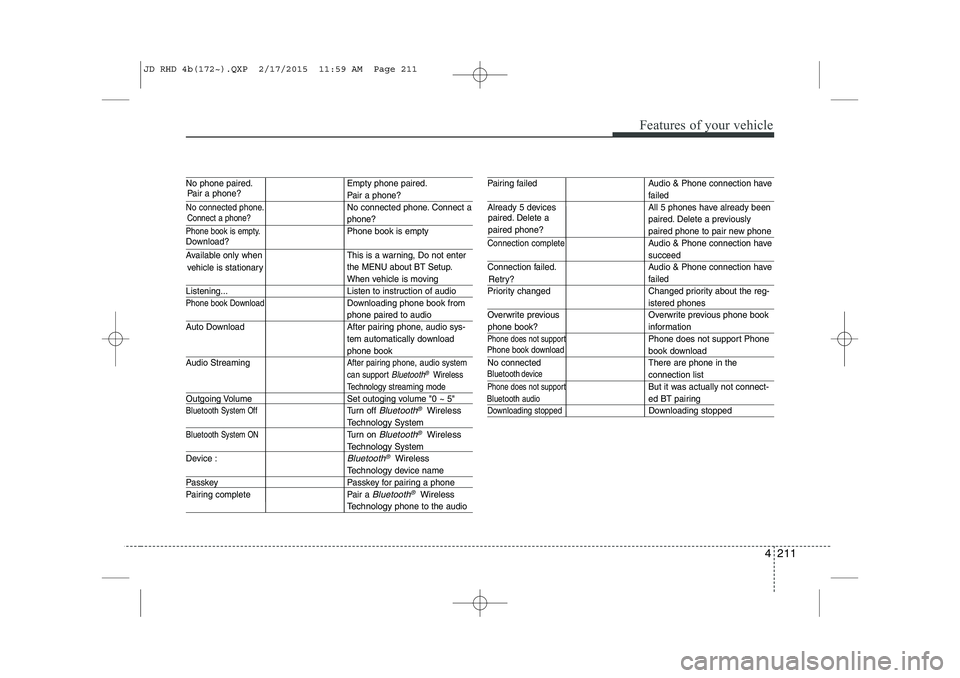
No phone paired. Empty phone paired.
Pair a phone?
No connected phone.No connected phone. Connect a
phone?
Phone book is empty.Phone book is empty
Available only when This is a warning, Do not enterthe MENU about BT Setup.
When vehicle is moving
Listening... Listen to instruction of audio
Phone book DownloadDownloading phone book from
phone paired to audio
Auto Download After pairing phone, audio sys- tem automatically download
phone book
Audio Streaming
After pairing phone, audio system
can support
Bluetooth®Wireless
Technology streaming mode
Outgoing Volume Set outoging volume "0 ~ 5"
Bluetooth System OffTurn off Bluetooth®Wireless
TechnologySystem
Bluetooth System ONTurn on Bluetooth®Wireless
TechnologySystem
Device :
Bluetooth®Wireless
Technologydevice name
Passkey Passkey for pairing a phone
Pairing complete Pair a
Bluetooth®Wireless
Technologyphone to the audio
Pairing failed Audio & Phone connection have
failed
Already 5 devices All 5 phones have already been paired. Delete a previously
paired phone to pair new phone
Connection completeAudio & Phone connection have
succeed
Connection failed. Audio & Phone connection have
failed
Priority changed Changed priority about the reg-
istered phones
Overwrite previous Overwrite previous phone book
information
Phone does not supportPhone does not support Phone
book download
No connected There are phone in the
connection list
Phone does not supportBut it was actually not connect-
ed BT pairing
Downloading stoppedDownloading stopped
paired. Delete a paired phone?
Phone book download
Bluetooth
audio
vehicle is stationary
Download?
Connect a phone?
Pair a phone?
phone book?Retry?
Bluetoothdevice
JD RHD 4b(172~).QXP 2/17/2015 11:59 AM Page 211
Page 898 of 1210
4 213
Features of your vehicle
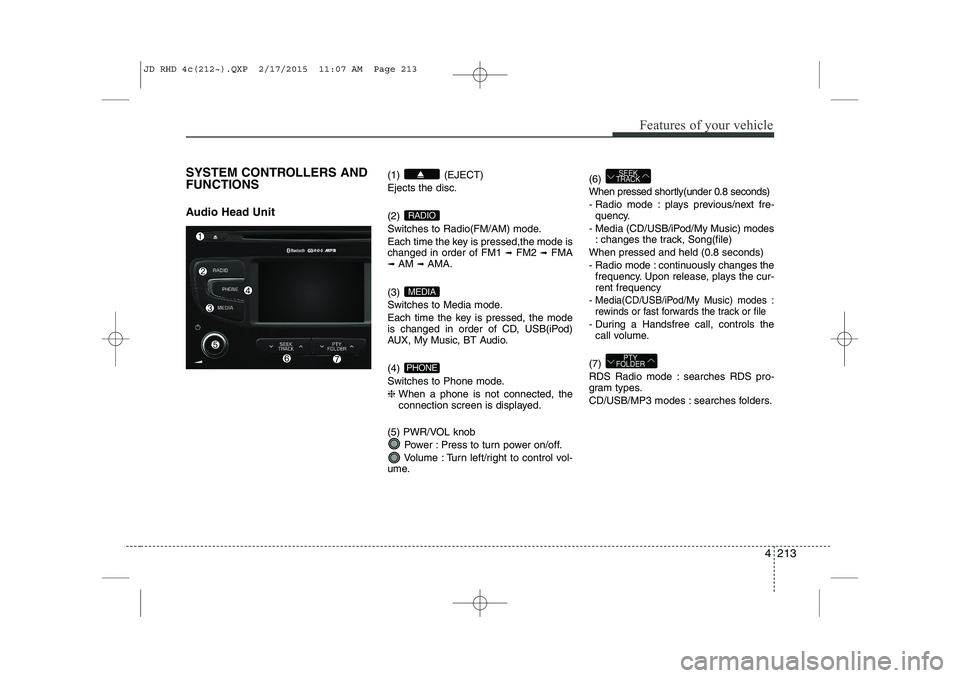
SYSTEM CONTROLLERS AND FUNCTIONS
Audio Head Unit (1) (EJECT) Ejects the disc. (2)
Switches to Radio(FM/AM) mode.
Each time the key is pressed,the mode is changed in order of FM1
➟
FM2 ➟FMA
➟ AM ➟AMA.
(3)
Switches to Media mode.
Each time the key is pressed, the mode
is changed in order of CD, USB(iPod)
AUX, My Music, BT Audio. (4)
Switches to Phone mode.❈ When a phone is not connected, the
connection screen is displayed.
(5) PWR/VOL knob Power : Press to turn power on/off.
Volume : Turn left/right to control vol-
ume. (6)
When pressed shortly(under 0.8 seconds)
- Radio mode : plays previous/next fre-
quency.
- Media (CD/USB/iPod/My Music) modes : changes the track, Song(file)
When pressed and held (0.8 seconds)
- Radio mode : continuously changes the frequency. Upon release, plays the cur- rent frequency
-
Media(CD/USB/iPod/My Music) modes :
rewinds or fast forwards the track or file
- During a Handsfree call, controls the call volume.
(7)
RDS Radio mode : searches RDS pro-
gram types.
CD/USB/MP3 modes : searches folders.
PTY
FOLDER
SEEK
TRACK
PHONE
MEDIA
RADIO
JD RHD 4c(212~).QXP 2/17/2015 11:07 AM Page 213
Page 900 of 1210
4 215
Features of your vehicle
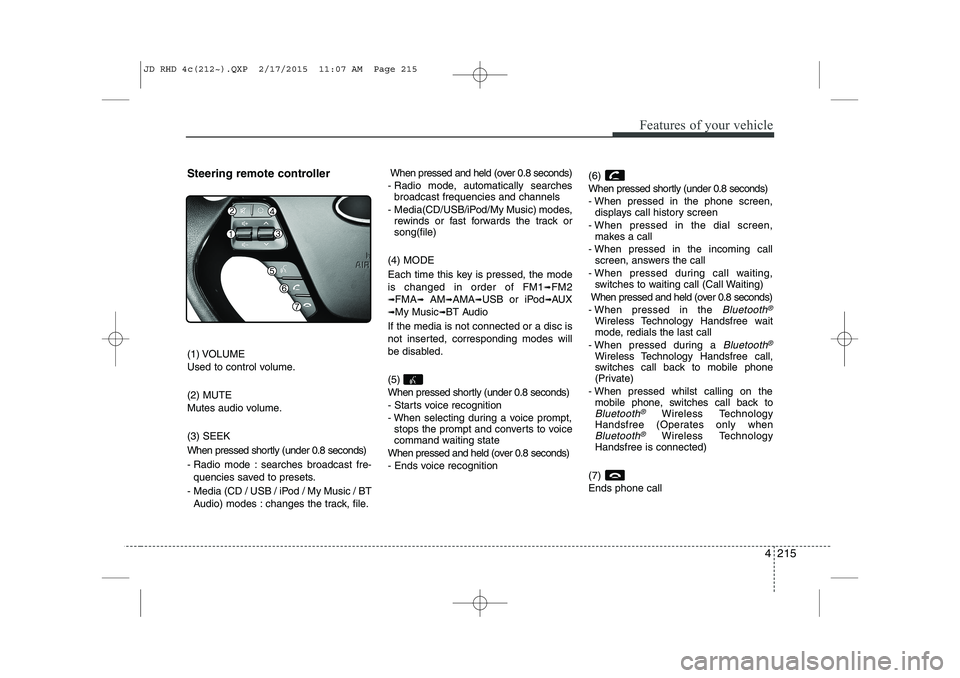
Steering remote controller
(1) VOLUME
Used to control volume. (2) MUTE
Mutes audio volume. (3) SEEK
When pressed shortly (under 0.8 seconds)
- Radio mode : searches broadcast fre-quencies saved to presets.
- Media (CD / USB / iPod / My Music / BT Audio) modes : changes the track, file. When pressed and held (over 0.8 seconds)
- Radio mode, automatically searches broadcast frequencies and channels
- Media(CD/USB/iPod/My Music) modes, rewinds or fast forwards the track or song(file)
(4) MODE
Each time this key is pressed, the mode is changed in order of FM1
➟FM2
➟FMA➟AM➟AMA➟USB or iPod➟AUX
➟My Music➟BT Audio
If the media is not connected or a disc is
not inserted, corresponding modes will
be disabled. (5)
When pressed shortly (under 0.8 seconds)
- Starts voice recognition
- When selecting during a voice prompt, stops the prompt and converts to voice
command waiting state
When pressed and held (over 0.8 seconds)
- Ends voice recognition (6)
When pressed shortly (under 0.8 seconds)
- When pressed in the phone screen,
displays call history screen
- When pressed in the dial screen, makes a call
- When pressed in the incoming call screen, answers the call
- When pressed during call waiting, switches to waiting call (Call Waiting)
When pressed and held (over 0.8 seconds)
- When pressed in the Bluetooth®
Wireless Technology Handsfree wait
mode, redials the last call
- When pressed during a
Bluetooth®
Wireless Technology Handsfree call,
switches call back to mobile phone
(Private)
- When pressed whilst calling on the mobile phone, switches call back to
Bluetooth®Wireless Technology
Handsfree (Operates only when
Bluetooth®Wireless Technology
Handsfree is connected)
(7) Ends phone call
JD RHD 4c(212~).QXP 2/17/2015 11:07 AM Page 215
Page 923 of 1210
Features of your vehicle
238
4
After selecting the files you want to
delete, press the button to delete
the selected files.
✽✽
NOTICE
If there is memory available, up to 6,000 files can be saved.
Identical files cannot be copied more than 1,000 times.
To check memory information, go to [System] [Memory
Information] ✽
✽
NOTICE - USING THE
Bluetooth®Wireless
Technology Audio Mode
Bluetooth ®
Wireless Technology Audio
Mode can be used only when a
Bluetooth ®
Wireless Technology
phone has been connected.
Bluetooth ®
Wireless Technology Audio
Mode will not be available when con-
necting mobile phones that do not
support this feature.
Whilst Bluetooth®
Wireless
Technology Audio is playing, if the
Bluetooth ®
Wireless Technology
phone is connected, then the music
will also stop.
Moving the Track up/down whilst
playing Bluetooth®
Wireless
Technology audio mode may result in
pop noises in some mobile phones.
Bluetooth ®
Wireless Technology
streaming audio may not be support-
ed in some mobile phones.
When returning to Bluetooth®
Wireless Technology Audio mode
after ending a call, the mode may not
automatically restart in some mobile
phones.
Receiving an incoming call or making
an outgoing call whilst playing
Bluetooth ®
Wireless Technology Audio
may result in audio interference.
Bluetooth®Wireless Technology
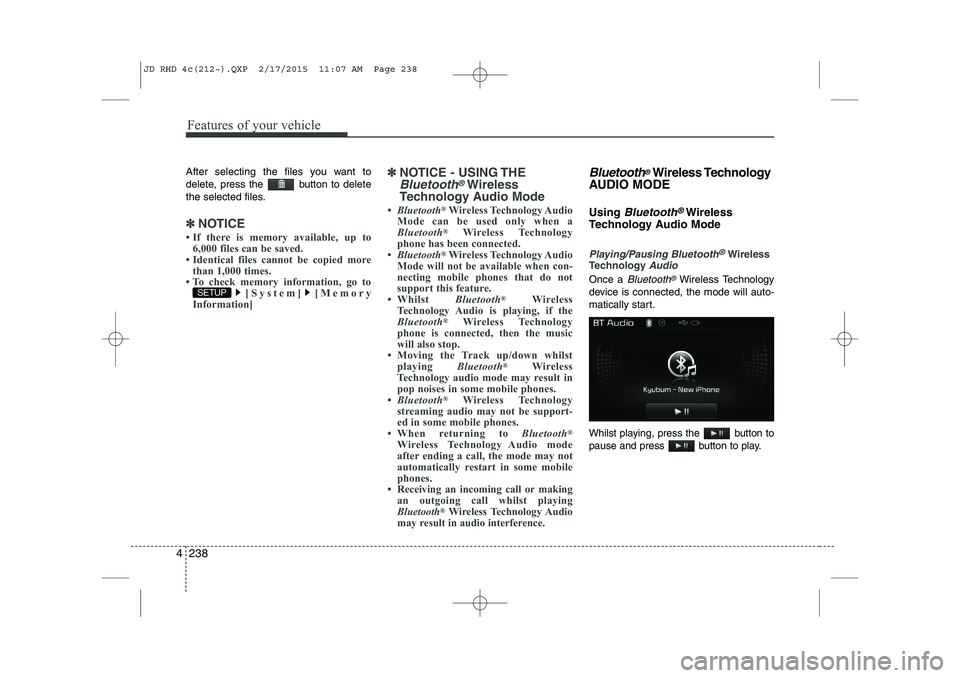
AUDIO MODE Using
Bluetooth®Wireless
Technology Audio Mode
Playing/Pausing Bluetooth®Wireless
TechnologyAudio
Once a Bluetooth®Wireless Technology
device is connected, the mode will auto-
matically start.
Whilst playing, press the button to
pause and press button to play.
SETUP
JD RHD 4c(212~).QXP 2/17/2015 11:07 AM Page 238
Page 924 of 1210
4 239
Features of your vehicle
✽✽NOTICE
The play/pause feature may operate dif-
ferently depending on the mobile phone.
Changing Files
Press the key to move to
the previous or next file.
Setting Connection
If a Bluetooth®Wireless Technology
device has not been connected, press
the key [Phone] button to
display the
Bluetooth®Wireless
Technology connection screen.
It is possible to use the pair phone, con-
nect/disconnect and delete features from
your
Bluetooth®Wireless Technology
phone.
✽✽ NOTICE
If the Bluetooth ®
Wireless Technology
audio is not operating properly, check
whether the feature is turned off at [Phone] [Audio stream-
ing]. If the feature is off, turn back on
and try again.
If music is not yet playing from your
mobile device after converting to
Bluetooth ®
Wireless Technology
Audio mode, pressing the play button
once may start playing the mode.
Check to see that music is playing
from the Bluetooth®
Wireless
Technology device after converting to
Bluetooth ®
Wireless Technology Audio
Mode.
SETUP
SETUP
SEEK
TRACK
JD RHD 4c(212~).QXP 2/17/2015 11:07 AM Page 239
Page 925 of 1210
Features of your vehicle
240
4
Bluetooth®Wireless Technology
Using Bluetooth®Wireless
Technology Handsfree
Bluetooth®Wireless Technology
refers to a short-distance wireless
networking technology which uses a
2.45GHz frequency to connect vari-
ous devices within a certain distance.
Supported within PCs, external
devices,
Bluetooth®Wireless
Technology phones, PDAs, various
electronic devices, and automotive
environments,
Bluetooth®Wireless
Technology allows data to be trans-
mitted at high speeds without hav-
ing to use a connector cable.
Bluetooth®Wireless Technology
Handsfree refers to a device which
allows the user to conveniently
make phone calls with
Bluetooth®
Wireless Technology mobilephones through the audio system.
CAUTION
Bluetooth®Wireless Technology
Handsfree is a feature that
enables drivers to practice safe driving. Connecting the car audiosystem with a Bluetooth
®
Wireless Technology phone allows the user to convenientlymake calls, receive calls, and
manage the phone book. Beforeusing the Bluetooth
®Wireless
Technology, carefully read the contents of this user’s manual.
Excessive use or operations whilst driving may lead to negli-gent driving practices and be the cause of accidents.
Do not operate the device exces- sively whilst driving.
Viewing the screen for prolonged periods of time is dangerous andmay lead to accidents. When driv-ing, view the screen only for short
periods of time.
JD RHD 4c(212~).QXP 2/17/2015 11:07 AM Page 240
Page 926 of 1210
4 241
Features of your vehicle
✽✽NOTICE - USING UPON CONNECTING
Bluetooth®
Wireless Technology PHONE
Before connecting the car audio system with the mobile phone, check to see that
the mobile phone supports Bluetooth®
Wireless Technology features.
Even if the phone supports Bluetooth®
Wireless Technology, the phone will
not be found during device searches if
the phone has been set to hidden state
or the Bluetooth ®
Wireless Technology
power is turned off. Disable the hidden
state or turn on the Bluetooth®
Wireless Technology power prior to
searching/connecting with the car
audio system.
If you do not want to automatically
connect your Bluetooth®
Wireless
Technology phone, try the following.
1. Turn off the Bluetooth®
Wireless
Technology feature in your mobile
phone.
- For more information on Bluetooth®
Wireless Technology features within
your mobile, refer to your mobile
phone user’s manual.
2. Turn off the Bluetooth®
Wireless
Technology feature in your car
audio system. (Continued)(Continued)
- To turn off the Bluetooth®
Wireless
Technology feature in your car audio
system, go to > [Phone] and
[turn off] the Bluetooth®
Wireless
Technology feature.
Park the vehicle when connecting the car audio system with your mobile
phone.
Bluetooth ®
Wireless Technology con-
nection may become intermittently
disconnected in some mobile phones.
Follow these steps to try again.
1. Turn the Bluetooth®
Wireless
Technology function within the
mobile phone off/on and try again.
2. Turn the mobile phone power Off/On and try again.
3 Completely remove the mobile phone battery, reboot, and then
again.
4. Reboot the audio system and try
again.
5. Delete all paired devices, pair and
try again.
The Handsfree call volume and quali-
ty may differ depending on the mobile
phone. (Continued)SETUP
(Continued)
Bluetooth ®
Wireless Technology fea-
tures supported within the vehicle are
as follows. Some features may not be
supported depending on your
Bluetooth ®
Wireless Technologydevice.
- Answering and placing Bluetooth®
Wireless Technology Handsfree calls
- Menu operation during call (Switch to Private, Switch to call waiting,
Outgoing volume)
- Download Call History
- Download Mobile Phone book
- Phone book/Call History Auto Download - Bluetooth ®
Wireless Technology
device auto connection - Bluetooth®
Wireless Technology Audio
It is possible to pair up to five Bluetooth ®
Wireless Technology
devices to the car system.
Only one Bluetooth®
Wireless
Technology device can be connected at
a time.
Other devices cannot be paired whilst a Bluetooth ®
Wireless Technology
device is already connected.
When a Bluetooth®
Wireless Technology
device is being connected, the connec-
tion process cannot be canceled. (Continued)
JD RHD 4c(212~).QXP 2/17/2015 11:07 AM Page 241