turn signal KIA CEED 2016 User Guide
[x] Cancel search | Manufacturer: KIA, Model Year: 2016, Model line: CEED, Model: KIA CEED 2016Pages: 643, PDF Size: 38.19 MB
Page 201 of 643
Features of your vehicle
118
4
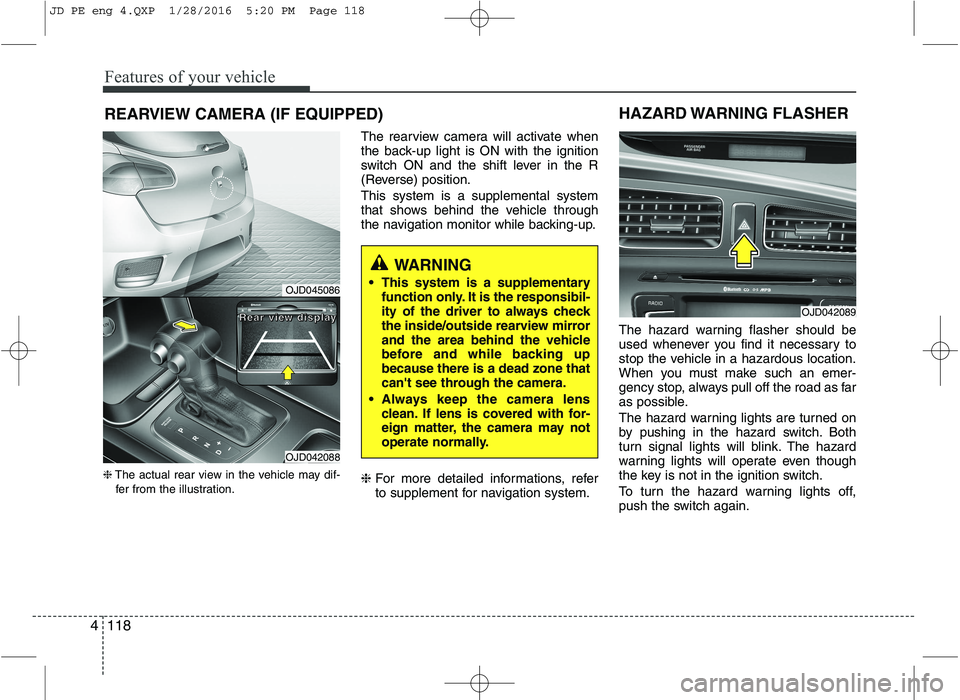
REARVIEW CAMERA (IF EQUIPPED)
❈ The actual rear view in the vehicle may dif-
fer from the illustration. The rearview camera will activate when
the back-up light is ON with the ignition
switch ON and the shift lever in the R
(Reverse) position. This system is a supplemental system
that shows behind the vehicle through
the navigation monitor while backing-up. ❈
For more detailed informations, refer
to supplement for navigation system. The hazard warning flasher should be
used whenever you find it necessary to
stop the vehicle in a hazardous location.
When you must make such an emer-
gency stop, always pull off the road as far
as possible.
The hazard warning lights are turned on
by pushing in the hazard switch. Both
turn signal lights will blink. The hazard
warning lights will operate even though
the key is not in the ignition switch.
To turn the hazard warning lights off,
push the switch again.
OJD042089
HAZARD WARNING FLASHER
WARNING
This system is a supplementary function only. It is the responsibil-
ity of the driver to always check
the inside/outside rearview mirror
and the area behind the vehicle
before and while backing upbecause there is a dead zone that
can't see through the camera.
Always keep the camera lens clean. If lens is covered with for-
eign matter, the camera may not
operate normally.
OJD045086
OJD042088
RRRReeeeaaaarrrr vvvviiiieeeewwww ddddiiiissssppppllllaaaayyyy
JD PE eng 4.QXP 1/28/2016 5:20 PM Page 118
Page 206 of 643
4123
Features of your vehicle
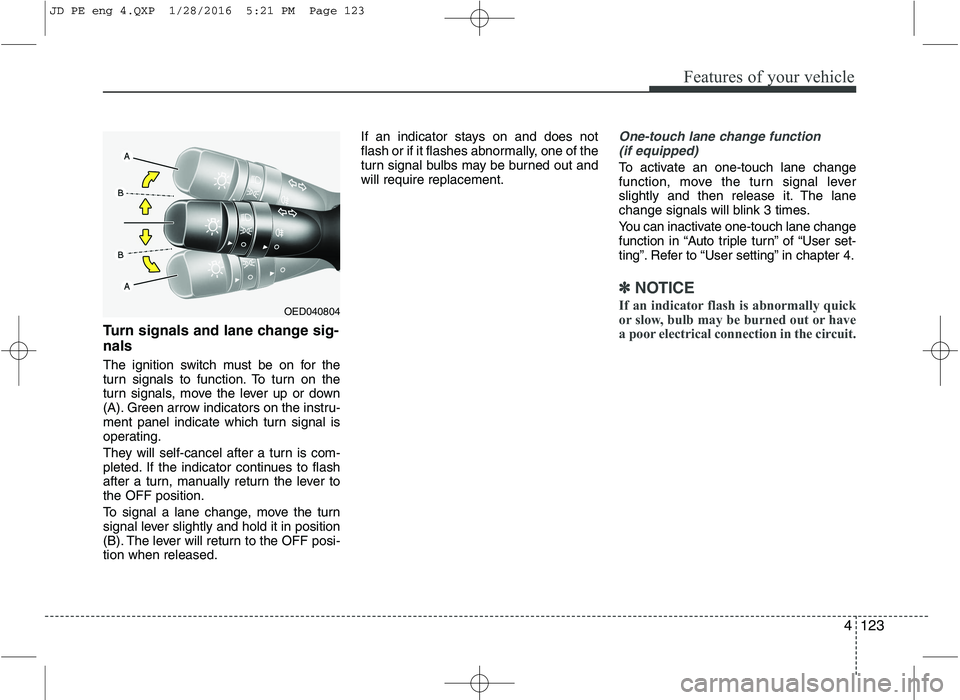
Turn signals and lane change sig- nals
The ignition switch must be on for the
turn signals to function. To turn on the
turn signals, move the lever up or down
(A). Green arrow indicators on the instru-
ment panel indicate which turn signal is
operating.
They will self-cancel after a turn is com-
pleted. If the indicator continues to flash
after a turn, manually return the lever tothe OFF position.
To signal a lane change, move the turn
signal lever slightly and hold it in position
(B). The lever will return to the OFF posi-tion when released.If an indicator stays on and does not
flash or if it flashes abnormally, one of the
turn signal bulbs may be burned out andwill require replacement.
One-touch lane change function
(if equipped)
To activate an one-touch lane change
function, move the turn signal lever
slightly and then release it. The lane
change signals will blink 3 times.
You can inactivate one-touch lane change
function in “Auto triple turn” of “User set-
ting”. Refer to “User setting” in chapter 4.
✽✽ NOTICE
If an indicator flash is abnormally quick
or slow, bulb may be burned out or have
a poor electrical connection in the circuit.
OED040804
JD PE eng 4.QXP 1/28/2016 5:21 PM Page 123
Page 264 of 643
Features of your vehicle
4181
AUDIO SYSTEM
✽✽
NOTICE
If you install an after market HID
head lamp, your vehicle’s audio and
electronic device may malfunction.
❈ If your vehicle is equipped with
AVN(Audio, Video and Navigation)
system, refer to a separately sup-
plied manual for detailed informa-tion. Antenna
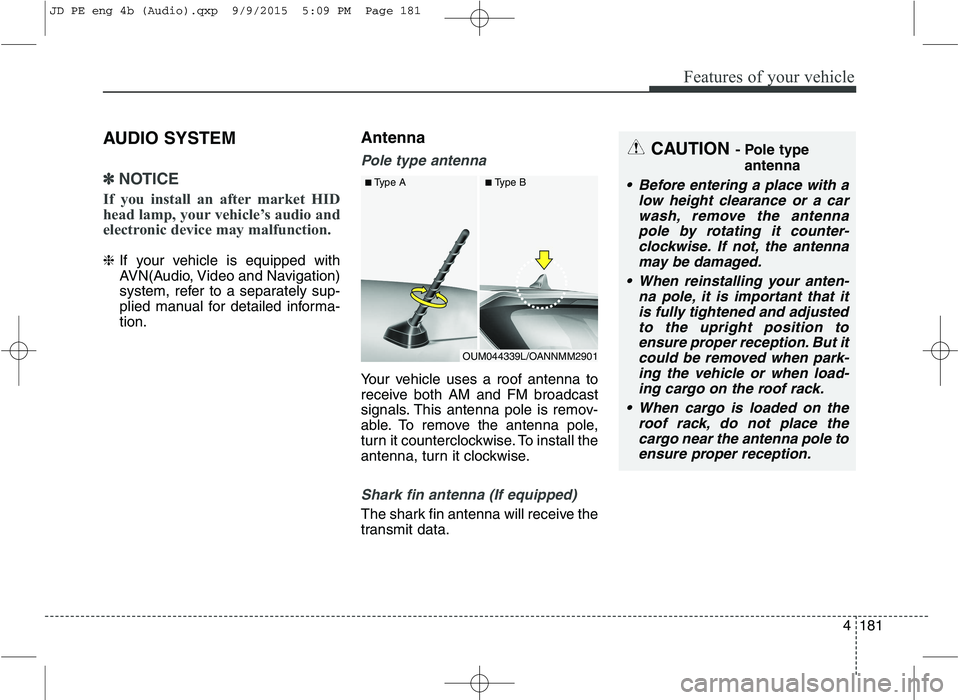
Pole type antenna
Your vehicle uses a roof antenna to
receive both AM and FM broadcast
signals. This antenna pole is remov-
able. To remove the antenna pole,
turn it counterclockwise. To install the
antenna, turn it clockwise.
Shark fin antenna (If equipped)
The shark fin antenna will receive the
transmit data.
CAUTION
- Pole type
antenna
• Before entering a place with a low height clearance or a carwash, remove the antennapole by rotating it counter-clockwise. If not, the antenna may be damaged.
When reinstalling your anten- na pole, it is important that itis fully tightened and adjustedto the upright position to ensure proper reception. But itcould be removed when park-ing the vehicle or when load- ing cargo on the roof rack.
When cargo is loaded on the roof rack, do not place thecargo near the antenna pole toensure proper reception.
OUM044339L/OANNMM2901
■
Type A ■Type B
JD PE eng 4b (Audio).qxp 9/9/2015 5:09 PM Page 181
Page 275 of 643
Features of your vehicle
192
4
✽✽
NOTICE - USING THE
Bluetooth®Wireless
Technology CELLULAR PHONE
Do not use a cellular phone or per- form Bluetooth ®
Wireless Technology
settings (e.g. pairing a phone)
while driving.
Some Bluetooth ®
Wireless Technology
-enabled phones may not be recog-
nized by the system or fully com-
patible with the system.
Before using Bluetooth®
Wireless
Technology related features of the
audio system, refer your phone’s
User’s Manual for phone-side
Bluetooth ®
Wireless Technology
operations.
The phone must be paired to the audio system to use Bluetooth®
Wireless Technology related fea-
tures.
You will not be able to use the hands-free feature when your
phone (in the car) is outside of the
cellular service area (e.g. in a tun-
nel, in a underground, in a moun-
tainous area, etc.). (Continued)(Continued)
If the cellular phone signal is poor
or the vehicles interior noise is too
loud, it may be difficult to hear the
other person’s voice during a call.
Do not place the phone near or inside metallic objects, otherwise
communications with Bluetooth®
Wireless Technology system or cel-
lular service stations can be dis-
turbed.
While a phone is connected through Bluetooth ®
Wireless Technology
your phone may discharge quicker
than usual for additional Bluetooth®
Wireless Technology-related opera-
tions.
Some cellular phones or other devices may cause interference
noise or malfunction to audio sys-
tem. In this case, store the device
in a different location may resolve
the condition.
Phone contact names should be saved in English or they may not
be displayed correctly. (Continued)(Continued)
If Priority is set upon vehicle igni-
tion(IGN/ACC ON), the Bluetooth®
Wireless Technology phone will be
automatically connected.
Even if you are outside, the
Bluetooth ®
Wireless Technology
phone will be automatically con-
nected once you are in the vicinity
of the vehicle.
If you do not want automatic
Bluetooth ®
Wireless Technology
connection, turn the Bluetooth®
Wireless Technology feature off.
The hands-free call volume and quality may differ depending on
the mobile phone type.
Bluetooth ®
Wireless Technology
features can be used only when the
mobile phone has been paired and
connected with the device. For
more information on pairing and
connecting Bluetooth®
Wireless
Technology enabled mobile phones,
refer to the “Phone Setup” section. (Continued)
JD PE eng 4b (Audio).qxp 9/9/2015 5:09 PM Page 192
Page 293 of 643
Features of your vehicle
210
4 SCAN
Press the key
Shortly pressing the key (under 0.8
seconds): TA On/Off
Pressing and holding the key(over 0.8 seconds): The broadcast sta-
tion increases and previews each
broadcasts for 5 seconds each.
After scanning all stations, returns
and plays the current broadcaststation.
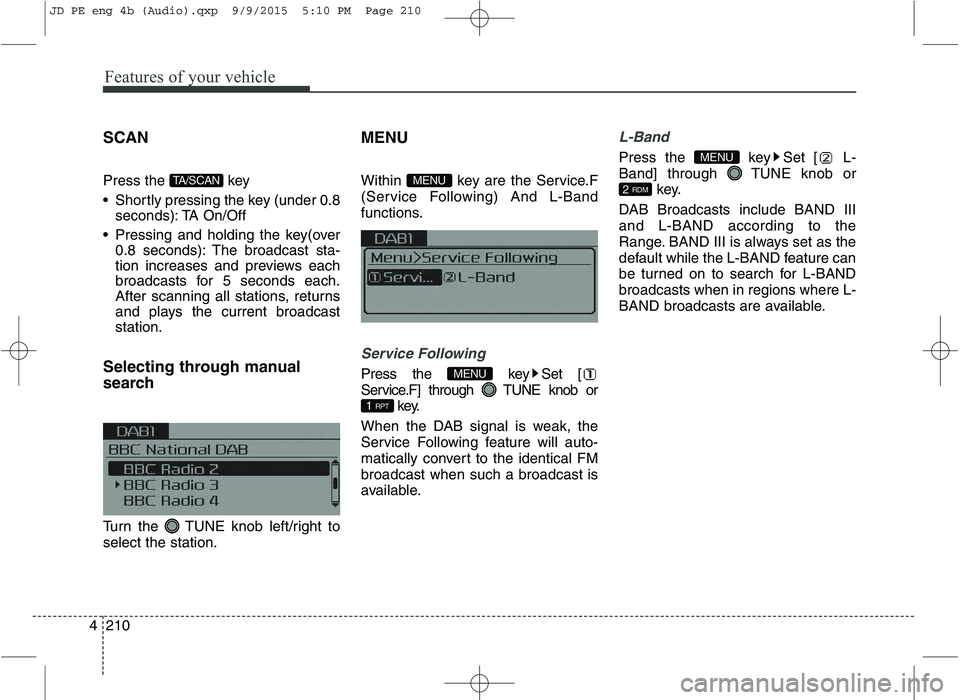
Selecting through manual
search
Turn the TUNE knob left/right to select the station. MENU
Within key are the Service.F
(Service Following) And L-Band
functions.
Service Following
Press the key Set [
Service.F] through TUNE knob or
key.
When the DAB signal is weak, the
Service Following feature will auto-
matically convert to the identical FMbroadcast when such a broadcast is
available.
L-Band
Press the key Set [ L-
Band] through TUNE knob or key.
DAB Broadcasts include BAND IIIand L-BAND according to the
Range. BAND III is always set as the
default while the L-BAND feature can
be turned on to search for L-BANDbroadcasts when in regions where L-
BAND broadcasts are available.
2 RDM
MENU
1 RPT
MENU
MENUTA/SCAN
JD PE eng 4b (Audio).qxp 9/9/2015 5:10 PM Page 210
Page 429 of 643

Driving your vehicle
56
5
Emergency Stop Signal (ESS) The Emergency Stop Signal system
alerts the driver behind by blinking the
stop light when the vehicle is braked rap-
idly and severely.
The system is activated when:
The vehicle suddenly stops (vehicle
speed is over 55km/h and the vehicle
deceleration at greater than 7 m/s 2
)
The ABS is activating
When the vehicle speed is under 40 km/h
and the ABS deactivates or the sudden
stop situation is over, the stop light blink-
ing will stop. Instead, the hazard warning
flasher will turn on automatically.
The hazard warning flasher will turn off
when vehicle speed is over 10km/h after
the vehicle has stopped. Also, it will turn
off when the vehicle is driven at low
speed for some time. You can turn it off
manually by pushing the hazard warning
flasher switch. Good braking practices
Check to be sure the parking brake is
not engaged and that the parking
brake indicator light is out before driv-
ing away.
Driving through water may get the brakes wet. They can also get wet
when the vehicle is washed. Wet
brakes can be dangerous! Your vehicle
will not stop as quickly if the brakes are
wet. Wet brakes may cause the vehicle
to pull to one side.
To dry the brakes, apply the brakes
lightly until the braking action returns to
normal, taking care to keep the vehicle
under control at all times. If the braking
action does not return to normal, stop
as soon as it is safe to do so and we
recommend that you call an authorized
Kia dealer.
Do not coast down hills with the vehicle out of gear. This is extremely haz-
ardous. Keep the vehicle in gear at all
times, use the brakes to slow down,
then shift to a lower gear so that
engine braking will help you maintain a
safe speed.
WARNING
Whenever you leave or park your vehicle, always set the parking
brake as far as possible and fully
engage the vehicle's transaxle
into the P (Park) position. If the
parking brake is not fully
engaged, the vehicle may move
inadvertently and injure yourself
and others.
All vehicles should always have the parking brake fully engaged
when parking to avoid inadver-
tent movement of the vehicle
which can injure occupants orpedestrians.
CAUTION
The Emergency Stop Signal (ESS)
system will not work if the hazardwarning flasher is already on.
JD PE eng 5.QXP 9/30/2015 5:25 PM Page 56
Page 441 of 643
Driving your vehicle
68
5
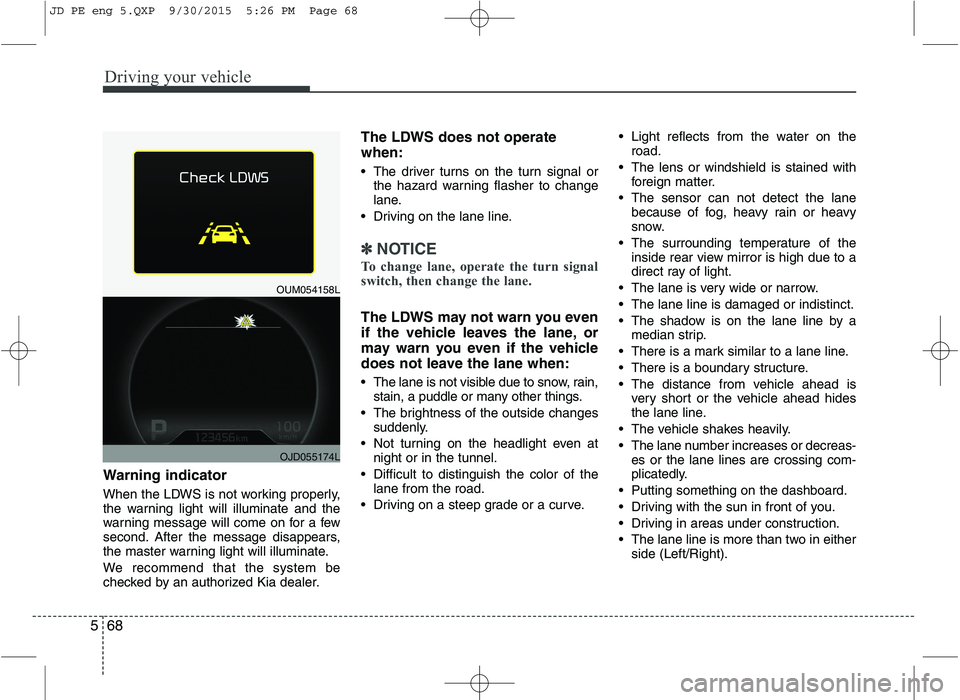
Warning indicator
When the LDWS is not working properly,
the warning light will illuminate and the
warning message will come on for a few
second. After the message disappears,
the master warning light will illuminate.
We recommend that the system be
checked by an authorized Kia dealer. The LDWS does not operate when:
The driver turns on the turn signal or
the hazard warning flasher to change
lane.
Driving on the lane line.
✽✽ NOTICE
To change lane, operate the turn signal
switch, then change the lane.
The LDWS may not warn you even
if the vehicle leaves the lane, or
may warn you even if the vehicle
does not leave the lane when:
The lane is not visible due to snow, rain, stain, a puddle or many other things.
The brightness of the outside changes suddenly.
Not turning on the headlight even at night or in the tunnel.
Difficult to distinguish the color of the lane from the road.
Driving on a steep grade or a curve. Light reflects from the water on the
road.
The lens or windshield is stained with foreign matter.
The sensor can not detect the lane because of fog, heavy rain or heavy
snow.
The surrounding temperature of the inside rear view mirror is high due to a
direct ray of light.
The lane is very wide or narrow.
The lane line is damaged or indistinct.
The shadow is on the lane line by a median strip.
There is a mark similar to a lane line.
There is a boundary structure.
The distance from vehicle ahead is very short or the vehicle ahead hides
the lane line.
The vehicle shakes heavily.
The lane number increases or decreas- es or the lane lines are crossing com-
plicatedly.
Putting something on the dashboard.
Driving with the sun in front of you.
Driving in areas under construction.
The lane line is more than two in either side (Left/Right).
OUM054158L
OJD055174L
JD PE eng 5.QXP 9/30/2015 5:26 PM Page 68
Page 443 of 643
Driving your vehicle
70
5
Operation
If a traffic sign that is relevant to your
vehicle is passed, the system displays
the information of the speed limits and
no passing restrictions to the driver. When the driver turn on the ignition,
the system displays stored information
of the speed limit before turn off theignition.
Sometimes different speed limits are displayed for the same road. The infor-
mation displayed depending on the sit-
uation. Because, traffic signs with addi-
tional sign (e.g rainy, arrow...) are also
detected and compared with vehicle
interior data(e.g wiper operation, turnsignal...).
The system can update the speed limit information without visible speed limit
signs in the following situations.
- When you change your driving direc-
tion with right or left or U turning.
- When vehicle changes roads. (e.g. from highway to country road…)
- When you enter or exit into town or village.
✽✽ NOTICE
If speed limit value has the difference
between cluster and navigation, check
the speed unit setting in navigation.
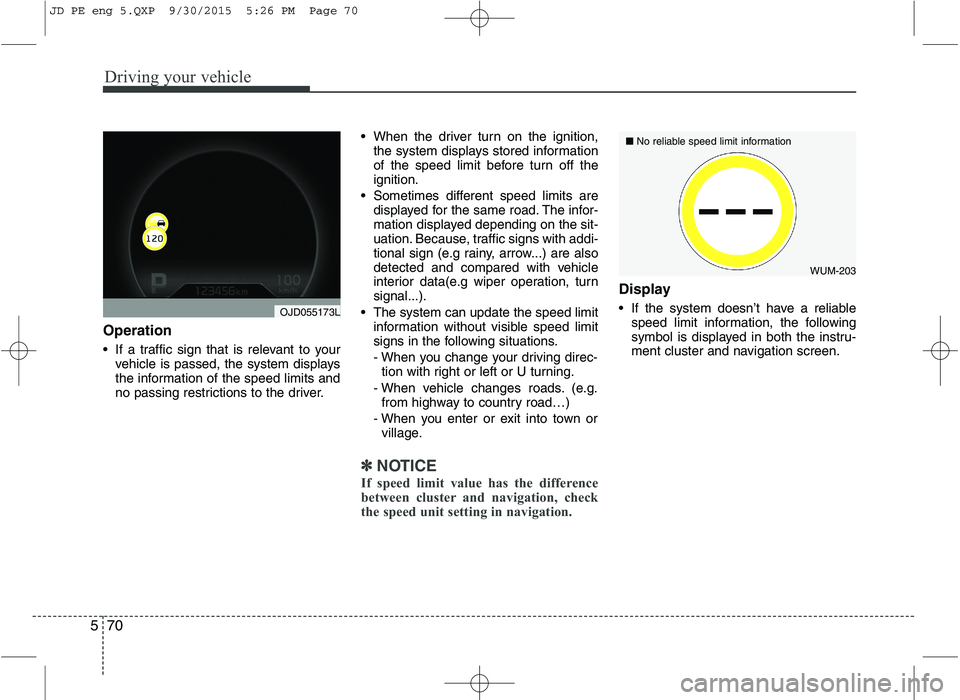
Display
If the system doesn’t have a reliable speed limit information, the following
symbol is displayed in both the instru-
ment cluster and navigation screen.
WUM-203
■
No reliable speed limit information
OJD055173L
JD PE eng 5.QXP 9/30/2015 5:26 PM Page 70
Page 449 of 643
Driving your vehicle
76
5
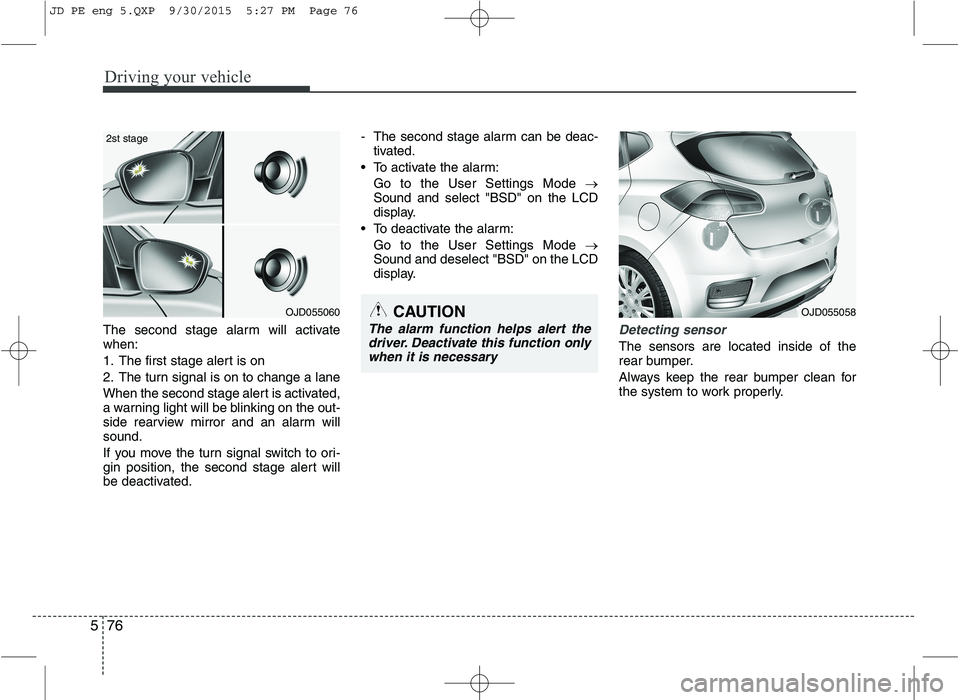
The second stage alarm will activate when:
1. The first stage alert is on
2. The turn signal is on to change a lane
When the second stage alert is activated,
a warning light will be blinking on the out-
side rearview mirror and an alarm willsound.
If you move the turn signal switch to ori-
gin position, the second stage alert will
be deactivated. - The second stage alarm can be deac-
tivated.
To activate the alarm: Go to the User Settings Mode
Sound and select "BSD" on the LCD
display.
To deactivate the alarm: Go to the User Settings Mode
Sound and deselect "BSD" on the LCD
display.Detecting sensor
The sensors are located inside of the
rear bumper.
Always keep the rear bumper clean for
the system to work properly.
OJD055060
2st stage
CAUTION
The alarm function helps alert the
driver. Deactivate this function only
when it is necessary
OJD055058
JD PE eng 5.QXP 9/30/2015 5:27 PM Page 76
Page 466 of 643
593
Driving your vehicle
Following distance
Stay at least twice as far behind the vehi-
cle ahead as you would when driving
your vehicle without a trailer. This can
help you avoid situations that require
heavy braking and sudden turns.
Passing
You’ll need more passing distance up
ahead when you’re towing a trailer. And,
because of the increased vehicle length,
you’ll need to go much farther beyond the
passed vehicle before you can return to
your lane.
Backing up
Hold the bottom of the steering wheel
with one hand. Then, to move the trailer
to the left, just move your hand to the left.
To move the trailer to the right, move your
hand to the right. Always back up slowly
and, if possible, have someone guide you.
Making turns
When you’re turning with a trailer, make
wider turns than normal. Do this so your
trailer won’t strike soft shoulders, curbs,
road signs, trees, or other objects. Avoid
jerky or sudden maneuvers. Signal well
in advance.
Turn signals when towing a trailer
When you tow a trailer, your vehicle has
to have a different turn signal flasher and
extra wiring. The green arrows on your
instrument panel will flash whenever you
signal a turn or lane change. Properly
connected, the trailer lights will also flash
to alert other drivers you’re about to turn,
change lanes, or stop.
When towing a trailer, the green arrows
on your instrument panel will flash for
turns even if the bulbs on the trailer are
burned out. Thus, you may think drivers
behind you are seeing your signals
when, in fact, they are not. It is important
to check occasionally to be sure the trail-
er bulbs are still working. You must also
check the lights every time you discon-
nect and then reconnect the wires.
Do not connect a trailer lighting system
directly to your vehicle’s lighting system.
Use only an approved trailer wiring har-
ness.
An authorized Kia dealer can assist you
in installing the wiring harness.WARNING
Failure to use an approved trailer wiring harness could result in dam-
age to the vehicle electrical system
and/or personal injury.
JD PE eng 5.QXP 9/30/2015 5:28 PM Page 93