change time KIA CEED 2016 Owner's Manual
[x] Cancel search | Manufacturer: KIA, Model Year: 2016, Model line: CEED, Model: KIA CEED 2016Pages: 643, PDF Size: 38.19 MB
Page 279 of 643
Features of your vehicle
196
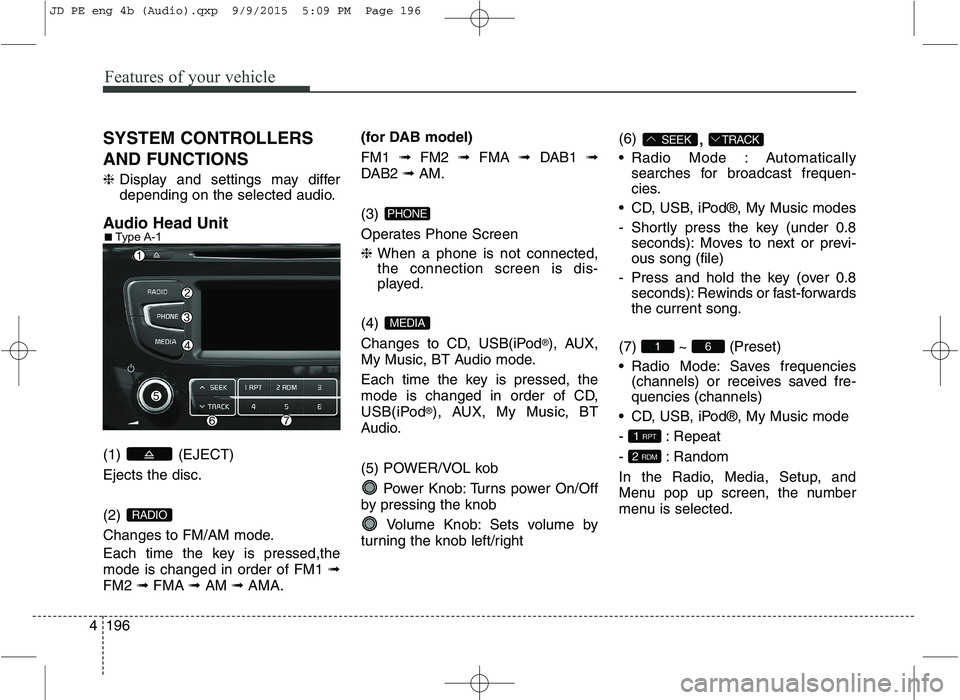
4 SYSTEM CONTROLLERS AND FUNCTIONS ❈
Display and settings may differ
depending on the selected audio.
Audio Head Unit (1) (EJECT) Ejects the disc. (2)
Changes to FM/AM mode.
Each time the key is pressed,the mode is changed in order of FM1 ➟
FM2 ➟FMA ➟AM ➟AMA. (for DAB model) FM1
➟FM2 ➟FMA ➟DAB1 ➟
DAB2 ➟AM.
(3)
Operates Phone Screen ❈ When a phone is not connected,
the connection screen is dis-
played.
(4)
Changes to CD, USB(iPod ®
), AUX,
My Music, BT Audio mode.
Each time the key is pressed, the
mode is changed in order of CD,
USB(iPod ®
), AUX, My Music, BT
Audio.
(5) POWER/VOL kob
Power Knob: Turns power On/Off
by pressing the knob
Volume Knob: Sets volume by
turning the knob left/right (6)
,
Radio Mode : Automatically searches for broadcast frequen-
cies.
CD, USB, iPod®, My Music modes
- Shortly press the key (under 0.8 seconds): Moves to next or previ- ous song (file)
- Press and hold the key (over 0.8 seconds): Rewinds or fast-forwardsthe current song.
(7) ~ (Preset)
Radio Mode: Saves frequencies (channels) or receives saved fre- quencies (channels)
CD, USB, iPod®, My Music mode
- : Repeat
- : Random
In the Radio, Media, Setup, and
Menu pop up screen, the number
menu is selected.
2 RDM
1 RPT
61
TRACKSEEK
MEDIA
PHONE
RADIO
■
Type A-1
JD PE eng 4b (Audio).qxp 9/9/2015 5:09 PM Page 196
Page 280 of 643
Features of your vehicle
4197
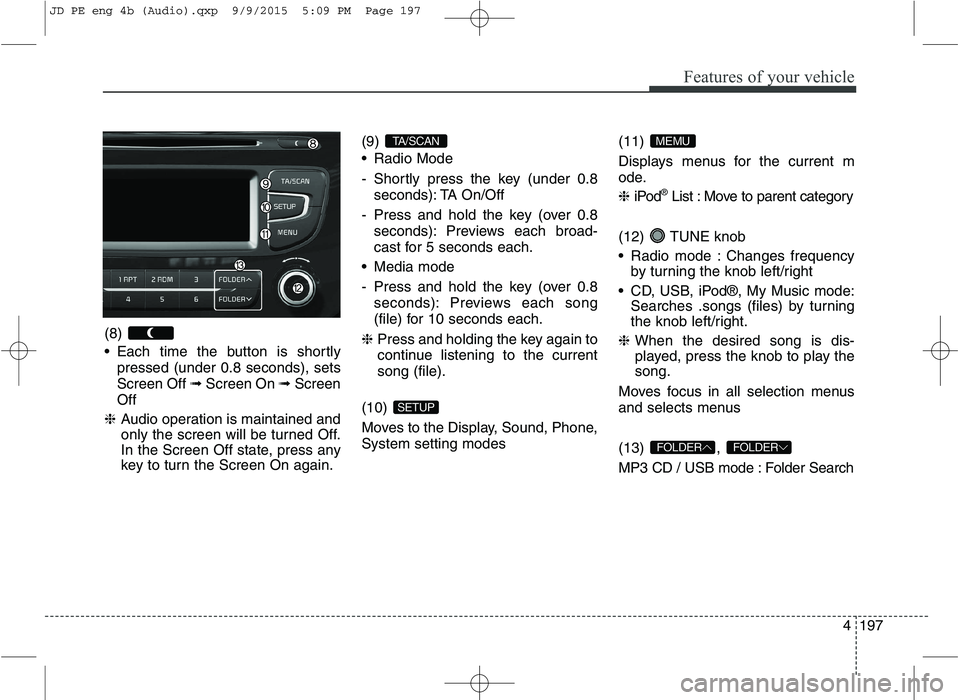
(8)
Each time the button is shortly
pressed (under 0.8 seconds), sets Screen Off ➟Screen On ➟Screen
Off
❈ Audio operation is maintained and
only the screen will be turned Off.
In the Screen Off state, press any
key to turn the Screen On again. (9)
Radio Mode
- Shortly press the key (under 0.8
seconds): TA On/Off
- Press and hold the key (over 0.8 seconds): Previews each broad-
cast for 5 seconds each.
Media mode
- Press and hold the key (over 0.8 seconds): Previews each song
(file) for 10 seconds each.
❈ Press and holding the key again to
continue listening to the currentsong (file).
(10)
Moves to the Display, Sound, Phone, System setting modes (11)
Displays menus for the current m
ode. ❈
iPod ®
List : Move to parent category
(12) TUNE knob
Radio mode : Changes frequency by turning the knob left/right
CD, USB, iPod®, My Music mode: Searches .songs (files) by turning
the knob left/right.
❈ When the desired song is dis-
played, press the knob to play the song.
Moves focus in all selection menus
and selects menus (13) ,
MP3 CD / USB mode : Folder Search
FOLDERFOLDER
MEMU
SETUP
TA/SCAN
JD PE eng 4b (Audio).qxp 9/9/2015 5:09 PM Page 197
Page 281 of 643
Features of your vehicle
198
4 Audio Head Unit
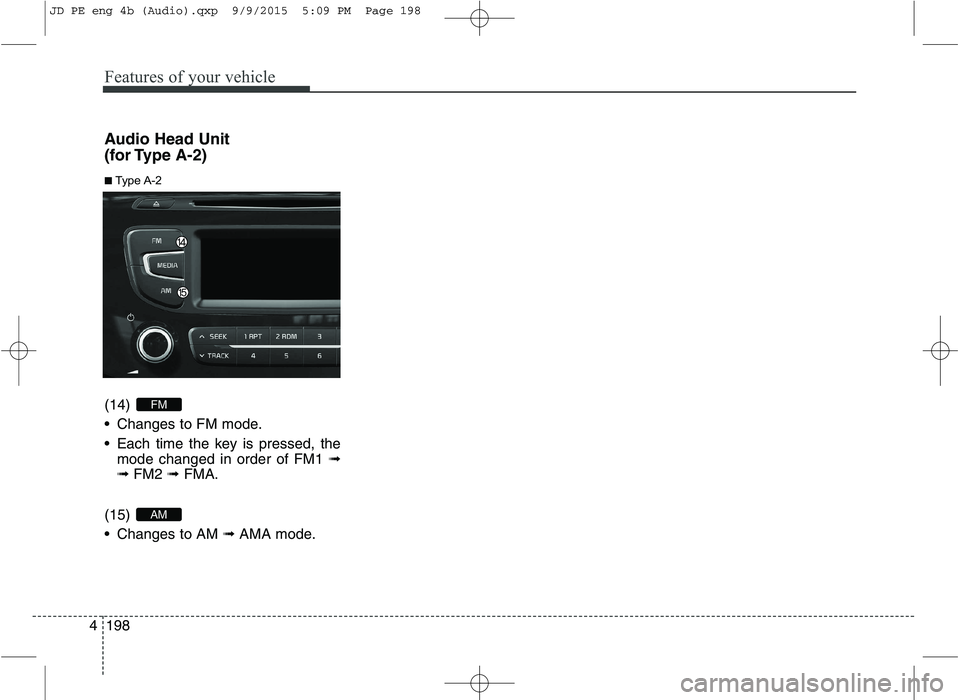
(for Type A-2) (14)
Changes to FM mode.
Each time the key is pressed, the
mode changed in order of FM1 ➟
➟ FM2 ➟ FMA.
(15)
Changes to AM ➟ AMA mode.
AM
FM
■ Type A-2
JD PE eng 4b (Audio).qxp 9/9/2015 5:09 PM Page 198
Page 282 of 643
![KIA CEED 2016 Owners Manual Features of your vehicle
4199
SETUP
Display Settings
Press the key Select [Display]
through TUNE knob or key
Select menu through TUNE knob
Mode Pop up
[Mode Pop up] Changes . selection mode](/img/2/57945/w960_57945-281.png "KIA CEED 2016 Owners Manual Features of your vehicle
4199
SETUP
Display Settings
Press the key Select [Display]
through TUNE knob or key
Select menu through TUNE knob
Mode Pop up
[Mode Pop up] Changes . selection mode")
Features of your vehicle
4199
SETUP
Display Settings
Press the key Select [Display]
through TUNE knob or key
Select menu through TUNE knob
Mode Pop up
[Mode Pop up] Changes . selection mode
or key to display the mode change pop up screen.
Scroll text
[Scroll text] Set /
Maintains scroll
: Scrolls only one (1) time.
Song Info
When playing an MP3 file, select the
desired display info from ‘Folder/File’
or ‘Album/Artist/Song’. Sound Settings
Press the key Select [Sound]
through TUNE knob or key
Select menu through TUNE knob
2
RDM
SETUP
OFF
ON
OFFON
MEDIA
RADIO
ON
1 RPT
SETUP
JD PE eng 4b (Audio).qxp 9/9/2015 5:09 PM Page 199
Page 300 of 643
![KIA CEED 2016 Owners Manual Features of your vehicle
4217
Delete All
Press the key Set [ Del.All]
through the TUNE knob or
key. Deletes all songs of My Music.
Delete Selection
Press the key Set [
Del.Sel] through the TUNE](/img/2/57945/w960_57945-299.png "KIA CEED 2016 Owners Manual Features of your vehicle
4217
Delete All
Press the key Set [ Del.All]
through the TUNE knob or
key. Deletes all songs of My Music.
Delete Selection
Press the key Set [
Del.Sel] through the TUNE")
Features of your vehicle
4217
Delete All
Press the key Set [ Del.All]
through the TUNE knob or
key. Deletes all songs of My Music.
Delete Selection
Press the key Set [
Del.Sel] through the TUNE knob
or key. Songs within My Music are selected and deleted. ➀Select the songs you wish to
delete from the list. ➁
After selecting, press the
key and select the delete menu.
✽✽
NOTICE - USING THE My
Music
Even if memory is available, a maximum of 6,000 songs can be
stored.
The same song can be copied up to 1,000 times.
Memory info can be checked in the System menu of Setup.
AUX
AUX is used to play external MEDIA
currently connected with the AUX
terminal.
AUX mode will automatically start
when an external device is connect-
ed with the AUX terminal.
If an external device is connected,
you can also press the key to
change to AUX mode. ❈ AUX mode cannot be started
unless there is an external device
connected to the AUX terminal.
✽✽ NOTICE - USING THE AUX
Fully insert the AUX cable into the
AUX terminal for use.
MEDIA
MENU
6
MENU
5
MENU
JD PE eng 4b (Audio).qxp 9/9/2015 5:10 PM Page 217
Page 313 of 643
Features of your vehicle
230
4 SYSTEM CONTROLLERS AND FUNCTIONS
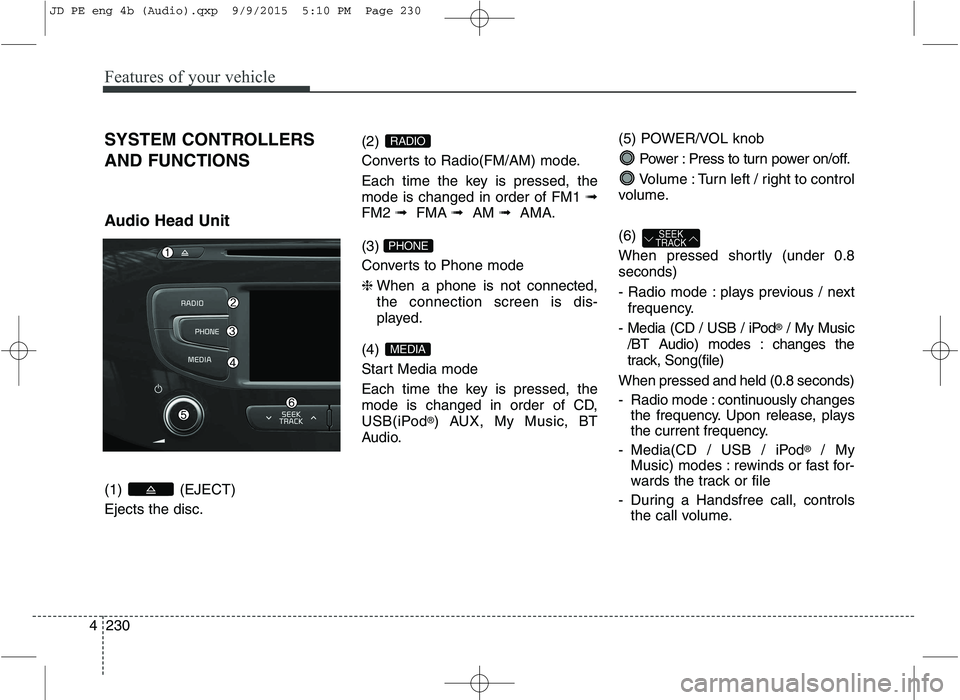
Audio Head Unit (1) (EJECT) Ejects the disc.
(2)
Converts to Radio(FM/AM) mode.
Each time the key is pressed, the mode is changed in order of FM1
➟
FM2 ➟FMA ➟AM ➟AMA.
(3)
Converts to Phone mode ❈ When a phone is not connected, the connection screen is dis-
played.
(4)
Start Media mode
Each time the key is pressed, the
mode is changed in order of CD,
USB(iPod ®
) AUX, My Music, BT
Audio. (5) POWER/VOL knob
Power : Press to turn power on/off.
Volume : Turn left / right to control
volume. (6)
When pressed shortly (under 0.8 seconds)
- Radio mode : plays previous / next frequency.
- Media (CD / USB / iPod ®
/ My Music
/BT Audio) modes : changes the
track, Song(file)
When pressed and held (0.8 seconds)
- Radio mode : continuously changes the frequency. Upon release, plays
the current frequency.
- Media(CD / USB / iPod ®
/ My
Music) modes : rewinds or fast for-
wards the track or file
- During a Handsfree call, controls the call volume.
SEEK
TRACK
MEDIA
PHONE
RADIO
JD PE eng 4b (Audio).qxp 9/9/2015 5:10 PM Page 230
Page 314 of 643
Features of your vehicle
4231
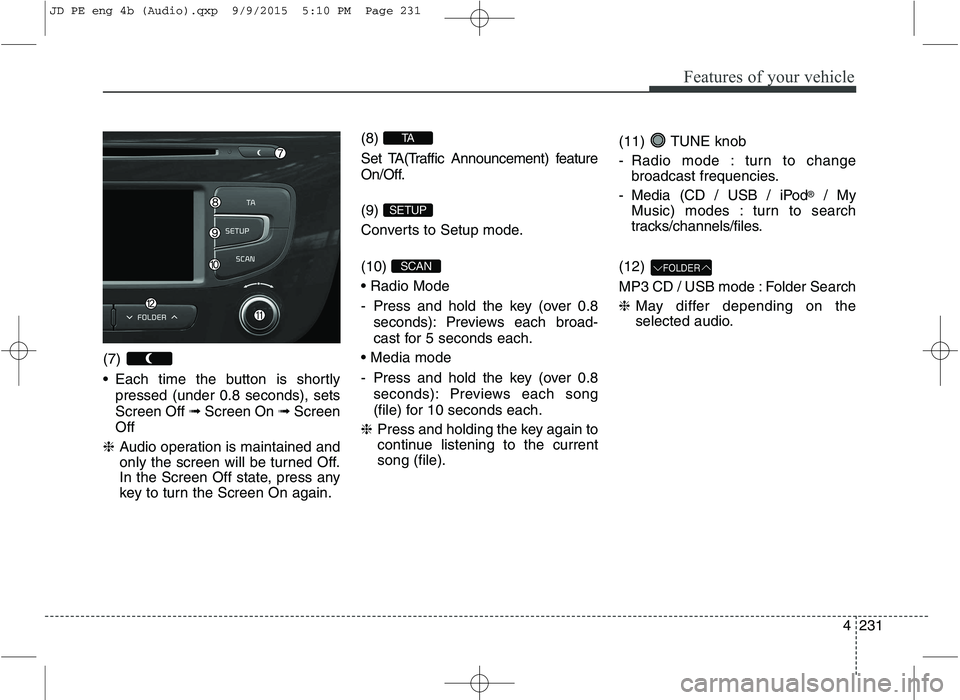
(7)
Each time the button is shortly
pressed (under 0.8 seconds), sets Screen Off ➟Screen On ➟Screen
Off
❈ Audio operation is maintained and
only the screen will be turned Off.
In the Screen Off state, press any
key to turn the Screen On again. (8)
Set TA(Traffic Announcement) feature
On/Off. (9)
Converts to Setup mode. (10)
- Press and hold the key (over 0.8
seconds): Previews each broad-
cast for 5 seconds each.
- Press and hold the key (over 0.8 seconds): Previews each song
(file) for 10 seconds each.
❈ Press and holding the key again to
continue listening to the current song (file). (11) TUNE knob
- Radio mode : turn to change
broadcast frequencies.
- Media (CD / USB / iPod ®
/ My
Music) modes : turn to search
tracks/channels/files.
(12)
MP3 CD / USB mode : Folder Search ❈ May differ depending on the
selected audio.
FOLDERSCAN
SETUP
TA
JD PE eng 4b (Audio).qxp 9/9/2015 5:10 PM Page 231
Page 320 of 643
Features of your vehicle
4237
AUDIO CD MODE Basic Mode Screen
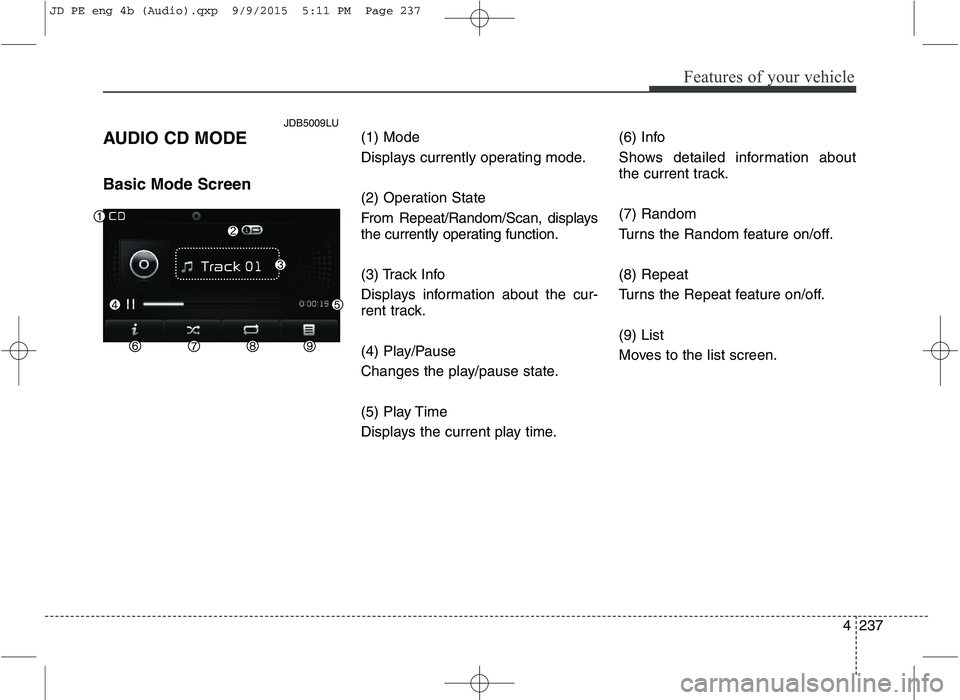
(1) Mode
Displays currently operating mode.
(2) Operation State
From Repeat/Random/Scan, displays
the currently operating function.
(3) Track Info
Displays information about the cur-
rent track.
(4) Play/Pause
Changes the play/pause state.
(5) Play Time
Displays the current play time.(6) Info
Shows detailed information about
the current track. (7) Random
Turns the Random feature on/off. (8) Repeat
Turns the Repeat feature on/off. (9) List
Moves to the list screen.
JDB5009LU
JD PE eng 4b (Audio).qxp 9/9/2015 5:11 PM Page 237
Page 323 of 643
Features of your vehicle
240
4
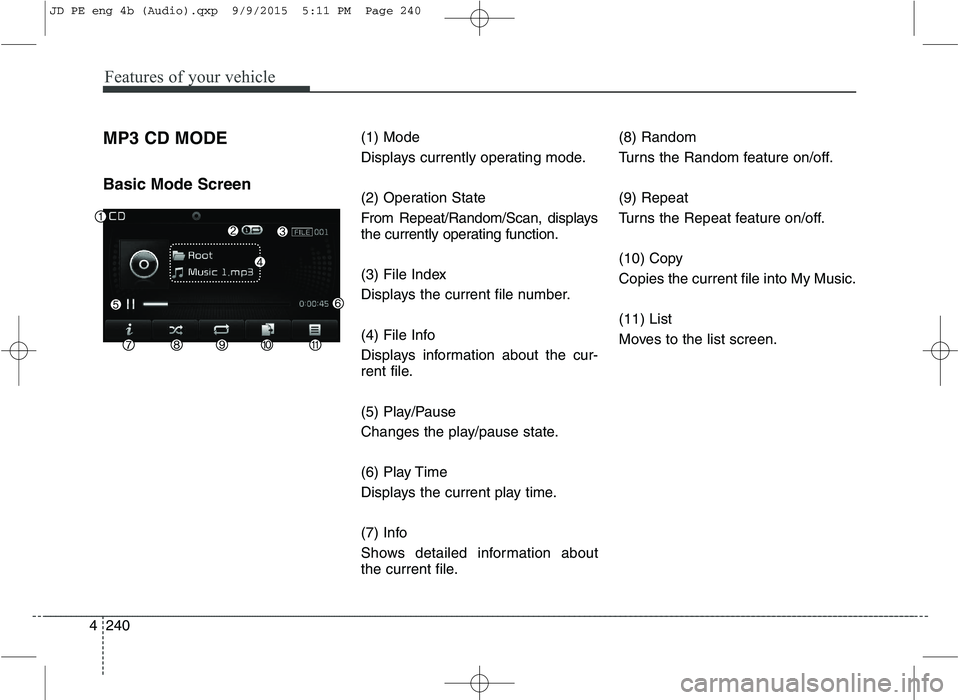
MP3 CD MODE Basic Mode Screen (1) Mode
Displays currently operating mode.
(2) Operation State
From Repeat/Random/Scan, displays
the currently operating function.
(3) File Index
Displays the current file number.
(4) File Info
Displays information about the cur-
rent file.
(5) Play/Pause
Changes the play/pause state.
(6) Play Time
Displays the current play time.
(7) Info
Shows detailed information about
the current file.(8) Random
Turns the Random feature on/off. (9) Repeat
Turns the Repeat feature on/off.
(10) Copy Copies the current file into My Music. (11) List
Moves to the list screen.
JD PE eng 4b (Audio).qxp 9/9/2015 5:11 PM Page 240
Page 326 of 643
Features of your vehicle
4243
Random
Press the button to play files in
random order.
Each time the button is pressed, the
feature changes in order of Random
Folder ➟ Random All ➟ Off.
Random Folder : Plays all files within the current folder in Random
order.
Random All : Plays all files in Random order.
Repeat
Press the button to repeat the
current file or folder.
Each time the button is pressed, the
feature changes in order of Repeat➟Repeat Folder ➟Off.
Repeat: Repeats the current file.
Repeat Folder: Repeats all files within the current Folder.
Copying Files
Press the button to copy the current file into My Music.
✽✽ NOTICE
Selecting another feature during
copying will display a pop-up asking
whether you wish to cancel copying.
To cancel, select 'Yes’.
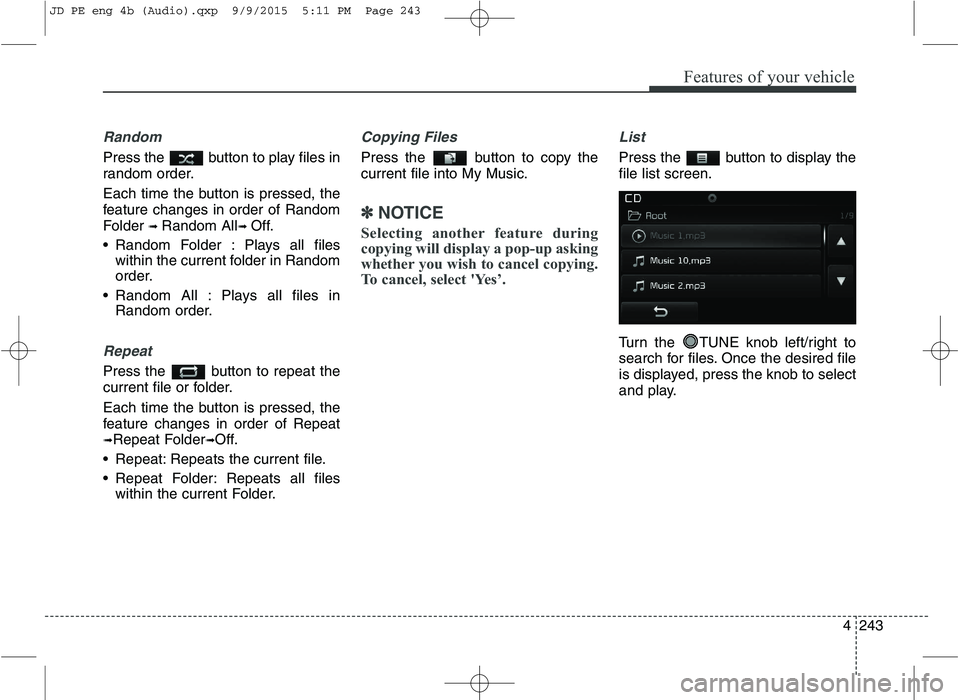
List
Press the button to display the file list screen.
Turn the TUNE knob left/right to
search for files. Once the desired file
is displayed, press the knob to select
and play.
JD PE eng 4b (Audio).qxp 9/9/2015 5:11 PM Page 243