change time KIA CEED 2016 User Guide
[x] Cancel search | Manufacturer: KIA, Model Year: 2016, Model line: CEED, Model: KIA CEED 2016Pages: 643, PDF Size: 38.19 MB
Page 206 of 643
4123
Features of your vehicle
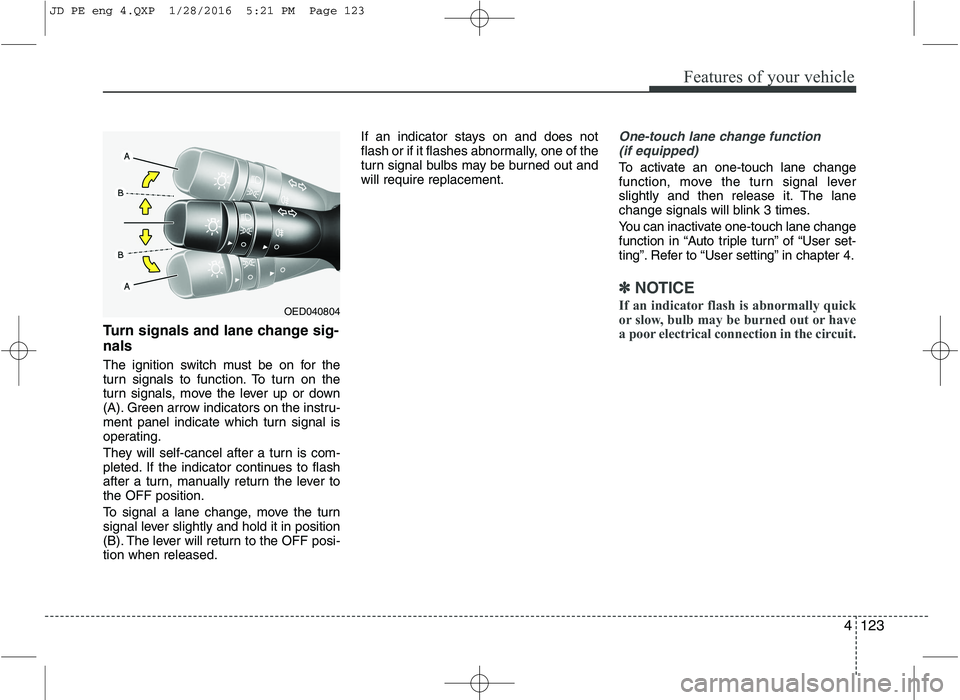
Turn signals and lane change sig- nals
The ignition switch must be on for the
turn signals to function. To turn on the
turn signals, move the lever up or down
(A). Green arrow indicators on the instru-
ment panel indicate which turn signal is
operating.
They will self-cancel after a turn is com-
pleted. If the indicator continues to flash
after a turn, manually return the lever tothe OFF position.
To signal a lane change, move the turn
signal lever slightly and hold it in position
(B). The lever will return to the OFF posi-tion when released.If an indicator stays on and does not
flash or if it flashes abnormally, one of the
turn signal bulbs may be burned out andwill require replacement.
One-touch lane change function
(if equipped)
To activate an one-touch lane change
function, move the turn signal lever
slightly and then release it. The lane
change signals will blink 3 times.
You can inactivate one-touch lane change
function in “Auto triple turn” of “User set-
ting”. Refer to “User setting” in chapter 4.
✽✽ NOTICE
If an indicator flash is abnormally quick
or slow, bulb may be burned out or have
a poor electrical connection in the circuit.
OED040804
JD PE eng 4.QXP 1/28/2016 5:21 PM Page 123
Page 214 of 643
4131
Features of your vehicle
Interior lamp AUTO cut
When all entrances are closed, if youlock the vehicle by using the transmit-
ter or the smart key, all interior lamp
will be off after a few seconds.
If you do not operate anything in the vehicle after turning off the engine, the
lights will turn off after 20 minutes. Map lamp
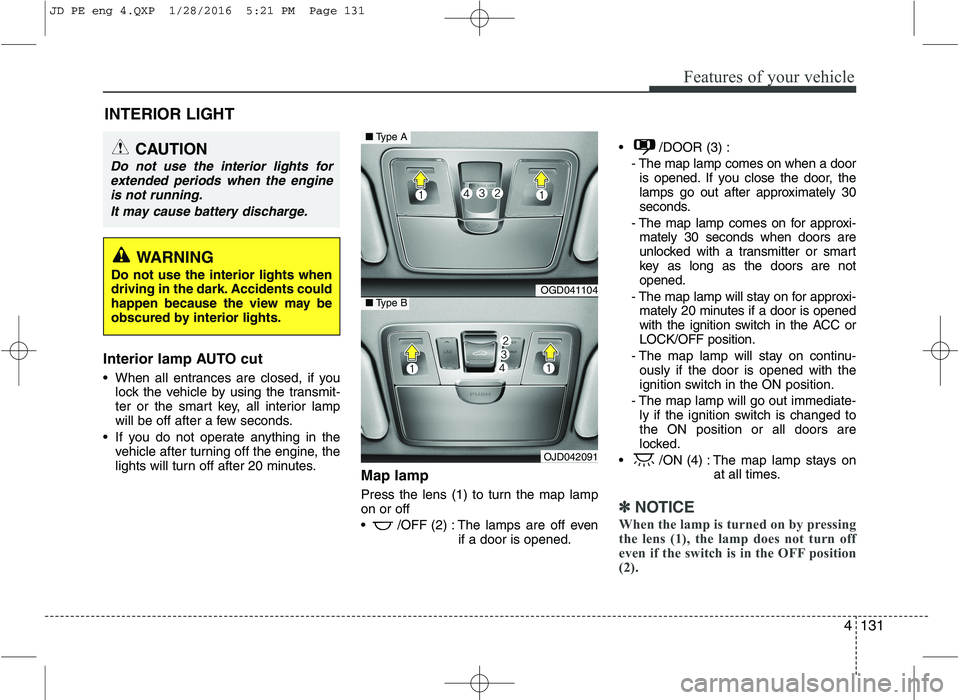
Press the lens (1) to turn the map lamp on or off
/OFF (2) : The lamps are off even
if a door is opened. /DOOR (3) :
- The map lamp comes on when a dooris opened. If you close the door, the
lamps go out after approximately 30
seconds.
- The map lamp comes on for approxi- mately 30 seconds when doors are
unlocked with a transmitter or smart
key as long as the doors are notopened.
- The map lamp will stay on for approxi- mately 20 minutes if a door is opened
with the ignition switch in the ACC orLOCK/OFF position.
- The map lamp will stay on continu- ously if the door is opened with the
ignition switch in the ON position.
- The map lamp will go out immediate- ly if the ignition switch is changed tothe ON position or all doors are
locked.
/ON (4) : The map lamp stays on at all times.
✽✽NOTICE
When the lamp is turned on by pressing
the lens (1), the lamp does not turn off
even if the switch is in the OFF position(2).
INTERIOR LIGHT
CAUTION
Do not use the interior lights for extended periods when the engineis not running.
It may cause battery discharge.
WARNING
Do not use the interior lights when
driving in the dark. Accidents could
happen because the view may be
obscured by interior lights.
OGD041104
OJD042091
■ Type A
■Type B
JD PE eng 4.QXP 1/28/2016 5:21 PM Page 131
Page 226 of 643

4143
Features of your vehicle
✽✽NOTICE
When using the air conditioning sys- tem, monitor the temperature gauge
closely while driving up hills or in
heavy traffic when outside tempera-
tures are high. Air conditioning sys-
tem operation may cause engine over-
heating. Continue to use the blower
fan but turn the air conditioning sys-
tem off if the temperature gauge indi-
cates engine overheating.
When opening the windows in humid weather air conditioning may create
water droplets inside the vehicle.
Since excessive water droplets may
cause damage to electrical equipment,
air conditioning should only be used
with the windows closed.Air conditioning system operation tips
If the vehicle has been parked in direct
sunlight during hot weather, open the
windows for a short time to let the hot
air inside the vehicle escape.
Use air conditioning to reduce humidi- ty and moisture inside the vehicle on
rainy or humid days.
During air conditioning system opera- tion, you may occasionally notice a slightchange in engine speed as the air con-
ditioning compressor cycles. This is a
normal system operation characteristic.
Use the air conditioning system every month only for a few minutes to ensure
maximum system performance.
When using the air conditioning sys- tem, you may notice clear water drip-
ping (or even puddling) on the ground
under the passenger side of the vehi-
cle. This is a normal system operation
characteristic.
Operating the air conditioning system in the recirculated air position provides
maximum cooling, however, continual
operation in this mode may cause the
air inside the vehicle to become stale.
During cooling operation, you may occasionally notice a misty air flow
because of rapid cooling and humid air
intake. This is a normal system opera-
tion characteristic. Climate control air filter The climate control air filter installed
behind the glove box filters the dust or
other pollutants that come into the vehi-cle from the outside through the heating
and air conditioning system. If dust or
other pollutants accumulate in the filter
over a period of time, the air flow from the
air vents may decrease, resulting in
moisture accumulation on the inside of
the windshield even when the outside
(fresh) air position is selected. If this hap-
pens, we recommend that the climate
control air filter be replaced by an author-
ized Kia dealer.
1LDA5047
Outside air
Recirculatedair
Climate control air filter Blower
Evaporatorcore Heater core
JD PE eng 4.QXP 1/28/2016 5:23 PM Page 143
Page 227 of 643
Features of your vehicle
144
4
✽✽
NOTICE
Replace the filter according to the Maintenance Schedule.
If the car is being driven in severe
conditions such as dusty, rough roads,
more frequent climate control air fil-
ter inspections and changes are
required.
When the air flow rate suddenly
decreases, we recommend that the
system be checked by an authorized
Kia dealer.Checking the amount of air con-
ditioner refrigerant and compres-sor lubricant
When the amount of refrigerant is low,
the performance of the air conditioning is
reduced. Overfilling also has a bad influ-ence on the air conditioning system.
Therefore, if abnormal operation is found,
we recommend that the system be inspect-
ed by an authorized Kia dealer.
*: Your vehicle is filled with R-134a or R-1234yf according to the regulation in
your country at the time of producing.
You can find out which air conditioning
refrigerant is applied your vehicle at
the label inside of hood. Refer to chap-
ter 8 for more detail location of air con-
ditioning refrigerant label.
WARNING - Vehicles
equipped with R-1234yf*
Because the refrigerant
is mildly inflammable
and at very high pres-
sure, the air conditioning
system should only be
serviced by trained and
certified technicians. It is
important that the cor-rect type and amount of
oil and refrigerant is used.
Otherwise, it may cause damage to
the vehicle and personal injury.
WARNING - Vehicles
equipped with R-134a*
Because the refrigerant
is at very high pressure,the air conditioning sys-
tem should only be
serviced by trained and
certified technicians. It is importantthat the correct type and amount of
oil and refrigerant is used.
Otherwise, it may cause damage to
the vehicle and personal injury.
JD PE eng 4.QXP 1/28/2016 5:23 PM Page 144
Page 229 of 643

Features of your vehicle
146
4
Automatic heating and air condi- tioning The automatic climate control system is
controlled by simply setting the desired
temperature.
You can choose either the soft mode or
fast mode to select the fan speed.
Soft mode : The wind blows gently.
Fast mode : The wind blows heavier than the soft mode to reach the selected tem-
perature fast.Each time you press the AUTO button,
the mode will change as follows:
Soft mode Fast mode
The Full Automatic Temperature Control
(FATC) system automatically controls the
heating and cooling system as follows:
1. Press the AUTO button.
The modes, fan speeds, air intake and air-conditioning will be controlled auto-
matically according to the temperaturesetting.
OJD042110
OJD042119
Soft mode
Fast mode
JD PE eng 4.QXP 1/28/2016 5:23 PM Page 146
Page 238 of 643
4155
Features of your vehicle
Air conditioning system operation tips
If the vehicle has been parked in directsunlight during hot weather, open the
windows for a short time to let the hot
air inside the vehicle escape.
Use air conditioning to reduce humidi- ty and moisture inside the vehicle on
rainy or humid days.
During air conditioning system opera- tion, you may occasionally notice aslight change in engine speed as the
air conditioning compressor cycles.
This is a normal system operation
characteristic.
Use the air conditioning system every month only for a few minutes to ensure
maximum system performance. When using the air conditioning sys-
tem, you may notice clear water drip-
ping (or even puddling) on the ground
under the passenger side of the vehi-
cle. This is a normal system operation
characteristic.
Operating the air conditioning system in the recirculated air position provides
maximum cooling, however, continual
operation in this mode may cause the
air inside the vehicle to become stale.
During cooling operation, you may occasionally notice a misty air flow
because of rapid cooling and humid air
intake. This is a normal system opera-
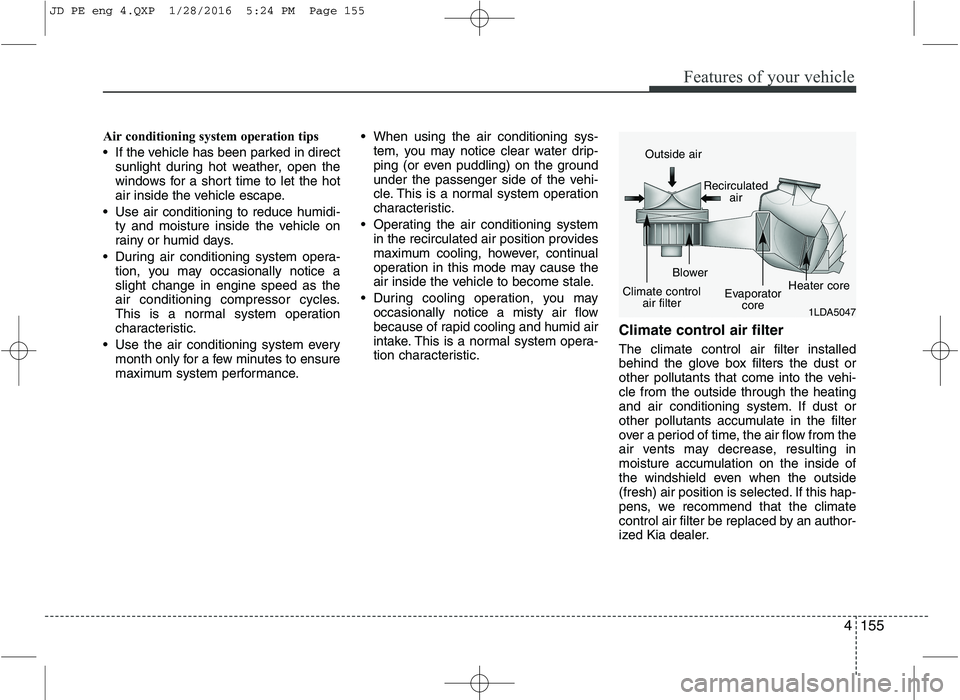
tion characteristic. Climate control air filter The climate control air filter installed
behind the glove box filters the dust or
other pollutants that come into the vehi-cle from the outside through the heating
and air conditioning system. If dust or
other pollutants accumulate in the filter
over a period of time, the air flow from the
air vents may decrease, resulting in
moisture accumulation on the inside of
the windshield even when the outside
(fresh) air position is selected. If this hap-
pens, we recommend that the climate
control air filter be replaced by an author-
ized Kia dealer.
1LDA5047
Outside air
Recirculatedair
Climate control air filter Blower
Evaporatorcore Heater core
JD PE eng 4.QXP 1/28/2016 5:24 PM Page 155
Page 239 of 643
Features of your vehicle
156
4
✽✽
NOTICE
Replace the filter according to the Maintenance Schedule.
If the car is being driven in severe
conditions such as dusty, rough roads,
more frequent climate control air fil-
ter inspections and changes are
required.
When the air flow rate suddenly
decreases, we recommend that the
system be checked by an authorized
Kia dealer.Checking the amount of air con-
ditioner refrigerant and compres-sor lubricant
When the amount of refrigerant is low,
the performance of the air conditioning is
reduced. Overfilling also has a bad influ-ence on the air conditioning system.
Therefore, if abnormal operation is
found, we recommend that the system be
inspected by an authorized Kia dealer.
*: Your vehicle is filled with R-134a or R-1234yf according to the regulation in
your country at the time of producing.
You can find out which air conditioning
refrigerant is applied your vehicle at
the label inside of hood. Refer to chap-
ter 8 for more detail location of air con-
ditioning refrigerant label.
WARNING - Vehicles
equipped with R-1234yf*
Because the refrigerant
is mildly inflammable
and at very high pres-
sure, the air conditioning
system should only be
serviced by trained and
certified technicians. It is
important that the cor-rect type and amount of
oil and refrigerant is used.
Otherwise, it may cause damage to
the vehicle and personal injury.
WARNING - Vehicles
equipped with R-134a*
Because the refrigerant
is at very high pressure,the air conditioning sys-
tem should only be
serviced by trained and
certified technicians. It is importantthat the correct type and amount of
oil and refrigerant is used.
Otherwise, it may cause damage to
the vehicle and personal injury.
JD PE eng 4.QXP 1/28/2016 5:24 PM Page 156
Page 244 of 643
4161
Features of your vehicle
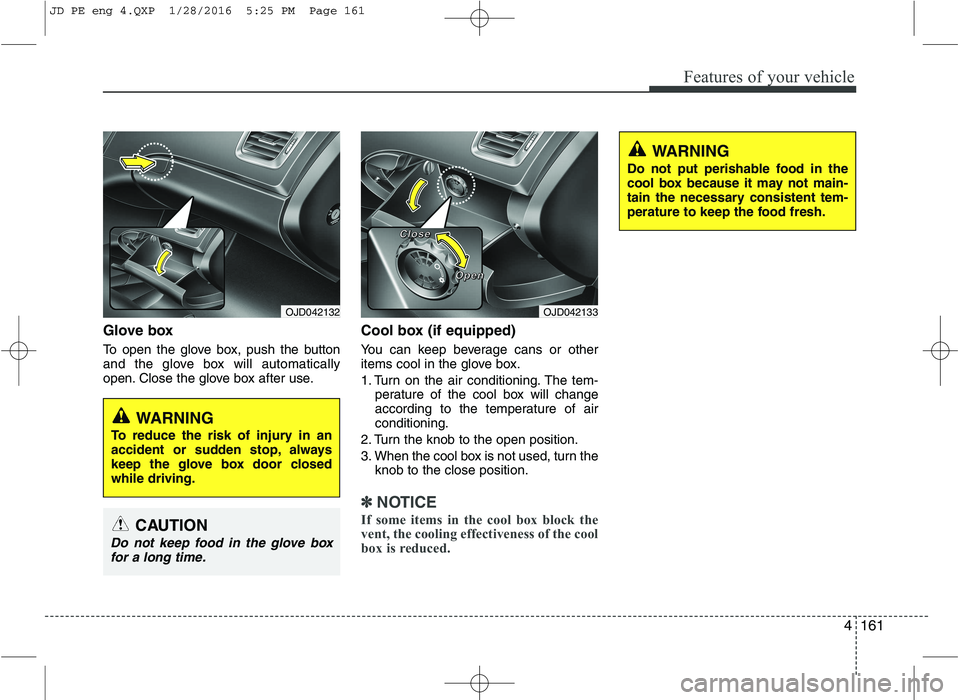
Glove box
To open the glove box, push the button
and the glove box will automatically
open. Close the glove box after use.Cool box (if equipped)
You can keep beverage cans or other
items cool in the glove box.
1. Turn on the air conditioning. The tem-
perature of the cool box will change
according to the temperature of airconditioning.
2. Turn the knob to the open position.
3. When the cool box is not used, turn the knob to the close position.
✽✽ NOTICE
If some items in the cool box block the
vent, the cooling effectiveness of the cool
box is reduced.
OJD042133
WARNING
Do not put perishable food in the
cool box because it may not main-
tain the necessary consistent tem-
perature to keep the food fresh.
OJD042132
WARNING
To reduce the risk of injury in an
accident or sudden stop, always
keep the glove box door closedwhile driving.
CAUTION
Do not keep food in the glove box for a long time.
CCCClllloooosssseeee
OOOOppppeeeennnn
JD PE eng 4.QXP 1/28/2016 5:25 PM Page 161
Page 271 of 643
Features of your vehicle
188
4
(Continued)
If you want to change the posi- tion of device installation,please inquire with your placeof purchase or service mainte-nance center. Technical expert- ise is required to install or dis-assemble the device.
Turn on the car ignition before using this device. Do not oper-ate the audio system for long periods of time with the igni-tion turned off as such opera-tions may lead to battery dis-charge.
Do not subject the device to severe shock or impact. Directpressure onto the front side ofthe monitor may cause damageto the LCD or touch screen.
(Continued)(Continued) When cleaning the device, make sure to turn off the deviceand use a dry and smoothcloth. Never use tough materi- als, chemical cloths, or sol-vents (alcohol, benzene, thin-ners, etc.) as such materials may damage the device panelor cause color/quality deterio-ration
Do not place beverages close to the audio system. Spillingbeverages may lead to systemmalfunction.
In case of product malfunc- tion, please contact your placeof purchase or After Service center.
Placing the audio system with- in an electromagnetic environ-ment may result in noise inter-ference.CAUTION
Operating the device while driving could lead to acci-dents due to a lack of atten-tion to external surroundings.First park the vehicle before operating the device.
Adjust the volume to levels that allow the driver to hearsounds from outside of thevehicle. Driving in a state where external sounds cannotbe heard may lead to acci-dents.
Pay attention to the volume setting when turning thedevice on. A sudden output ofextreme volume upon turningthe device on could lead tohearing impairment. (Adjust the volume to a suitable levelsbefore turning off the device.)
(Continued)
JD PE eng 4b (Audio).qxp 9/9/2015 5:09 PM Page 188
Page 274 of 643
Features of your vehicle
4191
✽✽NOTICE - USING THE iPod ®
DEVICE
Some iPod models may not sup- port communication protocol and
files may not properly play.
Supported iPod models:
- iPhone 3GS/4
- iPod touch 1st~4th generation
- iPod nano 1st~6th generation
- iPod classic
The order of search or playback of songs in the iPod can be different
from the order searched in the
audio system.
If the iPod disabled due to its own malfunction, reset the iPod.
(Reset: Refer to iPod manual)
An iPod may not operate normal- ly on low battery. (Continued)(Continued)
Some iPod devices, such as the
iPhone, can be connected through
the Bluetooth ®
Wireless Technology
interface. The device must have
audio Bluetooth®
Wireless
Technology capability (such as for
stereo headphone Bluetooth®
Wireless Technology ). The device
can play, but it will not be con-
trolled by the audio system.
To use iPod features within the audio, use the cable provided upon purchas-
ing an iPod device.
Skipping or improper operation may occur depending on the characteris-
tics of your iPod/Phone device.
If your iPhone is connected to both the Bluetooth ®
Wireless Technology
and USB, the sound may not be prop-
erly played. In your iPhone, select the
Dock connector or Bluetooth®
Wireless Technology to change the
sound output (source). (Continued)(Continued)
When connecting iPod with the
iPod Power Cable, insert the con-
nector to the multimedia socket
completely. If not inserted com-
pletely, communications between
iPod and audio may be interrupted.
When adjusting the sound effects of the iPod and the audio system,
the sound effects of both devices
will overlap and might reduce or
distort the quality of the sound.
Deactivate (turn off) the equalizer function of an iPod when adjust-
ing the audio system’s volume, and
turn off the equalizer of the audio
system when using the equalizer of
an iPod.
When not using iPod with car audio, detach the iPod cable from
iPod. Otherwise, iPod may remain
in accessory mode, and may not
work properly.
Beside support 1M cable when purchasing iPod/iPhone products,
Long Cable cannot be recognized.
JD PE eng 4b (Audio).qxp 9/9/2015 5:09 PM Page 191