instrument panel KIA CEED 2016 Owner's Manual
[x] Cancel search | Manufacturer: KIA, Model Year: 2016, Model line: CEED, Model: KIA CEED 2016Pages: 643, PDF Size: 38.19 MB
Page 218 of 643

4135
Features of your vehicle
✽✽NOTICE
If you want to defrost and defog the
front windshield, refer to “Windshield
Defrosting and Defogging” in this chap-
ter.
Rear window defroster
The defroster heats the window to
remove frost, fog and thin ice from the
interior and exterior of the rear window,
while engine is running. To activate the rear window defroster,
press the rear window defroster button
located in the center facia switch
panel. The indicator on the rear win-
dow defroster button illuminates whenthe defroster is ON.
To turn off the defroster, press the rear window defroster button again.
✽✽ NOTICE
If there is heavy accumulation of snow on the rear window, brush it off before
operating the rear defroster.
The rear window defroster automati- cally turns off after approximately 20
minutes or when the ignition switch is
turned off.
Outside mirror defroster
(if equipped)
The outside mirror defroster will operate
at the same time you turn on the rear
window defroster.
Front wiper deicer (if equipped)
The front wiper deicer will operate at the
same time you turn on the rear window
defroster.
DEFROSTER
CAUTION
To prevent damage to the conduc-
tors bonded to the inside surface ofthe rear window, never use sharp instruments or window cleaners
containing abrasives to clean thewindow.
OJD042094
OJD042095
■
Manual climate control
■Automatic climate control
JD PE eng 4.QXP 1/28/2016 5:22 PM Page 135
Page 222 of 643
4139
Features of your vehicle
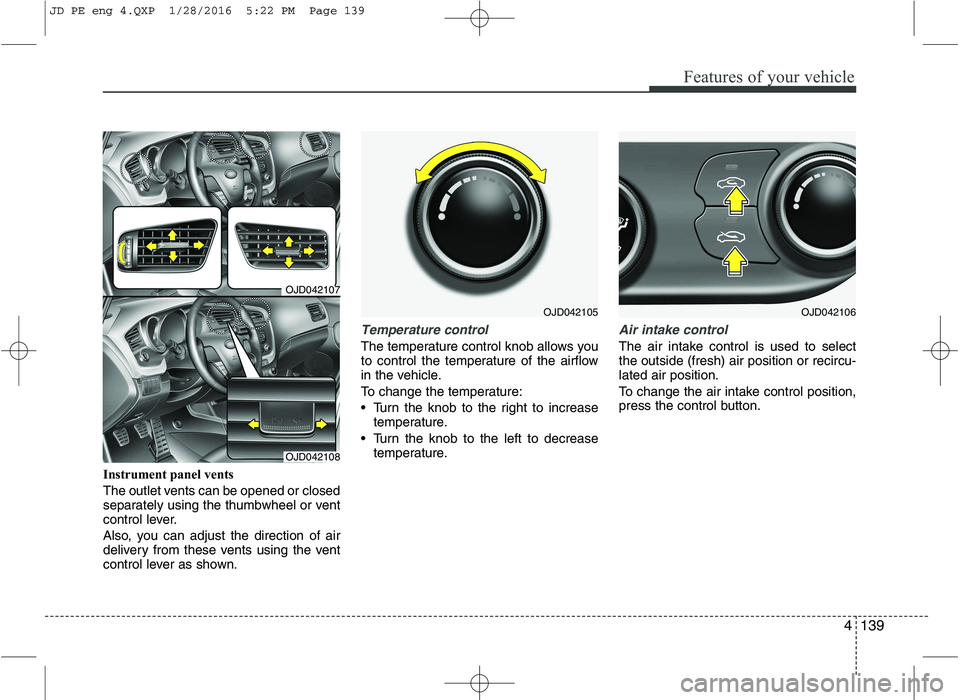
Instrument panel vents
The outlet vents can be opened or closed
separately using the thumbwheel or vent
control lever.
Also, you can adjust the direction of air
delivery from these vents using the vent
control lever as shown.
Temperature control
The temperature control knob allows you
to control the temperature of the airflow
in the vehicle.
To change the temperature:
Turn the knob to the right to increasetemperature.
Turn the knob to the left to decrease temperature.
Air intake control
The air intake control is used to select the outside (fresh) air position or recircu-lated air position.
To change the air intake control position,
press the control button.
OJD042105
OJD042107
OJD042108
OJD042106
JD PE eng 4.QXP 1/28/2016 5:22 PM Page 139
Page 230 of 643
4147
Features of your vehicle
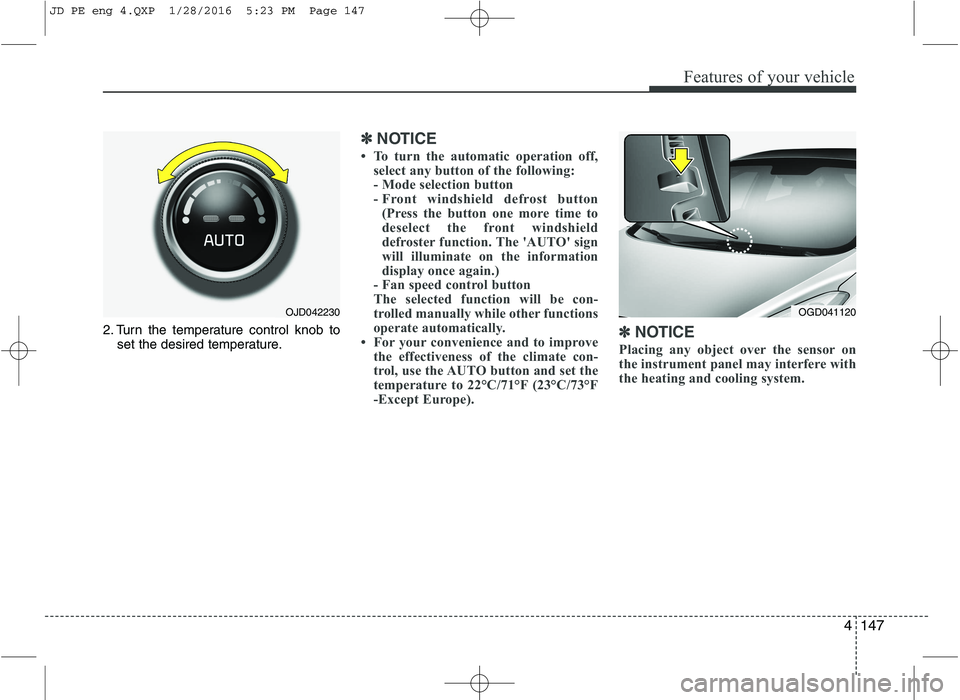
2. Turn the temperature control knob toset the desired temperature.
✽✽ NOTICE
To turn the automatic operation off, select any button of the following:
- Mode selection button
- Front windshield defrost button
(Press the button one more time to
deselect the front windshield
defroster function. The 'AUTO' sign
will illuminate on the information
display once again.)
- Fan speed control button
The selected function will be con-
trolled manually while other functions
operate automatically.
For your convenience and to improve
the effectiveness of the climate con-
trol, use the AUTO button and set the
temperature to 22°C/71°F (23°C/73°F
-Except Europe). ✽
✽
NOTICE
Placing any object over the sensor on
the instrument panel may interfere with
the heating and cooling system.
OGD041120OJD042230
JD PE eng 4.QXP 1/28/2016 5:23 PM Page 147
Page 233 of 643
Features of your vehicle
150
4
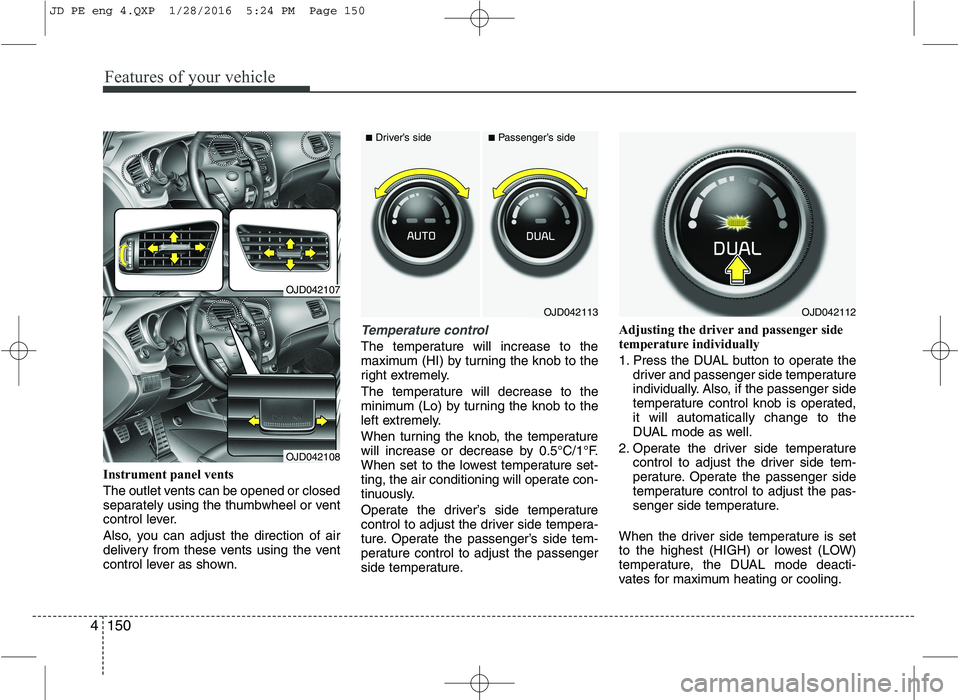
Instrument panel vents
The outlet vents can be opened or closed
separately using the thumbwheel or vent
control lever.
Also, you can adjust the direction of air
delivery from these vents using the vent
control lever as shown.
Temperature control
The temperature will increase to the
maximum (HI) by turning the knob to the
right extremely.
The temperature will decrease to the
minimum (Lo) by turning the knob to the
left extremely.
When turning the knob, the temperature
will increase or decrease by 0.5°C/1°F.
When set to the lowest temperature set-
ting, the air conditioning will operate con-
tinuously.
Operate the driver’s side temperature
control to adjust the driver side tempera-
ture. Operate the passenger’s side tem-
perature control to adjust the passenger
side temperature. Adjusting the driver and passenger side
temperature individually
1. Press the DUAL button to operate the
driver and passenger side temperature
individually. Also, if the passenger side
temperature control knob is operated,it will automatically change to the
DUAL mode as well.
2. Operate the driver side temperature control to adjust the driver side tem-
perature. Operate the passenger side
temperature control to adjust the pas-
senger side temperature.
When the driver side temperature is set
to the highest (HIGH) or lowest (LOW)
temperature, the DUAL mode deacti-
vates for maximum heating or cooling.
OJD042113
■ Driver’s side■Passenger’s side
OJD042112
OJD042107
OJD042108
JD PE eng 4.QXP 1/28/2016 5:24 PM Page 150
Page 446 of 643
573
Driving your vehicle
DRIVER'S ATTENTION
The driver must be cautious in the below
situations for the system may
not assist the driver and may not work
properly.
Do not stick or attach anything to thewindshield in front of the camera as
this may reduce effectiveness or causeone more of the systems dependent on
the camera to stop working.
Keep the windshield in the area behind the interior rear view mirror clean.
Do not place reflective materials, such as white paper or a mirror, on the
instrument panel.
Do not strike or damage the areas around the camera unit.
Do not touch the camera lens or remove the screw located on the cam-
era unit. The system does not work in all situa-
tions but is designed merely as a sup-
plementary aid.
The system assists the driver and does not replace the human eye.
The driver always bears ultimate responsibility for ensuring that the
vehicle is driven safely and that appli-
cable road traffic rules and regulations
are followed.
JD PE eng 5.QXP 9/30/2015 5:27 PM Page 73
Page 466 of 643
593
Driving your vehicle
Following distance
Stay at least twice as far behind the vehi-
cle ahead as you would when driving
your vehicle without a trailer. This can
help you avoid situations that require
heavy braking and sudden turns.
Passing
You’ll need more passing distance up
ahead when you’re towing a trailer. And,
because of the increased vehicle length,
you’ll need to go much farther beyond the
passed vehicle before you can return to
your lane.
Backing up
Hold the bottom of the steering wheel
with one hand. Then, to move the trailer
to the left, just move your hand to the left.
To move the trailer to the right, move your
hand to the right. Always back up slowly
and, if possible, have someone guide you.
Making turns
When you’re turning with a trailer, make
wider turns than normal. Do this so your
trailer won’t strike soft shoulders, curbs,
road signs, trees, or other objects. Avoid
jerky or sudden maneuvers. Signal well
in advance.
Turn signals when towing a trailer
When you tow a trailer, your vehicle has
to have a different turn signal flasher and
extra wiring. The green arrows on your
instrument panel will flash whenever you
signal a turn or lane change. Properly
connected, the trailer lights will also flash
to alert other drivers you’re about to turn,
change lanes, or stop.
When towing a trailer, the green arrows
on your instrument panel will flash for
turns even if the bulbs on the trailer are
burned out. Thus, you may think drivers
behind you are seeing your signals
when, in fact, they are not. It is important
to check occasionally to be sure the trail-
er bulbs are still working. You must also
check the lights every time you discon-
nect and then reconnect the wires.
Do not connect a trailer lighting system
directly to your vehicle’s lighting system.
Use only an approved trailer wiring har-
ness.
An authorized Kia dealer can assist you
in installing the wiring harness.WARNING
Failure to use an approved trailer wiring harness could result in dam-
age to the vehicle electrical system
and/or personal injury.
JD PE eng 5.QXP 9/30/2015 5:28 PM Page 93
Page 497 of 643
What to do in an emergency
24
6
TIRE PRESSURE MONITORING SYSTEM (TPMS)
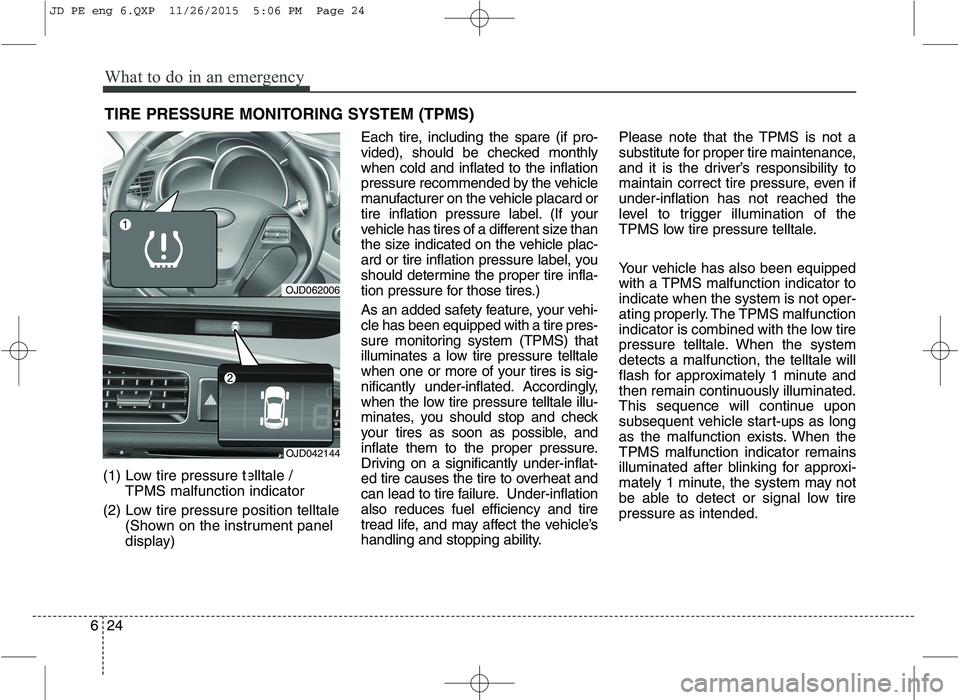
(1) Low tire pressure telltale / TPMS malfunction indicator
(2) Low tire pressure position telltale (Shown on the instrument panel
display) Each tire, including the spare (if pro-
vided), should be checked monthlywhen cold and inflated to the inflation
pressure recommended by the vehicle
manufacturer on the vehicle placard or
tire inflation pressure label. (If your
vehicle has tires of a different size than
the size indicated on the vehicle plac-
ard or tire inflation pressure label, you
should determine the proper tire infla-
tion pressure for those tires.)
As an added safety feature, your vehi- cle has been equipped with a tire pres-
sure monitoring system (TPMS) that
illuminates a low tire pressure telltale
when one or more of your tires is sig-
nificantly under-inflated. Accordingly,
when the low tire pressure telltale illu-
minates, you should stop and check
your tires as soon as possible, and
inflate them to the proper pressure.
Driving on a significantly under-inflat-
ed tire causes the tire to overheat and
can lead to tire failure. Under-inflationalso reduces fuel efficiency and tire
tread life, and may affect the vehicle’s
handling and stopping ability.
Please note that the TPMS is not a
substitute for proper tire maintenance,
and it is the driver’s responsibility to
maintain correct tire pressure, even ifunder-inflation has not reached the
level to trigger illumination of the
TPMS low tire pressure telltale.
Your vehicle has also been equipped
with a TPMS malfunction indicator toindicate when the system is not oper-
ating properly. The TPMS malfunction
indicator is combined with the low tire
pressure telltale. When the systemdetects a malfunction, the telltale will
flash for approximately 1 minute and
then remain continuously illuminated.
This sequence will continue upon
subsequent vehicle start-ups as long
as the malfunction exists. When theTPMS malfunction indicator remains
illuminated after blinking for approxi-
mately 1 minute, the system may not
be able to detect or signal low tirepressure as intended.
OJD062006
OJD042144
JD PE eng 6.QXP 11/26/2015 5:06 PM Page 24
Page 568 of 643
Maintenance
62
7
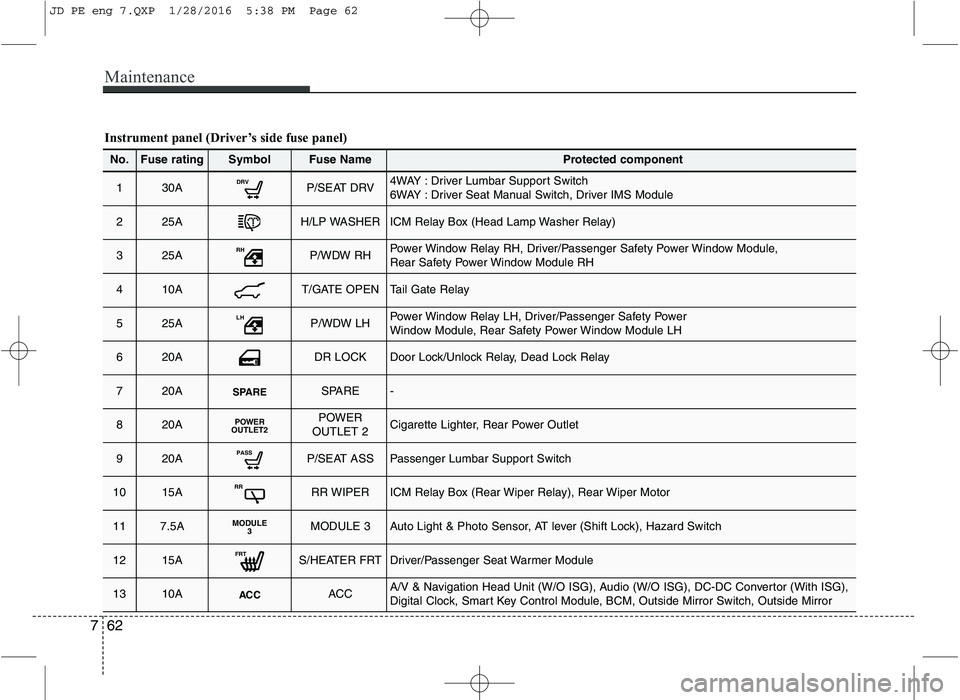
Instrument panel (Driver’s side fuse panel)
No.Fuse ratingSymbolFuse NameProtected component
130ADRVP/SEAT DRV4WAY : Driver Lumbar Support Switch
6WAY : Driver Seat Manual Switch, Driver IMS Module
225AH/LP WASHERICM Relay Box (Head Lamp Washer Relay)
325ARHP/WDW RHPower Window Relay RH, Driver/Passenger Safety Power Window Module,
Rear Safety Power Window Module RH
410AT/GATE OPENTail Gate Relay
525ALHP/WDW LHPower Window Relay LH, Driver/Passenger Safety Power
Window Module, Rear Safety Power Window Module LH
620ADR LOCKDoor Lock/Unlock Relay, Dead Lock Relay
720ASPARESPARE-
820APOWER
OUTLET2POWER
OUTLET 2Cigarette Lighter, Rear Power Outlet
920APASSP/SEAT ASSPassenger Lumbar Support Switch
1015ARRRR WIPERICM Relay Box (Rear Wiper Relay), Rear Wiper Motor
117.5AMODULE 3MODULE 3Auto Light & Photo Sensor, AT lever (Shift Lock), Hazard Switch
1215AFRTS/HEATER FRTDriver/Passenger Seat Warmer Module
1310AACCACCA/V & Navigation Head Unit (W/O ISG), Audio (W/O ISG), DC-DC Convertor (With ISG),
Digital Clock, Smart Key Control Module, BCM, Outside Mirror Switch, Outside Mirror
JD PE eng 7.QXP 1/28/2016 5:38 PM Page 62
Page 634 of 643
Index
4
I
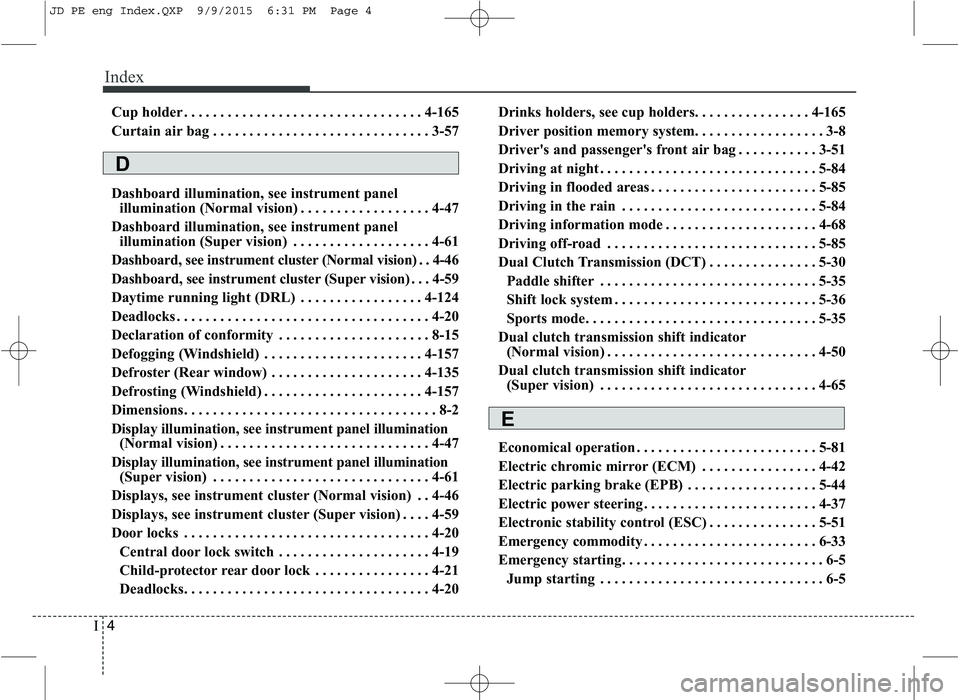
Cup holder . . . . . . . . . . . . . . . . . . . . . . . . . . . . . . . . . 4-165
Curtain air bag . . . . . . . . . . . . . . . . . . . . . . . . . . . . . . 3-57
Dashboard illumination, see instrument panel
illumination (Normal vision) . . . . . . . . . . . . . . . . . . 4-47
Dashboard illumination, see instrument panel illumination (Super vision) . . . . . . . . . . . . . . . . . . . 4-61
Dashboard, see instrument cluster (Normal vision) . . 4-46
Dashboard, see instrument cluster (Super vision) . . . 4-59
Daytime running light (DRL) . . . . . . . . . . . . . . . . . 4-124
Deadlocks . . . . . . . . . . . . . . . . . . . . . . . . . . . . . . . . . . . 4-20
Declaration of conformity . . . . . . . . . . . . . . . . . . . . . 8-15
Defogging (Windshield) . . . . . . . . . . . . . . . . . . . . . . 4-157
Defroster (Rear window) . . . . . . . . . . . . . . . . . . . . . 4-135
Defrosting (Windshield) . . . . . . . . . . . . . . . . . . . . . . 4-157
Dimensions. . . . . . . . . . . . . . . . . . . . . . . . . . . . . . . . . . . 8-2
Display illumination, see instrument panel illumination (Normal vision) . . . . . . . . . . . . . . . . . . . . . . . . . . . . . 4-47
Display illumination, see instrument panel illumination (Super vision) . . . . . . . . . . . . . . . . . . . . . . . . . . . . . . 4-61
Displays, see instrument cluster (Normal vision) . . 4-46
Displays, see instrument cluster (Super vision) . . . . 4-59
Door locks . . . . . . . . . . . . . . . . . . . . . . . . . . . . . . . . . . 4-20 Central door lock switch . . . . . . . . . . . . . . . . . . . . . 4-19
Child-protector rear door lock . . . . . . . . . . . . . . . . 4-21
Deadlocks. . . . . . . . . . . . . . . . . . . . . . . . . . . . . . . . . . 4-20 Drinks holders, see cup holders. . . . . . . . . . . . . . . . 4-165
Driver position memory system. . . . . . . . . . . . . . . . . . 3-8
Driver's and passenger's front air bag . . . . . . . . . . . 3-51
Driving at night . . . . . . . . . . . . . . . . . . . . . . . . . . . . . . 5-84
Driving in flooded areas . . . . . . . . . . . . . . . . . . . . . . . 5-85
Driving in the rain . . . . . . . . . . . . . . . . . . . . . . . . . . . 5-84
Driving information mode . . . . . . . . . . . . . . . . . . . . . 4-68
Driving off-road . . . . . . . . . . . . . . . . . . . . . . . . . . . . . 5-85
Dual Clutch Transmission (DCT) . . . . . . . . . . . . . . . 5-30
Paddle shifter . . . . . . . . . . . . . . . . . . . . . . . . . . . . . . 5-35
Shift lock system . . . . . . . . . . . . . . . . . . . . . . . . . . . . 5-36
Sports mode. . . . . . . . . . . . . . . . . . . . . . . . . . . . . . . . 5-35
Dual clutch transmission shift indicator (Normal vision) . . . . . . . . . . . . . . . . . . . . . . . . . . . . . 4-50
Dual clutch transmission shift indicator (Super vision) . . . . . . . . . . . . . . . . . . . . . . . . . . . . . . 4-65
Economical operation . . . . . . . . . . . . . . . . . . . . . . . . . 5-81
Electric chromic mirror (ECM) . . . . . . . . . . . . . . . . 4-42
Electric parking brake (EPB) . . . . . . . . . . . . . . . . . . 5-44
Electric power steering . . . . . . . . . . . . . . . . . . . . . . . . 4-37
Electronic stability control (ESC) . . . . . . . . . . . . . . . 5-51
Emergency commodity . . . . . . . . . . . . . . . . . . . . . . . . 6-33
Emergency starting. . . . . . . . . . . . . . . . . . . . . . . . . . . . 6-5 Jump starting . . . . . . . . . . . . . . . . . . . . . . . . . . . . . . . 6-5
E
D
JD PE eng Index.QXP 9/9/2015 6:31 PM Page 4
Page 636 of 643

Index
6
I
Fuses . . . . . . . . . . . . . . . . . . . . . . . . . . . . . . . . . . . . . . . 7-56
Engine compartment panel fuse . . . . . . . . . . . . . . . 7-58
Fuse switch . . . . . . . . . . . . . . . . . . . . . . . . . . . . . . . . 7-58
Fuse/relay panel description . . . . . . . . . . . . . . . . . . 7-61
Inner panel fuse . . . . . . . . . . . . . . . . . . . . . . . . . . . . 7-61
Main fuse . . . . . . . . . . . . . . . . . . . . . . . . . . . . . . . . . . 7-59
Multi fuse. . . . . . . . . . . . . . . . . . . . . . . . . . . . . . . . . . 7-60
Gauge (Normal vision) Engine coolant temperature gauge . . . . . . . . . . . . . 4-48
Fuel gauge . . . . . . . . . . . . . . . . . . . . . . . . . . . . . . . . . 4-48
Gauge (Super vision) Engine coolant temperature gauge . . . . . . . . . . . . 4-64
Fuel gauge . . . . . . . . . . . . . . . . . . . . . . . . . . . . . . . . . 4-62
Glove box . . . . . . . . . . . . . . . . . . . . . . . . . . . . . . . . . . 4-161
Gross vehicle weight . . . . . . . . . . . . . . . . . . . . . . . . . . . 8-5
Glove box lamp . . . . . . . . . . . . . . . . . . . . . . . . . . . . . 4-133
Hazard warning flasher . . . . . . . . . . . . . . . . . . . . . . 4-118
Hazardous driving conditions . . . . . . . . . . . . . . . . . . 5-83
Headlamp delay function . . . . . . . . . . . . . . . . . . . . . 4-119
Headlight (Headlamp) welcome function . . . . . . . . 4-119
Headlight bulb replacement. . . . . . . . . . . . . . . . . . . . 7-80
Headlight leveling device . . . . . . . . . . . . . . . . . . . . . 4-125 Headlight position . . . . . . . . . . . . . . . . . . . . . . . . . . . 4-121
Headlight washer . . . . . . . . . . . . . . . . . . . . . . . . . . . 4-130
Headrest (front). . . . . . . . . . . . . . . . . . . . . . . . . . . . . . . 3-9
Headrest(rear) . . . . . . . . . . . . . . . . . . . . . . . . . . . . . . . 3-14
Heated steering wheel. . . . . . . . . . . . . . . . . . . . . . . . . 4-38
High - beam operation . . . . . . . . . . . . . . . . . . . . . . . 4-122
Hight adjustment (seat belt) . . . . . . . . . . . . . . . . . . . 3-23
Highway driving . . . . . . . . . . . . . . . . . . . . . . . . . . . . . 5-85
Hill-start assist control (HAC). . . . . . . . . . . . . . . . . . 5-55
Hood . . . . . . . . . . . . . . . . . . . . . . . . . . . . . . . . . . . . . . . 4-28
Horn . . . . . . . . . . . . . . . . . . . . . . . . . . . . . . . . . . . . . . . 4-39
How to use this manual . . . . . . . . . . . . . . . . . . . . . . . . 1-2
Icy road warning . . . . . . . . . . . . . . . . . . . . . . . . . . . . . 4-92
Indicators and warnings . . . . . . . . . . . . . . . . . . . . . . 4-80
Inside rearview mirror . . . . . . . . . . . . . . . . . . . . . . . . 4-42
Instrument cluster
LCD display information . . . . . . . . . . . . . . . . . . . . . 4-74
Warning and indicators . . . . . . . . . . . . . . . . . . . . . . 4-80
Instrument cluster (Normal vision). . . . . . . . . . . . . . 4-46 Automatic transaxle shift position indicator . . . . . 4-49
Dual clutch transmission shift indicator . . . . . . . . 4-50
Fuel gauge . . . . . . . . . . . . . . . . . . . . . . . . . . . . . . . . . 4-48
Instrument panel illumination . . . . . . . . . . . . . . . . 4-47
Manual transaxle shift indicator. . . . . . . . . . . . . . . 4-49
G
H
I
JD PE eng Index.QXP 9/9/2015 6:31 PM Page 6