ECU KIA CEED 2016 Owner's Guide
[x] Cancel search | Manufacturer: KIA, Model Year: 2016, Model line: CEED, Model: KIA CEED 2016Pages: 643, PDF Size: 38.19 MB
Page 253 of 643
Features of your vehicle
170
4
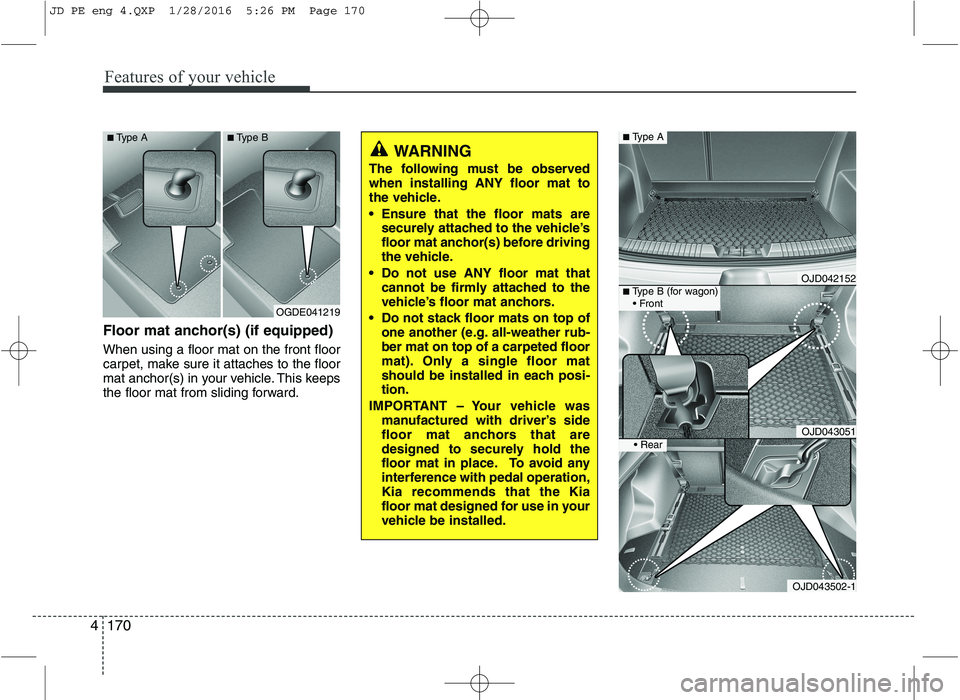
Floor mat anchor(s) (if equipped) When using a floor mat on the front floor
carpet, make sure it attaches to the floor
mat anchor(s) in your vehicle. This keeps
the floor mat from sliding forward.
WARNING
The following must be observed when installing ANY floor mat to
the vehicle.
Ensure that the floor mats are securely attached to the vehicle’s
floor mat anchor(s) before driving
the vehicle.
Do not use ANY floor mat that cannot be firmly attached to the
vehicle’s floor mat anchors.
Do not stack floor mats on top of one another (e.g. all-weather rub-ber mat on top of a carpeted floor
mat). Only a single floor mat
should be installed in each posi-tion.
IMPORTANT – Your vehicle was manufactured with driver’s side
floor mat anchors that are
designed to securely hold the
floor mat in place. To avoid any
interference with pedal operation,Kia recommends that the Kia
floor mat designed for use in your
vehicle be installed.
OGDE041219
■
Type A ■Type B
OJD042152
OJD043051
■Type A
■Type B (for wagon)
OJD043502-1
JD PE eng 4.QXP 1/28/2016 5:26 PM Page 170
Page 255 of 643
Features of your vehicle
172
4
Barrier net (wagon) (if equipped)
Your vehicle is equipped with a barrier net.
When you load some cargoes on the rear
seat or rear cargo area, you must install
the barrier net behind front seatback or
rear seatback. It is designed to help protect the heads of
the occupants by obstructing objects fly-
ing forward in frontal collisions. There are eight hook holders on both
side of the headliner over the headrests
for upper side fixation and on the floor
behind the front seats or rear seats for
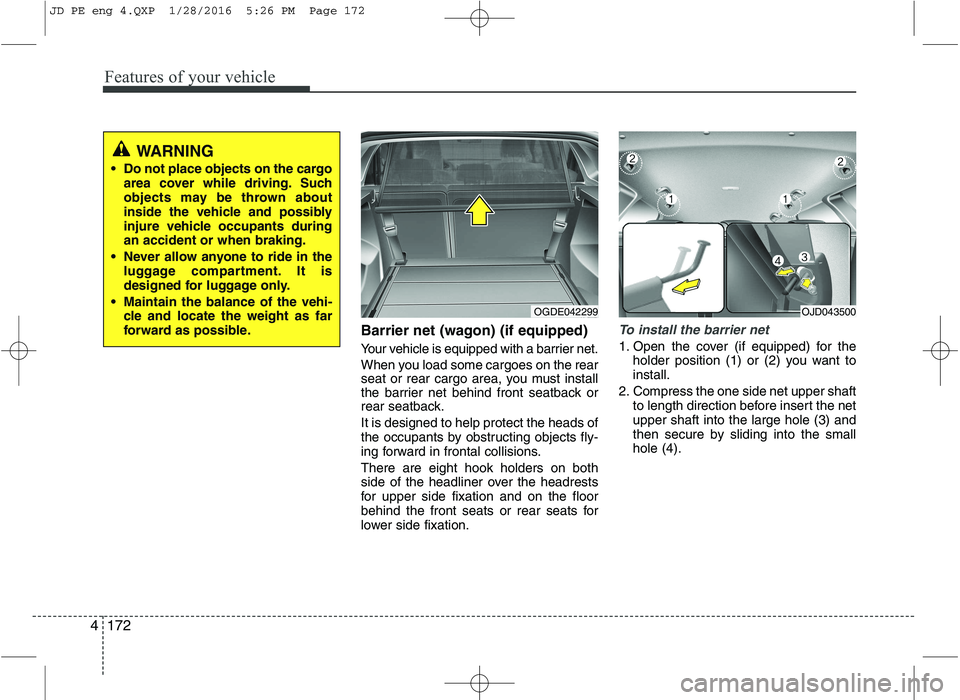
lower side fixation.To install the barrier net
1. Open the cover (if equipped) for the
holder position (1) or (2) you want to install.
2. Compress the one side net upper shaft to length direction before insert the netupper shaft into the large hole (3) and
then secure by sliding into the smallhole (4).
WARNING
Do not place objects on the cargo area cover while driving. Such
objects may be thrown about
inside the vehicle and possibly
injure vehicle occupants duringan accident or when braking.
Never allow anyone to ride in the luggage compartment. It is
designed for luggage only.
Maintain the balance of the vehi- cle and locate the weight as far
forward as possible.
OGDE042299OJD043500
JD PE eng 4.QXP 1/28/2016 5:26 PM Page 172
Page 256 of 643
4173
Features of your vehicle
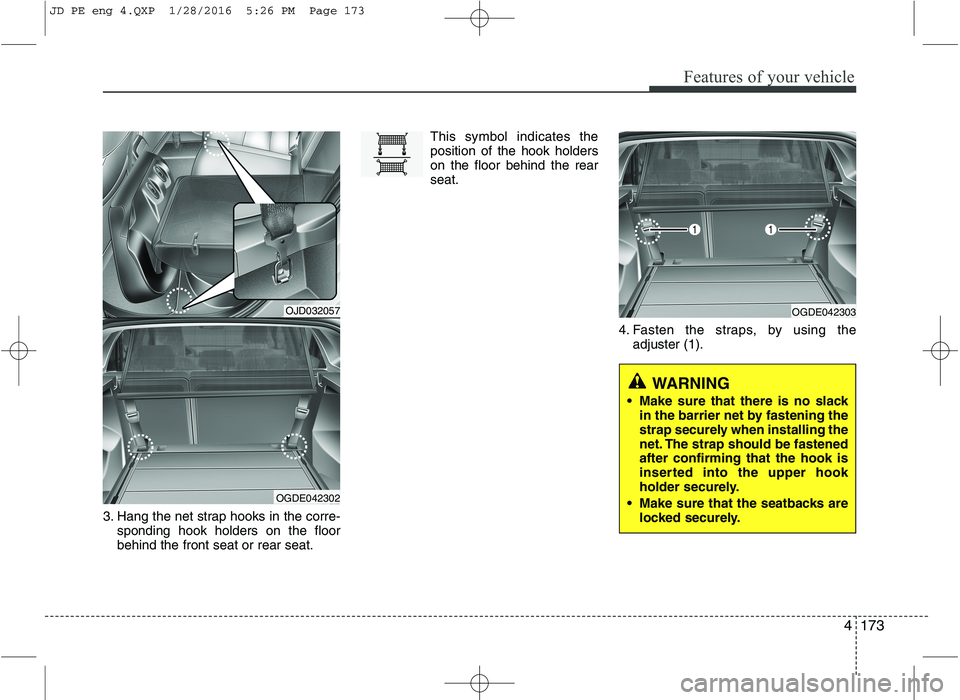
3. Hang the net strap hooks in the corre-sponding hook holders on the floor behind the front seat or rear seat. This symbol indicates theposition of the hook holderson the floor behind the rearseat.
4. Fasten the straps, by using theadjuster (1).
OJD032057
OGDE042302
OGDE042303
WARNING
Make sure that there is no slack in the barrier net by fastening the
strap securely when installing the
net. The strap should be fastenedafter confirming that the hook is
inserted into the upper hook
holder securely.
Make sure that the seatbacks are locked securely.
JD PE eng 4.QXP 1/28/2016 5:26 PM Page 173
Page 257 of 643
Features of your vehicle
174
4
To remove the barrier net
1. Loosen the straps by using the strap
adjusters and remove the strap hooks
from the hook holders.
2. Remove the net upper shaft by pulling it through the large holes.
3. Remove the barrier net.
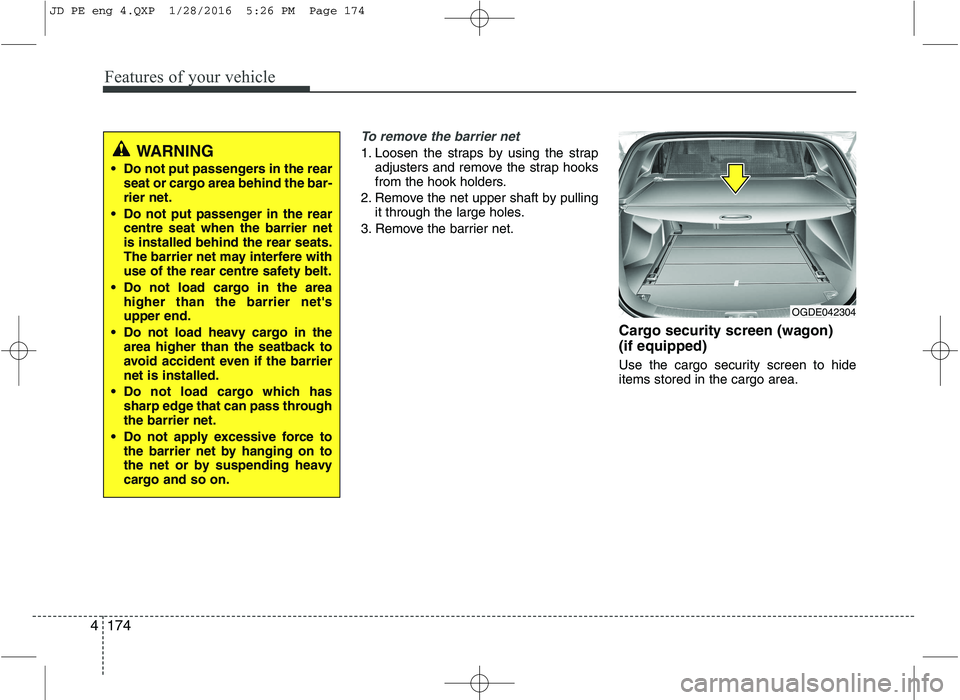
Cargo security screen (wagon) (if equipped)
Use the cargo security screen to hide items stored in the cargo area.WARNING
Do not put passengers in the rear seat or cargo area behind the bar- rier net.
Do not put passenger in the rear centre seat when the barrier netis installed behind the rear seats.
The barrier net may interfere with
use of the rear centre safety belt.
Do not load cargo in the area higher than the barrier net'supper end.
Do not load heavy cargo in the area higher than the seatback to
avoid accident even if the barriernet is installed.
Do not load cargo which has sharp edge that can pass throughthe barrier net.
Do not apply excessive force to the barrier net by hanging on to
the net or by suspending heavy
cargo and so on.
OGDE042304
JD PE eng 4.QXP 1/28/2016 5:26 PM Page 174
Page 258 of 643
4175
Features of your vehicle
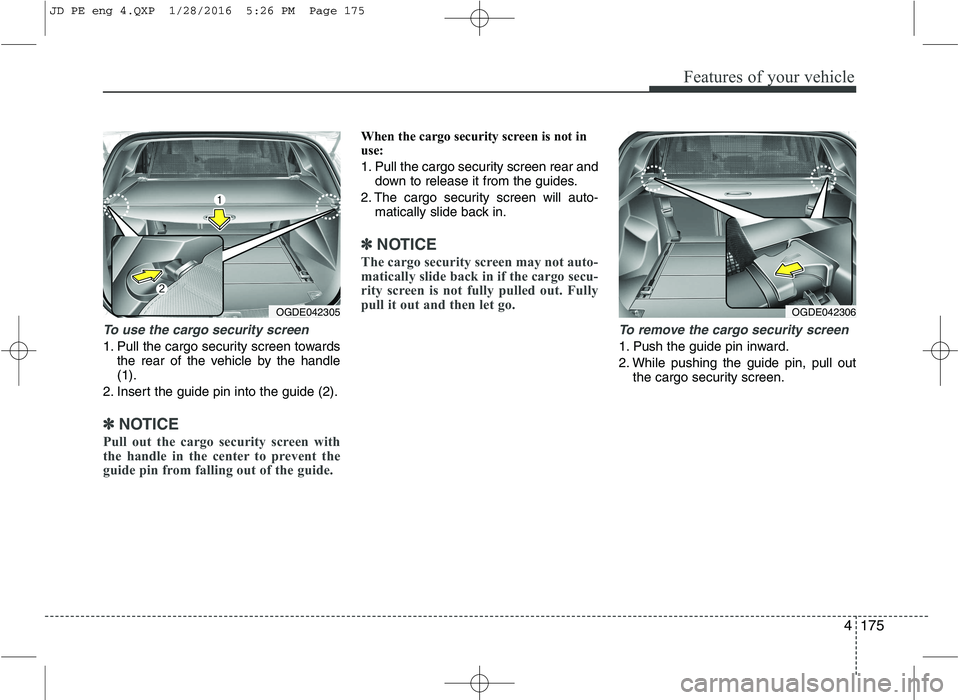
To use the cargo security screen
1. Pull the cargo security screen towardsthe rear of the vehicle by the handle (1).
2. Insert the guide pin into the guide (2).
✽✽ NOTICE
Pull out the cargo security screen with
the handle in the center to prevent the
guide pin from falling out of the guide.
When the cargo security screen is not in
use:
1. Pull the cargo security screen rear and down to release it from the guides.
2. The cargo security screen will auto- matically slide back in.
✽✽ NOTICE
The cargo security screen may not auto-
matically slide back in if the cargo secu-
rity screen is not fully pulled out. Fully
pull it out and then let go.
To remove the cargo security screen
1. Push the guide pin inward.
2. While pushing the guide pin, pull out the cargo security screen.
OGDE042305OGDE042306
JD PE eng 4.QXP 1/28/2016 5:26 PM Page 175
Page 259 of 643
Features of your vehicle
176
4
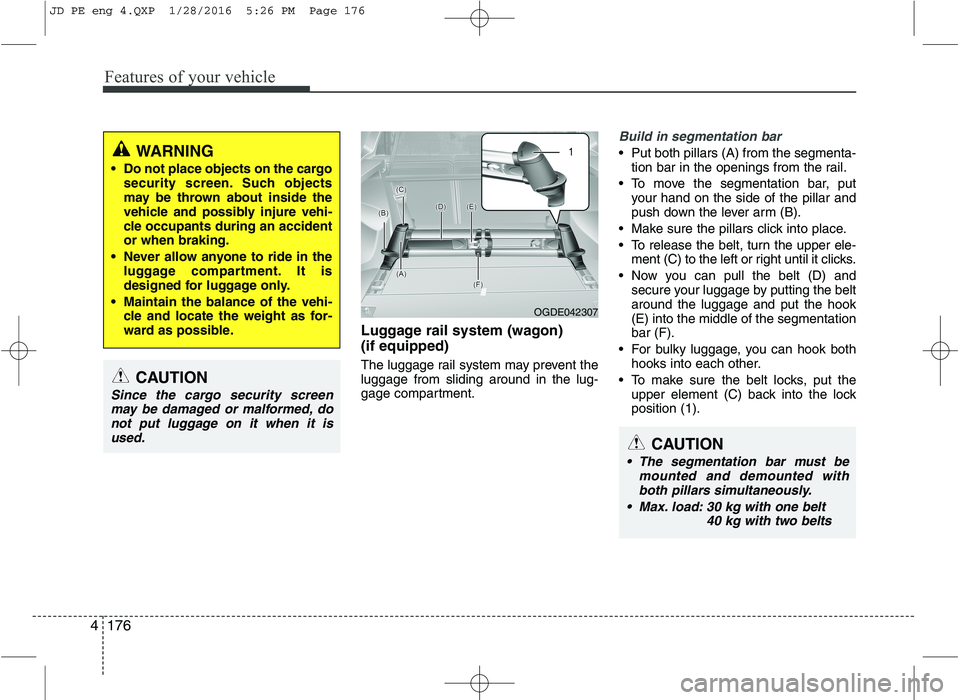
Luggage rail system (wagon) (if equipped)
The luggage rail system may prevent the luggage from sliding around in the lug-
gage compartment.
Build in segmentation bar
Put both pillars (A) from the segmenta-
tion bar in the openings from the rail.
To move the segmentation bar, put your hand on the side of the pillar and
push down the lever arm (B).
Make sure the pillars click into place.
To release the belt, turn the upper ele- ment (C) to the left or right until it clicks.
Now you can pull the belt (D) and secure your luggage by putting the belt around the luggage and put the hook(E) into the middle of the segmentationbar (F).
For bulky luggage, you can hook both hooks into each other.
To make sure the belt locks, put the upper element (C) back into the lockposition (1).WARNING
Do not place objects on the cargo security screen. Such objects
may be thrown about inside the
vehicle and possibly injure vehi-
cle occupants during an accidentor when braking.
Never allow anyone to ride in the luggage compartment. It is
designed for luggage only.
Maintain the balance of the vehi- cle and locate the weight as for-
ward as possible.
CAUTION
Since the cargo security screen
may be damaged or malformed, donot put luggage on it when it is used.
OGDE042307
CAUTION
The segmentation bar must be mounted and demounted withboth pillars simultaneously.
Max. load: 30 kg with one belt 40 kg with two belts
JD PE eng 4.QXP 1/28/2016 5:26 PM Page 176
Page 262 of 643
4179
Features of your vehicle
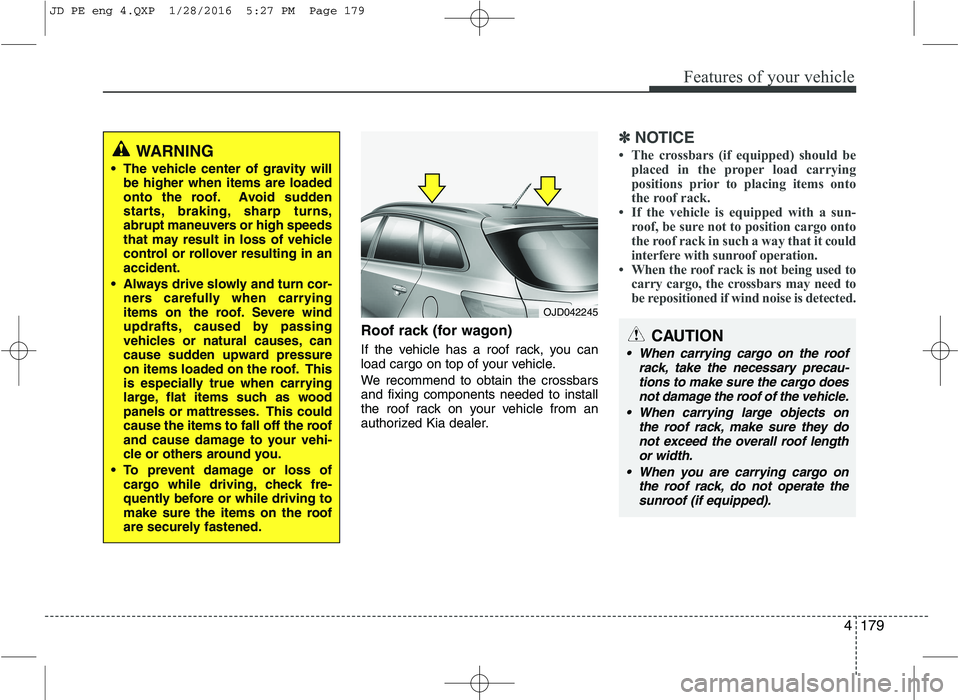
Roof rack (for wagon)
If the vehicle has a roof rack, you can
load cargo on top of your vehicle.
We recommend to obtain the crossbars and fixing components needed to install
the roof rack on your vehicle from an
authorized Kia dealer.
✽✽NOTICE
The crossbars (if equipped) should be placed in the proper load carrying
positions prior to placing items onto
the roof rack.
If the vehicle is equipped with a sun-
roof, be sure not to position cargo onto
the roof rack in such a way that it
could
interfere with sunroof operation.
When the roof rack is not being used to
carry cargo, the crossbars may need to
be repositioned if wind noise is detected.
WARNING
The vehicle center of gravity will be higher when items are loaded
onto the roof. Avoid sudden
starts, braking, sharp turns,
abrupt maneuvers or high speeds
that may result in loss of vehicle
control or rollover resulting in anaccident.
Always drive slowly and turn cor- ners carefully when carrying
items on the roof. Severe wind
updrafts, caused by passing
vehicles or natural causes, can
cause sudden upward pressure
on items loaded on the roof. This
is especially true when carrying
large, flat items such as wood
panels or mattresses. This could
cause the items to fall off the roof
and cause damage to your vehi-
cle or others around you.
To prevent damage or loss of cargo while driving, check fre-
quently before or while driving to
make sure the items on the roof
are securely fastened.
OJD042245
CAUTION
When carrying cargo on the roof
rack, take the necessary precau-tions to make sure the cargo does not damage the roof of the vehicle.
When carrying large objects on the roof rack, make sure they donot exceed the overall roof lengthor width.
When you are carrying cargo on the roof rack, do not operate the
sunroof (if equipped).
JD PE eng 4.QXP 1/28/2016 5:27 PM Page 179
Page 263 of 643
(Continued)
Always drive slowly and turn cor-ners carefully when carrying
items on the roof rack. Severe
wind updrafts, caused by passing
vehicles or natural causes, can
cause sudden upward pressure
on items loaded on the roof rack.
This is especially true when car-
rying large, flat items such as
wood panels or mattresses. Thiscould cause the items to fall off
the roof rack and cause damage
to your vehicle or others around
you.
To prevent damage or loss of cargo while driving, check fre-
quently before or while driving to
make sure the items on the roof
rack are securely fastened.WARNING
The following specification is the maximum weight that can be
loaded onto the roof rack.
Distribute the load as evenly as
possible across the crossbars (if
equipped) and roof rack and
secure the load firmly.
Loading cargo or luggage in
excess of the specified weight
limit on the roof rack may dam-
age your vehicle.
The vehicle center of gravity will be higher when items are loaded
onto the roof rack. Avoid sudden
starts, braking, sharp turns,
abrupt maneuvers or high speeds
that may result in loss of vehicle
control or rollover resulting in anaccident.
(Continued)
ROOF 100 kg (220 lbs.)
RACK EVENLY DISTRIBUTED
4 180
Features of your vehicle
JD PE eng 4.QXP 1/28/2016 5:27 PM Page 180
Page 284 of 643
![KIA CEED 2016 Owners Guide Features of your vehicle
4201
Phone Settings (
Bluetooth®Wireless
Technology equipped model)
Press the key Select [Phone]
Pair Phone
Select [Pair Phone] Set through TUNE knob
➀ Search for device](/img/2/57945/w960_57945-283.png "KIA CEED 2016 Owners Guide Features of your vehicle
4201
Phone Settings (
Bluetooth®Wireless
Technology equipped model)
Press the key Select [Phone]
Pair Phone
Select [Pair Phone] Set through TUNE knob
➀ Search for device")
Features of your vehicle
4201
Phone Settings (
Bluetooth®Wireless
Technology equipped model)
Press the key Select [Phone]
Pair Phone
Select [Pair Phone] Set through TUNE knob
➀ Search for device names as dis-
played on your mobile phone and connect.
[Non SSP supported device]
(SSP: Secure Simple Pairing)
➁ After a few moments, a screen is
displayed where the passkey is entered. Enter the passkey “0000” to pair
your Bluetooth®Wireless
Technology device with the caraudio system.
[SSP supported device] ➁ After a few moments, a screen is
displayed 6 digits passkey.
Check the passkey on your
Bluetooth®Wireless Technology
device and confirm.
❈ The device name and passkey will
be displayed on the screen for up
to 3 minutes. If pairing is not com-
pleted within the 3 minutes, the
mobile phone pairing process willautomatically be canceled.
➂ Pairing completion is displayed.
❈ In some mobile phones, pairing
will automatically be followed byconnection.
❈ It is possible to pair up to five
Bluetooth®Wireless Technology
enabled mobile phones.
SETUPCAUTION
To pair a Bluetooth®Wireless
Technology enabled mobile phone, authentication and con-nection processes are firstrequired. As a result, you can- not pair your mobile phonewhile driving the vehicle. Firstpark your vehicle before use.
JD PE eng 4b (Audio).qxp 9/9/2015 5:09 PM Page 201
Page 347 of 643
Features of your vehicle
264
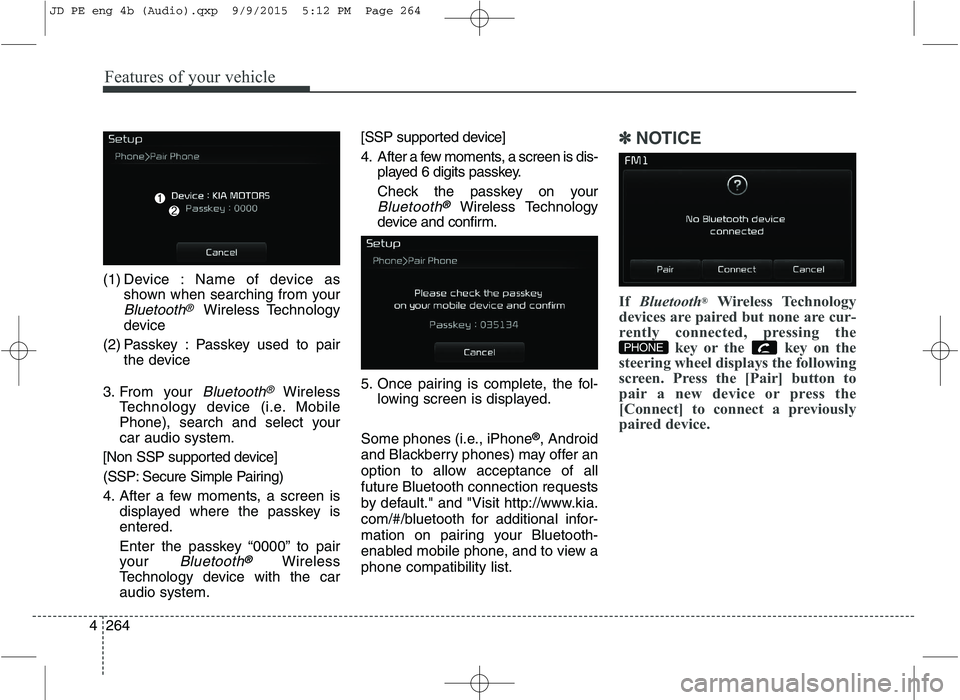
4 (1) Device : Name of device as
shown when searching from your
Bluetooth®Wireless Technology
device
(2) Passkey : Passkey used to pair the device
3. From your
Bluetooth®Wireless
Technology device (i.e. Mobile
Phone), search and select yourcar audio system.
[Non SSP supported device]
(SSP: Secure Simple Pairing)
4. After a few moments, a screen is displayed where the passkey is entered.
Enter the passkey “0000” to pair
your
Bluetooth®Wireless
Technology device with the caraudio system. [SSP supported device]
4. After a few moments, a screen is dis-
played 6 digits passkey.
Check the passkey on your
Bluetooth®Wireless Technology
device and confirm.
5. Once pairing is complete, the fol- lowing screen is displayed.
Some phones (i.e., iPhone ®
, Android
and Blackberry phones) may offer an
option to allow acceptance of allfuture Bluetooth connection requests
by default." and "Visit http://www.kia.
com/#/bluetooth for additional infor-
mation on pairing your Bluetooth-
enabled mobile phone, and to view aphone compatibility list.
✽✽ NOTICE
If Bluetooth ®
Wireless Technology
devices are paired but none are cur-
rently connected, pressing the key or the key on the
steering wheel displays the following
screen. Press the [Pair] button to
pair a new device or press the
[Connect] to connect a previously
paired device.
PHONE
JD PE eng 4b (Audio).qxp 9/9/2015 5:12 PM Page 264