audio KIA CEED 2017 Owner's Manual
[x] Cancel search | Manufacturer: KIA, Model Year: 2017, Model line: CEED, Model: KIA CEED 2017Pages: 653, PDF Size: 54.59 MB
Page 289 of 653
![KIA CEED 2017 Owners Manual Features of your vehicle
4 205
Phone Settings (
Bluetooth®Wireless
Technology equipped model)
Press the key Select [Phone]
Pair Phone
Select [Pair Phone] Set through TUNE knob
➀ Search for devic](/img/2/57941/w960_57941-288.png "KIA CEED 2017 Owners Manual Features of your vehicle
4 205
Phone Settings (
Bluetooth®Wireless
Technology equipped model)
Press the key Select [Phone]
Pair Phone
Select [Pair Phone] Set through TUNE knob
➀ Search for devic")
Features of your vehicle
4 205
Phone Settings (
Bluetooth®Wireless
Technology equipped model)
Press the key Select [Phone]
Pair Phone
Select [Pair Phone] Set through TUNE knob
➀ Search for device names as dis-
played on your mobile phone and connect.
[Non SSP supported device] (SSP: Secure Simple Pairing)
➁ After a few moments, a screen is
displayed where the passkey is entered. Enter the passkey “0000” to pair
your Bluetooth®Wireless
Technology device with the caraudio system.
[SSP supported device] ➁ After a few moments, a screen is
displayed 6 digits passkey.
Check the passkey on your
Bluetooth®Wireless Technology
device and confirm.
❈ The device name and passkey will
be displayed on the screen for up
to 3 minutes. If pairing is not com-
pleted within the 3 minutes, the
mobile phone pairing process willautomatically be canceled.
➂ Pairing completion is displayed.
❈ In some mobile phones, pairing
will automatically be followed byconnection.
❈ It is possible to pair up to five
Bluetooth®Wireless Technology
enabled mobile phones.
SETUPCAUTION
To pair a Bluetooth®Wireless
Technology enabled mobile phone, authentication and con-nection processes are firstrequired. As a result, you can- not pair your mobile phonewhile driving the vehicle. Firstpark your vehicle before use.
Page 291 of 653
![KIA CEED 2017 Owners Manual Features of your vehicle
4 207
Changing connection sequence
(Priority)
This is used to change the order (pri-
ority) of automatic connection for the
paired mobile phones.
Select [Phone List] Select](/img/2/57941/w960_57941-290.png "KIA CEED 2017 Owners Manual Features of your vehicle
4 207
Changing connection sequence
(Priority)
This is used to change the order (pri-
ority) of automatic connection for the
paired mobile phones.
Select [Phone List] Select")
Features of your vehicle
4 207
Changing connection sequence
(Priority)
This is used to change the order (pri-
ority) of automatic connection for the
paired mobile phones.
Select [Phone List] Select [Priority]
through TUNE knob Select No. 1
Priority mobile phone ➀ Select [Priority].
➁ From the paired phones, select
the phone desired for No.1 priority.
➂ The changed priority sequence is
displayed.
❈ Once the connection sequence
(priority) is changed, the new no. 1
priority mobile phone will be con-nected.
- When the no. 1 priority cannot be connected: Automatically attemptsto connect the most recently con-
nected phone.
- Cases when the most recently con- nected phone cannot be connect-
ed: Attempts to connect in the orderin which paired phones are listed. - The connected phone will automat-
ically be changed to No. 1 priority.
Delete
Select [Phone List] Select mobile
phone through TUNE knobSelect [Delete] ➀ Select the desired mobile phone.
➁ Delete the selected mobile phone.
➂ Deletion completion is displayed.
❈ When attempting to delete a cur-
rently connected phone, the phone is first disconnected.
Phone book Download
This feature is used to download
phone book and call histories intothe audio system.
Select [Phone book Download]
Select through TUNE knob
CAUTION
The download feature may not
be supported in some mobilephones.
When downloading new phone book, delete all previouslysaved phone book before start-ing download.
CAUTION
When you delete a mobile phone, the mobile phonephone book will also be erased.
For stable Bluetooth ®
Wireless
Technology communication, delete the mobile phone fromthe audio and also delete theaudio from your mobile phone.
Page 293 of 653

Features of your vehicle
4 209
Using the
Bluetooth®Wireless
Technology System
To use
Bluetooth®Wireless Technology
when the system is currently off, follow
these next steps.
Turning On
Bluetooth®Wireless
Technology through the
Key
Press the key Screen Guidance ❈ Moves to the screen where
Bluetooth®Wireless Technology
functions can be used and dis-
plays guidance. Turning On
Bluetooth®Wireless
Technology through the
Key
Press the key Select [Phone] knob ➀ A screen asking whether to turn on
Bluetooth®Wireless Technology will
be displayed.
➁ On the screen, select to turn on
Bluetooth®Wireless Technology
and display guidance.
❈ If the
Bluetooth®Wireless
Technology system is turned on,
the system will automatically try toconnect the most recently con-nected
Bluetooth®Wireless
Technology mobile phone. YES
SETUP
SETUP
PHONE
PHONE
CAUTION
Bluetooth
®
Wireless Technology
connection may become inter- mittently disconnected in somemobile phones. Follow thesenext steps to try again.
1)Turn the Bluetooth ®
Wireless
Technology function within the mobile phone ON/OFF andtry to connect again.
2)Turn the mobile phone power ON/OFF and try to connectagain.
3)Completely remove the mobile phone battery, reboot, andthen try to connect again.
4)Reboot the audio system and try to connect again
5)Delete all paired devices in your mobile phone and theaudio system and pair againfor use.
Page 294 of 653
![KIA CEED 2017 Owners Manual Features of your vehicle
210
4 System Settings
Press the key Select [System]
Memory Information
(If equipped)
Displays currently used memory and
total system memory.
Select [Memory Information]](/img/2/57941/w960_57941-293.png "KIA CEED 2017 Owners Manual Features of your vehicle
210
4 System Settings
Press the key Select [System]
Memory Information
(If equipped)
Displays currently used memory and
total system memory.
Select [Memory Information]")
Features of your vehicle
210
4 System Settings
Press the key Select [System]
Memory Information
(If equipped)
Displays currently used memory and
total system memory.
Select [Memory Information] OK
The currently used memory is dis-
played on the left side while the total
system memory is displayed on the
right side. ❈ May differ depending on the
selected audio.
VRS Mode (If equipped)
This feature is used to change voice
command feedback between Normal
and Expert modes.
Select [VRS Mode] Set through
TUNE knob
Normal : This mode is for beginner users and provides detailed
instructions during voice command
operation.
Expert : This mode is for expert users and omits some information
during voice command operation.
(When using Expert mode, guid-
ance instructions can be heard
through the [Help] or [Menu] com-
mands.
❈ May differ depending on the
selected audio.
SETUP
Page 295 of 653
![KIA CEED 2017 Owners Manual Features of your vehicle
4 211
Language
This menu is used to set the display
and voice recognition language.
Select [Language] Set throughTUNE knob
❈ The system will reboot after the
language is c](/img/2/57941/w960_57941-294.png "KIA CEED 2017 Owners Manual Features of your vehicle
4 211
Language
This menu is used to set the display
and voice recognition language.
Select [Language] Set throughTUNE knob
❈ The system will reboot after the
language is c")
Features of your vehicle
4 211
Language
This menu is used to set the display
and voice recognition language.
Select [Language] Set throughTUNE knob
❈ The system will reboot after the
language is changed.
❈ Language support by region RADIO ❈
RADIO may differ depending on
the selected audio.
Changing RADIO mode SEEK Press the ,key
seconds): Changes the frequency.
0.8 seconds): Automatically search-
es for the next frequency. Preset SEEK Press
the ~ key
seconds): Plays the frequency
saved in the corresponding key.
0.8 seconds): Pressing and holding
the desired key from ~
will save the currently playing
broadcast to the selected key and
sound a BEEP.
SCAN
Press the key
0.8 seconds): The broadcast fre-
quency increases and previews
each broadcast for 5 seconds each.
After scanning all frequencies,
returns and plays the current
broadcast frequency.
TA/SCAN
61
61
TRACKSEEK
Page 297 of 653

Features of your vehicle
4 213
DAB RADIO
(For DAB model) ❈
RADIO may differ depending on
the selected audio.
Changing RADIO mode
Press the key to change the mode in order of FM1 ➟FM2 ➟FMA
➟ DAB1 ➟DAB2 ➟ AM.
SEEK Press the ,key
Shortly pressing the key (under 0.8 seconds): Changes the station.
Press and hold the key (over 0.8 seconds): Change the Ensemble. Ensemble
Press the , key
Search the Ensemble. Use the
Tune knob to select the desired
Ensemble and select stations with-
in the Ensemble. Preset SEEK Press
the ~ key
Shortly pressing the key (under 0.8 seconds): Plays the station saved
in the corresponding key.
Pressing and holding the key (over 0.8 seconds): Pressing and holding
the desired key from ~
will save the currently playing station
to the selected key and sound a
BEEP.
61
61 FOLDERFOLDER
TRACKSEEK
RADIO
Page 299 of 653

Features of your vehicle
4 215
BASIC METHOD OF USE :
Audio CD / MP3 CD / USB /
iPod
®
/ My Music
Press the key to change the mode in order of CD ➟ USB(iPod ®
) ➟
AUX ➟ My Music ➟ BT Audio.
The folder/file name is displayed onthe screen.
Page 300 of 653

Features of your vehicle
216
4 Random
While song (file) is playing
(RDM) key
Audio CD, My Music mode: RDM on screen
Random (Shortly pressing the
key): Plays all songs in random
order.
MP3 CD, USB mode: FLD.RDM on screen
Folder Random (Shortly pressing the key): Plays all files within the
current folder in random order.
MP3 CD, USB mode: RDM on screen
Random (pressing twice): Plays all files in random order.
iPod ®
mode: RDM on screen
Random (Shortly pressing the key): Plays all files in random
order.
❈ Press the key again to turn
off random. Changing Song/File
While song (file) is playing
key
Shortly pressing the key: Plays the current song from the beginning.
❈ If the key is pressed
again within 1 second, the previ-
ous song is played.
Pressing and holding the key (over 0.8 seconds): Rewinds the song.
While song (file) is playing key
Shortly pressing the key : Plays the next song.
Pressing and holding the key (over 0.8 seconds): Fast forwards the song. Scan
Pressing and holding the
key (over 0.8 seconds) :
Scans all songs for 10 seconds
starting from the next song.
❈ Pressing and holding the
key again to turn off.
TA/SCAN
TA/SCAN
SEEK
TRACK
TRACK
2RDM
2 RDM
Page 301 of 653
Features of your vehicle
4 217
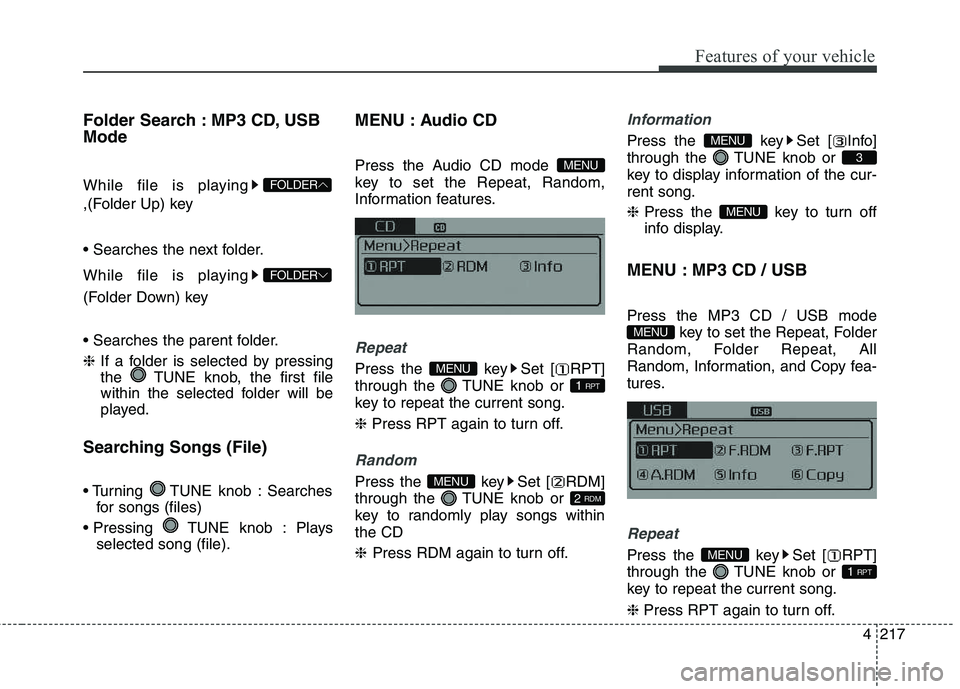
Folder Search : MP3 CD, USB Mode
While file is playing
,(Folder Up) key
While file is playing
(Folder Down) key
❈
If a folder is selected by pressing
the TUNE knob, the first file
within the selected folder will be
played.
Searching Songs (File)
TUNE knob : Searches for songs (files)
TUNE knob : Plays selected song (file). MENU : Audio CD
Press the Audio CD mode
key to set the Repeat, Random,
Information features.
Repeat
Press the key Set [ RPT]
through the TUNE knob or
key to repeat the current song. ❈
Press RPT again to turn off.
Random
Press the key Set [ RDM]
through the TUNE knob or
key to randomly play songs withinthe CD ❈ Press RDM again to turn off.
Information
Press the key Set [ Info]
through the TUNE knob or
key to display information of the cur-rent song. ❈Press the key to turn off
info display.
MENU : MP3 CD / USB
Press the MP3 CD / USB mode key to set the Repeat, Folder
Random, Folder Repeat, All
Random, Information, and Copy fea-
tures.
Repeat
Press the key Set [ RPT]
through the TUNE knob or
key to repeat the current song. ❈ Press RPT again to turn off.
1 RPT
MENU
MENU
MENU
3
MENU
2 RDM
MENU
1 RPT
MENU
MENU
FOLDER
FOLDER
Page 306 of 653
Features of your vehicle
222
4
Bluetooth®Wireless
Technology AUDIO
Type A-1
What is
Bluetooth®Wireless
Technology?
Bluetooth®Wireless Technology
allows devices to be connected in a
short distance, including hands-free
devices, stereo headsets, wireless
remote controllers, etc. For more
information, visit the
Bluetooth®
Wireless Technology website atwww.Bluetooth.com
Before using Bluetooth®Wireless
Technology audio features
Bluetooth®Wireless Technology
audio may not be supported depending on the compatibility of
your
Bluetooth®Wireless Technology
mobile phone.
In order to use
Bluetooth®
Wireless Technology audio, you
must first pair and connect the
Bluetooth®Wireless Technology
mobile phone. The Bluetooth
®
word mark and
logos are registered trademarks
owned by Bluetooth ®
SIG, Inc. and
any use of such marks by Kia is
under license. Other trademarks
and trade names are those of their
respective owners. A Bluetooth ®
enabled cell phone is required to
use
Bluetooth®Wireless Technology.
Bluetooth®Wireless Technology
audio can be used only when the
[Audio Streaming] of Phone is
turned On.
WARNING
Driving while distracted can
result in a loss of vehicle con-
trol that may lead to an acci-
dent, severe personal injury,
and death. The driver’s primary
responsibility is in the safe and
legal operation of a vehicle, and
use of any handheld devices,
other equipment, or vehicle sys-
tems which take the driver’s
eyes, attention and focus away
from the safe operation of a
vehicle or which are not permis-
sible by law should never beused during operation of the
vehicle.