audio KIA CEED 2017 Workshop Manual
[x] Cancel search | Manufacturer: KIA, Model Year: 2017, Model line: CEED, Model: KIA CEED 2017Pages: 653, PDF Size: 54.59 MB
Page 350 of 653

Features of your vehicle
266
4
(Continued)
Bluetooth ®
Wireless Technology
features supported within the
vehicle are as follows. Some fea-
tures may not be supported
depending on your Bluetooth®
Wireless Technology device.
-Answering and placing Bluetooth®
Wireless Technology Handsfree
calls
-Menu operation during call (Switch to Private, Switch to call
waiting, Outgoing volume)
-Download Call History
-Download Mobile Phone book
-Phone book/Call History Auto Download
- Bluetooth ®
Wireless Technology
device auto connection
- Bluetooth ®
Wireless Technology
Audio
It is possible to pair up to five Bluetooth ®
Wireless Technology
devices to the car system.
Only one Bluetooth®
Wireless
Technology device can be connect-
ed at a time. (Continued)(Continued)
Other devices cannot be paired
while
a Bluetooth ®
Wireless Technology
device is already connected.
When a Bluetooth®
Wireless
Technology device is being con-
nected, the connection process
cannot be canceled.
Only Bluetooth ®
Wireless Technology
Handsfree and Bluetooth®
Wireless
Technology audio related features will
operate within this system.
Normal operation is possible only for devices that support Handsfree
or audio features, such as a
Bluetooth ®
Wireless Technology
mobile phone or a Bluetooth®
Wireless Technology audio device.
Only one function can be used at a time between the Bluetooth®
Wireless Technology Handsfree
and Bluetooth ®
Wireless Technology
audio. (While playing Bluetooth®
Wireless Technology audio,
streaming will end upon entering
the Bluetooth ®
Wireless Technology
phone screen.) (Continued)(Continued)
If a connected
Bluetooth®
Wireless
Technology device becomes dis-
connected for various reasons,
such as being out of range, turning
the device OFF, or a Bluetooth®
Wireless Technology communica-
tion error, Bluetooth®
Wireless
Technology devices are automati-
cally searched and connected.
Placing the audio system within an electromagnetic environment may
result in noise interference.
Page 351 of 653

Features of your vehicle
4 267
Bluetooth®Wireless Technology
Pairing a
Bluetooth®Wireless
Technology Device What is
Bluetooth®Wireless
Technology Pairing?
Pairing refers to the process of syn-
chronizing your
Bluetooth®Wireless
Technology phone or device with the
car audio system for connection.
Pairing is necessary to connect anduse the
Bluetooth®Wireless
Technology feature. The Bluetooth ®
word mark and logos
are registered trademarks owned by
Bluetooth SIG, Inc. and any use of
such marks by Kia is under license.
Other trademarks and trade names
are those of their respective owners.A Bluetooth ®
enabled cell phone is
required to use
Bluetooth®Wireless
Technology. Pairing key
/ key
on the Steering Remote
Controller
When No Devices have been
Paired
1. Press the key or the key on the steering remote con-
troller. The following screen is dis-
played.
2. Press the button to enter the Pair Phone screen.PHONE
PHONEWARNING
Driving while distracted can
result in a loss of vehicle control
that may lead to an accident,
severe personal injury, and
death. The driver’s primary
responsibility is in the safe and
legal operation of a vehicle, and
use of any handheld devices,
other equipment, or vehicle sys-
tems which take the driver’s
eyes, attention and focus away
from the safe operation of a vehi-
cle or which are not permissible
by law should never be used dur-
ing operation of the vehicle.
Page 352 of 653

Features of your vehicle
268
4 (1) Device : Name of device as
shown when searching from your
Bluetooth®Wireless Technology
device
(2) Passkey : Passkey used to pair the device
3. From your
Bluetooth®Wireless
Technology device (i.e. Mobile
Phone), search and select yourcar audio system.
[Non SSP supported device]
(SSP: Secure Simple Pairing)
4. After a few moments, a screen is displayed where the passkey is entered.
Enter the passkey “0000” to pair
your
Bluetooth®Wireless
Technology device with the caraudio system. [SSP supported device]
4. After a few moments, a screen is dis-
played 6 digits passkey.
Check the passkey on your
Bluetooth®Wireless Technology
device and confirm.
5. Once pairing is complete, the fol- lowing screen is displayed.
Some phones (i.e., iPhone ®
, Android
and Blackberry phones) may offer an
option to allow acceptance of allfuture Bluetooth connection requests
by default." and "Visit http://www.kia.
com/#/bluetooth for additional infor-
mation on pairing your Bluetooth-
enabled mobile phone, and to view aphone compatibility list.
✽✽ NOTICE
If Bluetooth ®
Wireless Technology
devices are paired but none are cur-
rently connected, pressing the key or the key on the
steering wheel displays the following
screen. Press the [Pair] button to
pair a new device or press the
[Connect] to connect a previously
paired device.
PHONE
Page 354 of 653

Features of your vehicle
270
4 From the paired phone list, select the
device you want to connect and
press the button.
Changing Priority
What is Priority?
It is possible to pair up to five
Bluetooth®Wireless Technology
devices with the car audio system.
The "Change Priority" feature is used
to set the connection priority of
paired phones. However, the most
recently connected phone will always
be set as the highest priority.
Press the key Select
[Phone] Select [Paired Phone List] From the paired phone list, select
the phone you want to switch to the
highest priority, then press the
button from the Menu. The selected
device will be changed to the high-
est priority.
✽✽
NOTICE
When a device is currently connected,
even if you change the priority to a
different device, the currently con-
nected phone will always be set as the
highest priority.
SETUP
Page 357 of 653

Features of your vehicle
4 273
✽✽NOTICE
When an incoming call pop-up is displayed, most Audio and SETUP
mode features are disabled. Only
the call volume will operate.
The telephone number may not be properly displayed in some mobile
phones.
When a call is answered with the mobile phone, the call mode will
automatically revert to Private
mode.During a Handsfree Call
(1) Caller : Displays the other party’s name if the incoming caller is
saved within your phone book
(2) Incoming Number : Displays the incoming number
(3) Call time : Displays the call time
(4) End : Ends call
(5) Private : Converts to Private mode
(6) Out Vol. : Sets call volume as heard by the other party
(7) Mute : Turns Mic Mute On/Off
✽✽ NOTICE
If the mic is muted, the other party
will not be able to hear your voice.
Call History
Press the key Select [Call
History] A list of incoming, outgoing and
missed calls is displayed.
Press the [Download] button to
download the call history.
(1) Call History :
- Displays recent calls (call history)
- Connects call upon selection
(2) Download : Download Recent Call History
PHONE
Page 359 of 653

Features of your vehicle
4 275
✽✽NOTICE - USING THE VOICE
RECOGNITION
When using the voice recognition feature, only commands listed
within the user's manual are sup-
ported.
Be aware that during the opera- tion of the voice recognition sys-
tem, pressing any key other than
the key or touching the screen
will terminate voice recognition
mode.
For superior voice recognition performance, position the micro-
phone used for voice recognition
above the head of the driver’s seat
and maintain a proper position
when saying commands.
Within the following situations, voice recognition may not function
properly due to external sound.
- When the windows and sunroofare open
- When the wind of the cooling / heating device is strong
- When entering and passing through tunnels
- When driving on tgged and uneven roads (Continued)(Continued)
- During severe rain (heavy rains,windstorms)
Phone related voice commands can be used only when a
Bluetooth ®
Wireless Technology
device is connected.
When making calls by stating a name, the corresponding contact
must be downloaded and stored
within the audio system.
After downloading the Bluetooth®
Wireless Technology phone book,
it takes some times to convert the
phone book data into voice infor-
mation. During this time, voice
recognition may not properly
operate.
Pronounce the voice commands naturally and clearly as if in a nor-
mal conversation.
Page 362 of 653
Features of your vehicle
278
4
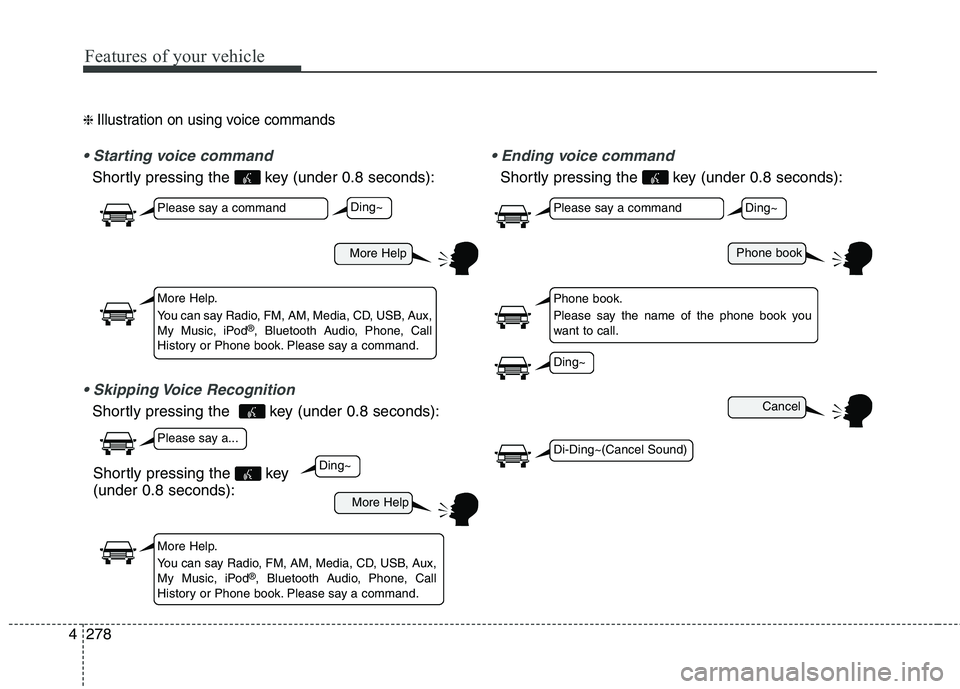
❈ Illustration on using voice commands
Shortly pressing the key (under 0.8 seconds):
Shortly pressing the key (under 0.8 seconds):
voice command
Shortly pressing the key (under 0.8 seconds):
More Help
More Help
Please say a command
Please say a...
More Help.
You can say Radio, FM, AM, Media, CD, USB, Aux,
My Music, iPod ®
, Bluetooth Audio, Phone, Call
History or Phone book. Please say a command.
More Help.
You can say Radio, FM, AM, Media, CD, USB, Aux,
My Music, iPod ®
, Bluetooth Audio, Phone, Call
History or Phone book. Please say a command.
Ding~
Ding~
Shortly pressing the key (under 0.8 seconds):
Phone book
Cancel
Please say a command
Phone book.
Please say the name of the phone book you
want to call.
Ding~
Di-Ding~(Cancel Sound)
Ding~
Page 364 of 653

Features of your vehicle
280
4
Command Function
Media Moves to the most recently played media
screen.
Play Track 1~30 If a music CD has been inserted, plays the
corresponding track.
CD Plays the music saved in the CD.
Search CD Moves to the CD track or file selection screen.
For audio CDs, move to the screen and say the
track number to play the corresponding track.
Moves to MP3 CD file selection screen. After
manually operate the device to select and
play music.
USB Plays USB music.
Search USB Moves to USB file selection screen. After manually operate the device to select and play
music.
iPod®Plays iPod®music.
Search iPod
®Moves to the iPod®file selection screen. After,
manually operate the device to select and play
music.
My Music Plays the music saved in My Music.
Search My Music Moves to My Music file selection screen. After manually operate the device to select and play
music.
Command Function
AUX (Auxiliary) Plays the connected external device.
Bluetooth Audio Plays the music saved in connected
Bluetooth®Wireless Technologydevice.
Mute Mutes the radio or music volume.
Pardon? Repeats the most recent comment.
Cancel (Exit) Ends voice command.
Page 365 of 653
Features of your vehicle
4 281
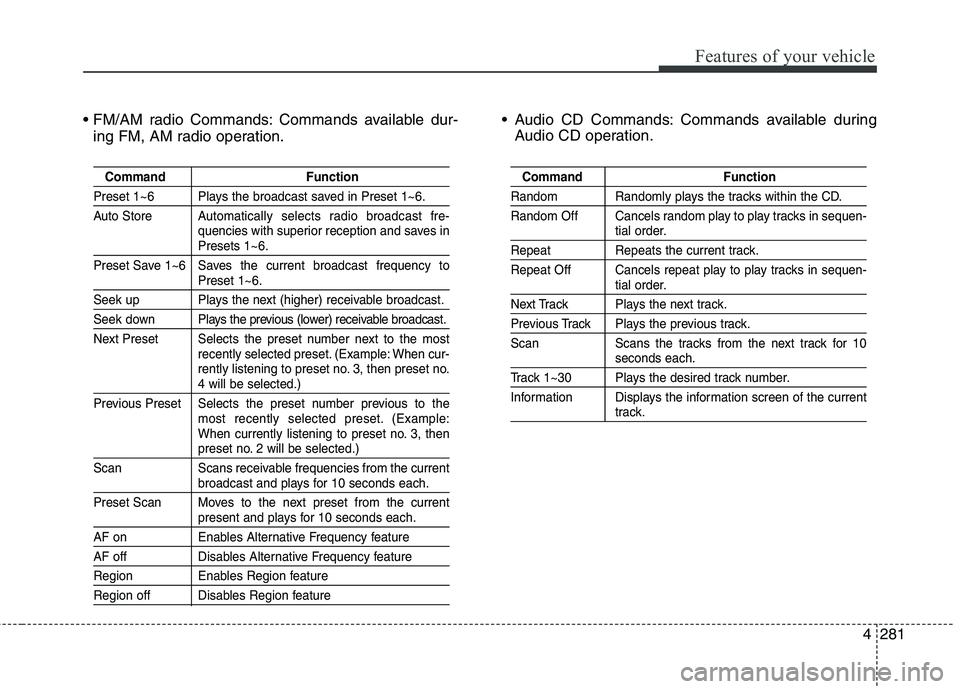
Commands available dur-
ing FM, AM radio operation. Audio CD Commands: Commands available during
Audio CD operation.
Command Function
Preset 1~6 Plays the broadcast saved in Preset 1~6.
Auto Store A utomatically selects radio broadcast fre-
quencies with superior reception and saves in
Presets 1~6.
Preset Save 1~6 Saves the current broadcast frequency to
Preset 1~6.
Seek up Plays the next (higher) receivable broadcast.
Seek down Plays the previous (lower) receivable broadcast.
Next Preset Selects the preset number next to the most recently selected preset. (Example: When cur-
rently listening to preset no. 3, then preset no.
4 will be selected.)
Previous Preset Selects the preset number previous to the most recently selected preset. (Example:
When currently listening to preset no. 3, then
preset no. 2 will be selected.)
Scan Scans receivable frequencies from the current
broadcast and plays for 10 seconds each.
Preset Scan Moves to the next preset from the current
present and plays for 10 seconds each.
AF on Enables Alternative Frequency feature
AF off Disables Alternative Frequency feature
Region Enables Region feature
Region off Disables Region feature
Command Function
Random Randomly plays the tracks within the CD.
Random Off Cancels random play to play tracks in sequen-
tial order.
Repeat Repeats the current track.
Repeat Off Cancels repeat play to play tracks in sequen-
tial order.
Next Track Plays the next track.
Previous Track Plays the previous track.
Scan Scans the tracks from the next track for 10
seconds each.
Track 1~30 Plays the desired track number.
Information Displays the information screen of the current
track.
Page 367 of 653
Features of your vehicle
4 283
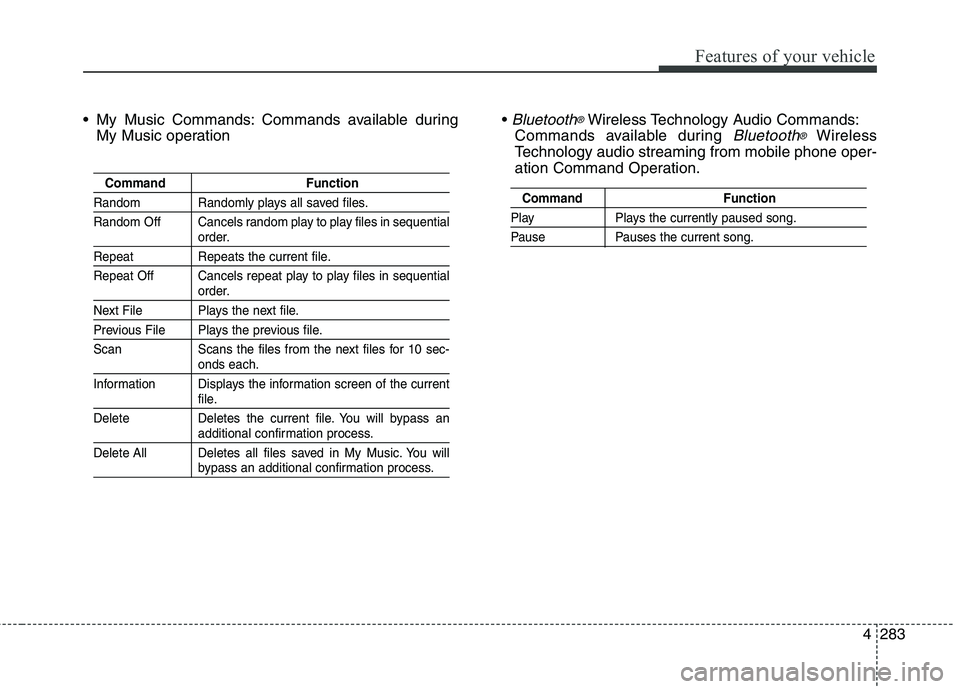
My Music Commands: Commands available during
My Music operation
Bluetooth®Wireless Technology Audio Commands:
Commands available during
Bluetooth®Wireless
Technology audio streaming from mobile phone oper-
ation Command Operation.
Command Function
Random Randomly plays all saved files.
Random Off Cancels random play to play files in sequential
order.
Repeat Repeats the current file.
Repeat Off Cancels repeat play to play files in sequential
order.
Next File Plays the next file.
Previous File Plays the previous file.
Scan Scans the files from the next files for 10 sec-
onds each.
Information Displays the information screen of the current
file.
Delete Deletes the current file. You will bypass an
additional confirmation process.
Delete All Deletes all files saved in My Music. You will
bypass an additional confirmation process.
Command Function
Play Plays the currently paused song.
Pause Pauses the current song.