audio KIA CEED 2017 Repair Manual
[x] Cancel search | Manufacturer: KIA, Model Year: 2017, Model line: CEED, Model: KIA CEED 2017Pages: 653, PDF Size: 54.59 MB
Page 369 of 653
![KIA CEED 2017 Repair Manual Features of your vehicle
4 285
Scroll Text
Press the key Select
[Display] Select [Scroll text]
This feature is used to scroll text dis-
played on the screen when it is too
long to be displayed at](/img/2/57941/w960_57941-368.png "KIA CEED 2017 Repair Manual Features of your vehicle
4 285
Scroll Text
Press the key Select
[Display] Select [Scroll text]
This feature is used to scroll text dis-
played on the screen when it is too
long to be displayed at")
Features of your vehicle
4 285
Scroll Text
Press the key Select
[Display] Select [Scroll text]
This feature is used to scroll text dis-
played on the screen when it is too
long to be displayed at once.
When turned on, the text is repeat-
edly scrolled. When turned off, the
text is scrolled just once.
MP3 Information Display
Press the key Select
[Display] Select [Song Info]
This feature is used to change the
information displayed within USB
and MP3 CD modes.
(1) Folder File : Displays file nameand folder name
(2) Album Artist Song : Displays album name/artist name/song Sound Settings
Audio Settings
Press the key Select
[Sound] Select [Audio Settings]SETUP
SETUPSETUP
Page 371 of 653

Features of your vehicle
4 287
Bluetooth®Wireless Technology
Setting The Bluetooth ®
word mark and logos
are registered trademarks owned by
Bluetooth SIG, Inc. and any use of
such marks by Kia is under license.
Other trademarks and trade names
are those of their respective owners.A Bluetooth ®
enabled cell phone is
required to use
Bluetooth®Wireless
Technology.
Pairing a New Device
Press the key Select
[Phone] Select [Pair Phone]
Bluetooth®Wireless Technology
devices can be paired with the audiosystem.
For more information, refer to the
“Pairing through Phone Setup” sec-tion within
Bluetooth®Wireless
Technology.
SETUPWARNING
Driving while distracted can
result in a loss of vehicle control
that may lead to an accident,
severe personal injury, and
death. The driver’s primary
responsibility is in the safe and
legal operation of a vehicle, and
use of any handheld devices,
other equipment, or vehicle sys-
tems which take the driver’s
eyes, attention and focus away
from the safe operation of a vehi-
cle or which are not permissible
by law should never be used dur-
ing operation of the vehicle.
Page 372 of 653
![KIA CEED 2017 Repair Manual Features of your vehicle
288
4
Viewing Paired Phone List
Press the key Select
[Phone] Select [Paired Phone List]
This feature is used to view mobile
phones that have been paired with
the audio sys](/img/2/57941/w960_57941-371.png "KIA CEED 2017 Repair Manual Features of your vehicle
288
4
Viewing Paired Phone List
Press the key Select
[Phone] Select [Paired Phone List]
This feature is used to view mobile
phones that have been paired with
the audio sys")
Features of your vehicle
288
4
Viewing Paired Phone List
Press the key Select
[Phone] Select [Paired Phone List]
This feature is used to view mobile
phones that have been paired with
the audio system. Upon selecting a
paired phone, the setup menu is dis-
played.
For more information, refer to the“Setting
Bluetooth®Wireless Technology
Connection” section within
Bluetooth®
Wireless Technology.
1) : Moves to the previous screen.
2) Connect/Disconnect Phone : Connect/ Disconnects currently selected phone.
3) Delete : Deletes the currentlyselected phone
4) Change Priority : Sets currently selected phone to highest connec-
tion priority
✽✽NOTICE - BEFORE
DOWNLOADING PHONE BOOKS
Only phone books within connect- ed phones can be downloaded.
Also check to see that your mobile
phone supports the download fea-
ture.
To learn more about whether your mobile phone supports phone
book downloads, refer to your
mobile phone user’s manual.
The Phone book for only the con- nected phone can be downloaded.
Before downloading, check to see
whether your phone supports the
download feature.
Downloading Phone books
Press the key Select [Phone]
Select [Phone book Download]
The Phone book is downloaded from
the mobile phone and the download
progress is displayed.
✽✽ NOTICE
Up to 1,000 phone book entries can be copied into car phone book.
Up to 1,000 phone book entries can be saved for each paired
device.
Upon downloading phone book data, previously saved phone book
data will be deleted. However,
Phone book entries saved to other
paired phones are not deleted.
SETUPSETUP
Page 373 of 653
![KIA CEED 2017 Repair Manual Features of your vehicle
4 289
Auto Download (Phone Book)
Press the key Select
[Phone] Select [Auto Download]
This feature is used to automatically
download mobile phone book entriesonce a
Blueto](/img/2/57941/w960_57941-372.png "KIA CEED 2017 Repair Manual Features of your vehicle
4 289
Auto Download (Phone Book)
Press the key Select
[Phone] Select [Auto Download]
This feature is used to automatically
download mobile phone book entriesonce a
Blueto")
Features of your vehicle
4 289
Auto Download (Phone Book)
Press the key Select
[Phone] Select [Auto Download]
This feature is used to automatically
download mobile phone book entriesonce a
Bluetooth®Wireless Technology
phone is connected.
✽✽ NOTICE
The Auto Download feature will download mobile phone book
entries every time the phone is
connected. The download time
may differ depending on the num-
ber of saved phone book entries
and the communication state.
When downloading a phone book, first check to see that your mobile
phone supports the phone book
download feature.
Outgoing Volume
Press the key Select
[Phone] Select [Outgoing Volume]
Use the , buttons to adjust
the outgoing volume level.
Turning Bluetooth System Off
Press the key Select
[Phone] Select [Bluetooth SystemOff] Once
Bluetooth®Wireless Technology
is turned off,
Bluetooth®Wireless
Technology related features will not
be supported within the audio system.
SETUPSETUPSETUP
Page 374 of 653
![KIA CEED 2017 Repair Manual Features of your vehicle
290
4
✽✽
NOTICE
To turn Bluetooth®
Wireless
Technology back on, go to
[Phone] and press “Yes”.System Setting
Memory Information
Press the key Select
[System] Se](/img/2/57941/w960_57941-373.png "KIA CEED 2017 Repair Manual Features of your vehicle
290
4
✽✽
NOTICE
To turn Bluetooth®
Wireless
Technology back on, go to
[Phone] and press “Yes”.System Setting
Memory Information
Press the key Select
[System] Se")
Features of your vehicle
290
4
✽✽
NOTICE
To turn Bluetooth®
Wireless
Technology back on, go to
[Phone] and press “Yes”.System Setting
Memory Information
Press the key Select
[System] Select [Memory Information]
This feature displays information
related to system memory.
(1) Using : Displays capacity current- ly in use
(2) Capacity : Displays total capacity❈ May differ depending on the
selected audio.
Voice Recognition Mode Setting
(If equipped)
Press the key Select
[System] Select [Voice RecognitionSystem]
This feature is used to select the
desired prompt feedback option from
Normal and Expert.
(1) Normal : When using voice recog- nition, provides detailed guidance prompts
(2) Expert : When using voice recog- nition, omits some guidanceprompts
✽✽NOTICE
Voice Recognition is depend on the
Audio System.
SETUP
SETUP
SETUP
CAUTION
Bluetooth ®
Wireless Technology
audio streaming may not be sup- ported in some Bluetooth ®
Wireless Technology phones.
Page 383 of 653

55
Driving your vehicle
Illuminated ignition switch
Whenever a front door is opened, the
ignition switch will be illuminated for your
convenience, provided the ignition switch
is not in the ON position. The light will go
off immediately when the ignition switch
is turned on or go off after about 30 sec-onds when the door is closed.KEY POSITIONS
WARNING
- Driving under
the influence of alcohol or drugs
Drinking and driving is dangerous.
Drunk driving is the number one
contributor to the highway death
toll each year. Even a small amount
of alcohol will affect your reflexes,
perceptions and judgement.Driving while under the influence of
drugs is as dangerous or more dan-
gerous than driving drunk.
You are much more likely to have a
serious accident if you drink or
take drugs and drive.
If you are drinking or taking drugs,
don’t drive. Do not ride with a driv-er who has been drinking or taking
drugs. Choose a designated driveror call a cab.WARNING
When you intend to park or stop the vehicle with the engine on, be careful not to depress the accel-
erator pedal for a long period of
time. It may overheat the engine
or exhaust system and cause fire.
When you make a sudden stop or turn the steering wheel rapidly,
loose objects may drop on the
floor and it could interfere with
the operation of the foot pedals,
possibly causing an accident.
Keep all things in the vehicle
safely stored.
If you do not focus on driving, it may cause an accident. Be care-
ful when operating what may dis-
turb driving such as audio or
heater. It is the responsibility of
the driver to always drive safely.
OGDE051055
ACC
ON
START
LOCK
Page 444 of 653
Driving your vehicle
66
5
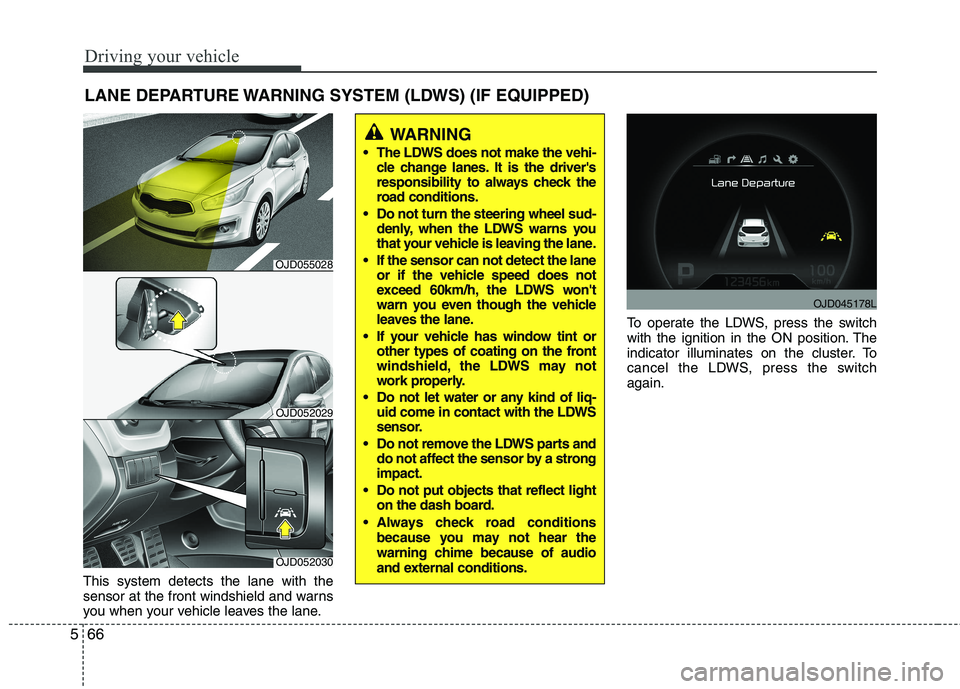
This system detects the lane with the
sensor at the front windshield and warns
you when your vehicle leaves the lane. To operate the LDWS, press the switch
with the ignition in the ON position. The
indicator illuminates on the cluster. To
cancel the LDWS, press the switchagain.
LANE DEPARTURE WARNING SYSTEM (LDWS) (IF EQUIPPED)
WARNING
The LDWS does not make the vehi- cle change lanes. It is the driver's
responsibility to always check the
road conditions.
Do not turn the steering wheel sud- denly, when the LDWS warns you
that your vehicle is leaving the lane.
If the sensor can not detect the lane or if the vehicle speed does not
exceed 60km/h, the LDWS won't
warn you even though the vehicle
leaves the lane.
If your vehicle has window tint or other types of coating on the front
windshield, the LDWS may not
work properly.
Do not let water or any kind of liq- uid come in contact with the LDWS
sensor.
Do not remove the LDWS parts and do not affect the sensor by a strongimpact.
Do not put objects that reflect light on the dash board.
Always check road conditions because you may not hear the
warning chime because of audio
and external conditions.
OJD052030
OJD052029
OJD045178L
OJD055028
Page 562 of 653

Maintenance
44
7
Reset items
Items should be reset after the battery
has been discharged or the battery hasbeen disconnected.
Auto up/down window (See chapter 4)
Sunroof (See chapter 4)
Trip computer (See chapter 4)
Climate control system
(See chapter 4)
Audio (See chapter 4)(Continued)
Wear eye protection when check- ing the battery during charging.
Disconnect the battery charger in the following order.
1. Turn off the battery charger main switch.
2. Unhook the negative clamp from the negative battery ter- minal.
3. Unhook the positive clamp from the positive battery termi-nal.
Before performing maintenance or recharging the battery, turn offall accessories and stop the
engine.
The negative battery cable must be removed first and installed
last when the battery is discon-nected.
JD PE eng 7.QXP 03.01.2017 17:19 Page 44
Page 576 of 653

Maintenance
58
7
Fuse switch
Always, put the fuse switch at the ON position.
If you move the switch to the OFF posi- tion, some items such as audio and digi-
tal clock must be reset and transmitter
(or smart key) may not work properly.
When the fuse switch is in the OFF posi-
tion, a message "Turn on fuse switch" will
illuminate on the cluster.
✽✽
NOTICE
If you need to park your vehicle for pro-
longed periods more than 1 month,
move the fuse switch to the OFF position
to prevent the battery being discharged.
Engine compartment panel fuse replacement
1. Turn the ignition switch and all other switches off.
OGD071019
OGD071021
Diesel onlyOJD072017
CAUTION
Always place the fuse switch in
the ON position while driving thevehicle.
Do not move the fuse switch repeatedly. The fuse switch may
be worn out.
JD PE eng 7.QXP 03.01.2017 17:19 Page 58
Page 580 of 653

Maintenance
62
7
Instrument panel (Driver’s side fuse panel)
No.Fuse ratingSymbolFuse NameProtected component
130ADRVP/SEAT DRV4WAY : Driver Lumbar Support Switch
6WAY : Driver Seat Manual Switch, Driver IMS Module
225AH/LP WASHERICM Relay Box (Head Lamp Washer Relay)
325ARHP/WDW RHPower Window Relay RH, Driver/Passenger Safety Power Window Module,
Rear Safety Power Window Module RH
410AT/GATE OPENTail Gate Relay
525ALHP/WDW LHPower Window Relay LH, Driver/Passenger Safety Power
Window Module, Rear Safety Power Window Module LH
620ADR LOCKDoor Lock/Unlock Relay, Dead Lock Relay
720ASPARESPARE-
820APOWER
OUTLET2POWER
OUTLET 2Cigarette Lighter, Rear Power Outlet
920APASSP/SEAT ASSPassenger Lumbar Support Switch
1015ARRRR WIPERICM Relay Box (Rear Wiper Relay), Rear Wiper Motor
117.5AMODULE 3MODULE 3Auto Light & Photo Sensor, AT lever (Shift Lock), Hazard Switch
1215AFRTS/HEATER FRTDriver/Passenger Seat Warmer Module
1310AACCACCA/V & Navigation Head Unit (W/O ISG), Audio (W/O ISG), DC-DC Convertor (With ISG),
Digital Clock, Smart Key Control Module, BCM, Outside Mirror Switch, Outside Mirror
JD PE eng 7.QXP 03.01.2017 17:19 Page 62