wheel KIA CEED 2017 Owner's Guide
[x] Cancel search | Manufacturer: KIA, Model Year: 2017, Model line: CEED, Model: KIA CEED 2017Pages: 653, PDF Size: 54.59 MB
Page 188 of 653
Features of your vehicle
104
4
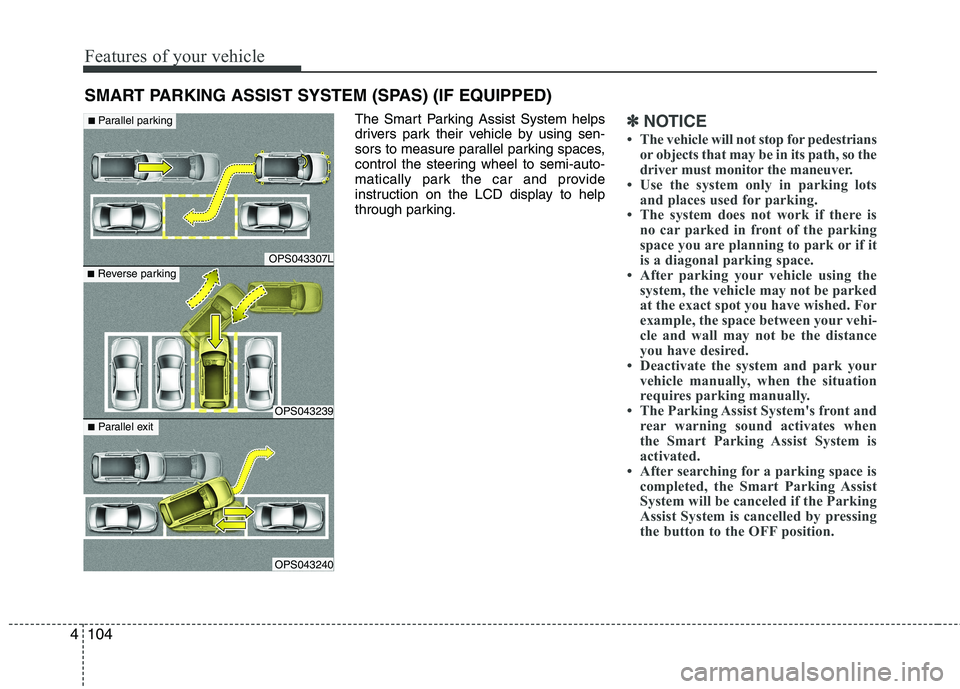
The Smart Parking Assist System helps
drivers park their vehicle by using sen-
sors to measure parallel parking spaces,
control the steering wheel to semi-auto-
matically park the car and provide
instruction on the LCD display to help
through parking.✽✽
NOTICE
The vehicle will not stop for pedestrians or objects that may be in its path, so the
driver must monitor the maneuver.
Use the system only in parking lots
and places used for parking.
The system does not work if there is
no car parked in front of the parking
space you are planning to park or if it
is a diagonal parking space.
After parking your vehicle using the
system, the vehicle may not be parked
at the exact spot you have wished. For
example, the space between your vehi-
cle and wall may not be the distance
you have desired.
Deactivate the system and park your
vehicle manually, when the situation
requires parking manually.
The Parking Assist System's front and rear warning sound activates when
the Smart Parking Assist System is
activated.
After searching for a parking space is completed, the Smart Parking Assist
System will be canceled if the Parking
Assist System is cancelled by pressing
the button to the OFF position.
SMART PARKING ASSIST SYSTEM (SPAS) (IF EQUIPPED)
OPS043307L
OPS043239
OPS043240
■Parallel parking
■ Reverse parking
■Parallel exit
Page 189 of 653
4105
Features of your vehicle
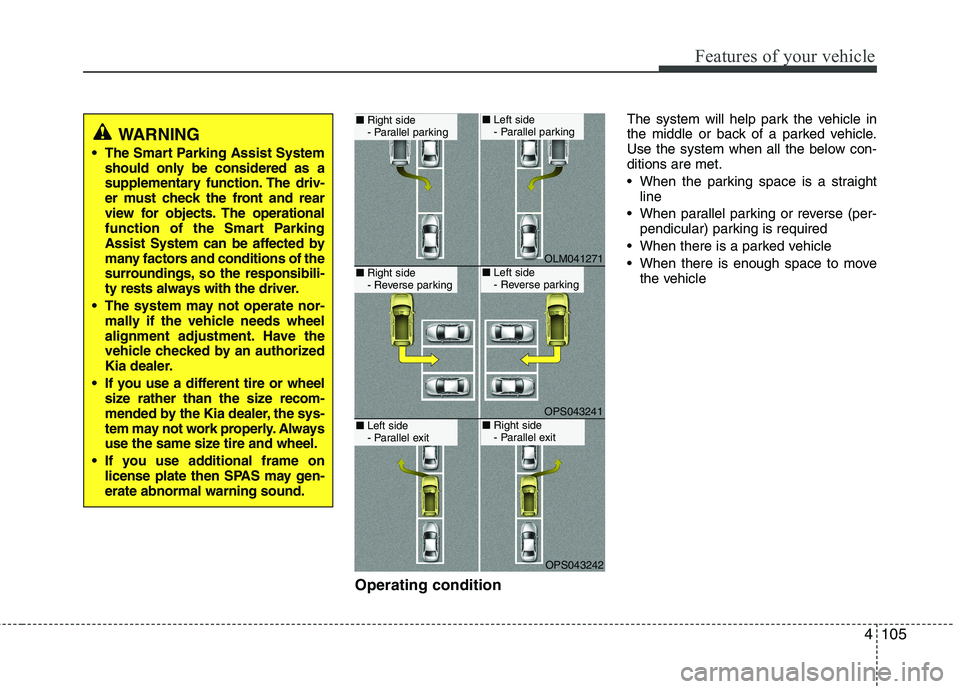
Operating conditionThe system will help park the vehicle in
the middle or back of a parked vehicle.
Use the system when all the below con-ditions are met.
When the parking space is a straight
line
When parallel parking or reverse (per- pendicular) parking is required
When there is a parked vehicle
When there is enough space to move the vehicle
WARNING
The Smart Parking Assist System should only be considered as a
supplementary function. The driv-
er must check the front and rear
view for objects. The operational
function of the Smart Parking
Assist System can be affected by
many factors and conditions of the
surroundings, so the responsibili-
ty rests always with the driver.
The system may not operate nor- mally if the vehicle needs wheel
alignment adjustment. Have the
vehicle checked by an authorized
Kia dealer.
If you use a different tire or wheel size rather than the size recom-
mended by the Kia dealer, the sys-
tem may not work properly. Always
use the same size tire and wheel.
If you use additional frame on license plate then SPAS may gen-erate abnormal warning sound.
OLM041271
OPS043241
OPS043242
■Right side
- Parallel parking■ Left side
- Parallel parking
■Right side
- Reverse parking■ Left side
- Reverse parking
■Left side
- Parallel exit■ Right side
- Parallel exit
Page 190 of 653

Features of your vehicle
106
4
Non-operating condition
Never use the Smart Parking Assist
System in the below conditions.
Curved parking space
Inclined roads
A vehicle loaded with longer or wider
cargo compared to the vehicle
Diagonal parking space
Parking space with trash, grass or bar- riers
Heavy snow or rain
A pole close to the parking line
Bumpy roads
A vehicle equipped with a snow chain or spare tire
Tire pressure lower or higher than the standard tire pressure
A trailer connected to the vehicle
Slippery or uneven road
Big vehicles such as buses or trucks parked
Sensor covered with foreign matter, such as snow or water
Moisture frozen on the sensor.
A motorcycle or bicycle parked
A trash can or obstacle near Heavy wind
Wheel changed to an unauthorized
size
A problem with the wheel alignment
Next to a garden or bush
A accessory installed on the detective area the of sensors (such as number plate holder)
Vehicle leaned severely to one side
Strong sunlight or very cold weather
Ultrasonic interference other vehicle's. Such as horn sounds of other vehicles,
motorcycle's engine noise, air brake
noise of heavy vehicles and with the
other vehicle's parking assist system
working.
Near a circular pillar or narrow pillar, or a pillar surrounded by object such as
fire extinguisher, etc.
The sensor is positioned incorrectly by an impact to the bumper
WARNING
Do not use the Smart Parking
Assist System in the following con-
ditions for unexpected results mayoccur and cause a serious accident.
1. Parking on inclines
The driver must apply the accelera- tor and brake pedal when parking
on inclines. If the driver is unfamil-
iar with applying the accelerator
and brake pedal, a car accident may
occur.
(Continued)
OJD042156
Page 193 of 653

4109
Features of your vehicle
How the system works
(Parking mode)
1. Activate the Smart Parking AssistSystem
The shift lever should be placed in D
(Drive) or N(Neutral).
2. Select parking assist mode
3. Search for parking space (slowly move forward.)
4. Search complete (automatic search by sensor.)
5. Steering wheel control (1) Shift according to the instruction on the LCD display.
(2) Drive slowly with the brake pedal applied.
6. Smart Parking Assist System complete
7. If necessary, manually adjust position of vehicle.
✽✽ NOTICE
Before activating the system check if the conditions are possible to use the
system.
For your safety, always apply the
brake pedal except for when driving.
1. Activate Smart Parking Assist
System
Press the Smart Parking AssistSystem button (the button indicator will illuminate).
The Parking Assist System will be acti- vated (the button indicator will illumi-nate).
A warning sound will be heard if an obstacle is detected.
Press the Smart Parking Assist System button again for more than 2
seconds to turn off the system.
The Smart Parking Assist System defaults to the OFF position whenever
the ignition switch is turned on.
OJD042082
(Continued)
8. Leaving a parking space near a wall
When leaving a parking space that
is narrow and near a wall, the sys-
tem may not work properly. When
leaving a parking space similar to
the above picture, the driver must
watch out for obstacles while leav-ing.
OJD045533
Page 196 of 653

Features of your vehicle
112
4
4. Search complete
While driving forward to search for a
parking space, the above message willappear with a beep sound if the search is
complete. Stop the vehicle and shift to
the R (Reverse) position.
5. Steering wheel control
The above message will appear if the
shift lever is in R (Reverse). The steering
wheel will be controlled automatically.
The system will be cancelled if you firmly hold the steering wheel while it is
controlled automatically.
The system will be cancelled if vehicle speed is over 7km/h(4.3mph).
CAUTION
Always drive slowly with the
brake pedal applied.
If the parking space is to small the system may be cancelled atthe Steering wheel control stage.Do not park your vehicle if the
space is too small.
OUM044315L
WARNING
Do not put your hands between the steering wheel while it is being
automatically controlled.
■ Right side
- parallel mode ■
Left side
-parallel mode
■ Right side
- reverse mode ■
Left side
- reverse mode
OJD045302L/OJD045303L
OUM044304L/OUM044305L
Page 197 of 653

4113
Features of your vehicle
✽✽NOTICE
If you do not follow the instructions pro- vided, you may fail to park your vehicle.
However, if the Parking Assist System
warning sound (distance from object
is within 30cm: continuous beep)
occurs, slowly drive the vehicle to the
reverse direction of the detected
object after checking the surrounding.
Always check the surrounding before
driving your vehicle if the Parking
Assist System warning sound (dis-
tance from object is within 30cm: con-
tinuous beep) is heard for the object is
close to your vehicle.
To cancel the system while parking
Press the Smart Parking Assist System
button or turn the steering wheel to the
left or right.
Gear shift while steering wheel control
When the above message appears with a
beep sound, shift the gear and drive the
vehicle with the brake pedal depressed.■Manual transaxle
■ Automatic transaxle
OUM044316L/OUM044317L
OUM044318L/OUM044317L
CAUTION
Always drive slowly with the
brake pedal applied.
Always check for objects around your vehicle before driving.
If the vehicle does not move even though the brake pedal is notdepressed, check the surround-
ing before depressing the accel-erator pedal. Be sure not to speedover 7km/h(4.3mph).
Page 198 of 653
Features of your vehicle
114
4
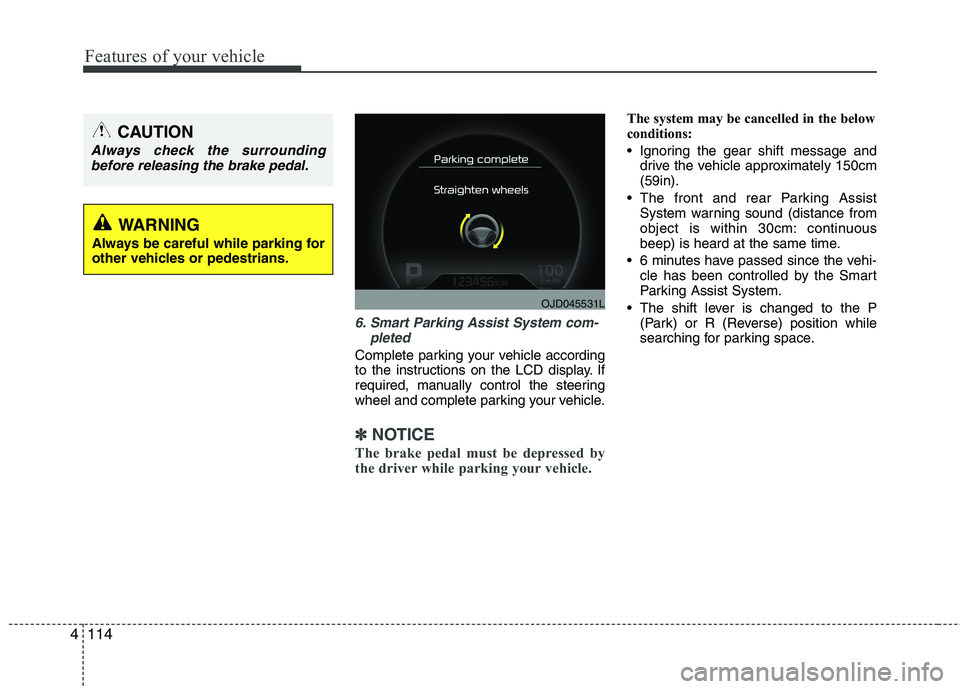
6. Smart Parking Assist System com-
pleted
Complete parking your vehicle according
to the instructions on the LCD display. If
required, manually control the steering
wheel and complete parking your vehicle.
✽✽NOTICE
The brake pedal must be depressed by
the driver while parking your vehicle.
The system may be cancelled in the below
conditions:
Ignoring the gear shift message and drive the vehicle approximately 150cm (59in).
The front and rear Parking Assist System warning sound (distance from
object is within 30cm: continuous
beep) is heard at the same time.
6 minutes have passed since the vehi- cle has been controlled by the Smart
Parking Assist System.
The shift lever is changed to the P (Park) or R (Reverse) position while
searching for parking space.
OJD045531L
WARNING
Always be careful while parking for
other vehicles or pedestrians.
CAUTION
Always check the surrounding before releasing the brake pedal.
Page 199 of 653

4115
Features of your vehicle
How the system works (Exit mode)
The Exit Mode operates in the below condition:
When vehicle speed is below 5 km/hthe first time after the engine has been
started.
After parallel parking is completed with the Smart Parking Assist System.
1. Activate the Smart Parking Assist System
The shift lever should be placed in P (Park) or N (Neutral).
2. Select Exit Mode
3. Check surroundings
4. Steering wheel control (1) Shift according to the instruction on the LCD display.
(2) Drive slowly with the brake pedal applied.
5. Exiting complete If necessary, manually adjust position
of vehicle.✽✽NOTICE
Before activating the system check if the conditions are possible to use the
system.
For your safety, always apply the
brake pedal except for when driving.
1. Activate Smart Parking Assist
System
Press the Smart Parking Assist
System button (the button indicator will illuminate).
The Parking Assist System will be acti- vated (the button indicator will illumi- nate).
A warning sound will be heard if an obstacle is detected.
Press the Smart Parking Assist System button again for more than 2
seconds to turn off the system.
The Smart Parking Assist System defaults to the OFF position whenever
the ignition switch is turned on.
OJD042082
Page 201 of 653

4117
Features of your vehicle
4. Steering wheel control
The above message will appear if theshift lever is in D (Drive) or R (Reverse) according to the distance of the front
and rear object from the sensor.
The steering wheel will be controlled
automatically.
The system will be cancelled if you firmly hold the steering wheel while it is
controlled automatically.
The system will be cancelled if vehicle speed is over 7km/h (4.3mph). To cancel the system while exiting
Press the Parking Assist System or
Smart Parking Assist System button.
WARNING
Do not put your hands between the steering wheel while it is being
automatically controlled.
CAUTION
Always drive slowly with the brake pedal applied.
OUM044318L
OUM044317L
OUM045315L
Page 202 of 653

Features of your vehicle
118
4
5. Exiting Complete
When assisting the driver exit the parking
space is completed the above message
will appear.
Turn the steering wheel to the direction
you are leaving and manually control the
steering wheel while leaving the parking
space.
Additional instructions(messages)
CAUTION
When leaving the parking spaceturn the steering wheel as much
as you can to the direction youare leaving, and then drive thevehicle slowly by depressing the vehicle.
Always check the surrounding before driving your vehicle if theParking Assist System warningsound is continuously heard.
The system will be cancelled for safety reasons if the vehicle isparked at a small space near awall.
OUM044328L
OUM044319L
OUM044320L
OUM044321L