wheel KIA CEED 2017 Service Manual
[x] Cancel search | Manufacturer: KIA, Model Year: 2017, Model line: CEED, Model: KIA CEED 2017Pages: 653, PDF Size: 54.59 MB
Page 203 of 653

4119
Features of your vehicle
When the Smart Parking Assist System
is operating, a message may appear
regardless of the parking order. The messages will appear according to
the circumstances. Follow the instruc-
tions provided while parking your vehicle
with the Smart Parking Assist System.✽✽NOTICE
In the below conditions the system will be cancelled. Park your vehicle manually.
1. Search for parking space
- When the ABS/ESC is activated
- When the vehicle speed is over30km/h(18.6mph)
- When you press the Smart Parking Assist System button (the front and
rear Parking Assist System operates)
- When you shift the shift lever to R
(Reverse)
2. Steering wheel control
- When the ABS/ESC is activated
- When the vehicle speed is over7km/h (4.3 mph)
- When you press the Smart Parking
Assist System button (the front and
rear Parking Assist System operates)
- When you shift the shift lever to D (Drive) before entering the parking
space
- When you hold the steering wheel
firmly
System malfunction
If there is a problem with the system, when the system is turned on, the
above message will appear. Also, the
indicator on the button will not light up
and a beep sound will be heard 3 times.
If there is a problem with only the Smart Parking Assist System, the
Parking Assist System will operate
after 2 seconds.
If you notice any problem, have your
vehicle checked by an authorized Kia
dealer as soon as possible.
OJD045532L
Page 206 of 653
Features of your vehicle
122
4
Static bending light (if equipped)
While driving the corner, for your sight
and safety, the static bending light turns
on automatically. The system will operate
automatically as follows:
When vehicle speed is under 10km/h
and steering wheel angle approximate-
ly 80 degrees.
When vehicle speed is over 10km/h and steering wheel angle approximate-
ly 35 degrees.
When the vehicle is at a standstill.
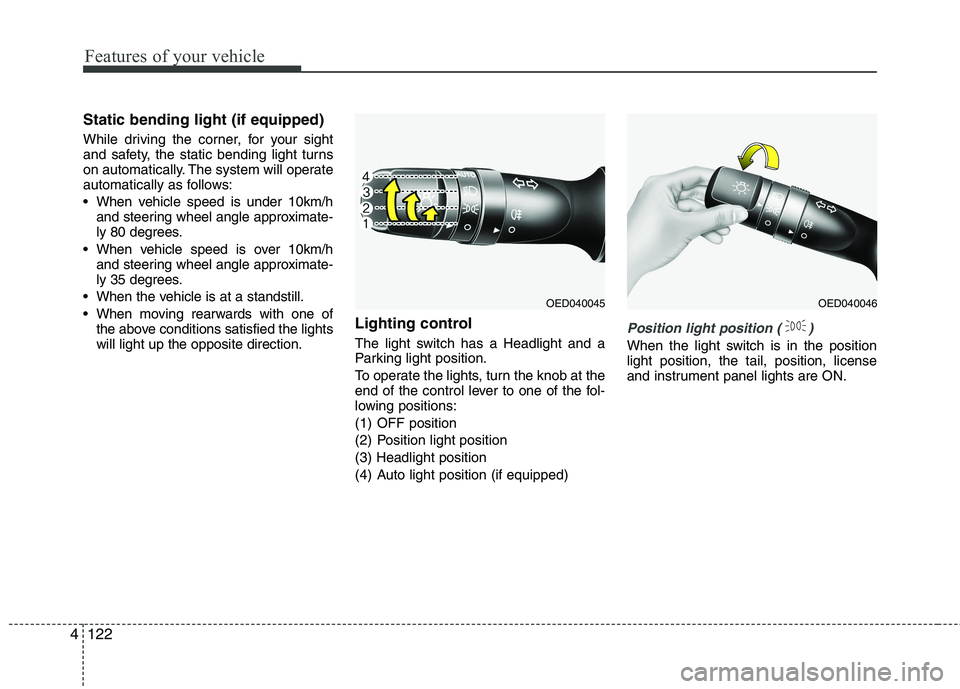
When moving rearwards with one of the above conditions satisfied the lights will light up the opposite direction. Lighting control
The light switch has a Headlight and a
Parking light position.
To operate the lights, turn the knob at the
end of the control lever to one of the fol-
lowing positions:
(1) OFF position
(2) Position light position(3) Headlight position
(4) Auto light position (if equipped)
Position light position ( )
When the light switch is in the position light position, the tail, position, license
and instrument panel lights are ON.
OED040045OED040046
Page 227 of 653

4143
Features of your vehicle
Instrument panel vents
The outlet vents can be opened or closed
separately using the thumbwheel or vent
control lever.
Also, you can adjust the direction of air
delivery from these vents using the vent
control lever as shown.
Temperature control
The temperature control knob allows you
to control the temperature of the airflow
in the vehicle.
To change the temperature:
Turn the knob to the right to increasetemperature.
Turn the knob to the left to decrease temperature.
Air intake control
The air intake control is used to select the outside (fresh) air position or recircu-lated air position.
To change the air intake control position,
press the control button.
OJD042105
OJD042107
OJD042108
OJD042106
Page 238 of 653

Features of your vehicle
154
4
Instrument panel vents
The outlet vents can be opened or closed
separately using the thumbwheel or vent
control lever.
Also, you can adjust the direction of air
delivery from these vents using the vent
control lever as shown.
Temperature control
The temperature will increase to the
maximum (HI) by turning the knob to the
right extremely.
The temperature will decrease to the
minimum (Lo) by turning the knob to the
left extremely.
When turning the knob, the temperature
will increase or decrease by 0.5°C/1°F.
When set to the lowest temperature set-
ting, the air conditioning will operate con-
tinuously.
Operate the driver’s side temperature
control to adjust the driver side tempera-
ture. Operate the passenger’s side tem-
perature control to adjust the passenger
side temperature. Adjusting the driver and passenger side
temperature individually
1. Press the DUAL button to operate the
driver and passenger side temperature
individually. Also, if the passenger side
temperature control knob is operated,it will automatically change to the
DUAL mode as well.
2. Operate the driver side temperature control to adjust the driver side tem-
perature. Operate the passenger side
temperature control to adjust the pas-
senger side temperature.
When the driver side temperature is set
to the highest (HIGH) or lowest (LOW)
temperature, the DUAL mode deacti-
vates for maximum heating or cooling.
OJD042113
■ Driver’s side■Passenger’s side
OJD042112
OJD042107
OJD042108
Page 270 of 653

Features of your vehicle
186
4 Steering wheel audio controls (If equipped)
The steering wheel may incorporate
audio control buttons.
VOLUME ( / ) (1)
• Press the lever upward ( ) to
increase the volume.
Press the lever downward ( ) to decrease the volume.
SEEK/PRESET ( / ) (2)
The SEEK/PRESET lever has differ- ent functions based on the system
mode. For the following functions the
lever should be pressed for 0.8 sec-
onds or more.
RADIO mode
It will function as the AUTO SEEK
select button.
CD/USB/ i Pod ®
mode
It will function as the FF/REW button.
If the SEEK/PRESET button is
pressed for less than 0.8 seconds, it
will work as follows in each mode. RADIO mode
It will function as the PRESET STA-
TION buttons.
CD/USB/ i Pod
®
mode
It will function as TRACK UP/DOWN
button.
MODE ( ) (3)
Press the button to change audio
source. FM ➟ AM ➟ CD ➟ USB/iPod ®
➟ AUX ➟
MY MUSIC ➟
Bluetooth®Wireless
Technology audio
MUTE ( ) (4, if equipped)
Press the button to mute the sound.
Press the button to turn off the microphone during a telephone call.
Detailed information for audio control
buttons are described in the followingpages in this section.
CAUTION
Do not operate audio remote control buttons simultaneously.
OUM044210L
■
Type A
■ Type B ■
Type C
■ Type D
Page 308 of 653
Features of your vehicle
224
4 PHONE (If equipped)
Before using the
Bluetooth®Wireless
Technology
phone features
In order to use
Bluetooth®Wireless
Technology phone, you must first pair and connect the
Bluetooth®
Wireless Technology mobile
phone.
If the mobile phone is not paired or connected, it is not possible to
enter Phone mode. Once a phoneis paired or connected, the guid-
ance screen will be displayed.
If Priority is set upon vehicle igni- tion (IGN/ACC ON), the
Bluetooth®
Wireless Technology phone will be
automatically connected. Even if
you are outside, the
Bluetooth®
Wireless Technology phone will be
automatically connected once you
are in the vicinity of the vehicle. If
you do not want automatic
Bluetooth®Wireless Technology
phone connection, set the
Bluetooth®Wireless Technology
power to OFF. Making a call using the
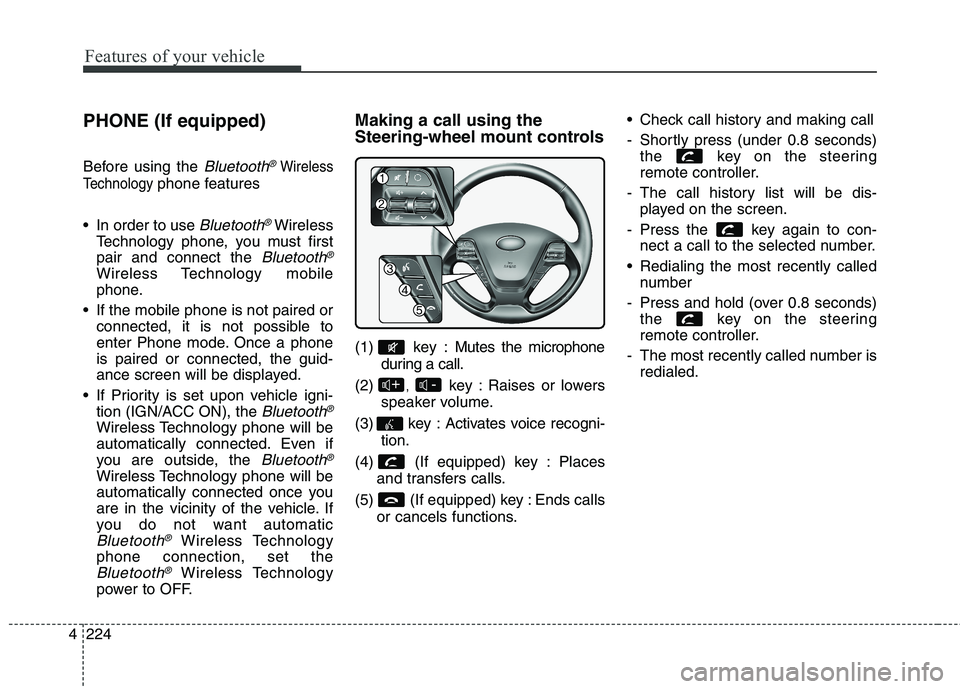
Steering-wheel mount controls
(1) key : Mutes the microphone
during a call.
(2) , key : Raises or lowers
speaker volume.
(3) key : Activates voice recogni- tion.
(4) (If equipped) key : Places and transfers calls.
(5) (If equipped) key : Ends calls or cancels functions. Check call history and making call
- Shortly press (under 0.8 seconds)
the key on the steering
remote controller.
- The call history list will be dis- played on the screen.
- Press the key again to con- nect a call to the selected number.
Redialing the most recently called number
- Press and hold (over 0.8 seconds) the key on the steering
remote controller.
- The most recently called number is redialed.
-+
Page 310 of 653
Features of your vehicle
226
4 VOICE COMMAND (If equipped)
Starting Voice Command
To start voice command, shortly
press the key on the steering
wheel remote controller.
If voice command is in [Normal Mode], then the system will say
“Please say a command. Beep”
❈ If voice command is in [Expert
Mode], then the system will only
say a “Beep-”
❈ Setting Voice command [Normal
Mode]/[Expert Mode]:
Press the key Select
[System] through the TUNE
knob or key Select [VRS
Mode] through the TUNE
knob Set [Normal Mode]/[ExpertMode]
Say the voice command.
✽✽ NOTICE
For proper voice recognition, say the
voice command after the guidance
message and the “Beep” sound.
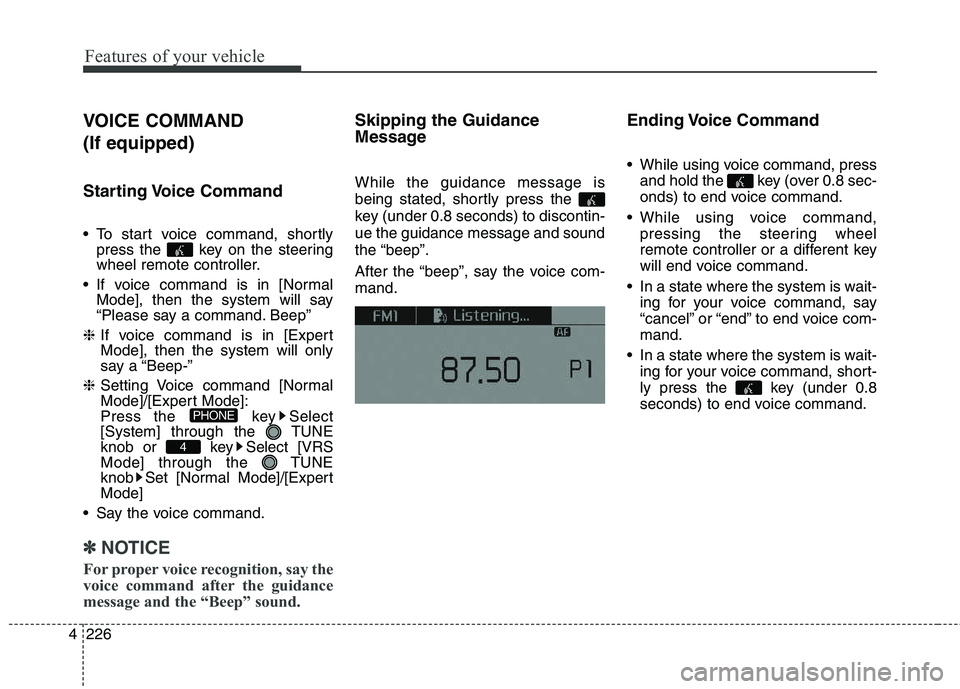
Skipping the Guidance
Message While the guidance message is
being stated, shortly press the
key (under 0.8 seconds) to discontin-ue the guidance message and soundthe “beep”.
After the “beep”, say the voice com- mand. Ending Voice Command
While using voice command, press
and hold the key (over 0.8 sec-
onds) to end voice command.
While using voice command, pressing the steering wheel
remote controller or a different key
will end voice command.
In a state where the system is wait- ing for your voice command, say
“cancel” or “end” to end voice com-mand.
In a state where the system is wait- ing for your voice command, short-
ly press the key (under 0.8
seconds) to end voice command.
4
PHONE
Page 320 of 653

Features of your vehicle
236
4 Steering-wheel mount controls
(1) : Mutes the microphone dur-
ing a call.
(2) , : Used to control volume. (3) (If
equipped)
When pressed shortly (under 0.8 seconds)
- Starts voice recognition
- When selecting during a voice prompt, stops the prompt and con-
verts to voice command waitingstate
When pressed and held (over 0.8 seconds)
- Ends voice recognition (4)
When pressed shortly (under 0.8 sec- onds)
- When pressed in the phone screen, displays call history screen
- When pressed in the dial screen, makes a call
- When pressed in the incoming call screen, answers the call - When pressed during call waiting,
switches to waiting call (Call Waiting)
When pressed and held (over 0.8 seconds)
- When pressed in the
Bluetooth®
Wireless Technology Handsfree
wait mode, redials the last call
- When pressed during a
Bluetooth®
Wireless Technology Handsfree
call, switches call back to mobile
phone (Private)
- When pressed while calling on the mobile phone, switches call back to
Bluetooth®Wireless Technology
Handsfree (Operates only when
Bluetooth®Wireless Technology
Handsfree is connected)
(5) Ends phone call-+
Page 352 of 653

Features of your vehicle
268
4 (1) Device : Name of device as
shown when searching from your
Bluetooth®Wireless Technology
device
(2) Passkey : Passkey used to pair the device
3. From your
Bluetooth®Wireless
Technology device (i.e. Mobile
Phone), search and select yourcar audio system.
[Non SSP supported device]
(SSP: Secure Simple Pairing)
4. After a few moments, a screen is displayed where the passkey is entered.
Enter the passkey “0000” to pair
your
Bluetooth®Wireless
Technology device with the caraudio system. [SSP supported device]
4. After a few moments, a screen is dis-
played 6 digits passkey.
Check the passkey on your
Bluetooth®Wireless Technology
device and confirm.
5. Once pairing is complete, the fol- lowing screen is displayed.
Some phones (i.e., iPhone ®
, Android
and Blackberry phones) may offer an
option to allow acceptance of allfuture Bluetooth connection requests
by default." and "Visit http://www.kia.
com/#/bluetooth for additional infor-
mation on pairing your Bluetooth-
enabled mobile phone, and to view aphone compatibility list.
✽✽ NOTICE
If Bluetooth ®
Wireless Technology
devices are paired but none are cur-
rently connected, pressing the key or the key on the
steering wheel displays the following
screen. Press the [Pair] button to
pair a new device or press the
[Connect] to connect a previously
paired device.
PHONE
Page 360 of 653

Features of your vehicle
276
4 VOICE RECOGNITION (If equipped)
Using Voice Recognition
Starting Voice Recognition
Shortly press the key on the
steering wheel Say a command.
If voice recognition is in [Normal
Mode], then the system will say
“Please say a command. Beep~”
If voice recognition is in [Expert
Mode], then the system will only
say a “Beep~”
To change the Normal Mode/Expert Mode setting, go to [System] [Voice Recognition
System].
✽✽ NOTICE
For proper recognition, say the com-
mand after the voice insttction and
beep tone.
Phonebook List Best Practice
1) Do not store single-name entries (e.g., “Bob”, “Mom”, “Kim”, etc.).
Instead, always use full names
(including first and last names) for
phonebook (e.g., use “Jacob
Stevenson” instead of “Dad”).
2) Do not use abbreviations (i.e., use “Lieutenant” instead of “Lt.” or
“Sergeant” instead of “Sgt.”).
3) Do not use acronyms (i.e., use “County Finance Department”
instead of “CFD”).
4) Do not use special characters (e.g., “@”, “hyphen -”, “asterisk *”,ampersand &”).
5) If a name is not recognized from the phonebook, change it to a
more descriptive name (e.g., use
“Grandpa Joseph” instead of “PaJoe”).