ignition KIA CERATO 2007 Owner's Manual
[x] Cancel search | Manufacturer: KIA, Model Year: 2007, Model line: CERATO, Model: KIA CERATO 2007Pages: 329, PDF Size: 34.09 MB
Page 96 of 329
Knowing your vehicle
86
3
1 23456789
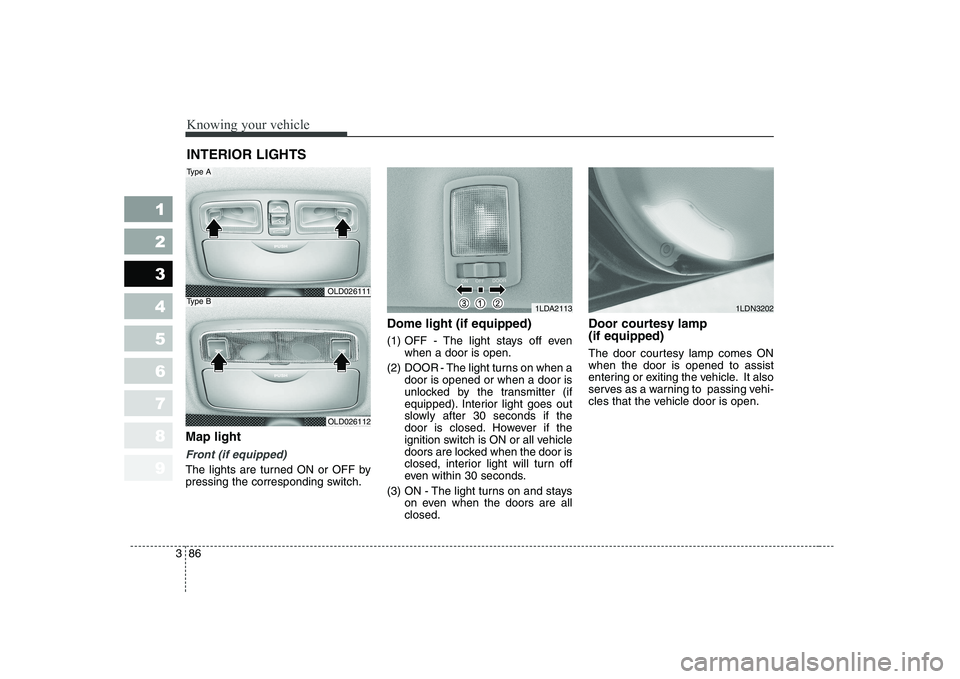
Map light
Front (if equipped)
The lights are turned ON or OFF by
pressing the corresponding switch. Dome light (if equipped)
(1) OFF - The light stays off even
when a door is open.
(2) DOOR - The light turns on when a door is opened or when a door is
unlocked by the transmitter (if
equipped). Interior light goes out
slowly after 30 seconds if the
door is closed. However if the
ignition switch is ON or all vehicle
doors are locked when the door is
closed, interior light will turn off
even within 30 seconds.
(3) ON - The light turns on and stays on even when the doors are allclosed. Door courtesy lamp (if equipped)
The door courtesy lamp comes ON when the door is opened to assist
entering or exiting the vehicle. It also
serves as a warning to passing vehi-
cles that the vehicle door is open.
INTERIOR LIGHTS
1LDA2113
OLD026111
OLD026112
Type A
Type B1LDN3202
Page 104 of 329
Knowing your vehicle
94
3
1 23456789
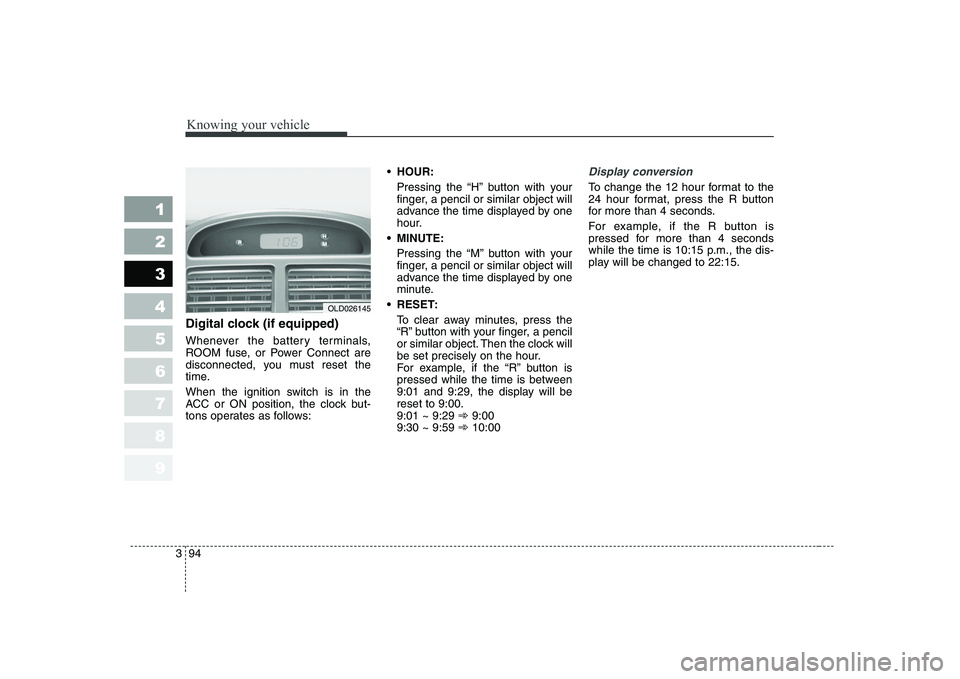
Digital clock (if equipped)
Whenever the battery terminals,
ROOM fuse, or Power Connect are
disconnected, you must reset the
time.
When the ignition switch is in the
ACC or ON position, the clock but-
tons operates as follows:
HOUR:
Pressing the “H” button with your
finger, a pencil or similar object will
advance the time displayed by one
hour.
MINUTE: Pressing the “M” button with your
finger, a pencil or similar object will
advance the time displayed by one
minute.
RESET: To clear away minutes, press the
“R” button with your finger, a pencil
or similar object. Then the clock will
be set precisely on the hour.
For example, if the “R” button is
pressed while the time is between
9:01 and 9:29, the display will bereset to 9:00.9:01 ~ 9:29 ➾9:00
9:30 ~ 9:59 ➾10:00
Display conversion
To change the 12 hour format to the
24 hour format, press the R button
for more than 4 seconds.
For example, if the R button is
pressed for more than 4 seconds
while the time is 10:15 p.m., the dis-
play will be changed to 22:15.
OLD026145
Page 105 of 329

395
1 23456789
Knowing your vehicle
Shopping bag holder (if equipped)
To use the holder, push the lower
portion.If your vehicle is equipped with this
feature, you can slide or tilt your sun-
roof with the sunroof control buttons
located on the overhead console.
(1) Slide button
(2) Tilt button
(3) Close buttonThe sunroof can only be opened, closed, or tilted when the ignition
switch is in the “ON” position.
OLD026022
OLD026154
OUN026360
Front
Rear
CAUTION
Do not hang a bag weighing
more than 3 kg (7 lbs.). It may cause damage to the shoppingbag holder.
SUNROOF (IF EQUIPPED)
Page 108 of 329
Knowing your vehicle
98
3
1 23456789
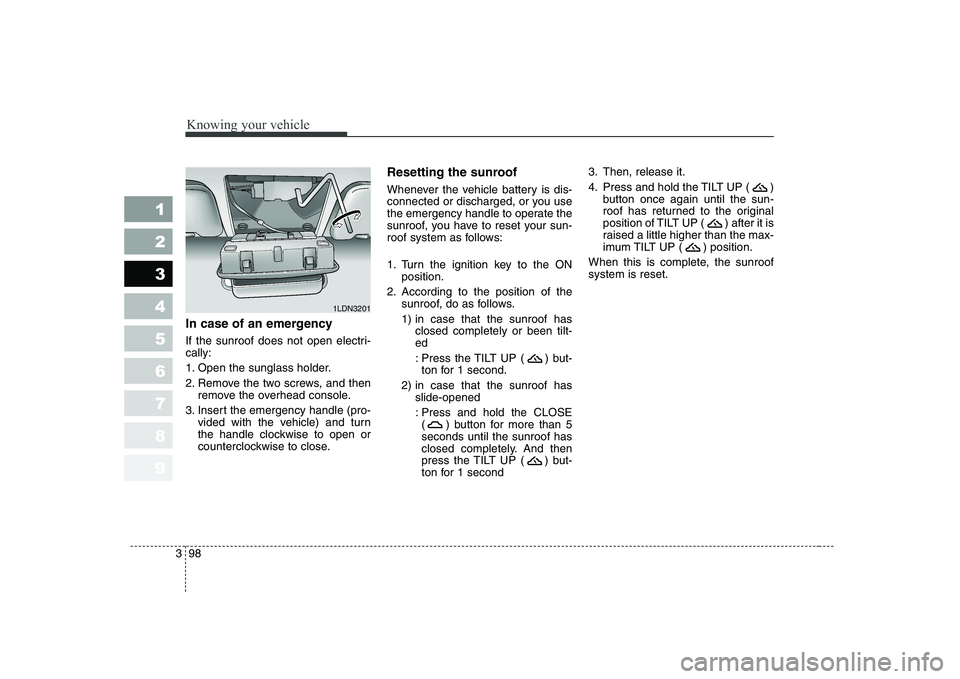
In case of an emergency
If the sunroof does not open electri- cally:
1. Open the sunglass holder.
2. Remove the two screws, and then
remove the overhead console.
3. Insert the emergency handle (pro- vided with the vehicle) and turn
the handle clockwise to open or
counterclockwise to close. Resetting the sunroof
Whenever the vehicle battery is dis-
connected or discharged, or you use
the emergency handle to operate the
sunroof, you have to reset your sun-
roof system as follows:
1. Turn the ignition key to the ON
position.
2. According to the position of the sunroof, do as follows.
1) in case that the sunroof hasclosed completely or been tilt- ed
: Press the TILT UP ( ) but- ton for 1 second.
2) in case that the sunroof has slide-opened
: Press and hold the CLOSE ( ) button for more than 5seconds until the sunroof has
closed completely. And then
press the TILT UP ( ) but-
ton for 1 second 3. Then, release it.
4. Press and hold the TILT UP ( )
button once again until the sun-
roof has returned to the original
position of TILT UP ( ) after it is
raised a little higher than the max-
imum TILT UP ( ) position.
When this is complete, the sunroofsystem is reset.
1LDN3201
Page 111 of 329
3 101
1 23456789
Knowing your vehicle
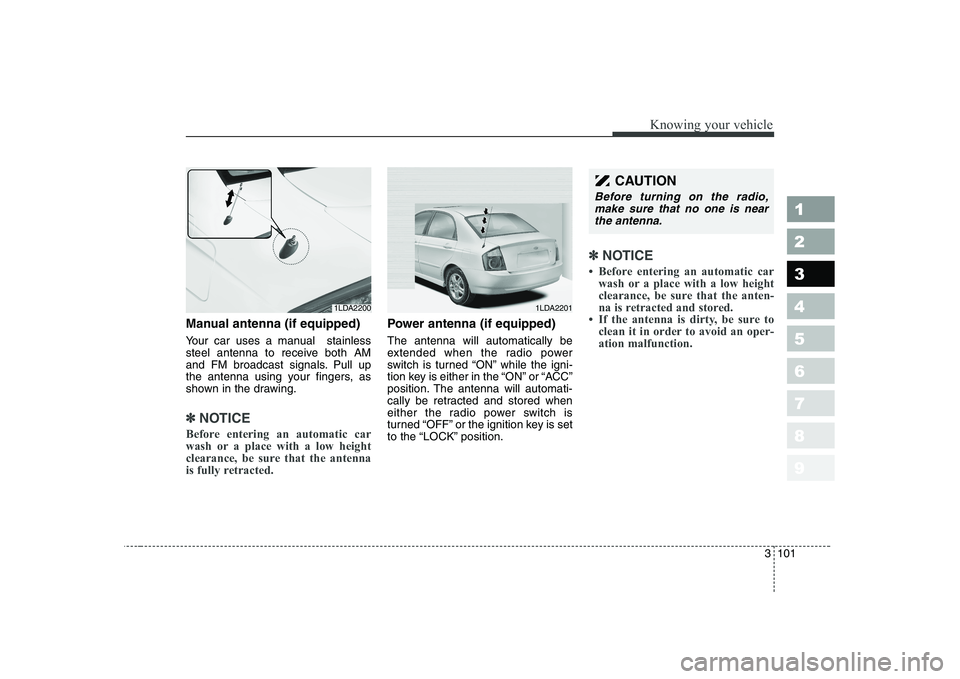
Manual antenna (if equipped)
Your car uses a manual stainless
steel antenna to receive both AM
and FM broadcast signals. Pull up
the antenna using your fingers, as
shown in the drawing.
✽✽NOTICE
Before entering an automatic car
wash or a place with a low height
clearance, be sure that the antenna
is fully retracted.
Power antenna (if equipped) The antenna will automatically be
extended when the radio power
switch is turned “ON” while the igni-
tion key is either in the “ON” or “ACC”
position. The antenna will automati-
cally be retracted and stored when
either the radio power switch is
turned “OFF” or the ignition key is set
to the “LOCK” position.
✽✽ NOTICE
Page 116 of 329
Knowing your vehicle
106
3
1 23456789
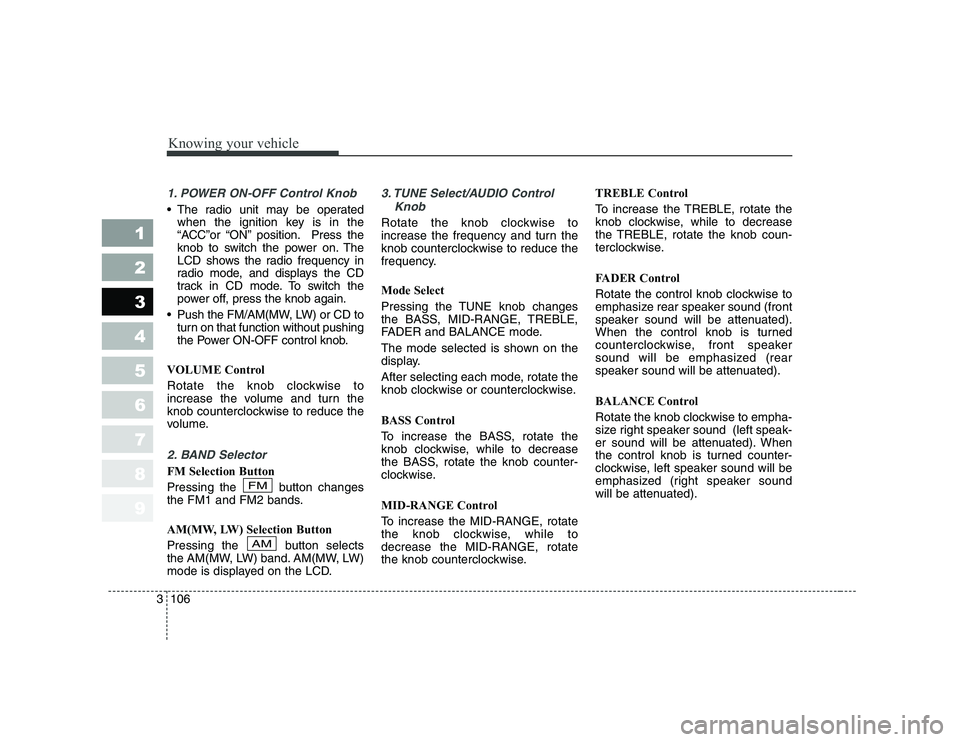
1. POWER ON-OFF Control Knob
The radio unit may be operated
when the ignition key is in the
“ACC”or “ON” position. Press the
knob to switch the power on. The
LCD shows the radio frequency in
radio mode, and displays the CD
track in CD mode. To switch the
power off, press the knob again.
Push the FM/AM(MW, LW) or CD to turn on that function without pushing
the Power ON-OFF control knob.
VOLUME Control
Rotate the knob clockwise to
increase the volume and turn the
knob counterclockwise to reduce the
volume.
2. BAND Selector
FM Selection Button
Pressing the button changes
the FM1 and FM2 bands.
AM(MW, LW) Selection Button
Pressing the button selects
the AM(MW, LW) band. AM(MW, LW)
mode is displayed on the LCD.
3. TUNE Select/AUDIO Control Knob
Rotate the knob clockwise to
increase the frequency and turn the
knob counterclockwise to reduce the
frequency. Mode Select
Pressing the TUNE knob changes
the BASS, MID-RANGE, TREBLE,
FADER and BALANCE mode.
The mode selected is shown on the
display.
After selecting each mode, rotate the
knob clockwise or counterclockwise.
BASS Control
To increase the BASS, rotate the
knob clockwise, while to decrease
the BASS, rotate the knob counter-
clockwise.
MID-RANGE Control
To increase the MID-RANGE, rotate
the knob clockwise, while todecrease the MID-RANGE, rotate
the knob counterclockwise. TREBLE Control
To increase the TREBLE, rotate the
knob clockwise, while to decrease
the TREBLE, rotate the knob coun-
terclockwise.
FADER Control
Rotate the control knob clockwise to
emphasize rear speaker sound (front
speaker sound will be attenuated).
When the control knob is turned
counterclockwise, front speaker
sound will be emphasized (rear
speaker sound will be attenuated).
BALANCE Control
Rotate the knob clockwise to empha-
size right speaker sound (left speak-
er sound will be attenuated). When
the control knob is turned counter-
clockwise, left speaker sound will be
emphasized (right speaker sound
will be attenuated).
AM
FM
Page 119 of 329
3 109
Knowing your vehicle
1 23456789
1. CD/AUX Select
CD Select
Insert the CD with the label facingupward.
Insert the CD to start CD playback, during radio operation.
When a disc is in the CD deck, if you press the CD/AUX button the
CD player will begin playing even if
the radio player is being used.
The CD/AUX player can be used when the ignition switch is in either
the “ON” or “ACC” position.
Push the CD/AUX button to turn on that function without pushing the
Power ON-OFF control knob.
✽✽ NOTICE
Page 123 of 329
3 113
Knowing your vehicle
1 23456789
1. POWER ON-OFF Control Knob
The radio unit may be operatedwhen the ignition key is in the
"ACC" or "ON" position. Press the
button to switch the power on. The
LCD shows the radio frequency in
the radio mode, the tape directionindicator in the tape mode or
CD/MP3 track in the CD/MP3
mode. To switch the power off,
press the button again.
Push the FM/AM(MW, LW), TAPE or CD/MP3 to turn on that function
without pushing the Power ON-
OFF control knob.
VOLUME Control
Rotate the knob clockwise to
increase the volume and turn the
knob counterclockwise to reduce the
volume.
2. AUDIO Select Button
Pressing the AUDIO button changes
the BASS, MID-RANGE, TREBLE,
FADER and BALANCE mode.
The mode selected is shown on the
display.
After selecting each mode, rotate the
Audio control knob clockwise or
counterclockwise.
BASS Control
To increase the BASS, rotate the
knob clockwise, while to decreasethe BASS, rotate the knob counter-
clockwise.
MID-RANGE Control
To increase the MID-RANGE, rotate
the knob clockwise, while todecrease the MID-RANGE, rotate
the knob counterclockwise.
TREBLE Control
To increase the TREBLE, rotate the
knob clockwise, while to decrease
the TREBLE, rotate the knob coun-
terclockwise. FADER Control
Turn the control knob clockwise to
emphasize rear speaker sound (front
speaker sound will be attenuated).
When the control knob is turned
counterclockwise, front speaker
sound will be emphasized (rear
speaker sound will be attenuated).
BALANCE Control
Rotate the knob clockwise to empha-
size right speaker sound (left speak-
er sound will be attenuated). When
the control knob is turned counter
clockwise, left speaker sound will be
emphasized (right speaker sound
will be attenuated).
3. BAND Select Button
Pressing the FM/AM button changes
the AM(MW, LW), FM1 and FM2
bands. The mode selected is shown
on the display.
Page 126 of 329
Knowing your vehicle
116
3
1 23456789
1. AUDIO/MP3 CD or AUX Select
Button
AUDIO/MP3 CD Select
Insert the CD with the label facingupward.
Insert the CD to start CD playback, during radio operation or cassette
tape playblack.
If you press the CD/AUX button while a disc is in the CD deck, the
CD player will begin playing even if
the radio or cassette player is beingused.
The CD/AUX player can be used
when the ignition switch is in either
the “ON” or “ACC” position.
Push the CD/AUX button to turn on
that function without pushing the
Power ON-OFF control knob.
✽✽ NOTICE
Page 131 of 329
1. Power on/off and volumecontrol button
When the ignition switch is on ACC
or ON, push this button to power on.
Push this button again to power off.
2. Volume control button
Rotate this button clockwise to vol-
ume up and anti-clockwise to volume
down.
3. Radio selection button (FM/AM)
Push [FM/AM] button for FM or AM
radio. Each press will changeFM1 ➟FM2 ➟AM ➟FM1 and repeats.
4. Scan button
Push this button to automatically
select available stations and remains
for 5 seconds from current station.
Push again to stay on current station.BSM button
Push [BSM] button to start automatic
search from current station. The sta-
tions are memorized in 1~6 pre-set
buttons from smallest station.Number 1 pre-set station will be on
after the search and memory.
5. Automatic station selection button (Seek)
Push [seek ] button, to increase
the band and [seek ] button to
decrease the band. It automatically
finds available station. If the station is
already memorized in pre-set memo-
ry, it will show the pre-set number.
6. Manual station selection button (Tune)
Rotate this tune button clockwise 1
click to increase band 1 step and
anti-clockwise to decrease.
Regular export
FM: Move by 0.1MHz (87.5 ➟87.6 ➟87.7····87.7 ➟87.6
➟ 87.5) AM: Move by 9 KHz
(531 ➟
540 ➟549····549 ➟540 ➟531)
North America export (Columbian
units FM move by 0.1 MHz)
FM: Move by 0.2MHz
(87.5 ➟87.7 ➟87.9····87.9 ➟87.7
➟ 87.5)
AM: Move by 10 KHz
(530 ➟
540 ➟550····550 ➟540 ➟530)
7. Pre-set button (1~6)
Push these buttons to listen to mem-
orized stations. Push pre-set button
for more than 1.5 seconds (with a
beep) to memorize current station.
8. LCD display It indicates FM1/FM2/AM along with cur- rent band, pre-set channel, FM stereowith "ST".
3 121
Knowing your vehicle
1 23456789