ECO mode KIA FORTE 2017 User Guide
[x] Cancel search | Manufacturer: KIA, Model Year: 2017, Model line: FORTE, Model: KIA FORTE 2017Pages: 595, PDF Size: 11.5 MB
Page 140 of 595
Features of your vehicle
68 4
Elapsed Time (3)
• The elapsed time is the total driv-
ing time since the last elapsed time
reset.
- Time range (hh:mm): 00:00 ~ 99:59
• To reset the elapsed time, press
the RESET button (Type A :
RESET, Type B, C : ) on the
steering wheel for more than 1
second when the elapsed time is
displayed.
✽NOTICE
Even if the vehicle is not in motion,
the elapsed time keeps going while
the engine is running.
Digital speedometer
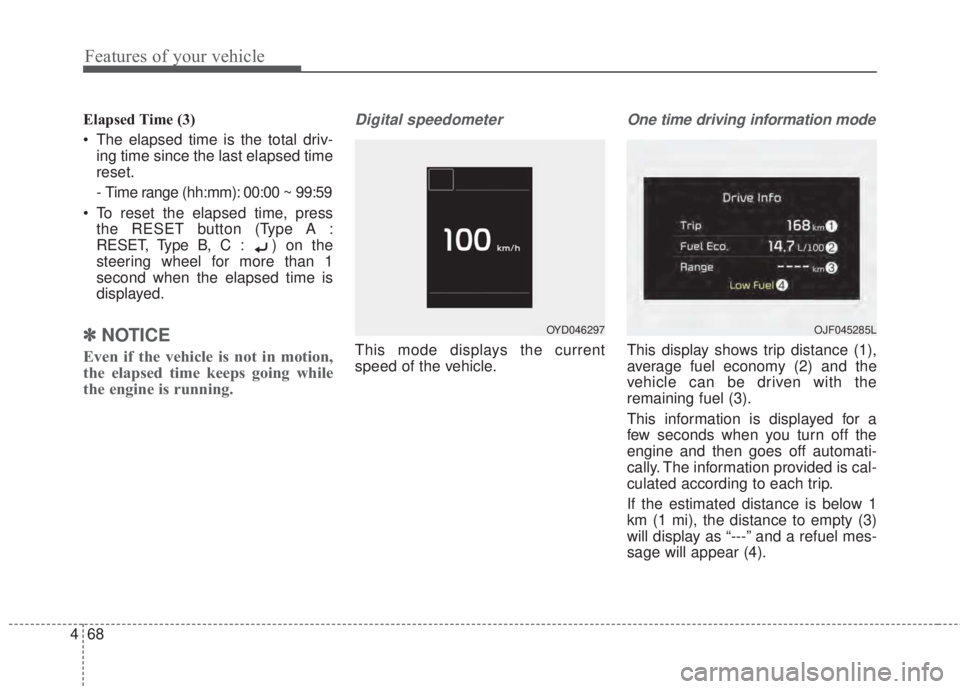
This mode displays the current
speed of the vehicle.
One time driving information mode
This display shows trip distance (1),
average fuel economy (2) and the
vehicle can be driven with the
remaining fuel (3).
This information is displayed for a
few seconds when you turn off the
engine and then goes off automati-
cally. The information provided is cal-
culated according to each trip.
If the estimated distance is below 1
km (1 mi), the distance to empty (3)
will display as “---” and a refuel mes-
sage will appear (4).
OYD046297OJF045285L
Page 141 of 595
469
Features of your vehicle
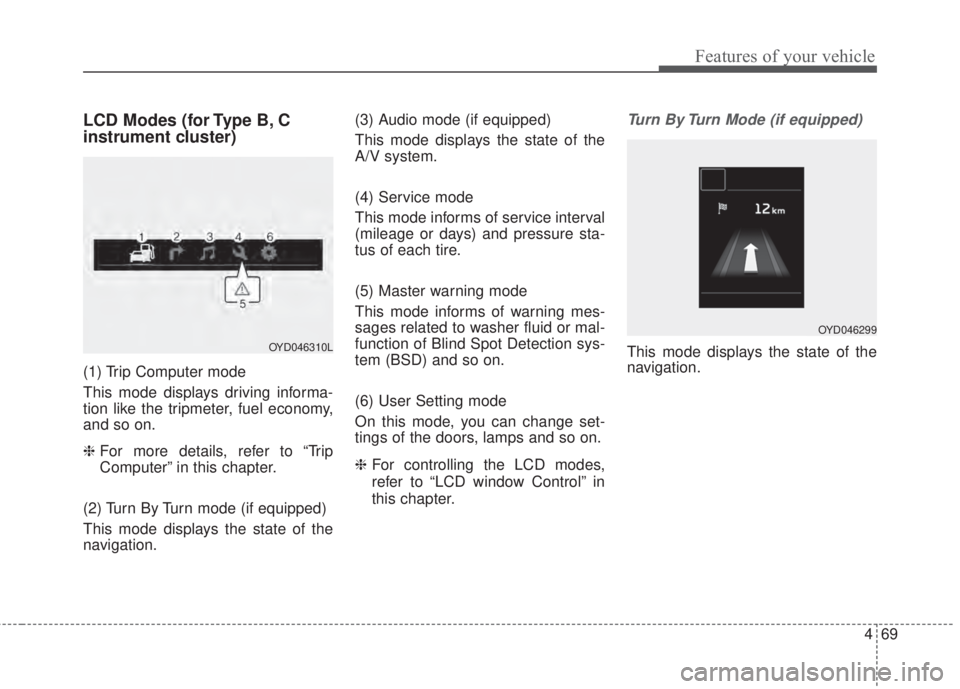
LCD Modes (for Type B, C
instrument cluster)
(1) Trip Computer mode
This mode displays driving informa-
tion like the tripmeter, fuel economy,
and so on.
❈ For more details, refer to “Trip
Computer” in this chapter.
(2) Turn By Turn mode (if equipped)
This mode displays the state of the
navigation.(3) Audio mode (if equipped)
This mode displays the state of the
A/V system.
(4) Service mode
This mode informs of service interval
(mileage or days) and pressure sta-
tus of each tire.
(5) Master warning mode
This mode informs of warning mes-
sages related to washer fluid or mal-
function of Blind Spot Detection sys-
tem (BSD) and so on.
(6) User Setting mode
On this mode, you can change set-
tings of the doors, lamps and so on.
❈For controlling the LCD modes,
refer to “LCD window Control” in
this chapter.
Turn By Turn Mode (if equipped)
This mode displays the state of the
navigation.OYD046310L
OYD046299
Page 142 of 595
Features of your vehicle
70 4
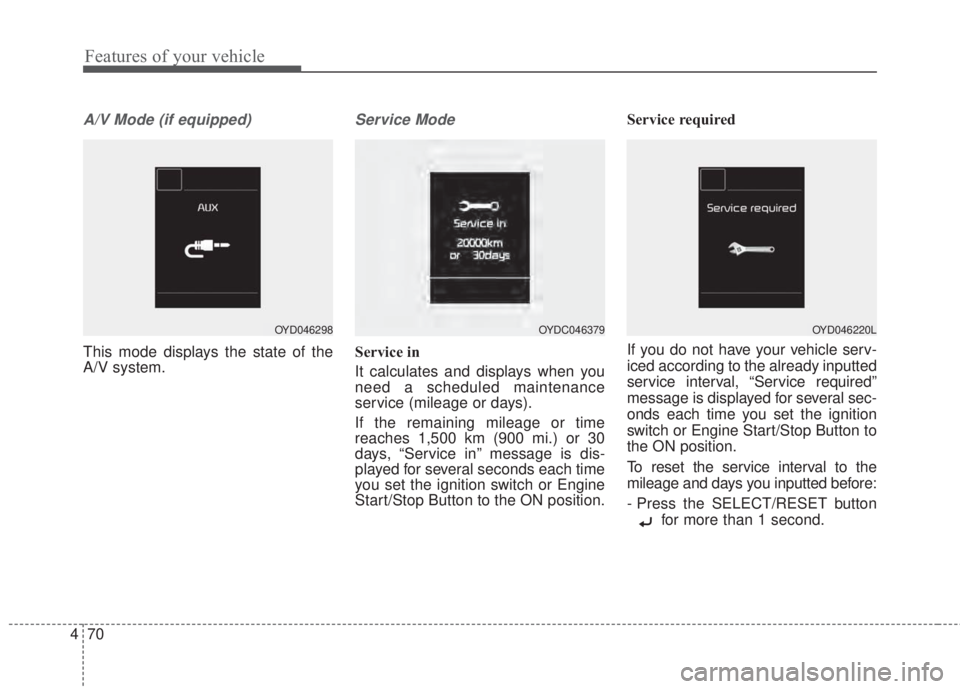
A/V Mode (if equipped)
This mode displays the state of the
A/V system.
Service Mode
Service in
It calculates and displays when you
need a scheduled maintenance
service (mileage or days).
If the remaining mileage or time
reaches 1,500 km (900 mi.) or 30
days, “Service in” message is dis-
played for several seconds each time
you set the ignition switch or Engine
Start/Stop Button to the ON position.Service required
If you do not have your vehicle serv-
iced according to the already inputted
service interval, “Service required”
message is displayed for several sec-
onds each time you set the ignition
switch or Engine Start/Stop Button to
the ON position.
To reset the service interval to the
mileage and days you inputted before:
- Press the SELECT/RESET button
for more than 1 second.
OYD046298OYDC046379OYD046220L
Page 146 of 595
Features of your vehicle
74 4
Service interval (if equipped)
On this mode, you can activate the
service interval function with mileage
(km or mi.) and period (months).
- Off : The service interval function
will be deactivated.
- On : You can set the service interval
(mileage and months).
❈For more details, refer to “Service
Mode” in this chapter.
✽NOTICE
If it is not available to set service
interval on your vehicle, we recom-
mend that you consult an authorized
Kia dealer.
Other features
• Fuel Economy Auto Reset
- Off : The average fuel economy will
not reset automatically whenever
refueling.
- After Ignition : The average fuel
economy will reset automatically
when driving.
- After Refueling : The average fuel
economy will reset automatically
when refueling.
• Fuel Economy Unit
Choose the preferred fuel economy
unit.
• Temperature Unit
Choose the preferred temperature
unit.
• Language (if equipped)
Choose preferred the language.Warning messages
Warning messages appear on the
LCD to warn the driver. It is located in
the center of the instrument cluster.
The warning message may appear
differently depending on the type of
instrument cluster and some may not
show the warning message at all.
The warning message is shown in
either symbol, symbol and text, or
text type only. You can choose the
preferred language (for Type B only)
by selecting the User setting menu in
LCD mode.
Page 150 of 595
Features of your vehicle
78 4
Press START button with smart key
(for smart key system)
• This warning message illuminates
if you press the Engine Start/Stop
Button while the warning message
“Key not detected” is illuminating.
• At this time, the immobilizer indica-
tor light blinks.
Check fuse “BRAKE SWITCH”
(for smart key system and automatic
transaxle/transmission)
• This warning message illuminates
if the brake switch fuse is discon-
nected.
• It means that you should replace
the fuse with a new one. If that is
not possible, you can start the
engine by pressing the Engine
Start/Stop Button for 10 seconds in
the ACC position.Shift to P or N to start engine
(for smart key system and automatic
transaxle)
• This warning message illuminates
if you try to start the engine with
the shift lever not in the P (Park) or
N (Neutral) position.
✽NOTICE
You can start the engine with the
shift lever in the N (Neutral) position.
But, for your safety, we recommend
that you start the engine with the
shift lever in the P (Park) position.
Low Washer Fluid (if equipped)
• This warning message illuminates
on the service reminder mode if
the washer fluid level in the reser-
voir is nearly empty.
• It means that you should refill the
washer fluid.
Low Fuel
• This warning message illuminates
if the fuel tank is nearly empty.
- When the low fuel level warning
light is illuminates.
Add fuel as soon as possible.
Page 159 of 595
487
Features of your vehicle
Master Warning Mode
(if equipped)
• This warning light informs the driv-
er the following situations
- Low washer fluid (if equipped)
- Blind Spot Detection (BSD) mal-
function (if equipped)
- Service reminder and so on.
The Master Warning Light illumi-
nates when more than one of the
above warning situations occur. At
this time, the LCD Modes Icon will
change from ( ) to ( ).
If the warning situation is solved, the
master warning light will be turned off
and the LCD Modes Icon will be
changed back to its previous icon ( ).
(ex : refill the washer fluid)
Indicator Lights
Electronic Stability
Control (ESC) Indicator
Light
This indicator light illuminates:
• Once you set the ignition switch or
Engine Start/Stop Button to the ON
position.
- It illuminates for approximately 3
seconds and then goes off.
• When there is a malfunction with
the ESC system.
In this case, have your vehicle
inspected by an authorized Kia
dealer.
This indicator light blinks:
While the ESC is operating.
❈For more details, refer to
“Electronic Stability Control (ESC)”
in chapter 5.
Electronic Stability
Control (ESC) OFF
Indicator Light
This indicator light illuminates:
• Once you set the ignition switch or
Engine Start/Stop Button to the ON
position.
- It illuminates for approximately 3
seconds and then goes off.
• When you deactivate the ESC sys-
tem by pressing the ESC OFF but-
ton.
❈For more details, refer to
“Electronic Stability Control (ESC)”
in chapter 5.
Page 160 of 595
Features of your vehicle
88 4
SPORT Mode Indicator
Light (if equipped)
This indicator light illuminates
• When you select “SPORT” mode
as drive mode.
❈For more details, refer to “Drive
Mode Integrated Control System”
in chapter 5.
ECO Mode Indicator
Light (if equipped)
This indicator light illuminates:
• When you select “ECO” mode as
drive mode.
❈For more details, refer to “Drive
Mode Integrated Control System”
in chapter 5.
Immobilizer Indicator
Light (Without Smart Key)
This indicator light illuminates:
• When the vehicle detects the
immobilizer in your key properly
while the ignition switch is ON.
- At this time, you can start the
engine.
- The indicator light goes off after
starting the engine.
This indicator light blinks:
• When there is a malfunction with
the immobilizer system.
In this case, have your vehicle
inspected by an authorized Kia
dealer.
Page 194 of 595
Features of your vehicle
122 4
• Operating the air conditioning sys-
tem in the recirculated air position
provides maximum cooling, how-
ever, continual operation in this
mode may cause the air inside the
vehicle to become stale.
• During cooling operation, you may
occasionally notice a misty air flow
because of rapid cooling and
humid air intake. This is a normal
system operation characteristic.Climate control air filter
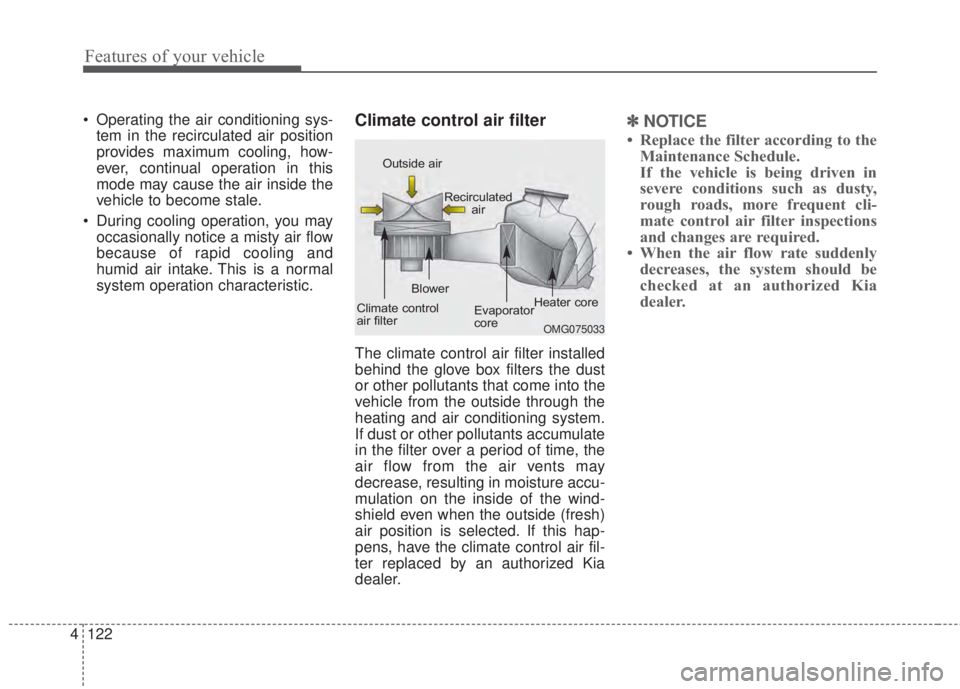
The climate control air filter installed
behind the glove box filters the dust
or other pollutants that come into the
vehicle from the outside through the
heating and air conditioning system.
If dust or other pollutants accumulate
in the filter over a period of time, the
air flow from the air vents may
decrease, resulting in moisture accu-
mulation on the inside of the wind-
shield even when the outside (fresh)
air position is selected. If this hap-
pens, have the climate control air fil-
ter replaced by an authorized Kia
dealer.
✽NOTICE
• Replace the filter according to the
Maintenance Schedule.
If the vehicle is being driven in
severe conditions such as dusty,
rough roads, more frequent cli-
mate control air filter inspections
and changes are required.
• When the air flow rate suddenly
decreases, the system should be
checked at an authorized Kia
dealer.
OMG075033
Outside air
Recirculated
air
Climate control
air filterBlower
Evaporator
coreHeater core
Page 205 of 595
4 133
Features of your vehicle
Air conditioning system operation tips
• If the vehicle has been parked in
direct sunlight during hot weather,
open the windows for a short time
to let the hot air inside the vehicle
escape.
• To help reduce moisture inside of
the windows on rainy or humid
days, decrease the humidity inside
the vehicle by operating the air
conditioning system.
• During air conditioning system
operation, you may occasionally
notice a slight change in engine
speed as the air conditioning com-
pressor cycles. This is a normal
system operation characteristic.
• Use the air conditioning system
every month only for a few minutes
to ensure maximum system per-
formance.
• When using the air conditioning
system, you may notice clear water
dripping (or even puddling) on the
ground under the passenger side
of the vehicle. This is a normal sys-
tem operation characteristic.• Operating the air conditioning sys-
tem in the recirculated air position
provides maximum cooling, how-
ever, continual operation in this
mode may cause the air inside the
vehicle to become stale.
• During cooling operation, you may
occasionally notice a misty air flow
because of rapid cooling and
humid air intake. This is a normal
system operation characteristic.
• If you operate air conditioner
excessively, the difference between
the temperature of the outside air
and that of the windshield could
cause the outer surface of the
windshield to fog up, causing loss
of visibility. In this case, set the
mode selection knob or button to
the position and fan speed
control to the lower speed.CAUTION
• When using the air condition-
ing system, monitor the tem-
perature gauge closely while
driving up hills or in heavy
traffic when outside tempera-
tures are high. Air condition-
ing system operation may
cause engine overheating.
Continue to use the blower fan
but turn the air conditioning
system off if the temperature
gauge indicates engine over-
heating.
• When opening the windows in
humid weather air condition-
ing may create water droplets
inside the vehicle. Since
excessive water droplets may
cause damage to electrical
equipment, air conditioning
should only be used with the
windows closed.
Page 208 of 595
Features of your vehicle
136 4
Defogging Logic
To reduce the probability of fogging
up inside of the windshield, the air
intake or air conditioning are con-
trolled automatically according to
certain conditions such as or
position. Logic can be disabled and
enabled by doing following :
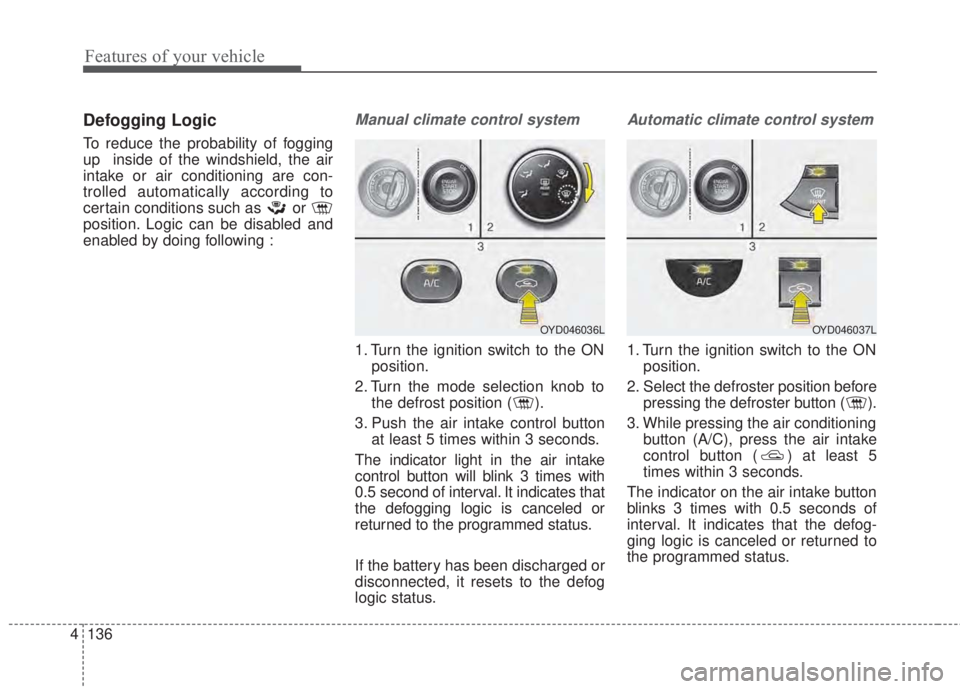
Manual climate control system
1. Turn the ignition switch to the ON
position.
2. Turn the mode selection knob to
the defrost position ( ).
3. Push the air intake control button
at least 5 times within 3 seconds.
The indicator light in the air intake
control button will blink 3 times with
0.5 second of interval. It indicates that
the defogging logic is canceled or
returned to the programmed status.
If the battery has been discharged or
disconnected, it resets to the defog
logic status.
Automatic climate control system
1. Turn the ignition switch to the ON
position.
2. Select the defroster position before
pressing the defroster button ( ).
3. While pressing the air conditioning
button (A/C), press the air intake
control button ( ) at least 5
times within 3 seconds.
The indicator on the air intake button
blinks 3 times with 0.5 seconds of
interval. It indicates that the defog-
ging logic is canceled or returned to
the programmed status.
OYD046036LOYD046037L