pressure KIA FORTE 2017 Owners Manual
[x] Cancel search | Manufacturer: KIA, Model Year: 2017, Model line: FORTE, Model: KIA FORTE 2017Pages: 595, PDF Size: 11.5 MB
Page 18 of 595
Safety features of your vehicle
4 3
Front seat adjustment - manual
Forward and backward
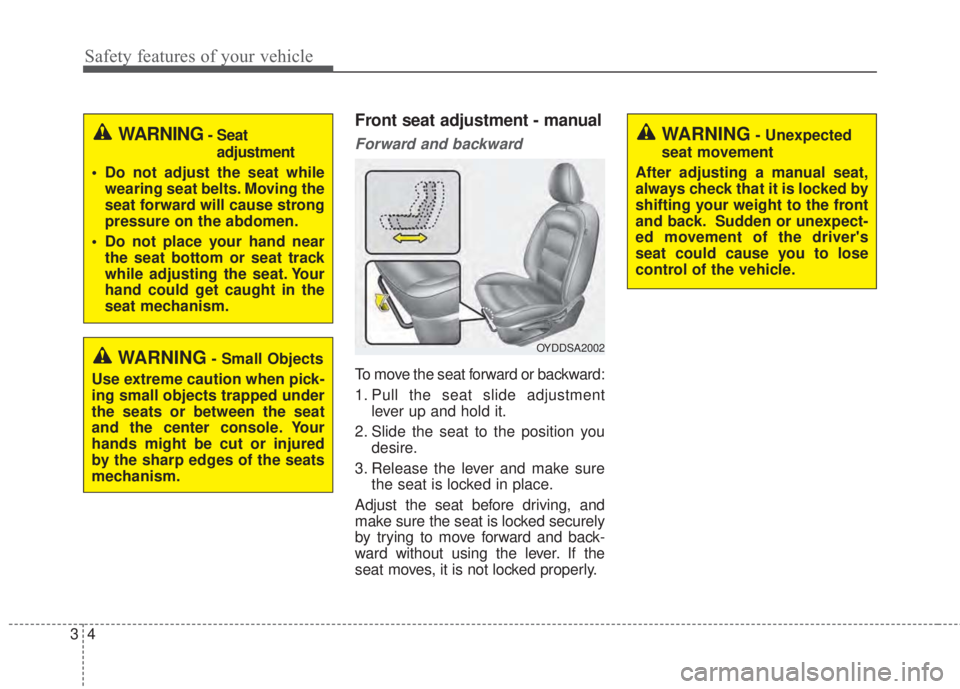
To move the seat forward or backward:
1. Pull the seat slide adjustment
lever up and hold it.
2. Slide the seat to the position you
desire.
3. Release the lever and make sure
the seat is locked in place.
Adjust the seat before driving, and
make sure the seat is locked securely
by trying to move forward and back-
ward without using the lever. If the
seat moves, it is not locked properly.
WARNING- Unexpected
seat movement
After adjusting a manual seat,
always check that it is locked by
shifting your weight to the front
and back. Sudden or unexpect-
ed movement of the driver's
seat could cause you to lose
control of the vehicle.
OYDDSA2002
WARNING- Seat
adjustment
• Do not adjust the seat while
wearing seat belts. Moving the
seat forward will cause strong
pressure on the abdomen.
• Do not place your hand near
the seat bottom or seat track
while adjusting the seat. Your
hand could get caught in the
seat mechanism.
WARNING- Small Objects
Use extreme caution when pick-
ing small objects trapped under
the seats or between the seat
and the center console. Your
hands might be cut or injured
by the sharp edges of the seats
mechanism.
Page 36 of 595
Safety features of your vehicle
22 3
Pre-tensioner seat belt
Your vehicle is equipped with driver's
and front passenger's pre-tensioner
seat belts.
1. Retractor pre-tensioner
The retractor pre-tensioner, which is
a supplement system of the seat
belts. The purpose of the retractor
pre-tensioner is to tighten the shoul-
der belt against the occupant's upper
body in certain frontal collisions.2. Emergency Fastening Device
(EFD)
The Emergency Fastening Device
(EFD) is a supplemental system of
the seat belts. The purpose of the
EFD is to tighten the lap belt against
the occupant's pelvis in certain
frontal collisions.
The pre-tensioner seat belts may be
activated, when a frontal collision is
severe enough, together with the air
bags.
When the vehicle stops suddenly, or
if the occupant tries to lean forward
too quickly, the seat belt retractor
may lock into position. In certain
frontal collisions (or side collisions),
the pre-tensioner may activate and
pull the seat belt into tighter contact
against the occupant's body.
If the system senses excessive ten-
sion on the driver or passenger's seat
belt when the pre-tensioner activates,
the load limiter inside the retractor
pre-tensioner will release some of the
pressure on the affected seat belt.The seat belt pre-tensioner system
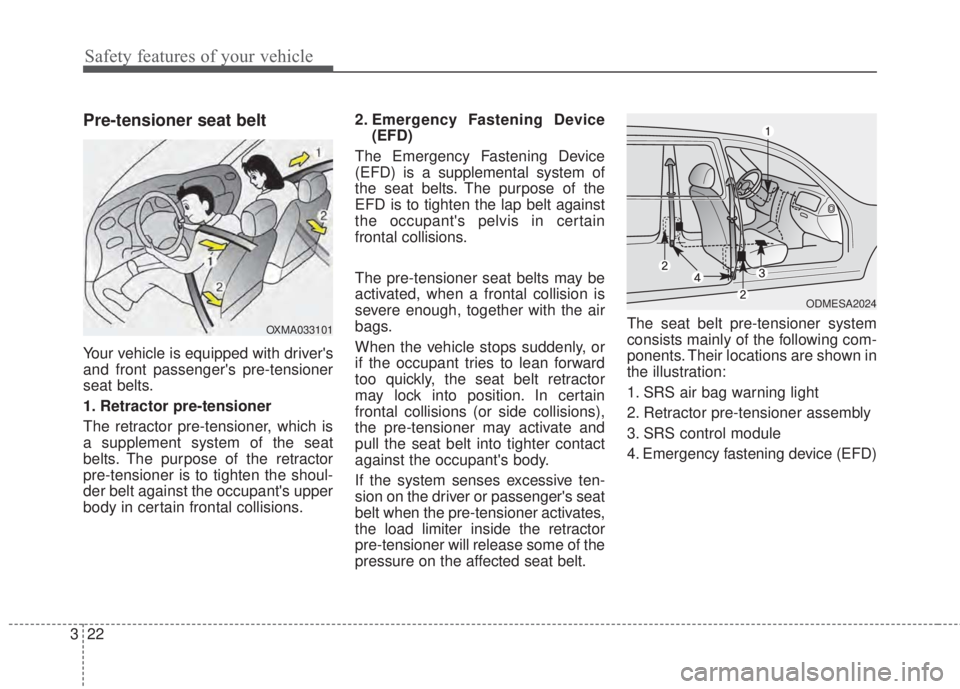
consists mainly of the following com-
ponents. Their locations are shown in
the illustration:
1. SRS air bag warning light
2. Retractor pre-tensioner assembly
3. SRS control module
4. Emergency fastening device (EFD)
ODMESA2024
OXMA033101
Page 54 of 595
Safety features of your vehicle
40 3
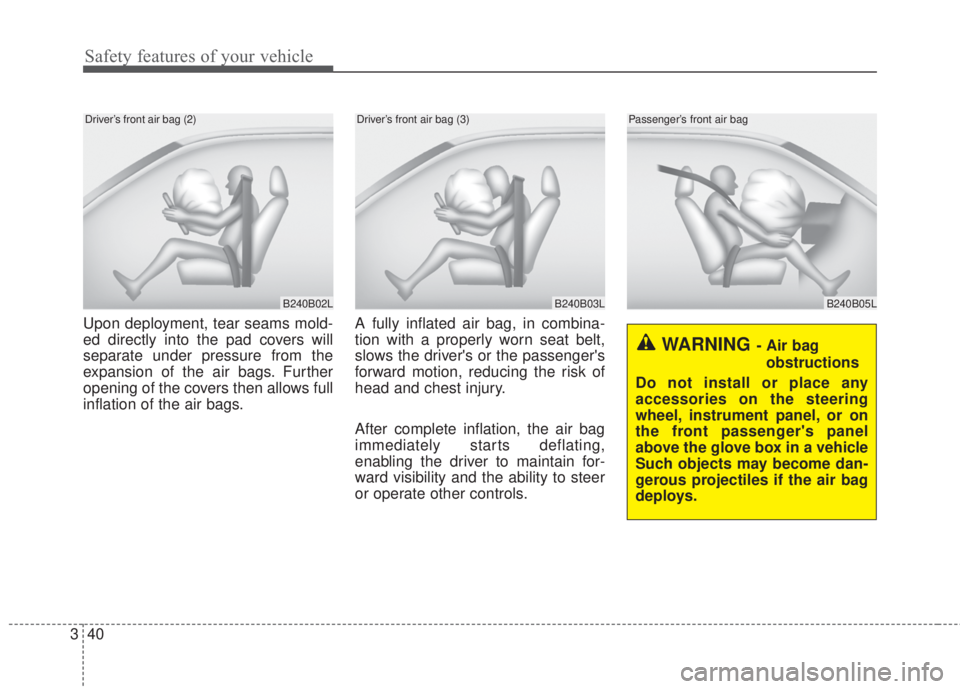
Upon deployment, tear seams mold-
ed directly into the pad covers will
separate under pressure from the
expansion of the air bags. Further
opening of the covers then allows full
inflation of the air bags.A fully inflated air bag, in combina-
tion with a properly worn seat belt,
slows the driver's or the passenger's
forward motion, reducing the risk of
head and chest injury.
After complete inflation, the air bag
immediately starts deflating,
enabling the driver to maintain for-
ward visibility and the ability to steer
or operate other controls.
B240B03L
Driver’s front air bag (3)
B240B02L
Driver’s front air bag (2)
B240B05L
Passenger’s front air bag
WARNING - Air bag
obstructions
Do not install or place any
accessories on the steering
wheel, instrument panel, or on
the front passenger's panel
above the glove box in a vehicle
Such objects may become dan-
gerous projectiles if the air bag
deploys.
Page 66 of 595
Safety features of your vehicle
52 3
Why didn’t my air bag go off in
a collision? (Inflation and non-
inflation conditions of the air
bag)
There are many types of accidents
in which the air bag would not be
expected to provide additional
protection.
These include rear impacts, sec-
ond or third collisions in multiple
impact accidents, as well as low
speed impacts.
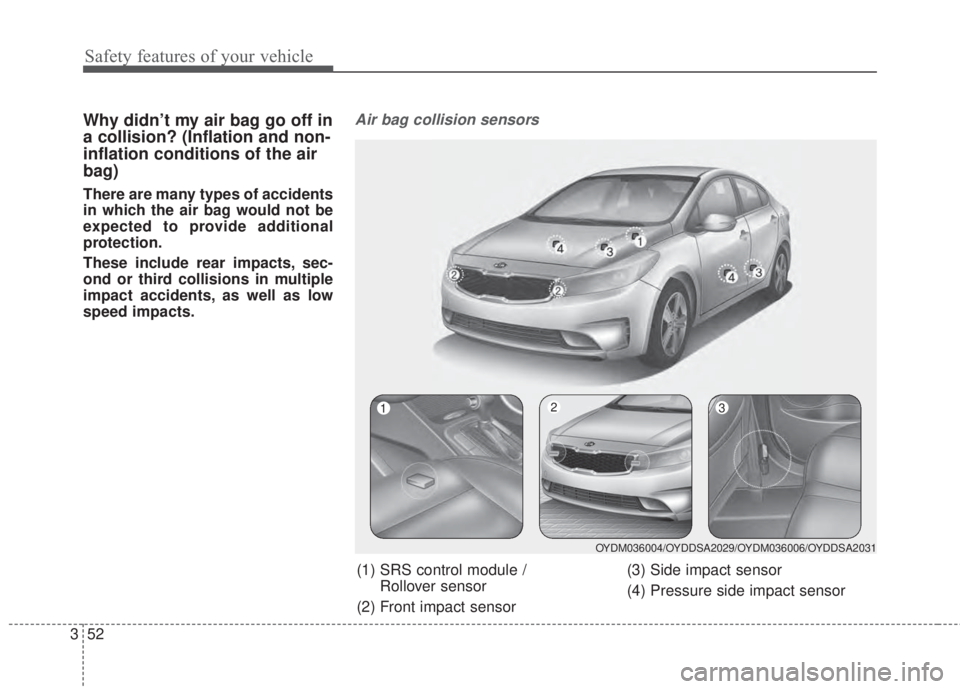
Air bag collision sensors
(1) SRS control module /
Rollover sensor
(2) Front impact sensor(3) Side impact sensor
(4) Pressure side impact sensor
OYDM036004/OYDDSA2029/OYDM036006/OYDDSA2031
123
Page 141 of 595
469
Features of your vehicle
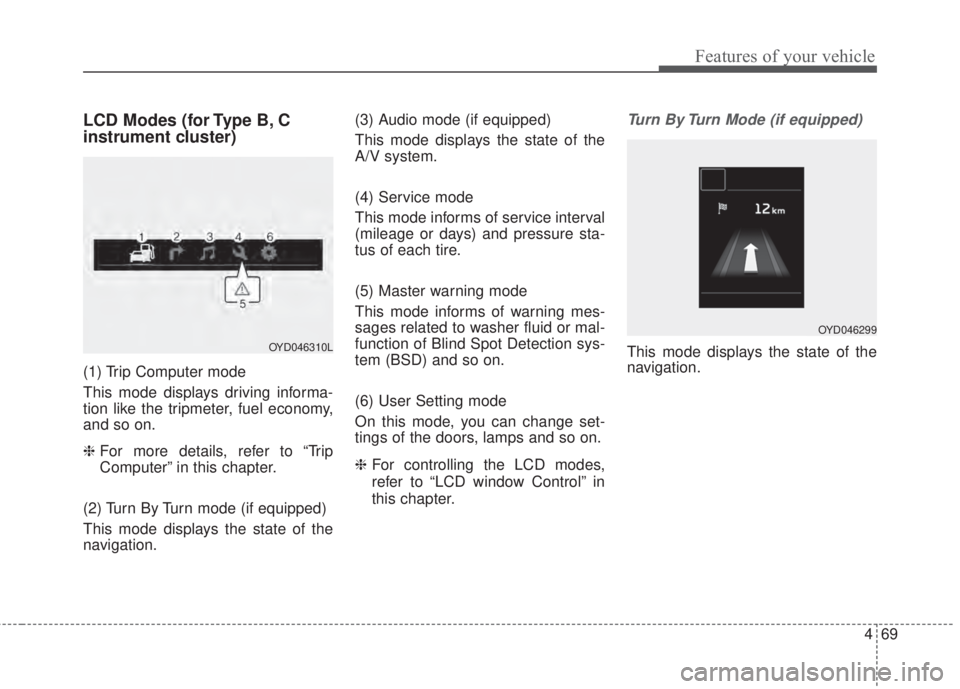
LCD Modes (for Type B, C
instrument cluster)
(1) Trip Computer mode
This mode displays driving informa-
tion like the tripmeter, fuel economy,
and so on.
❈ For more details, refer to “Trip
Computer” in this chapter.
(2) Turn By Turn mode (if equipped)
This mode displays the state of the
navigation.(3) Audio mode (if equipped)
This mode displays the state of the
A/V system.
(4) Service mode
This mode informs of service interval
(mileage or days) and pressure sta-
tus of each tire.
(5) Master warning mode
This mode informs of warning mes-
sages related to washer fluid or mal-
function of Blind Spot Detection sys-
tem (BSD) and so on.
(6) User Setting mode
On this mode, you can change set-
tings of the doors, lamps and so on.
❈For controlling the LCD modes,
refer to “LCD window Control” in
this chapter.
Turn By Turn Mode (if equipped)
This mode displays the state of the
navigation.OYD046310L
OYD046299
Page 152 of 595
Features of your vehicle
80 4
Parking Brake & Brake
Fluid Warning Light
This warning light illuminates:
• Once you set the ignition switch or
Engine Start/Stop Button to the ON
position.
- It illuminates for approximately 3
seconds
- It remains on if the parking brake
is applied.
• When the parking brake is applied.
• When the brake fluid level in the
reservoir is low.
- If the warning light illuminates
with the parking brake released, it
indicates the brake fluid level in
reservoir is low.If the brake fluid level in the reservoir
is low:
1.Drive carefully to the nearest safe
location and stop your vehicle.
2.With the engine stopped, check the
brake fluid level immediately and
add fluid as required (For more
details, refer to “Brake Fluid” in
chapter 7).
Then check all brake components
for fluid leaks. If any leak on the
brake system is still found, the
warning light remains on, or the
brakes do not operate properly, do
not drive the vehicle.
In this case, have your vehicle
towed to an authorized Kia dealer
and inspected.Dual-diagonal braking system
Your vehicle is equipped with dual-
diagonal braking systems. This
means you still have braking on two
wheels even if one of the dual sys-
tems should fail.
With only one of the dual systems
working, more than normal pedal
travel and greater pedal pressure are
required to stop the vehicle.
Also, the vehicle will not stop in as
short a distance with only a portion
of the brake system working.
If the brakes fail while you are driv-
ing, shift to a lower gear for addition-
al engine braking and stop the vehi-
cle as soon as it is safe to do so.
Driving the vehicle with a warning
light ON is dangerous. If the Parking
Brake & Brake Fluid Warning Light
illuminates with the parking brake
released, it indicates that the brake
fluid level is low.
In this case, have your vehicle inspect-
ed by an authorized Kia dealer.
Page 156 of 595
Features of your vehicle
84 4
If there is a malfunction with either
the alternator or electrical charging
system:
1. Drive carefully to the nearest safe
location and stop your vehicle.
2. Turn the engine off and check the
alternator drive belt for looseness
or breakage.
If the belt is adjusted properly,
there may be a problem in the
electrical charging system.
In this case, have your vehicle
inspected by an authorized Kia
dealer as soon as possible.Engine Oil Pressure
Warning Light
This warning light illuminates:
• Once you set the ignition switch or
Engine Start/Stop Button to the ON
position.
- It remains on until the engine is
started.
• When the engine oil pressure is low.
If the engine oil pressure is low:
1. Drive carefully to the nearest safe
location and stop your vehicle.
2. Turn the engine off and check the
engine oil level (For more details,
refer to “Engine Oil” in section 7). If
the level is low, add oil as required.
If the warning light remains on
after adding oil or if oil is not avail-
able, have your vehicle inspected
by an authorized Kia dealer as
soon as possible.
CAUTION - Engine
damage
If the engine is not stopped
immediately after the engine oil
pressure warning light is illumi-
nated and stays on while the
engine is running, serious
engine damage may result.
Page 166 of 595
Features of your vehicle
94 4
This system can only sense objects
within the range and location of the
sensors;
It can not detect objects in other
areas where sensors are not
installed. Also, small or slim objects,
such as poles or objects located
between sensors may not be detect-
ed by the sensors.
Always visually check behind the
vehicle when backing up.
Be sure to inform any drivers of the
vehicle that may be unfamiliar with
the system regarding the systems
capabilities and limitations.
✽NOTICE
• The actual warning sound and indicator may differ from the illustration
according to objects or sensor status.
• Do not wash the vehicle's sensor with high pressure water.
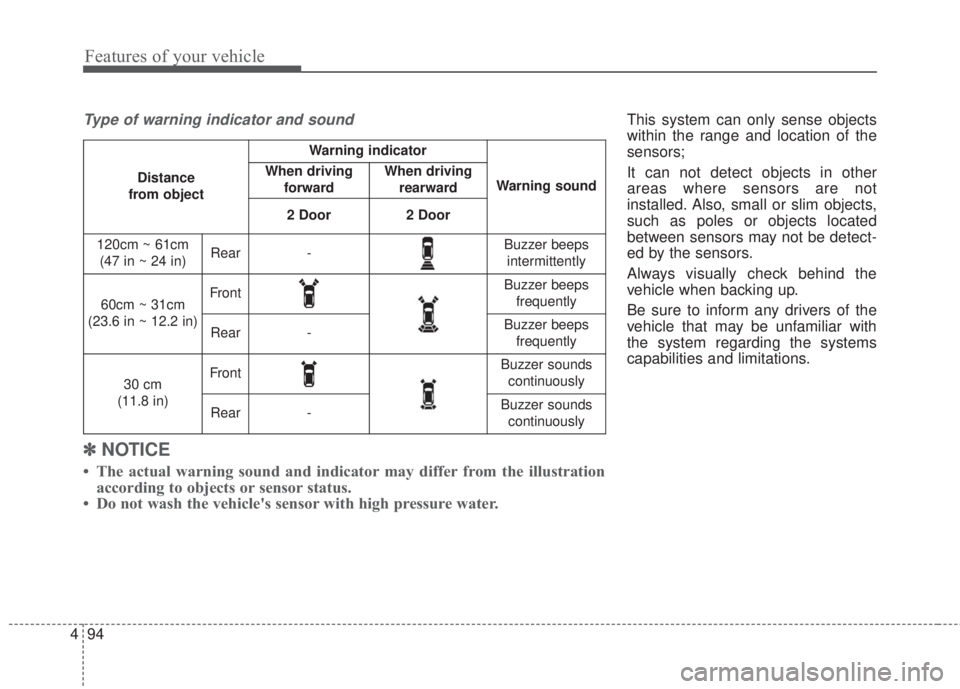
Type of warning indicator and sound
Distance
from object
Warning indicator
Warning soundWhen driving
forwardWhen driving
rearward
2 Door2 Door
120cm ~ 61cm
(47 in ~ 24 in)Rear-Buzzer beeps
intermittently
60cm ~ 31cm
(23.6 in ~ 12.2 in)FrontBuzzer beeps
frequently
Rear-Buzzer beeps
frequently
30 cm
(11.8 in)FrontBuzzer sounds
continuously
Rear-Buzzer sounds
continuously
Page 232 of 595
4 160
Features of your vehicle
• Adjust the volume to levels that
allow the driver to hear sounds
from outside of the vehicle. Driving
in a state where external sounds
cannot be heard may lead to acci-
dents.
• Pay attention to the volume setting
when turning the device on. A sud-
den output of extreme volume
upon turning the device on could
lead to hearing impairment. (Adjust
the volume to a suitable levels
before turning off the device.)
• If you want to change the position
of device installation, please
inquire with your place of purchase
or service maintenance center.
Technical expertise is required to
install or disassemble the device.
• Turn on the car ignition before
using this device. Do not operate
the audio system for long periods
of time with the ignition turned off
as such operations may lead to
battery discharge.
✽NOTICE
In case of product malfunction,
please contact your place of pur-
chase or After Service center.
CAUTION - LCD Monitor
Do not subject the device to
severe shock or impact. Direct
pressure onto the front side of
the monitor may cause damage
to the LCD or touch screen.
CAUTION - Device
cleaning
• When cleaning the device,
make sure to turn off the
device and use a dry and
smooth cloth.
• Never use tough materials,
chemical cloths, or solvents
(alcohol, benzene, thinners,
etc.) as such materials may
damage the device panel or
cause color/quality deteriora-
tion.
(Continued)
(Continued)
• Prevent caustic solutions such
as perfume and cosmetic oil
from contacting the dashboard
because they may cause dam-
age or discoloration.
• Placing the audio system
within an electromagnetic
environment may result in
noise interference.
Page 245 of 595
173 4
Features of your vehicle
✽NOTICE
• If you want to change the position
of device installation, please
inquire with your place of pur-
chase or service maintenance cen-
ter. Technical expertise is required
to install or disassemble the
device.
• Turn on the car ignition before
using this device. Do not operate
the audio system for long periods
of time with the ignition turned off
as such operations may lead to
battery discharge.
✽NOTICE
In case of product malfunction,
please contact your dealer or vehicle
service center.CAUTION
• Do not subject the device to
severe shock or impact. Direct
pressure onto the front side of
the monitor may cause damage
to the LCD or touch screen.
• When cleaning the device,
make sure to turn off the
device and use a dry and
smooth cloth. Never use
tough materials, chemical
cloths, or solvents (alcohol,
benzene, thinners, etc.) as
such materials may damage
the device panel or cause
color/quality deterioration
• Do not place beverages close
to the audio system. Spilling
beverages may lead to system
malfunction.
• Placing the audio system with-
in an electromagnetic environ-
ment may result in noise inter-
ference.