braking system KIA FORTE 2018 User Guide
[x] Cancel search | Manufacturer: KIA, Model Year: 2018, Model line: FORTE, Model: KIA FORTE 2018Pages: 584, PDF Size: 15.14 MB
Page 385 of 584
Driving your vehicle
44
5
The VSM does not operate when:
Driving on bank roads such as gra-
dient or incline
Driving rearward
ESC OFF indicator light ( ) remains on the instrument
cluster
EPS indicator light remains on the instrument clusterVSM operation off
If you press the ESC OFF button to
turn off the ESC, the VSM will also
cancel and the ESC OFF indicator
light ( ) illuminates.
To turn on the VSM, press the button
again. The ESC OFF indicator light
goes out.
Malfunction indicator
The VSM can be deactivated even if
you don’t cancel the VSM operation
by pressing the ESC OFF button. It
indicates that a malfunction has
been detected somewhere in the
Electric Power Steering system or
VSM system. If the ESC indicator
light ( ) or EPS warning light
remains on, take your vehicle to an
authorized Kia dealer and have the
system checked.
The VSM is designed to functionabove approximately 15 km/h (9
mph) on curves. The VSM is designed to function
above approximately 30 km/h (18
mph) when a vehicle is braking on
a split-mu road. The split-mu road
is made of surfaces which have dif-
ferent friction forces.
The Vehicle Stability Management system is not a substitute for safe
driving practices but a supplemen-
tary function only. It is the respon-
sibility of the driver to always check
the speed and the distance to the
vehicle ahead. Always hold the
steering wheel firmly while driving.
Your vehicle is designed to activate according to the driver’s intention,
even with installed VSM. Always
follow all the normal precautions
for driving at safe speeds for the
conditions – including driving in
inclement weather and on a slip-
pery road.
Page 388 of 584
547
Driving your vehicle
The AEB system is to reduce or to
avoid accident risk. It recognizes the
distance from the vehicle ahead or
the pedestrian through the sensors
(i.e. radar and camera), and, if nec-
essary, warns the driver of accident
risk with the warning message or the
warning alarms.✽ ✽NOTICE
Take the following precautions when
using the Autonomous Emergency
Braking (AEB):
• This system is only a supplemental
system and it is not intended to,
nor does it replace the need for
extreme care and attention of the
driver. The sensing range and
objects detectable by the sensors
are limited. Pay attention to the
road conditions at all times.
• NEVER drive too fast in accor- dance with the road conditions or
while cornering.
• Always drive cautiously to prevent unexpected and sudden situations
from occurring. AEB does not stop
the vehicle completely and does
not avoid collisions.
System setting and activation
System setting
The driver can activate the AEB by
placing the ignition switch to the ON
position and by selecting 'User
Settings', 'Driving Assist', and 'Assist
Braking System'. The AEB deacti-
vates, when the driver cancels the
system setting.
AUTONOMOUS EMERGENCY BRAKING (AEB)/ FORWARD COLLISION WARNING (FCW)
(IF EQUIPPED)
WARNING
-
Autonomous Emergency
Braking (AEB) Limitations
The AEB system is a supple-
mental system and is not a sub-
stitute for safe driving prac-
tices. It is the responsibility of
the driver to always check the
speed and distance to the vehi-
cle ahead to ensure it is safety
to use the AEB system.
Page 389 of 584
Driving your vehicle
48
5
The warning light illumi-
nates on the LCD display,
when you cancel the AEB
system. The driver can
monitor the AEB ON/OFF status on
the LCD display. When the warning
light remains ON with the AEB acti-
vated, we recommend you to have
the system checked by an authorized
Kia dealer.
The driver can select the initial warn-
ing activation time in the User
Settings in the instrument cluster
LCD display. The options for the ini-
tial Forward Collision Warning
include the following:
selected, the initial
Forward Collision Warning
is activated earlier than
normal. This setting maxi-
mizes the amount of dis-
tance between the vehicle
or pedestrian ahead before
the initial warning occurs.
selected, the initial
Forward Collision
Warning is activated nor-
mally. This setting allows
for a nominal amount of
distance between the
vehicle or pedestrian
ahead before the initial
warning occurs.
selected, the initial Forward
Collision Warning is activat-
ed later than normal. This
setting reduces the amount
of distance between the
vehicle or pedestrian ahead
before the initial warning
occurs.Prerequisite for activation
The AEB will activate activated when
the AEB is selected on the LCD dis-
play, and when the following prereq-
uisites are satisfied:
- The ESC (Electronic StabilityControl) is activated.
- The driving speed is over 6 mph. (The AEB only works within a cer-
tain range of vehicle speeds)
- When the AEB recognizes a vehi- cle or the pedestrian in front. (The
AEB may not recognize every
obstacle or provide warnings and
braking in every situation, so do
not rely on the AEB to stop the
vehicle in instances where the driv-
er sees an obstacle and has the
ability to apply the brakes)
Page 390 of 584
549
Driving your vehicle
The AEB automatically activateswhen you turn the vehicle on.
The driver can deactivate the AEB
by canceling the in the system set-
ting on the LCD display.
The AEB automatically deactivates when canceling the ESC. When the
ESC is canceled, the AEB cannot
be activated on the LCD display.
AEB warning message and
system control
The AEB produces warning mes-
sages, warning alarms, and emer-
gency braking based on the level of
risk of a frontal collision, such as
when a vehicle ahead suddenly
brakes, when there is no following dis-
tance from the vehicle in front, or
when it detects a collision with a
pedestrian is imminent.
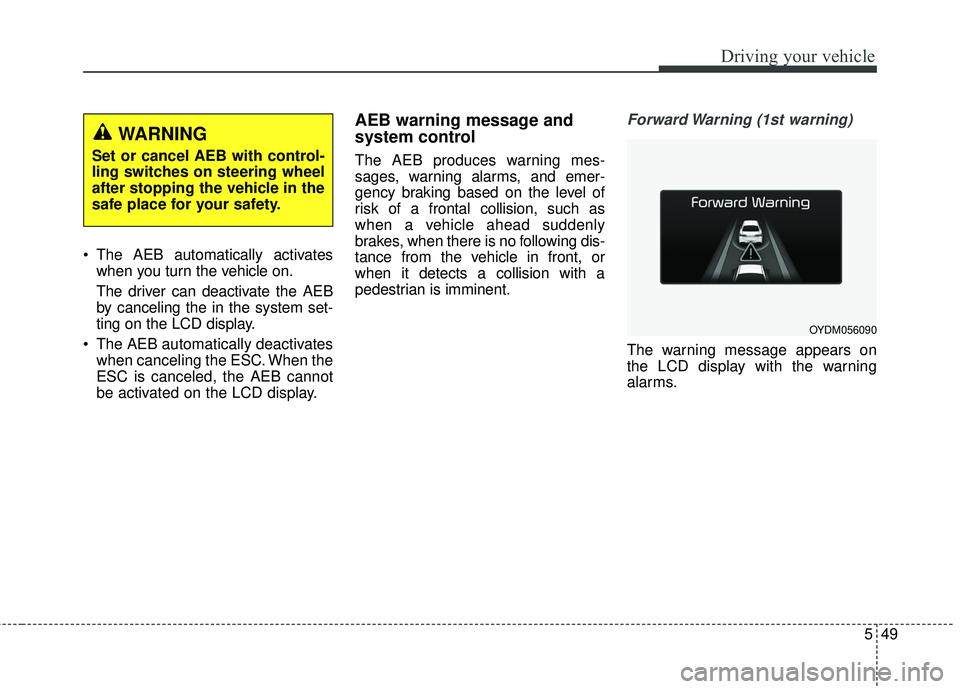
Forward Warning (1st warning)
The warning message appears on
the LCD display with the warning
alarms.
WARNING
Set or cancel AEB with control-
ling switches on steering wheel
after stopping the vehicle in the
safe place for your safety.
OYDM056090
Page 391 of 584
Driving your vehicle
50
5
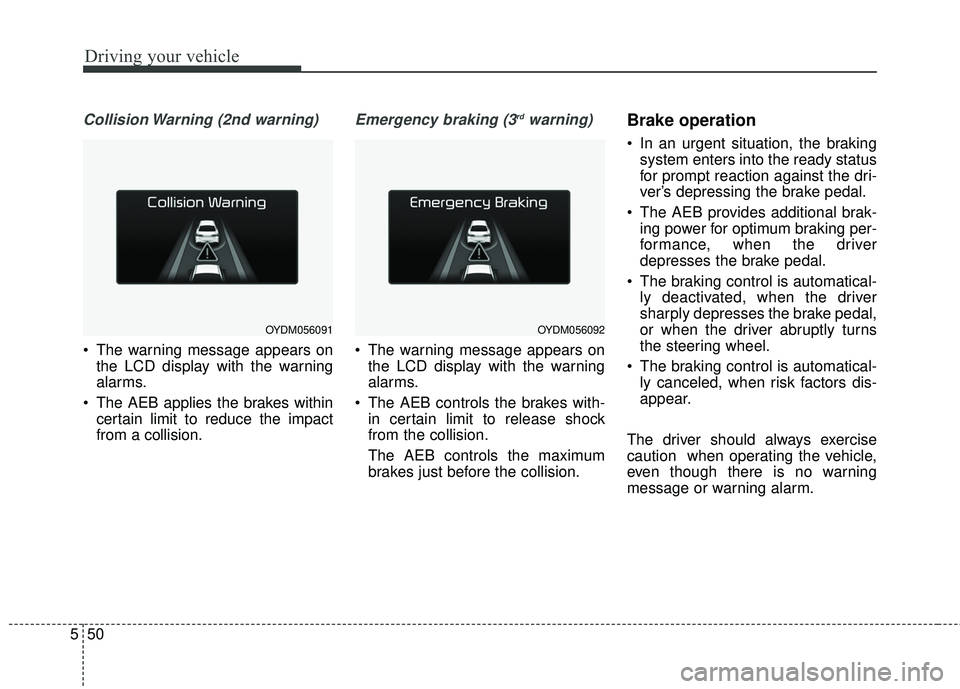
Collision Warning (2nd warning)
The warning message appears on
the LCD display with the warning
alarms.
The AEB applies the brakes within certain limit to reduce the impact
from a collision.
Emergency braking (3rdwarning)
The warning message appears onthe LCD display with the warning
alarms.
The AEB controls the brakes with- in certain limit to release shock
from the collision.
The AEB controls the maximum
brakes just before the collision.
Brake operation
In an urgent situation, the brakingsystem enters into the ready status
for prompt reaction against the dri-
ver’s depressing the brake pedal.
The AEB provides additional brak- ing power for optimum braking per-
formance, when the driver
depresses the brake pedal.
The braking control is automatical- ly deactivated, when the driver
sharply depresses the brake pedal,
or when the driver abruptly turns
the steering wheel.
The braking control is automatical- ly canceled, when risk factors dis-
appear.
The driver should always exercise
caution when operating the vehicle,
even though there is no warning
message or warning alarm.
OYDM056091OYDM056092
Page 393 of 584
Driving your vehicle
52
5
✽ ✽
NOTICE
• Do not install any accessories, such
as a license plate bracket or
bumper sticker near the sensor
area. Do not replace the bumper
by yourself. Doing so may adverse-
ly affect the sensing performance.
• Always keep the sensor/bumper area clean.
• Use only a soft cloth to wash the vehicle. Also, do not spray highly
pressurized water on the sensor
installed on the bumper.
• Be careful not to apply unneces- sary force on the frontal sensor
area. When the sensor moves out
of the correct position due to
external force, the system may not
operate correctly even without the
warning light or message. In this
case, we recommend you to have
the vehicle inspected by an
authorized Kia dealer.
• Use only the genuine Kia sensor cover. Do not arbitrarily apply
paint on the sensor cover.
System malfunction
When the AEB is not working prop-
erly, the AEB warning light ( ) will
illuminate and the warning mes-
sage (“Check AEB system”) will
appear for a few seconds. After the
message disappears, the master
warning light ( ) will illuminate. In
this case, we recommend you to
have the vehicle inspected by an
authorized Kia dealer.
The AEB warning message may appear along with the illumination
of the ESC warning light.WARNING
The AEB is only a supplemental
system for the driver’s conven-
ience.
The driver still maintains
responsibility to control the
vehicle. Do not solely depend
on the AEB system. Rather,
maintain a safe braking dis-
tance, and, if necessary,
depress the brake pedal to
lower the driving speed.
Page 394 of 584
553
Driving your vehicle
The AEB may unnecessarily pro-duce warning messages and warn-
ing alarms. Due to the sensing lim-
itation, the AEB may not produce
warning messages or warning
alarm at all.
When there is a malfunction with the AEB, the braking control does
not operate upon detecting a colli-
sion risk even with other braking
systems normally operating.
The AEB operates only for the vehicle / pedestrian in front, while
driving forward. It does not operate
for any animals or vehicles in the
opposite direction.
The AEB can not recognize cross- traffic or parked vehicles present-
ing a side-profile.Limitation of the system
The AEB is an assistant system for a
driver in a certain risky driving condi-
tion and it does not take every
responsibility for all risks from driving
condition.
The AEB monitors the driving situa-
tions through the radar and the cam-
era sensor. For any vehicle activity
occurring outside the sensor range,
the AEB may not function. The driver
should exercise caution in the follow-
ing situations, as the AEB operation
may be limited:
Recognizing vehicles
- The radar or the camera is con-taminated with foreign substances.
- It heavily rains or snows.
- There is electromagnetic interfer- ence.
- Something in the path of travel deflects the radar waves.
- The vehicle in front has a narrow body. (i.e. motorcycles and bicycles)
- The driver’s view is degraded by driving towards sunlight, reflected
light, or darkness.
- The camera cannot see the full profile of the vehicle in front.
- The vehicle in front is a special vehicle, such as a heavily-loaded
truck or a trailer.
Page 424 of 584
583
Driving your vehicle
Remember, your vehicle does notrequire extended warm-up. After
the engine has started, allow the
engine to run for 10 to 20 seconds
prior to placing the vehicle in gear.
In very cold weather, however, give
your engine a slightly longer warm-
up period.
Don't "lug" or "over-rev" the engine. Lugging is driving too slowly in a
very high gear resulting in engine
bucking. If this happens, shift to a
lower gear. Over-revving is racing
the engine beyond its safe limit.
This can be avoided by shifting at
the recommended speed. Use your air conditioning sparingly.
The air conditioning system is
operated by engine power so your
fuel economy is reduced when you
use it.
Open windows at high speeds can reduce fuel economy.
Fuel economy is reduced by cross- winds and headwinds. To help off-
set some of this loss, slow down
when driving in these conditions.
Keeping a vehicle in good operating
condition is important both for econ-
omy and safety. Therefore, have an
authorized Kia dealer perform
scheduled inspections and mainte-
nance.
WARNING- Engine off during
motion
Never turn the engine off to
coast down hills or anytime the
vehicle is in motion. The power
steering and power brakes will
not function properly without
the engine running. In addition,
turning off the ignition while
driving could engage the steer-
ing wheel lock resulting in loss
of vehicle steering. Keep the
engine on and downshift to an
appropriate gear for engine
braking effect.
Page 425 of 584
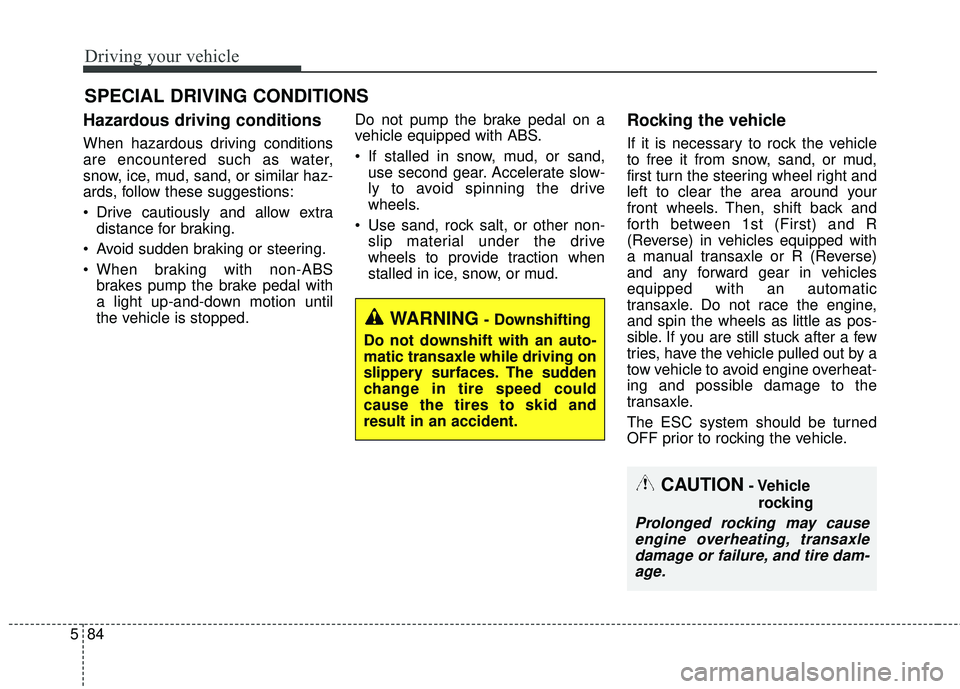
Driving your vehicle
84
5
Hazardous driving conditions
When hazardous driving conditions
are encountered such as water,
snow, ice, mud, sand, or similar haz-
ards, follow these suggestions:
Drive cautiously and allow extra
distance for braking.
Avoid sudden braking or steering.
When braking with non-ABS brakes pump the brake pedal with
a light up-and-down motion until
the vehicle is stopped. Do not pump the brake pedal on a
vehicle equipped with ABS.
If stalled in snow, mud, or sand,
use second gear. Accelerate slow-
ly to avoid spinning the drive
wheels.
Use sand, rock salt, or other non- slip material under the drive
wheels to provide traction when
stalled in ice, snow, or mud.
Rocking the vehicle
If it is necessary to rock the vehicle
to free it from snow, sand, or mud,
first turn the steering wheel right and
left to clear the area around your
front wheels. Then, shift back and
forth between 1st (First) and R
(Reverse) in vehicles equipped with
a manual transaxle or R (Reverse)
and any forward gear in vehicles
equipped with an automatic
transaxle. Do not race the engine,
and spin the wheels as little as pos-
sible. If you are still stuck after a few
tries, have the vehicle pulled out by a
tow vehicle to avoid engine overheat-
ing and possible damage to the
transaxle.
The ESC system should be turned
OFF prior to rocking the vehicle.
SPECIAL DRIVING CONDITIONS
WARNING- Downshifting
Do not downshift with an auto-
matic transaxle while driving on
slippery surfaces. The sudden
change in tire speed could
cause the tires to skid and
result in an accident.
CAUTION- Vehicle rocking
Prolonged rocking may causeengine overheating, transaxledamage or failure, and tire dam-age.
Page 577 of 584
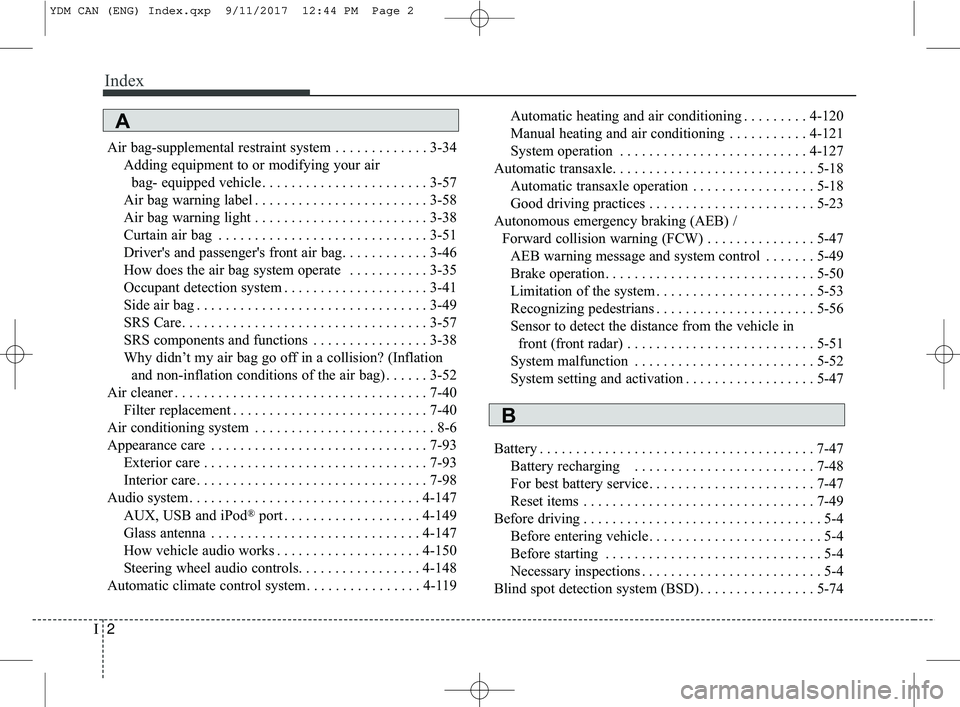
Index
2I
Air bag-supplemental restraint system . . . . . . . . . . . . . 3-34Adding equipment to or modifying your airbag- equipped vehicle . . . . . . . . . . . . . . . . . . . . . . . 3-57
Air bag warning label . . . . . . . . . . . . . . . . . . . . . . . . 3-58
Air bag warning light . . . . . . . . . . . . . . . . . . . . . . . . 3-38
Curtain air bag . . . . . . . . . . . . . . . . . . . . . . . . . . . . . 3-51
Driver's and passenger's front air bag. . . . . . . . . . . . 3-46
How does the air bag system operate . . . . . . . . . . . 3-35
Occupant detection system . . . . . . . . . . . . . . . . . . . . 3-41
Side air bag . . . . . . . . . . . . . . . . . . . . . . . . . . . . . . . . 3-49
SRS Care. . . . . . . . . . . . . . . . . . . . . . . . . . . . . . . . . . 3-57\
SRS components and functions . . . . . . . . . . . . . . . . 3-38
Why didn’t my air bag go off in a collision? (Inflation and non-inflation conditions of the air bag) . . . . . . 3-52
Air cleaner . . . . . . . . . . . . . . . . . . . . . . . . . . . . . . . . . . . 7-\
40 Filter replacement . . . . . . . . . . . . . . . . . . . . . . . . . . . 7-40
Air conditioning system . . . . . . . . . . . . . . . . . . . . . . . . . 8-6
Appearance care . . . . . . . . . . . . . . . . . . . . . . . . . . . . . . 7-93 Exterior care . . . . . . . . . . . . . . . . . . . . . . . . . . . . . . . 7-93
Interior care. . . . . . . . . . . . . . . . . . . . . . . . . . . . . . . . 7-98
Audio system . . . . . . . . . . . . . . . . . . . . . . . . . . . . . . . . 4-147
AUX, USB and iPod
®port . . . . . . . . . . . . . . . . . . . 4-149
Glass antenna . . . . . . . . . . . . . . . . . . . . . . . . . . . . . 4-147
How vehicle audio works . . . . . . . . . . . . . . . . . . . . 4-150
Steering wheel audio controls. . . . . . . . . . . . . . . . . 4-148
Automatic climate control system . . . . . . . . . . . . . . . . 4-119 Automatic heating and air conditioning . . . . . . . . . 4-120
Manual heating and air conditioning . . . . . . . . . . . 4-121
System operation . . . . . . . . . . . . . . . . . . . . . . . . . . 4-127
Automatic transaxle. . . . . . . . . . . . . . . . . . . . . . . . . . . . 5-18 Automatic transaxle operation . . . . . . . . . . . . . . . . . 5-18
Good driving practices . . . . . . . . . . . . . . . . . . . . . . . 5-23
Autonomous emergency braking (AEB) / Forward collision warning (FCW) . . . . . . . . . . . . . . . 5-47 AEB warning message and system control . . . . . . . 5-49
Brake operation. . . . . . . . . . . . . . . . . . . . . . . . . . . . . 5-50
Limitation of the system . . . . . . . . . . . . . . . . . . . . . . 5-53
Recognizing pedestrians . . . . . . . . . . . . . . . . . . . . . . 5-56
Sensor to detect the distance from the vehicle in front (front radar) . . . . . . . . . . . . . . . . . . . . . . . . . . 5-51
System malfunction . . . . . . . . . . . . . . . . . . . . . . . . . 5-52
System setting and activation . . . . . . . . . . . . . . . . . . 5-47
Battery . . . . . . . . . . . . . . . . . . . . . . . . . . . . . . . . . . . . \
. . 7-47 Battery recharging . . . . . . . . . . . . . . . . . . . . . . . . . 7-48
For best battery service . . . . . . . . . . . . . . . . . . . . . . . 7-47
Reset items . . . . . . . . . . . . . . . . . . . . . . . . . . . . . . . . 7-49
Before driving . . . . . . . . . . . . . . . . . . . . . . . . . . . . . . . . . 5-4 Before entering vehicle . . . . . . . . . . . . . . . . . . . . . . . . 5-4
Before starting . . . . . . . . . . . . . . . . . . . . . . . . . . . . . . 5-4
Necessary inspections . . . . . . . . . . . . . . . . . . . . . . . . . 5-4
Blind spot detection system (BSD) . . . . . . . . . . . . . . . . 5-74
A
B
YDM CAN (ENG) Index.qxp 9/11/2017 12:44 PM Page 2