change KIA FORTE 2022 Navigation System Quick Reference Guide
[x] Cancel search | Manufacturer: KIA, Model Year: 2022, Model line: FORTE, Model: KIA FORTE 2022Pages: 316, PDF Size: 10.52 MB
Page 52 of 316
2-14
Using the climate control system (if equipped)
You can check and adjust the climate system settings on the screen.0000
A
For more information about how to use the heater and air conditioner, refer to Owner's
Manual of the vehicle.
1 Perform any of the following methods:
\225Press the [
CLIMATE] button on the climate control system.
\225On the All Menus screen, press Climate.
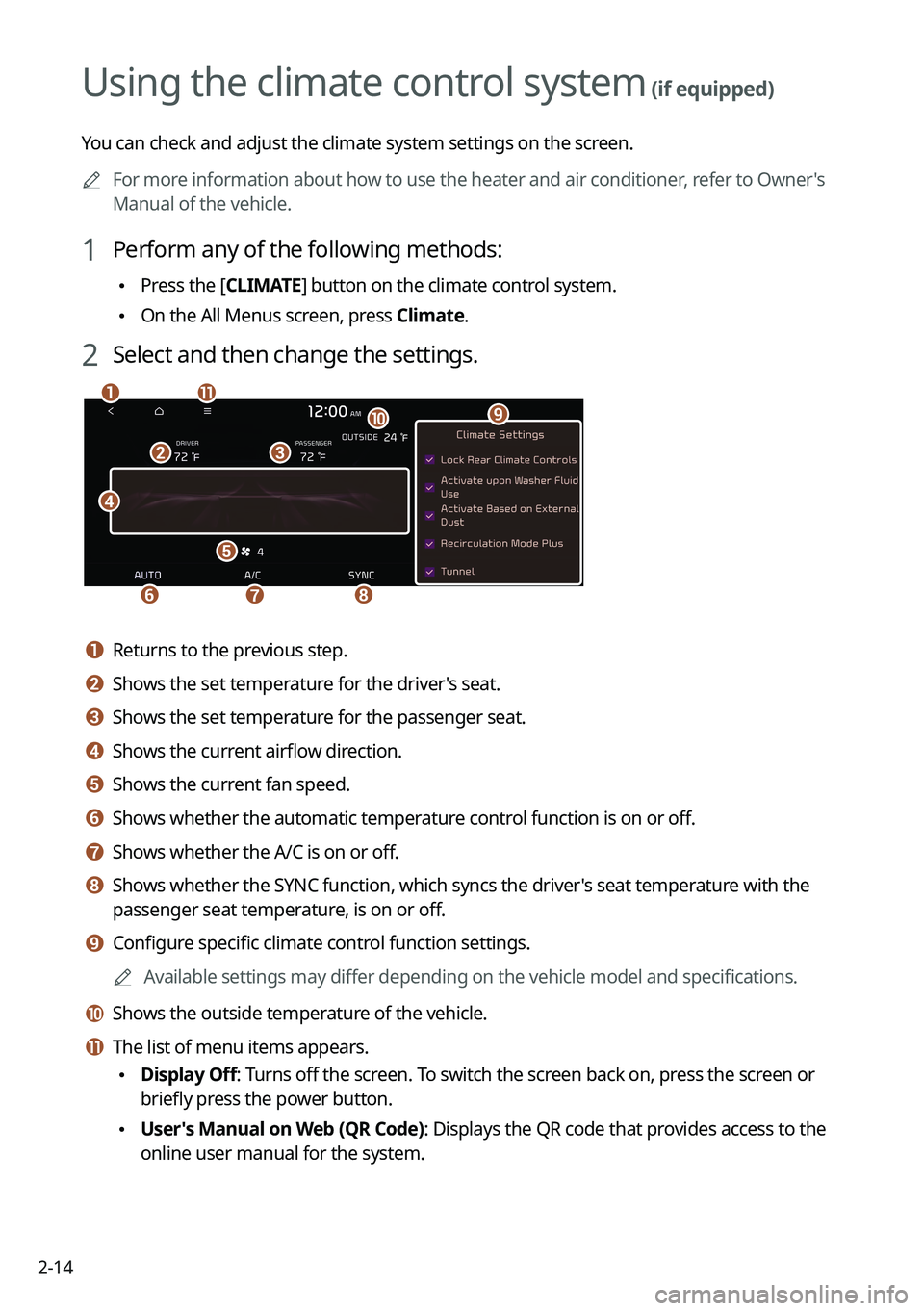
2 Select and then change the settings.
\037
\036
\035
\034
\033
\032\031
\030
\027
\026\025
a a Returns to the previous step.
b b Shows the set temperature for the driver's seat.
c c Shows the set temperature for the passenger seat.
d d Shows the current airflow direction.
e e Shows the current fan speed.
f f Shows whether the automatic temperature control function is on or off.
g g Shows whether the A/C is on or off.
h h Shows whether the SYNC function, which syncs the driver's seat temperature with the
passenger seat temperature, is on or off.
i i Configure specific climate control function settings.
0000
A
Available settings may differ depending on the vehicle model and specifications.
j j Shows the outside temperature of the vehicle.
k k The list of menu items appears.
\225Display Off: Turns off the screen. To switch the screen back on, press the screen or
briefly press the power button.
\225User's Manual on Web (QR Code): Displays the QR code that provides access to the
online user manual for the system.
Page 53 of 316
2-15
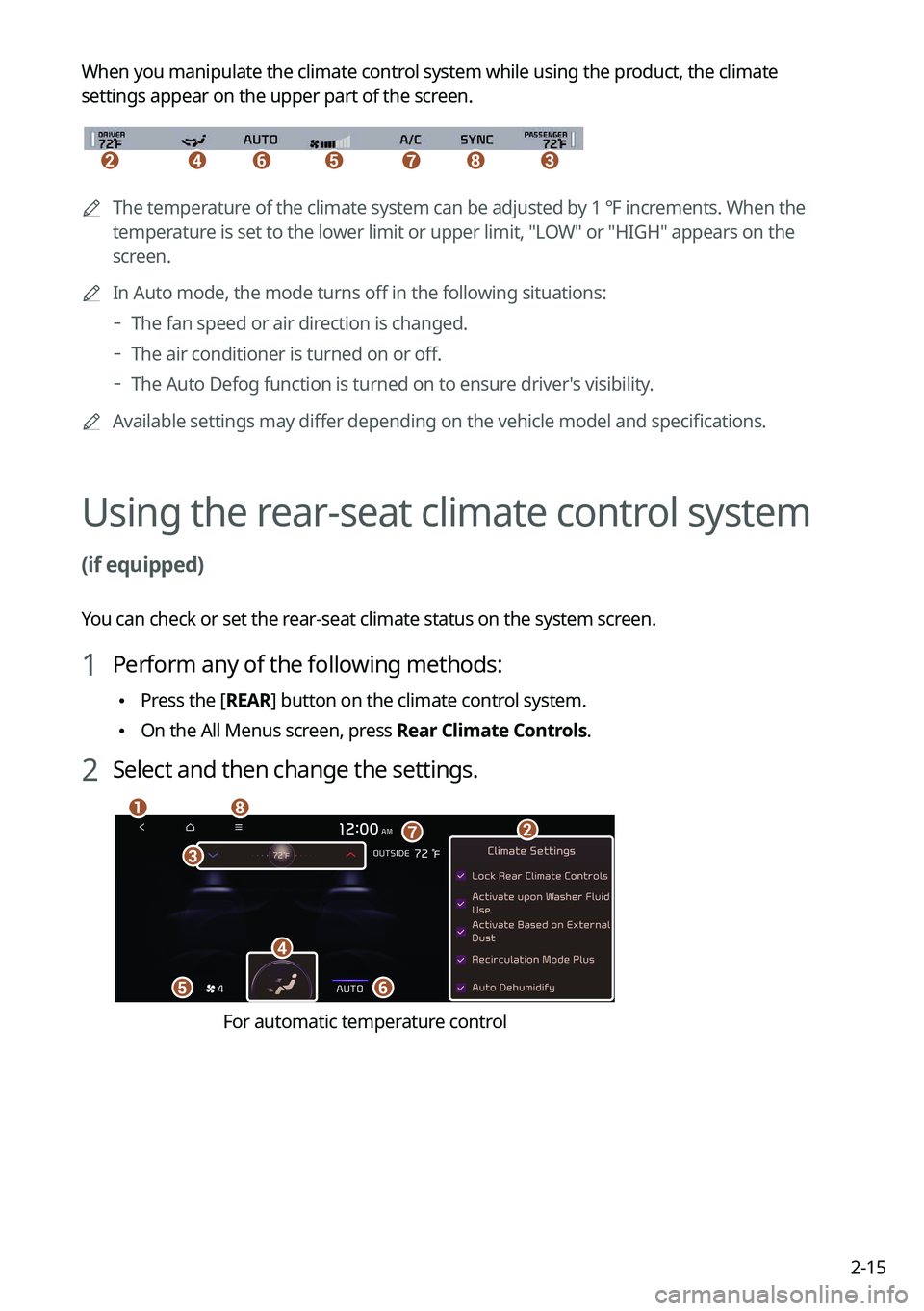
When you manipulate the climate control system while using the product, the climate
settings appear on the upper part of the screen.
\037\036\035\034\033\032\031
0000A
The temperature of the climate system can be adjusted by 1 ℉ increments. When the
temperature is set to the lower limit or upper limit, "LOW" or "HIGH" appears on the
screen.
0000
A
In Auto mode, the mode turns off in the following situations:
000DThe fan speed or air direction is changed.
000DThe air conditioner is turned on or off.
000DThe Auto Defog function is turned on to ensure driver's visibility.
0000
A
Available settings may differ depending on the vehicle model and specifications.
Using the rear-seat climate control system
(if equipped)
You can check or set the rear-seat climate status on the system screen.
1 Perform any of the following methods:
\225Press the [
REAR] button on the climate control system.
\225On the All Menus screen, press Rear Climate Controls.
2 Select and then change the settings.
\037
\036
\035
\034
\033
\032\031
\030
For automatic temperature control
Page 54 of 316
2-16
\037
\036\035\034
\033
\032
\031
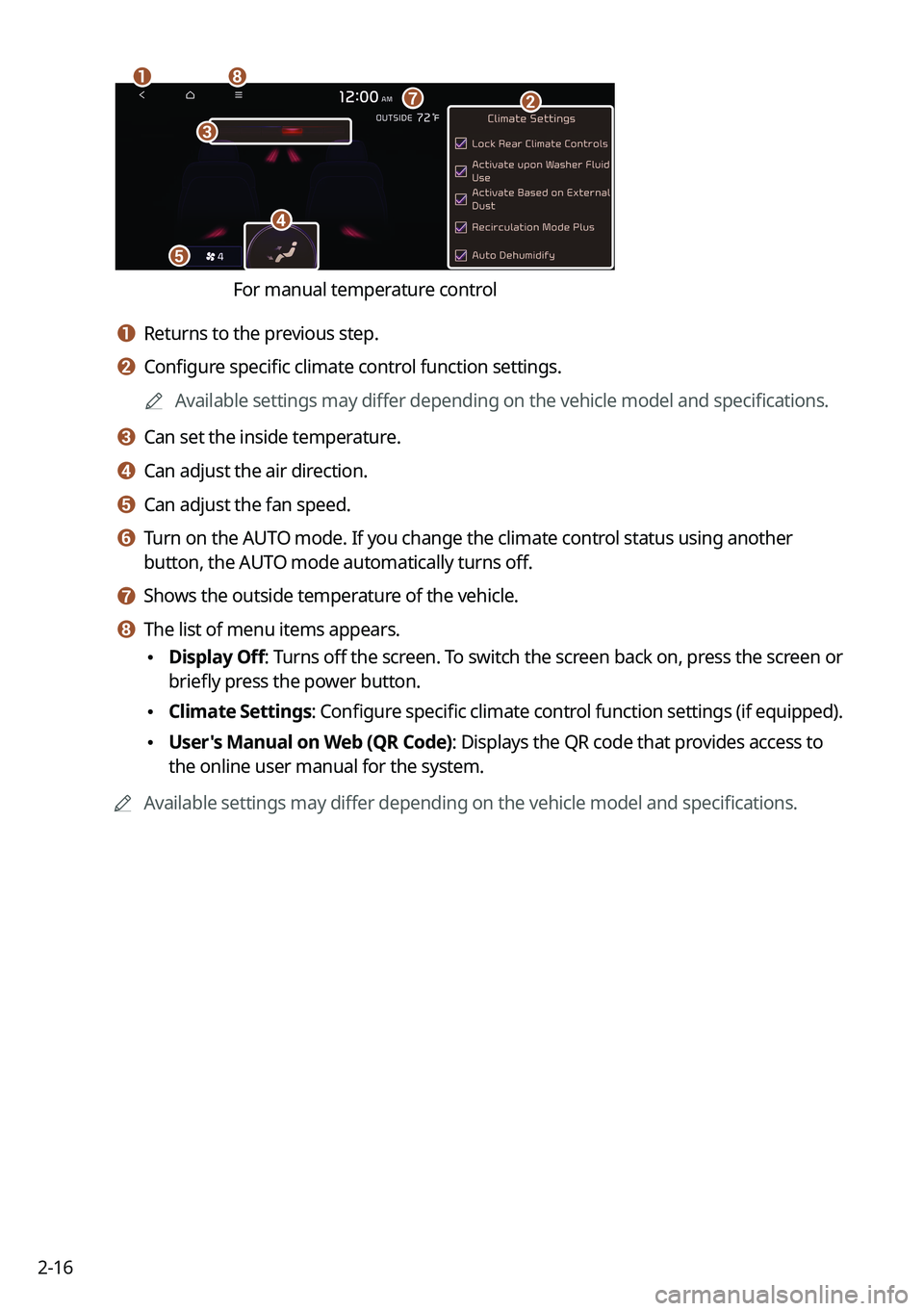
For manual temperature control
a a Returns to the previous step.
b b Configure specific climate control function settings.0000
A
Available settings may differ depending on the vehicle model and specifications.
c c Can set the inside temperature.
d d Can adjust the air direction.
e e Can adjust the fan speed.
f f Turn on the AUTO mode. If you change the climate control status using another
button, the AUTO mode automatically turns off.
g g Shows the outside temperature of the vehicle.
h h The list of menu items appears.
\225Display Off
: Turns off the screen. To switch the screen back on, press the screen or
briefly press the power button.
\225 Climate Settings
: Configure specific climate control function settings (if equipped).
\225User's Manual on Web (QR Code): Displays the QR code that provides access to
the online user manual for the system.
0000
A
Available settings may differ depending on the vehicle model and specifications.
Page 58 of 316
2-20
Using the sound mood lamp (if equipped)
You can set to implement various lighting effects by synchronizing with the playing music.
1 On the All Menus screen, press Sound Mood Lamp.
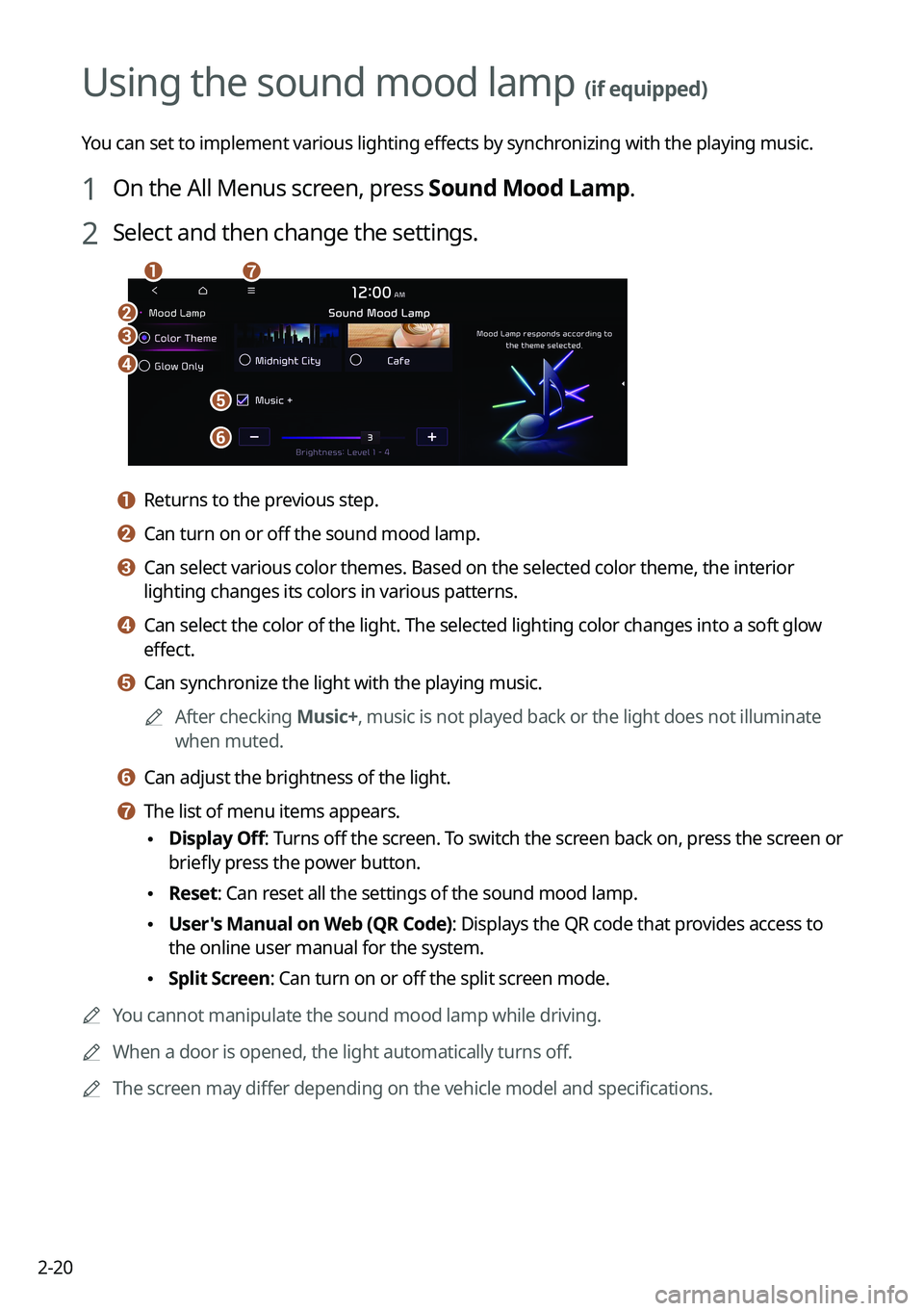
2 Select and then change the settings.
\037
\036
\035
\034
\033
\032\031
a a Returns to the previous step.
b b Can turn on or off the sound mood lamp.
c c Can select various color themes. Based on the selected color theme, the \
interior
lighting changes its colors in various patterns.
d d Can select the color of the light. The selected lighting color changes i\
nto a soft glow
effect.
e e Can synchronize the light with the playing music.0000
A
After checking Music+, music is not played back or the light does not illuminate
when muted.
f f Can adjust the brightness of the light.
g g The list of menu items appears.
\225Display Off
: Turns off the screen. To switch the screen back on, press the screen or
briefly press the power button.
\225 Reset: Can reset all the settings of the sound mood lamp.
\225User's Manual on Web (QR Code): Displays the QR code that provides access to
the online user manual for the system.
\225Split Screen: Can turn on or off the split screen mode.
0000
A
You cannot manipulate the sound mood lamp while driving.
0000
A
When a door is opened, the light automatically turns off.
0000
A
The screen may differ depending on the vehicle model and specifications.
Page 62 of 316

2-24
Seeing weather information by using Doppler weather
radar
1 On the All Menus screen, press HD Radio Data.
2 Press Doppler Radar.
3 See the weather condition details in the HD Radio coverage area.
Seeing fuel price information by using HD radio data
(if equipped)
1 On the All Menus screen, press HD Radio Data.
2 Press Fuel Price.
3 Search nearby gas stations, and check the current fuel prices.
0000
A
To change the sorting order, press on the drop-down list and then select the
sorting criteria.
0000
A
To see the latest information, press
.
Page 69 of 316
3-3
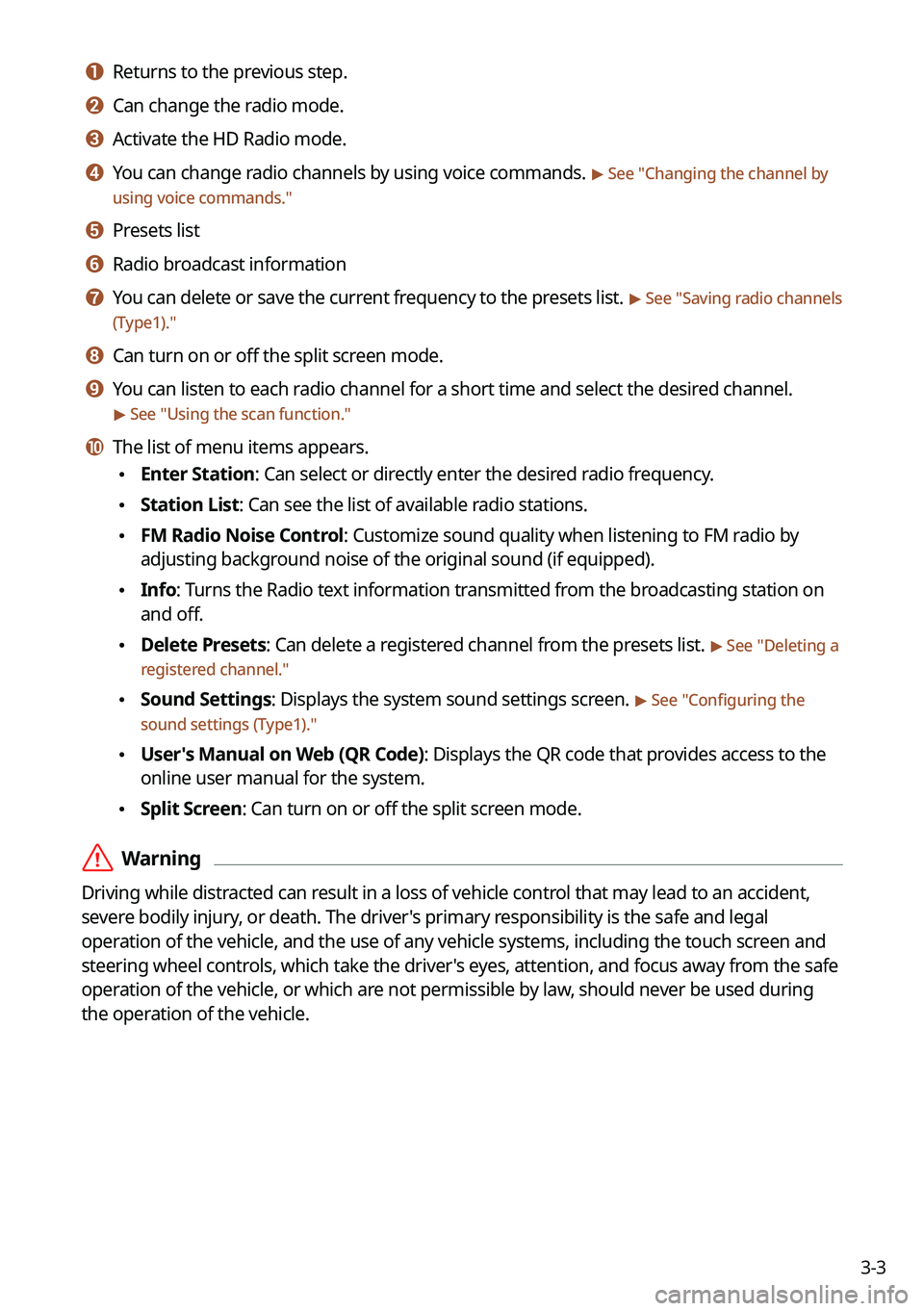
a a Returns to the previous step.
b b Can change the radio mode.
c c Activate the HD Radio mode.
d d You can change radio channels by using voice commands. > See "Changing the channel by
using voice commands."
e e Presets list
f f Radio broadcast information
g g You can delete or save the current frequency to the presets list. > See " Saving radio channels
(Type1)."
h h Can turn on or off the split screen mode.
i i You can listen to each radio channel for a short time and select the desired channel.
> See " Using the scan function."
j j The list of menu items appears.
\225 Enter Station: Can select or directly enter the desired radio frequency.
\225Station List: Can see the list of available radio stations.
\225FM Radio Noise Control: Customize sound quality when listening to FM radio by
adjusting background noise of the original sound (if equipped).
\225Info: Turns the Radio text information transmitted from the broadcasting station on
and off.
\225Delete Presets: Can delete a registered channel from the presets list. > See "
Deleting a
registered channel."
\225 Sound Settings: Displays the system sound settings screen. > See "
Configuring the
sound settings (Type1)."
\225 User's Manual on Web (QR Code): Displays the QR code that provides access to the
online user manual for the system.
\225Split Screen: Can turn on or off the split screen mode.
\335Warning
Driving while distracted can result in a loss of vehicle control that may lead to an accident,
severe bodily injury, or death. The driver's primary responsibility is the safe and legal
operation of the vehicle, and the use of any vehicle systems, including the \
touch screen and
steering wheel controls, which take the driver's eyes, attention, and focus away from the safe
operation of the vehicle, or which are not permissible by law, should never be used during
the operation of the vehicle.
Page 70 of 316
3-4
Radio screen (Type2)
The radio screen provides various functions while listening to radio broadcasts.
\037
\036
\035
\034
\033\032
\031
\030\027
\026\025
\024
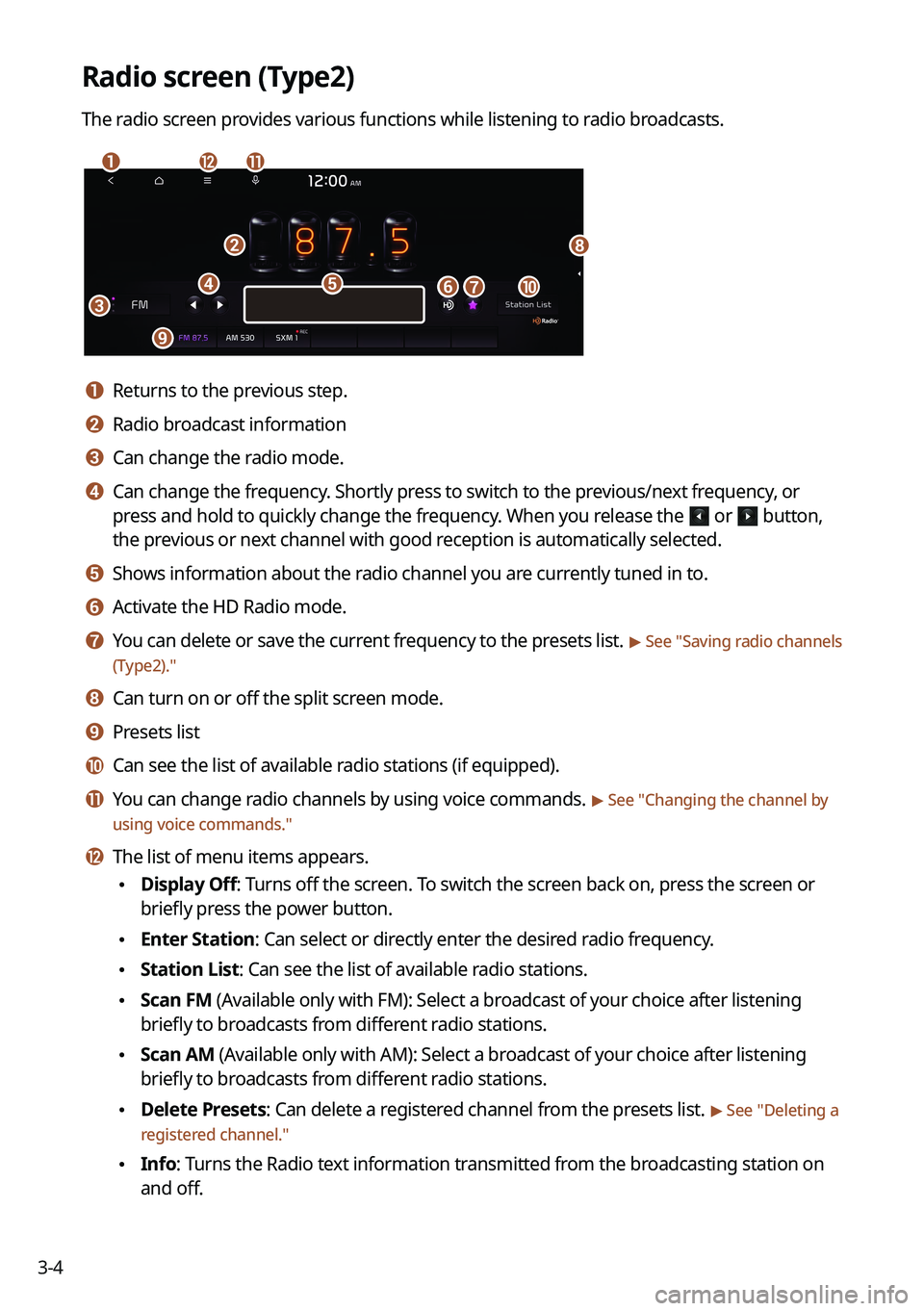
a a Returns to the previous step.
b b Radio broadcast information
c c Can change the radio mode.
d d Can change the frequency. Shortly press to switch to the previous/next frequency, or
press and hold to quickly change the frequency. When you release the
or button,
the previous or next channel with good reception is automatically selected.
e e Shows information about the radio channel you are currently tuned in to.
f f Activate the HD Radio mode.
g g You can delete or save the current frequency to the presets list. > See "Saving radio channels
(Type2)."
h h Can turn on or off the split screen mode.
i i Presets list
j j Can see the list of available radio stations (if equipped).
k k You can change radio channels by using voice commands. > See " Changing the channel by
using voice commands."
l l The list of menu items appears.
\225 Display Off: Turns off the screen. To switch the screen back on, press the screen or
briefly press the power button.
\225Enter Station: Can select or directly enter the desired radio frequency.
\225Station List: Can see the list of available radio stations.
\225Scan FM (Available only with FM): Select a broadcast of your choice after listening
briefly to broadcasts from different radio stations.
\225Scan AM (Available only with AM): Select a broadcast of your choice after listening
briefly to broadcasts from different radio stations.
\225Delete Presets: Can delete a registered channel from the presets list. > See "
Deleting a
registered channel."
\225 Info: Turns the Radio text information transmitted from the broadcasting station on
and off.
Page 72 of 316
![KIA FORTE 2022 Navigation System Quick Reference Guide 3-6
Changing the radio mode (Type2)
Perform any of the following methods:
\225On the Radio screen, press Radio Mode button repeatedly.
\225On the control panel, press the [
RADIO] button repeatedly.](/img/2/54851/w960_54851-71.png "KIA FORTE 2022 Navigation System Quick Reference Guide 3-6
Changing the radio mode (Type2)
Perform any of the following methods:
\225On the Radio screen, press Radio Mode button repeatedly.
\225On the control panel, press the [
RADIO] button repeatedly.")
3-6
Changing the radio mode (Type2)
Perform any of the following methods:
\225On the Radio screen, press Radio Mode button repeatedly.
\225On the control panel, press the [
RADIO] button repeatedly.
The radio mode changes in the order of FM >
AM >
SXM.
0000A
The screen may differ depending on the vehicle model and specifications.
Changing the radio channel (Type1)
Perform any of the following methods:
\225On the Radio screen, press the desired channel from the presets list.
0000
A
You can also change the channel by using the Move lever/button on the steering
wheel.
\225On the control panel, press the [
SEEK] or [TRACK ] button. You can move to the
previous or next channel with good reception.
\225 When you know an accurate frequency, turn the Search knob on the control panel to
change the frequency.
You can listen to the changed radio broadcast.
Changing the channel by using voice commands
You can change the radio channel by using voice commands.
1 On the Radio screen, press .
2 When a guiding beep is heard, say the desired radio station channel.
Page 73 of 316
3-7
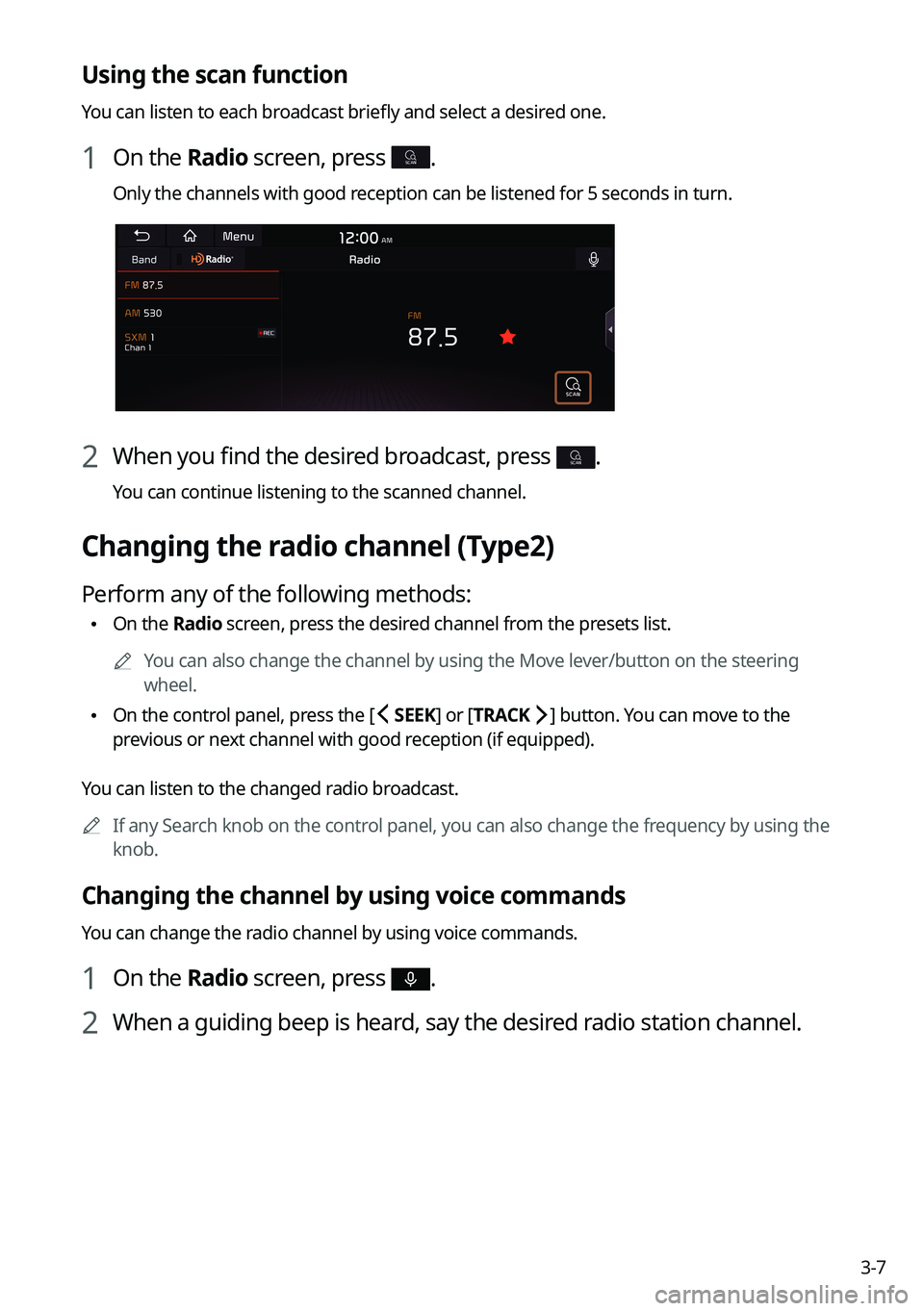
Using the scan function
You can listen to each broadcast briefly and select a desired one.
1 On the Radio screen, press SCAN.
Only the channels with good reception can be listened for 5 seconds in turn.
2 When you find the desired broadcast, press SCAN.
You can continue listening to the scanned channel.
Changing the radio channel (Type2)
Perform any of the following methods:
\225On the Radio screen, press the desired channel from the presets list.
0000
A
You can also change the channel by using the Move lever/button on the steering
wheel.
\225On the control panel, press the [
SEEK] or [TRACK ] button. You can move to the
previous or next channel with good reception (if equipped).
You can listen to the changed radio broadcast. 0000
A
If any Search knob on the control panel, you can also change the frequency by using the
knob.
Changing the channel by using voice commands
You can change the radio channel by using voice commands.
1 On the Radio screen, press .
2 When a guiding beep is heard, say the desired radio station channel.
Page 78 of 316
3-12
Listening to SiriusXM™ radio
You can listen to radio channels provided by SiriusXM, a satellite radio service.
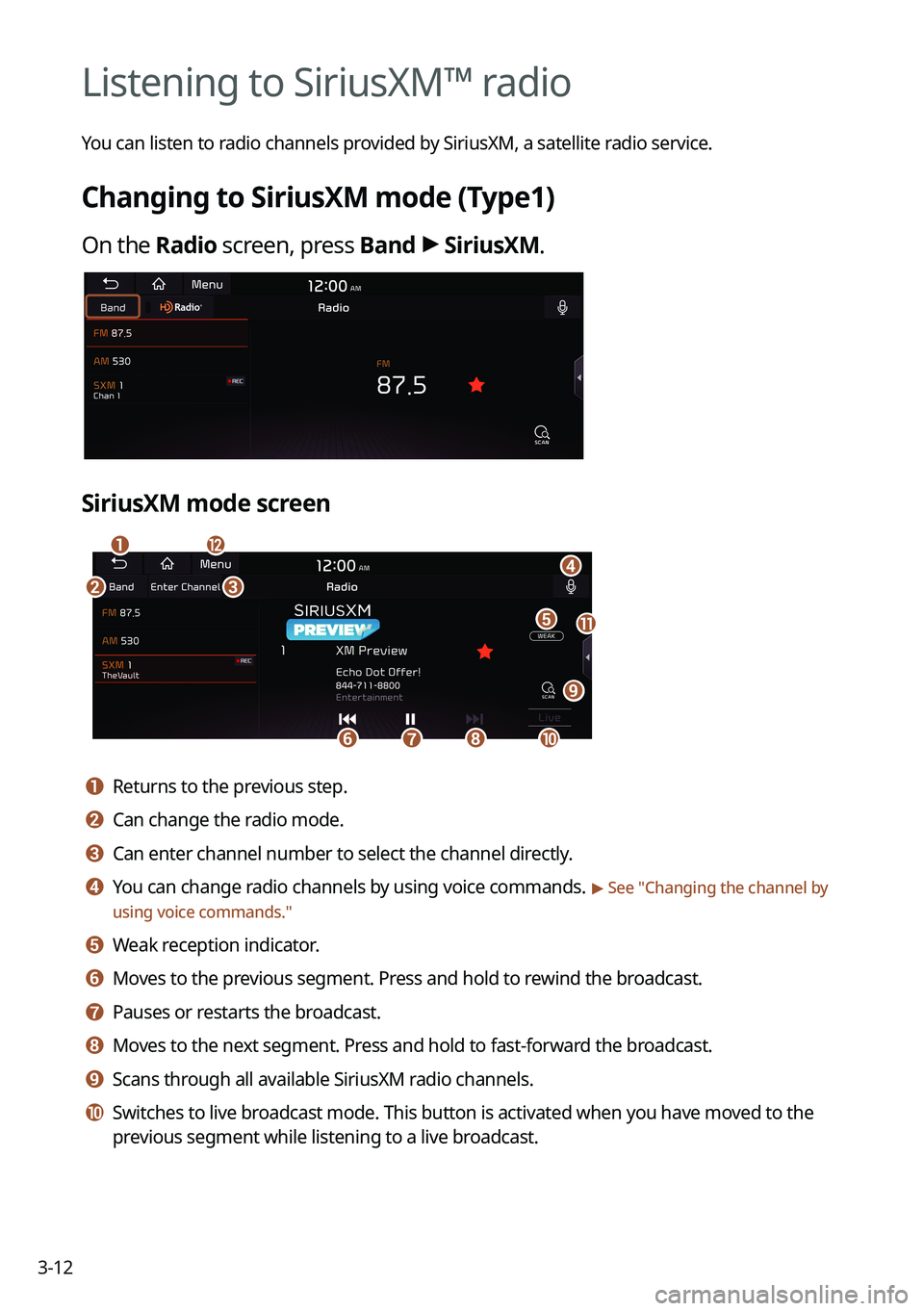
Changing to SiriusXM mode (Type1)
On the Radio screen, press Band >
SiriusXM.
SiriusXM mode screen
\037
\036
\035
\034\033
\032\031
\030
\027
\026\025
\024
a a Returns to the previous step.
b b Can change the radio mode.
c c Can enter channel number to select the channel directly.
d d You can change radio channels by using voice commands. > See " Changing the channel by
using voice commands."
e e Weak reception indicator.
f f Moves to the previous segment. Press and hold to rewind the broadcast.
g g Pauses or restarts the broadcast.
h h Moves to the next segment. Press and hold to fast-forward the broadcast.
i i Scans through all available SiriusXM radio channels.
j j Switches to live broadcast mode. This button is activated when you have moved to the
previous segment while listening to a live broadcast.