change KIA FORTE 2022 Navigation System Quick Reference Guide
[x] Cancel search | Manufacturer: KIA, Model Year: 2022, Model line: FORTE, Model: KIA FORTE 2022Pages: 316, PDF Size: 10.52 MB
Page 80 of 316
3-14
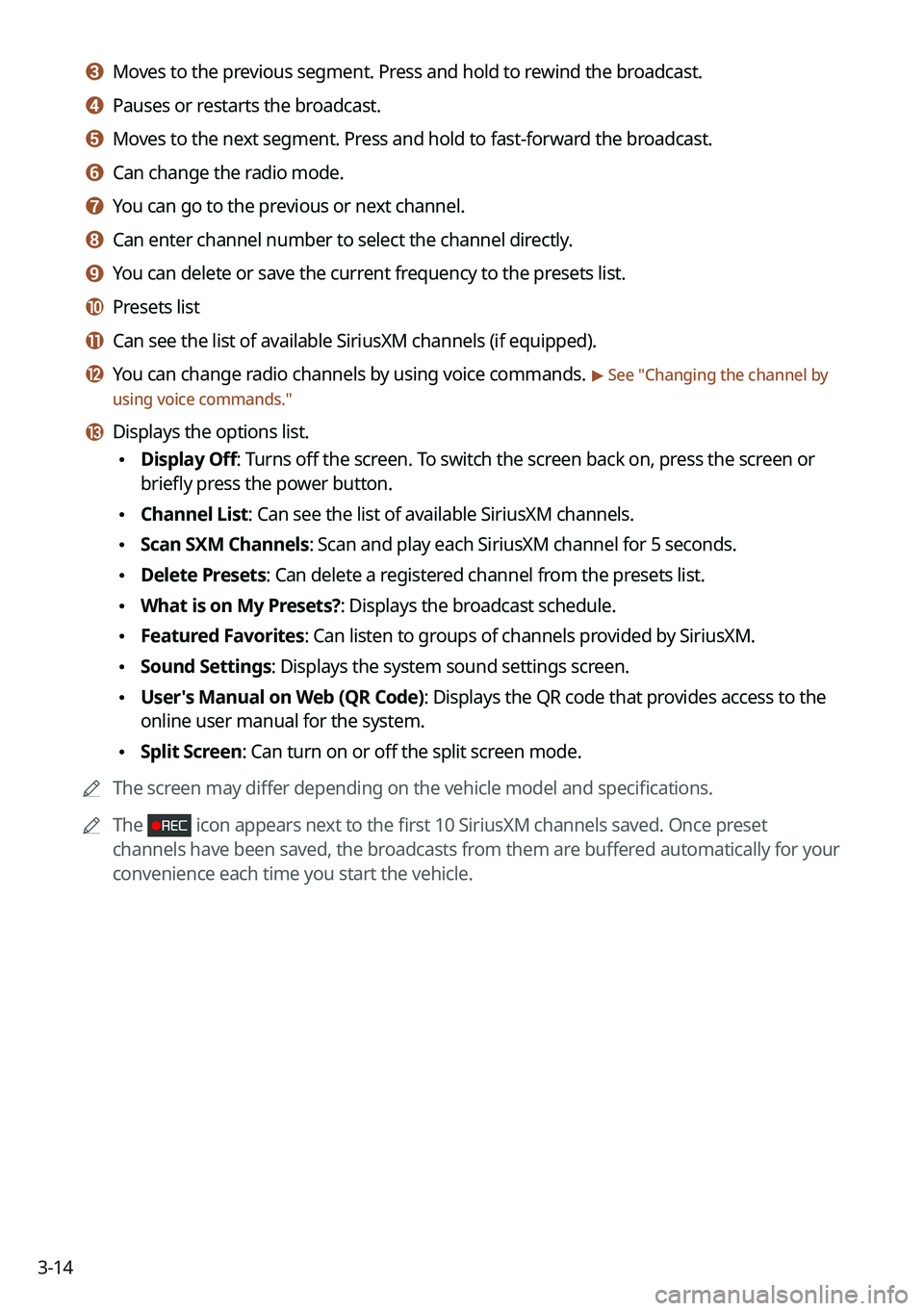
c c Moves to the previous segment. Press and hold to rewind the broadcast.
d d Pauses or restarts the broadcast.
e e Moves to the next segment. Press and hold to fast-forward the broadcast.
f f Can change the radio mode.
g g You can go to the previous or next channel.
h h Can enter channel number to select the channel directly.
i i You can delete or save the current frequency to the presets list.
j j Presets list
k k Can see the list of available SiriusXM channels (if equipped).
l l You can change radio channels by using voice commands. > See "Changing the channel by
using voice commands."
m m Displays the options list.
\225 Display Off: Turns off the screen. To switch the screen back on, press the screen or
briefly press the power button.
\225Channel List: Can see the list of available SiriusXM channels.
\225Scan SXM Channels: Scan and play each SiriusXM channel for 5 seconds.
\225Delete Presets: Can delete a registered channel from the presets list.
\225What is on My Presets?: Displays the broadcast schedule.
\225Featured Favorites: Can listen to groups of channels provided by SiriusXM.
\225Sound Settings: Displays the system sound settings screen.
\225User's Manual on Web (QR Code): Displays the QR code that provides access to the
online user manual for the system.
\225Split Screen: Can turn on or off the split screen mode.
0000
A
The screen may differ depending on the vehicle model and specifications.
0000
A
The
icon appears next to the first 10 SiriusXM channels saved. Once preset
channels have been saved, the broadcasts from them are buffered automatically for your
convenience each time you start the vehicle.
Page 84 of 316

3-18
4 Select a channel and a program to see its detailed information.
0000
A
If any hidden information, an arrow appears next to the program. Press the arrow to
see the hidden information.
Listening to Featured Favorites channels (Type1)
You can listen to Featured Favorites channels on the SiriusXM radio. Multiple sets of channels
can be broadcast and can be changed by SiriusXM.
1 On the Radio screen, press Band >
SiriusXM.
2 On the SiriusXM radio screen, press Menu >
Featured Favorites.
3 Select a channel.
Listening to Featured Favorites channels (Type2)
You can listen to Featured Favorites channels on the SiriusXM radio. Multiple sets of channels
can be broadcast and can be changed by SiriusXM.
1 On the Radio screen, press Radio Mode button repeatedly.
2 On the SiriusXM radio screen, press >
Featured Favorites.
3 Select a channel.
Page 87 of 316
4-3
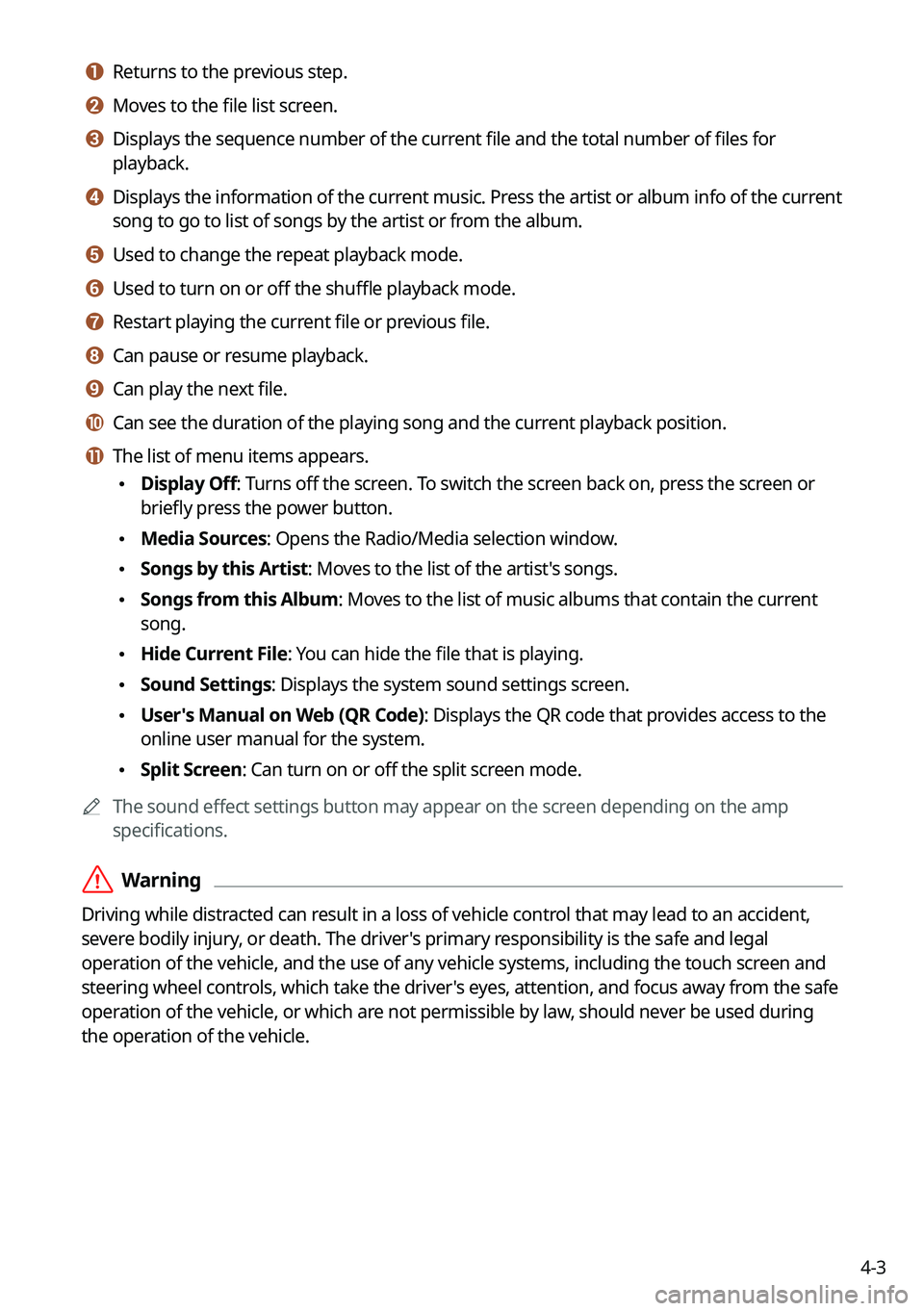
a a Returns to the previous step.
b b Moves to the file list screen.
c c Displays the sequence number of the current file and the total number of files for
playback.
d d Displays the information of the current music. Press the artist or album info of the current
song to go to list of songs by the artist or from the album.
e e Used to change the repeat playback mode.
f f Used to turn on or off the shuffle playback mode.
g g Restart playing the current file or previous file.
h h Can pause or resume playback.
i i Can play the next file.
j j Can see the duration of the playing song and the current playback position.
k k The list of menu items appears.
\225Display Off: Turns off the screen. To switch the screen back on, press the screen or
briefly press the power button.
\225Media Sources: Opens the Radio/Media selection window.
\225Songs by this Artist: Moves to the list of the artist's songs.
\225Songs from this Album: Moves to the list of music albums that contain the current
song.
\225Hide Current File: You can hide the file that is playing.
\225Sound Settings: Displays the system sound settings screen.
\225User's Manual on Web (QR Code): Displays the QR code that provides access to the
online user manual for the system.
\225Split Screen: Can turn on or off the split screen mode.
0000
A
The sound effect settings button may appear on the screen depending on the amp
specifications.
\335Warning
Driving while distracted can result in a loss of vehicle control that may lead to an accident,
severe bodily injury, or death. The driver's primary responsibility is the safe and legal
operation of the vehicle, and the use of any vehicle systems, including the touch screen and
steering wheel controls, which take the driver's eyes, attention, and focus away from the safe
operation of the vehicle, or which are not permissible by law, should never be used during
the operation of the vehicle.
Page 89 of 316
4-5
Playing the previous file
You can play the previous file during playback in the USB device.
Perform any of the following methods:
\225On the USB music playback screen, press within 3 seconds during playback.
\225On the control panel, press the [
SEEK] button within 3 seconds during playback (if
equipped).
0000
A
To play the previous music during playback, press
twice or pressing the [ SEEK]
button on the control panel twice after 3 seconds from the start of the playback (if
equipped).
0000
A
You can also run the function by using the Move lever/button on the steering wheel.
0000
A
If any Search knob on the control panel, you can search for the desired music by using
the knob. When you press the knob within 5 seconds, music is played. However, if no
input within 5 seconds, the search stops and the system displays the information of the
current file.
Playing the next file
You can play the next file in the USB device during playback.
Perform any of the following methods:
\225On the USB music playback screen, press .
\225On the control panel, press the [
TRACK ] button (if equipped).
0000
A
You can also run the function by using the Move lever/button on the steering wheel.
0000
A
If any Search knob on the control panel, you can search for the desired music by using
the knob. When you press the knob within 5 seconds, music is played. However, if no
input within 5 seconds, the search stops and the system displays the information of the
current file.
Changing the repeated playback mode for USB music
You can change the repeated playback mode for USB music: Repeat One, Repeat Folder, and
Repeat All.
On the USB music playback screen, press repeatedly.
Each time the icon is pressed, the playback repetition modes are toggled and the activated
mode icon appears on the screen.
Turning on/off the shuffle playback mode for USB music
You can turn on or off the shuffle playback mode for USB music.
On the USB music playback screen, press repeatedly.
Each time the icon is pressed, the shuffle playback mode is turned on and off. When the
shuffle playback is active, the files are played randomly with no sequence.
Page 92 of 316
4-8
Bluetooth audio playback screen
The media player runs when you play a music file from a connected audio device via
Bluetooth.
\037\036
\035
\034\033\032\031
\030
\027
\026
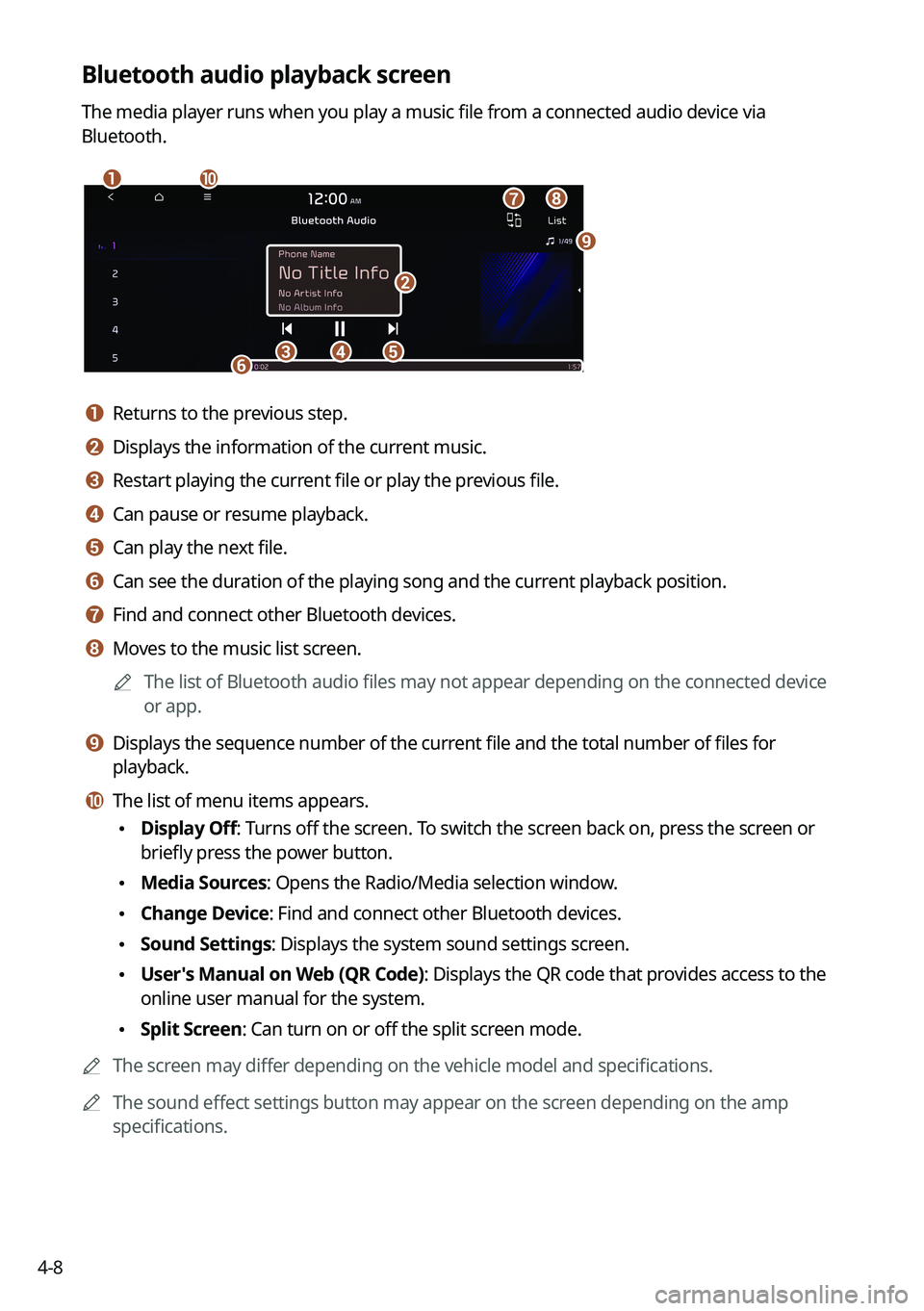
a a Returns to the previous step.
b b Displays the information of the current music.
c c Restart playing the current file or play the previous file.
d d Can pause or resume playback.
e e Can play the next file.
f f Can see the duration of the playing song and the current playback position.
g g Find and connect other Bluetooth devices.
h h Moves to the music list screen.0000
A
The list of Bluetooth audio files may not appear depending on the connected device
or app.
i i Displays the sequence number of the current file and the total number of files for
playback.
j j The list of menu items appears.
\225Display Off: Turns off the screen. To switch the screen back on, press the screen or
briefly press the power button.
\225Media Sources: Opens the Radio/Media selection window.
\225Change Device: Find and connect other Bluetooth devices.
\225Sound Settings: Displays the system sound settings screen.
\225User's Manual on Web (QR Code): Displays the QR code that provides access to the
online user manual for the system.
\225Split Screen: Can turn on or off the split screen mode.
0000
A
The screen may differ depending on the vehicle model and specifications.
0000
A
The sound effect settings button may appear on the screen depending on the amp
specifications.
Page 96 of 316
5-2
Navigation functions
Navigation Menu overview
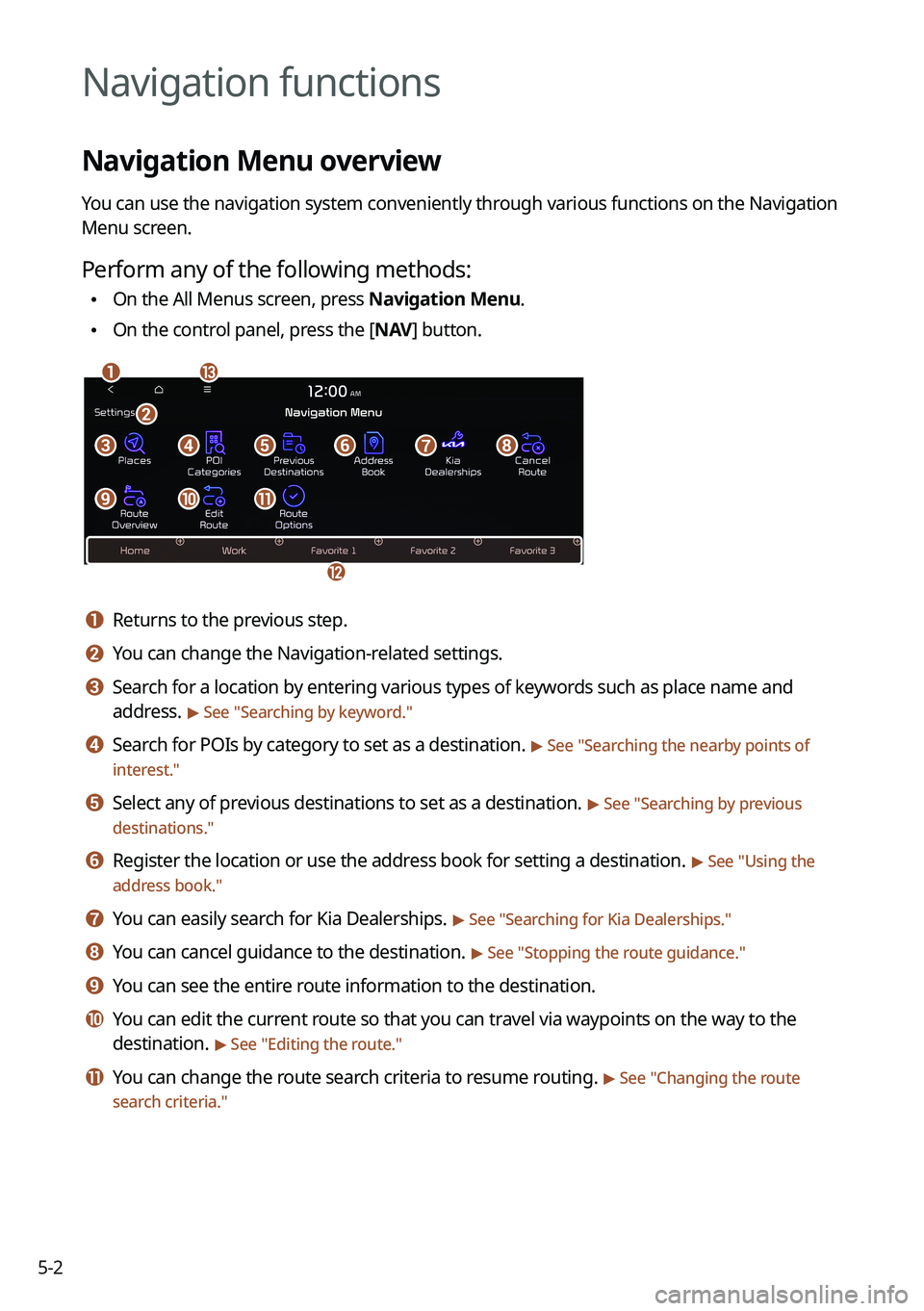
You can use the navigation system conveniently through various functions on the Navigation
Menu screen.
Perform any of the following methods:
\225On the All Menus screen, press Navigation Menu.
\225On the control panel, press the [
NAV] button.
\037\036
\035
\034
\033\032\031\030\027
\026\025\024
\023
a a Returns to the previous step.
b b You can change the Navigation-related settings.
c c Search for a location by entering various types of keywords such as place name and
address.
> See " Searching by keyword."
d d Search for POIs by category to set as a destination. > See "Searching the nearby points of
interest."
e e Select any of previous destinations to set as a destination. > See " Searching by previous
destinations."
f f Register the location or use the address book for setting a destination. > See " Using the
address book."
g g You can easily search for Kia Dealerships. > See "Searching for Kia Dealerships."
h h You can cancel guidance to the destination. > See " Stopping the route guidance."
i i You can see the entire route information to the destination.
j j You can edit the current route so that you can travel via waypoints on the way to the
destination.
> See "Editing the route."
k k You can change the route search criteria to resume routing. > See "Changing the route
search criteria."
Page 97 of 316
5-3
l l You can register your home, office, or other frequently visited places as a favorite for ease
of search.
> See "Registering a frequently visited place as a favorite place ."
m m The list of menu items appears.
\225Reorder Icons: Can change the location of an icon on the Navigation Menu screen.
\225Display Off: Turns off the screen. To switch the screen back on, press the screen or
briefly press the power button.
\225User's Manual on Web (QR Code): Displays the QR code that provides access to the
online user manual for the system.
0000
A
Available icons and their arrangement may differ depending on the vehicle model and
specifications.
Finding a route easily
\335Warning
Driving while distracted may cause a loss of vehicle control that may lead to an accident,
severe bodily injury, or death. The driver's primary responsibility is the safe and legal
operation of the vehicle, and the use of any devices or systems that take the driver's attention
away from driving.
1 Perform any of the following methods:
\225On the All Menus screen, press Navigation Menu >
Places.
\225 On the map screen, press .
0000
A
Press and hold the [ NAV] button on the control panel to enter into Places.
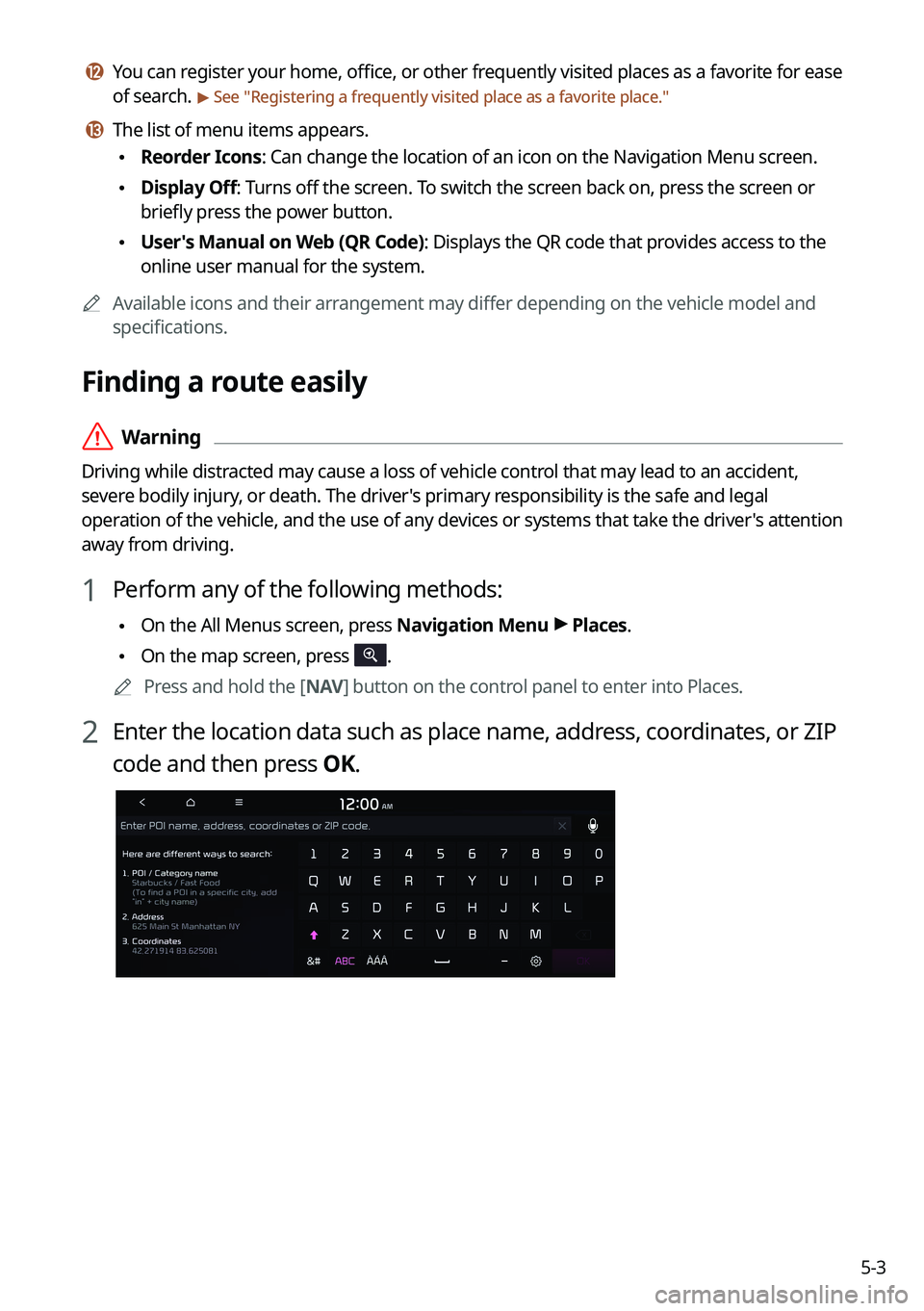
2 Enter the location data such as place name, address, coordinates, or ZIP
code and then press OK.
Page 98 of 316
5-4
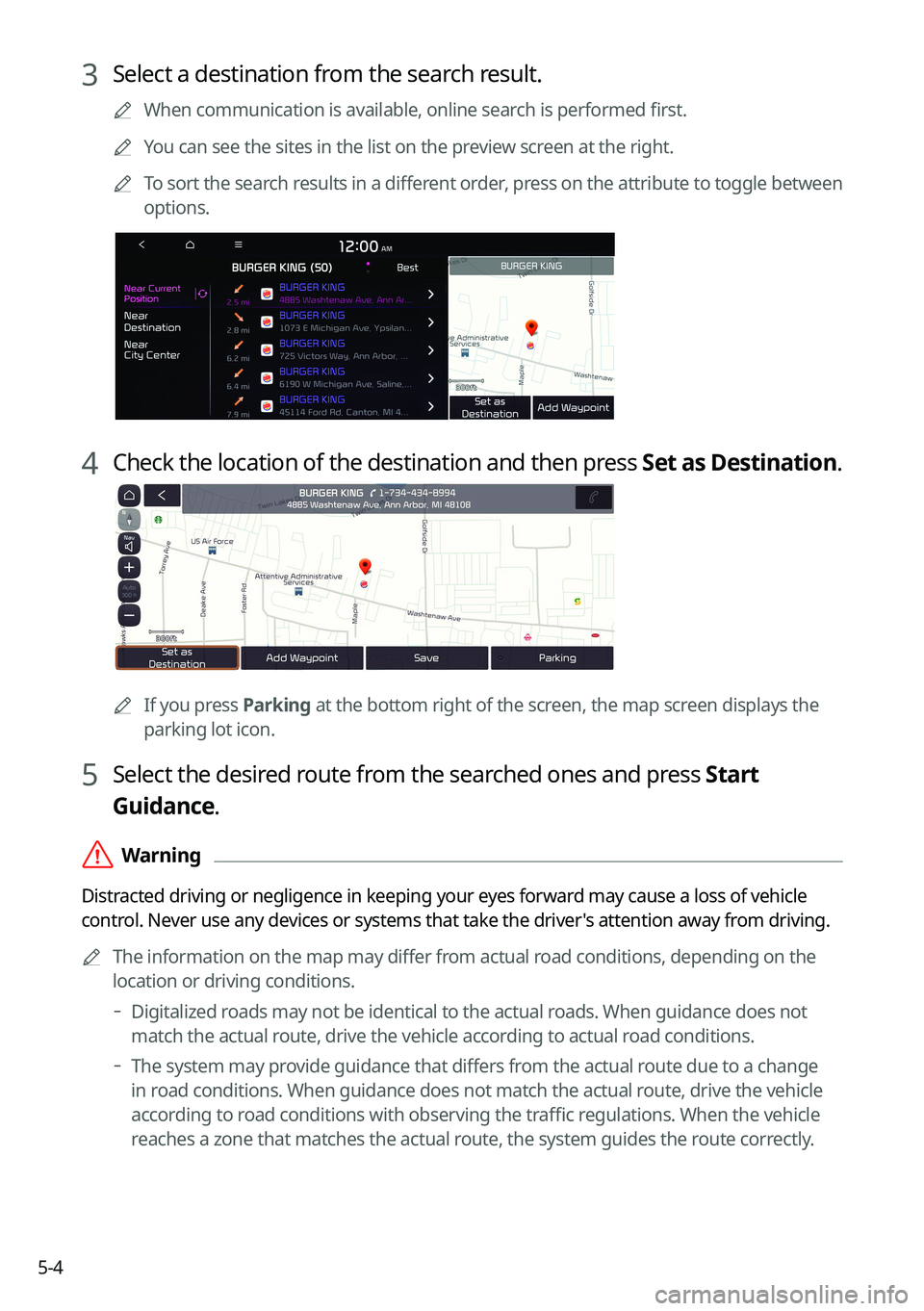
3 Select a destination from the search result.
0000
A
When communication is available, online search is performed first.
0000
A
You can see the sites in the list on the preview screen at the right.
0000
A
To sort the search results in a different order, press on the attribute to toggle between
options.
4 Check the location of the destination and then press Set as Destination.
0000A
If you press Parking at the bottom right of the screen, the map screen displays the
parking lot icon.
5 Select the desired route from the searched ones and press Start
Guidance.
\335Warning
Distracted driving or negligence in keeping your eyes forward may cause a loss of vehicle
control. Never use any devices or systems that take the driver's attention away from driving.
0000
A
The information on the map may differ from actual road conditions, depending on the
location or driving conditions.
000DDigitalized roads may not be identical to the actual roads. When guidance does not
match the actual route, drive the vehicle according to actual road conditions.
000DThe system may provide guidance that differs from the actual route due to a change
in road conditions. When guidance does not match the actual route, drive the vehicle
according to road conditions with observing the traffic regulations. When the vehicle
reaches a zone that matches the actual route, the system guides the route correctly.
Page 100 of 316
5-6
Map screen
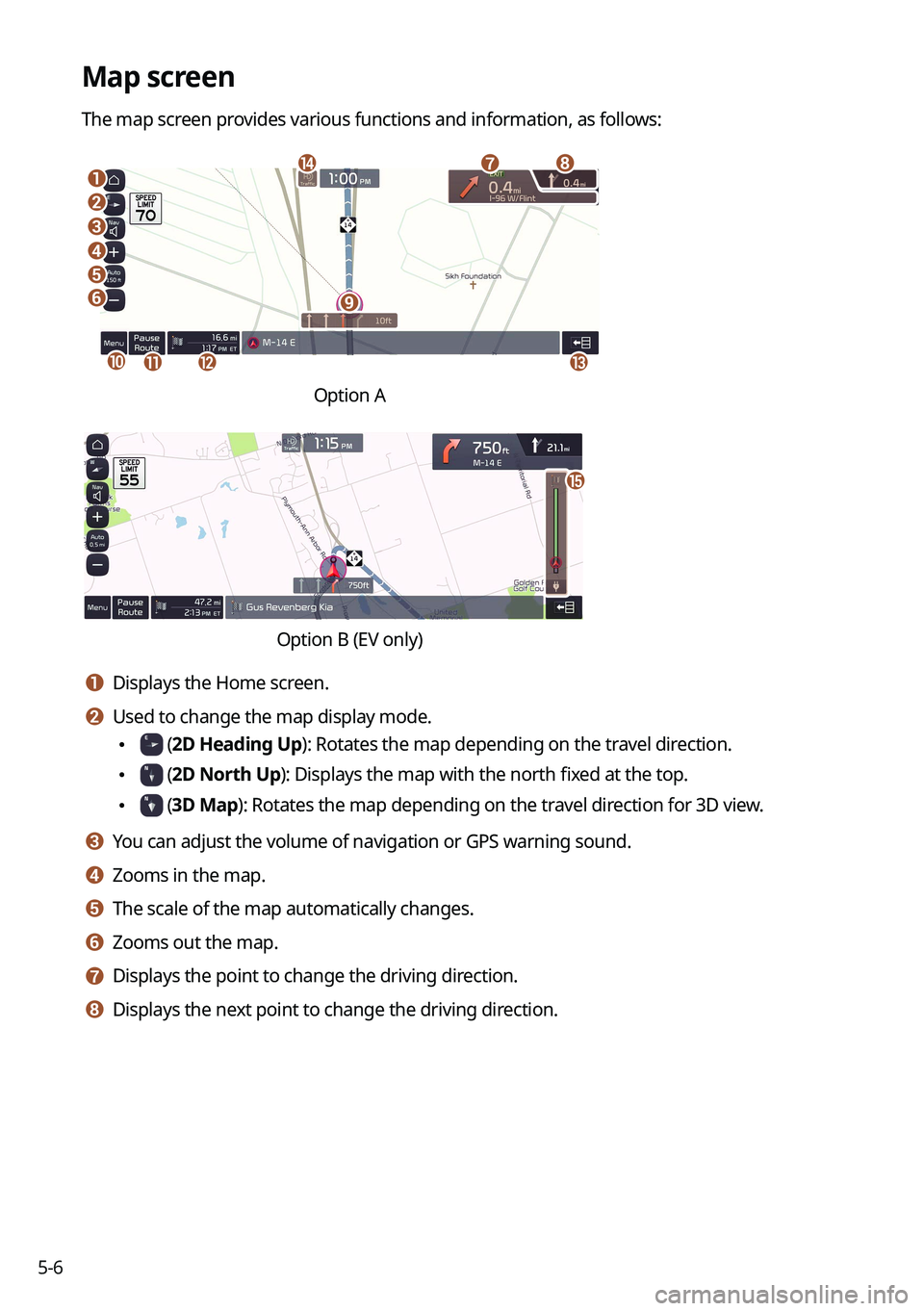
The map screen provides various functions and information, as follows:
\037
\036\035
\034
\033
\032
\031
\030
\027
\026
\025\024\023
\022
Option A
o
\0002\000S\000W\000L\000R\000Q\000\003\000%\000\003\000\013\000\(\0009\000\
\003\000R\000Q\000O\000\\\000\f
a a Displays the Home screen.
b b Used to change the map display mode.
\225 (2D Heading Up): Rotates the map depending on the travel direction.
\225 (2D North Up): Displays the map with the north fixed at the top.
\225 (3D Map): Rotates the map depending on the travel direction for 3D view.
c c You can adjust the volume of navigation or GPS warning sound.
d d Zooms in the map.
e e The scale of the map automatically changes.
f f Zooms out the map.
g g Displays the point to change the driving direction.
h h Displays the next point to change the driving direction.
Page 101 of 316
5-7
i i Displays the lanes in different colors.
\225Orange: Recommended lane
\225White: Available lane
\225Gray: Unavailable lane
j j Displays quick menu items that can be used during guidance.
k k Can pause or cancel the route guidance. > See "
Stopping the route guidance."
l l Displays the remaining distance to the destination and the estimated time of arrival. For
more details, press the information item.
m m Displays or hides the detailed guidance.
n n Displays the system information on the map. (It can display up to two items.)
\225 Traffic information (with an icon if there is no HD data reception)
\225Bluetooth connection status
o o Check the range you can drive with the current amount of battery (EV only).
0000
A
To see only the map with no destination, press the map area on the Home screen or on
the All Menus screen, press Map. Or press the [ MAP] button on the control panel.
0000
A
The screen may differ depending on the vehicle model and specifications.
\335Warning
Be sure to check the road conditions while driving, because the camera information may get
changed occasionally after a map update to the latest version. Relying solely on the driving
assist system may cause violation of traffic rules and regulations, resulting in an accident.