power KIA FORTE 2023 Navigation System Quick Reference Guide
[x] Cancel search | Manufacturer: KIA, Model Year: 2023, Model line: FORTE, Model: KIA FORTE 2023Pages: 324, PDF Size: 10.59 MB
Page 144 of 324
6-12
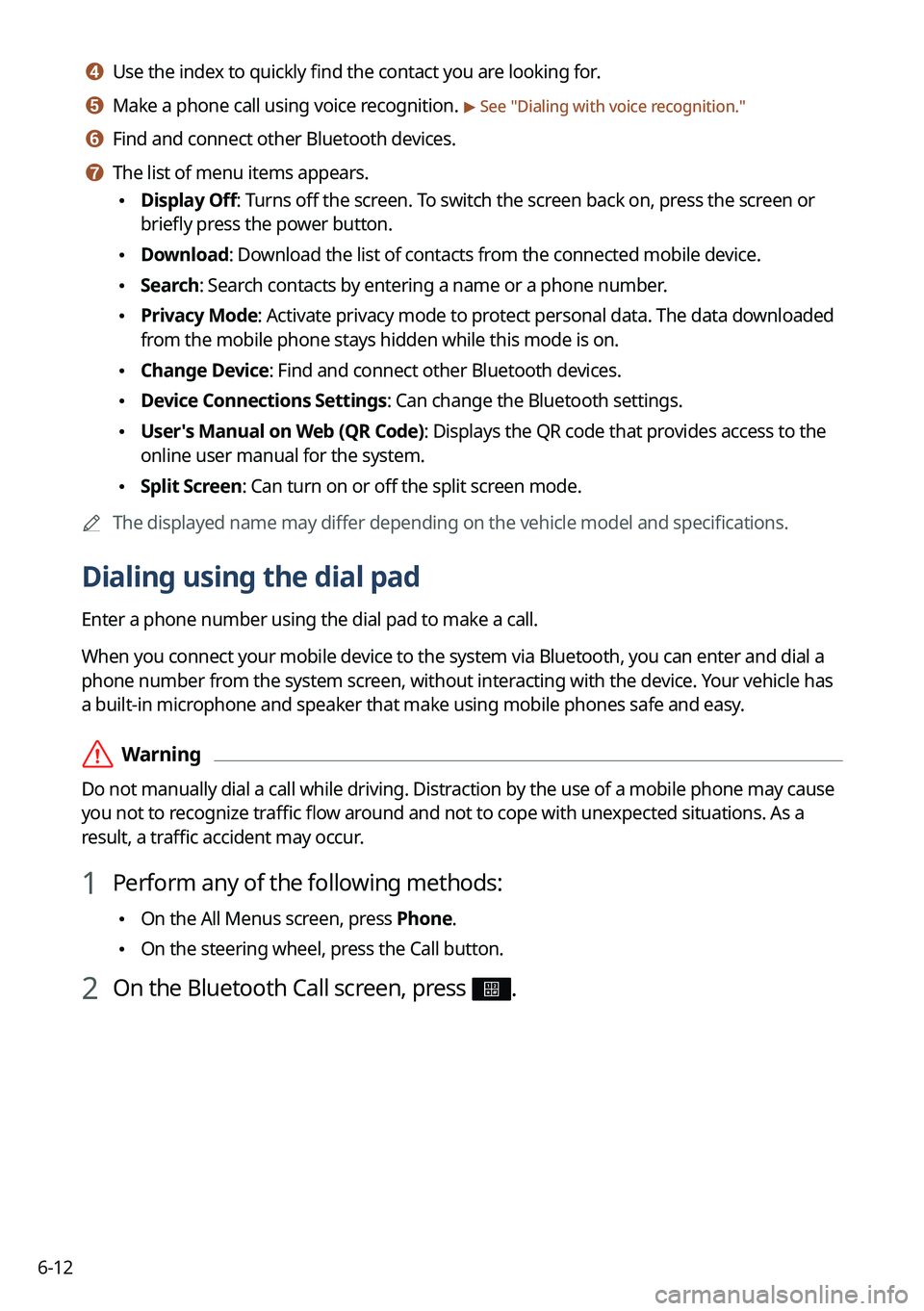
d d Use the index to quickly find the contact you are looking for.
e e Make a phone call using voice recognition. > See "Dialing with voice recognition."
f f Find and connect other Bluetooth devices.
g g The list of menu items appears.
• Display Off: Turns off the screen. To switch the screen back on, press the screen or
briefly press the power button.
•Download: Download the list of contacts from the connected mobile device.
•Search: Search contacts by entering a name or a phone number.
•Privacy Mode: Activate privacy mode to protect personal data. The data downloaded
from the mobile phone stays hidden while this mode is on.
•Change Device: Find and connect other Bluetooth devices.
•Device Connections Settings: Can change the Bluetooth settings.
•User's Manual on Web (QR Code): Displays the QR code that provides access to the
online user manual for the system.
•Split Screen: Can turn on or off the split screen mode.
A
The displayed name may differ depending on the vehicle model and specifications.
Dialing using the dial pad
Enter a phone number using the dial pad to make a call.
When you connect your mobile device to the system via Bluetooth, you can enter and dial a
phone number from the system screen, without interacting with the device. Your vehicle has
a built-in microphone and speaker that make using mobile phones safe and easy.
ÝWarning
Do not manually dial a call while driving. Distraction by the use of a mobile phone may cause
you not to recognize traffic flow around and not to cope with unexpected situations. As a
result, a traffic accident may occur.
1 Perform any of the following methods:
•On the All Menus screen, press Phone.
•On the steering wheel, press the Call button.
2 On the Bluetooth Call screen, press .
Page 146 of 324
6-14
h h The list of menu items appears.
•Display Off: Turns off the screen. To switch the screen back on, press the screen or
briefly press the power button.
•Privacy Mode: Activate privacy mode to protect personal data. The data downloaded
from the mobile phone stays hidden while this mode is on.
•Change Device: Find and connect other Bluetooth devices.
•Device Connections Settings: Can change the Bluetooth settings.
•User's Manual on Web (QR Code): Displays the QR code that provides access to the
online user manual for the system.
•Split Screen: Can turn on or off the split screen mode.
A
The displayed name may differ depending on the vehicle model and specifications.
Dialing with voice recognition
When you connect your mobile device to the system via Bluetooth, contacts from the device
are downloaded to the system, and you can choose to call them using voice recognition.
A
To call using voice recognition, there must be contacts stored on the system.
1 Perform any of the following methods:
•On the All Menus screen, press Phone.
•On the steering wheel, press the Call button.
2 On the Bluetooth Call screen, press .
3 When a guiding beep is heard, say the name of the contact to make a
phone call.
The system dials the selected contact.
A
In case of the dial pad screen, press
say the phone number to make a call.
Page 148 of 324
6-16
Using functions during a call
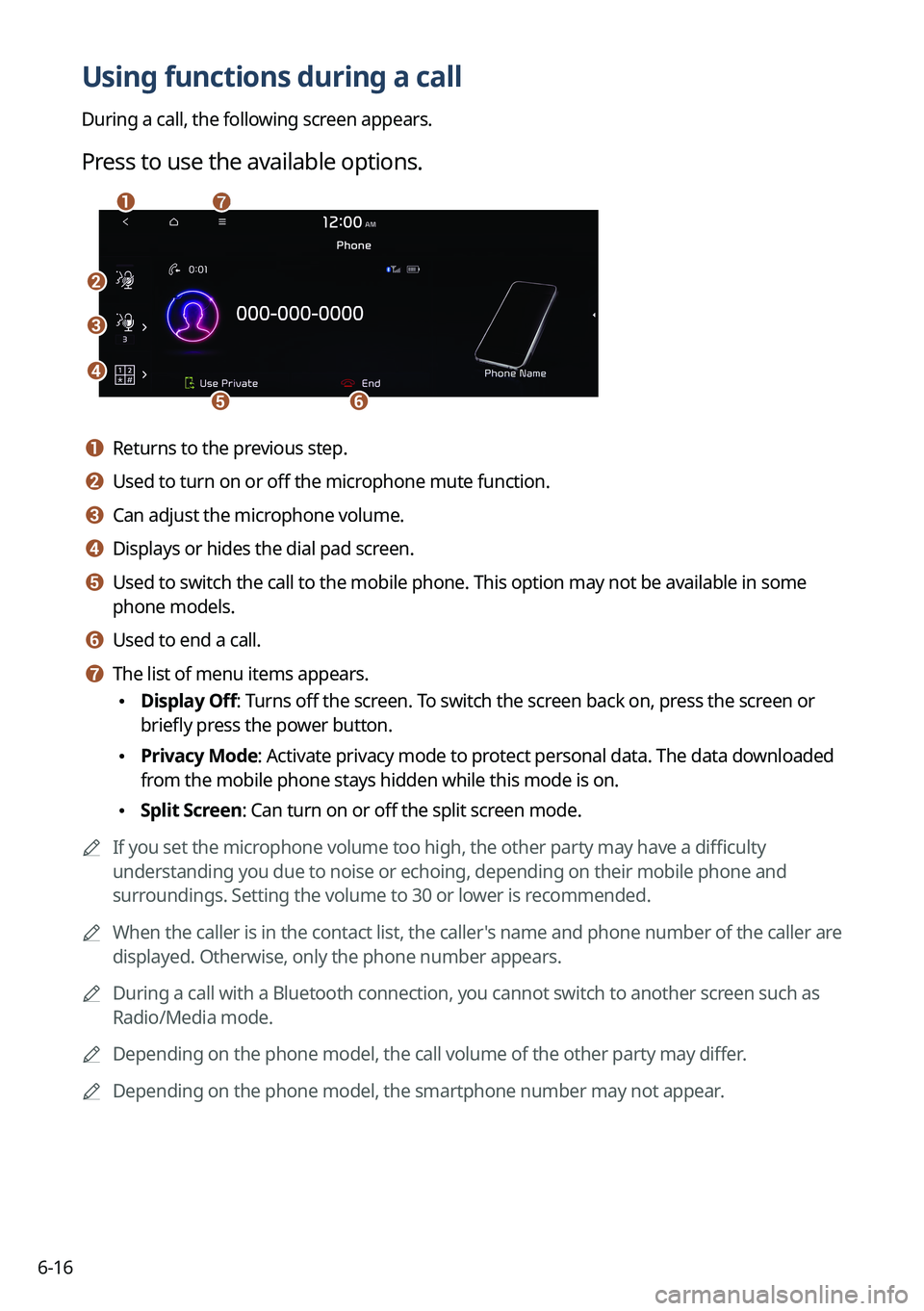
During a call, the following screen appears.
Press to use the available options.
b
c
d
ef
ag
a a Returns to the previous step.
b b Used to turn on or off the microphone mute function.
c c Can adjust the microphone volume.
d d Displays or hides the dial pad screen.
e e Used to switch the call to the mobile phone. This option may not be avai\
lable in some
phone models.
f f Used to end a call.
g g The list of menu items appears.
•Display Off: Turns off the screen. To switch the screen back on, press the screen or
briefly press the power button.
•Privacy Mode: Activate privacy mode to protect personal data. The data downloaded
from the mobile phone stays hidden while this mode is on.
•Split Screen: Can turn on or off the split screen mode.
A
If you set the microphone volume too high, the other party may have a difficulty
understanding you due to noise or echoing, depending on their mobile pho\
ne and
surroundings. Setting the volume to 30 or lower is recommended.
A
When the caller is in the contact list, the caller's name and phone number of the caller are
displayed. Otherwise, only the phone number appears.
A
During a call with a Bluetooth connection, you cannot switch to another \
screen such as
Radio/Media mode.
A
Depending on the phone model, the call volume of the other party may differ.
A
Depending on the phone model, the smartphone number may not appear.
Page 150 of 324
6-18
c c Can see the message details.
d d Reads out the message through the speakers in the vehicle.
e e Used to close the notification window.
A
The message notification window does not appear when the privacy mode is enabled or
the message notification is turned off.
A
The screen display may differ depending on the mobile phone model.
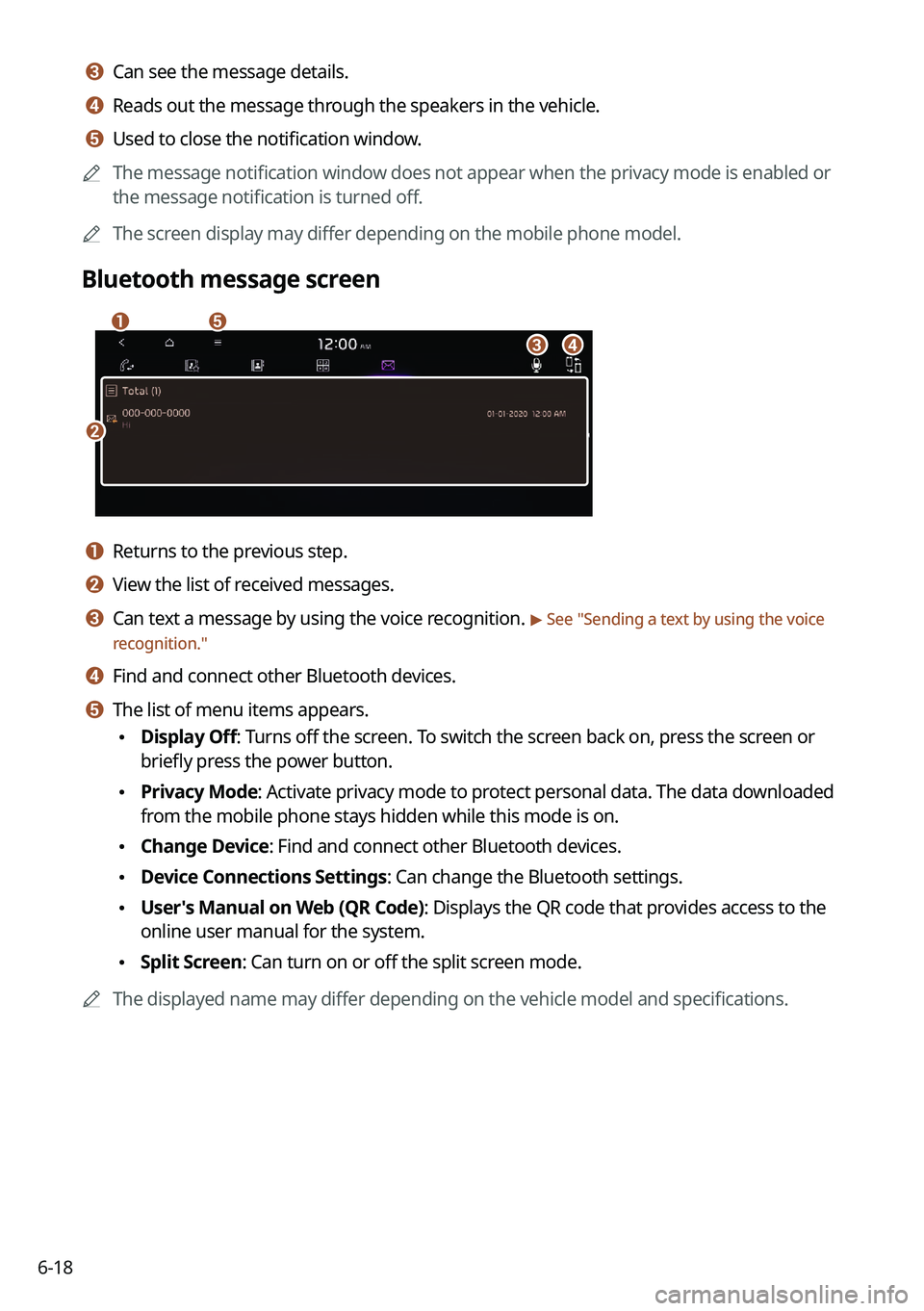
Bluetooth message screen
b
a
d
e
c
a a Returns to the previous step.
b b View the list of received messages.
c c Can text a message by using the voice recognition. > See "Sending a text by using the voice
recognition."
d d Find and connect other Bluetooth devices.
e e The list of menu items appears.
• Display Off: Turns off the screen. To switch the screen back on, press the screen or
briefly press the power button.
•Privacy Mode: Activate privacy mode to protect personal data. The data downloaded
from the mobile phone stays hidden while this mode is on.
•Change Device: Find and connect other Bluetooth devices.
•Device Connections Settings: Can change the Bluetooth settings.
•User's Manual on Web (QR Code): Displays the QR code that provides access to the
online user manual for the system.
•Split Screen: Can turn on or off the split screen mode.
A
The displayed name may differ depending on the vehicle model and specifications.
Page 151 of 324
6-19
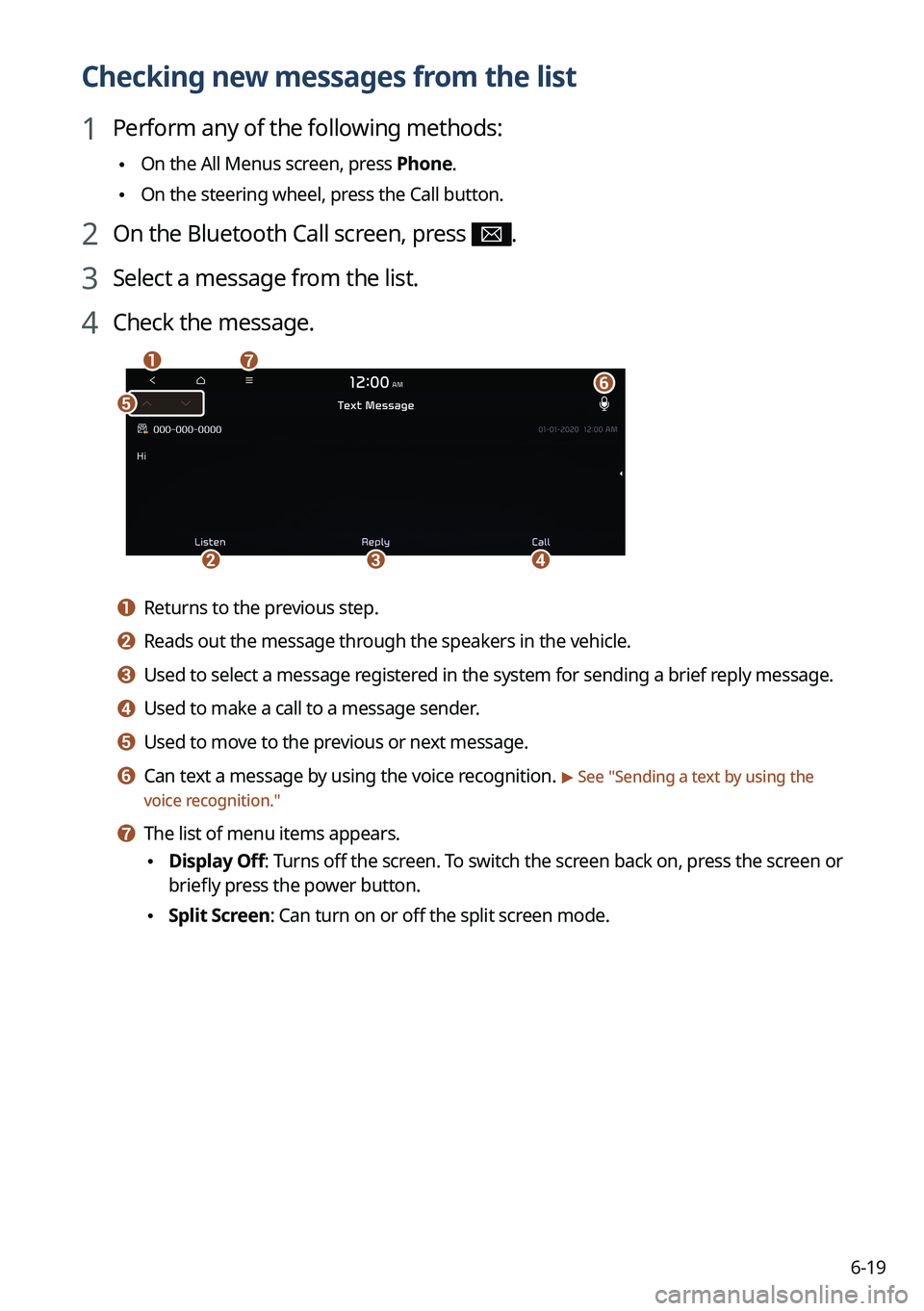
Checking new messages from the list
1 Perform any of the following methods:
•On the All Menus screen, press Phone.
•On the steering wheel, press the Call button.
2 On the Bluetooth Call screen, press .
3 Select a message from the list.
4 Check the message.
b
a
e
g
cd
f
a a Returns to the previous step.
b b Reads out the message through the speakers in the vehicle.
c c Used to select a message registered in the system for sending a brief reply message.
d d Used to make a call to a message sender.
e e Used to move to the previous or next message.
f f Can text a message by using the voice recognition. > See "
Sending a text by using the
voice recognition."
g g The list of menu items appears.
• Display Off
: Turns off the screen. To switch the screen back on, press the screen or
briefly press the power button.
• Split Screen: Can turn on or off the split screen mode.
Page 174 of 324
7-22
Voice Memo
You can use the microphone on the vehicle to record and play voice memos.
Running the voice memo
On the All Menus screen, press Voice Memo.
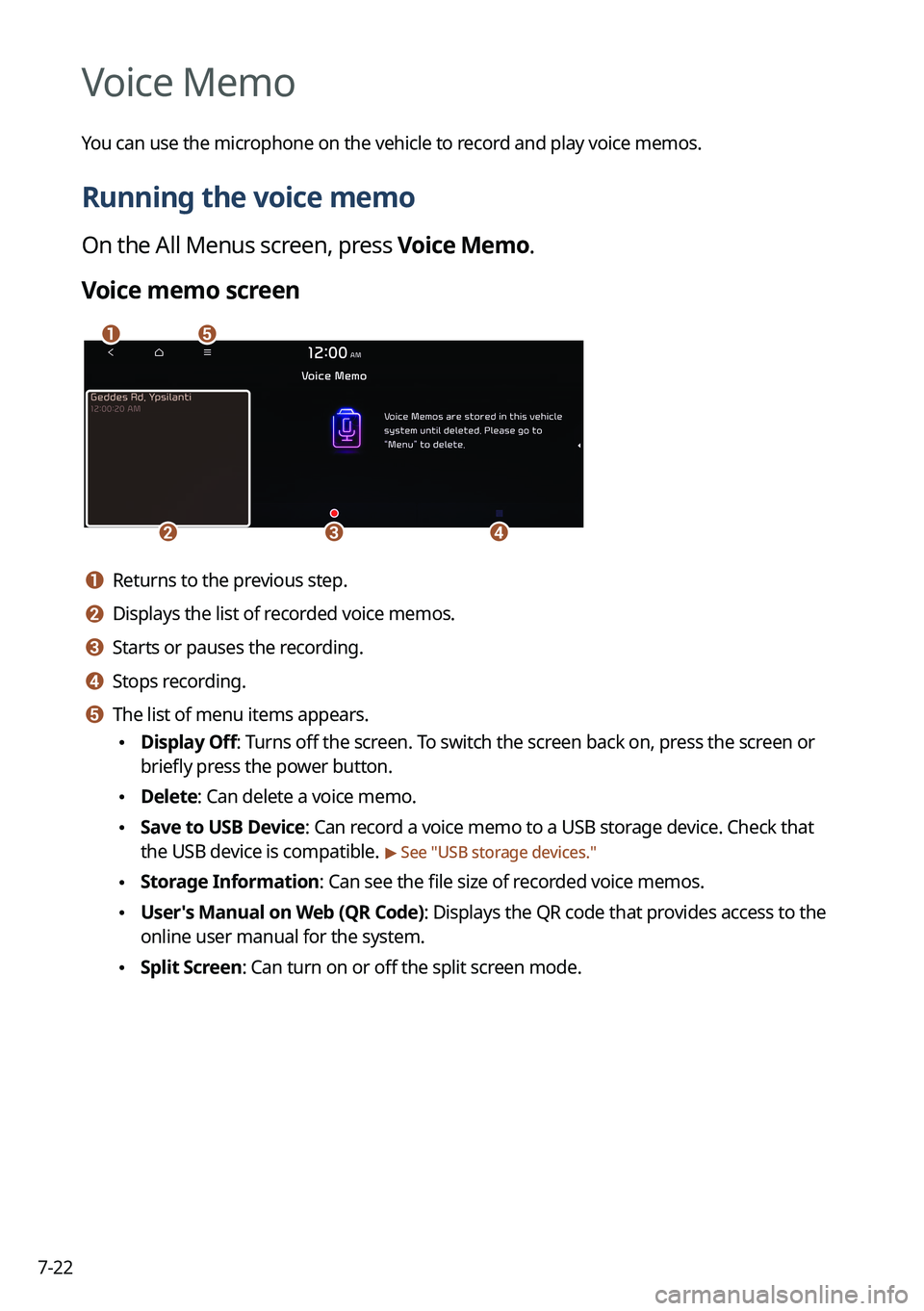
Voice memo screen
ae
cdb
a a Returns to the previous step.
b b Displays the list of recorded voice memos.
c c Starts or pauses the recording.
d d Stops recording.
e e The list of menu items appears.
•Display Off: Turns off the screen. To switch the screen back on, press the screen or
briefly press the power button.
•Delete: Can delete a voice memo.
•Save to USB Device: Can record a voice memo to a USB storage device. Check that
the USB device is compatible.
> See "USB storage devices."
•Storage Information: Can see the file size of recorded voice memos.
•User's Manual on Web (QR Code): Displays the QR code that provides access to the
online user manual for the system.
•Split Screen: Can turn on or off the split screen mode.
Page 180 of 324
8-4
Running the UVO menu
You can run the UVO in the system to use the service.
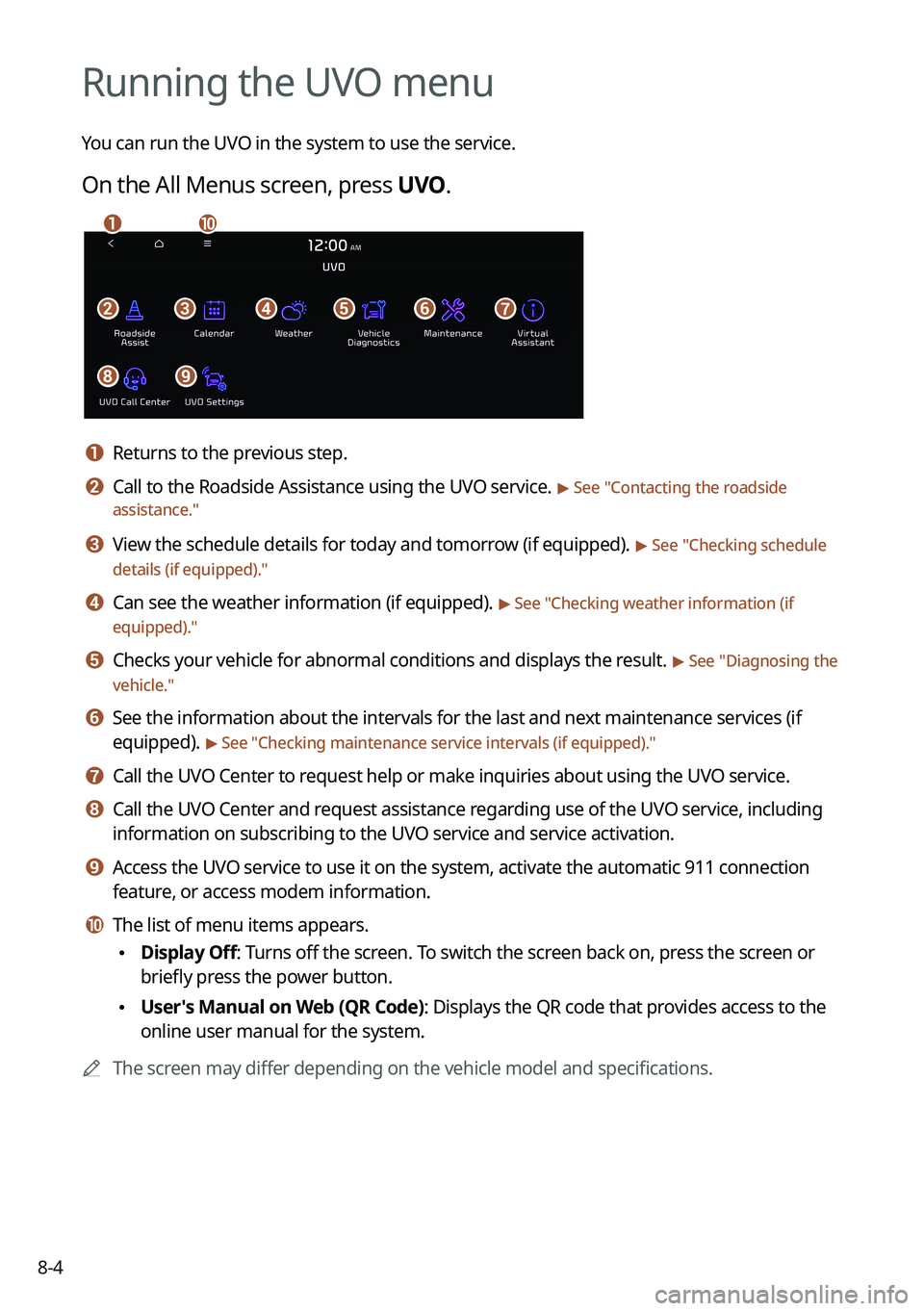
On the All Menus screen, press UVO.
bfgdec
aj
hi
a a Returns to the previous step.
b b Call to the Roadside Assistance using the UVO service. > See "Contacting the roadside
assistance."
c c View the schedule details for today and tomorrow (if equipped). > See " Checking schedule
details (if equipped)."
d d Can see the weather information (if equipped). > See "Checking weather information (if
equipped)."
e e Checks your vehicle for abnormal conditions and displays the result. > See " Diagnosing the
vehicle."
f f See the information about the intervals for the last and next maintenance services (if
equipped).
> See "Checking maintenance service intervals (if equipped) ."
g g Call the UVO Center to request help or make inquiries about using the UVO service.
h h Call the UVO Center and request assistance regarding use of the UVO service, including
information on subscribing to the UVO service and service activation.
i i Access the UVO service to use it on the system, activate the automatic 911 connection\
feature, or access modem information.
j j The list of menu items appears.
•Display Off: Turns off the screen. To switch the screen back on, press the screen or
briefly press the power button.
•User's Manual on Web (QR Code): Displays the QR code that provides access to the
online user manual for the system.
A
The screen may differ depending on the vehicle model and specifications.
Page 182 of 324
8-6
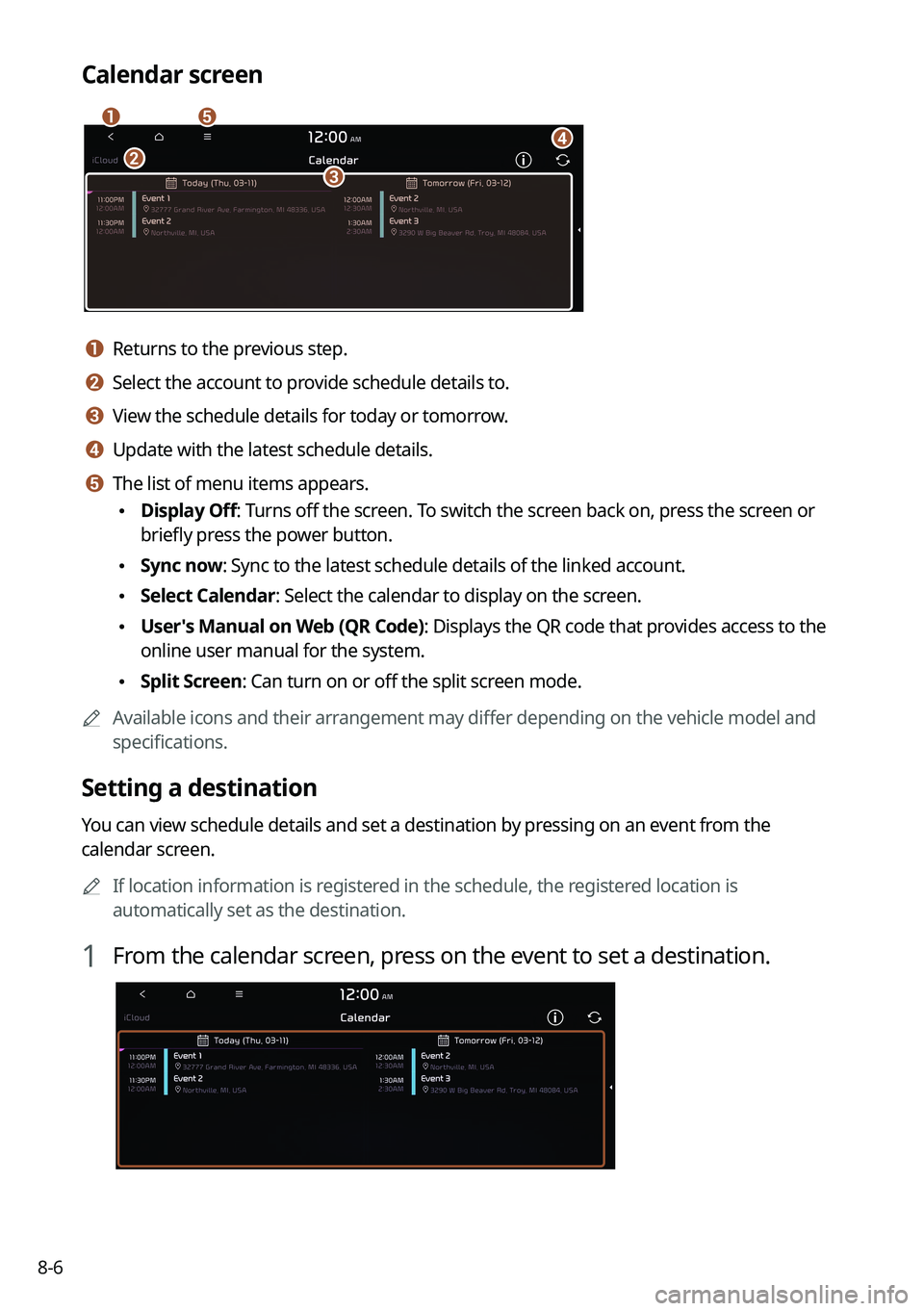
Calendar screen
eadbc
a a Returns to the previous step.
b b Select the account to provide schedule details to.
c c View the schedule details for today or tomorrow.
d d Update with the latest schedule details.
e e The list of menu items appears.
•Display Off: Turns off the screen. To switch the screen back on, press the screen or
briefly press the power button.
•Sync now: Sync to the latest schedule details of the linked account.
•Select Calendar: Select the calendar to display on the screen.
•User's Manual on Web (QR Code): Displays the QR code that provides access to the
online user manual for the system.
•Split Screen: Can turn on or off the split screen mode.
A
Available icons and their arrangement may differ depending on the vehicle model and
specifications.
Setting a destination
You can view schedule details and set a destination by pressing on an event from the
calendar screen.
A
If location information is registered in the schedule, the registered location is
automatically set as the destination.
1 From the calendar screen, press on the event to set a destination.
Page 184 of 324
8-8
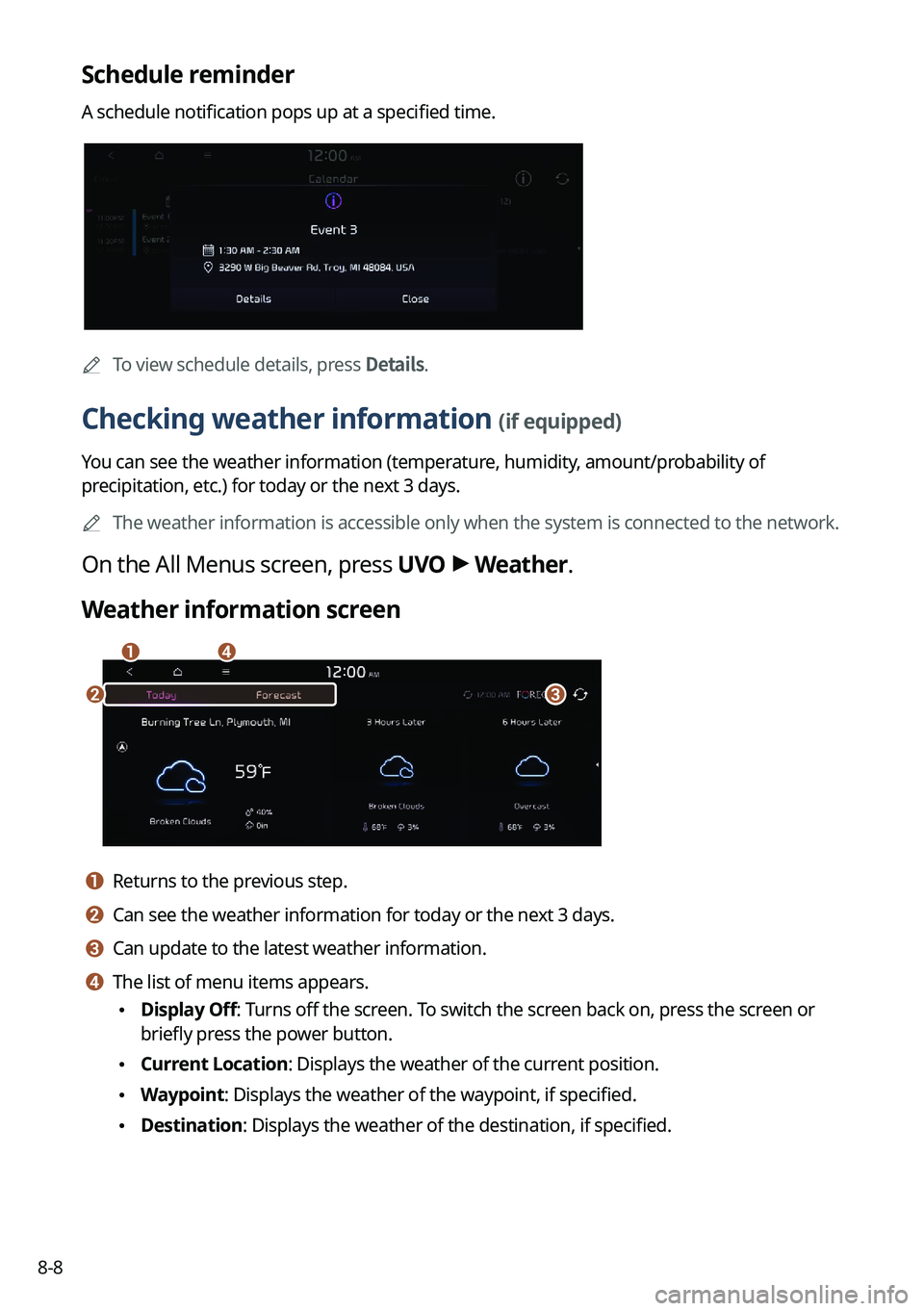
Schedule reminder
A schedule notification pops up at a specified time.
A
To view schedule details, press Details.
Checking weather information (if equipped)
You can see the weather information (temperature, humidity, amount/probability of
precipitation, etc.) for today or the next 3 days.
A
The weather information is accessible only when the system is connected \
to the network.
On the All Menus screen, press UVO >
Weather.
Weather information screen
da
cb
a a Returns to the previous step.
b b Can see the weather information for today or the next 3 days.
c c Can update to the latest weather information.
d d The list of menu items appears.
• Display Off: Turns off the screen. To switch the screen back on, press the screen or
briefly press the power button.
•Current Location: Displays the weather of the current position.
•Waypoint: Displays the weather of the waypoint, if specified.
•Destination: Displays the weather of the destination, if specified.
Page 190 of 324
9-2
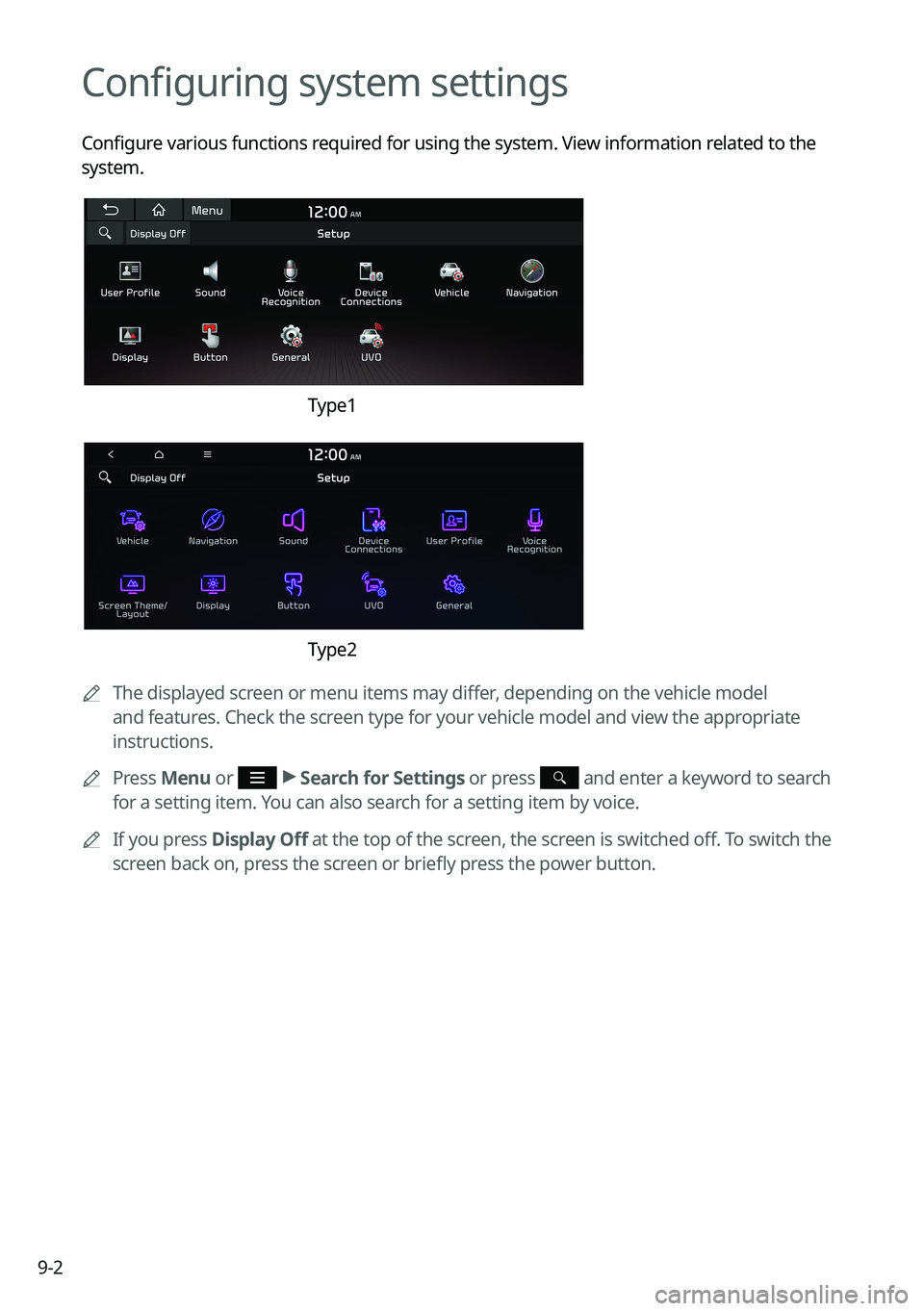
Configuring system settings
Configure various functions required for using the system. View information related to the
system.
Type1
Type2
A
The displayed screen or menu items may differ, depending on the vehicle model
and features. Check the screen type for your vehicle model and view the appropriate
instructions.
A
Press Menu or
>
Search for Settings or press and enter a keyword to search
for a setting item. You can also search for a setting item by voice.
A
If you press Display Off at the top of the screen, the screen is switched off. To switch the
screen back on, press the screen or briefly press the power button.