power KIA FORTE 2023 Navigation System Quick Reference Guide
[x] Cancel search | Manufacturer: KIA, Model Year: 2023, Model line: FORTE, Model: KIA FORTE 2023Pages: 324, PDF Size: 10.59 MB
Page 64 of 324
2-26
Viewing notifications (if equipped)
You can view UVO notifications including the navigation and map update information.
A
Subscribe to UVO to check the function.
> See "Subscribing to the service."
1 On the All Menus screen, press Notifications.
2 Select to view the item.
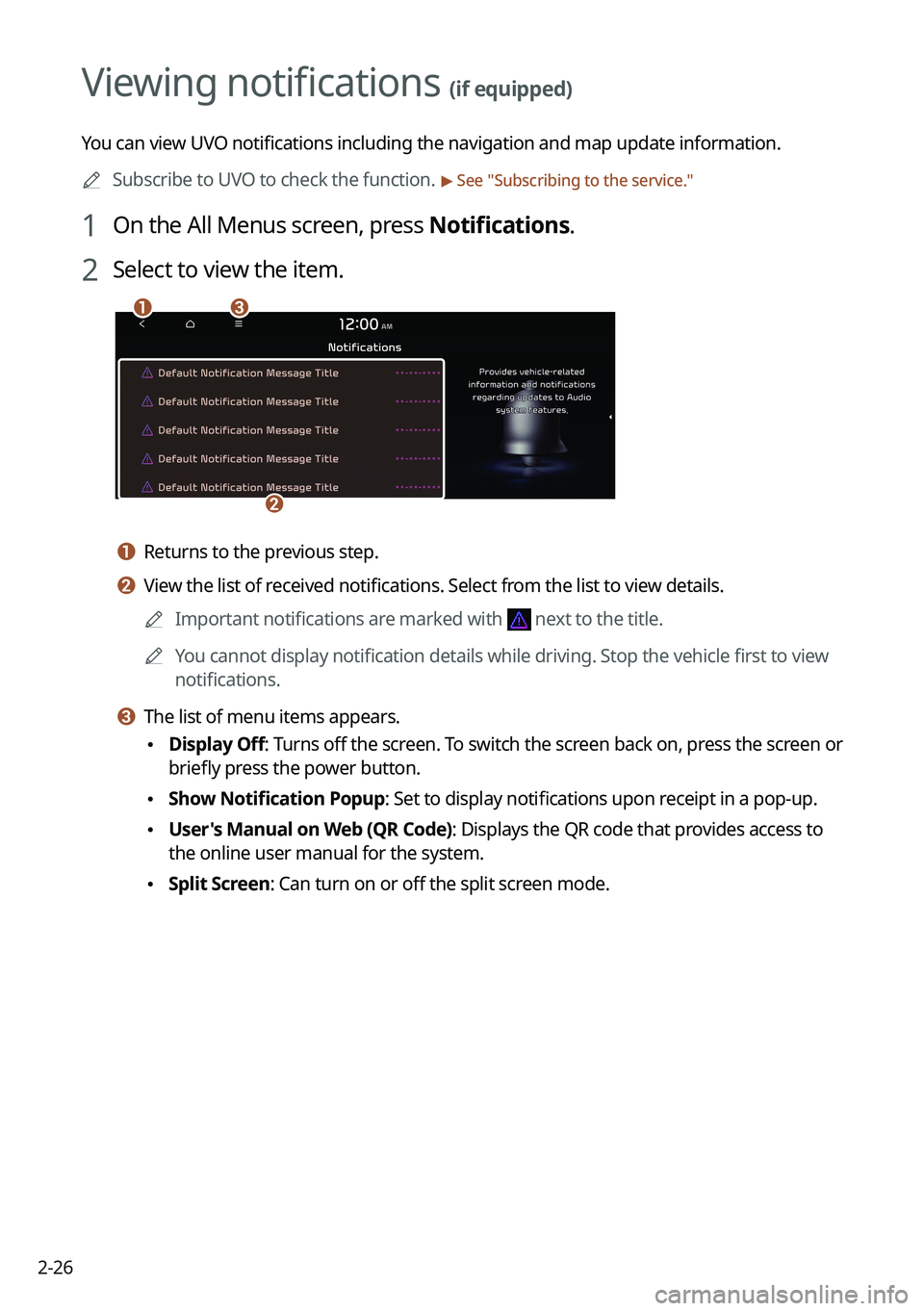
ca
b
a a Returns to the previous step.
b b View the list of received notifications. Select from the list to view details.
A
Important notifications are marked with
next to the title.
A
You cannot display notification details while driving. Stop the vehicle first to view
notifications.
c c The list of menu items appears.
•Display Off
: Turns off the screen. To switch the screen back on, press the screen or
briefly press the power button.
• Show Notification Popup: Set to display notifications upon receipt in a pop-up.
•User's Manual on Web (QR Code): Displays the QR code that provides access to
the online user manual for the system.
•Split Screen: Can turn on or off the split screen mode.
Page 71 of 324
3-5
l l The list of menu items appears.
•Display Off: Turns off the screen. To switch the screen back on, press the screen or
briefly press the power button.
•Enter Station: Can select or directly enter the desired radio frequency.
•Station List: Can see the list of available radio stations.
•Scan FM (Available only with FM): Select a broadcast of your choice after listening
briefly to broadcasts from different radio stations.
•Scan AM (Available only with AM): Select a broadcast of your choice after listening
briefly to broadcasts from different radio stations.
•Delete Presets: Can delete a registered channel from the presets list. > See "
Deleting a
registered channel."
• Info: Turns the Radio text information transmitted from the broadcasting station on
and off.
•Radio Noise (Available only with FM): Customize sound quality when listening to F\
M
radio by adjusting background noise of the original sound (if equipped).
•Sound Settings: Displays the system sound settings screen. > See "
Configuring the
sound settings (Type2)."
• User's Manual on Web (QR Code): Displays the QR code that provides access to the
online user manual for the system.
•Split Screen: Can turn on or off the split screen mode.
A
The screen may differ depending on the vehicle model and specifications.
A
The sound effect settings button may appear on the screen depending on the amp
specifications.
ÝWarning
Driving while distracted can result in a loss of vehicle control that may lead to an accident,
severe bodily injury, or death. The driver's primary responsibility is the safe and legal
operation of the vehicle, and the use of any vehicle systems, including the \
touch screen and
steering wheel controls, which take the driver's eyes, attention, and focus away from the safe
operation of the vehicle, or which are not permissible by law, should never be used during
the operation of the vehicle.
Page 81 of 324
3-15
c c Moves to the previous segment. Press and hold to rewind the broadcast.
d d Pauses or restarts the broadcast.
e e Moves to the next segment. Press and hold to fast-forward the broadcast.
f f Can change the radio mode.
g g You can go to the previous or next channel.
h h Can enter channel number to select the channel directly.
i i You can delete or save the current frequency to the presets list.
j j Presets list
k k Can see the list of available SiriusXM channels (if equipped).
l l You can change radio channels by using voice commands. > See "Changing the channel by
using voice commands."
m m Displays the options list.
• Display Off: Turns off the screen. To switch the screen back on, press the screen or
briefly press the power button.
•Channel List: Can see the list of available SiriusXM channels.
•Scan SXM Channels: Scan and play each SiriusXM channel for 5 seconds.
•Delete Presets: Can delete a registered channel from the presets list.
•What is on My Presets?: Displays the broadcast schedule.
•Featured Favorites: Can listen to groups of channels provided by SiriusXM.
•Sound Settings: Displays the system sound settings screen.
•User's Manual on Web (QR Code): Displays the QR code that provides access to the
online user manual for the system.
•Split Screen: Can turn on or off the split screen mode.
A
The screen may differ depending on the vehicle model and specifications.
A
The
icon appears next to the first 10 SiriusXM channels saved. Once preset
channels have been saved, the broadcasts from them are buffered automatically for your
convenience each time you start the vehicle.
Page 89 of 324
4-3
a a Returns to the previous step.
b b Moves to the file list screen.
c c Displays the sequence number of the current file and the total number of files for
playback.
d d Displays the information of the current music. Press the artist or album info of the current
song to go to list of songs by the artist or from the album.
e e Used to change the repeat playback mode.
f f Used to turn on or off the shuffle playback mode.
g g Restart playing the current file or previous file.
h h Can pause or resume playback.
i i Can play the next file.
j j Can see the duration of the playing song and the current playback position.
k k The list of menu items appears.
•Display Off: Turns off the screen. To switch the screen back on, press the screen or
briefly press the power button.
•Media Sources: Opens the Radio/Media selection window.
•Songs by this Artist: Moves to the list of the artist's songs.
•Songs from this Album: Moves to the list of music albums that contain the current
song.
•Hide Current File: You can hide the file that is playing.
•Sound Settings: Displays the system sound settings screen.
•User's Manual on Web (QR Code): Displays the QR code that provides access to the
online user manual for the system.
•Split Screen: Can turn on or off the split screen mode.
A
The sound effect settings button may appear on the screen depending on the amp
specifications.
ÝWarning
Driving while distracted can result in a loss of vehicle control that may lead to an accident,
severe bodily injury, or death. The driver's primary responsibility is the safe and legal
operation of the vehicle, and the use of any vehicle systems, including the touch screen and
steering wheel controls, which take the driver's eyes, attention, and focus away from the safe
operation of the vehicle, or which are not permissible by law, should never be used during
the operation of the vehicle.
Page 92 of 324
4-6
Turning on/off the shuffle playback mode for USB music
You can turn on or off the shuffle playback mode for USB music.
On the USB music playback screen, press repeatedly.
Each time the icon is pressed, the shuffle playback mode is turned on and off. When the
shuffle playback is active, the files are played randomly with no sequence.
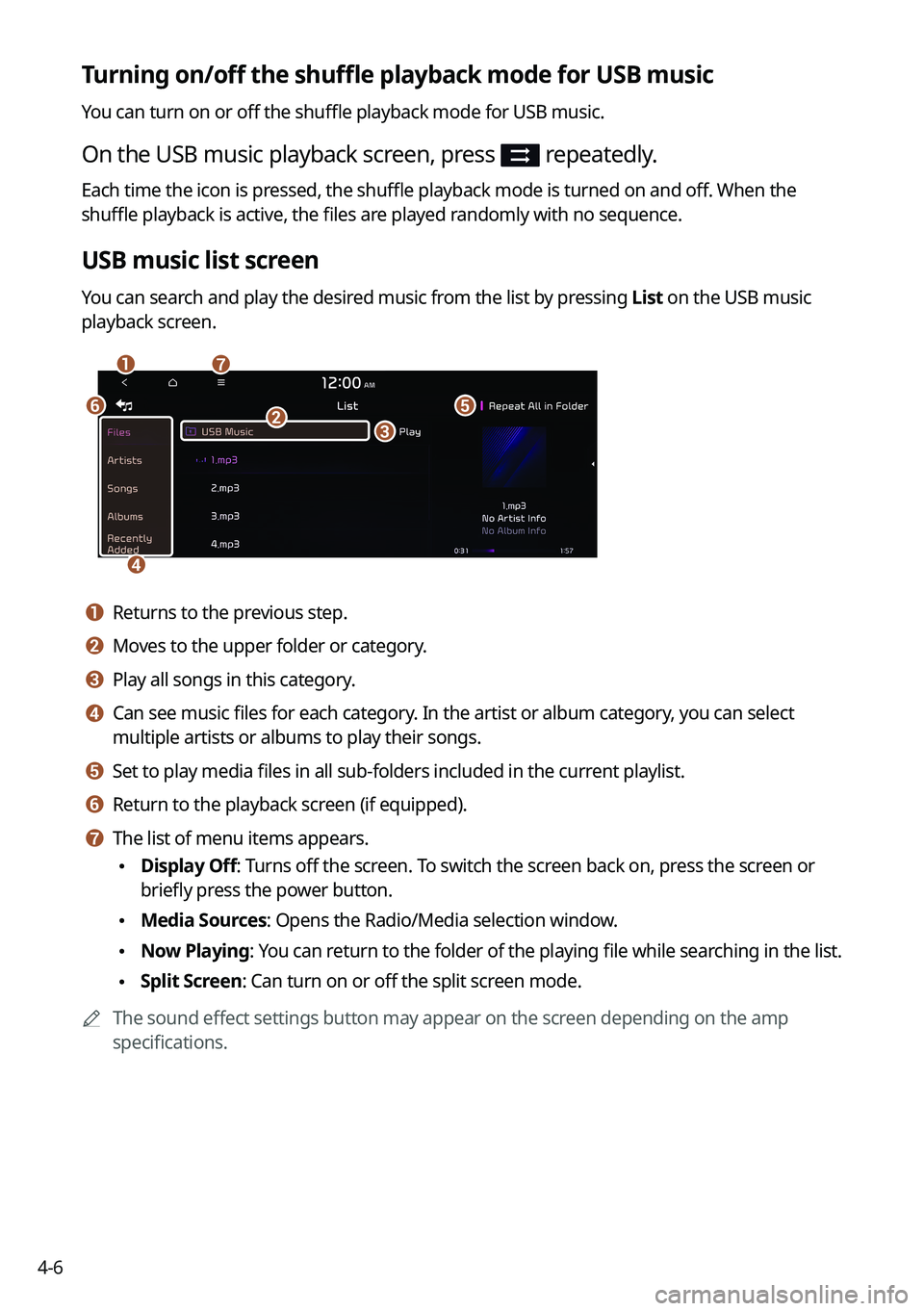
USB music list screen
You can search and play the desired music from the list by pressing List on the USB music
playback screen.
ag
e
d
bc
f
a a Returns to the previous step.
b b Moves to the upper folder or category.
c c Play all songs in this category.
d d Can see music files for each category. In the artist or album category, you can select
multiple artists or albums to play their songs.
e e Set to play media files in all sub-folders included in the current playlist.
f f Return to the playback screen (if equipped).
g g The list of menu items appears.
•Display Off: Turns off the screen. To switch the screen back on, press the screen or
briefly press the power button.
•Media Sources: Opens the Radio/Media selection window.
•Now Playing
: You can return to the folder of the playing file while searching in the list.
•Split Screen: Can turn on or off the split screen mode.
A
The sound effect settings button may appear on the screen depending on the amp
specifications.
Page 95 of 324
4-9
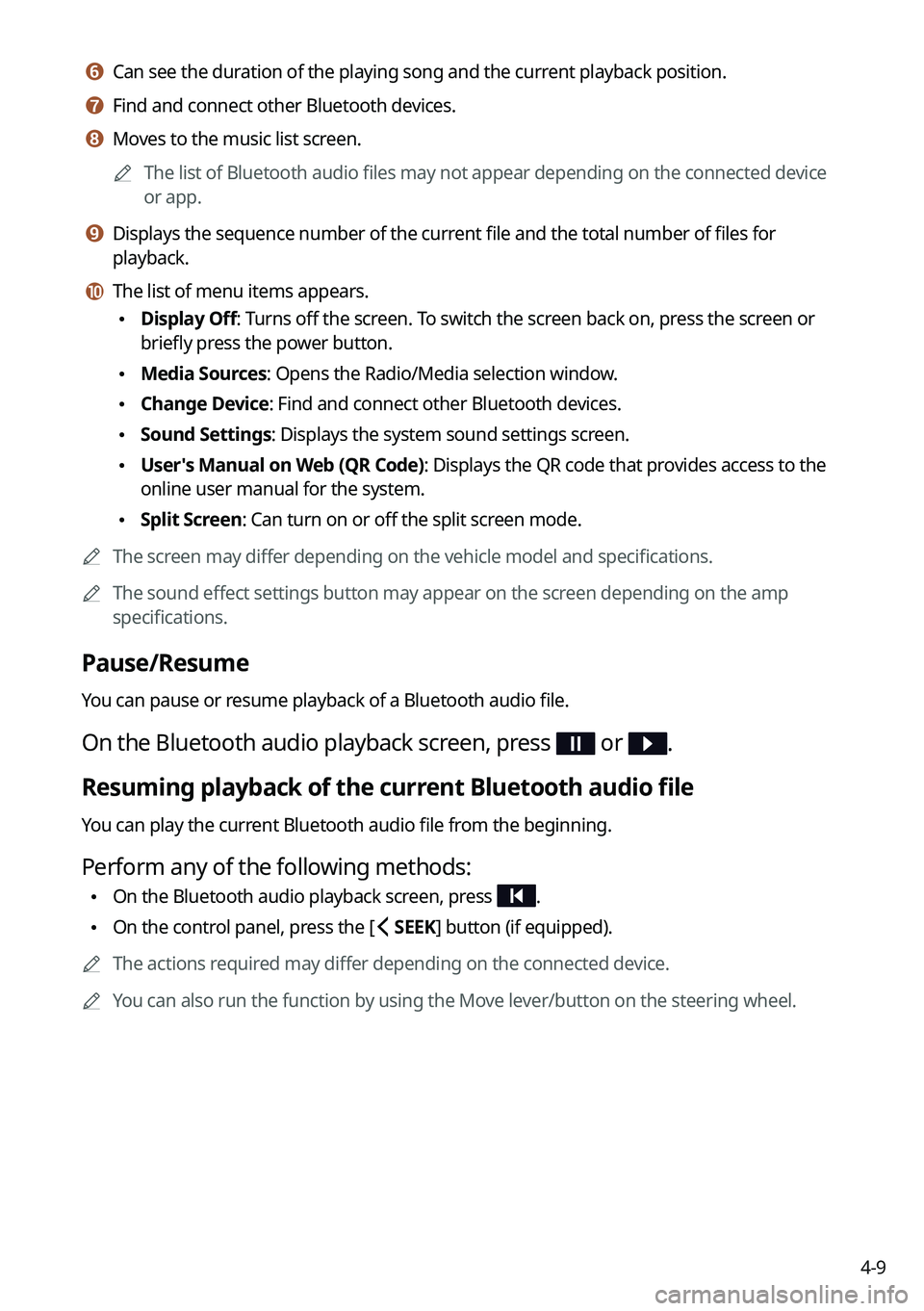
f f Can see the duration of the playing song and the current playback position.
g g Find and connect other Bluetooth devices.
h h Moves to the music list screen.
A
The list of Bluetooth audio files may not appear depending on the connected device
or app.
i i Displays the sequence number of the current file and the total number of files for
playback.
j j The list of menu items appears.
•Display Off: Turns off the screen. To switch the screen back on, press the screen or
briefly press the power button.
•Media Sources: Opens the Radio/Media selection window.
•Change Device: Find and connect other Bluetooth devices.
•Sound Settings: Displays the system sound settings screen.
•User's Manual on Web (QR Code): Displays the QR code that provides access to the
online user manual for the system.
•Split Screen: Can turn on or off the split screen mode.
A
The screen may differ depending on the vehicle model and specifications.
A
The sound effect settings button may appear on the screen depending on the amp
specifications.
Pause/Resume
You can pause or resume playback of a Bluetooth audio file.
On the Bluetooth audio playback screen, press or .
Resuming playback of the current Bluetooth audio file
You can play the current Bluetooth audio file from the beginning.
Perform any of the following methods:
•On the Bluetooth audio playback screen, press .
•On the control panel, press the [
SEEK] button (if equipped).
A
The actions required may differ depending on the connected device.
A
You can also run the function by using the Move lever/button on the steering wheel.
Page 99 of 324
5-3
l l Register your home, office or other frequently visited places as a favorite location to
making searching easier.
> See "Saving a frequently visited place as a favorite place."
m m The list of menu items appears.
• Reorder Icons: Can change the location of an icon on the Navigation Menu screen.
•Display Off: Turns off the screen. To switch the screen back on, press the screen or
briefly press the power button.
•User's Manual on Web (QR Code): Displays the QR code that provides access to the
online user manual for the system.
A
Available icons and their arrangement may differ depending on the vehicle model and
specifications.
Finding a route easily
ÝWarning
Driving while distracted may cause a loss of vehicle control that may lead to an accident,
severe bodily injury, or death. The driver's primary responsibility is the safe and legal
operation of the vehicle, and the use of any devices or systems that take the driver's attention
away from driving.
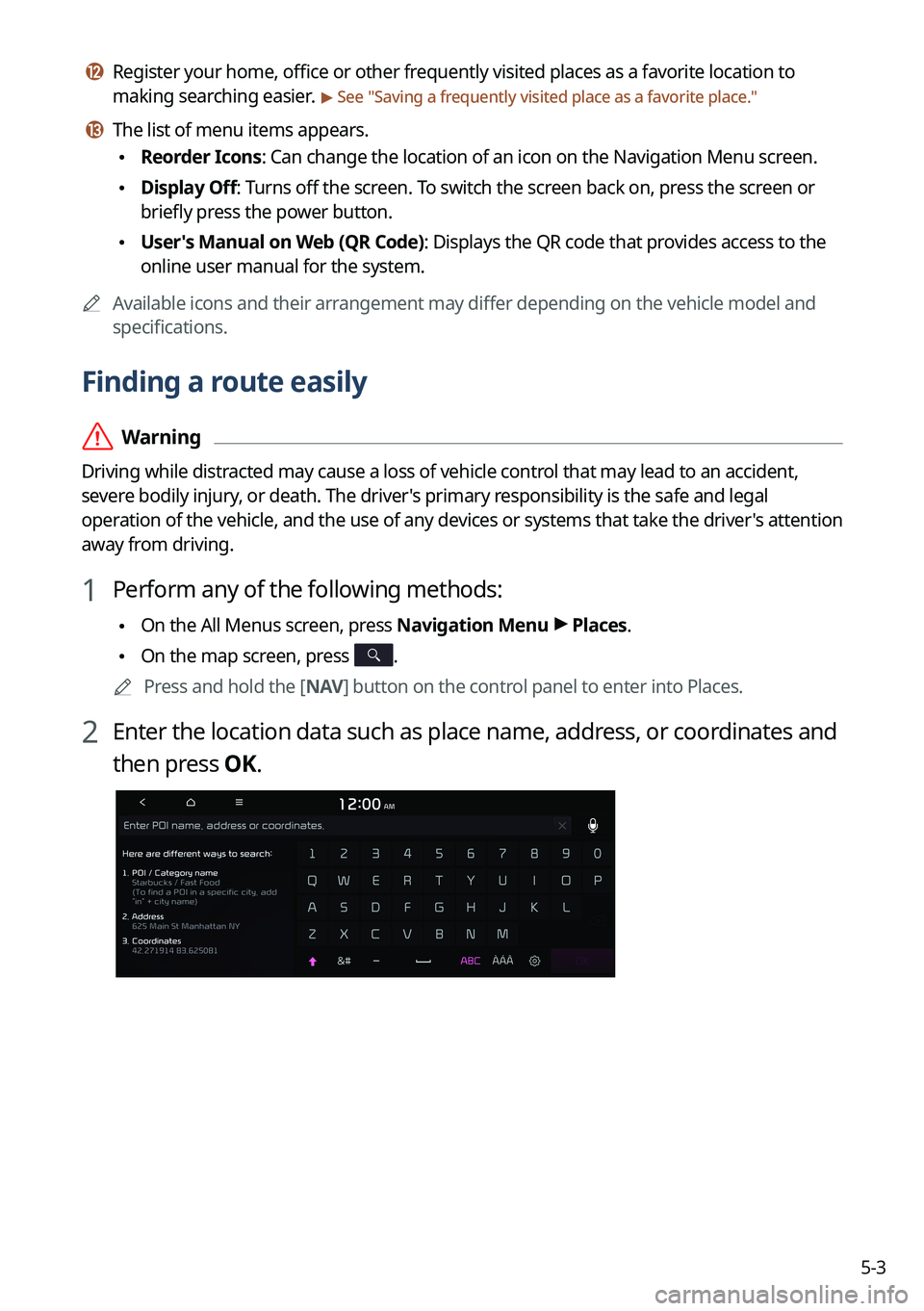
1 Perform any of the following methods:
•On the All Menus screen, press Navigation Menu >
Places.
• On the map screen, press .
A
Press and hold the [ NAV] button on the control panel to enter into Places.
2 Enter the location data such as place name, address, or coordinates and
then press OK.
Page 137 of 324

6-5
a a Returns to the previous step.
b b Search for a setting item by voice or by entering a keyword.
c c Select hands-free or Bluetooth audio to connect or disconnect Bluetooth devices.
d d Add a new device to the system.
e e Delete a registered device from the system.
f f The list of menu items appears.
•Display Off: Turns off the screen. To switch the screen back on, press the screen or
briefly press the power button.
•Auto Connection Priority: Set the priority order for automatic Bluetooth connection
to the system when it turns on (if equipped).
•Search for Settings: Search for a setting item by voice or by entering a keyword.
•Phone Projection Settings: Change the settings related to phone projection (if
equipped).
•User's Manual on Web (QR Code): Displays the QR code that provides access to the
online user manual for the system.
Disconnecting a registered device
1 On the All Menus screen, press Setup >
Device Connections >
Device
Connections.
2 Press the connected icons.
Deleting a registered device
If you will no longer use a Bluetooth device or you want to add a new device when 6 devices
are already registered, delete an existing registered device.
1 On the All Menus screen, press Setup >
Device Connections >
Device
Connections >
Delete Device(s).
2 Select a device to delete and press Delete.
To delete all registered devices, press Mark All >
Delete.
3 Press Yes.
A
When you delete a registered device, all related contacts, call logs, and text messages are
removed from the system.
Page 139 of 324
6-7
A
The download may not work in some phone models.
A
You can download up to 50 call records for each list.
A
Call durations do not appear on the system screen.
A
You cannot download call records when the download is prohibited by the phone. Some
phone models may require approval for a download. When a successful download is not
made, check the phone screen or its settings.
A
When call records are newly downloaded, the previous records are removed.
A
Learn more about receiving calls while using a Bluetooth connection.
> See "Accepting an
incoming call over Bluetooth."
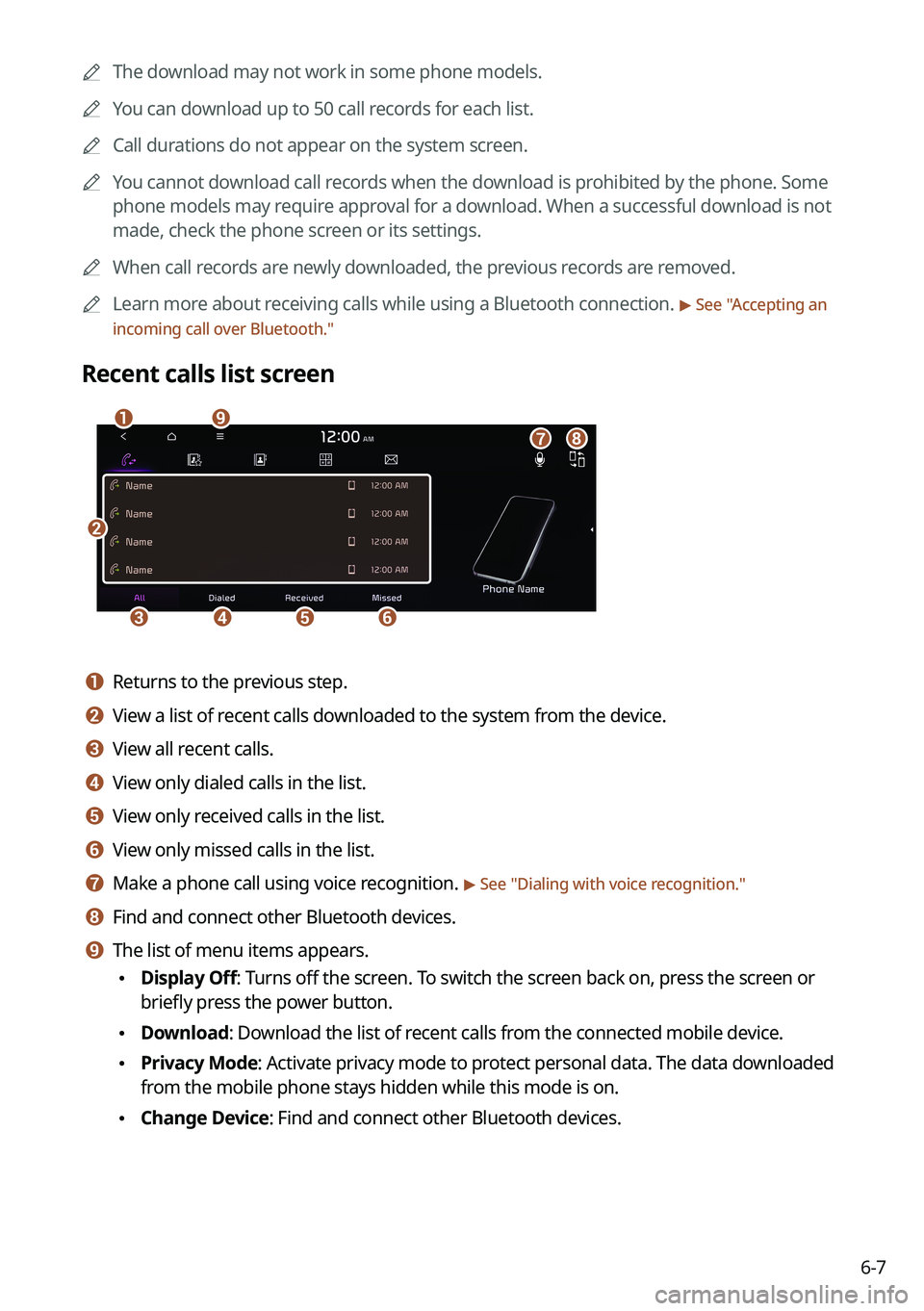
Recent calls list screen
b
cdef
agih
a a Returns to the previous step.
b b View a list of recent calls downloaded to the system from the device.
c c View all recent calls.
d d View only dialed calls in the list.
e e View only received calls in the list.
f f View only missed calls in the list.
g g Make a phone call using voice recognition. > See " Dialing with voice recognition."
h h Find and connect other Bluetooth devices.
i i The list of menu items appears.
• Display Off: Turns off the screen. To switch the screen back on, press the screen or
briefly press the power button.
•Download: Download the list of recent calls from the connected mobile device.
•Privacy Mode: Activate privacy mode to protect personal data. The data downloaded
from the mobile phone stays hidden while this mode is on.
•Change Device: Find and connect other Bluetooth devices.
Page 142 of 324
6-10
e e The list of menu items appears.
•Display Off: Turns off the screen. To switch the screen back on, press the screen or
briefly press the power button.
•Add New/Edit: Add a new contact or edit the favorites list from downloaded contacts.
•Delete: Delete a contact from the favorites list.
•Privacy Mode: Activate privacy mode to protect personal data. The data downloaded
from the mobile phone stays hidden while this mode is on.
•Change Device: Find and connect other Bluetooth devices.
•Device Connections Settings: Can change the Bluetooth settings.
•User's Manual on Web (QR Code): Displays the QR code that provides access to the
online user manual for the system.
•Split Screen: Can turn on or off the split screen mode.
A
The displayed name may differ depending on the vehicle model and specifications.
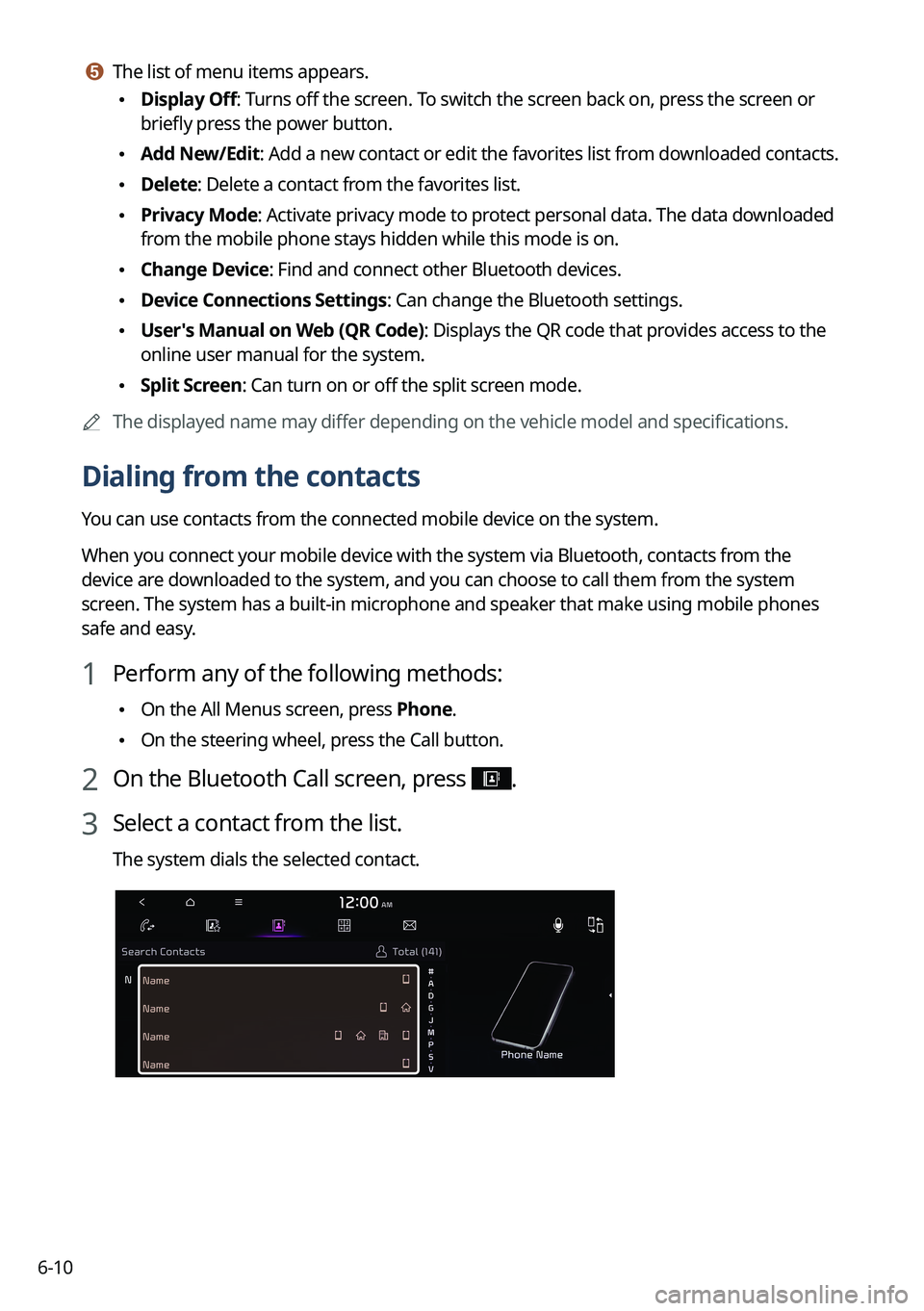
Dialing from the contacts
You can use contacts from the connected mobile device on the system.
When you connect your mobile device with the system via Bluetooth, contacts from the
device are downloaded to the system, and you can choose to call them from the system
screen. The system has a built-in microphone and speaker that make using mobile phones
safe and easy.
1 Perform any of the following methods:
•On the All Menus screen, press Phone.
•On the steering wheel, press the Call button.
2 On the Bluetooth Call screen, press .
3 Select a contact from the list.
The system dials the selected contact.