mirror KIA FORTE 5 2017 Owner's Manual
[x] Cancel search | Manufacturer: KIA, Model Year: 2017, Model line: FORTE 5, Model: KIA FORTE 5 2017Pages: 595, PDF Size: 11.53 MB
Page 416 of 595
573
Driving your vehicle
BSD (Blind Spot Detection) /
LCA (Lane Change Assist)
Operating conditions
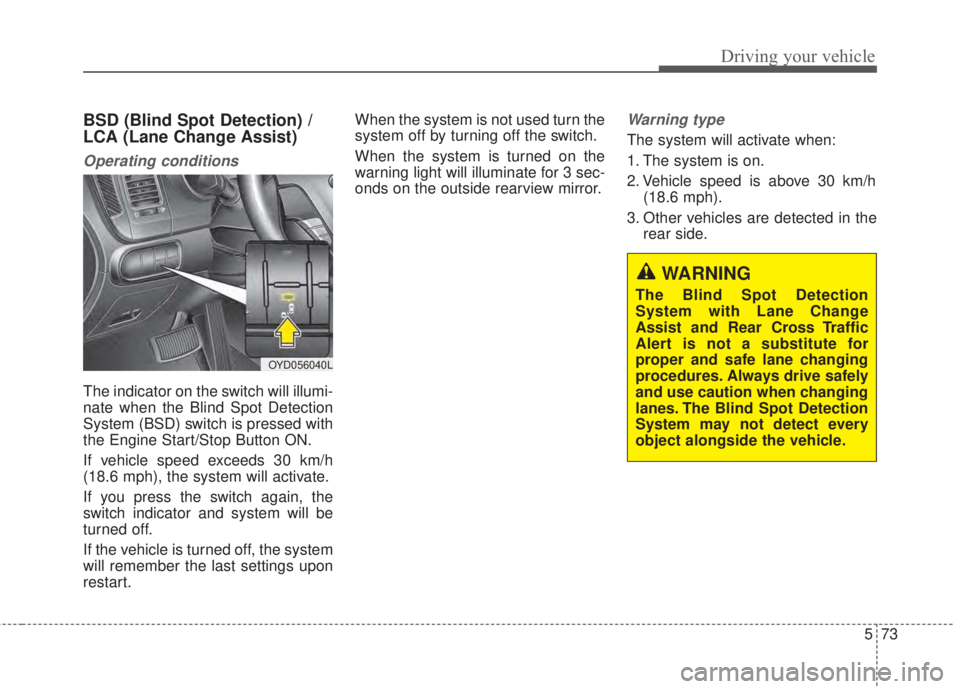
The indicator on the switch will illumi-
nate when the Blind Spot Detection
System (BSD) switch is pressed with
the Engine Start/Stop Button ON.
If vehicle speed exceeds 30 km/h
(18.6 mph), the system will activate.
If you press the switch again, the
switch indicator and system will be
turned off.
If the vehicle is turned off, the system
will remember the last settings upon
restart.When the system is not used turn the
system off by turning off the switch.
When the system is turned on the
warning light will illuminate for 3 sec-
onds on the outside rearview mirror.
Warning type
The system will activate when:
1. The system is on.
2. Vehicle speed is above 30 km/h
(18.6 mph).
3. Other vehicles are detected in the
rear side.
WARNING
The Blind Spot Detection
System with Lane Change
Assist and Rear Cross Traffic
Alert is not a substitute for
proper and safe lane changing
procedures. Always drive safely
and use caution when changing
lanes. The Blind Spot Detection
System may not detect every
object alongside the vehicle.
OYD056040L
Page 417 of 595
Driving your vehicle
74 5
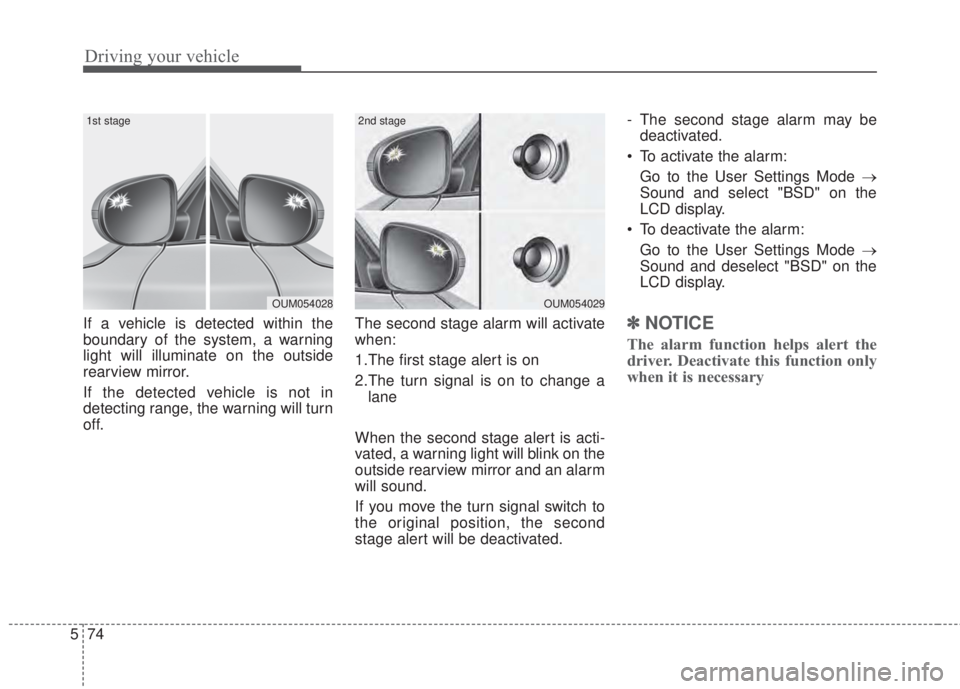
If a vehicle is detected within the
boundary of the system, a warning
light will illuminate on the outside
rearview mirror.
If the detected vehicle is not in
detecting range, the warning will turn
off.The second stage alarm will activate
when:
1.The first stage alert is on
2.The turn signal is on to change a
lane
When the second stage alert is acti-
vated, a warning light will blink on the
outside rearview mirror and an alarm
will sound.
If you move the turn signal switch to
the original position, the second
stage alert will be deactivated.- The second stage alarm may be
deactivated.
• To activate the alarm:
Go to the User Settings Mode →
Sound and select "BSD" on the
LCD display.
• To deactivate the alarm:
Go to the User Settings Mode →
Sound and deselect "BSD" on the
LCD display.✽ NOTICE
The alarm function helps alert the
driver. Deactivate this function only
when it is necessary
OUM054029
2nd stage
OUM054028
1st stage
Page 420 of 595
577
Driving your vehicle
• If the vehicle detected by sensors
approaches your vehicle, the warn-
ing chime will sound and the warn-
ing light will blink on the outside
rearview mirror.
• If the detected object is not in your
way, move the vehicle away from
the detected object slowly; and the
warning will cancel once the object
has been safely cleared.
• The system may not operate prop-
erly due to other factors or circum-
stances. Always pay attention to
your surroundings.
❈If your vehicle's left or right side
bumper is blinded by a barrier or
vehicles, the system sensing abili-
ty may be deteriorated.✽ NOTICE
• The system may not work proper-
ly if the bumper has been replaced
or if repair work has been done
near the sensor.
• The detection area differs accord-
ing to the road's width. If the road
is narrow the system may detect
other vehicles in the next lane.
• If the road is very wide the system
may not detect other vehicles.
• The system may turn off due to
strong electromagnetic interfer-
ence.WARNING
The Blind Spot Detection
System with Lane Change
Assist and Rear Cross Traffic
Alert is not a substitute for
proper and safe lane changing
procedures. Always drive safely
and use caution when changing
lanes. The Blind Spot Detection
System may not detect every
object alongside the vehicle.
Page 422 of 595
579
Driving your vehicle
Outside rearview mirror may not
alert the driver when:
- The outside rearview mirror hous-
ing is very dirty.
- The window is very dirty.
- The windows are tinted very dark.This device complies with
Industry Canada licence-exempt
RSS standard(s).
Operation is subject to the following
two conditions:
(1) This device may not cause inter-
ference, and
(2) This device must accept any
interference, including interfer-
ence that may cause undesired
operation of the device.
Page 427 of 595
Driving your vehicle
84 5
• Adjust your mirrors to reduce the
glare from other driver's head-
lights.
• Keep your headlights clean and
properly aimed on vehicles not
equipped with the automatic head-
light aiming feature. Dirty or
improperly aimed headlights will
make it much more difficult to see
at night.
• Avoid staring directly at the head-
lights of oncoming vehicles. You
could be temporarily blinded, and it
will take several seconds for your
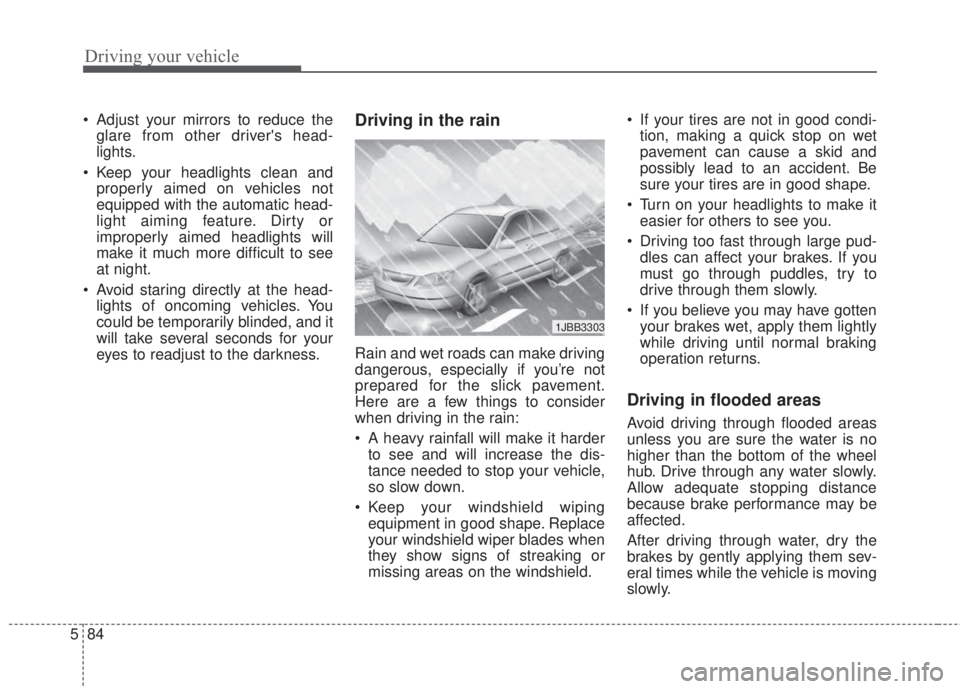
eyes to readjust to the darkness.Driving in the rain
Rain and wet roads can make driving
dangerous, especially if you’re not
prepared for the slick pavement.
Here are a few things to consider
when driving in the rain:
• A heavy rainfall will make it harder
to see and will increase the dis-
tance needed to stop your vehicle,
so slow down.
• Keep your windshield wiping
equipment in good shape. Replace
your windshield wiper blades when
they show signs of streaking or
missing areas on the windshield.• If your tires are not in good condi-
tion, making a quick stop on wet
pavement can cause a skid and
possibly lead to an accident. Be
sure your tires are in good shape.
• Turn on your headlights to make it
easier for others to see you.
• Driving too fast through large pud-
dles can affect your brakes. If you
must go through puddles, try to
drive through them slowly.
• If you believe you may have gotten
your brakes wet, apply them lightly
while driving until normal braking
operation returns.
Driving in flooded areas
Avoid driving through flooded areas
unless you are sure the water is no
higher than the bottom of the wheel
hub. Drive through any water slowly.
Allow adequate stopping distance
because brake performance may be
affected.
After driving through water, dry the
brakes by gently applying them sev-
eral times while the vehicle is moving
slowly.
1JBB3303
Page 464 of 595
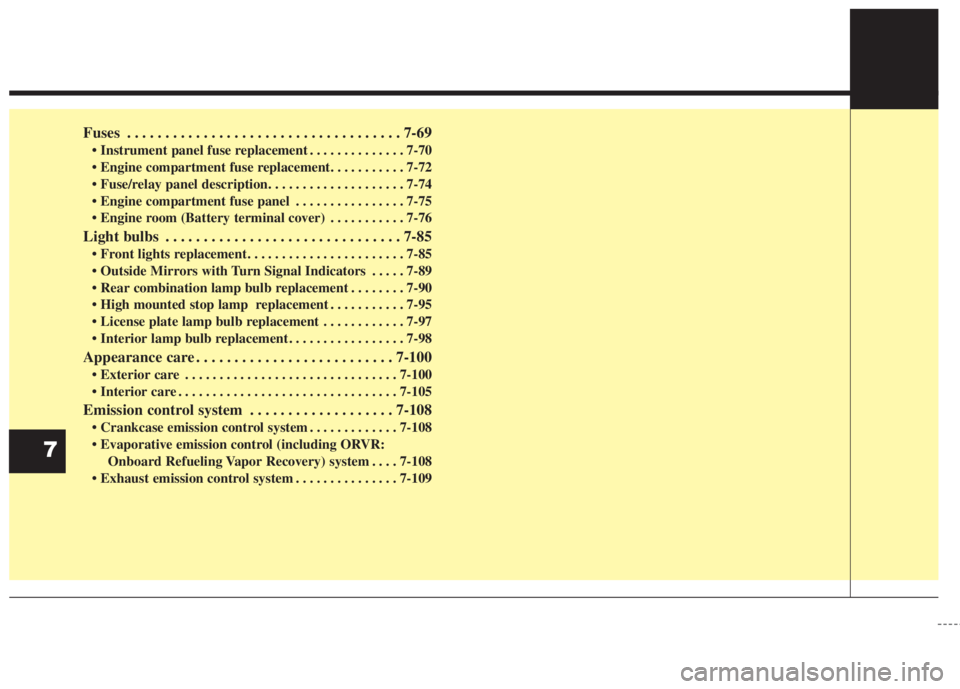
Fuses . . . . . . . . . . . . . . . . . . . . . . . . . . . . . . . . . . . . 7-69
• Instrument panel fuse replacement . . . . . . . . . . . . . . 7-70
• Engine compartment fuse replacement. . . . . . . . . . . 7-72
• Fuse/relay panel description. . . . . . . . . . . . . . . . . . . . 7-74
• Engine compartment fuse panel . . . . . . . . . . . . . . . . 7-75
• Engine room (Battery terminal cover) . . . . . . . . . . . 7-76
Light bulbs . . . . . . . . . . . . . . . . . . . . . . . . . . . . . . . 7-85
• Front lights replacement. . . . . . . . . . . . . . . . . . . . . . . 7-85
• Outside Mirrors with Turn Signal Indicators . . . . . 7-89
• Rear combination lamp bulb replacement . . . . . . . . 7-90
• High mounted stop lamp replacement . . . . . . . . . . . 7-95
• License plate lamp bulb replacement . . . . . . . . . . . . 7-97
• Interior lamp bulb replacement . . . . . . . . . . . . . . . . . 7-98
Appearance care . . . . . . . . . . . . . . . . . . . . . . . . . . 7-100
• Exterior care . . . . . . . . . . . . . . . . . . . . . . . . . . . . . . . 7-100
• Interior care . . . . . . . . . . . . . . . . . . . . . . . . . . . . . . . . 7-105
Emission control system . . . . . . . . . . . . . . . . . . . 7-108
• Crankcase emission control system . . . . . . . . . . . . . 7-108
• Evaporative emission control (including ORVR:
Onboard Refueling Vapor Recovery) system . . . . 7-108
• Exhaust emission control system . . . . . . . . . . . . . . . 7-109
7
Page 539 of 595
777
Maintenance
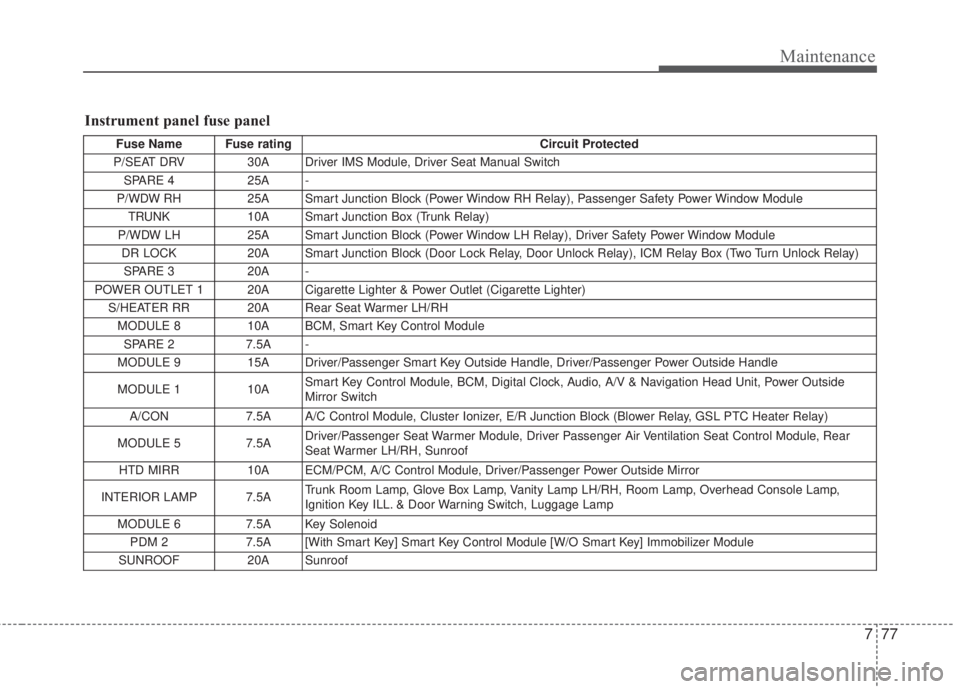
Instrument panel fuse panel
Fuse Name Fuse rating Circuit Protected
P/SEAT DRV 30A Driver IMS Module, Driver Seat Manual Switch
SPARE 4 25A -
P/WDW RH 25A Smart Junction Block (Power Window RH Relay), Passenger Safety Power Window Module
TRUNK 10A Smart Junction Box (Trunk Relay)
P/WDW LH 25A Smart Junction Block (Power Window LH Relay), Driver Safety Power Window Module
DR LOCK 20A Smart Junction Block (Door Lock Relay, Door Unlock Relay), ICM Relay Box (Two Turn Unlock Relay)
SPARE 3 20A -
POWER OUTLET 1 20A Cigarette Lighter & Power Outlet (Cigarette Lighter)
S/HEATER RR 20A Rear Seat Warmer LH/RH
MODULE 8 10A BCM, Smart Key Control Module
SPARE 2 7.5A -
MODULE 9 15A Driver/Passenger Smart Key Outside Handle, Driver/Passenger Power Outside Handle
MODULE 1 10ASmart Key Control Module, BCM, Digital Clock, Audio, A/V & Navigation Head Unit, Power Outside
Mirror Switch
A/CON 7.5A A/C Control Module, Cluster Ionizer, E/R Junction Block (Blower Relay, GSL PTC Heater Relay)
MODULE 5 7.5ADriver/Passenger Seat Warmer Module, Driver Passenger Air Ventilation Seat Control Module, Rear
Seat Warmer LH/RH, Sunroof
HTD MIRR 10A ECM/PCM, A/C Control Module, Driver/Passenger Power Outside Mirror
INTERIOR LAMP 7.5ATrunk Room Lamp, Glove Box Lamp, Vanity Lamp LH/RH, Room Lamp, Overhead Console Lamp,
Ignition Key ILL. & Door Warning Switch, Luggage Lamp
MODULE 6 7.5A Key Solenoid
PDM 2 7.5A [With Smart Key] Smart Key Control Module [W/O Smart Key] Immobilizer Module
SUNROOF 20ASunroof
Page 540 of 595
Maintenance
78 7
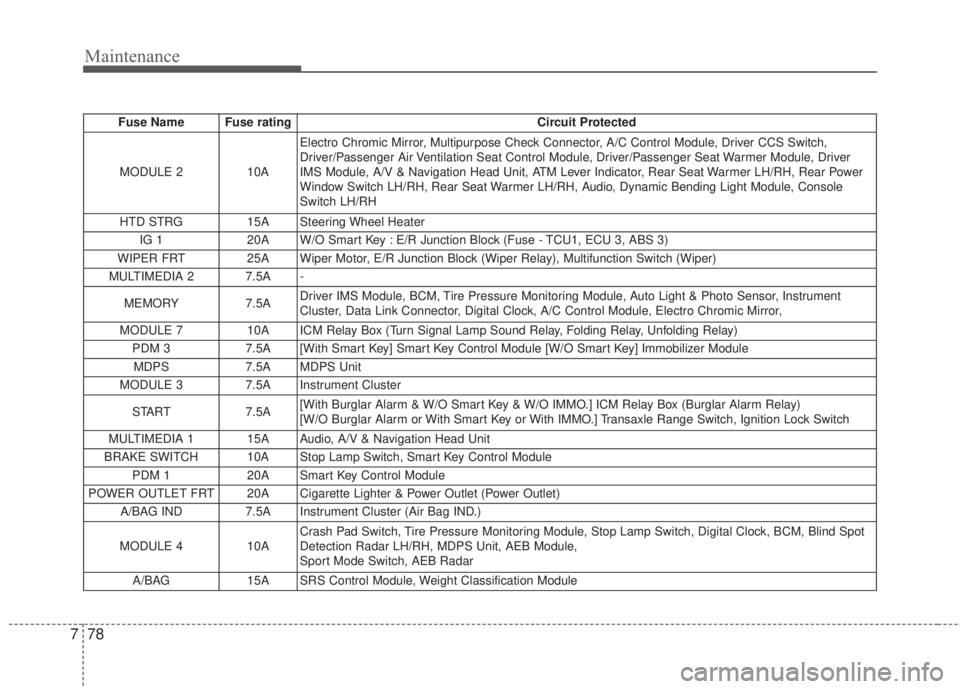
Fuse Name Fuse rating Circuit Protected
MODULE 2 10A Electro Chromic Mirror, Multipurpose Check Connector, A/C Control Module, Driver CCS Switch,
Driver/Passenger Air Ventilation Seat Control Module, Driver/Passenger Seat Warmer Module, Driver
IMS Module, A/V & Navigation Head Unit, ATM Lever Indicator, Rear Seat Warmer LH/RH, Rear Power
Window Switch LH/RH, Rear Seat Warmer LH/RH, Audio, Dynamic Bending Light Module, Console
Switch LH/RH
HTD STRG 15A Steering Wheel Heater
IG 1 20A W/O Smart Key : E/R Junction Block (Fuse - TCU1, ECU 3, ABS 3)
WIPER FRT 25A Wiper Motor, E/R Junction Block (Wiper Relay), Multifunction Switch (Wiper)
MULTIMEDIA 2 7.5A -
MEMORY 7.5ADriver IMS Module, BCM, Tire Pressure Monitoring Module, Auto Light & Photo Sensor, Instrument
Cluster, Data Link Connector, Digital Clock, A/C Control Module, Electro Chromic Mirror,
MODULE 7 10A ICM Relay Box (Turn Signal Lamp Sound Relay, Folding Relay, Unfolding Relay)
PDM 3 7.5A [With Smart Key] Smart Key Control Module [W/O Smart Key] Immobilizer Module
MDPS 7.5A MDPS Unit
MODULE 3 7.5A Instrument Cluster
START 7.5A[With Burglar Alarm & W/O Smart Key & W/O IMMO.] ICM Relay Box (Burglar Alarm Relay)
[W/O Burglar Alarm or With Smart Key or With IMMO.] Transaxle Range Switch, Ignition Lock Switch
MULTIMEDIA 1 15A Audio, A/V & Navigation Head Unit
BRAKE SWITCH 10A Stop Lamp Switch, Smart Key Control Module
PDM 1 20A Smart Key Control Module
POWER OUTLET FRT 20A Cigarette Lighter & Power Outlet (Power Outlet)
A/BAG IND 7.5A Instrument Cluster (Air Bag IND.)
MODULE 4 10ACrash Pad Switch, Tire Pressure Monitoring Module, Stop Lamp Switch, Digital Clock, BCM, Blind Spot
Detection Radar LH/RH, MDPS Unit, AEB Module,
Sport Mode Switch, AEB Radar
A/BAG 15A SRS Control Module, Weight Classification Module
Page 541 of 595
779
Maintenance
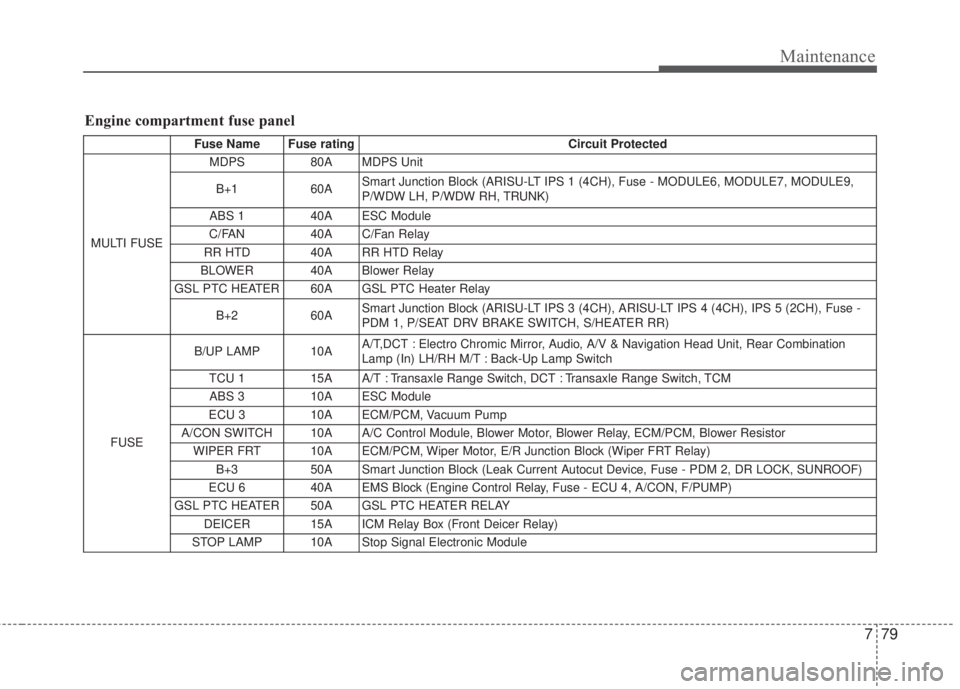
Engine compartment fuse panel
Fuse Name Fuse rating Circuit Protected
MULTI FUSE MDPS 80A MDPS Unit
B+1 60A Smart Junction Block (ARISU-LT IPS 1 (4CH), Fuse - MODULE6, MODULE7, MODULE9,
P/WDW LH, P/WDW RH, TRUNK)
ABS 1 40A ESC Module
C/FAN 40A C/Fan Relay
RR HTD 40A RR HTD Relay
BLOWER 40A Blower Relay
GSL PTC HEATER 60A GSL PTC Heater Relay
B+2 60A Smart Junction Block (ARISU-LT IPS 3 (4CH), ARISU-LT IPS 4 (4CH), IPS 5 (2CH), Fuse -
PDM 1, P/SEAT DRV BRAKE SWITCH, S/HEATER RR)
FUSEB/UP LAMP 10A A/T,DCT : Electro Chromic Mirror, Audio, A/V & Navigation Head Unit, Rear Combination
Lamp (In) LH/RH M/T : Back-Up Lamp Switch
TCU 1 15A A/T : Transaxle Range Switch, DCT : Transaxle Range Switch, TCM
ABS 3 10A ESC Module
ECU 3 10A ECM/PCM, Vacuum Pump
A/CON SWITCH 10A A/C Control Module, Blower Motor, Blower Relay, ECM/PCM, Blower Resistor
WIPER FRT 10A ECM/PCM, Wiper Motor, E/R Junction Block (Wiper FRT Relay)
B+3 50A Smart Junction Block (Leak Current Autocut Device, Fuse - PDM 2, DR LOCK, SUNROOF)
ECU 6 40A EMS Block (Engine Control Relay, Fuse - ECU 4, A/CON, F/PUMP)
GSL PTC HEATER 50A GSL PTC HEATER RELAY
DEICER 15A ICM Relay Box (Front Deicer Relay)
STOP LAMP 10A Stop Signal Electronic Module
Page 551 of 595
789
Maintenance
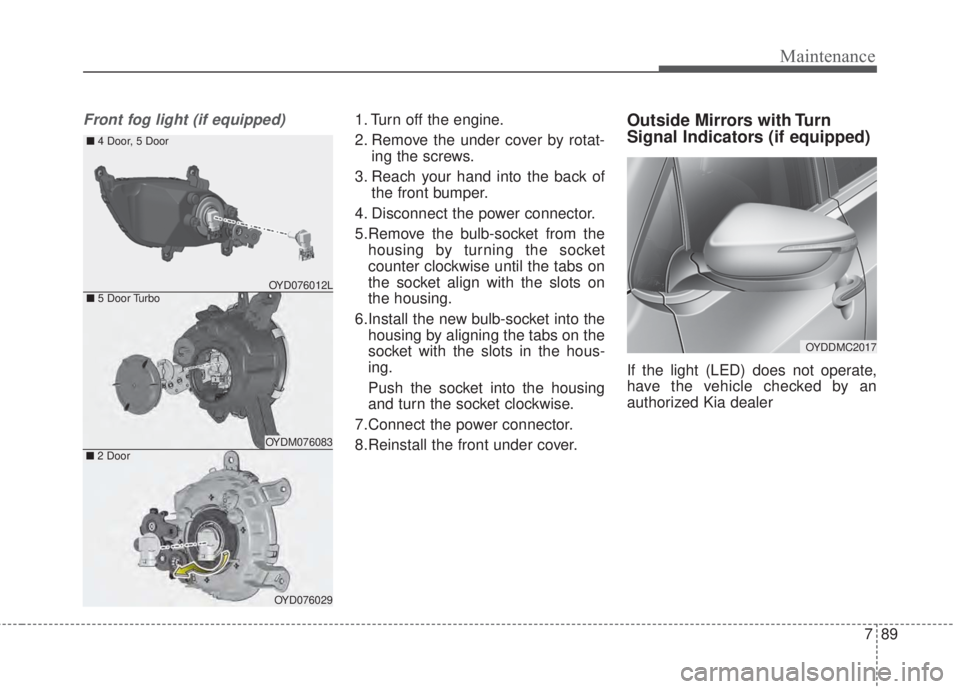
Front fog light (if equipped)1. Turn off the engine.
2. Remove the under cover by rotat-
ing the screws.
3. Reach your hand into the back of
the front bumper.
4. Disconnect the power connector.
5.Remove the bulb-socket from the
housing by turning the socket
counter clockwise until the tabs on
the socket align with the slots on
the housing.
6.Install the new bulb-socket into the
housing by aligning the tabs on the
socket with the slots in the hous-
ing.
Push the socket into the housing
and turn the socket clockwise.
7.Connect the power connector.
8.Reinstall the front under cover.Outside Mirrors with Turn
Signal Indicators (if equipped)
If the light (LED) does not operate,
have the vehicle checked by an
authorized Kia dealer
■5 Door Turbo
■4 Door, 5 Door
OYDM076083■2 Door
OYD076029
OYD076012L
OYDDMC2017