clock KIA FORTE 5 2018 Owner's Manual
[x] Cancel search | Manufacturer: KIA, Model Year: 2018, Model line: FORTE 5, Model: KIA FORTE 5 2018Pages: 584, PDF Size: 15.16 MB
Page 550 of 584
Maintenance
88
7
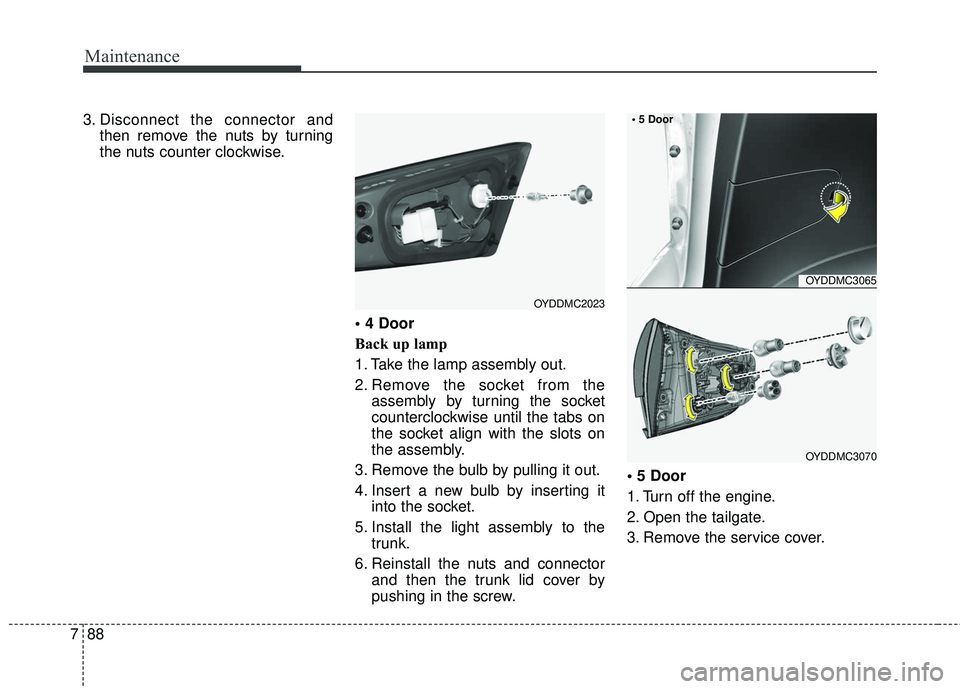
3. Disconnect the connector and
then remove the nuts by turning
the nuts counter clockwise.
Back up lamp
1. Take the lamp assembly out.
2. Remove the socket from theassembly by turning the socket
counterclockwise until the tabs on
the socket align with the slots on
the assembly.
3. Remove the bulb by pulling it out.
4. Insert a new bulb by inserting it into the socket.
5. Install the light assembly to the trunk.
6. Reinstall the nuts and connector and then the trunk lid cover by
pushing in the screw.
1. Turn off the engine.
2. Open the tailgate.
3. Remove the service cover.
OYDDMC2023
OYDDMC3065
OYDDMC3070
Page 551 of 584
789
Maintenance
4. Remove the socket from theassembly by turning the socket
counterclockwise until the tabs on
the socket align with the slots on
the assembly.
5. Remove the bulb from the socket by pressing it in and rotating it
counterclockwise until the tabs on
the bulb align with the slots in the
socket. Pull the bulb out of the
socket.
6. Insert a new bulb by inserting it into the socket and rotating it until
it locks into place.
7. Install the socket in the assembly by aligning the tabs on the socket
with the slots in the assembly.
Push the socket into the assembly
and turn the socket clockwise.
8. Install the service cover by putting it into the service hole.
Stop/tail light (LED type)
If the light does not operate, we rec-
ommend that the system be checked
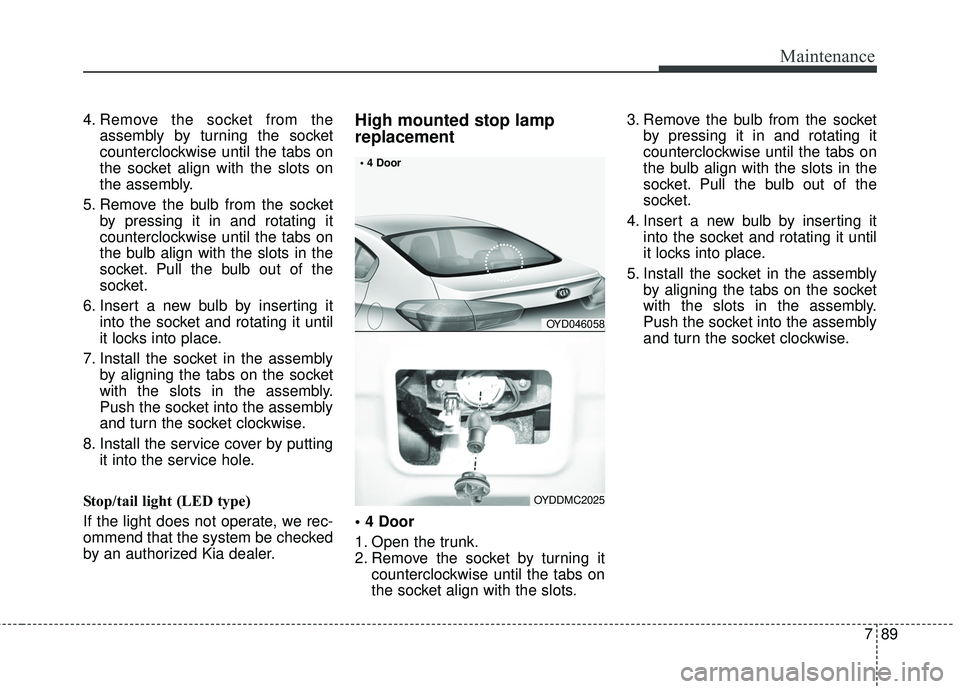
by an authorized Kia dealer.High mounted stop lamp
replacement
1. Open the trunk.
2. Remove the socket by turning it counterclockwise until the tabs on
the socket align with the slots. 3. Remove the bulb from the socket
by pressing it in and rotating it
counterclockwise until the tabs on
the bulb align with the slots in the
socket. Pull the bulb out of the
socket.
4. Insert a new bulb by inserting it into the socket and rotating it until
it locks into place.
5. Install the socket in the assembly by aligning the tabs on the socket
with the slots in the assembly.
Push the socket into the assembly
and turn the socket clockwise.
OYD046058
OYDDMC2025
Page 553 of 584
791
Maintenance
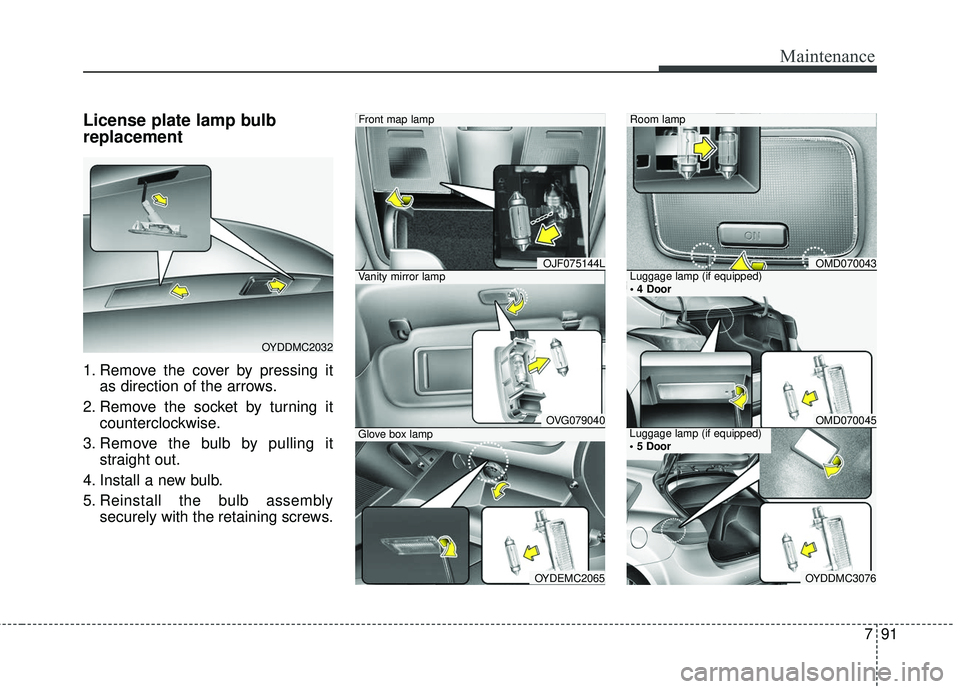
License plate lamp bulb
replacement
1. Remove the cover by pressing itas direction of the arrows.
2. Remove the socket by turning it counterclockwise.
3. Remove the bulb by pulling it straight out.
4. Install a new bulb.
5. Reinstall the bulb assembly securely with the retaining screws.
OYDDMC2032
Vanity mirror lamp
Front map lamp
OVG079040Glove box lamp
OYDEMC2065
OJF075144LLuggage lamp (if equipped)
Room lamp
OMD070045Luggage lamp (if equipped)
OYDDMC3076
OMD070043
Page 580 of 584
I5
Index
If the engine doesn't turn over or turns over slowly. . 6-4
If you have a flat tire . . . . . . . . . . . . . . . . . . . . . . . . . . . 6-13 Changing tires . . . . . . . . . . . . . . . . . . . . . . . . . . . . . . 6-14
Jack and tools . . . . . . . . . . . . . . . . . . . . . . . . . . . . . . 6-13
Jack label . . . . . . . . . . . . . . . . . . . . . . . . . . . . . . . . . 6-21
Removing and storing the spare tire . . . . . . . . . . . . . 6-14
If you have a flat tire (with tire mobility kit) . . . . . . . . . 6-7 Checking the tire inflation pressure . . . . . . . . . . . . . 6-11
Components of the Tire Mobility Kit . . . . . . . . . . . . . 6-9
Distributing the sealant . . . . . . . . . . . . . . . . . . . . . . . 6-11
Introduction. . . . . . . . . . . . . . . . . . . . . . . . . . . . . . . . . 6-7
Notes on the safe use of the Tire Mobility Kit . . . . . . 6-8
Technical Data . . . . . . . . . . . . . . . . . . . . . . . . . . . . . 6-12
Using the Tire Mobility Kit . . . . . . . . . . . . . . . . . . . 6-10
In case of an emergency while driving . . . . . . . . . . . . . . 6-3 If engine stalls while driving . . . . . . . . . . . . . . . . . . . 6-3
If the engine stalls at a crossroad or crossing. . . . . . . 6-3
If you have a flat tire while driving . . . . . . . . . . . . . . 6-3
Instrument cluster . . . . . . . . . . . . . . . . . . . . . . . . . . . . . 4-56 Gauges . . . . . . . . . . . . . . . . . . . . . . . . . . . . . . . . . . . 4-\
58
Instrument Cluster Control . . . . . . . . . . . . . . . . . . . . 4-57
LCD window Control . . . . . . . . . . . . . . . . . . . . . . . . 4-58
Transaxle Shift Indicator . . . . . . . . . . . . . . . . . . . . . 4-61
Instrument panel overview . . . . . . . . . . . . . . . . . . . . . . . 2-5
Interior features . . . . . . . . . . . . . . . . . . . . . . . . . . . . . . 4-136 Ashtray . . . . . . . . . . . . . . . . . . . . . . . . . . . . . . . . . . 4-13\
6
Clothes hanger . . . . . . . . . . . . . . . . . . . . . . . . . . . . 4-143
Covering shelf (5 Door) . . . . . . . . . . . . . . . . . . . . . 4-145 Cup holder . . . . . . . . . . . . . . . . . . . . . . . . . . . . . . . 4-136
Floor mat anchor(s) . . . . . . . . . . . . . . . . . . . . . . . . 4-143
LCD monitor (clock) . . . . . . . . . . . . . . . . . . . . . . . 4-142
Luggage net (holder) . . . . . . . . . . . . . . . . . . . . . . . 4-144
Navigation system . . . . . . . . . . . . . . . . . . . . . . . . . 4-146
Power outlet . . . . . . . . . . . . . . . . . . . . . . . . . . . . . . 4-141
Seat warmer . . . . . . . . . . . . . . . . . . . . . . . . . . . . . . 4-138
Sliding armrest . . . . . . . . . . . . . . . . . . . . . . . . . . . . 4-137
Sunvisor . . . . . . . . . . . . . . . . . . . . . . . . . . . . . . . . . 4-138
Ventilated seat . . . . . . . . . . . . . . . . . . . . . . . . . . . . . 4-140
Interior light. . . . . . . . . . . . . . . . . . . . . . . . . . . . . . . . . 4-103 Automatic turn off function . . . . . . . . . . . . . . . . . . 4-103
Glove box lamp . . . . . . . . . . . . . . . . . . . . . . . . . . . 4-106
Luggage room lamp . . . . . . . . . . . . . . . . . . . . . . . . 4-105
Map lamp . . . . . . . . . . . . . . . . . . . . . . . . . . . . . . . . 4-103
Room lamp . . . . . . . . . . . . . . . . . . . . . . . . . . . . . . . 4-104
Vanity mirror lamp . . . . . . . . . . . . . . . . . . . . . . . . . 4-106
Interior overview . . . . . . . . . . . . . . . . . . . . . . . . . . . . . . . 2-4
Key positions . . . . . . . . . . . . . . . . . . . . . . . . . . . . . . . . . . 5-6 Ignition switch position . . . . . . . . . . . . . . . . . . . . . . . 5-6
Illuminated ignition switch . . . . . . . . . . . . . . . . . . . . . 5-6
Keys . . . . . . . . . . . . . . . . . . . . . . . . . . . . . . . . . . . . \
. . . . . 4-4 Key operations . . . . . . . . . . . . . . . . . . . . . . . . . . . . . . 4-4
Record your key number . . . . . . . . . . . . . . . . . . . . . . 4-4
K
YDM CAN (ENG) Index.qxp 9/11/2017 12:44 PM Page 5