audio KIA K900 2016 User Guide
[x] Cancel search | Manufacturer: KIA, Model Year: 2016, Model line: K900, Model: KIA K900 2016Pages: 542, PDF Size: 38.35 MB
Page 258 of 542
To raise the rear curtain, depress the
button. To lower the rear curtain,
depress the button again.
The rear curtain will be lowered auto-
matically when you shift the shift
lever into R (Reverse) and raised
automatically when you shift the shift
lever from R (Reverse) into P (Park).
After the rear curtain is lowered by
shifting the shift lever into R
(Reverse), if you drive more than
12mph (20km/h) with the shift lever
in D (Drive), the rear curtain will be
raised automatically.
You can activate or deactivate the
rear curtain button on the rear arm-
rest by using the REAR LOCK button
on the rear armrest or “System
Settings” in AVN (Audio, Video, and
Navigation).Detailed information for “System
Settings” is described in a separately
supplied manual.
If the REAR LOCK button activated
(LED “ON”), you can not activate the
rear curtain button.
After deactivating (LED “OFF”) the
REAR LOCK button, you can acti-
vate the rear curtain button.
If the REAR LOCK button has acti-
vated through AVN, you can deacti-
vate the REAR LOCK button only
through AVN.Side curtain (if equipped)
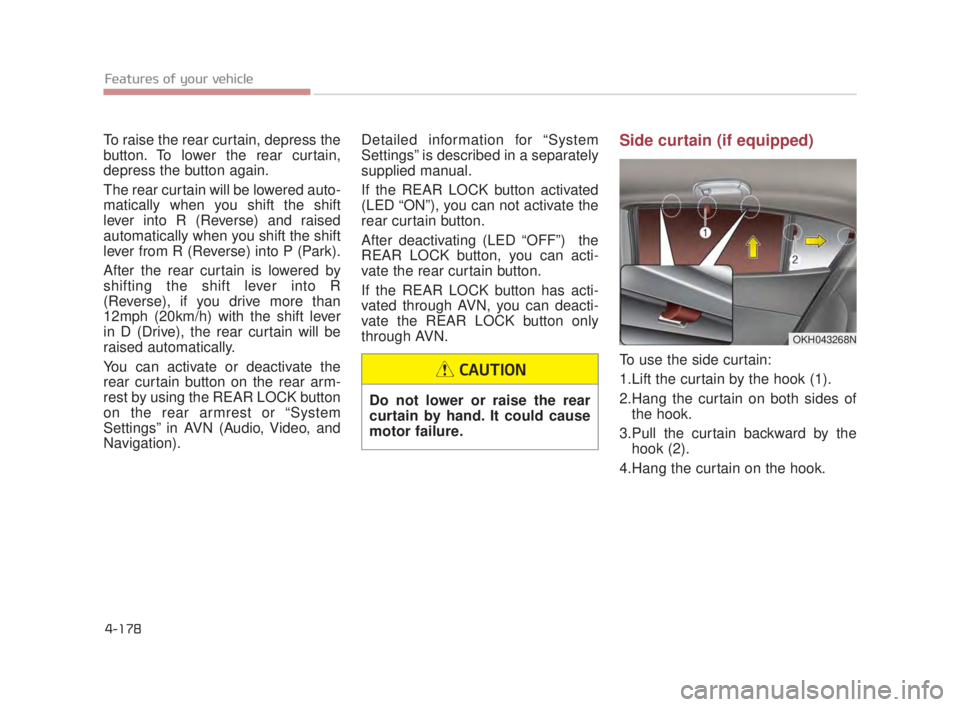
To use the side curtain:
1.Lift the curtain by the hook (1).
2.Hang the curtain on both sides of
the hook.
3.Pull the curtain backward by the hook (2).
4.Hang the curtain on the hook.
OKH043268N
Do not lower or raise the rear
curtain by hand. It could cause
motor failure.
CAUTION
4-178 Features of your vehicle
KH USA 4:2015 3/24/2015 4:45 PM Page 178
Page 259 of 542
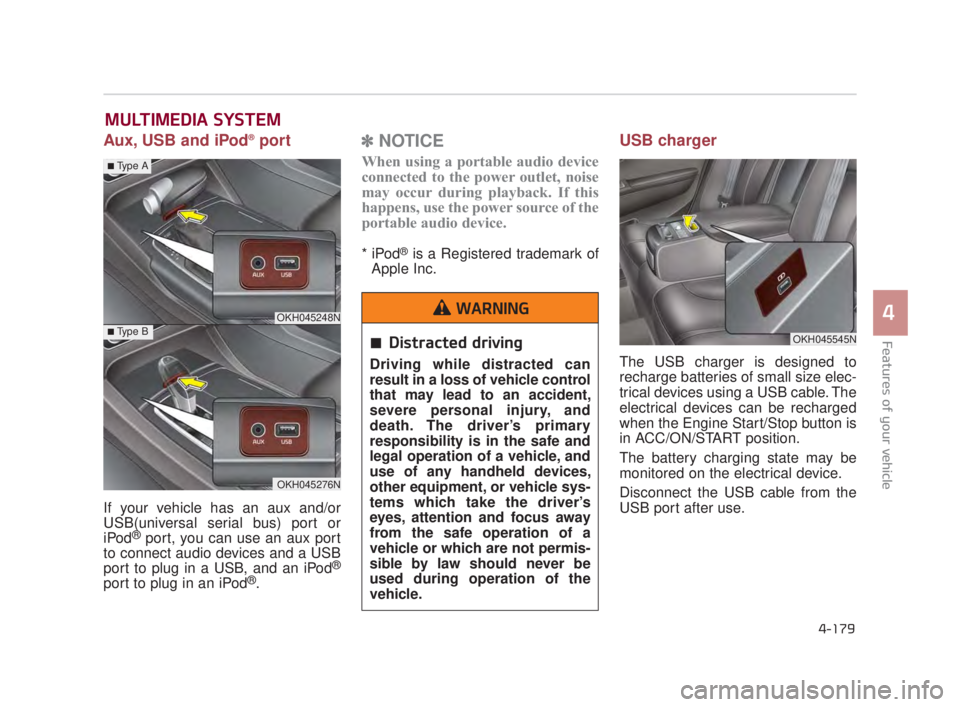
Aux, USB and iPod®port
If your vehicle has an aux and/or
USB(universal serial bus) port or
iPod
®port, you can use an aux port
to connect audio devices and a USB
port to plug in a USB, and an iPod
®
port to plug in an iPod®.
✽ NOTICE
When using a portable audio device
connected to the power outlet, noise
may occur during playback. If this
happens, use the power source of the
portable audio device.
* iPod®is a Registered trademark of
Apple Inc.
USB charger
The USB charger is designed to
recharge batteries of small size elec-
trical devices using a USB cable. The
electrical devices can be recharged
when the Engine Start/Stop button is
in ACC/ON/START position.
The battery charging state may be
monitored on the electrical device.
Disconnect the USB cable from the
USB port after use.
MULTIMEDIA SYSTEM
OKH045545N
OKH045248N
OKH045276N
■Type A
■Type B
4-179
4
Features of your vehicle
4
Distracted driving
Driving while distracted can
result in a loss of vehicle control
that may lead to an accident,
severe personal injury, and
death. The driver’s primary
responsibility is in the safe and
legal operation of a vehicle, and
use of any handheld devices,
other equipment, or vehicle sys-
tems which take the driver’s
eyes, attention and focus away
from the safe operation of a
vehicle or which are not permis-
sible by law should never be
used during operation of the
vehicle.
WARNING
KH USA 4:2015 3/24/2015 4:45 PM Page 179
Page 260 of 542
Some devices are not supportedfor fast charging but will be
charged with normal speed.
Use the USB charger when the engine is running to prevent bat-
tery discharge.
Only devices that fits the USB port can be used.
The USB charger can be used only for battery charging purposes.
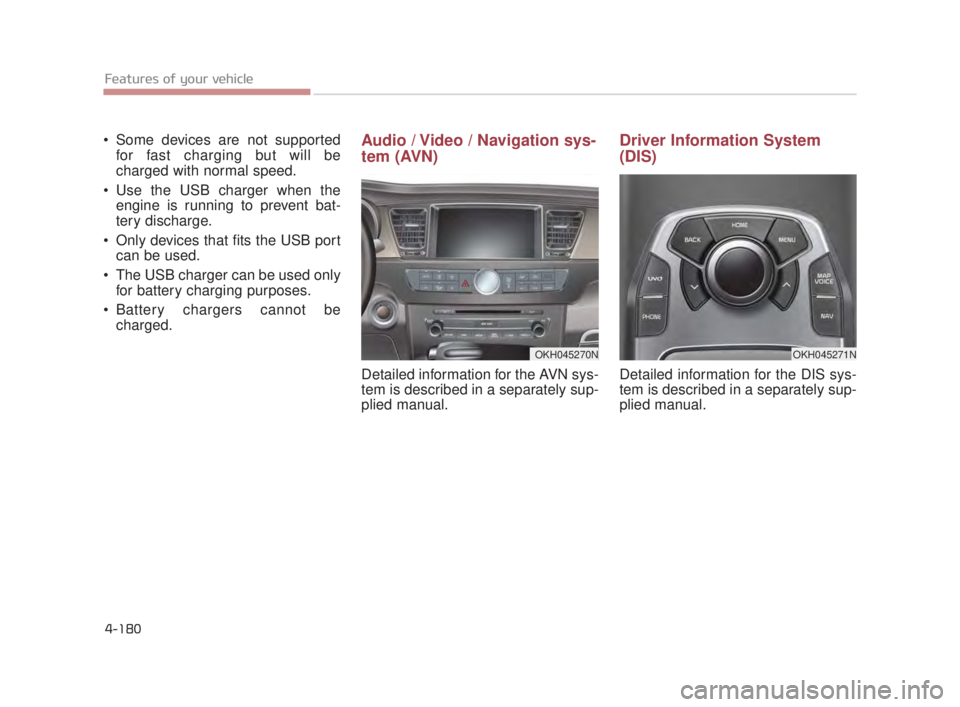
Battery chargers cannot be charged. Audio / Video / Navigation sys-
tem (AVN)
Detailed information for the AVN sys-
tem is described in a separately sup-
plied manual.
Driver Information System
(DIS)
Detailed information for the DIS sys-
tem is described in a separately sup-
plied manual.
OKH045271NOKH045270N
4-180 Features of your vehicle
KH USA 4:2015 3/24/2015 4:45 PM Page 180
Page 262 of 542
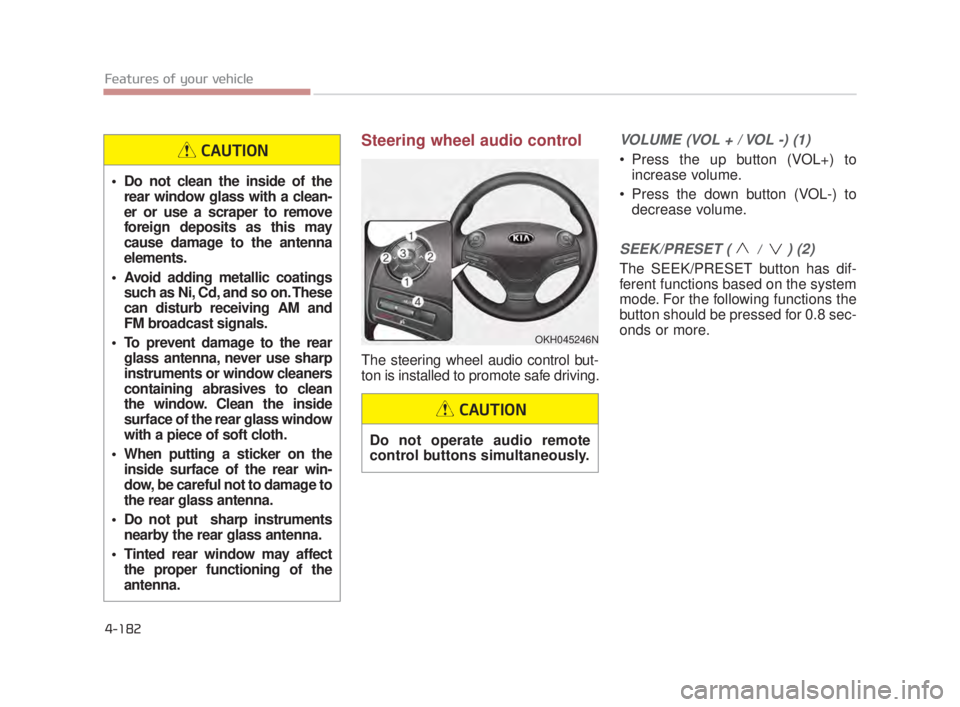
Steering wheel audio control
The steering wheel audio control but-
ton is installed to promote safe driving.
VOLUME (VOL + / VOL -) (1)
Press the up button (VOL+) toincrease volume.
Press the down button (VOL-) to decrease volume.
SEEK/PRESET ( / ) (2)
The SEEK/PRESET button has dif-
ferent functions based on the system
mode. For the following functions the
button should be pressed for 0.8 sec-
onds or more.
OKH045246N
Do not clean the inside of therear window glass with a clean-
er or use a scraper to remove
foreign deposits as this may
cause damage to the antenna
elements.
Avoid adding metallic coatings such as Ni, Cd, and so on. These
can disturb receiving AM and
FM broadcast signals.
To prevent damage to the rear glass antenna, never use sharp
instruments or window cleaners
containing abrasives to clean
the window. Clean the inside
surface of the rear glass window
with a piece of soft cloth.
When putting a sticker on the inside surface of the rear win-
dow, be careful not to damage to
the rear glass antenna.
Do not put sharp instruments nearby the rear glass antenna.
Tinted rear window may affect the proper functioning of the
antenna.
CAUTION
Do not operate audio remote
control buttons simultaneously.
CAUTION
4-182 Features of your vehicle
KH USA 4:2015 3/24/2015 4:45 PM Page 182
Page 345 of 542
5-82
Driving your vehicle
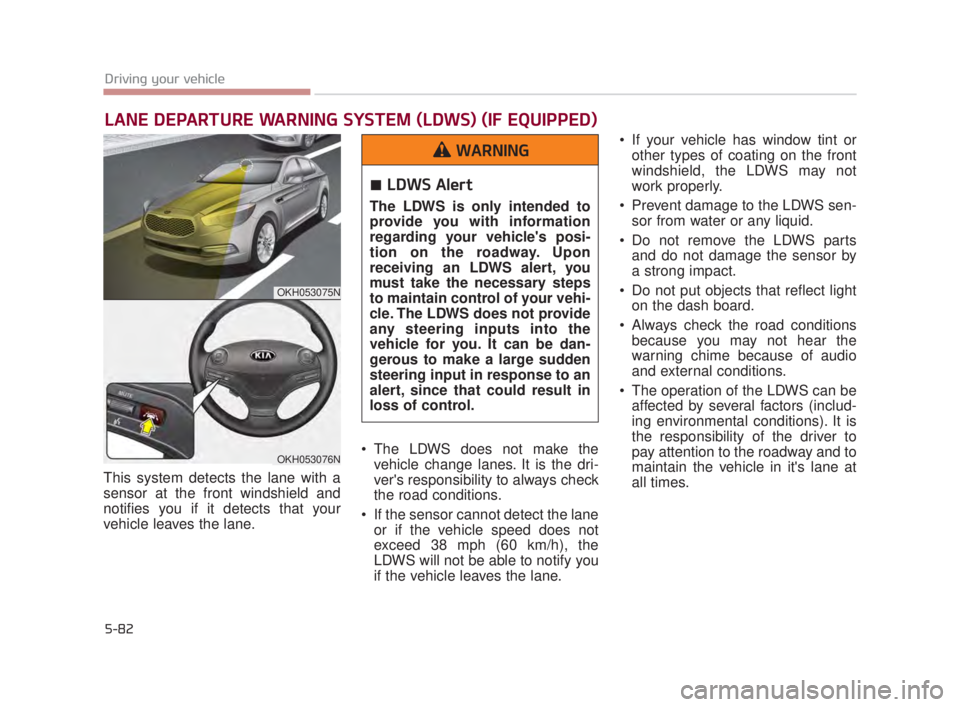
This system detects the lane with a
sensor at the front windshield and
notifies you if it detects that your
vehicle leaves the lane. The LDWS does not make the
vehicle change lanes. It is the dri-
ver's responsibility to always check
the road conditions.
If the sensor cannot detect the lane or if the vehicle speed does not
exceed 38 mph (60 km/h), the
LDWS will not be able to notify you
if the vehicle leaves the lane. If your vehicle has window tint or
other types of coating on the front
windshield, the LDWS may not
work properly.
Prevent damage to the LDWS sen- sor from water or any liquid.
Do not remove the LDWS parts and do not damage the sensor by
a strong impact.
Do not put objects that reflect light on the dash board.
Always check the road conditions because you may not hear the
warning chime because of audio
and external conditions.
The operation of the LDWS can be affected by several factors (includ-
ing environmental conditions). It is
the responsibility of the driver to
pay attention to the roadway and to
maintain the vehicle in it's lane at
all times.
LANE DEPARTURE WARNING SYSTEM (LDWS) (IF EQUIPPED)
OKH053075N
OKH053076N
LDWS Alert
The LDWS is only intended to
provide you with information
regarding your vehicle's posi-
tion on the roadway. Upon
receiving an LDWS alert, you
must take the necessary steps
to maintain control of your vehi-
cle. The LDWS does not provide
any steering inputs into the
vehicle for you. It can be dan-
gerous to make a large sudden
steering input in response to an
alert, since that could result in
loss of control.
WARNING
KH USA 5:2015 3/25/2015 9:17 AM Page 82
Page 459 of 542
Maintenance
7
7-53
Reset items
Items should be reset after the bat-
tery has been discharged or the bat-
tery has been disconnected.
Auto up/down window (See section 4)
Sunroof (See section 4)
Driver position memory system (See section 4)
Trip computer (See section 4)
Climate control system (See section 4)
Clock (See section 4)
Audio (See section 4)
Power trunk (See section 4)
Battery in trunk
Your vehicle is equipped with a
battery in the trunk. For your
safety, avoid storing containers
with liquid in the trunk of the
vehicle. If the liquid leaks, this
could contact the battery and
create a risk of electrocution.
WARNING
KH USA 7:2015 3/25/2015 11:36 AM Page 53
Page 479 of 542
Maintenance
7
7-73
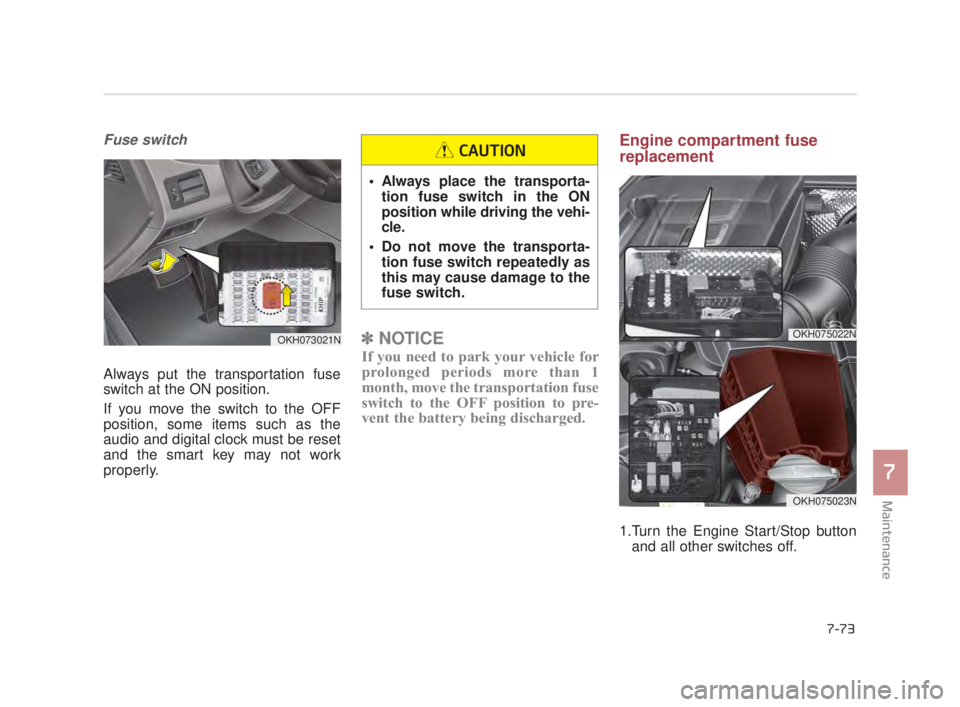
Fuse switch
Always put the transportation fuse
switch at the ON position.
If you move the switch to the OFF
position, some items such as the
audio and digital clock must be reset
and the smart key may not work
properly.
✽NOTICE
If you need to park your vehicle for
prolonged periods more than 1
month, move the transportation fuse
switch to the OFF position to pre-
vent the battery being discharged.
Engine compartment fuse
replacement
1.Turn the Engine Start/Stop button
and all other switches off.
OKH073021NOKH075022N
OKH075023N
Always place the transporta-tion fuse switch in the ON
position while driving the vehi-
cle.
Do not move the transporta- tion fuse switch repeatedly as
this may cause damage to the
fuse switch.
CAUTION
KH USA 7:2015 3/25/2015 11:36 AM Page 73
Page 483 of 542
Maintenance
7
7-77
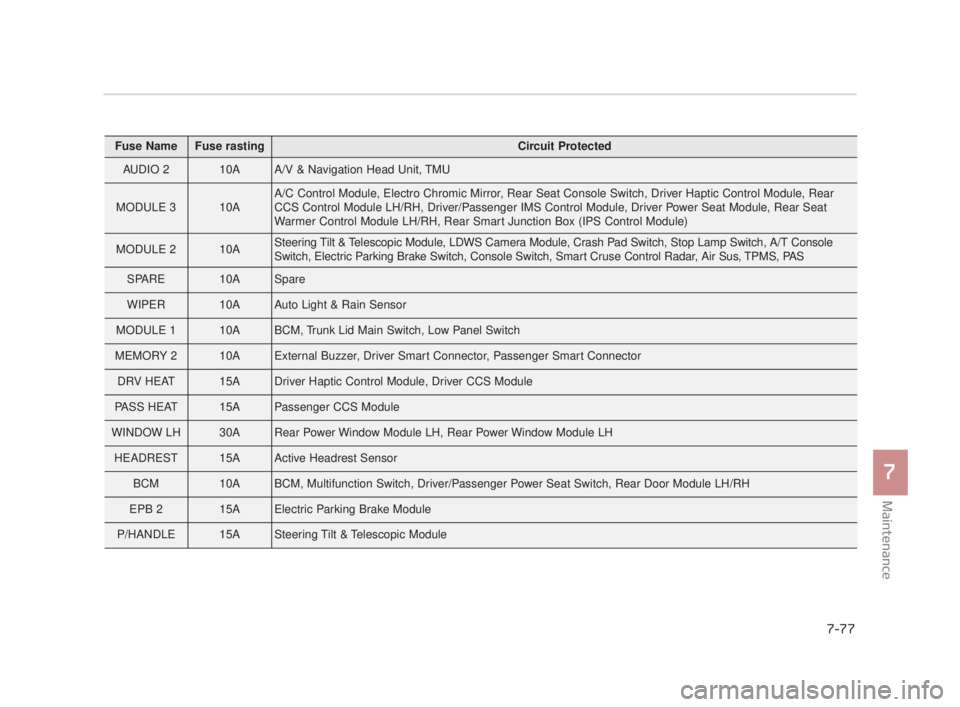
Fuse NameFuse rastingCircuit Protected
AUDIO 210AA/V & Navigation Head Unit, TMU
MODULE 310AA/C Control Module, Electro Chromic Mirror, Rear Seat Console Switch, Driver Haptic Control Module, Rear
CCS Control Module LH/RH, Driver/Passenger IMS Control Module, Driver Power Seat Module, Rear Seat
Warmer Control Module LH/RH, Rear Smart Junction Box (IPS Control Module)
MODULE 210ASteering Tilt & Telescopic Module, LDWS Camera Module, Crash Pad Switch, Stop Lamp Switch, A/T Console
Switch, Electric Parking Brake Switch, Console Switch, Smart Cruse Control Radar, Air Sus, TPMS, PAS
SPARE10ASpare
WIPER10AAuto Light & Rain Sensor
MODULE 110ABCM, Trunk Lid Main Switch, Low Panel Switch
MEMORY 210AExternal Buzzer, Driver Smart Connector, Passenger Smart Connector
DRV HEAT15ADriver Haptic Control Module, Driver CCS Module
PASS HEAT15APassenger CCS Module
WINDOW LH30ARear Power Window Module LH, Rear Power Window Module LH
HEADREST15AActive Headrest Sensor
BCM10ABCM, Multifunction Switch, Driver/Passenger Power Seat Switch, Rear Door Module LH/RH
EPB 215AElectric Parking Brake Module
P/HANDLE15ASteering Tilt & Telescopic Module
KH USA 7:2015 3/25/2015 11:36 AM Page 77
Page 486 of 542
7-80
Maintenance
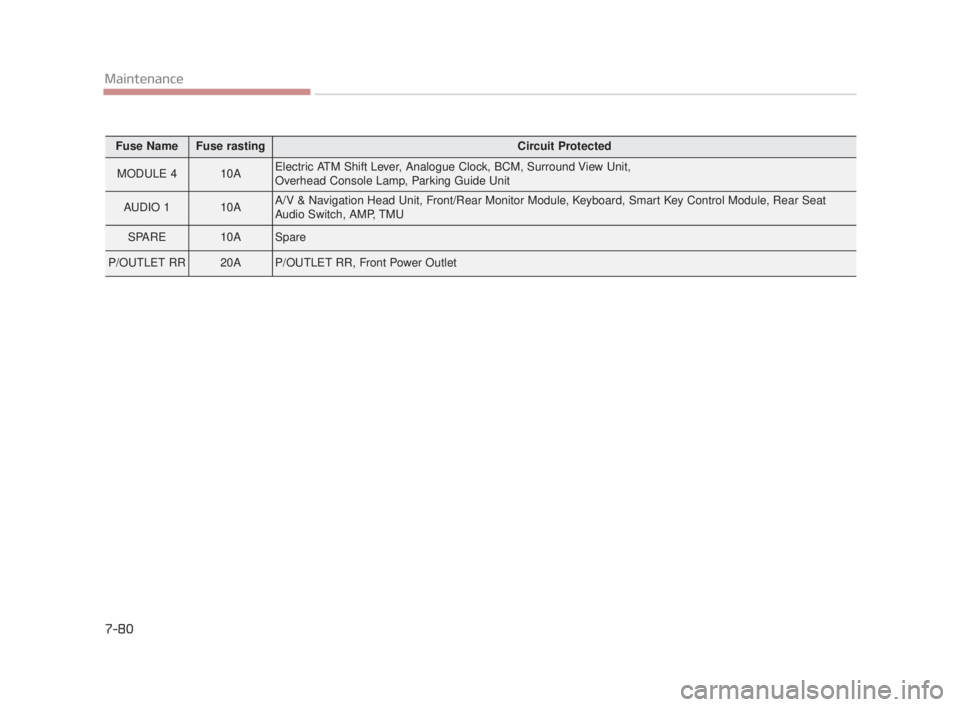
Fuse NameFuse rastingCircuit Protected
MODULE 410AElectric ATM Shift Lever, Analogue Clock, BCM, Surround View Unit,
Overhead Console Lamp, Parking Guide Unit
AUDIO 110AA/V & Navigation Head Unit, Front/Rear Monitor Module, Keyboard, Smart Key Control Module, Rear Seat
Audio Switch, AMP, TMU
SPARE10ASpare
P/OUTLET RR20AP/OUTLET RR, Front Power Outlet
KH USA 7:2015 3/25/2015 11:36 AM Page 80
Page 528 of 542
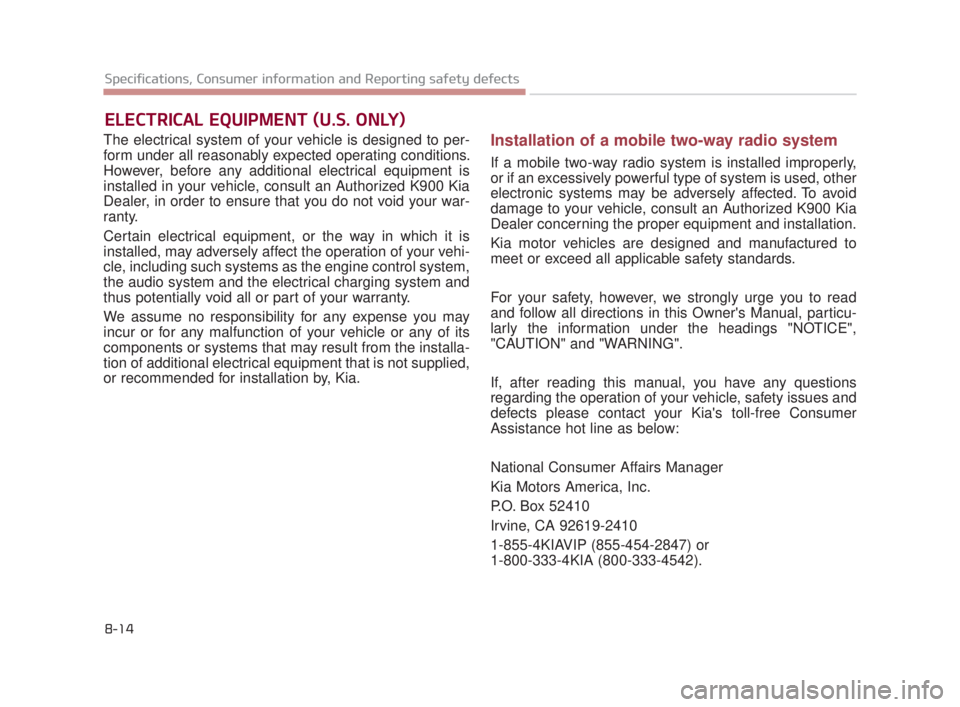
The electrical system of your vehicle is designed to per-
form under all reasonably expected operating conditions.
However, before any additional electrical equipment is
installed in your vehicle, consult an Authorized K900 Kia
Dealer, in order to ensure that you do not void your war-
ranty.
Certain electrical equipment, or the way in which it is
installed, may adversely affect the operation of your vehi-
cle, including such systems as the engine control system,
the audio system and the electrical charging system and
thus potentially void all or part of your warranty.
We assume no responsibility for any expense you may
incur or for any malfunction of your vehicle or any of its
components or systems that may result from the installa-
tion of additional electrical equipment that is not supplied,
or recommended for installation by, Kia.Installation of a mobile two-way radio system
If a mobile two-way radio system is installed improperly,
or if an excessively powerful type of system is used, other
electronic systems may be adversely affected. To avoid
damage to your vehicle, consult an Authorized K900 Kia
Dealer concerning the proper equipment and installation.
Kia motor vehicles are designed and manufactured to
meet or exceed all applicable safety standards.
For your safety, however, we strongly urge you to read
and follow all directions in this Owner's Manual, particu-
larly the information under the headings "NOTICE",
"CAUTION" and "WARNING".
If, after reading this manual, you have any questions
regarding the operation of your vehicle, safety issues and
defects please contact your Kia's toll-free Consumer
Assistance hot line as below:
National Consumer Affairs Manager
Kia Motors America, Inc.
P.O. Box 52410
Irvine, CA 92619-2410
1-855-4KIAVIP (855-454-2847) or
1-800-333-4KIA (800-333-4542).
ELECTRICAL EQUIPMENT (U.S. ONLY)
8-14
Specifications, Consumer information and Reporting safety defects
KH USA 8:2015 3/25/2015 3:17 PM Page 14